low beam ACURA MDX 2022 Owners Manual
[x] Cancel search | Manufacturer: ACURA, Model Year: 2022, Model line: MDX, Model: ACURA MDX 2022Pages: 712, PDF Size: 22.65 MB
Page 15 of 712
14
Quick Reference Guide
Controls (P127)
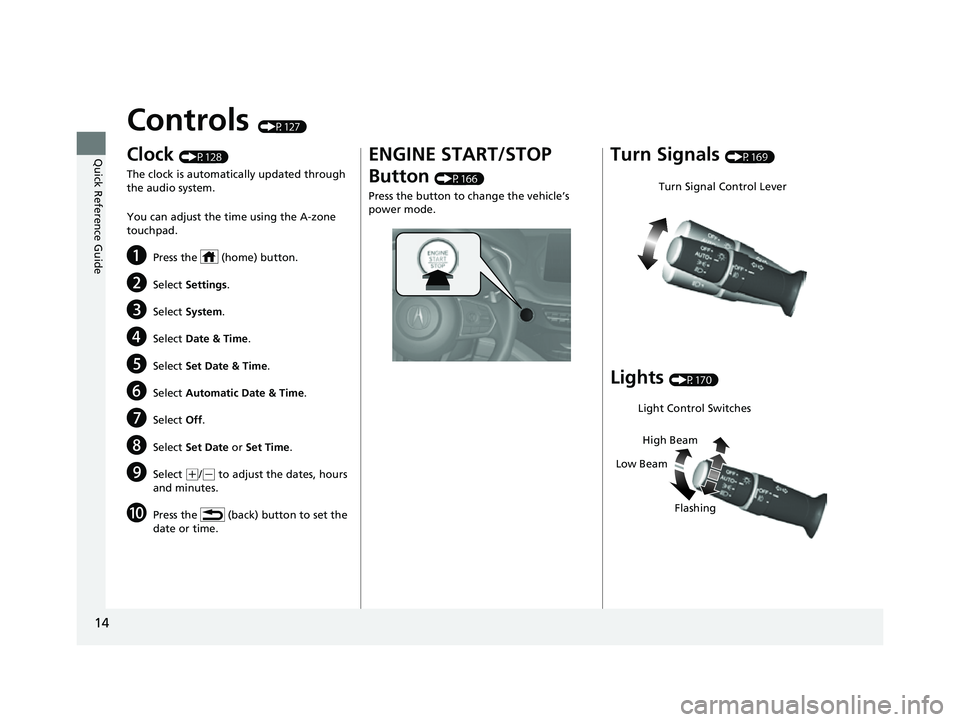
Clock (P128)
The clock is automatically updated through
the audio system.
You can adjust the time using the A-zone
touchpad.
aPress the (home) button.
bSelect Settings .
cSelect System .
dSelect Date & Time .
eSelect Set Date & Time .
fSelect Automatic Date & Time .
gSelect Off.
hSelect Set Date or Set Time .
iSelect (+/(- to adjust the dates, hours
and minutes.
jPress the (back) button to set the
date or time.
ENGINE START/STOP
Button
(P166)
Press the button to change the vehicle’s
power mode.
Turn Signals (P169)
Lights (P170)
Turn Signal Control Lever
Light Control Switches
Low Beam High Beam
Flashing
22 ACURA MDX-31TYA6000_02.book 14 ページ 2020年11月5日 木曜日 午前11時39分
Page 86 of 712
85
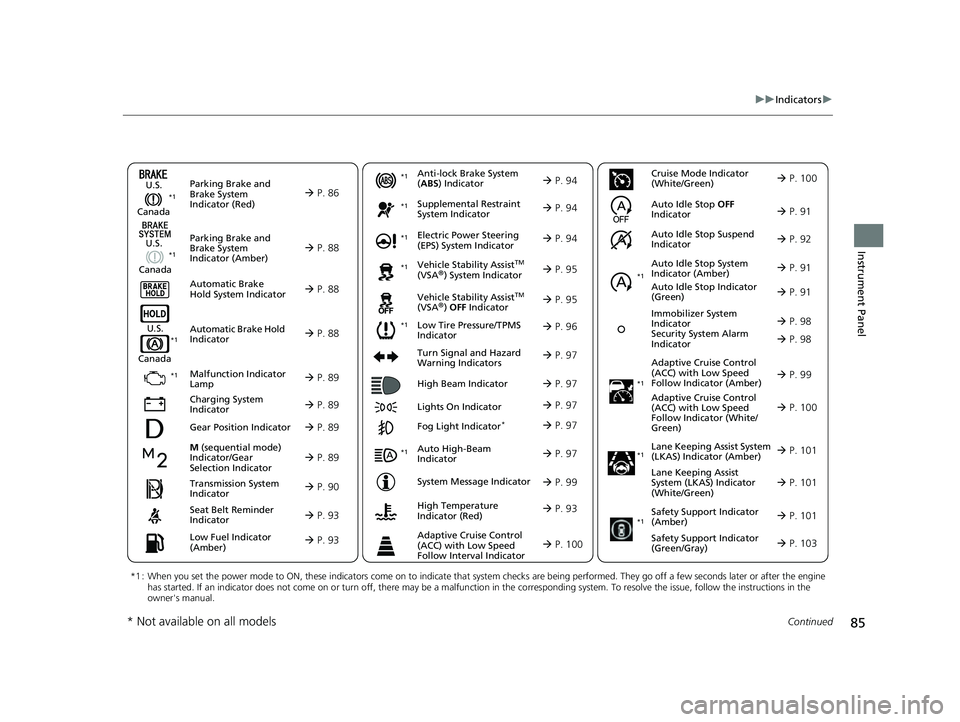
uuIndicators u
Continued
Instrument Panel
M (sequential mode)
Indicator/Gear
Selection Indicator P. 89
Parking Brake and
Brake System
Indicator (Red)
Parking Brake and
Brake System
Indicator (Amber)
U.S.
Canada
U.S.
Canada Automatic Brake
Hold System Indicator
Automatic Brake Hold
Indicator
U.S.
Canada
*1 : When you set the power mode to ON, these indicators come on to indicate that system checks are being perf ormed. They go off a few seconds later or after the engine
has started. If an indicator does not come on or turn off, th ere may be a malfunction in the corresponding system. To resolve the issue, follow the instructions in the
owner's manual.
P. 86*1
Malfunction Indicator
Lamp
Charging System
Indicator
Anti-lock Brake System
(ABS ) Indicator
Seat Belt Reminder
Indicator
Low Fuel Indicator
(Amber)
Vehicle Stability AssistTM
(VSA®) System Indicator
Vehicle Stability Assist
TM
(VSA®) OFF Indicator
Supplemental Restraint
System Indicator
Auto High-Beam
Indicator
Low Tire Pressure/TPMS
Indicator Electric Power Steering
(EPS) System Indicator
Turn Signal and Hazard
Warning Indicators
Lights On Indicator High Beam Indicator
Fog Light Indicator*
System Message Indicator Adaptive Cruise Control
(ACC) with Low Speed
Follow Indicator (Amber)
Lane Keeping Assist System
(LKAS) Indicator (Amber)
Safety Support Indicator
(Green/Gray)
P. 88
P. 88
P. 88
P. 89
P. 89*1 *1
P. 96
*1
Gear Position Indicator P. 89
Transmission System
Indicator P. 90
Auto Idle Stop System
Indicator (Amber)
P. 91
P. 93
P. 93
P. 94
P. 94
P. 97
P. 95
*1
*1
P. 95
*1 P. 94
P. 97
P. 99
*1
P. 97
P. 97
P. 97
Immobilizer System
Indicator
Security System Alarm
Indicator P. 98
P. 99
P. 101
P. 103
*1
Adaptive Cruise Control
(ACC) with Low Speed
Follow Indicator (White/
Green) P. 100
*1
Lane Keeping Assist
System (LKAS) Indicator
(White/Green) P. 101
*1
*1
Safety Support Indicator
(Amber) P. 101
*1
Cruise Mode Indicator
(White/Green) P. 100
Auto Idle Stop OFF
Indicator P. 91
Auto Idle Stop Suspend
Indicator P. 92
*1
Auto Idle Stop Indicator
(Green)
P. 91
High Temperature
Indicator (Red) P. 93
Adaptive Cruise Control
(ACC) with Low Speed
Follow Interval Indicator P. 100
P. 98
* Not available on all models
22 ACURA MDX-31TYA6000_02.book 85 ページ 2020年11月5日 木曜日 午前11時39分
Page 128 of 712
127
Controls
This chapter explains how to operate the various controls necessary for driving.
Clock.................................................. 128
Locking and Unlocking the Doors
Key .................................................. 130
Low Keyless Access Remote Signal Strength ......................................... 132
Locking/Unlocking the Doors from the Outside .......................................... 133
Locking/Unlocking the Doors from the
Inside ............................................. 143
Childproof Door Locks ..................... 145
Auto Door Locking/Unlocking .......... 146
Tailgate .............................................. 147
Security System ................................ 157
Windows ........................................... 160
Panoramic Roof ................................. 163 Operating the Switches Around the
Steering Wheel ENGINE START/STOP Button............. 166
Turn Signals ..................................... 169
Light Switches.................................. 170
Fog Lights
*...................................... 173
Daytime Running Lights ................... 173
Auto High-Beam .............................. 174
Wipers and Washers ........................ 177
Rear Defogger/Heated Door Mirror Button ... 180Heated Windshield Button*............. 180
Brightness Control ........................... 181
Driving Position Memory System ...... 183
Adjusting the Steering Wheel........... 186 Mirrors
Interior Rearview Mirror ................... 187
Power Door Mirrors ......................... 188
Seats
Front Seats ...................................... 190
Second Row Seats ........................... 195
Third Row Seats ............................... 199
Armrest ........................................... 207
Interior Convenience Items .............. 208
Climate Control System Using Automatic Climate Control .... 229
Rear Climate Control System ........... 233
Automatic Climate Control Sensors ... 235
* Not available on all models
22 ACURA MDX-31TYA6000_02.book 127 ページ 2020年11月5日 木曜日 午前11時39分
Page 171 of 712

170
uuOperating the Switches Around the Steering Wheel uLight Switches
Controls
Light Switches
Rotating the light switch turns the lights on
and off, regardless of the power mode
setting.
■High beams
Push the lever forward until you hear a click.
■Low beams
When in high beams, pull the lever back to
return to low beams.
■Flashing the high beams
Pull the lever back, and release it.
■Lights off
Rotate the switch to OFF either when:
• The transmission is in
(P.
• The parking brake is applied.
To turn the lights on ag ain, rotate the switch
to OFF to cancel the lights off mode. Even if
you do not cancel the lights off mode, the
lights come on automatically when:
• The transmission is taken out of
(P and the
parking brake is released.
• The vehicle starts to move.
■Manual Operation1Light Switches
If you leave the power mode in VEHICLE OFF while
the lights are on, a chime sounds when the driver’s
door is opened.
When the lights are on, the lights on indicator in the
instrument pane l will be on.
2 Lights On Indicator P. 97
Do not leave the lights on when the engine is off
because it will cause the battery to discharge.
If you sense that the le vel of the headlights is
abnormal, have the vehicl e inspected by a dealer.
High Beams
Flashing the high beams
Low Beams
Turns on parking, side marker,
tail, and rear license plate lights
Turns on headlights, parking,
side marker, tail, and rear
license plate lights
22 ACURA MDX-31TYA6000_02.book 170 ページ 2020年11月5日 木曜日 午前11時39分
Page 174 of 712

173
uuOperating the Switches Around the Steering Wheel uFog Lights*
Controls
Fog Lights*
When the low beam headlights are on, turn
the fog light switch on to use the fog lights.
Daytime Running Lights
The parking/daytime running lights come on when the following conditions have
been met:
• The power mode is in ON.
• The headlight switch is in AUTO.
Rotating the light switch to OFF will turn off the daytime running lights.
The daytime running lights are off once the h eadlight switch is turned on, or when
the head light switch is in AUTO and it is getting darker outside.
Fog Light Switch
* Not available on all models
22 ACURA MDX-31TYA6000_02.book 173 ページ 2020年11月5日 木曜日 午前11時39分
Page 175 of 712

174
uuOperating the Switches Around the Steering Wheel uAuto High-Beam
Controls
Auto High-Beam
The front sensor camera detects the light sources ahead of the vehicle such as the
lights of a preceding or oncoming vehicle, or street lights. When you are driving at
night, the system automatically switches the headlights between low beam and high
beam depending on the situation.
When all of the following conditions have been met, the auto high-beam indicator
comes on and the auto high-beam is activated. •The power mode is in ON.
• The light switch is in AUTO.
• The lever is in the low beam position.
• The headlights have been automatically
activated.
• It is dark outside the vehicle.
If the auto high-beam indicator does not co me on even when all the conditions have
been met, carry out the following procedure and the indicator will come on.
• Pull the lever toward you for flashing the high beams then release it while driving.1Auto High-Beam
The auto high-beam system does not always operate
in every situation. This syst em is just for assisting the
driver. Always observe your surroundings and switch
the headlights between high beam and low beam
manually if necessary.
If you find the timing of beam changes inconvenient
for driving, change the headlight beams manually.
The range and the distance at which the camera can
recognize varies de pending on conditions
surrounding your vehicle.
Regarding the handling of the camera mounted to
the inside of the windshiel d, refer to the following.
2 Front Sensor Camera P. 547
For the auto high-beam to work properly:
•Do not place an object that reflects light on the
dashboard.
•Keep the windshield around the camera clean.
•When cleaning the windshield, be careful not to
apply the windshield cleans er to the camera lens.
•Do not attach an object, sticker or film to the area
around the camera.
•Do not touch the camera lens.
If the camera receives a st rong impact, or repairing of
the area near the camera is required, consult a dealer.
■How to Use the Auto High-Beam
Front Sensor
Camera
Light Switch
Auto High-Beam
Indicator
22 ACURA MDX-31TYA6000_02.book 174 ページ 2020年11月5日 木曜日 午前11時39分
Page 176 of 712

Continued175
uuOperating the Switches Around the Steering Wheel uAuto High-Beam
Controls
■Automatic switching between high-beam and low-beam
When auto high-beam is active, the head lights switch between high beam and low
beam based on the following conditions.
■Manual switching between high-beam and low-beam
If you want to manually switch the h eadlights between high beam and low beam,
follow either of the procedur es below. Note that when you do this, the auto high-
beam indicator will turn off and the auto high-beam will be deactivated.
Using the lever:
Pull the lever toward you for flashing the hi gh beams then release it within about
one second while driving. u To reactivate the auto hi gh-beam, pull the lever toward you for flashing the
high beams then release it while driv ing. The auto high-beam indicator will
come on.
Using the light switch:
Turn the light switch to . u To reactivate the au to high-beam, turn the light switch to AUTO when the
lever is in the low beam position, the auto high-beam indicator will come on.
Switching to high beam:Switching to low beam:
All of the following conditions must
be met before the high beams turn
on.
●Your vehicle speed is 25mph (40
km/h) or more.
●There are no preceding or
oncoming vehicle with headlights
or taillights turned on.
●There are few street lights on the
road ahead.
One of the following conditions
must be met before the low beams
turn on.
●Your vehicle speed is 15 mph (24
km/h) or less.
●There is a preceding or oncoming
vehicle with headlights or
taillights turned on.
●There are many street lights on
the road ahead.
1How to Use the Auto High-Beam
In the following cases, th e auto high-beam system
may not switch the head lights properly or the
switching timing may be ch anged. In case of the
automatic switching operation does not fit for your
driving habits, please swit ch the headlights manually.
•The brightness of the lights from the preceding or
oncoming vehicle is intense or poor.
•Visibility is poor due to the weather (rain, snow,
fog, windshield frost, etc.).
•Surrounding light sources, such as street lights,
electric billboards and traf fic lights are illuminating
the road ahead.
•The brightness level of th e road ahead constantly
changes.
•The road is bumpy or has many curves.•A vehicle suddenly appears in front of you, or a
vehicle in front of you is not in the preceding or
oncoming direction.
•Your vehicle is tilted with a heavy load in the rear.•A traffic sign, mirror, or other reflective object
ahead is reflecting strong light toward the vehicle.
•The oncoming vehicle freq uently disappears under
roadside trees or be hind median barriers.
•The preceding or oncoming vehicle is a motorcycle,
bicycle, mobility scooter, or other small vehicle.
The auto high-beam system keeps the headlight low
beam when:
•Windshield wipers are op erating at a high speed.
•The camera has detected dense fog.
22 ACURA MDX-31TYA6000_02.book 175 ページ 2020年11月5日 木曜日 午前11時39分
Page 177 of 712

uuOperating the Switches Around the Steering Wheel uAuto High-Beam
176
Controls
You can turn the auto high-beam system off. If you want to turn the system off or
on, set the power mode to ON, then carry out the following procedures while the
vehicle is stationary.
To turn the system off:
With the light switch is in AUTO, pull the lever
toward you and hold it for at least 40 seconds.
After the auto high-beam indicator light blinks
twice, release the lever.
To turn the system on:
With the light switch is in AUTO, pull the lever
toward you and hold it for at least 30 seconds.
After the auto high-beam indicator light blinks
once, release the lever.
■How to Turn Off the Auto High-Beam1 How to Use the Auto High-Beam
If the Some driver assist systems cannot operate:
Camera temperature too high message appears:
•Use the climate control system to cool down the
interior and, if necessary, also use defroster mode
with the airflow directed toward the camera.
•Start driving the vehicle to lower the windshield
temperature, which cool s down the area around
the camera.
If the Some driver assist systems cannot operate:
Clean front windshield message appears:
•Park your vehicle in a sa fe place, and clean the
windshield. If the message does not disappear after
you have cleaned the winds hield and driven for a
while, have your vehicle checked by a dealer.
1 How to Turn Off the Auto High-Beam
If you turn the au to high-beam system off, the system
does not operate until you turn the system on.
Park in a safe place before turning the system off or
on.
AUTO Position
22 ACURA MDX-31TYA6000_02.book 176 ページ 2020年11月5日 木曜日 午前11時39分
Page 413 of 712

uuAcuraLink ®u
412
Features
Your subscribed telematics service provider can check your vehicle’s condition. For
maximum functionality download AcuraLink app in your smartphone and connect it
with the vehicle.
■Automatic Collision Notifications
A live agent will reach out and check on you and request that help be sent in the
event of a crash.
■Send Destination
Search for destinations on your phone and in stantly beam turn-by-turn directions to
your navigation system
*. Requires In-vehicle Navigation System*.
■Stolen Vehicle Locator
Helps authorities track and recover your vehicle in case of theft.
■Remote Start & Stop
Arrive at your vehicle with the engine warmed up and the interior set to a
comfortable temperature.
■Remote Lock & Unlock
Lock and unlock your vehicle with your smartphone.
■Find My Car
Find your parked vehicle and flash/sound your horns remotely using your
smartphone.
■Connection Features1 Connection Features
The contact information of your provider, your user
ID and PIN will be given when you subscribe to
AcuraLink. If you forget any of the above, contact a
Acura dealer, or go to owners.acura.com (U.S.) or
www.acura.ca/owners/acuralink (Canada).
You can also activate the remote door lock/unlock
and vehicle finder features from the Internet or using
your smartphone app. As k a dealer, or visit
owners.acura.com (U.S.) or www.acura.ca/owners/
acuralink (Canada) for details.
1Find My Car
The lights will stop flas hing and horn will stop
sounding under the following:
•When conditions 30 seconds have elapsed.
•You unlock the doors using the remote transmitter.
•You unlock the doors using the keyless access
system.
•You unlock the doors using the built-in key.
•The power mode is set to ACCESSORY or ON.
* Not available on all models
22 ACURA MDX-31TYA6000_02.book 412 ページ 2020年11月5日 木曜日 午前11時39分
Page 691 of 712
690
Information
Specifications
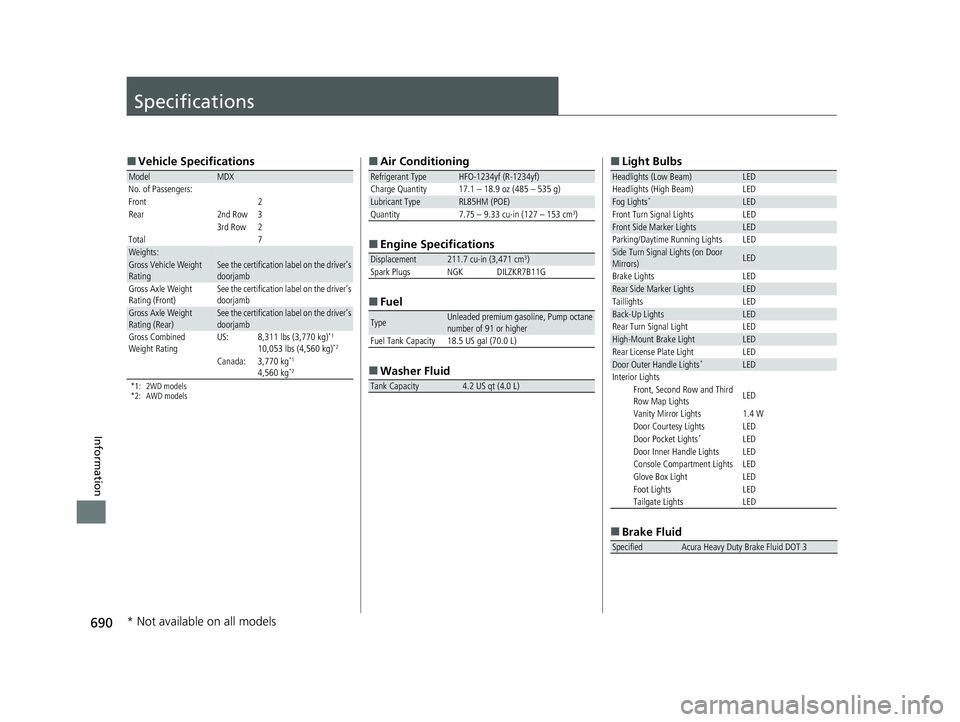
■Vehicle Specifications
*1: 2WD models
*2: AWD models
ModelMDX
No. of Passengers:
Front
2Rear2nd Row33rd Row2
Total 7
Weights:Gross Vehicle Weight
RatingSee the certification label on the driver’s
doorjamb
Gross Axle Weight
Rating (Front)See the certification label on the driver’s
doorjamb
Gross Axle Weight
Rating (Rear)See the certification label on the driver’s
doorjamb
Gross Combined
Weight RatingUS:8,311 lbs (3,770 kg)*1
10,053 lbs (4,560 kg)*2
Canada:3,770 kg*1
4,560 kg*2
■ Air Conditioning
■ Engine Specifications
■ Fuel
■ Washer Fluid
Refrigerant TypeHFO-1234yf (R-1234yf)
Charge Quantity 17.1 – 18.9 oz (485 – 535 g)
Lubricant TypeRL85HM (POE)
Quantity 7.75 – 9.33 cu-in (127 – 153 cm3)
Displacement211.7 cu-in (3,471 cm3)
Spark Plugs NGK DILZKR7B11G
TypeUnleaded premium gasoline, Pump octane
number of 91 or higher
Fuel Tank Capacity 18.5 US gal (70.0 L)
Tank Capacity4.2 US qt (4.0 L)
■ Light Bulbs
■ Brake Fluid
Headlights (Low Beam)LED
Headlights (High Beam) LED
Fog Lights*LED
Front Turn Signal Lights LED
Front Side Marker LightsLED
Parking/Daytime Running Lights LED
Side Turn Signal Lights (on Door
Mirrors)LED
Brake Lights LED
Rear Side Marker LightsLED
Taillights LED
Back-Up LightsLED
Rear Turn Signal Light LED
High-Mount Brake LightLED
Rear License Plate Light LED
Door Outer Handle Lights*LED
Interior Lights Front, Second Row and Third
Row Map Lights LED
Vanity Mirror Lights 1.4 W
Door Courtesy Lights LED
Door Pocket Lights
*LED
Door Inner Handle Lights LED
Console Compartment Lights LED
Glove Box Light LED
Foot Lights LED
Tailgate Lights LED
SpecifiedAcura Heavy Duty Brake Fluid DOT 3
* Not available on all models
22 ACURA MDX-31TYA6000_02.book 690 ページ 2020年11月5日 木曜日 午前11時39分