lock Acura MDX Hybrid 2017 Owner's Guide
[x] Cancel search | Manufacturer: ACURA, Model Year: 2017, Model line: MDX Hybrid, Model: Acura MDX Hybrid 2017Pages: 453, PDF Size: 23.77 MB
Page 70 of 453
Continued69
uuChild Safety uSafety of Infants and Small Children
Safe Driving
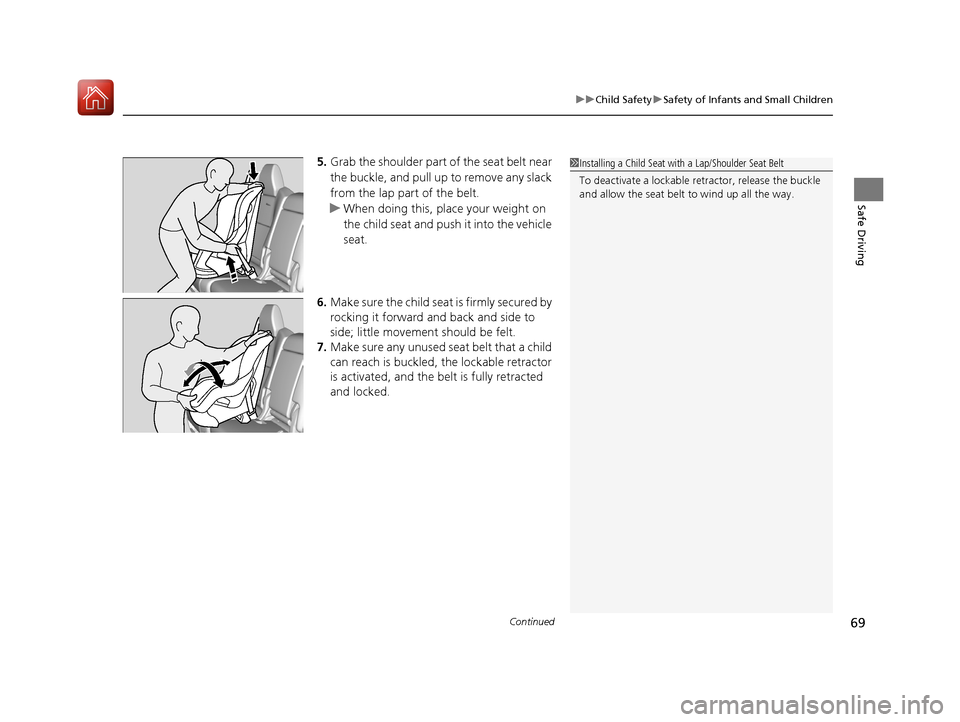
5. Grab the shoulder part of the seat belt near
the buckle, and pull up to remove any slack
from the lap part of the belt.
u When doing this, place your weight on
the child seat and push it into the vehicle
seat.
6. Make sure the child seat is firmly secured by
rocking it forward and back and side to
side; little movement should be felt.
7. Make sure any unused seat belt that a child
can reach is buckled, the lockable retractor
is activated, and the be lt is fully retracted
and locked.1 Installing a Child Seat with a Lap/Shoulder Seat Belt
To deactivate a lockable retractor, release the buckle
and allow the seat belt to wind up all the way.
17 ACURA MDX E-AWD-31TRX6000.book 69 ページ 2017年1月20日 金曜日 午後2時5 3分
Page 88 of 453
87
uuIndicators u
Continued
Instrument Panel
IndicatorNameOn/BlinkingExplanationMessage
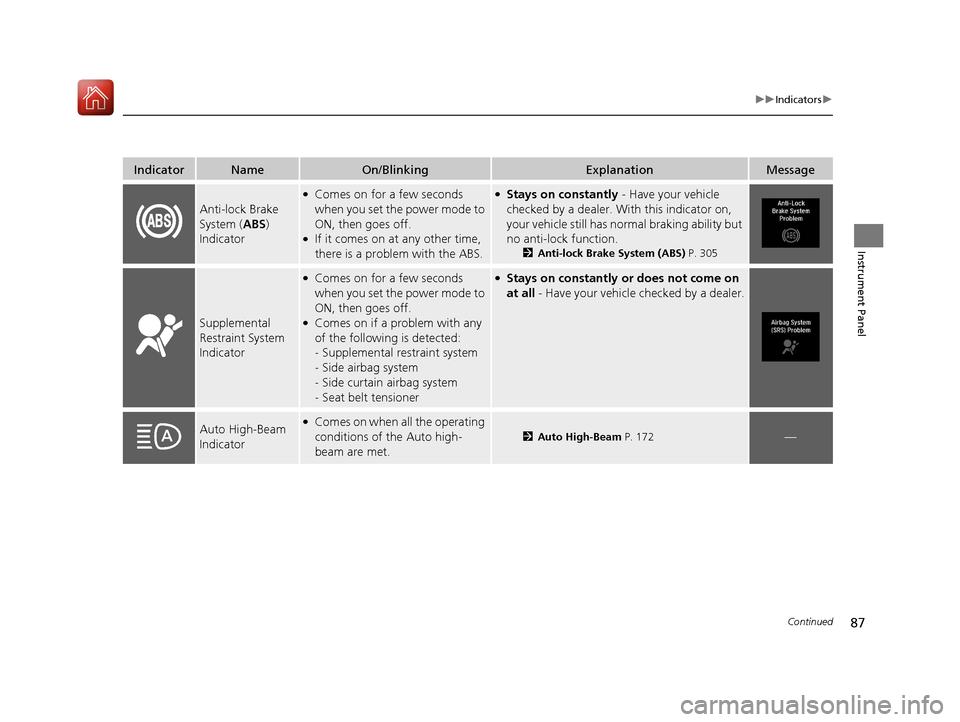
Anti-lock Brake
System (ABS)
Indicator
●Comes on for a few seconds
when you set the power mode to
ON, then goes off.
●If it comes on at any other time,
there is a problem with the ABS.
●Stays on constantly - Have your vehicle
checked by a dealer. Wi th this indicator on,
your vehicle still has normal braking ability but
no anti-lock function.
2 Anti-lock Brake System (ABS) P. 305
Supplemental
Restraint System
Indicator
●Comes on for a few seconds
when you set the power mode to
ON, then goes off.
●Comes on if a problem with any
of the following is detected:
-Supplemental restraint system
- Side airbag system
- Side curtain airbag system
- Seat belt tensioner
●Stays on constantly or does not come on
at all - Have your vehicle checked by a dealer.
Auto High-Beam
Indicator●Comes on when all the operating
conditions of the Auto high-
beam are met.
2Auto High-Beam P. 172—
17 ACURA MDX E-AWD-31TRX6000.book 87 ページ 2017年1月20日 金曜日 午後2時5 3分
Page 93 of 453

92
uuIndicators u
Instrument Panel
IndicatorNameOn/BlinkingExplanationMessage
Lane Keeping
Assist System
(LKAS ) Indicator
(Amber)●Comes on for a few seconds
when you set the power mode to
ON, then goes off.
●Comes on if there is a problem
with the LKAS.
●Stays on constantly - Have your vehicle
checked by a dealer.
Lane Keeping
Assist System
( LKAS ) Indicator
(Green)
●Comes on when you press the
MAIN button.2Lane Keeping Assist System (LKAS)
P. 279—
●Comes on when the LKAS is in
operation, or the LKAS button is
pressed, but the temperature
inside the front sensor camera is
too high. The LKAS cancels
automatically. The beeper sounds
simultaneously.●Use the climate control system to cool down
the camera.
●Goes off - The camera has been cooled down
and the system activates normally.
2 Front Sensor Camera P. 257
●Comes on when the area around
the camera is blocked by dirt,
mud, etc. Stop your vehicle in a
safe place, and wipe it off with a
soft cloth.
●May come on when driving in
bad weather (rain, snow, fog,
etc.)
●Have your vehicle checked by a dealer if the
indicator and message come back on after
you cleaned the area around the camera.
17 ACURA MDX E-AWD-31TRX6000.book 92 ページ 2017年1月20日 金曜日 午後2時5 3分
Page 94 of 453

93
uuIndicators u
Continued
Instrument Panel
IndicatorNameOn/BlinkingExplanationMessage
Road Departure
Mitigation (RDM)
Indicator
●Comes on for a few seconds
when you set the power mode to
ON, then goes off.
●Comes on if there is a problem
with the RDM system.
●Stays on constantly - Have your vehicle
checked by a dealer.
●Comes on when the RDM system
shuts itself off.●Stays on - The temperature inside the camera
is too high.
Use the climate control system to cool down
the camera.
The system activates when the temperature
inside the camera cools down.
2 Front Sensor Camera P. 257
●Stays on - The area around the camera is
blocked by dirt, mud, etc. Stop your vehicle in
a safe place, and wipe it off with a soft cloth.
●Have your vehicle checke d by a dealer if the
indicator and message come back on after
you cleaned the area around the camera.
2 Front Sensor Camera P. 257
17 ACURA MDX E-AWD-31TRX6000.book 93 ページ 2017年1月20日 金曜日 午後2時5 3分
Page 96 of 453

95
uuIndicators u
Continued
Instrument Panel
IndicatorNameOn/BlinkingExplanationMessage
Adaptive Cruise
Control (ACC)
with Low Speed
Follow (LSF)
Indicator (Green)
●Comes on when ACC with LSF is
in operation, but the temperature
inside the front sensor camera is
too high. ACC with LSF cancels
automatically. The beeper sounds
simultaneously.●Use the climate control system to cool down
the camera.
●Goes off - The camera has been cooled down
and the system activates normally.
●Comes on when the area around
the camera is blocked by dirt,
mud, etc. Stop your vehicle in a
safe place, and wipe it off with a
soft cloth.
●May come on when driving in
bad weather (rain, snow, fog,
etc.)
●Have your vehicle checke d by a dealer if the
indicator and message come back on after
you cleaned the area around the camera.
17 ACURA MDX E-AWD-31TRX6000.book 95 ページ 2017年1月20日 金曜日 午後2時5 3分
Page 98 of 453

97
uuIndicators u
Continued
Instrument Panel
IndicatorNameOn/BlinkingExplanationMessage
Collision
Mitigation Braking
System
TM
(CMBSTM)
Indicator
●Comes on when the CMBSTM
system shuts itself off.●Stays on - The area around the camera is
blocked by dirt, mud, etc. Stop your vehicle in
a safe place, and wipe it off with a soft cloth.
2 Front Sensor Camera P. 257
●When the radar sensor gets dirty, stop your
vehicle in a safe place, and wipe off dirt using
a soft cloth.
●Have your vehicle checke d by a dealer if the
message does not disappear even after you
clean the sensor cover.
2 Collision Mitigation Braking SystemTM
(CMBSTM) P. 307
●Stays on - The temperature inside the camera
is too high. Use the climate control system to
cool down the camera. The system activates
when the temperature inside the camera cools
down.
2 Front Sensor Camera P. 257
17 ACURA MDX E-AWD-31TRX6000.book 97 ページ 2017年1月20日 金曜日 午後2時5 3分
Page 110 of 453

109
uuIndicators uMulti-Information Display (MID) Warning and Information Messages
Continued
Instrument Panel
MessageConditionExplanation
●Appears if there is a problem with the Auto high-beam.●Manually operate the headlight switch.●If you are driving with the high-beam headlights when
this happens, the headlights are changed to low beams.
●Appears if the temperature inside the camera is too
high and either the auto high beams are in operation or
the headlight switch is turned to AUTO.●Use the climate control system to cool down the
camera.
● Goes off - The camera has cooled down. To resume
the system, turn the headlight switch to AUTO.
2Front Sensor Camera P. 257
●Appears when the area around the camera is blocked
by dirt, mud, etc. Stop your vehicle in a safe place, and
wipe it off with a soft cloth.
●May appear when driving in bad weather (rain, snow,
fog, etc.)
●Have your vehicle checked by a dealer if the message
comes back on after you have cleaned the area around
the camera.
●Appears after the 12-volt battery charging system
indicator comes on.●Your vehicle has less abilit y to accelerate and may be
harder to start on an incline.
●Contact a dealer immediately.
●Appears if there is a problem with the acoustic vehicle
alerting system.●Have your vehicle checked by a dealer immediately.
17 ACURA MDX E-AWD-31TRX6000.book 109 ページ 2017年1月20日 金曜日 午後2時 53分
Page 116 of 453

115
uuIndicators uMulti-Information Display (MID) Warning and Information Messages
Continued
Instrument Panel
MessageConditionExplanation
●Appears if ACC with LSF is ca nceled while your vehicle
is automatically stopped by ACC with LSF. The beeper
sounds.●Immediately depress the brake pedal.
●Appears when pressing the RES/+/SET/– switch down
while the vehicle is moving and the brake pedal is
depressed.●ACC with LSF cannot be set.
2 Adaptive Cruise Control (ACC) with Low Speed
Follow (LSF) P. 259
●Appears when you unlock an d open the driver’s door
while the power system is on by two-way keyless access
remote.
2 Remote Engine Start with Vehicle Feedback P. 241
17 ACURA MDX E-AWD-31TRX6000.book 115 ページ 2017年1月20日 金曜日 午後2時 53分
Page 126 of 453

Continued125
uuGauges and Multi-Info rmation Display (MID)uMID
Instrument Panel
Use the MID to custom ize certain features.
■How to customize
Select the Vehicle Settings screen by rolling the mu lti-function steering-wheel
controls while the power mode is in ON, an d the vehicle is at a complete stop. Push
the multi-function steering-wheel controls.
■Customized Features1 Customized Features
To customize other features , roll the multi-function
steering-wheel controls.
2 List of customizable options P. 128
2 Example of customization settings P. 133
Customization is possible when you see the driver’s
ID ( Driver 1 or Driver 2 ) on the screen.
The driver’s ID indicates which remote transmitter
you have used to unlock the driver’s door. The
customized settings are recalled every time you
unlock the driver’s door with that remote.
Change to
( P before you attempt to change any
customized setting.
Customizing is also av ailable from the audio/
information screen.
You cannot have Vehicle Settings displayed on the
multi-information display while the audio/
information screen shows the same menu. 2 Customized Features P. 125
Multi-function Steering-
wheel Controls
Roll: Changes the
customize menus and
items.
Push: Enter the selected
item.
MID: Goes to
Vehicle Settings.
17 ACURA MDX E-AWD-31TRX6000.book 125 ページ 2017年1月20日 金曜日 午後2時 53分
Page 127 of 453

126
uuGauges and Multi-Information Display (MID) uMID
Instrument Panel
■Customization flow
Roll the multi-function steering-wheel controls to select Vehicle Settings and push the multi-function steering-wheel controls.
Vehicle Settings
“Trip A” Reset Timing
Language Selection
Adjust Outside Temp. Display
Memory Position Link
Door Unlock Mode
Keyless Access Beep
Driver Assist System Setup
Meter Setup
Driving Position Setup
Keyless Access Setup
“Trip B” Reset Timing
Forward Collision Warning Distance
ACC Forward Vehicle Detect Beep
ACC Display Speed Unit
Push
Lane Keeping Assist Suspend Beep
Blind Spot Info
Easy Entry/Exit
Roll
Walk Away Auto Lock
Push
Keyless Access Light Flash
Roll
Turn by Turn Display
Road Departure Mitigation Setting
Reverse Alert Tone
Remote Start System On/Off
RollRoll
Roll
Roll
Push
Push
Push
Push
Roll
Roll
Roll
17 ACURA MDX E-AWD-31TRX6000.book 126 ページ 2017年1月20日 金曜日 午後2時 53分