window Acura MDX Hybrid 2017 Owner's Guide
[x] Cancel search | Manufacturer: ACURA, Model Year: 2017, Model line: MDX Hybrid, Model: Acura MDX Hybrid 2017Pages: 453, PDF Size: 23.77 MB
Page 215 of 453

214
Controls
Climate Control System
Using Automatic Climate Control
The automatic climate control system maintains the interior temperature you select.
The system also selects the proper mix of heated or cooled air that raises or lowers
the interior temperature to your pr eference as quickly as possible.
Use the system when the power system is on.
1. Press the AUTO button.
2. Adjust the interior temperature using the driver’s side or passenger’s side
temperature control switch.
3. Press the (On/Off) button to cancel.1Using Automatic Climate Control
If any buttons/icons on the touch screen are pressed
while using the climate control system in auto, the
function of the button/icon th at was pressed will take
priority.
The AUTO indicator will go off, but functions
unrelated to the button/icon that was pressed will be
controlled automatically.
To prevent cold air from bl owing in from outside, the
fan may operate at low speed for a while after the
AUTO button has been pressed.
If the interior is very warm, you can cool it down
more rapidly by partial ly opening the windows,
turning the system on auto, and setting the
temperature to low. Change the fresh mode to
recirculation mode until the temperature cools down.
When you set the temperat ure to the lower or upper
limit, Lo or Hi is displayed.
Pressing the button switches the climate control
system between on and off. When turned on, the
system returns to your last selection.
(On/Off) ButtonAUTO Button
On Demand Multi-Use Display
TM
Driver’s Side
Temperature
Control Switch
Passenger’s
Side
Temperature
Control Switch Passenger’s
Side
Temperature
Driver’s Side
Temperature
17 ACURA MDX E-AWD-31TRX6000.book 214 ページ 2017年1月20日 金曜日 午後2時
53分
Page 222 of 453
221
uuClimate Control System uUsing Automatic Climate Control
Controls
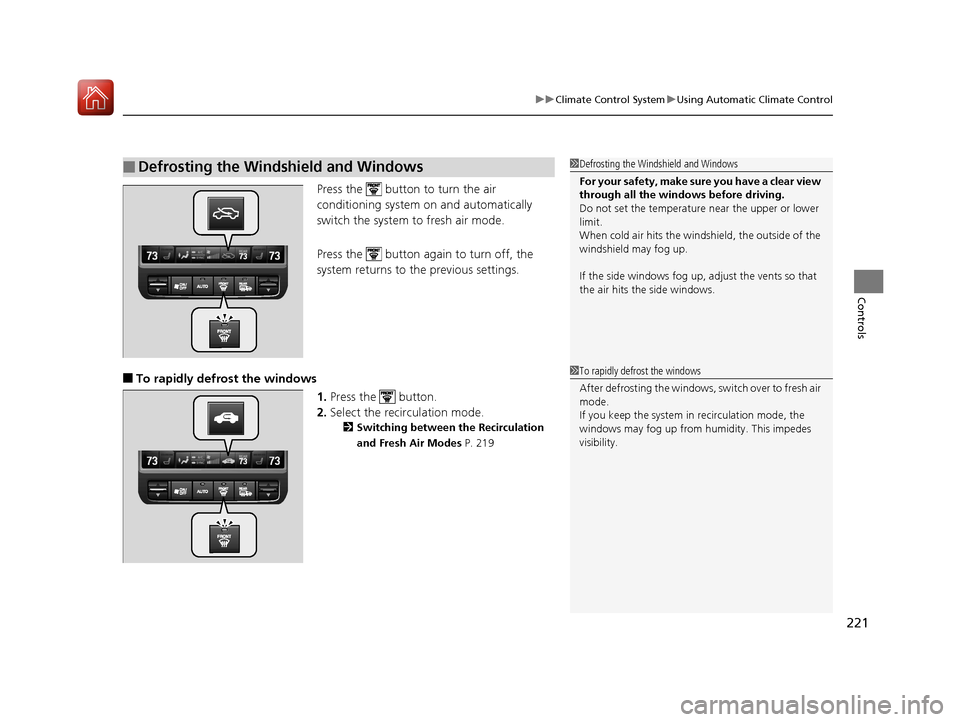
Press the button to turn the air
conditioning system on and automatically
switch the system to fresh air mode.
Press the button again to turn off, the
system returns to the previous settings.
■To rapidly defrost the windows
1.Press the button.
2. Select the recirculation mode.
2 Switching between the Recirculation
and Fresh Air Modes P. 219
■Defrosting the Windshield and Windows1Defrosting the Windshield and Windows
For your safety, make sure you have a clear view
through all the windows before driving.
Do not set the temperatur e near the upper or lower
limit.
When cold air hits the windshield, the outside of the
windshield may fog up.
If the side windows fog up, adjust the vents so that
the air hits th e side windows.
1To rapidly defrost the windows
After defrosting the windows, switch over to fresh air
mode.
If you keep the system in recirculation mode, the
windows may fog up from humidity. This impedes
visibility.
17 ACURA MDX E-AWD-31TRX6000.book 221 ページ 2017年1月20日 金曜日 午後2時 53分
Page 231 of 453
230
Driving
Before Driving
Driving Preparation
Check the following items before you start driving.
• Make sure there are no obstructions on th e windows, door mirrors, exterior
lights, or other parts of the vehicle.
u Remove any frost, snow, or ice.
u Remove any snow on the roof, as this can slip down and obstruct your field of
vision while driving. If frozen solid , remove ice once it has softened.
u When removing ice from around the wheel s, be sure not to damage the wheel
or wheel components.
• Make sure the hood is securely closed.
u If the hood opens while driving, your front view will be blocked.
• Make sure the tires are in good condition.
u Check air pressures, and check for damage and excessive wear.
2Checking and Maintaining Tires P. 361
•Make sure there are no people or ob jects behind or around the vehicle.
u There are blind spots from the inside.
■Exterior Checks1Exterior Checks
NOTICE
When doors are frozen s hut, use warm water around
the door edges to melt any ice. Do not try to force
them open, as this can damage the rubber trim
around the doors. When done, wipe dry to avoid
further freezing.
Do not pour warm water into the key cylinder.
You will be unable to insert the key if the water
freezes in the hole.
Heat from the engine and exhaust can ignite
flammable material s left under the hood, causing a
fire. If you’ve parked y our vehicle for an extended
period, inspect and remove any debris that may have
collected, such as dried grass and leaves that have
fallen or have been carried in for use as a nest by a
small animal. Also check under the hood for leftover
flammable materials after you or someone else has
performed maintenance on your vehicle.
17 ACURA MDX E-AWD-31TRX6000.book 230 ページ 2017年1月20日 金曜日 午後2時 53分
Page 332 of 453
331
Maintenance
This chapter discusses basic maintenance.
Before Performing MaintenanceInspection and Maintenance ............ 332
Safety When Performing Maintenance ..333
Parts and Fluids Used in Maintenance Service...334Maintenance MinderTM..................... 335
Maintenance Under the Hood
Maintenance Items Under the Hood .. 339
Opening the Hood ........................... 340
Engine Compartment Cover ............. 341
Recommended Engine Oil ................ 342
Oil Check ......................................... 343
Adding Engine Oil ............................ 344
Changing the Engine Oil and Oil Filter ...345 Cooling System ................................ 347
Transmission Fluid ............................ 350
Brake Fluid ....................................... 351
Refilling Window Washer Fluid......... 351
Replacing Light Bulbs ....................... 352Checking and Maintaining Wiper Blades... 357Checking and Maintaining Tires
Checking Tires ................................. 361
Tire and Loading Information Label .. 362
Tire Labeling .................................... 362
DOT Tire Quality Grading (U.S. Vehicles).. 364Wear Indicators................................ 366
Tire Service Life ................................ 366 Tire and Wheel Replacement ........... 367
Tire Rotation .................................... 368
Winter Tires ..................................... 369
12-Volt Battery ................................. 370
Remote Transmitter Care Replacing the Button Battery ........... 371
Remote Control and Wireless Headphone Care
*........................... 372Climate Control System Maintenance.. 374Cleaning Interior Care .................................... 375
Exterior Care.................................... 377
Accessories and Modifications ........ 380
* Not available on all models
17 ACURA MDX E-AWD-31TRX6000.book 331 ページ 2017年1月20日 金曜日 午後2時 53分
Page 352 of 453
351
uuMaintenance Under the Hood uBrake Fluid
Maintenance
Brake Fluid
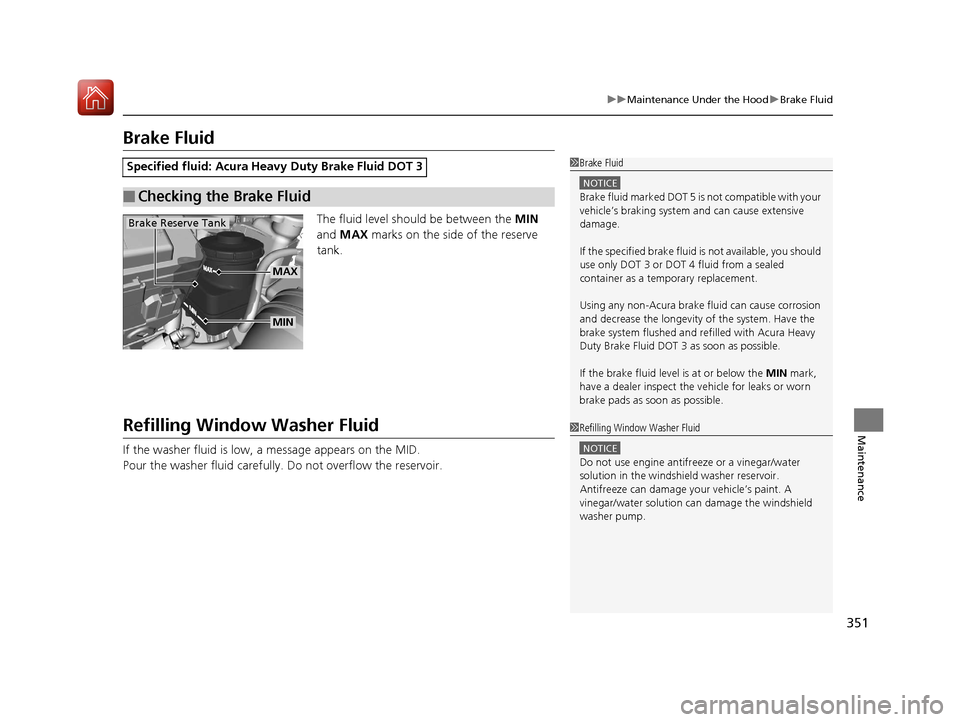
The fluid level should be between the MIN
and MAX marks on the side of the reserve
tank.
Refilling Window Washer Fluid
If the washer fluid is low, a message appears on the MID.
Pour the washer fluid carefully. Do not overflow the reservoir.
Specified fluid: Acura Heav y Duty Brake Fluid DOT 3
■Checking the Brake Fluid
1Brake Fluid
NOTICE
Brake fluid marked DOT 5 is not compatible with your
vehicle’s braking system and can cause extensive
damage.
If the specified brake fluid is not available, you should
use only DOT 3 or DOT 4 fluid from a sealed
container as a temporary replacement.
Using any non-Acura brake fl uid can cause corrosion
and decrease the longevity of the system. Have the
brake system flushed and re filled with Acura Heavy
Duty Brake Fluid DOT 3 as soon as possible.
If the brake fluid level is at or below the MIN mark,
have a dealer inspect the vehicle for leaks or worn
brake pads as soon as possible.
Brake Reserve Tank
MIN
MAX
1 Refilling Window Washer Fluid
NOTICE
Do not use engine antifreeze or a vinegar/water
solution in the windshield washer reservoir.
Antifreeze can damage y our vehicle’s paint. A
vinegar/water solution ca n damage the windshield
washer pump.
17 ACURA MDX E-AWD-31TRX6000.book 351 ページ 2017年1月20日 金曜日 午後2時 53分
Page 358 of 453
357Continued
Maintenance
Checking and Maintaining Wiper Blades
Checking Wiper Blades
If the wiper blade rubber has deteriorated, it will leave streaks and the hard surfaces
of the blade may scratch the window glass.
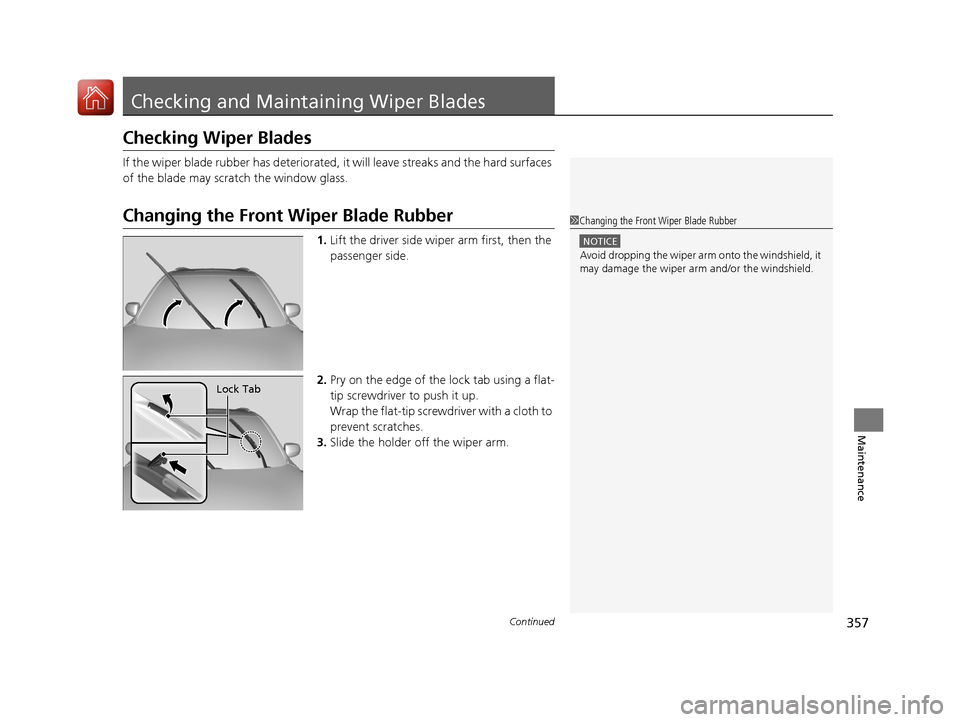
Changing the Front Wiper Blade Rubber
1.Lift the driver side wiper arm first, then the
passenger side.
2. Pry on the edge of the lock tab using a flat-
tip screwdriver to push it up.
Wrap the flat-tip screwd river with a cloth to
prevent scratches.
3. Slide the holder off the wiper arm.
1Changing the Front Wiper Blade Rubber
NOTICE
Avoid dropping the wiper arm onto the windshield, it
may damage the wiper arm and/or the windshield.
Lock Tab
17 ACURA MDX E-AWD-31TRX6000.book 357 ページ 2017年1月20日 金曜日 午後2時 53分
Page 360 of 453
359
uuChecking and Maintaining Wiper Blades uChanging the Rear Wiper Blade Rubber
Continued
Maintenance
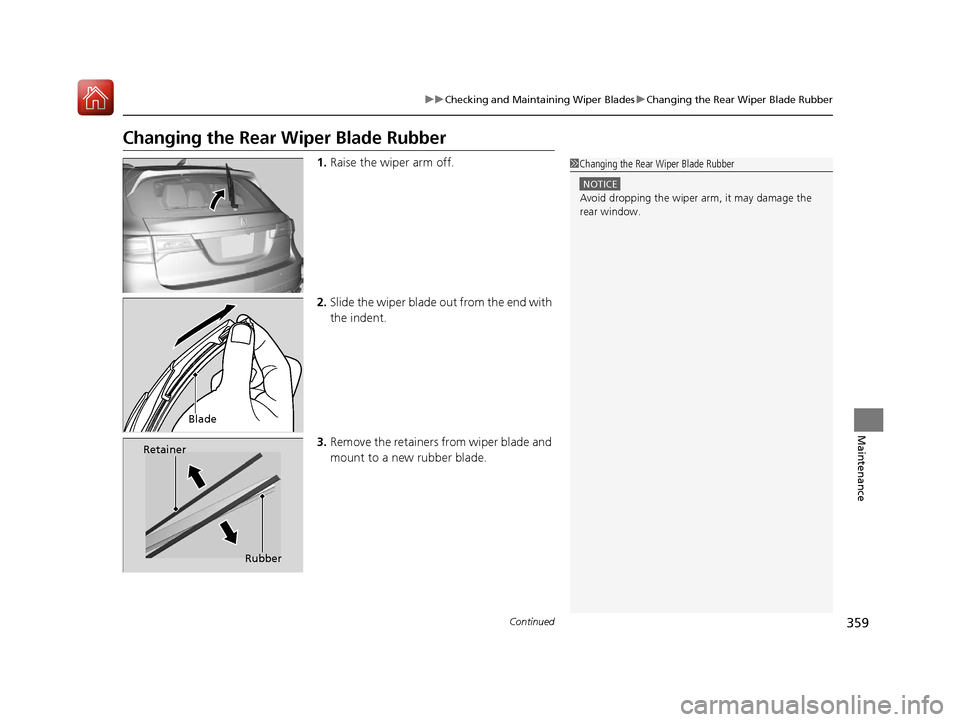
Changing the Rear Wiper Blade Rubber
1.Raise the wiper arm off.
2. Slide the wiper blade out from the end with
the indent.
3. Remove the retainers from wiper blade and
mount to a new rubber blade.1Changing the Rear Wiper Blade Rubber
NOTICE
Avoid dropping the wiper ar m, it may damage the
rear window.
Blade
Retainer
Rubber
17 ACURA MDX E-AWD-31TRX6000.book 359 ページ 2017年1月20日 金曜日 午後2時 53分
Page 375 of 453

374
Maintenance
Climate Control System Maintenance
Dust and Pollen Filter
The climate control system is equipped wi th a dust and pollen filter that collects
pollen, dust, and other debris in the air. The Maintenance MinderTM messages will let
you know when to replace the filter.
We recommend that you replace the dust and pollen filter sooner when using your
vehicle in areas with high concentrations of dust.
1Dust and Pollen Filter
If the airflow from the climate control system
deteriorates noticeably, and the windows fog up
easily, the filter may need to be replaced. Please
contact a dealer for replacement.
17 ACURA MDX E-AWD-31TRX6000.book 374 ページ 2017年1月20日 金曜日 午後2時 53分
Page 377 of 453

uuCleaning uInterior Care
376
Maintenance
Wipe using a glass cleaner.
The front and second row passenger’s floor
mats hook over floor anchors, which keep
them from sliding forward. To remove a mat
for cleaning, turn the anchor knobs to the
unlock position. When reinstalling the mat
after cleaning, turn the knobs to the lock
position.
Do not put additional floor mats on top of
the anchored mats.
To properly clean leather:
1. Use a vacuum or soft dry cloth first to remove any dirt or dust.
2. Clean the leather with a soft cloth dampen ed with a solution comprised of 90%
water and 10% neutral soap.
3. Wipe away any soap residu e with a clean damp cloth.
4. Wipe away residual water and allow leather to air dry in the shade.
■Cleaning the Window
■Floor Mats
1Cleaning the Window
Wires are mounted to the in side of the rear window.
Wipe along the same direct ion as the wires with a
soft cloth so as not to damage them.
Be careful not to spill flui ds, such as water or glass
cleaner, on or around the co ver of both the front
sensor camera and the rainfall/light sensor.
2 Automatic Operation (automatic lighting
control) P. 169
2 Automatic Intermittent Wipers P. 176
2 Front Sensor Camera P. 257
1Floor Mats
If you use any floor mats that were not originally
provided with your vehicle, make sure they are
designed for your specific ve hicle, fit correctly, and
are securely anchored by the floor anchors.
Position the rear seat floor mat properly. If they are
not properly positioned, th e floor mat can interfere
with the front seat functions.
Lock
Unlock
■Maintaining Genuine Leather1
Maintaining Genuine Leather
It is important to clean or wipe away dirt or dust as
soon as possible. Spills can soak into leather resulting
in stains. Dirt or dust ca n cause abrasions in the
leather. In addition, pl ease note that some dark
colored clothing can rub onto the leather seats
resulting in discol oration or stains.
17 ACURA MDX E-AWD-31TRX6000.book 376 ページ 2017年1月20日 金曜日 午後2時 53分
Page 379 of 453
uuCleaning uExterior Care
378
Maintenance
• Keep sufficient distance between the cleaning nozzl e and the vehicle body.
• Take particular care around the windows. Standing too close may cause water to
enter the vehicle interior.
• Do not spray high pressure water directly into the engine compartment. Instead,
use low pressure water and a mild detergent.
A good coat of automotive body wax helps protect your vehicle’s paint from the
elements. Wax will wear off over time and expose your vehicle’s paint to the
elements, so reapply as necessary.
If you get gasoline, oil, engine coolant, or battery fluid on resin coated parts, they
may be stained or the coating may peel. Prom ptly wipe it away using a soft cloth and
clean water.
Wipe using a glass cleaner.
■Using High Pressure Cleaners
■Applying Wax
■Maintaining the Bumpers and Other Resin Coated Parts
■Cleaning the Window
1 Applying Wax
NOTICE
Chemical solvents and st rong cleaners can damage
the paint, metal, and plasti c on your vehicle. Wipe
away spills immediately.
1 Maintaining the Bumpers an d Other Resin Coated Parts
Ask a dealer about the correct coating material when
you want to repair the pa inted surface of the parts
made of resin.
17 ACURA MDX E-AWD-31TRX6000.book 378 ページ 2017年1月20日 金曜日 午後2時 53分