change wheel Acura MDX Hybrid 2017 Owner's Manual
[x] Cancel search | Manufacturer: ACURA, Model Year: 2017, Model line: MDX Hybrid, Model: Acura MDX Hybrid 2017Pages: 453, PDF Size: 23.77 MB
Page 120 of 453

119
uuGauges and Multi-Info rmation Display (MID)uMID
Continued
Instrument Panel
MID
The MID shows the odometer, trip meter, ou tside temperature indicator, and other
gauges. It also displays important messag es such as warnings and other helpful
information.
■Main displays
Roll the multi-function steering-wheel controls to change the display.
■Switching the Display
BlankInstant Fuel
Economy/
Average Fuel
Economy Range
Elapsed Time Average Speed
SH-AWD®/
Dynamic Mode
Vehicle
Settings Tire Pressure
for Each Tire Engine Oil Life Turn-by-Turn
Directions
Multi-function Steering-
wheel Controls Compass
17 ACURA MDX E-AWD-31TRX6000.book 119 ページ 2017年1月20日 金曜日 午後2時
53分
Page 126 of 453

Continued125
uuGauges and Multi-Info rmation Display (MID)uMID
Instrument Panel
Use the MID to custom ize certain features.
■How to customize
Select the Vehicle Settings screen by rolling the mu lti-function steering-wheel
controls while the power mode is in ON, an d the vehicle is at a complete stop. Push
the multi-function steering-wheel controls.
■Customized Features1 Customized Features
To customize other features , roll the multi-function
steering-wheel controls.
2 List of customizable options P. 128
2 Example of customization settings P. 133
Customization is possible when you see the driver’s
ID ( Driver 1 or Driver 2 ) on the screen.
The driver’s ID indicates which remote transmitter
you have used to unlock the driver’s door. The
customized settings are recalled every time you
unlock the driver’s door with that remote.
Change to
( P before you attempt to change any
customized setting.
Customizing is also av ailable from the audio/
information screen.
You cannot have Vehicle Settings displayed on the
multi-information display while the audio/
information screen shows the same menu. 2 Customized Features P. 125
Multi-function Steering-
wheel Controls
Roll: Changes the
customize menus and
items.
Push: Enter the selected
item.
MID: Goes to
Vehicle Settings.
17 ACURA MDX E-AWD-31TRX6000.book 125 ページ 2017年1月20日 金曜日 午後2時 53分
Page 131 of 453

130
uuGauges and Multi-Information Display (MID) uMID
Instrument Panel
*1: Default SettingSetup Group Customizable Features
Description Selectable Settings
Driving
Position
SetupMemory Position LinkTurns the driving position memory system on and
off.On*1/Off
Easy Entry/Exit
Moves the seat rearward and steering wheel fully up
when you get in/get out of the vehicle. Changes the
setting for this feature.Seat & Steering Wheel*1/
Seat Only /Steering Wheel
Only /Off
Keyless
Access Setup Door Unlock Mode
Changes which doors unlock when you grab the
driver’s door handle. Driver’s Door or Tailgate
Only
*1/
All Doors
Keyless Access Light
Flash Causes some exterior li
ghts to flash when you
unlock/lock the doors. On
*1/
Off
Keyless Access Beep Causes the beeper to sound when you unlock/lock
the doors.
On
*1/
Off
Remote Start System
On/Off Turns the remote engine start feature on and off.
On
*1/Off
Walk Away Auto Lock Changes the settings for the automatic locking the
doors when you walk away from the vehicle while
carrying the keyless
access remote. On
/Off
*1
17 ACURA MDX E-AWD-31TRX6000.book 130 ページ 2017年1月20日 金曜日 午後2時 53分
Page 167 of 453

uuOperating the Switches Around the Steering Wheel uPOWER Button
166
Controls
Warning buzzers may sound from inside and/
or outside the vehicle to remind you that the
keyless access remote is out of the vehicle. If
the buzzer continues even after the remote is
put back inside, place it to be within its
operational range.
■When the power mode is in ON
If the keyless access remo te is taken out of the
vehicle, and the driver’s door is closed, a
warning buzzer sounds from both inside and
outside the vehicle. A warning message on
the MID notifies the driver inside that the
remote outside of the vehicle.
■When the power mode is in
ACCESSORY
If the keyless access remo te is taken out of the
vehicle, and the driver’s door is closed, a
warning buzzer sounds from outside the
vehicle.
■Keyless Access Remote Reminder1 Keyless Access Remote Reminder
When the keyless access remote is within the
system’s operational range, and the driver’s door is
closed, the warni ng function cancels.
If the keyless access remote is taken out of the vehicle
after the power system has been turned on, you can
no longer change the POWER button mode or
restart the power system. Always make sure if the
remote is in your vehi cle when you operate the
POWER button.
Removing the keyless access remote from the vehicle
through a window does not activate the warning
buzzer.
Do not put the keyless access remote on the
dashboard or in the glove box. It may cause the
warning buzzer to go of f. Under some other
conditions that can prevent the vehicle from locating
the remote, the warning buzzer may also go off even
if the remote is within the system’s operational
range.
17 ACURA MDX E-AWD-31TRX6000.book 166 ページ 2017年1月20日 金曜日 午後2時 53分
Page 168 of 453
167
uuOperating the Switches Around the Steering Wheel uTurn Signals
Controls
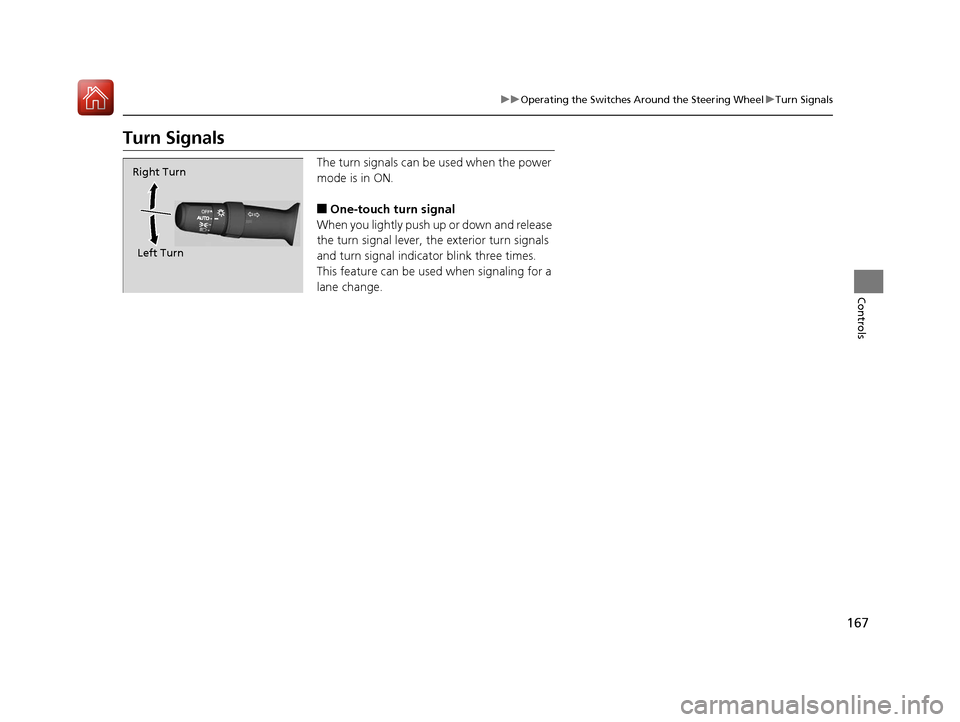
Turn Signals
The turn signals can be used when the power
mode is in ON.
■One-touch turn signal
When you lightly push up or down and release
the turn signal lever, th e exterior turn signals
and turn signal indicator blink three times.
This feature can be used when signaling for a
lane change.
Right Turn
Left Turn
17 ACURA MDX E-AWD-31TRX6000.book 167 ページ 2017年1月20日 金曜日 午後2時 53分
Page 169 of 453

168
uuOperating the Switches Around the Steering Wheel uLight Switches
Controls
Light Switches
Rotating the light switch turns the lights on
and off, regardless of the power mode
setting.
■High beams
Push the lever forward until you hear a click.
■Low beams
When in high beams, pull the lever back to
return to low beams.
■Flashing the high beams
Pull the lever back, and release it.
■Lights off
Turn the lever to OFF either when:
• The transmission is in
(P.
• The parking brake is applied.
To turn the lights on ag ain, turn the lever to
OFF to cancel the lights off mode. Even if you
do not cancel the lights off mode, the lights
come on automatically when:
• The gear position is changed out of
(P and
the parking brake is released.
• The vehicle starts to move.
■Manual Operation1Light Switches
If you leave the power mode in VEHICLE OFF (LOCK)
while the lights are on, a chime sounds when the
driver’s door is opened.
When the lights are on, the lights on indicator in the
instrument pane l will be on.
2 Lights On Indicator P. 90
Do not leave the lights on when the power system is
off because it will caus e the 12-volt battery to
discharge.
If you sense that the le vel of the headlights is
abnormal, have the vehicl e inspected by a dealer.
Your vehicle is equipped with the automatic
headlight adjusting system that automatically adjusts
the vertical angle of the high/low beam headlights. If
you find a significant change in the vertical angle of
the headlights, there may be a problem with the
system. Have your vehicle checked by a dealer.
Models without automatic headlight adjusting system
Models with automatic headlight adjusting system
High Beams
Flashing the high beams
Low Beams
Turns on parking, side marker,
tail, and rear license plate lights
Turns on headlights, parking,
side marker, tail, and rear
license plate lights
17 ACURA MDX E-AWD-31TRX6000.book 168 ページ 2017年1月20日 金曜日 午後2時 53分
Page 170 of 453

Continued169
uuOperating the Switches Around the Steering Wheel uLight Switches
Controls
Automatic lighting control can be used when
the power mode is in ON.
When the light switch is in AUTO, the
headlights and other exterior lights will switch
on and off automatically depending on the
ambient brightness. u You can change the auto light sensitivity
setting.
2 Customized Features P. 125
2 Refer to the Navigation System Manual
■Automatic Operation (automatic lighting control)1Automatic Operation (aut omatic lighting control)
We recommend that you tu rn on the lights manually
when driving at night, in a dense fog, or in dark areas
such as long tunnels or parking facilities.
The light sensor is in the location shown below.
Adjust the auto light sensitivity as follows:
SettingThe exterior lights come on
when the ambient light is at
Max
High
Mid
Low
Min
Light Sensor
Bright
Dark
17 ACURA MDX E-AWD-31TRX6000.book 169 ページ 2017年1月20日 金曜日 午後2時 53分
Page 171 of 453
uuOperating the Switches Around the Steering Wheel uLight Switches
170
Controls
The headlights automatically co me on when the wipers are used several times within
a certain number of intervals wi th the headlight switch in AUTO.
The headlights automatically go off a few minutes later if the wipers are stopped.
The headlights, all other exterior lights, an d the instrument panel lights turn off 15
seconds after you set the power mode to VE HICLE OFF (LOCK), take the remote with
you, and close th e driver’s door.
If you set the power mode to VEHICLE OFF (LOCK) with the headlight switch on, but
do not open the door, the lights turn off after 10 minutes (3 minutes, if the switch
is in the AUTO position).
The lights turn on again when you unlock or open the driver’s door. If you unlock
the door, but do not open it within 15 seconds, the lights go off. If you open the
driver’s door, you will hear a lights on reminder chime.
■Headlight Integration with Wiper
■Automatic Lighting Off Feature
1Headlight Integration with Wiper
This feature activates while the headlights are off in
AUTO .
The instrument panel br ightness does not change
when the headlights come on.
At dark ambient light levels, the automatic lighting
control feature turns on the headlights, regardless of
the number of wiper sweeps.
1 Automatic Lighting Off Feature
You can change the headlight auto off timer setting.
2 Customized Features P. 125
2 Refer to the Navigation System Manual
17 ACURA MDX E-AWD-31TRX6000.book 170 ページ 2017年1月20日 金曜日 午後2時 53分
Page 173 of 453

172
uuOperating the Switches Around the Steering Wheel uAuto High-Beam
Controls
Auto High-Beam
Uses the camera attached to the windsh ield, monitors the space ahead of your
vehicle, and automatically changes th e low beam headlights to high beam
headlights when necessary.1 Auto High-Beam
The auto high-beam determines when to change the
headlight beams by responding to the brightness of
the lights ahead of your vehicle. In the following
cases, the system may not respond to the lights
properly:
•The brightness of the lights from the preceding or
oncoming vehicle is intense or poor.
•Visibility is poor due to the weather (rain, snow,
fog, windshield frost, etc.).
•Other light sources, such as street lights and
electric billboards are illuminating the road ahead.
•The brightness level of th e road ahead constantly
changes.
•The road is bumpy or with many curves.
•A vehicle cuts in front of you, or a vehicle in front
of you is not in the preceding or oncoming
direction.
•Your vehicle is tilted with a heavy load in the rear.
If you find the timing of beam changes inconvenient
for driving, change the headlight beams manually.
■The headlight switch is in AUTO.■The lever is in the low beam
position.
■The system recognizes that you
are driving at night and the low
beam headlights come on.
■The vehicle speed is above 35 mph
(56 km/h).
The system operates when:
The camera is not detecting any lights coming from preceding or oncoming
vehicles: The headlights change to high beams.
The camera detects lights coming from a preceding or oncoming vehicle: The
headlights are return ed to low beams.
The view angle or distance that the camera can detect lights ahead differs
depending on conditions, such as the brightness of the lights and the weather.
The system changes between high and low beam headlights when:
17 ACURA MDX E-AWD-31TRX6000.book 172 ページ 2017年1月20日 金曜日 午後2時 53分
Page 175 of 453

uuOperating the Switches Around the Steering Wheel uAuto High-Beam
174
Controls
■To manually cancel the system temporarily
You can cancel the operation when you manually change the headlights to high
beams. Push the lever forward until you hear a click, or lightly pull the lever towards
you to flash high beams. The auto high-beam indicator goes off.
If you want the auto high-beam operation to resume at once, pull the lever towards
you.
Adjust the system when the vehicle is parked
with the power mode in ON and the light
switch is in the AUTO position.
To disable the system: Pull the light switch
lever towards you and hold it for 40 seconds.
The auto high-beam indica tor in the meter will
blink twice.
To enable the system: Pull the light switch
lever towards you and hold it for 30 seconds.
The auto high-beam indica tor in the meter will
blink once.
To set the high sensitivity: Pull the light
switch lever towards you and hold it for 2
minutes.
The auto high-beam indica tor in the meter will
blink three times. The se tting is reset when the
power mode is set to VEHICLE OFF (LOCK).
■To Adjust the System1 To Adjust the System
The auto high-beam is in the previously selected
disabled or enabled setti ng each time you start the
power system.
AUTO Position
17 ACURA MDX E-AWD-31TRX6000.book 174 ページ 2017年1月20日 金曜日 午後2時 53分