reset Acura MDX Hybrid 2017 Owner's Manual
[x] Cancel search | Manufacturer: ACURA, Model Year: 2017, Model line: MDX Hybrid, Model: Acura MDX Hybrid 2017Pages: 453, PDF Size: 23.77 MB
Page 69 of 453
uuChild Safety uSafety of Infants and Small Children
68
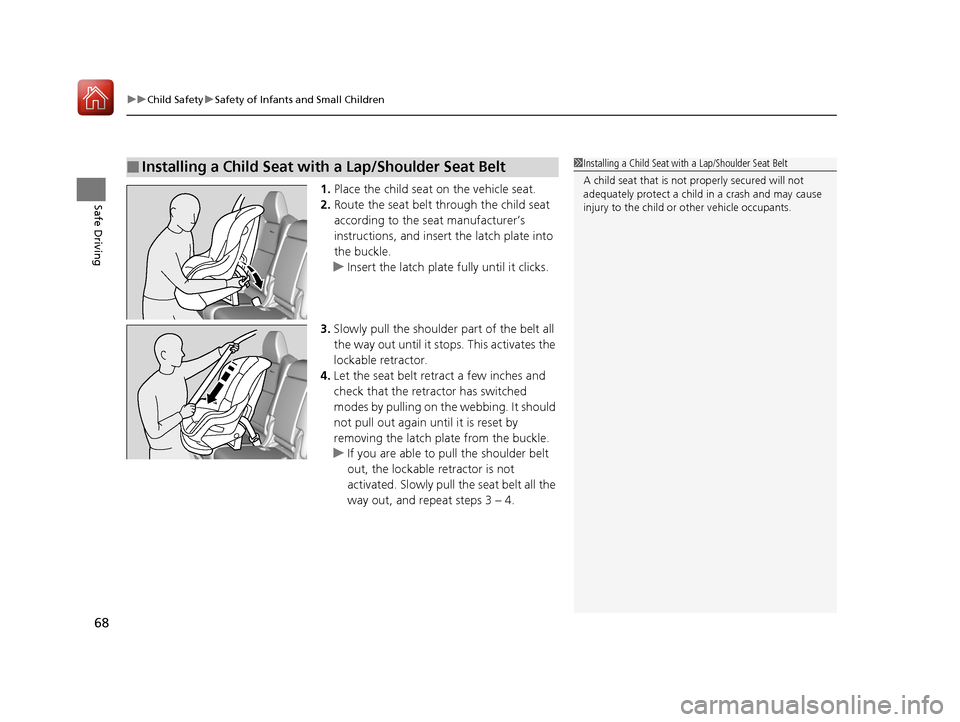
Safe Driving1. Place the child seat on the vehicle seat.
2. Route the seat belt through the child seat
according to the seat manufacturer’s
instructions, and insert the latch plate into
the buckle.
u Insert the latch plate fully until it clicks.
3. Slowly pull the shoulder part of the belt all
the way out until it stops. This activates the
lockable retractor.
4. Let the seat belt retract a few inches and
check that the retractor has switched
modes by pulling on the webbing. It should
not pull out again until it is reset by
removing the latch plate from the buckle.
u If you are able to pull the shoulder belt
out, the lockable retractor is not
activated. Slowly pull the seat belt all the
way out, and repeat steps 3 – 4.
■Installing a Child Seat with a Lap/Shoulder Seat Belt1Installing a Child Seat with a Lap/Shoulder Seat Belt
A child seat that is not properly secured will not
adequately protect a child in a crash and may cause
injury to the child or other vehicle occupants.
17 ACURA MDX E-AWD-31TRX6000.book 68 ページ 2017年1月20日 金曜日 午後2時5 3分
Page 122 of 453
Continued121
uuGauges and Multi-Info rmation Display (MID)uMID
Instrument Panel
Shows the total number of miles (U.S.) or k ilometers (Canada) driven since the last
reset. Meters A and B can be used to measure two separate trips.
■Resetting a trip meter
To reset a trip meter, display it, then press and hold the TRIP button until the trip
meter is reset to 0.0.
Shows the outside temperature in Fahr enheit (U.S.) or Celsius (Canada).
■Adjusting the outside temperature display
Adjust the temperature reading up to ±5 °F or ±3°C if the temperature reading
seems incorrect.
Shows the estimated average fuel economy of each trip meter in mpg (U.S.) or l/100
km (Canada). The display is updated at set intervals. When a trip meter is reset, the
average fuel economy is also reset.
■Trip Meter
■Outside Temperature
■Average Fuel Economy
1 Trip Meter
Switch between trip meter A and trip meter B by
pressing the TRIP button.
1Outside Temperature
The temperature sensor is located in the front
bumper.
Road heat and exhaust fr om another vehicle can
affect the temperature reading when your vehicle
speed is less than 19 mph (30 km/h).
It may take several minutes for the display to be
updated after the temperature reading has stabilized.
Use the MID’s customized features to correct the
temperature. 2 Customized Features P. 125
1Average Fuel Economy
You can change when to reset the average fuel
economy.
2 Customized Features P. 125
17 ACURA MDX E-AWD-31TRX6000.book 121 ページ 2017年1月20日 金曜日 午後2時 53分
Page 123 of 453

uuGauges and Multi-Information Display (MID) uMID
122
Instrument Panel
Shows the instant fuel economy as a bar gr aph in mpg (U.S.) or l/100 km (Canada).
Shows the estimated distance you can travel on the remaining power and fuel. This
distance is estimated from the fuel economy of your previous trips.
Shows the time elapsed since Trip A or Trip B was reset.
Shows the average speed in m ph (U.S.) or km/h (Canada) since Trip A or Trip B was
reset.
■Instant Fuel Economy
■Range
■Elapsed Time
■Average Speed
1 Elapsed Time
You can change when to reset the elapsed time.
2 Customized Features P. 125
1Average Speed
You can change when to reset the average speed.
2 Customized Features P. 125
17 ACURA MDX E-AWD-31TRX6000.book 122 ページ 2017年1月20日 金曜日 午後2時 53分
Page 127 of 453

126
uuGauges and Multi-Information Display (MID) uMID
Instrument Panel
■Customization flow
Roll the multi-function steering-wheel controls to select Vehicle Settings and push the multi-function steering-wheel controls.
Vehicle Settings
“Trip A” Reset Timing
Language Selection
Adjust Outside Temp. Display
Memory Position Link
Door Unlock Mode
Keyless Access Beep
Driver Assist System Setup
Meter Setup
Driving Position Setup
Keyless Access Setup
“Trip B” Reset Timing
Forward Collision Warning Distance
ACC Forward Vehicle Detect Beep
ACC Display Speed Unit
Push
Lane Keeping Assist Suspend Beep
Blind Spot Info
Easy Entry/Exit
Roll
Walk Away Auto Lock
Push
Keyless Access Light Flash
Roll
Turn by Turn Display
Road Departure Mitigation Setting
Reverse Alert Tone
Remote Start System On/Off
RollRoll
Roll
Roll
Push
Push
Push
Push
Roll
Roll
Roll
17 ACURA MDX E-AWD-31TRX6000.book 126 ページ 2017年1月20日 金曜日 午後2時 53分
Page 128 of 453
127
uuGauges and Multi-Info rmation Display (MID)uMID
Continued
Instrument Panel
Exit
Door Setup
Dynamic Mode Setup
Default All
Lighting Setup
Key And Remote Unlock Mode
Auto Door Lock
Auto Door Unlock
Keyless Lock Answer Back
Auto Folding Door Mirror
Interior Ligh t Dimming Time
Headlight Auto Off Timer
Auto Light Sensitivity
Roll
Push
Push
Roll
Roll
Roll
Roll
Roll
Roll
Power Tailgate SetupPush
Power Open By Outer Handle
Keyless Open Mode
Push
Maintenance Info.
Roll
PushPreferred Dynamic Mode
Roll
Roll
Roll
PushMaintenance Reset
Security Relock Timer
17 ACURA MDX E-AWD-31TRX6000.book 127 ページ 2017年1月20日 金曜日 午後2時 53分
Page 130 of 453

129
uuGauges and Multi-Info rmation Display (MID)uMID
Continued
Instrument Panel
*1:Default SettingSetup Group Customizable Features
Description Selectable Settings
Meter Setup Language Selection
Changes the displayed language. English
*1/Français /Español
Adjust Outside Temp.
Display Adjusts the temperature r
eading by a few degrees. -5°F
~ ±0°F
*1 ~ +5°F (U.S.)
-3°C ~ ±0°C
*1 ~ +3°C (Canada)
“Trip A” Reset Timing Changes the setting of how to reset trip meter A,
average fuel economy A,
average speed A, and
elapsed time A. When Refueled
/IGN Off/
Manually Reset
*1
“Trip B” Reset Timing Changes the setting of ho
w to reset trip meter B,
average fuel economy B, average speed B, and
elapsed time B. When Refueled
/IGN Off/
Manually Reset*1
Reverse Alert Tone Causes the beeper to so
und once when the change
the gear position to ( R. On*1/
Off
Turn by Turn Display Select whether the turn-by
-turn display comes on
during the route guidance. On
*1/
Off
17 ACURA MDX E-AWD-31TRX6000.book 129 ページ 2017年1月20日 金曜日 午後2時 53分
Page 133 of 453
132
uuGauges and Multi-Information Display (MID) uMID
Instrument Panel
*1: Default SettingSetup Group Customizable Features
Description Selectable Settings
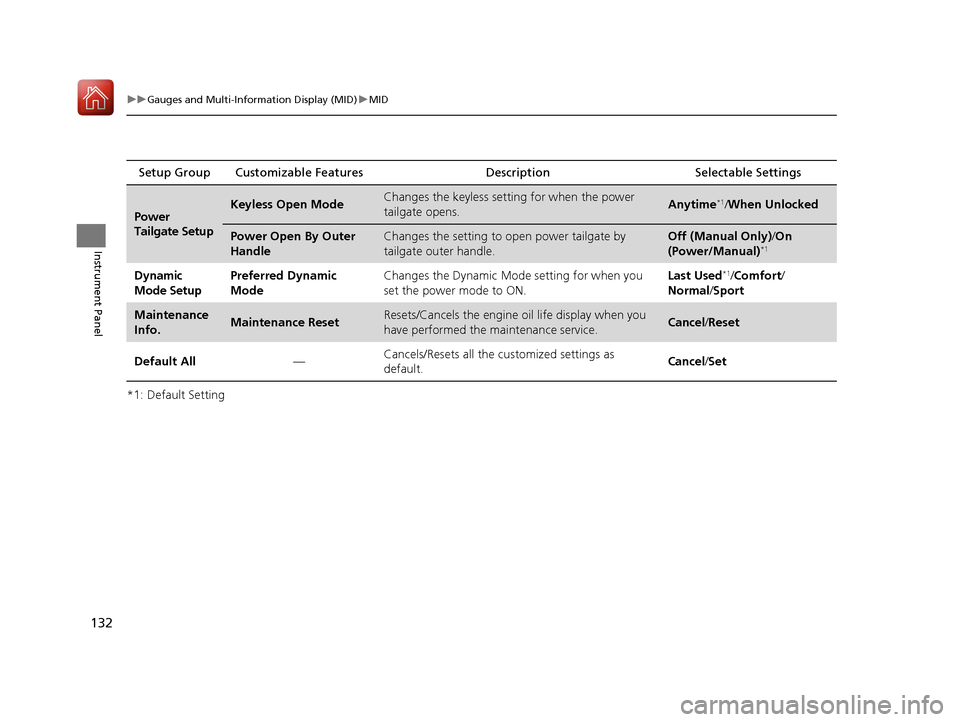
Power
Tailgate SetupKeyless Open ModeChanges the keyless setting for when the power
tailgate opens.Anytime*1/When Unlocked
Power Open By Outer
HandleChanges the setting to open power tailgate by
tailgate outer handle.Off (Manual Only) /On
(Power/Manual)*1
Dynamic
Mode SetupPreferred Dynamic
ModeChanges the Dynamic Mode setting for when you
set the power mode to ON.Last Used*1/ Comfort /
Normal /Sport
Maintenance
Info.Maintenance ResetResets/Cancels the engine oil life display when you
have performed the maintenance service. Cancel /Reset
Default All —Cancels/Resets all the
customized settings as
default. Cancel
/Set
17 ACURA MDX E-AWD-31TRX6000.book 132 ページ 2017年1月20日 金曜日 午後2時 53分
Page 134 of 453

133
uuGauges and Multi-Info rmation Display (MID)uMID
Continued
Instrument Panel
■Example of customization settings
The steps for changing the “Trip A” Reset Timing setting to When Refueled are
shown below. The default setting for “Trip A” Reset Timing is Manually Reset.
1. Roll the multi-function steering-wheel
controls to select Vehicle Settings , then
push the multi-func tion steering-wheel
controls.
2. Roll the multi-function steering-wheel
controls until Meter Setup appears on the
display.
3. Push the multi-func tion steering-wheel
controls.
u Language Selection appears first on
the display.
17 ACURA MDX E-AWD-31TRX6000.book 133 ページ 2017年1月20日 金曜日 午後2時 53分
Page 135 of 453

134
uuGauges and Multi-Information Display (MID) uMID
Instrument Panel
4. Roll the multi-function steering-wheel
controls until “Trip A” Reset Timing
appears on the display, then push the multi-
function steering-wheel controls.
u The display switches to the
customization setup screen, where you
can select When Refueled , IGN Off,
Manually Reset , or Exit .
5. Roll the multi-function steering-wheel
controls and select When Refueled, then
push the multi-functi on steering-wheel
controls.
u The When Refueled Setup screen
appears, then the di splay returns to the
customization menu screen.
6. Roll the multi-function steering-wheel
controls until Exit appears on the display,
then push the multi-function steering-
wheel controls.
7. Repeat Step 6 until you return to the
normal screen.
17 ACURA MDX E-AWD-31TRX6000.book 134 ページ 2017年1月20日 金曜日 午後2時 53分
Page 175 of 453

uuOperating the Switches Around the Steering Wheel uAuto High-Beam
174
Controls
■To manually cancel the system temporarily
You can cancel the operation when you manually change the headlights to high
beams. Push the lever forward until you hear a click, or lightly pull the lever towards
you to flash high beams. The auto high-beam indicator goes off.
If you want the auto high-beam operation to resume at once, pull the lever towards
you.
Adjust the system when the vehicle is parked
with the power mode in ON and the light
switch is in the AUTO position.
To disable the system: Pull the light switch
lever towards you and hold it for 40 seconds.
The auto high-beam indica tor in the meter will
blink twice.
To enable the system: Pull the light switch
lever towards you and hold it for 30 seconds.
The auto high-beam indica tor in the meter will
blink once.
To set the high sensitivity: Pull the light
switch lever towards you and hold it for 2
minutes.
The auto high-beam indica tor in the meter will
blink three times. The se tting is reset when the
power mode is set to VEHICLE OFF (LOCK).
■To Adjust the System1 To Adjust the System
The auto high-beam is in the previously selected
disabled or enabled setti ng each time you start the
power system.
AUTO Position
17 ACURA MDX E-AWD-31TRX6000.book 174 ページ 2017年1月20日 金曜日 午後2時 53分