ESP Acura MDX HYBRID 2018 Owner's Guide
[x] Cancel search | Manufacturer: ACURA, Model Year: 2018, Model line: MDX HYBRID, Model: Acura MDX HYBRID 2018Pages: 685, PDF Size: 41.38 MB
Page 337 of 685
336
uuGeneral Information on the Audio System uHonda App License Agreement
Features
L. Changes to the SOFTWARE or SERVICES. WE may change, modify, or update the SOFT WARE or SERVICES from time to time. Unless
explicitly stated otherwis e, any new features or services that augment or en hance the SOFTWARE or SERVICES in the future shall
respectively be considered part of the SOFT WARE or SERVICES and subject to this AGREEMENT. WE reserve the right at any time and from
time to time to interrupt, restrict, modi fy, suspend, discontinue, temporarily or pe rmanently, the SOFTWARE or SERVICES (or any portion
thereof), with or without notice to you, and you agree that HONDA shall not be liable to you or to any third party for any modi fication,
suspension or discontinuance of the SOFTWARE or SERVICES.
M. ARBITRATION:
PLEASE READ THIS ARBITRATION PROVISION CAREFULLY TO UNDER STAND YOUR RIGHTS. YOU AGREE THAT ANY CLAIM THAT YOU
MAY HAVE IN THE FUTURE MUST BE RESOLV ED THROUGH BINDING ARBITRATION. YOU WAIVE THE RIGHT TO HAVE YOUR DISPUTE
HEARD IN COURT AND WAIVE THE RIGHT TO BRING CLASS CLAIMS. YOU UNDERSTAND THAT DISCOVERY AND APPEAL RIGHTS ARE
MORE LIMITED IN ARBITRATION.
Arbitration is a method of resolving a claim, dispute or contro versy without filing a lawsuit. By agreeing to arbitrate, the ri ght to go to
court is waived and instead claims, disputes or controversies are submitted to binding arbitration. This provision sets forth t he terms and
conditions of our agreement. YOU and HO NDA agree and acknowledge that this Agreement affects interstate commerce and the
Federal Arbitration Act (“FAA”) ap plies. By using the Software, Vehicle, or Servic es, YOU elect to have disputes resolved by arbitration.
YOU, HONDA or any involved third party may pursue a Claim. “Cla im” means any dispute between YOU, HONDA, or any involved third
party relating to your use of the Software, the Vehicle, or the Services, this Agreement, or our relationship, including any
representations, omissions or warranties. “C laim” does not include personal injury or wrongful death claims. YOU or HONDA may s eek
remedies in small claims court or provisional judicial remedi es without arbitrating. In addition, notwithstanding anything here in to the
contrary, YOU or HONDA may seek equitable reli ef in a court of competent jurisdiction.
YOU or HONDA may select arbitration with American Arbitration As sociation, JAMS or National Arbitration and Mediation. Contact
these sponsors for their rules. The hearing will be in the federa l district where YOU reside. If agreed, it may be by telephone or written
submissions. Filing and arbitrator fees to be paid per the spon sor rules. You may contact the sponsor for a fee waiver. If no f ee waivers,
HONDA will pay filing and arbitrator fees up to $5,000, unless la w requires more. Each party is responsible for other fees. Arbitrator
may award costs or fees to prevailing party, if permitted by law. HONDA will not seek fees, unless the claims are frivolous.
18 ACURA MDX E-AWD-31TRX6100.book 336 ページ 2018年3月27日 火曜日 午後8時6分
Page 340 of 685
339
uuGeneral Information on the Audio System uLegal Information on Apple CarPlay/Android Auto
Features
YOU EXPRESSLY ACKNOWLEDGE AND AGREE THAT USE OF APPLE CARPLAY OR ANDROID AUTO (“THE APPLICATIONS”) IS AT YOUR
SOLE RISK AND THAT THE ENTIRE RISK AS TO SATISFACTORY Q UALITY, PERFORMANCE, ACCURACY AND EFFORT IS WITH YOU TO THE
MAXIMUM EXTENT PERMITTED BY APPLICABLE LAW, AND THAT TH E APPLICATIONS AND INFORMATION ON THE APPLICATIONS IS
PROVIDED “AS IS” AND “AS AVAILABLE,” WITH ALL FAUL TS AND WITHOUT WARRANTY OF ANY KIND, AND HONDA HEREBY
DISCLAIMS ALL WARRANTIES AND CONDITIONS WITH RESPECT TO THE APPLICATIONS AND INFORMATION ON THE APPLICATIONS,
EITHER EXPRESS, IMPLIED OR STATUTORY, INCLUDING, BUT NOT LIMITED TO, THE IMPLIED WARRANTIES AND/OR CONDITIONS OF
MERCHANTABILITY, SATISFACTORY QUALITY, FITNESS FOR A PA RTICULAR PURPOSE, ACCURACY, QUIET ENJOYMENT, AND NON-
INFRINGEMENT OF THIRD PARTY RIGHTS. NO ORAL OR WRITTEN INFORMATION OR ADVICE GIVEN BY HONDA OR AN AUTHORIZED
REPRESENTATIVE SHALL CREATE A WARRANTY. AS EXAMPLES, AND WITHOUT LIMITATION, HONDA DISCLAIMS ANY WARRANTY
REGARDING THE ACCURACY OF DATA PROVIDED BY THE APPLI CATIONS, SUCH AS THE ACCURACY OF DIRECTIONS, ESTIMATED
TRAVEL TIME, SPEED LIMITS, ROAD CONDITIONS, NEWS, WEATHER, TRAF FIC, OR OTHER CONTENT PROVIDED BY APPLE, GOOGLE, THEIR
AFFILIATES, OR THIRD PARTY PROVIDERS; HONDA DOES NOT GUARANTEE AGAINST LO SS OF APPLICATION DATA, WHICH MAY BE LOST
AT ANY TIME; HONDA DOES NOT GUARANTEE THAT THE APPLICATIO NS OR ANY SERVICES PROVIDED THROUGH THEM WILL BE
PROVIDED AT ALL TIMES OR THAT ANY OR ALL SERVICES WILL BE AVAILABLE AT ANY PA RTICULAR TIME OR LOCATION. FOR EXAMPLE,
SERVICES MAY BE SUSPENDED OR INTERRUPTED WITHOUT NOTICE FOR REPAIR, MAINTENANCE, SECURITY FIXES, UPDATES, ETC.,
SERVICES MAY BE UNAVAILABLE IN YOUR AREA OR LOCATION, ETC. IN ADDITION, YOU UNDERSTAND THAT CHANGES IN THIRD PARTY
TECHNOLOGY OR GOVERNMENT REGULATION MAY RENDER THE SERVICES AND/OR APPLICATIONS OBSOLETE AND/OR UNUSABLE.
TO THE EXTENT NOT PROHIBITED BY LAW, IN NO EVENT SHALL HONDA OR ITS AFFILIATES BE LIABLE FOR PERSONAL INJURY, OR ANY
INCIDENTAL, SPECIAL, INDIRECT OR CO NSEQUENTIAL DAMAGES WHATSOEVER, INCLUDING, WITHOUT LIMITATION, DAMAGES FOR
LOSS OF PROFITS, CORRUPTION OR LOSS OF DATA, FAILURE TO TRANSMIT OR RECEIVE ANY DATA, BUSINESS INTERRUPTION OR ANY
OTHER COMMERCIAL DAMAGES OR LOSSES, ARISIN G OUT OF OR RELATED TO THE APPLICATIONS OR YOUR USE OF OR INABILITY TO
USE THE APPLICATIONS OR INFORMATION ON THE APPLICATIONS, HOWEVER CAUSED, REGARDLESS OF THE THEORY OF LIABILITY
(CONTRACT, TORT OR OTHERWISE) AND EVEN IF HONDA WERE ADVISED OF THE POSSIBILITY OF SUCH DAMAGES. SOME STATES AND
JURISDICTIONS DISALLOW THE EXCLUSION OR LIMITATION OF LI ABILITY FOR DAMAGES, SO THESE LIMITATIONS AND EXCLUSIONS MAY
NOT APPLY TO YOU. IN NO EVENT SHALL HONDA’S TOTAL LIABILITY TO YOU FOR ALL DAM AGES (OTHER THAN AS MAY BE REQUIRED
BY APPLICABLE LAW IN CASES INVOLVING PERSONAL INJURY) EXCE ED THE AMOUNT OF FIVE DOLLARS ($5.00). THE FOREGOING
LIMITATIONS WILL APPLY EVEN IF THE ABOVE STATED REMEDY FAILS OF ITS ESSENTIAL PURPOSE.
■DISCLAIMER OF WARRANTIES; LIMITATION ON LIABILITY
18 ACURA MDX E-AWD-31TRX6100.book 339 ページ 2018年3月27日 火曜日 午後8時6分
Page 352 of 685
351
uuRear Entertainment System (RES)*uRear Control Panel Operation
Continued
Features
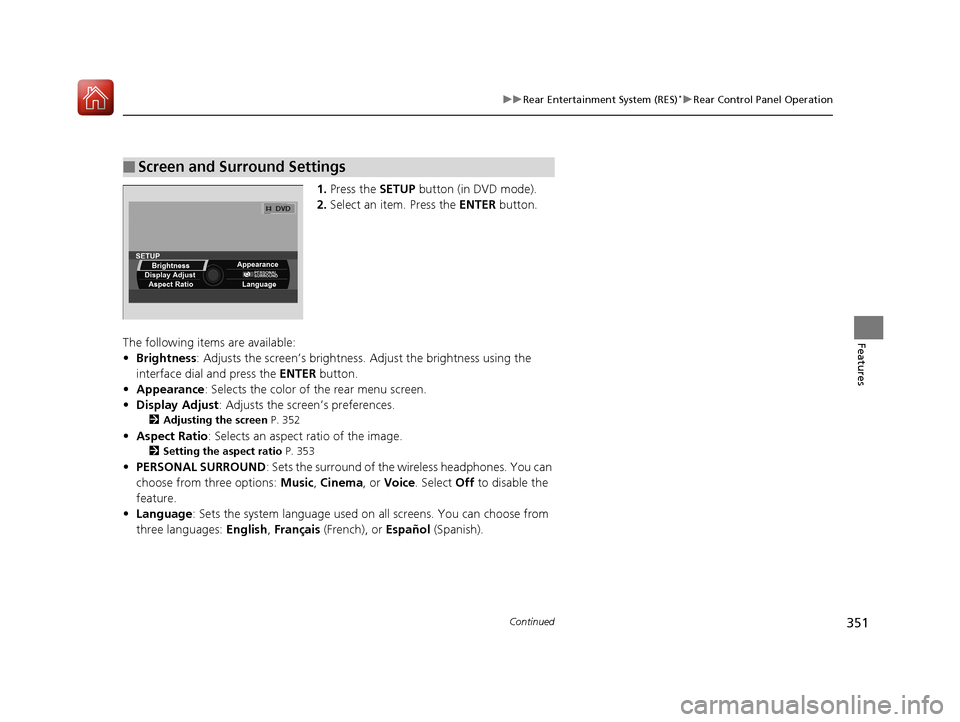
1. Press the SETUP button (in DVD mode).
2. Select an item. Press the ENTER button.
The following items are available:
• Brightness: Adjusts the screen’s brightness. Adjust the brightness using the
interface dial and press the ENTER button.
• Appearance : Selects the color of the rear menu screen.
• Display Adjust : Adjusts the screen’s preferences.
2Adjusting the screen P. 352
•Aspect Ratio : Selects an aspect ratio of the image.
2Setting the aspect ratio P. 353
•PERSONAL SURROUND : Sets the surround of the wireless headphones. You can
choose from three options: Music, Cinema , or Voice . Select Off to disable the
feature.
• Language : Sets the system language used on al l screens. You can choose from
three languages: English, Français (French), or Español (Spanish).
■Screen and Surround Settings
18 ACURA MDX E-AWD-31TRX6100.book 351 ページ 2018年3月27日 火曜日 午後8時6分
Page 376 of 685
375
uuCustomized Features u
Continued
Features
*1:Default SettingSetup
Group Customizable Features Desc
ription Selectable Settings
Vehicle
Settings MeterLanguage Selection
Changes the displayed language on the MID. English
*1/
Français /
Español
Adjust Outside Temp.
Display Adjusts the temperature reading by a few
degrees. -5°F ~ ±0°F
*1
~ +5°F
(U.S.)
-3°C ~ ±0°C
*1 ~ +3°C
(Canada)
“Trip A” Reset Timing Changes the setting of how to reset trip meter A,
average fuel economy A,
average speed A, and
elapsed time A. When Refueled
/IGN
Off /Manually Reset
*1
“Trip B” Reset Timing Changes the setting of how
to reset trip meter B,
average fuel economy B, average speed B, and
elapsed time B. When Refueled
/IGN
Off /Manually Reset*1
Reverse Alert Tone Causes the beeper to
sound once when the
transmission is put into (R. On*1/
Off
Turn by Turn Display Selects whether the turn
-by-turn display comes
on during the route guidance. On
*1/
Off
18 ACURA MDX E-AWD-31TRX6100.book 375 ページ 2018年3月27日 火曜日 午後8時6分
Page 385 of 685
384
uuCustomized Features u
Features
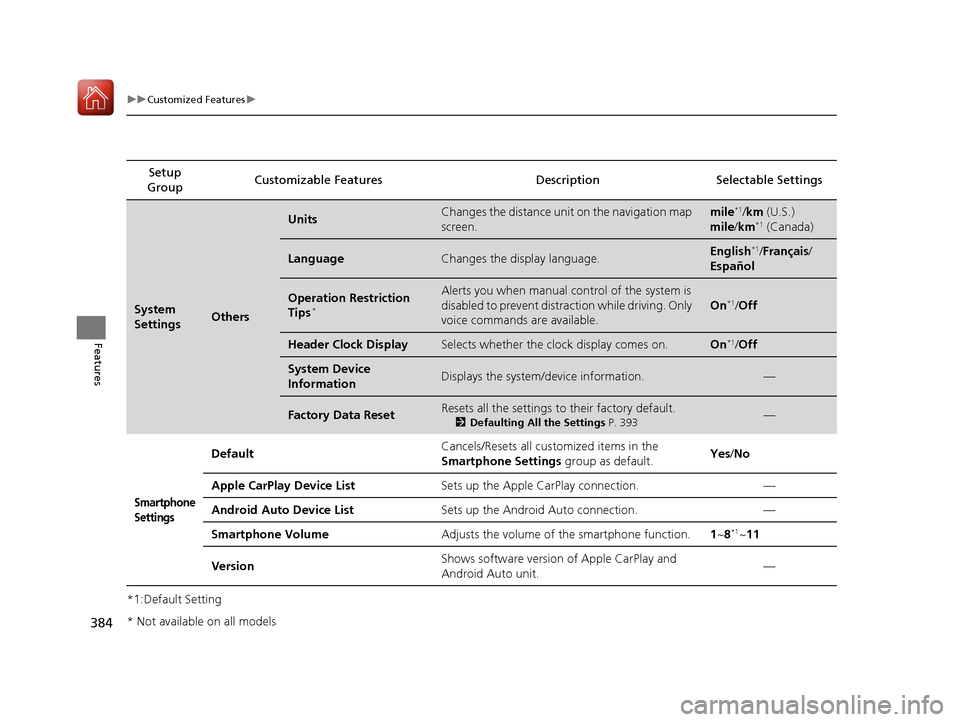
*1:Default SettingSetup
Group Customizable Features Desc
ription Selectable Settings
System
SettingsOthers
UnitsChanges the distance unit on the navigation map
screen.mile*1/km (U.S.)
mile /km*1 (Canada)
LanguageChanges the display language.English*1/Français /
Español
Operation Restriction
Tips*
Alerts you when manual control of the system is
disabled to prevent distraction while driving. Only
voice commands are available.
On*1/ Off
Header Clock DisplaySelects whether the clock display comes on.On*1/Off
System Device
InformationDisplays the system/device information.—
Factory Data ResetResets all the settings to their factory default.
2 Defaulting All the Settings P. 393—
Smartphone
Settings
Default Cancels/Resets all customized items in the
Smartphone Settings
group as default. Yes
/No
Apple CarPlay Device List Sets up the Apple CarPlay connection. —
Android Auto Device List Sets up the Android Auto connection. —
Smartphone Volume Adjusts the volume of the smartphone function. 1~8
*1~11
Version Shows software version of Apple CarPlay and
Android Auto unit. —
* Not available on all models
18 ACURA MDX E-AWD-31TRX6100.book 384 ページ 2018年3月27日 火曜日 午後8時6分
Page 399 of 685
uuBluetooth ® HandsFreeLink ®u Using HFL
398
Features
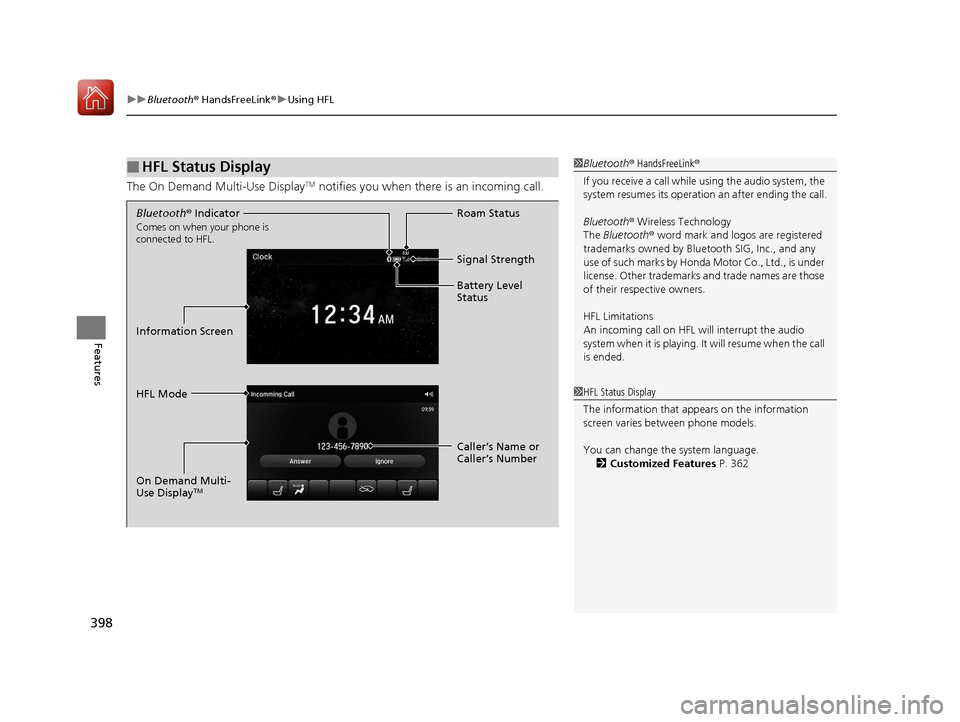
The On Demand Multi-Use DisplayTM notifies you when there is an incoming call.
■HFL Status Display1Bluetooth ® HandsFreeLink ®
If you receive a call while using the audio system, the
system resumes its operation an after ending the call.
Bluetooth ® Wireless Technology
The Bluetooth ® word mark and logos are registered
trademarks owned by Blue tooth SIG, Inc., and any
use of such marks by Honda Motor Co., Ltd., is under
license. Other trademarks and trade names are those
of their respective owners.
HFL Limitations
An incoming call on HFL will interrupt the audio
system when it is playing. It will resume when the call
is ended.
1 HFL Status Display
The information that a ppears on the information
screen varies between phone models.
You can change the system language. 2 Customized Features P. 362
Bluetooth® Indicator
Comes on when your phone is
connected to HFL.
Signal Strength
HFL Mode Roam Status
Information Screen Battery Level
Status
Caller’s Name or
Caller’s Number
On Demand Multi-
Use Display
TM
18 ACURA MDX E-AWD-31TRX6100.book 398 ページ 2018年3月27日 火曜日 午後8時6分
Page 465 of 685
464
uuWhen Driving uDual Clutch Transmission
Driving
Dual Clutch Transmission
As with a conventional gasoline-powered vehicle with an automatic transmission,
this vehicle will creep.
Keep the brake pedal firmly depressed when stopped.
Quickly depressing the accelerator pedal while driving uphill may cause the
transmission to drop to a lower gear, unexpectedly increasing vehicle speed. Depress
the accelerator pedal carefully, especi ally on slippery roads and curves.
■Creeping
■Kickdown
1Driving Guidelines for Your Utility Vehicle
Failure to operate your vehicle correctly might result
in a crash or a rollover. 2 Important Handling Information P. 36
2 Precautions While Driving P. 463
18 ACURA MDX E-AWD-31TRX6100.book 464 ページ 2018年3月27日 火曜日 午後8時6分
Page 475 of 685
474
uuWhen Driving uIntegrated Dynamics System
Driving
Integrated Dynamics System
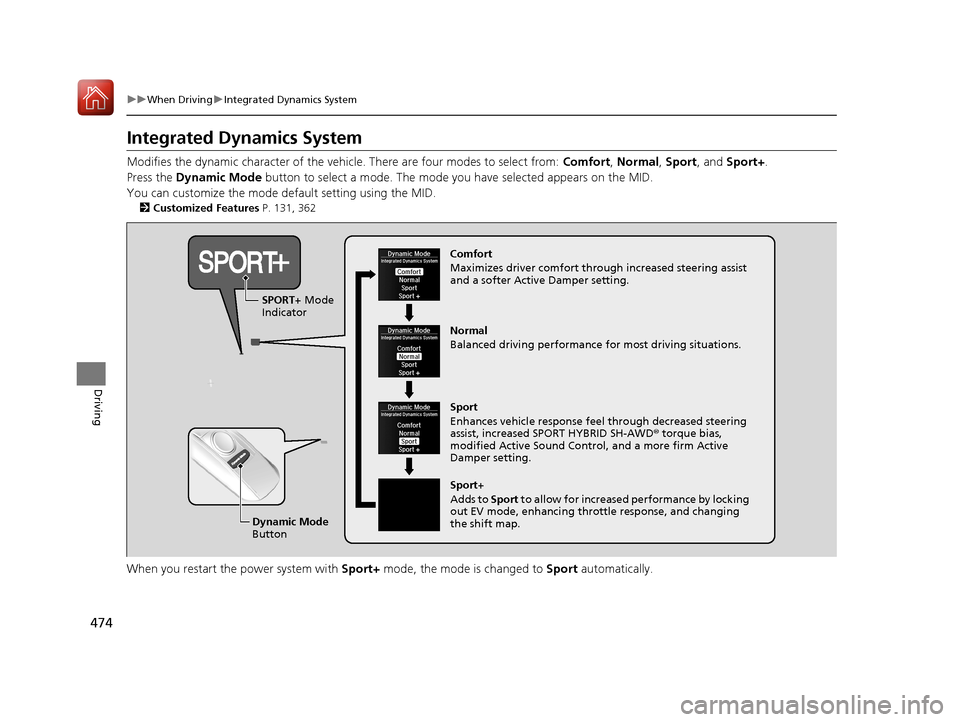
Modifies the dynamic character of the vehicl e. There are four modes to select from: Comfort, Normal, Sport , and Sport+ .
Press the Dynamic Mode button to select a mode. The mode you have selected appears on the MID.
You can customize the mode default setting using the MID.
2 Customized Features P. 131, 362
When you restart the power system with Sport+ mode, the mode is changed to Sport automatically.
Normal
Balanced driving performance for most driving situations.
Sport
Enhances vehicle response feel through decreased steering
assist, increased SPORT HYBRID SH-AWD ® torque bias,
modified Active Sound Contro l, and a more firm Active
Damper setting. Comfort
Maximizes driver comfort through increased steering assist
and a softer Active Damper setting.
Dynamic Mode
Button
SPORT+ Mode
Indicator
Sport+
Adds to Sport to allow for increased performance by locking
out EV mode, enhancing throttle response, and changing
the shift map.
18 ACURA MDX E-AWD-31TRX6100.book 474 ページ 2018年3月27日 火曜日 午後8時6分
Page 493 of 685
492
uuWhen Driving uRoad Departure Mitigation (RDM) System
Driving
Road Departure Mitigation (RDM) System
Alerts and helps to assist you when the sy stem detects a possibility of your vehicle
unintentionally crossing over detected la ne markings and/or leaving the roadway
altogether.
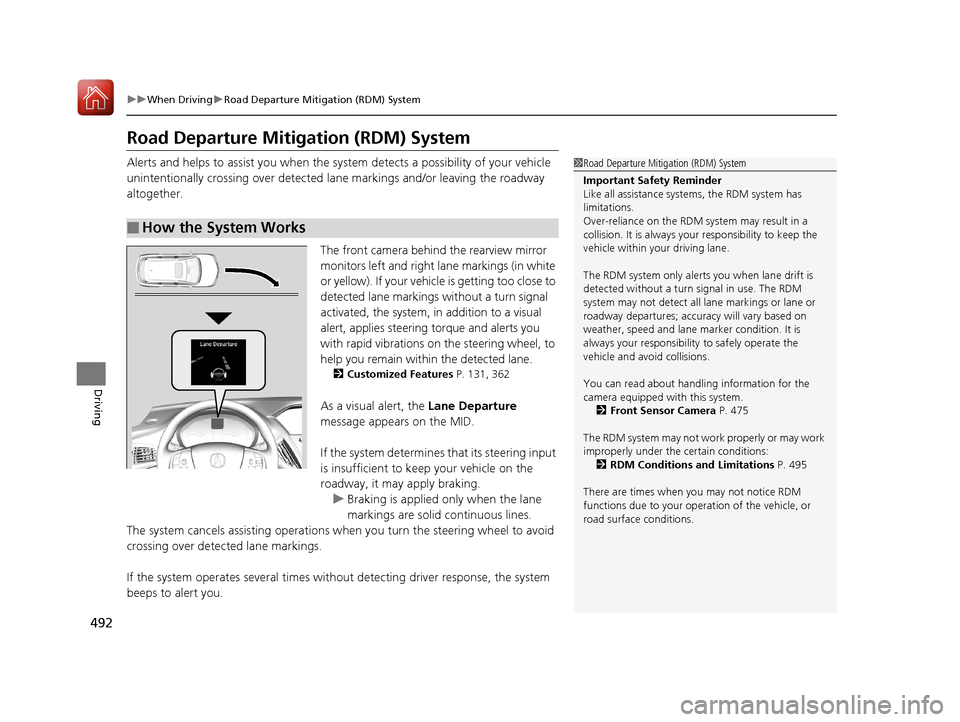
The front camera behind the rearview mirror
monitors left and right lane markings (in white
or yellow). If your vehicle is getting too close to
detected lane markings without a turn signal
activated, the system, in addition to a visual
alert, applies steering torque and alerts you
with rapid vibrations on the steering wheel, to
help you remain within the detected lane.
2 Customized Features P. 131, 362
As a visual alert, the Lane Departure
message appears on the MID.
If the system determines that its steering input
is insufficient to keep your vehicle on the
roadway, it may apply braking. u Braking is applied only when the lane
markings are solid continuous lines.
The system cancels assisting operations wh en you turn the steering wheel to avoid
crossing over detected lane markings.
If the system operates several times without detecting driver response, the system
beeps to alert you.
■How the System Works
1 Road Departure Mitigation (RDM) System
Important Safety Reminder
Like all assistance systems, the RDM system has
limitations.
Over-reliance on the RDM system may result in a
collision. It is always your responsibility to keep the
vehicle within your driving lane.
The RDM system only alerts you when lane drift is
detected without a turn signal in use. The RDM
system may not detect all la ne markings or lane or
roadway departures; accu racy will vary based on
weather, speed and lane marker condition. It is
always your responsibilit y to safely operate the
vehicle and avoid collisions.
You can read about handling information for the
camera equipped with this system.
2 Front Sensor Camera P. 475
The RDM system may not wo rk properly or may work
improperly under the certain conditions: 2 RDM Conditions and Limitations P. 495
There are times when you may not notice RDM
functions due to your opera tion of the vehicle, or
road surface conditions.
18 ACURA MDX E-AWD-31TRX6100.book 492 ページ 2018年3月27日 火曜日 午後8時6分
Page 498 of 685
497
uuWhen Driving uLane Keeping Assist System (LKAS)
Continued
Driving
Lane Keeping Assist System (LKAS)
Provides steering input to help keep the vehicle in the middle of a detected lane and
provides tactile and visual al erts if the vehicle is detected drifting out of its lane.1Lane Keeping Assist System (LKAS)
Important Safety Reminders
The LKAS is for your convenience only. It is not a
substitute for your vehicle control. The system does
not work if you take y our hands off the steering
wheel or fail to steer the vehicle.
2 Multi-Information Display Warning and
Information Messages P. 122
Do not place objects on the instrument panel.
Objects may reflect on th e windshield and prevent
correct detection of the traffic lanes.
The LKAS only alerts you when lane drift is detected
without a turn signal in use. The LKAS may not detect
all lane markings or lane departures; accuracy will
vary based on weather, speed, and lane marker
condition. It is always your responsibility to safely
operate the vehicle an d avoid collisions.
The LKAS is convenient when it is used on freeways.
The LKAS may not work properly or may work
improperly under the certain conditions: 2 LKAS Conditions and Limitations P. 503
You can read about handling information for the
camera equipped with this system. 2 Front Sensor Camera P. 475
The LKAS may not function as designed while driving
in frequent stop and go traf fic, or on roads with
sharp curves.
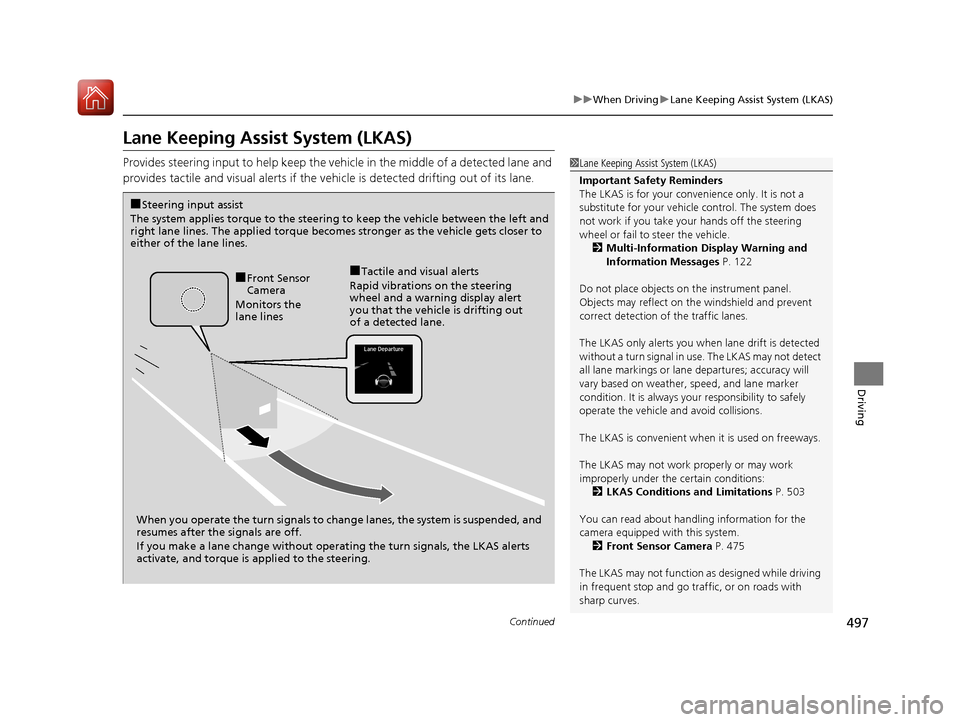
When you operate the turn signals to chan ge lanes, the system is suspended, and
resumes after the signals are off.
If you make a lane change without operat ing the turn signals, the LKAS alerts
activate, and torque is applied to the steering.
■Front Sensor
Camera
Monitors the
lane lines■Tactile and visual alerts
Rapid vibrations on the steering
wheel and a warning display alert
you that the vehicle is drifting out
of a detected lane.
■Steering input assist
The system applies torque to the steering to keep the vehicle between the left and
right lane lines. The applied torque becomes stronger as the vehicle gets closer to
either of the lane lines.
18 ACURA MDX E-AWD-31TRX6100.book 497 ページ 2018年3月27日 火曜日 午後8時6分