maintenance Acura MDX HYBRID 2019 User Guide
[x] Cancel search | Manufacturer: ACURA, Model Year: 2019, Model line: MDX HYBRID, Model: Acura MDX HYBRID 2019Pages: 685, PDF Size: 36.92 MB
Page 134 of 685
133
uuGauges and Multi-Info rmation Display (MID)uMID
Continued
Instrument Panel
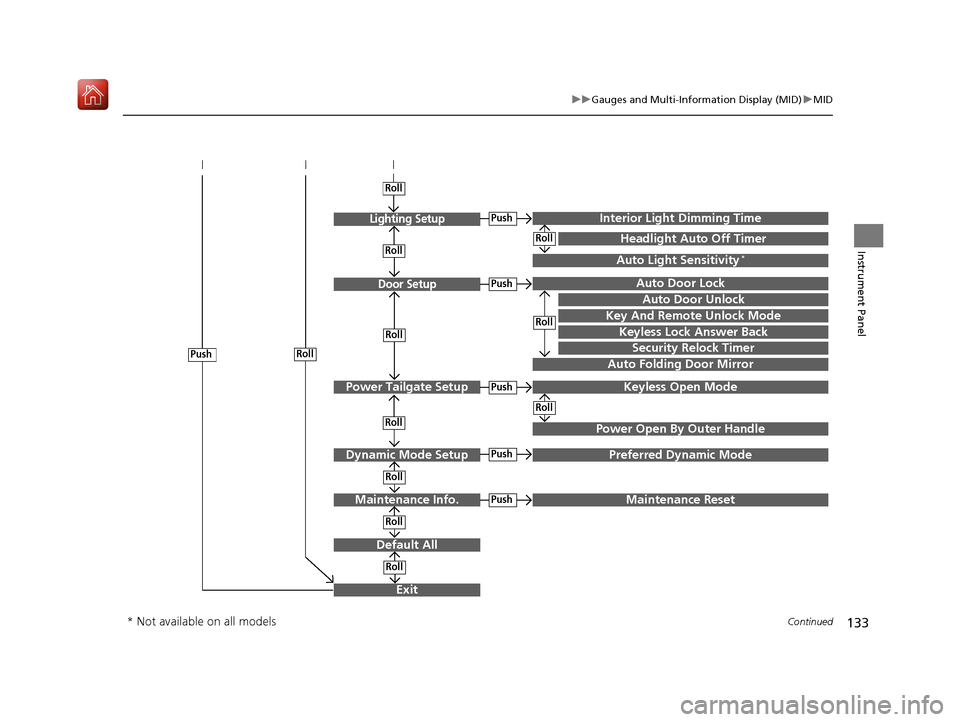
Exit
Door Setup
Dynamic Mode Setup
Default All
Lighting Setup
Key And Remote Unlock Mode
Auto Door Lock
Auto Door Unlock
Keyless Lock Answer Back
Auto Folding Door Mirror
Interior Ligh t Dimming Time
Headlight Auto Off Timer
Auto Light Sensitivity*
Roll
Push
Push
Roll
Roll
Roll
Roll
Roll
Roll
Power Tailgate SetupPush
Power Open By Outer Handle
Keyless Open Mode
Push
Maintenance Info.
Roll
PushPreferred Dynamic Mode
Roll
Roll
Roll
PushMaintenance Reset
Security Relock Timer
* Not available on all models
19 ACURA MDX E-AWD-31TRX6200.book 133 ページ 2018年6月22日 金曜日 午後7時42分
Page 139 of 685
138
uuGauges and Multi-Information Display (MID) uMID
Instrument Panel
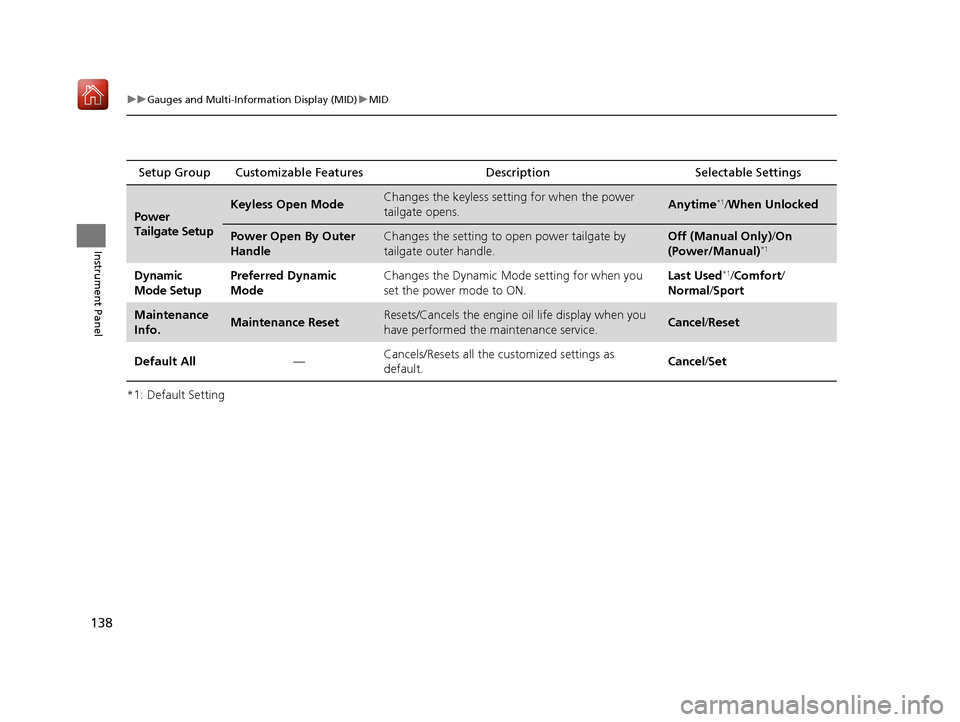
*1: Default SettingSetup Group Customizable Features
Description Selectable Settings
Power
Tailgate SetupKeyless Open ModeChanges the keyless setting for when the power
tailgate opens.Anytime*1/When Unlocked
Power Open By Outer
HandleChanges the setting to open power tailgate by
tailgate outer handle.Off (Manual Only) /On
(Power/Manual)*1
Dynamic
Mode SetupPreferred Dynamic
ModeChanges the Dynamic Mode setting for when you
set the power mode to ON.Last Used*1/ Comfort /
Normal /Sport
Maintenance
Info.Maintenance ResetResets/Cancels the engine oil life display when you
have performed the maintenance service. Cancel /Reset
Default All —Cancels/Resets all the
customized settings as
default. Cancel
/Set
19 ACURA MDX E-AWD-31TRX6200.book 138 ページ 2018年6月22日 金曜日 午後7時42分
Page 321 of 685

320
uuAudio Error Messages uPandora®
Features
Error MessageSolution
The PANDORA app version on your device is not supported.
When safe, please update the app and try again later.Appears when Pandora ® version is not supported. Update
Pandora® to the latest version.
PANDORA is performing system maintenance. Please try
again later.Appears when the Pandora ® server is in maintenance. Try again
later.
The system cannot connect to PANDORA. When safe, please
check your device.
Appears when Pandora ® is unable to play music. Check your
device.
The system is unable to play PANDORA. When safe, login to
PANDORA.
The maximum number of stations that can be created is 100.
To create more, please delete one or more previously created
stations.Appears when the number of created stations reaches the
limitation. Delete one or more created stations from Pandora ® app
on the connected device.
The system is unable to create a new station. Please try again.Appears when there is a temporar y error with the audio system.
Try again later.
The system is unable to play PANDORA. Please try again later.Appears when your connected device has network problems.
Check your device.
When safe, please check your device.
Appears when your connected device has some kind of problem
such as being out of the service area.
Check that the connected device is within the service area, and
then try again to play Pandora ®. If the problem persists, consult a
dealer.
The system is unable to play PANDORA.
Music licensing restricts play in this area.Appears when you try playing the Pandora ® in the country where
the service is not available.
19 ACURA MDX E-AWD-31TRX6200.book 320 ページ 2018年6月22日 金曜日 午後7時42分
Page 333 of 685
332
uuGeneral Information on the Audio System uHonda App License Agreement
Features
E. Information Coll ection and Storage
1. Information Collection, Use, Transmission and Storage of Data. Consent to Use of Data:
You agree that HONDA and PROVIDERS may
collect and use your information gathered in any manner as part of product support services related to the SOFTWARE or related services.
HONDA may share such information with third parties, including, without limitation, PROVIDERS, th ird party software and services
suppliers, their affiliates and/or their desi gnated agents, solely to improve their products or to provide services or technolo gies to you.
HONDA, third party software and systems s uppliers, their affiliates and/or their designated agent may disclose this information to others,
but not in a form that pe rsonally identifies you.
2. Information Storage.
Depending on the type of multimedia system you have in your VEHICLE, certain information may be stored for ease
of use of the SOFTWARE including, without limitation, search hi story, location history in certain applications, previous and saved
destinations, map locations within certain applications, and device numbers and contact information.
(a) Vehicle Health Information.
Your VEHICLE may remotely trans mit information regarding the status and health of your VEHICLE
(“VEHICLE INFORMATION”) to HONDA without notification to you. VEHICLE INFORMATION may contain VEHICLE maintenance and
malfunction status that is derived from VEHICLE diagnostic data and includes, but is not limited to, status of powered doors and windows,
battery life data, battery charging data, VEHICLE speed, coolant temperat ure, air compressor revolution, output power, warning codes,
diagnostic trouble codes, fuel injection volume, and engine rotati ons per minute. VEHICLE HEALTH INFORMATION may be used by HONDA
for research and development, to deliver HONDA SERVICES and information to you, and to contact you, and is retained only for a period
of time necessary to fulfill these goals.
(b) VEHICLE Geolocation Data (non-navigation/map based).
If you opt-in to geolocation-based SERVICES, your vehicle’s geolocation data
(latitude and longitude) will be automatically se nt from your VEHICLE to HONDA and PROVIDERS.
(c) You understand that the inputting or uploading of information to your VEHICLE’s multimedia system or the SOFTWARE or SERVIC ES is
at your own risk and that HONDA is not responsible for unauthorized access to or use of any personal or other information. All information
uploaded to the SOFTWARE and SERVICES may be stored on your VEHICLES’s multimedia system and you understand that the security and
safety of your VEHICLE’s multimedia system is your sole responsibility.
19 ACURA MDX E-AWD-31TRX6200.book 332 ページ 2018年6月22日 金曜日 午後7時42分
Page 340 of 685

339
uuGeneral Information on the Audio System uLegal Information on Apple CarPlay/Android Auto
Features
YOU EXPRESSLY ACKNOWLEDGE AND AGREE THAT USE OF APPLE CARPLAY OR ANDROID AUTO (“THE APPLICATIONS”) IS AT YOUR
SOLE RISK AND THAT THE ENTIRE RISK AS TO SATISFACTORY Q UALITY, PERFORMANCE, ACCURACY AND EFFORT IS WITH YOU TO THE
MAXIMUM EXTENT PERMITTED BY APPLICABLE LAW, AND THAT TH E APPLICATIONS AND INFORMATION ON THE APPLICATIONS IS
PROVIDED “AS IS” AND “AS AVAILABLE,” WITH ALL FAUL TS AND WITHOUT WARRANTY OF ANY KIND, AND HONDA HEREBY
DISCLAIMS ALL WARRANTIES AND CONDITIONS WITH RESPECT TO THE APPLICATIONS AND INFORMATION ON THE APPLICATIONS,
EITHER EXPRESS, IMPLIED OR STATUTORY, INCLUDING, BUT NOT LIMITED TO, THE IMPLIED WARRANTIES AND/OR CONDITIONS OF
MERCHANTABILITY, SATISFACTORY QUALITY, FITNESS FOR A PA RTICULAR PURPOSE, ACCURACY, QUIET ENJOYMENT, AND NON-
INFRINGEMENT OF THIRD PARTY RIGHTS. NO ORAL OR WRITTEN INFORMATION OR ADVICE GIVEN BY HONDA OR AN AUTHORIZED
REPRESENTATIVE SHALL CREATE A WARRANTY. AS EXAMPLES, AND WITHOUT LIMITATION, HONDA DISCLAIMS ANY WARRANTY
REGARDING THE ACCURACY OF DATA PROVIDED BY THE APPLI CATIONS, SUCH AS THE ACCURACY OF DIRECTIONS, ESTIMATED
TRAVEL TIME, SPEED LIMITS, ROAD CONDITIONS, NEWS, WEATHER, TRAF FIC, OR OTHER CONTENT PROVIDED BY APPLE, GOOGLE, THEIR
AFFILIATES, OR THIRD PARTY PROVIDERS; HONDA DOES NOT GUARANTEE AGAINST LO SS OF APPLICATION DATA, WHICH MAY BE LOST
AT ANY TIME; HONDA DOES NOT GUARANTEE THAT THE APPLICATIO NS OR ANY SERVICES PROVIDED THROUGH THEM WILL BE
PROVIDED AT ALL TIMES OR THAT ANY OR ALL SERVICES WILL BE AVAILABLE AT ANY PA RTICULAR TIME OR LOCATION. FOR EXAMPLE,
SERVICES MAY BE SUSPENDED OR INTERRUPTED WITHOUT NOTICE FOR REPAIR, MAINTENANCE, SECURITY FIXES, UPDATES, ETC.,
SERVICES MAY BE UNAVAILABLE IN YOUR AREA OR LOCATION, ETC. IN ADDITION, YOU UNDERSTAND THAT CHANGES IN THIRD PARTY
TECHNOLOGY OR GOVERNMENT REGULATION MAY RENDER THE SERVICES AND/OR APPLICATIONS OBSOLETE AND/OR UNUSABLE.
TO THE EXTENT NOT PROHIBITED BY LAW, IN NO EVENT SHALL HONDA OR ITS AFFILIATES BE LIABLE FOR PERSONAL INJURY, OR ANY
INCIDENTAL, SPECIAL, INDIRECT OR CO NSEQUENTIAL DAMAGES WHATSOEVER, INCLUDING, WITHOUT LIMITATION, DAMAGES FOR
LOSS OF PROFITS, CORRUPTION OR LOSS OF DATA, FAILURE TO TRANSMIT OR RECEIVE ANY DATA, BUSINESS INTERRUPTION OR ANY
OTHER COMMERCIAL DAMAGES OR LOSSES, ARISIN G OUT OF OR RELATED TO THE APPLICATIONS OR YOUR USE OF OR INABILITY TO
USE THE APPLICATIONS OR INFORMATION ON THE APPLICATIONS, HOWEVER CAUSED, REGARDLESS OF THE THEORY OF LIABILITY
(CONTRACT, TORT OR OTHERWISE) AND EVEN IF HONDA WERE ADVISED OF THE POSSIBILITY OF SUCH DAMAGES. SOME STATES AND
JURISDICTIONS DISALLOW THE EXCLUSION OR LIMITATION OF LI ABILITY FOR DAMAGES, SO THESE LIMITATIONS AND EXCLUSIONS MAY
NOT APPLY TO YOU. IN NO EVENT SHALL HONDA’S TOTAL LIABILITY TO YOU FOR ALL DAM AGES (OTHER THAN AS MAY BE REQUIRED
BY APPLICABLE LAW IN CASES INVOLVING PERSONAL INJURY) EXCE ED THE AMOUNT OF FIVE DOLLARS ($5.00). THE FOREGOING
LIMITATIONS WILL APPLY EVEN IF THE ABOVE STATED REMEDY FAILS OF ITS ESSENTIAL PURPOSE.
■DISCLAIMER OF WARRANTIES; LIMITATION ON LIABILITY
19 ACURA MDX E-AWD-31TRX6200.book 339 ページ 2018年6月22日 金曜日 午後7時42分
Page 367 of 685

366
uuCustomized Features u
Features
Maintenance ResetMaintenance Info.
Preferred Dynamic ModeDynamic
Mode
Key And Remote Unlock Mode
Keyless Lock Answer Back
Security Relock Timer
Auto Door Lock
Auto Door Unlock Door
Auto Folding Door Mirror
Door Unlock Mode
Keyless Access Beep
Interior Light Dimming Time
Headlight Auto Off Timer
Auto Light Sensitivity*
Remote Start System On/Off
Walk Away Auto Lock
Lighting
Keyless
Access
Keyless Access Light Flash
Keyless Open Mode
Power Open By Outer Handle
Power
Tailgate
* Not available on all models
19 ACURA MDX E-AWD-31TRX6200.book 366 ページ 2018年6月22日 金曜日 午後7時42分
Page 380 of 685
379
uuCustomized Features u
Continued
Features
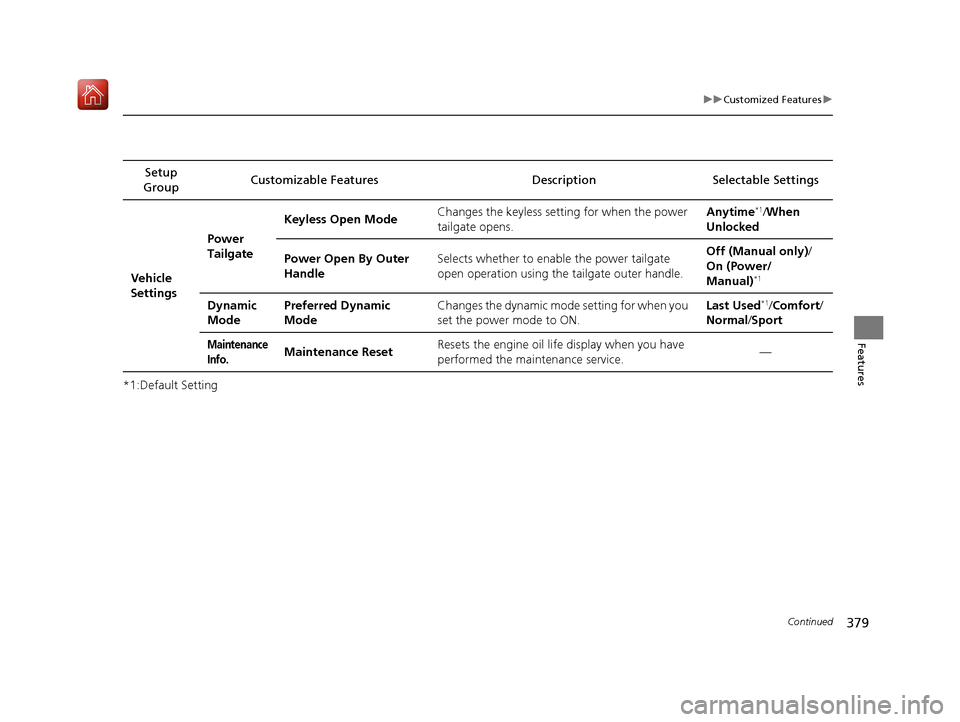
*1:Default SettingSetup
Group Customizable Features Desc
ription Selectable Settings
Vehicle
Settings Power
Tailgate
Keyless Open Mode
Changes the keyless setting for when the power
tailgate opens. Anytime
*1/
When
Unlocked
Power Open By Outer
Handle Selects whether to enable the power tailgate
open operation using the tailgate outer handle. Off (Manual only)
/
On (Power/
Manual)
*1
Dynamic
Mode Preferred Dynamic
Mode Changes the dynamic mode
setting for when you
set the power mode to ON. Last Used*1/
Comfort/
Normal /Sport
Maintenance
Info.Maintenance Reset Resets the engine oil life display when you have
performed the maintenance service.
—
19 ACURA MDX E-AWD-31TRX6200.book 379 ページ 2018年6月22日 金曜日 午後7時42分
Page 443 of 685

uuAcuraLink ®u
442
Features
AcuraLink sends you messages on vehicle
features, safety and emissions recall
campaigns, maintenance reminders, and
diagnostic information.
When you receive a new message, an icon
appears on the information screen.
■Message category
There are six message categories.
• Feature Guide: Appears for the first 30 days of ownership, introducing vehicle
features each day.
• Quick Tips : Supplements your Owner’s Ma nual with updated vehicle
information.
• Diagnostic Information : Appears when a warning indicator or message comes
on.
Rotate to select Check Later or Check Now .
u Selecting Check Now lets you know if you should see a dealer immediately or
later in accordance with the warning severity level.
• Scheduled Dealer Appointment : An appointment made through the Acura
server or Acura Owners website can be re scheduled or canceled from this option.
2 P. 444
•Maintenance Minder : Lets you know which maintenance item is due along with
a reminder message.
• Recalls/Campaigns : Reminds you of a recall or important safety information.
You should also be notified by mail.
■AcuraLink Message1 AcuraLink Message
Messages may not appear immediately after your
vehicle purchase. It can ta ke several days for your
dealer to register your vehicle’s ID.
If an icon includes an excl amation point, it indicates
that Acura gives high priority to this message
compared to the one without.
•: An unread message with high priority
•: An unread message
Message Icon
1 Message category
Message categories can be added, edited, or deleted
through broadcast me ssages from Acura.
You can call your dealer, find the nearest dealer, or
schedule appointments from the message options in
Maintenance Minder , Recalls/Campaigns, and
Diagnostic Information .
2 Message Options P. 443
19 ACURA MDX E-AWD-31TRX6200.book 442 ページ 2018年6月22日 金曜日 午後7時42分
Page 445 of 685
uuAcuraLink ®u
444
Features
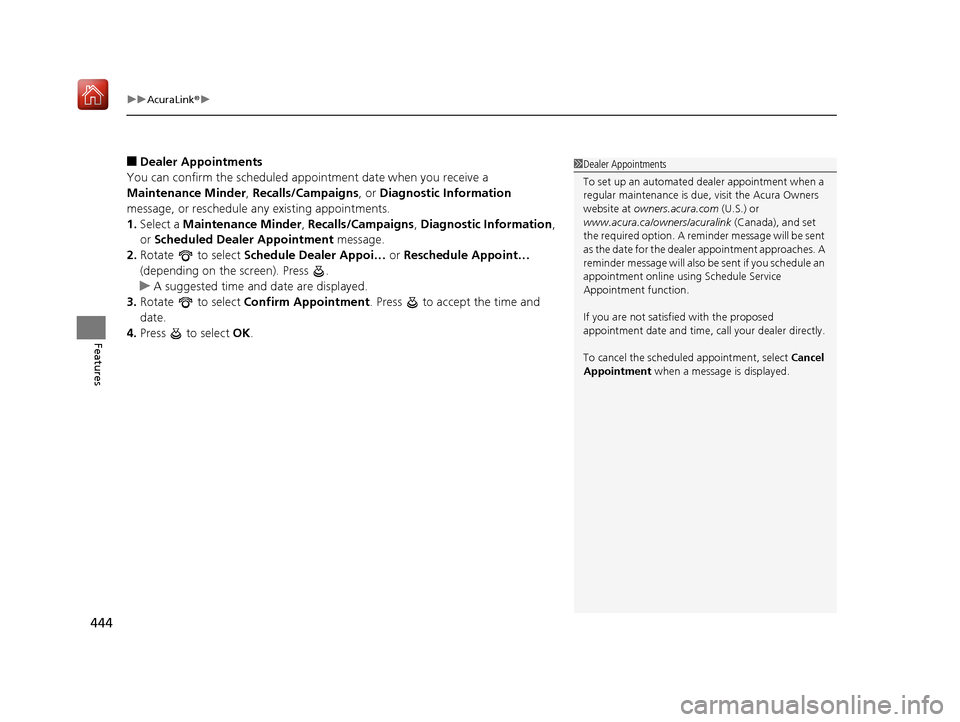
■Dealer Appointments
You can confirm the scheduled appointment date when you receive a
Maintenance Minder , Recalls/Campaigns, or Diagnostic Information
message, or reschedule any existing appointments.
1. Select a Maintenance Minder , Recalls/Campaigns , Diagnostic Information ,
or Scheduled Dealer Appointment message.
2. Rotate to select Schedule Dealer Appoi… or Reschedule Appoint…
(depending on the screen). Press .
u A suggested time and date are displayed.
3. Rotate to select Confirm Appointment . Press to accept the time and
date.
4. Press to select OK.1Dealer Appointments
To set up an automated de aler appointment when a
regular maintenance is due , visit the Acura Owners
website at owners.acura.com (U.S.) or
www.acura.ca/owners/acuralink (Canada), and set
the required option. A remi nder message will be sent
as the date for the dealer appointment approaches. A
reminder message will also be sent if you schedule an
appointment online using Schedule Service
Appointment function.
If you are not satisfied with the proposed
appointment date and time, ca ll your dealer directly.
To cancel the scheduled appointment, select Cancel
Appointment when a message is displayed.
19 ACURA MDX E-AWD-31TRX6200.book 444 ページ 2018年6月22日 金曜日 午後7時42分
Page 449 of 685

448
Driving
Before Driving
Driving Preparation
Check the following items before you start driving.
• Make sure there are no obstructions on the windows, door mirrors, exterior
lights, or other parts of the vehicle.
u Remove any frost, snow, or ice.
u Remove any snow on the roof, as this can slip down and obstruct your field of
vision while driving. If frozen solid , remove ice once it has softened.
u When removing ice from around the wheels, be sure not to damage the wheel
or wheel components.
• Make sure the hood is securely closed.
u If the hood opens while driving, your front view will be blocked.
• Make sure the tires are in good condition.
u Check air pressures, and check for damage and excessive wear.
2Checking and Maintaining Tires P. 591
•Make sure there are no people or ob jects behind or around the vehicle.
u There are blind spots from the inside.
■Exterior Checks1Exterior Checks
NOTICE
When doors are frozen s hut, use warm water around
the door edges to melt any ice. Do not try to force
them open, as this can damage the rubber trim
around the doors. When done, wipe dry to avoid
further freezing.
Do not pour warm water into the key cylinder.
You will be unable to insert the key if the water
freezes in the hole.
Heat from the engine and exhaust can ignite
flammable material s left under the hood, causing a
fire. If you’ve parked y our vehicle for an extended
period, inspect and remove any debris that may have
collected, such as dried grass and leaves that have
fallen or have been carried in for use as a nest by a
small animal. Also check under the hood for leftover
flammable materials after you or someone else has
performed maintenance on your vehicle.
19 ACURA MDX E-AWD-31TRX6200.book 448 ページ 2018年6月22日 金曜日 午後7時42分