brake Acura MDX HYBRID 2019 Manual Online
[x] Cancel search | Manufacturer: ACURA, Model Year: 2019, Model line: MDX HYBRID, Model: Acura MDX HYBRID 2019Pages: 685, PDF Size: 36.92 MB
Page 582 of 685
581
uuMaintenance Under the Hood uBrake Fluid
Maintenance
Brake Fluid
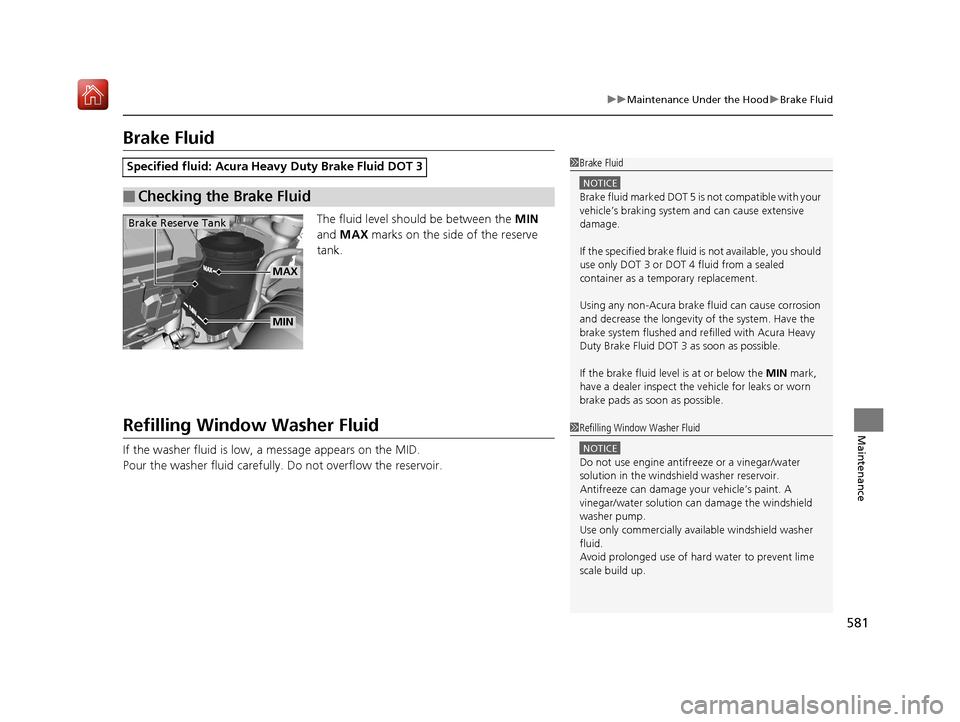
The fluid level should be between the MIN
and MAX marks on the side of the reserve
tank.
Refilling Window Washer Fluid
If the washer fluid is low, a message appears on the MID.
Pour the washer fluid carefully. Do not overflow the reservoir.
Specified fluid: Acura Heav y Duty Brake Fluid DOT 3
■Checking the Brake Fluid
1Brake Fluid
NOTICE
Brake fluid marked DOT 5 is not compatible with your
vehicle’s braking system and can cause extensive
damage.
If the specified brake fluid is not available, you should
use only DOT 3 or DOT 4 fluid from a sealed
container as a temporary replacement.
Using any non-Acura brake fl uid can cause corrosion
and decrease the longevity of the system. Have the
brake system flushed and re filled with Acura Heavy
Duty Brake Fluid DOT 3 as soon as possible.
If the brake fluid level is at or below the MIN mark,
have a dealer inspect the vehicle for leaks or worn
brake pads as soon as possible.
Brake Reserve Tank
MIN
MAX
1 Refilling Window Washer Fluid
NOTICE
Do not use engine antifreeze or a vinegar/water
solution in the windshield washer reservoir.
Antifreeze can damage y our vehicle’s paint. A
vinegar/water solution ca n damage the windshield
washer pump.
Use only commercially avai lable windshield washer
fluid.
Avoid prolonged use of hard water to prevent lime
scale build up.
19 ACURA MDX E-AWD-31TRX6200.book 581 ページ 2018年6月22日 金曜日 午後7時42分
Page 584 of 685
583
uuReplacing Light Bulbs uBrake Light and Rear Turn Signal Light Bulbs
Continued
Maintenance
Brake Light and Rear Turn Signal Light Bulbs
When replacing, use the following bulbs.
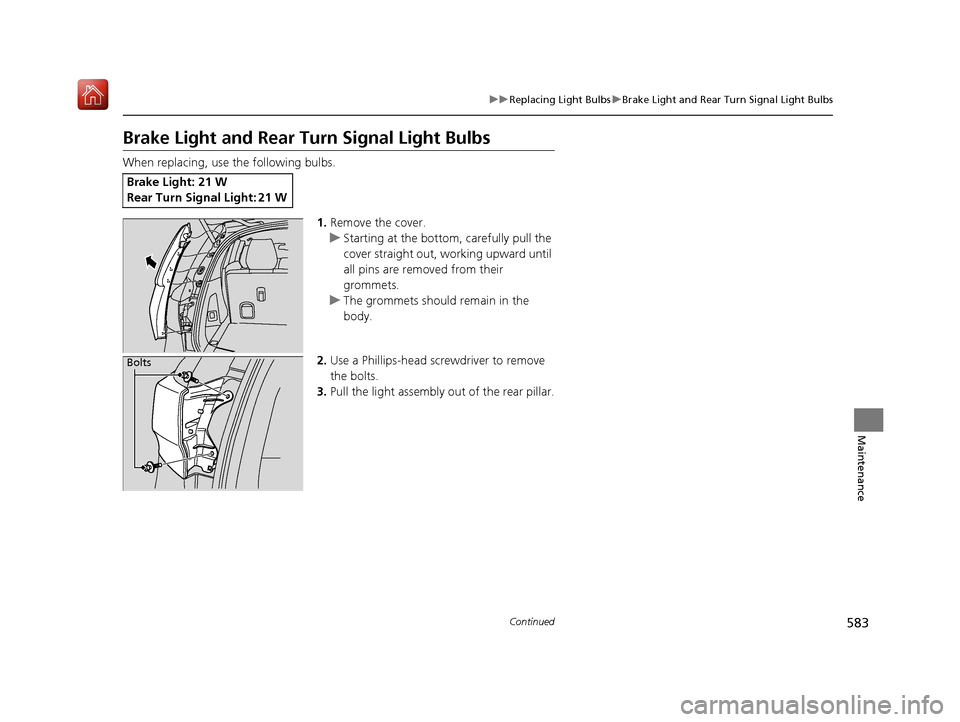
1.Remove the cover.
u Starting at the bottom, carefully pull the
cover straight out, working upward until
all pins are removed from their
grommets.
u The grommets should remain in the
body.
2. Use a Phillips-head screwdriver to remove
the bolts.
3. Pull the light assembly out of the rear pillar.
Brake Light: 21 W
Rear Turn Signal Light: 21 W
Bolts
19 ACURA MDX E-AWD-31TRX6200.book 583 ページ 2018年6月22日 金曜日 午後7時42分
Page 587 of 685
586
uuReplacing Light Bulbs uRear License Plate Lights
Maintenance
Rear License Plate Lights
Rear license plate lights are LED type. Have an authorized Acura dealer inspect and
replace the light assembly.
High-Mount Brake Light
High-mount brake light is LED type. Have an authorized Acura dealer inspect and
replace the light assembly.
Puddle Lights
Puddle lights are LED type. Have an author ized Acura dealer inspect and replace the
light assembly.
19 ACURA MDX E-AWD-31TRX6200.book 586 ページ 2018年6月22日 金曜日 午後7時42分
Page 600 of 685
599
uuChecking and Maintaining Tires uWinter Tires
Maintenance
Winter Tires
If driving on snowy or frozen roads, mount all season marked M+S tires, snow tires,
or tire chains; reduce speed; and maintain sufficient distance between vehicles when
driving.
Be particularly careful wh en operating the steering wheel or brakes to prevent
skidding.
Use tire chains, snow tires, or all season tires when necessary or according to the law.
When mounting, refer to the following points.
For winter tires:
• Select the size and load ranges that are the same as the original tires.
• Mount the tires to all four wheels.
For tire chains:
• Install them on the front tires only.
• Because your vehicle has limited tire clea rance, we strongly recommend using the
chains listed below:
• Follow the chain manufactur er’s instruction when installing. Mount them as
tightly as you can.
• Check that the chains do not touc h the brake lines or suspension.
• Drive slowly.
Cable-type: SCC Cable Chain Super Z LT - ZT735
1Winter Tires
NOTICE
Traction devices that are th e wrong size or improperly
installed can damage your vehicle’s brake lines,
suspension, body, and wheels. Stop driving if they are
hitting any part of the vehicle.
When tire chains are mounted, follow the chain
manufacturer’s instructi ons regarding vehicle
operational limits.
If your vehicle is equipped with summer tires, be
aware that these tires are not designed for winter
driving conditions. For more information, contact a
dealer.
3WARNING
Using the wrong chains, or not properly
installing chains, can damage the brake
lines and cause a crash in which you can be
seriously injured or killed.
Follow all instruction s in this owner’s
manual regarding the selection and use of
tire chains.
19 ACURA MDX E-AWD-31TRX6200.book 599 ページ 2018年6月22日 金曜日 午後7時42分
Page 610 of 685
609
uuCleaning uExterior Care
Continued
Maintenance
Aluminum is susceptible to deterioration caused by salt and other road
contaminants. When necessary, as early as possible use a sponge and mild detergent
to wipe away these contaminants. Do no t use a stiff brush or harsh chemicals
(including some commercial wheel cleaners). These can damage the protective finish
on aluminum alloy wheels, resulting in corrosion. Depending on the type of finish,
the wheels also may lo se their luster or appear burn ished. To avoid water stains,
wipe the wheels dry with a cloth while they are still wet.
The inside lenses of exterior lights (headlights, brake light s, etc.) may fog temporarily
if you have driven in the rain, or after the vehicle has been run through a car wash.
Dew condensation also may build up inside the lenses when there is a significant
enough difference between the ambient and inside lens temperatures (similar to
vehicle windows fogging up in rainy conditions). These conditions are natural
processes, not structural design problems in the exterior lights.
Lens design characteristics ma y result in moisture developing on the light lens frame
surfaces. This also is not a malfunction.
However, if you see large amounts of wa ter accumulation, or large water drops
building up inside the lenses, have your vehicle inspected by a dealer.
■Maintaining Aluminum Wheels
■Fogged Exterior Light Lenses
19 ACURA MDX E-AWD-31TRX6200.book 609 ページ 2018年6月22日 金曜日 午後7時42分
Page 614 of 685

613
Handling the Unexpected
This chapter explains how to handle unexpected troubles.
ToolsTypes of Tools .................................. 614
If a Tire Goes Flat
Changing a Flat Tire
*....................... 615
Temporarily Repair ing a Flat Tire*..... 622
Power System Won’t Start ............... 634
Checking the Procedure ................... 634
If the Keyless Access Remote Battery is Weak ............................................. 635
Emergency Power System Off........... 636
Jump Starting .................................... 637
Overheating
How to Handle Overheating ............. 639 Indicator, Coming On/Blinking
If the Low Oil Pressure Indicator Comes On ... 641If the 12-Volt Battery Charging System
Indicator Comes On ....................... 641
If the Malfunction Indicator Lamp Comes On or Blinks ................................... 642
If the Brake System Indicator (Red) Comes On ................................................... 643
If the Speed-Sensitive Electric Power Steering (EPS) System Indicator Comes
On.................................................. 643
If the Low Tire Pressure/TPMS Indicator
Comes On or Blinks........................ 645 If the Transmission System Indicator Blinks
along with the Warning Message ...... 645
If the Power System Indicator Comes On .. 646Fuses Fuse Locations ................................. 647
Inspecting and Changing Fuses ........ 655
Emergency Towing ........................... 656
When You Cannot Unlock the Fuel Fill Door ................................................. 657
When You Cannot Open the Tailgate.. 658Refueling ........................................... 659Refueling From a Portable Fuel
Container ................................... 659
* Not available on all models
19 ACURA MDX E-AWD-31TRX6200.book 613 ページ 2018年6月22日 金曜日 午後7時42分
Page 616 of 685

615Continued
Handling the Unexpected
If a Tire Goes Flat
Changing a Flat Tire*
If a tire goes flat while driving, grasp the steering wheel firmly, and brake gradually
to reduce speed. Then, stop in a safe plac e. Replace the flat tire with a compact
spare tire. Go to a dealer as soon as possib le to have the full-size tire repaired or
replaced.
1. Park the vehicle on firm, level, non-slip pery surface and apply the parking brake.
2. Change the gear position to
(P.
3. Turn on the hazard warning lights an d set the power mode to VEHICLE OFF.
1Changing a Flat Tire*
Follow compact spare precautions:
Periodically check the tire pressure of the compact
spare. It should be set to the specified pressure.
Specified Pressure: 60 psi (420 kPa, 4.2 kgf/cm
2)
When driving with the compact spare tire, keep the
vehicle speed under 50 mph (80 km/h). Replace with
a full-size tire as soon as possible.
The compact spare tire and wheel in your vehicle are
specifically for this model. Do not use them with
another vehicle. Do not us e another type of compact
spare tire or wheel with your vehicle.
Do not mount tire chains on a compact spare tire.
If a chain-mounted front tire goes flat, remove one of
the full-size rear tires and replace it with the compact
spare tire. Remove the flat front tire and replace it
with the full-size tire that was removed from the rear.
Mount the tire chains on the front tire.
Do not use a puncture-repairing agent other than the
one provided in the kit that came with your vehicle (if
equipped). If a different agent is used, you may
permanently damage the tire pressure sensor.
* Not available on all models
19 ACURA MDX E-AWD-31TRX6200.book 615 ページ 2018年6月22日 金曜日 午後7時42分
Page 623 of 685

622
uuIf a Tire Goes Flat uTemporarily Repairing a Flat Tire*
Handling the Unexpected
Temporarily Repairing a Flat Tire*
If the tire has a large cut or is otherwise se verely damaged, you will need to have the
vehicle towed. If the tire only has a smal l puncture, from a nail for instance, you can
use the temporary tire repair kit so that you can drive to the nearest service station
for a more permanent repair.
If a tire goes flat while driving, grasp the steering wheel firmly, and brake gradually
to reduce speed. Then stop in a safe place.
1. Park the vehicle on a firm, level, and non-slippery surface and apply the parking
brake.
2. Change the gear position to
(P.
3. Turn on the hazard warning lights an d set the power mode to VEHICLE OFF.
1Temporarily Repairing a Flat Tire*
The kit should not be used in the following situations.
Instead, contact a dealer or roadside assistance to
have the vehicle towed.
•The tire sealant has expired.
•More than one tire is punctured.•The puncture or cut is larger than 3/16 inch (4mm).
•The tire side wall is da maged or the puncture is
outside the contact area.
•Damage has been caused by driving with the tires
extremely under inflated.
•The tire bead is no longer seated.
•The rim is damaged.
Do not remove a nail or screw that punctured the
tire. If you remove it from the tire, you may not be
able to repair the puncture using the kit.
NOTICE
Do not use a puncture-repairing agent other than the
one provided in the kit that came with your vehicle. If
a different agent is used, you may permanently
damage the tire pressure sensor.
When the puncture is:Use Kit
Smaller than 3/16 inch (4 mm)Yes
Larger than 3/16 inch (4 mm)No
Contact
Area
* Not available on all models
19 ACURA MDX E-AWD-31TRX6200.book 622 ページ 2018年6月22日 金曜日 午後7時42分
Page 635 of 685

634
Handling the Unexpected
Power System Won’t Start
Checking the Procedure
When the READY indicator does not come on and the Ready To Drive message
does not appear on the multi-information display, check the following items and
take appropriate action.
ChecklistConditionWhat to Do
Check if the related
indicator or multi-
information display
messages come on.The Temperature Is Too Cold For Vehicle To Operate
message appears.2 Multi-Information Display (MID) Warning
and Information Messages P. 105
The To Start, Hold Remote Near Start Button message
appears.
u Make sure the keyless access remo te is in its operating range.
2POWER Button Operating Range P. 172
2If the Keyless Access Remote Battery is
Weak P. 635
The POWER SYSTEM indicator comes on.Have your vehicle checked by a dealer.
The transmission system indicator blinks and Transmission
Problem Apply Parking Brake When Parked message
appears.2 If the Transmission System Indicator Blinks
along with the Warning Message P. 645
Check the brightness
of the interior lights.The interior lights are dim or do not come on at
all. Have the 12-volt battery checked by a dealer.
The interior lights come on normally. Check al l fuses, or have your vehicle checked by
a dealer.
2 Inspecting and Changing Fuses P. 655
Check the gear
position.The transmission is not in (P.Change the gear position to (P.
Check the
immobilizer system
indicator. When the immobilizer system indicator is blinking, the power
system cannot be turned on.
2
Immobilizer System Indicator P. 96
1Checking the Procedure
If you must start the vehi cle immediately, use an
assisting vehicle or booster battery to jump start it.
2 Jump Starting P. 637
19 ACURA MDX E-AWD-31TRX6200.book 634 ページ 2018年6月22日 金曜日 午後7時42分
Page 636 of 685

635
uuPower System Won’t Start uIf the Keyless Access Remote Battery is Weak
Handling the Unexpected
If the Keyless Access Re mote Battery is Weak
If the beeper sounds, the To Start, Hold Remote Near Start Button message
appears on the multi-information display, and the indicator on the POWER button
flashes, and the READY indicator does not come on.
Turn on the power system as follows: 1.Touch the center of the POWER button
with the A logo on the keyless access
remote while the indicator on the POWER
button is flashing. The buttons on the
keyless access remote should be facing you.
u The indicator flashes for about 30
seconds.
2. Depress the brake pedal and press the
POWER button within 10 seconds after the
beeper sounds while th e indicator stays on.
u If you don’t depress the pedal, the mode
will change to ACCESSORY.
19 ACURA MDX E-AWD-31TRX6200.book 635 ページ 2018年6月22日 金曜日 午後7時42分