sat Acura MDX HYBRID 2019 Owner's Manual
[x] Cancel search | Manufacturer: ACURA, Model Year: 2019, Model line: MDX HYBRID, Model: Acura MDX HYBRID 2019Pages: 685, PDF Size: 36.92 MB
Page 18 of 685
17
Quick Reference Guide
Controls (P141)
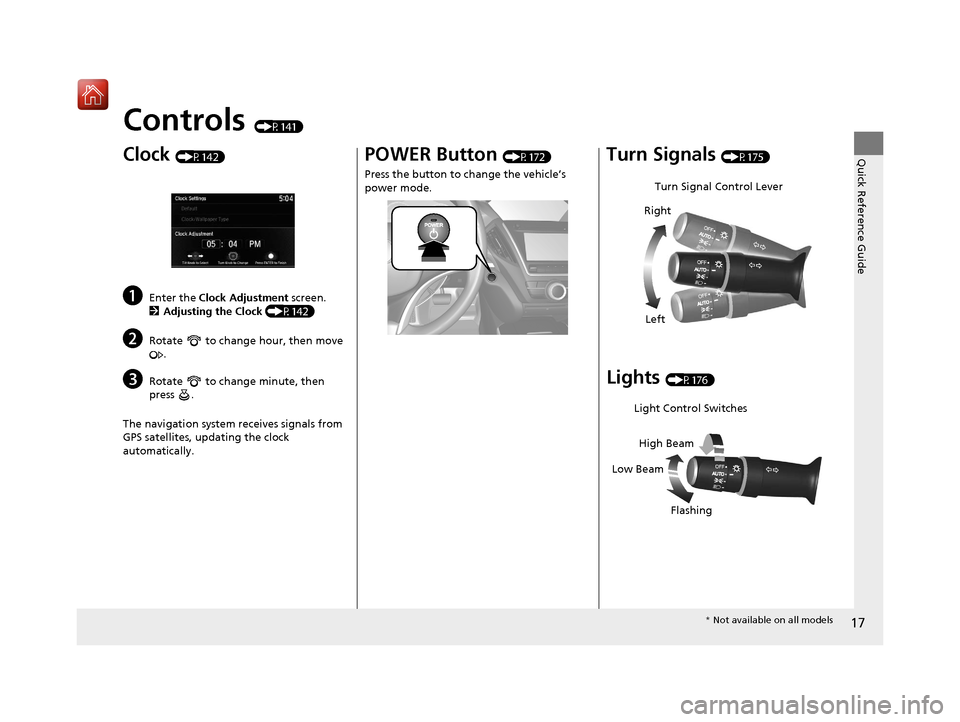
Clock (P142)
aEnter the Clock Adjustment screen.
2 Adjusting the Clock (P142)
bRotate to change hour, then move
.
cRotate to change minute, then
press .
The navigation system receives signals from
GPS satellites, updating the clock
automatically.
POWER Button (P172)
Press the button to ch ange the vehicle’s
power mode.Turn Signals (P175)
Lights (P176)
Turn Signal Control Lever
Right
Left
Light Control Switches
Low Beam High Beam
Flashing
* Not available on all models
19 ACURA MDX E-AWD-31TRX6200.book 17 ページ 2018年6月22日 金曜日 午後7時42分
Page 36 of 685

35
uuFor Safe Driving uImportant Safety Precautions
Safe Driving
■Pay appropriate attention to the task of driving safely
Engaging in cell phone conversation or other activities that keep you from paying
close attention to the road, other vehicles, and pedestrians could lead to a crash.
Remember, situations can change quickly, and only you can decide when it is safe to
divert some attention away from driving.
■Control your speed
Excessive speed is a major factor in crash injuries and deaths. Generally, the higher
the speed, the greater the risk, but serious injuries can also occur at lower speeds.
Never drive faster than is safe for current conditions, regardless of the maximum
speed posted.
■Keep your vehicle in safe condition
Having a tire blowout or a mechanical failure can be extremely hazardous.
To reduce the possibility of such problems, check your tire pressures and condition
frequently, and perform all regul arly scheduled maintenance.
■Do not leave children unattended in the vehicle
Children, pets and people needing assistan ce left unattended in the vehicle may be
injured if they activate one or more of the vehicle controls. They may also cause the
vehicle to move, resulting in a crash in wh ich they and/or another person(s) can be
injured or killed. Also, depending on the am bient temperature, the temperature of
the interior may reach extreme levels, which can result in harm or death. Even if the
climate control system is on, never leave them in the vehicle unattended as the
climate control system can shut off at any time.
19 ACURA MDX E-AWD-31TRX6200.book 35 ページ 2018年6月22日 金曜日 午後7時42分
Page 257 of 685
256
uuAudio System Basic Operation uAdjusting the Sound
Features
Adjusting the Sound
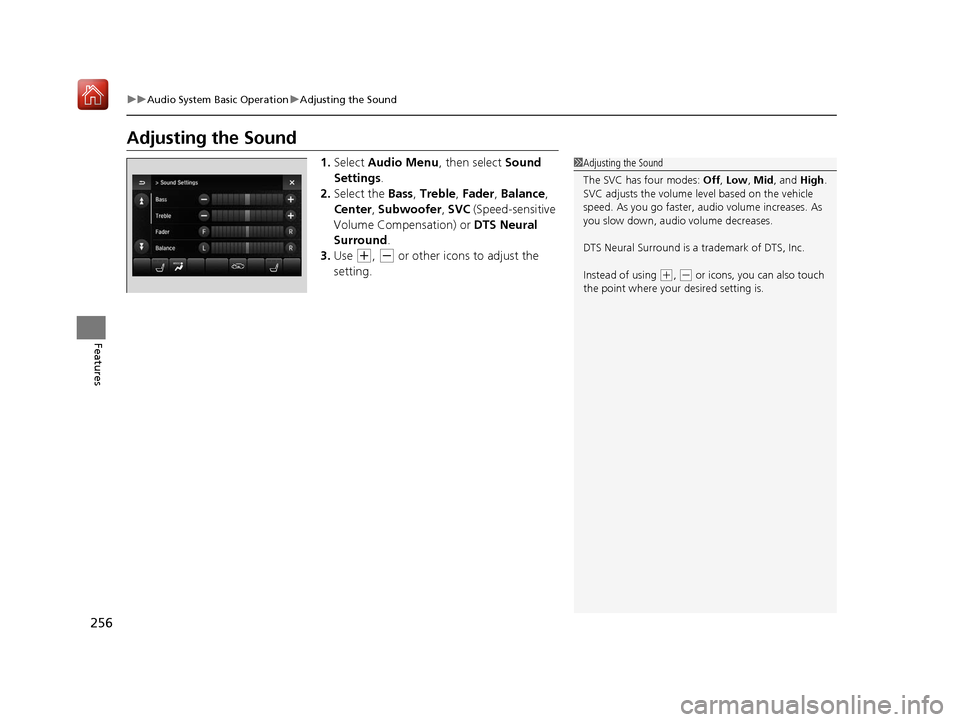
1. Select Audio Menu , then select Sound
Settings .
2. Select the Bass, Treble , Fader , Balance ,
Center , Subwoofer , SVC (Speed-sensitive
Volume Compensation) or DTS Neural
Surround .
3. Use
(+, (- or other icons to adjust the
setting.
1 Adjusting the Sound
The SVC has four modes: Off, Low , Mid, and High.
SVC adjusts the volume level based on the vehicle
speed. As you go faster, audio volume increases. As
you slow down, audi o volume decreases.
DTS Neural Surround is a trademark of DTS, Inc.
Instead of using
( +, (- or icons, you can also touch
the point where your desired setting is.
19 ACURA MDX E-AWD-31TRX6200.book 256 ページ 2018年6月22日 金曜日 午後7時42分
Page 280 of 685
Continued279
uuAudio System Basic Operation uPlaying Hard Disk Drive (HDD) Audio
Features
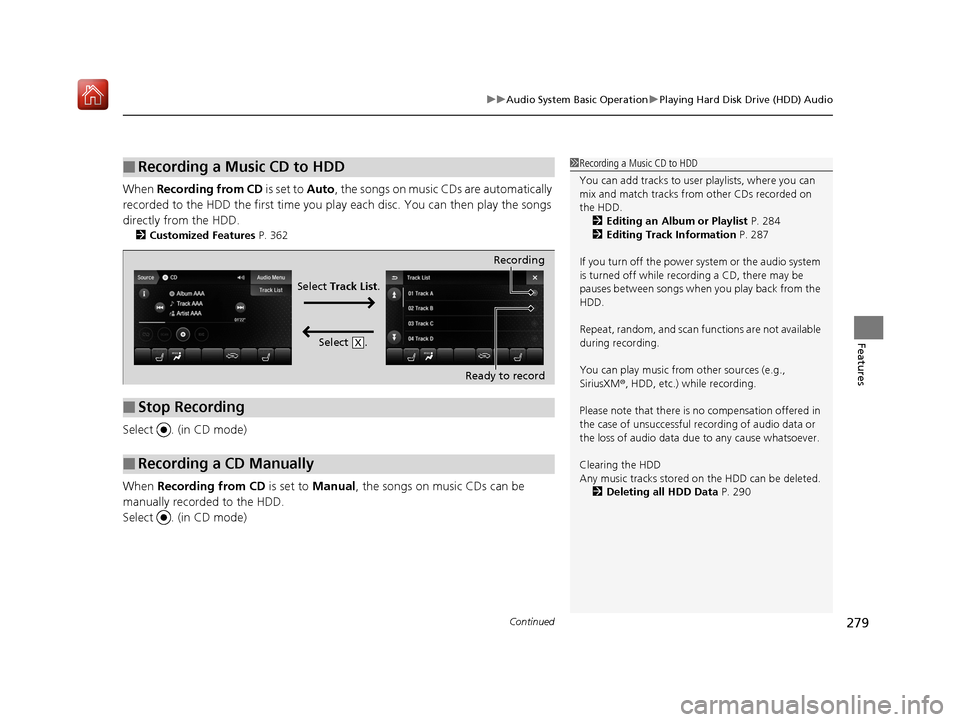
When Recording from CD is set to Auto, the songs on music CDs are automatically
recorded to the HDD the first time you pl ay each disc. You can then play the songs
directly from the HDD.
2 Customized Features P. 362
Select . (in CD mode)
When Recording from CD is set to Manual, the songs on music CDs can be
manually recorded to the HDD.
Select . (in CD mode)
■Recording a Music CD to HDD1 Recording a Music CD to HDD
You can add tracks to user playlists, where you can
mix and match tracks from other CDs recorded on
the HDD.
2 Editing an Album or Playlist P. 284
2 Editing Track Information P. 287
If you turn off the power system or the audio system
is turned off while recording a CD, there may be
pauses between songs when you play back from the
HDD.
Repeat, random, and scan f unctions are not available
during recording.
You can play music from other sources (e.g.,
SiriusXM ®, HDD, etc.) while recording.
Please note that there is no compensation offered in
the case of unsuccessful re cording of audio data or
the loss of audio data due to any cause whatsoever.
Clearing the HDD
Any music tracks stored on the HDD can be deleted. 2 Deleting all HDD Data P. 290
■Stop Recording
■Recording a CD Manually
Recording
Ready to record
Select Track List .
Select .
X
19 ACURA MDX E-AWD-31TRX6200.book 279 ページ 2018年6月22日 金曜日 午後7時42分
Page 308 of 685
Continued307
uuAudio System Basic Operation uApple CarPlay
Features
■Phone
Access the contact list, make phone ca lls, or listen to voice mail.
■Messages
Check and reply to text messages, or have messages read to you.
■Music
Play music stored on your iPhone.
■Maps
Display Apple Maps and use the navigation function just as you would on your
iPhone.
Only one navigation system (pre-installed navigation or Apple Maps) can give
directions at a time. When you are using one system, directions to any prior
destination set on the other system will be canceled, and the system you are
currently using will direct you to your destination.
1 Apple CarPlay
Apple CarPlay Operating Requirements &
Limitations
Apple CarPlay requi res a compatible iPhone with an
active cellular connecti on and data plan. Your
carrier’s rate plans will apply.
Changes in operating systems, hardware, software,
and other technology integral to providing Apple
CarPlay functionality, as well as new or revised
governmental regulations, may result in a decrease or
cessation of Apple CarPlay functionality and services.
Acura cannot and does not provide any warranty or
guarantee of future Appl e CarPlay performance or
functionality.
It is possible to use 3r d party apps if they are
compatible with Apple CarPlay. Refer to the Apple
homepage for information on compatible apps.
19 ACURA MDX E-AWD-31TRX6200.book 307 ページ 2018年6月22日 金曜日 午後7時42分
Page 312 of 685
Continued311
uuAudio System Basic Operation uAndroid Auto
Features
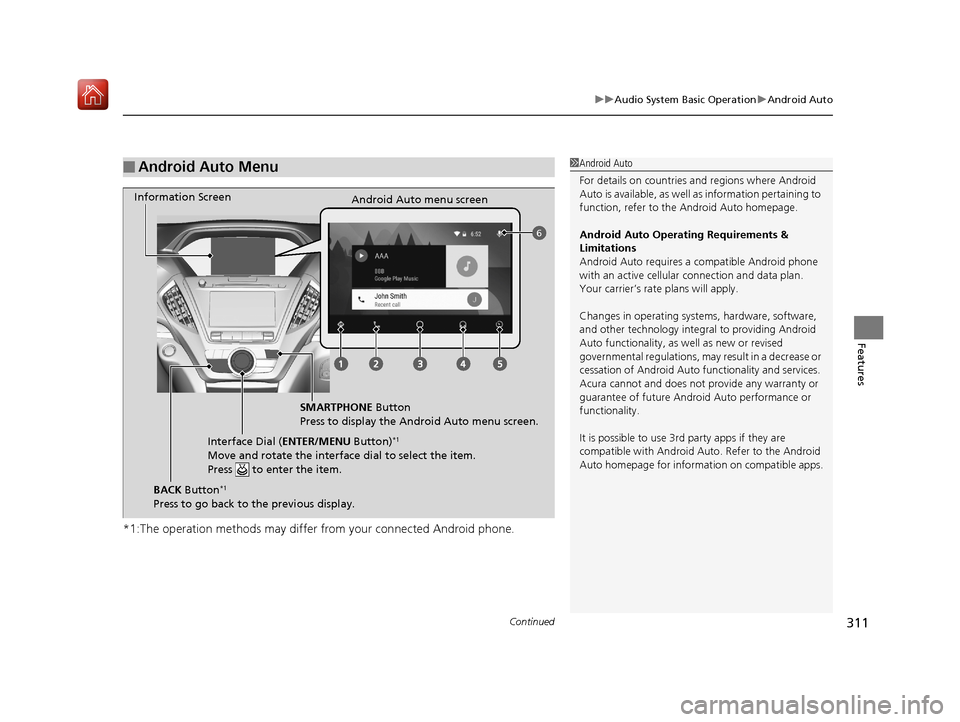
*1:The operation methods may differ from your connected Android phone.
■Android Auto Menu1Android Auto
For details on c ountries and regions where Android
Auto is available, as well as information pertaining to
function, refer to the Android Auto homepage.
Android Auto Operating Requirements &
Limitations
Android Auto requires a compatible Android phone
with an active cellular connection and data plan.
Your carrier’s rate plans will apply.
Changes in operating systems, hardware, software,
and other technology integral to providing Android
Auto functionality, as well as new or revised
governmental regulations, may result in a decrease or
cessation of Android Auto functionality and services.
Acura cannot and does not provide any warranty or
guarantee of future Android Auto performance or
functionality.
It is possible to use 3r d party apps if they are
compatible with Android Auto. Refer to the Android
Auto homepage for informat ion on compatible apps.
6
Information Screen
Android Auto menu screen
SMARTPHONE Button
Press to display the Android Auto menu screen.
Interface Dial ( ENTER/MENU Button)
*1
Move and rotate the interface dial to select the item.
Press to enter the item.
BACK Button*1
Press to go back to the previous display.
19 ACURA MDX E-AWD-31TRX6200.book 311 ページ 2018年6月22日 金曜日 午後7時42分
Page 324 of 685

323
Features
General Information on the Audio System
SiriusXM® Radio Service
1.You need your radio ID ready before regist ering for subscription. To see the ID in
the On Demand Multi-Use DisplayTM, select channel up/down icons until CH000
and the radio ID appears.
2. Have your radio ID and credit card numb er ready, and either call or visit the
SiriusXM ® website to subscribe.
Switch to the SiriusXM ® mode by pressing the SOURCE button on the steering
wheel, or through the On Demand Multi-Use Display
TM, and stay in this mode for
about 30 minutes until the service is activated. Make sure your vehicle is in an open
area with good reception.
Loading...:
SiriusXM ® is loading the audio or program information.
No Signal:
The signal is too weak in the current location.
Unsubscribed channel:
You are not subscribed to the channel selected.
Unavailable channel:
No such channel exists, the channel is not part of your subscription, or the artist or
title information is unavailable.
Check the antenna, Disconnect ed antenna, Shorted antenna:
There is a problem with the SiriusXM ® antenna. Contact a dealer.
■Subscribing to SiriusXM® Radio
■Receiving SiriusXM ® Radio
■SiriusXM ® Radio Display Messages
1 Subscribing to SiriusXM ® Radio
Contact Information for SiriusXM ® Radio:
•U.S.: SiriusXM ® Radio at www.siriusxm.com/
subscribenow or 1-866-635-2349
•Canada: SiriusXM ® Canada at www.siriusxm.ca/
subscribe-now or 1-877-209-0079
1Receiving SiriusXM ® Radio
The SiriusXM ® satellites are in orbit over the equator;
therefore, objects south of the vehicle may cause
satellite reception interruptions. Sa tellite signals are
more likely to be blocked by tall buildings and
mountains the farther north you travel from the
equator.
You may experience rece ption problems under the
following circumstances:
•In a location with an obstruction to the south of
your vehicle.
•In tunnels
•On the lower level of a multi-tiered road•Large items carried on the roof rack
19 ACURA MDX E-AWD-31TRX6200.book 323 ページ 2018年6月22日 金曜日 午後7時42分
Page 335 of 685

334
uuGeneral Information on the Audio System uHonda App License Agreement
Features
2. Limitation on HONDA and PROVIDER liability. Neither HONDA nor PROVIDERS will be liable to you or any other part y for consequential,
indirect, incidental, special, or punitive damages (including wi thout limitation lost profits) in connection with your use of the SOFTWARE
or SERVICES, even if HONDA or PROVIDERS are aware of the possibility of such damages. These limitations apply to all claims, including,
without limitation, claims in contract and tort (such as negligence, product liability and strict liability). To the extent tha t a jurisdiction does
not permit the exclusion or limitation of liability as set forth herein our liability is limited to the maximum extent permitte d by law in such
states. If HONDA or PROVIDERS are found lia ble to you for any reason, you agree that the aggregate liability of all these parties to you for
any claim is limited to ten U.S. dollars (US $10.00). Neither HO NDA nor any PROVIDER would have agreed to provide the SOFTWARE or
SERVICES to you if you did not agree to th is limitation. This amount is the sole and exclusive liability of HONDA and PROVIDERS to you,
and is payable as liquidated damages and not as a penalty. Exce pt where prohibited by law, you may not bring any claim against HONDA
or any third-party beneficiary more than two (2) years after the claim arises. We do not have any liability for SOFTWARE or SERVICES
interruptions of any length.
(a) Release of HONDA and PROVIDERS
For yourself and anyone else claiming under you, you agree to release and discharge HONDA,
PROVIDERS, their respective officers, dire ctors, and employees, and each third-party beneficiary from all claims, liabilities and losses in
connection with the SOFTWARE or SERVICES, including, but not limite d to claims for personal injury or property damage arising from the
total or partial failure of performance of the SOFTWARE or SERVIC ES, even if caused by or based upon the negligence, gross negl igence,
strict products liability, Deceptive Trade Practices Act violations, bad faith, or breach of warranty of us or the malfunction of the SOFTWARE
or SOFTWARE SERVICES. YOU AGREE TO WAIVE TO THE FULL EST EXTENT ALLOWED BY LAW, ANY CLAIM FOR DAMAGES OTHER THAN
DIRECT, COMPENSATORY DAMAGES AS LIMITED IN THIS AG REEMENT. YOU HEREBY RELEASE AND DISCHARGE HONDA AND ITS
LICENSORS AND CONTRACTORS (INCLUDI NG ANY THIRD PARTIES PROVIDING ALL OR PART OF THE SOFTWARE OR SERVICES) FROM AND
AGAINST ANY CLAIMS, DAMAGES, EXPENSES AND LIABILITY ARISING FROM OR RELATED TO ANY INJURIES, DAMAGES, OR LOSSES TO
ANY PERSON (INCLUDING DEATH) OR PROPERTY OF ANY KIND RESULTING IN WHOL\
E OR PART, DIRECTLY OR I NDIRECTLY, FROM YOUR
USE OF THE SOFTWARE OR SERVICES.
H. Survival. You agree that the limitations of liability and indemnities in this AGREEMENT will survive even after the AGREEMENT has
ended. These limitations of liability apply not only to you, but to anyone using the SOFTWARE or SERVICES via your VEHICLE, to anyone
making a claim on your behalf, and to any claims made by your fa mily, employees, customers, or others arising out of or relating to your
VEHICLE, the SOFTWARE, or SERVICES.
19 ACURA MDX E-AWD-31TRX6200.book 334 ページ 2018年6月22日 金曜日 午後7時42分
Page 340 of 685

339
uuGeneral Information on the Audio System uLegal Information on Apple CarPlay/Android Auto
Features
YOU EXPRESSLY ACKNOWLEDGE AND AGREE THAT USE OF APPLE CARPLAY OR ANDROID AUTO (“THE APPLICATIONS”) IS AT YOUR
SOLE RISK AND THAT THE ENTIRE RISK AS TO SATISFACTORY Q UALITY, PERFORMANCE, ACCURACY AND EFFORT IS WITH YOU TO THE
MAXIMUM EXTENT PERMITTED BY APPLICABLE LAW, AND THAT TH E APPLICATIONS AND INFORMATION ON THE APPLICATIONS IS
PROVIDED “AS IS” AND “AS AVAILABLE,” WITH ALL FAUL TS AND WITHOUT WARRANTY OF ANY KIND, AND HONDA HEREBY
DISCLAIMS ALL WARRANTIES AND CONDITIONS WITH RESPECT TO THE APPLICATIONS AND INFORMATION ON THE APPLICATIONS,
EITHER EXPRESS, IMPLIED OR STATUTORY, INCLUDING, BUT NOT LIMITED TO, THE IMPLIED WARRANTIES AND/OR CONDITIONS OF
MERCHANTABILITY, SATISFACTORY QUALITY, FITNESS FOR A PA RTICULAR PURPOSE, ACCURACY, QUIET ENJOYMENT, AND NON-
INFRINGEMENT OF THIRD PARTY RIGHTS. NO ORAL OR WRITTEN INFORMATION OR ADVICE GIVEN BY HONDA OR AN AUTHORIZED
REPRESENTATIVE SHALL CREATE A WARRANTY. AS EXAMPLES, AND WITHOUT LIMITATION, HONDA DISCLAIMS ANY WARRANTY
REGARDING THE ACCURACY OF DATA PROVIDED BY THE APPLI CATIONS, SUCH AS THE ACCURACY OF DIRECTIONS, ESTIMATED
TRAVEL TIME, SPEED LIMITS, ROAD CONDITIONS, NEWS, WEATHER, TRAF FIC, OR OTHER CONTENT PROVIDED BY APPLE, GOOGLE, THEIR
AFFILIATES, OR THIRD PARTY PROVIDERS; HONDA DOES NOT GUARANTEE AGAINST LO SS OF APPLICATION DATA, WHICH MAY BE LOST
AT ANY TIME; HONDA DOES NOT GUARANTEE THAT THE APPLICATIO NS OR ANY SERVICES PROVIDED THROUGH THEM WILL BE
PROVIDED AT ALL TIMES OR THAT ANY OR ALL SERVICES WILL BE AVAILABLE AT ANY PA RTICULAR TIME OR LOCATION. FOR EXAMPLE,
SERVICES MAY BE SUSPENDED OR INTERRUPTED WITHOUT NOTICE FOR REPAIR, MAINTENANCE, SECURITY FIXES, UPDATES, ETC.,
SERVICES MAY BE UNAVAILABLE IN YOUR AREA OR LOCATION, ETC. IN ADDITION, YOU UNDERSTAND THAT CHANGES IN THIRD PARTY
TECHNOLOGY OR GOVERNMENT REGULATION MAY RENDER THE SERVICES AND/OR APPLICATIONS OBSOLETE AND/OR UNUSABLE.
TO THE EXTENT NOT PROHIBITED BY LAW, IN NO EVENT SHALL HONDA OR ITS AFFILIATES BE LIABLE FOR PERSONAL INJURY, OR ANY
INCIDENTAL, SPECIAL, INDIRECT OR CO NSEQUENTIAL DAMAGES WHATSOEVER, INCLUDING, WITHOUT LIMITATION, DAMAGES FOR
LOSS OF PROFITS, CORRUPTION OR LOSS OF DATA, FAILURE TO TRANSMIT OR RECEIVE ANY DATA, BUSINESS INTERRUPTION OR ANY
OTHER COMMERCIAL DAMAGES OR LOSSES, ARISIN G OUT OF OR RELATED TO THE APPLICATIONS OR YOUR USE OF OR INABILITY TO
USE THE APPLICATIONS OR INFORMATION ON THE APPLICATIONS, HOWEVER CAUSED, REGARDLESS OF THE THEORY OF LIABILITY
(CONTRACT, TORT OR OTHERWISE) AND EVEN IF HONDA WERE ADVISED OF THE POSSIBILITY OF SUCH DAMAGES. SOME STATES AND
JURISDICTIONS DISALLOW THE EXCLUSION OR LIMITATION OF LI ABILITY FOR DAMAGES, SO THESE LIMITATIONS AND EXCLUSIONS MAY
NOT APPLY TO YOU. IN NO EVENT SHALL HONDA’S TOTAL LIABILITY TO YOU FOR ALL DAM AGES (OTHER THAN AS MAY BE REQUIRED
BY APPLICABLE LAW IN CASES INVOLVING PERSONAL INJURY) EXCE ED THE AMOUNT OF FIVE DOLLARS ($5.00). THE FOREGOING
LIMITATIONS WILL APPLY EVEN IF THE ABOVE STATED REMEDY FAILS OF ITS ESSENTIAL PURPOSE.
■DISCLAIMER OF WARRANTIES; LIMITATION ON LIABILITY
19 ACURA MDX E-AWD-31TRX6200.book 339 ページ 2018年6月22日 金曜日 午後7時42分
Page 445 of 685
uuAcuraLink ®u
444
Features
■Dealer Appointments
You can confirm the scheduled appointment date when you receive a
Maintenance Minder , Recalls/Campaigns, or Diagnostic Information
message, or reschedule any existing appointments.
1. Select a Maintenance Minder , Recalls/Campaigns , Diagnostic Information ,
or Scheduled Dealer Appointment message.
2. Rotate to select Schedule Dealer Appoi… or Reschedule Appoint…
(depending on the screen). Press .
u A suggested time and date are displayed.
3. Rotate to select Confirm Appointment . Press to accept the time and
date.
4. Press to select OK.1Dealer Appointments
To set up an automated de aler appointment when a
regular maintenance is due , visit the Acura Owners
website at owners.acura.com (U.S.) or
www.acura.ca/owners/acuralink (Canada), and set
the required option. A remi nder message will be sent
as the date for the dealer appointment approaches. A
reminder message will also be sent if you schedule an
appointment online using Schedule Service
Appointment function.
If you are not satisfied with the proposed
appointment date and time, ca ll your dealer directly.
To cancel the scheduled appointment, select Cancel
Appointment when a message is displayed.
19 ACURA MDX E-AWD-31TRX6200.book 444 ページ 2018年6月22日 金曜日 午後7時42分