turn Acura MDX HYBRID 2019 Owner's Manual
[x] Cancel search | Manufacturer: ACURA, Model Year: 2019, Model line: MDX HYBRID, Model: Acura MDX HYBRID 2019Pages: 685, PDF Size: 36.92 MB
Page 6 of 685
5
Quick Reference Guide
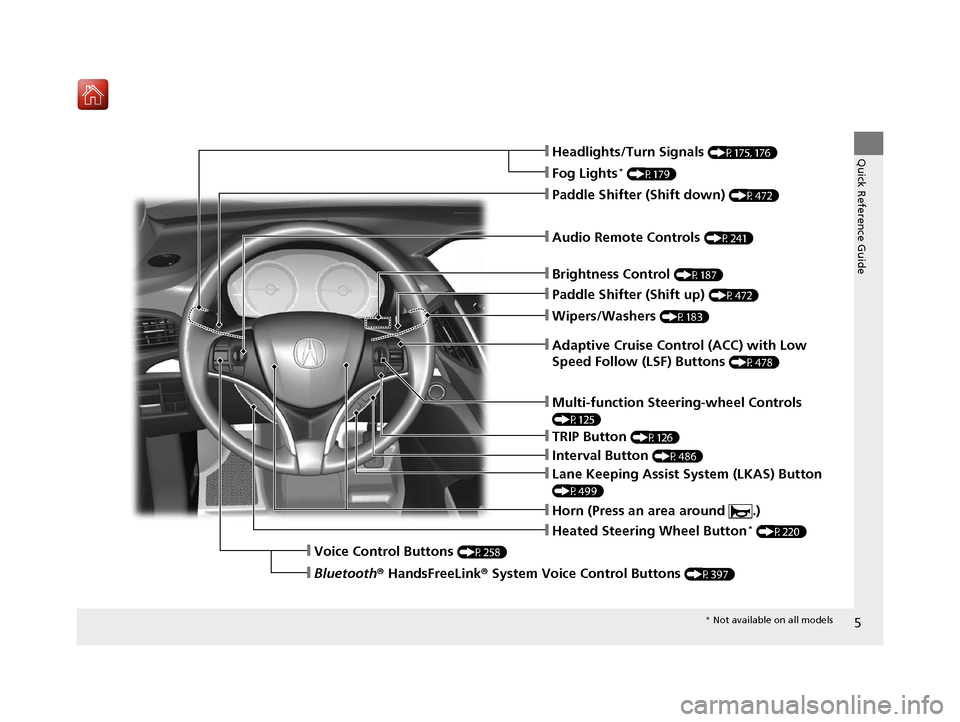
❙Wipers/Washers (P183)
❙Audio Remote Controls (P241)
❙Paddle Shifter (Shift down) (P472)
❙Paddle Shifter (Shift up) (P472)
❙Horn (Press an area around .)
❙Voice Control Buttons (P258)
❙Brightness Control (P187)
❙Adaptive Cruise Control (ACC) with Low
Speed Follow (LSF) Buttons
(P478)
❙TRIP Button (P126)
❙Interval Button (P486)
❙Lane Keeping Assist System (LKAS) Button
(P499)
❙Multi-function Steering-wheel Controls
(P125)
❙Heated Steering Wheel Button* (P220)
❙Headlights/Turn Signals (P175, 176)
❙Fog Lights* (P179)
❙Bluetooth® HandsFreeLink ® System Voice Control Buttons (P397)
* Not available on all models
19 ACURA MDX E-AWD-31TRX6200.book 5 ページ 2018年6月22日 金曜日 午後7時42分
Page 9 of 685
Visual Index
8
Quick Reference Guide
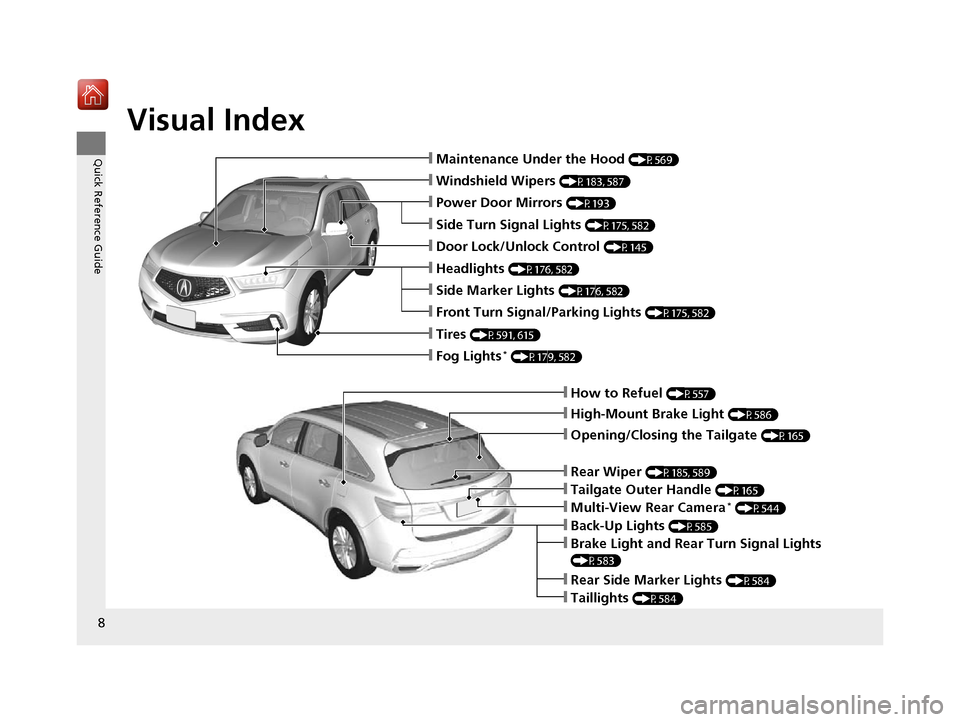
❙How to Refuel (P557)
❙High-Mount Brake Light (P586)
❙Opening/Closing the Tailgate (P165)
❙Back-Up Lights (P585)
❙Multi-View Rear Camera* (P544)
❙Tailgate Outer Handle (P165)
❙Rear Side Marker Lights (P584)
❙Taillights (P584)
❙Brake Light and Rear Turn Signal Lights
(P583)
❙Rear Wiper (P185, 589)
❙Maintenance Under the Hood (P569)
❙Windshield Wipers (P183, 587)
❙Tires (P591, 615)
❙Power Door Mirrors (P193)
❙Headlights (P176, 582)
❙Side Marker Lights (P176, 582)
❙Front Turn Signal/Parking Lights (P175, 582)
❙Fog Lights* (P179, 582)
❙Door Lock/Unlock Control (P145)
❙Side Turn Signal Lights (P175, 582)
19 ACURA MDX E-AWD-31TRX6200.book 8 ページ 2018年6月22日 金曜日 午後7時42分
Page 14 of 685
13
Quick Reference Guide
Auto Engine Stop/Start
Your vehicle’s gasoline engine will automatically stop and start during vehicle operation as needed to meet driving and battery conditions.
These are some examples that could cause the gasoline engine to automatically start.
In the following cases, however, Auto Engine Stop may not activate.
●When the Integrated Dynamics System is in SPORT+ mode.
● The vehicle momentarily needs additional power for aggressive acceleration, driving uphill, or driving at high speeds.
● The climate control system is in heavy use.
● The High Voltage battery temperature is high or low.
● The High Voltage battery state of charge is low.
● When the gear position is in
(S or ( R.
Sounds Unique to th e SPORT HYBRID SH-AWD ® System
When you first start driving this vehicle, you will likely hear so me unfamiliar sounds, particularly when you turn on the power system, or
while you are driving or accelerating from a stop. Some of thes e sounds are unique to this vehicle‘s powertrain, fuel, and climate control
systems; others are similar to sounds generated by conventional automobiles that typically are masked by louder noises absent f rom a
vehicle of this design.
These sounds are not a cause for concern, and you will soon recognize them as normal and thus be able to detect any new or unus ual noise
should one develop.
19 ACURA MDX E-AWD-31TRX6200.book 13 ページ 2018年6月22日 金曜日 午後7時42分
Page 15 of 685

14
Quick Reference Guide
Safety Precautions
Do not touch the High Voltage systemAttempting to take a High Voltage system component apart or disconnect one of its wires
can cause severe electrical shock. Make sure that any maintenance or repairs to the High
Voltage system is performed by an Acura dealer.
If a crash occurs●Be careful of electric shock hazard.
uIf a severe crash damages your vehi cle’s High Voltage system, there is a possibility of electrical shock
due to exposed High Voltage components or wires. If this happens, do not touch any of the High
Voltage system components or any of its orange wires.
● Avoid contact with High Voltage battery fluid.
uThe High Voltage battery contains a flammable electrolyte that could leak as a result of a severe
crash. Avoid skin or eye c ontact with the electrolyte as it is corrosive. If you accidentally come into
contact with the electrolyte, rinse the exposed skin or flush your eyes with copious amounts of water
for at least five minutes, and seek medical attention immediately.
● Use a fire extinguisher for an electrical fire.
uAttempting to extinguish an electrical fire with a small quantity of water, from a garden hose for
instance, can be dangerous.
● Anytime the vehicle is damaged in a crash, have it repaired by an Acura dealer.
Emergency Shutdown System for the High Voltage SystemIf the vehicle is involved in a crash, the emergency shutdown system will activate depending
on the severity of the impact. When the system activates, the High Voltage system
automatically shuts down, and the vehicle can no longer move under its own power. To
return the High Voltage system back to normal operation, consult an Acura dealer.
Acura collects and recycles High Voltage batteries used in its vehicles – consult an Acura
dealer for more information.
19 ACURA MDX E-AWD-31TRX6200.book 14 ページ 2018年6月22日 金曜日 午後7時42分
Page 17 of 685
16
Quick Reference Guide
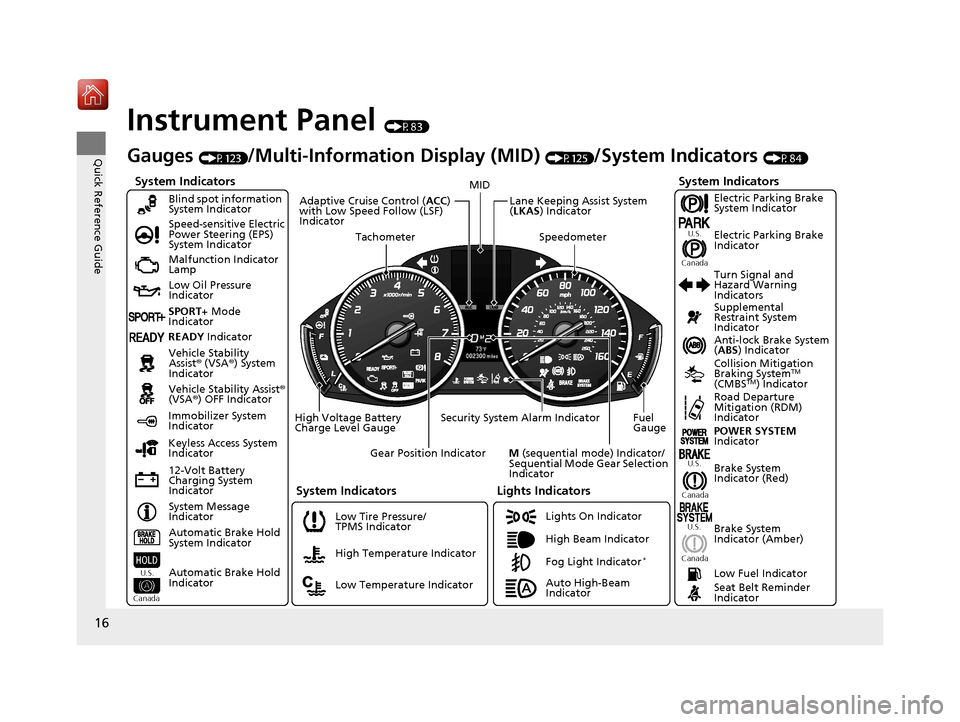
Instrument Panel (P83)
System Indicators
Malfunction Indicator
Lamp
Low Oil Pressure
Indicator
12-Volt Battery
Charging System
IndicatorAnti-lock Brake System
(
ABS ) Indicator
Vehicle Stability
Assist® (VSA®) System
Indicator
Vehicle Stability Assist ®
(VSA ®) OFF Indicator
Speed-sensitive Electric
Power Steering (EPS)
System Indicator
Lights Indicators
Lights On Indicator
High Beam Indicator
Immobilizer System
Indicator
Seat Belt Reminder
Indicator
System Indicators
System Message
IndicatorBrake System
Indicator (Red) Supplemental
Restraint System
Indicator
Low Fuel Indicator
Gauges (P123)/Multi-Information Display (MID) (P125)/System Indicators (P84)
Low Tire Pressure/
TPMS Indicator Turn Signal and
Hazard Warning
Indicators
Keyless Access System
Indicator
High Voltage Battery
Charge Level Gauge Security System Alarm Indicator Fuel
Gauge
Tachometer
MID
Speedometer
Gear Position Indicator
M (sequential mode) Indicator/
Sequential Mode Gear Selection
Indicator
Brake System
Indicator (Amber)
Blind spot information
System Indicator
System Indicators
Collision Mitigation
Braking SystemTM
(CMBSTM) IndicatorRoad Departure
Mitigation (RDM)
Indicator
Lane Keeping Assist System
( LKAS ) Indicator
Adaptive Cruise Control (
ACC)
with Low Speed Follow (LSF)
Indicator
U.S.
Canada U.S.
Canada
Fog Light Indicator*
Automatic Brake Hold
System Indicator
Automatic Brake Hold
Indicator
U.S.
Canada
Electric Parking Brake
System Indicator
Electric Parking Brake
Indicator
U.S.
Canada
Auto High-Beam
Indicator POWER SYSTEM
Indicator
High Temperature Indicator
Low Temperature Indicator
SPORT+
Mode
Indicator
READY Indicator
19 ACURA MDX E-AWD-31TRX6200.book 16 ページ 2018年6月22日 金曜日 午後7時42分
Page 18 of 685
17
Quick Reference Guide
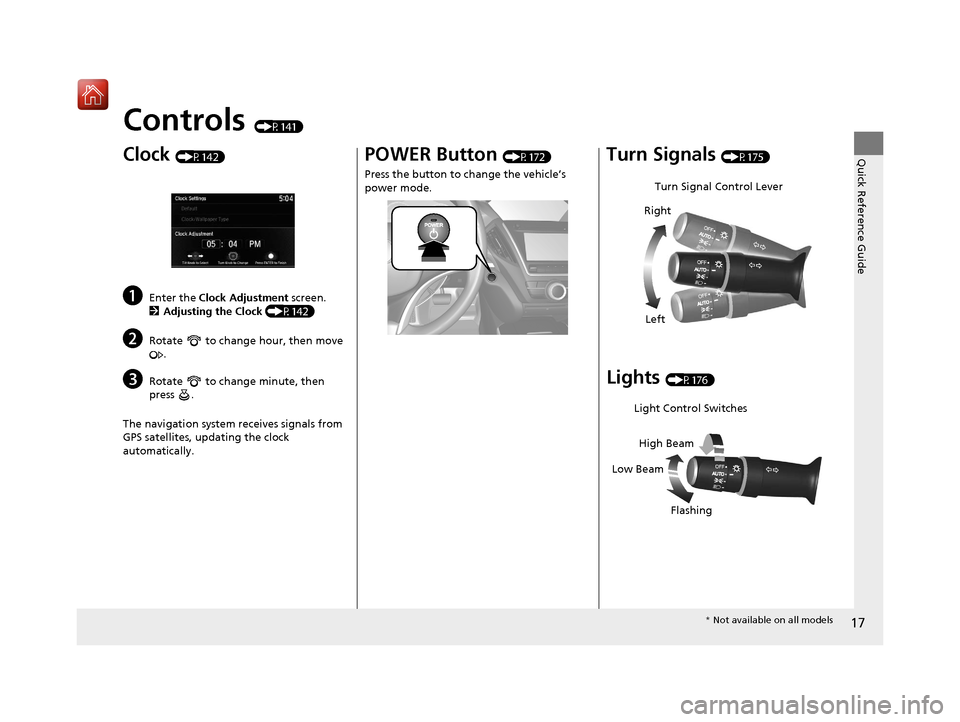
Controls (P141)
Clock (P142)
aEnter the Clock Adjustment screen.
2 Adjusting the Clock (P142)
bRotate to change hour, then move
.
cRotate to change minute, then
press .
The navigation system receives signals from
GPS satellites, updating the clock
automatically.
POWER Button (P172)
Press the button to ch ange the vehicle’s
power mode.Turn Signals (P175)
Lights (P176)
Turn Signal Control Lever
Right
Left
Light Control Switches
Low Beam High Beam
Flashing
* Not available on all models
19 ACURA MDX E-AWD-31TRX6200.book 17 ページ 2018年6月22日 金曜日 午後7時42分
Page 19 of 685
18
Quick Reference Guide
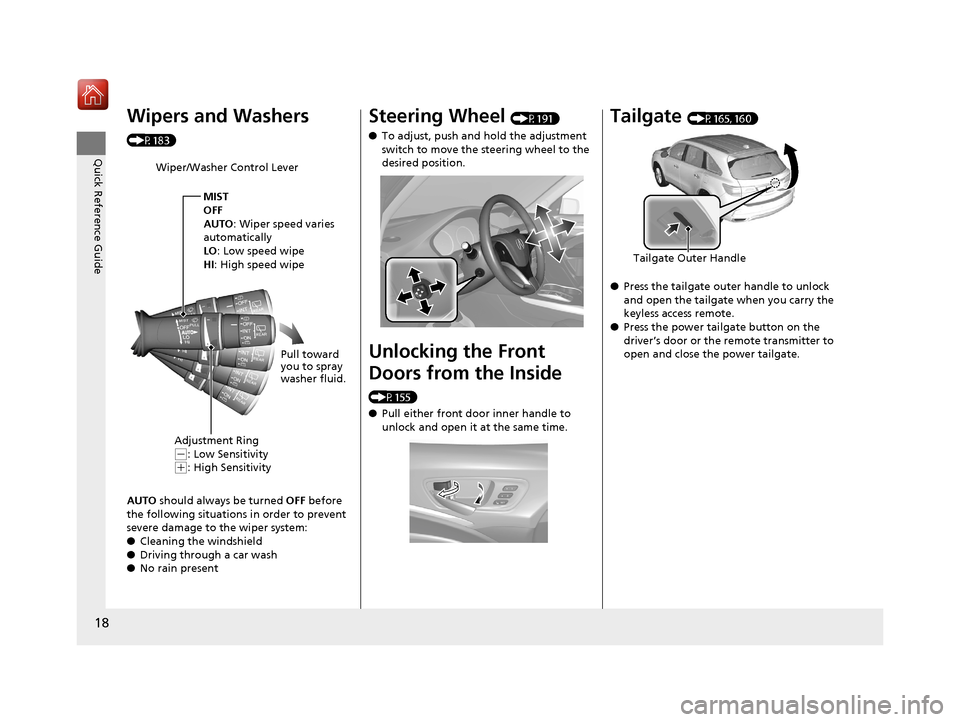
Wipers and Washers
(P183)
AUTO should always be turned OFF before
the following situations in order to prevent
severe damage to the wiper system:
● Cleaning the windshield
● Driving through a car wash
● No rain present
Wiper/Washer Control Lever
MIST
OFF
AUTO: Wiper speed varies
automatically
LO: Low speed wipe
HI : High speed wipe
Pull toward
you to spray
washer fluid.
Adjustment Ring
(-: Low Sensitivity(+: High Sensitivity
Steering Wheel (P191)
● To adjust, push and hold the adjustment
switch to move the steering wheel to the
desired position.
Unlocking the Front
Doors from the Inside
(P155)
●Pull either front door inner handle to
unlock and open it at the same time.
Tailgate (P165, 160)
● Press the tailgate outer handle to unlock
and open the tailgate when you carry the
keyless access remote.
● Press the power tailgate button on the
driver’s door or the remote transmitter to
open and close the power tailgate.
Tailgate Outer Handle
19 ACURA MDX E-AWD-31TRX6200.book 18 ページ 2018年6月22日 金曜日 午後7時42分
Page 21 of 685
20
Quick Reference Guide
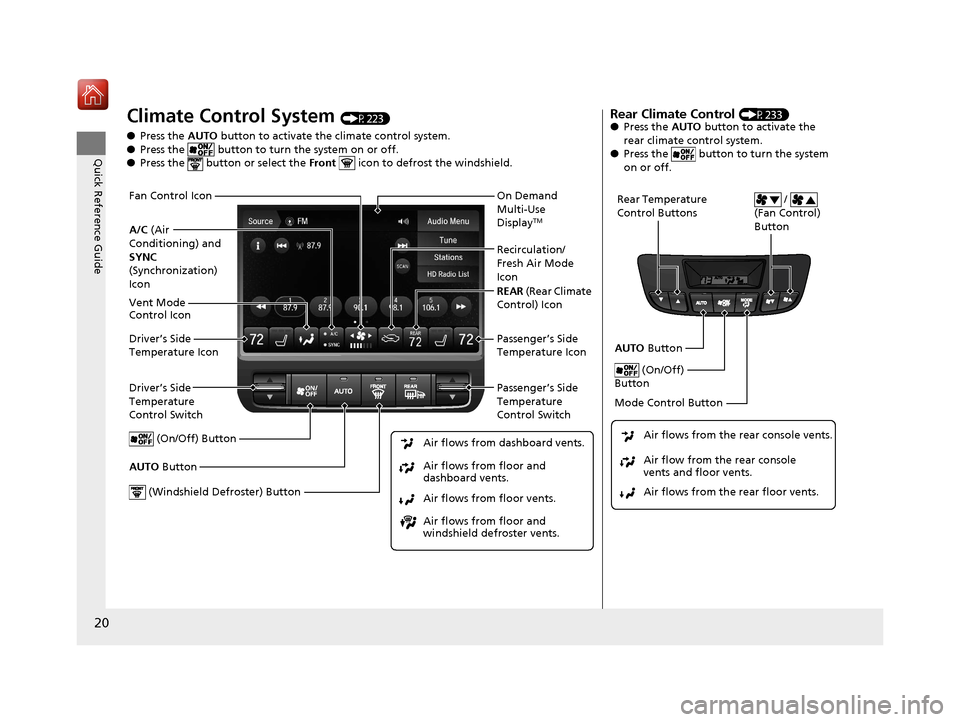
Climate Control System (P223)
● Press the AUTO button to activate the climate control system.
● Press the button to turn the system on or off.
● Press the button or select the Front icon to defrost the windshield.
Driver’s Side
Temperature
Control Switch
Air flows from floor and
windshield defroster vents. Air flows from floor vents. Air flows from floor and
dashboard vents. Air flows from dashboard vents.
AUTO Button Passenger’s Side
Temperature
Control Switch
(On/Off) Button
Driver’s Side
Temperature Icon Passenger’s Side
Temperature Icon On Demand
Multi-Use
Display
TM
(Windshield Defroster) Button
A/C
(Air
Conditioning) and
SYNC
(Synchronization)
Icon Recirculation/
Fresh Air Mode
Icon
Fan Control Icon
REAR
(Rear Climate
Control) IconVent Mode
Control Icon
Rear Climate Control (P233)
● Press the AUTO button to activate the
rear climate control system.
● Press the button to turn the system
on or off.
Rear Temperature
Control Buttons /
(Fan Control)
Button
AUTO Button
(On/Off)
Button
Mode Control Button
Air flows from the rear floor vents. Air flow from the rear console
vents and floor vents. Air flows from the rear console vents.
19 ACURA MDX E-AWD-31TRX6200.book 20 ページ 2018年6月22日 金曜日 午後7時42分
Page 23 of 685
22
Quick Reference Guide
Models with rear entertainment system
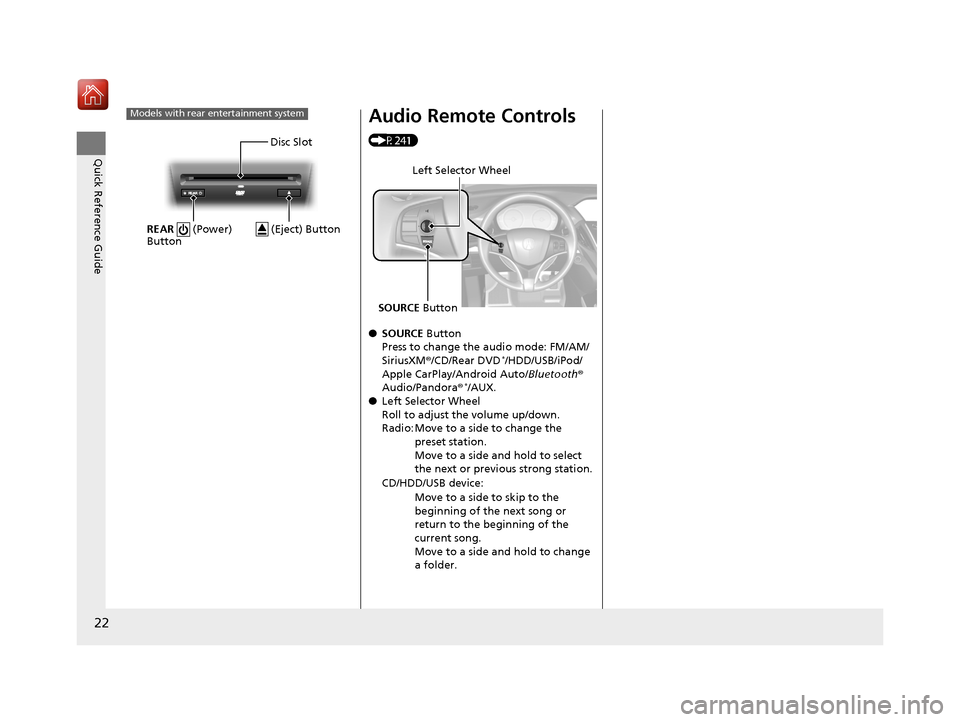
Disc Slot
REAR (Power)
Button
(Eject) Button
Audio Remote Controls
(P241)
● SOURCE Button
Press to change the audio mode: FM/AM/
SiriusXM ®/CD/Rear DVD
*/HDD/USB/iPod/
Apple CarPlay/Android Auto/ Bluetooth®
Audio/Pandora ®
*/AUX.
● Left Selector Wheel
Roll to adjust the volume up/down.
Radio: Move to a side to change the
preset station.
Move to a side and hold to select
the next or previous strong station.
CD/HDD/USB device: Move to a side to skip to the
beginning of the next song or
return to the beginning of the
current song.
Move to a side and hold to change
a folder.
Left Selector Wheel
SOURCE Button
19 ACURA MDX E-AWD-31TRX6200.book 22 ページ 2018年6月22日 金曜日 午後7時42分
Page 24 of 685
23
Quick Reference Guide
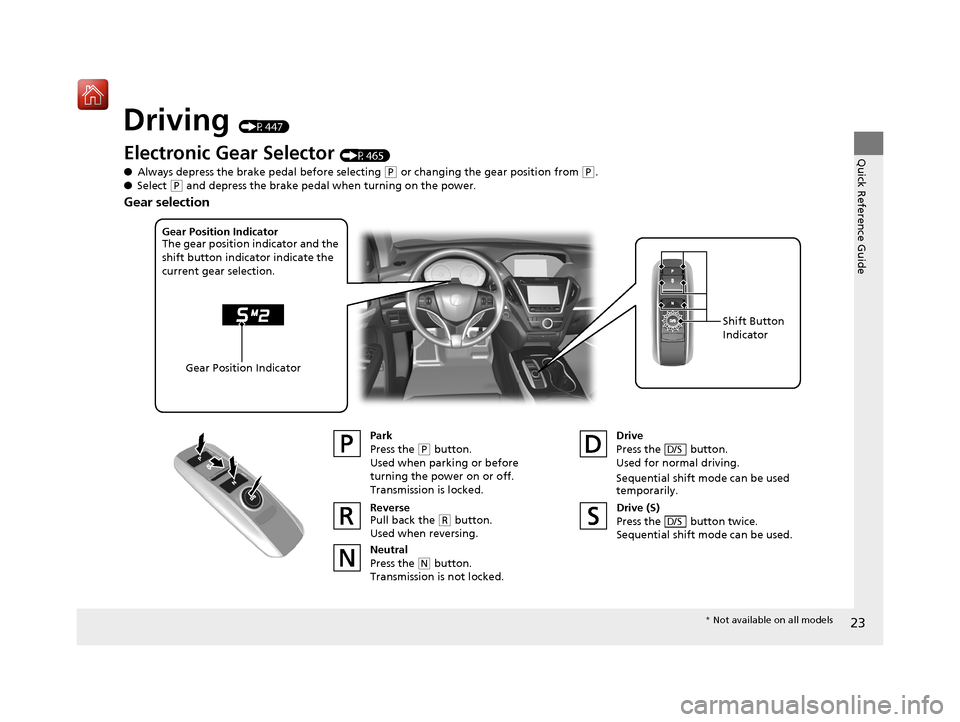
Driving (P447)
Electronic Gear Selector (P465)
● Always depress the brake pedal before selecting
(P or changing the gear position from (P.
● Select
(P and depress the brake pedal when turning on the power.
Park
Press the
(P button.
Used when parking or before
turning the power on or off.
Transmission is locked.
Reverse
Pull back the
( R button.
Used when reversing.
Neutral
Press the
( N button.
Transmission is not locked. Drive
Press the button.
Used for normal driving.
Sequential shift mode can be used
temporarily.
D/S
Gear Position Indicator
The gear position indicator and the
shift button indicator indicate the
current gear selection.
Gear Position Indicator Shift Button
Indicator
Drive (S)
Press the button twice.
Sequential shift mode can be used.
D/S
Gear selection
*
Not available on all models
19 ACURA MDX E-AWD-31TRX6200.book 23 ページ 2018年6月22日 金曜日 午後7時42分