buttons Acura NSX 2017 User Guide
[x] Cancel search | Manufacturer: ACURA, Model Year: 2017, Model line: NSX, Model: Acura NSX 2017Pages: 473, PDF Size: 16.01 MB
Page 258 of 473
257
uuHomeLink ® Universal Transceiver uTraining HomeLink
Features
■Training a Button1Training HomeLink
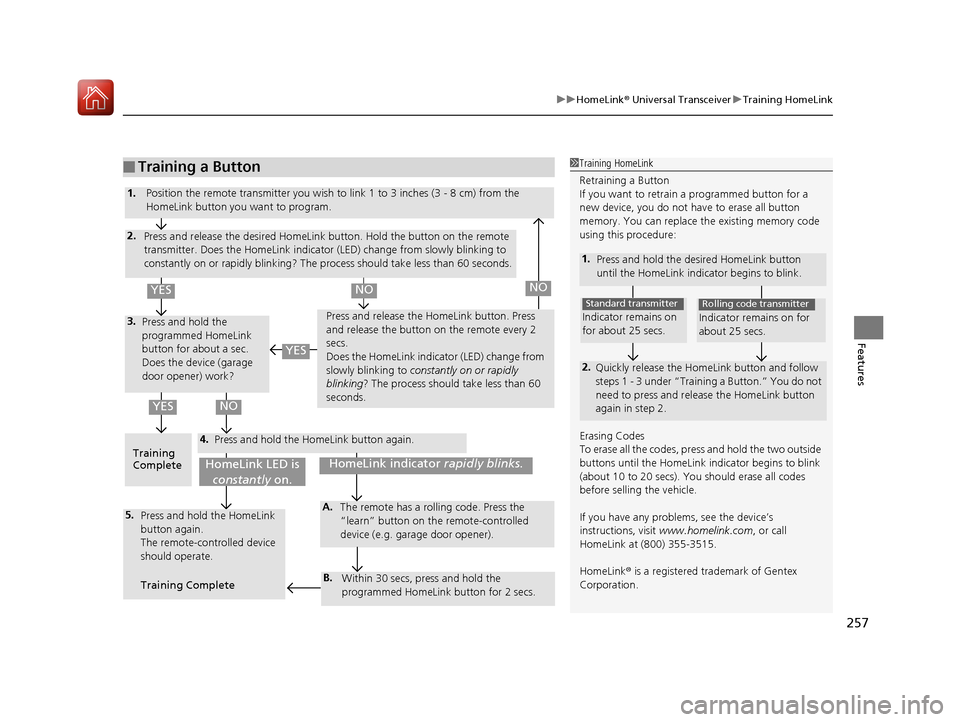
Retraining a Button
If you want to retrain a programmed button for a
new device, you do not ha ve to erase all button
memory. You can replace the existing memory code
using this procedure:
1. Press and hold the desi red HomeLink button
until the HomeLink indi cator begins to blink.
2.
Quickly release the Home Link button and follow
steps 1 - 3 under “Training a Button.” You do not
need to press and rele ase the HomeLink button
again in step 2.
Indicator remains on
for about 25 secs.
Standard transmitter
Indicator remains on for
about 25 secs.
Rolling code transmitter
Erasing Codes
To erase all the codes, press and hold the two outside
buttons until the HomeLink i ndicator begins to blink
(about 10 to 20 secs). You should erase all codes
before selling the vehicle.
If you have any problems, see the device’s
instructions, visit www.homelink.com , or call
HomeLink at (800) 355-3515.
HomeLink ® is a registered tra demark of Gentex
Corporation.4.
3.
2.
5.A.
B.
1. Position the remote transmitter you wish to link 1 to 3 inches (3 - 8 cm) from the
HomeLink button you want to program.
Press and release the desi red HomeLink button. Hold the button on the remote
transmitter. Does the HomeLink indicato r (LED) change from slowly blinking to
constantly on or rapidly blinking? The process should take less than 60 seconds.
Press and hold the
programmed HomeLink
button for about a sec.
Does the device (garage
door opener) work? Press and release the Ho
meLink button. Press
and release the button on the remote every 2
secs.
Does the HomeLink indicator (LED) change from
slowly blinking to constantly on or rapidly
blinking? The process should take less than 60
seconds.
Training
Complete Press and hold the HomeLink button again.
Press and hold the HomeLink
button again.
The remote-controlled device
should operate.
Training Complete The remote has a ro
lling code. Press the
“learn” button on the remote-controlled
device (e.g. garage door opener).
Within 30 secs, press and hold the
programmed HomeLink button for 2 secs.
HomeLink indicator rapidly blinks.HomeLink LED is
constantly on.
YESNO
YES
YESNONO
17 NSX-31T6N6000.book 257 ページ 2016年4月22日 金曜日 午後3時44分
Page 259 of 473
258
Features
Bluetooth® HandsFreeLink ®
Bluetooth® HandsFreeLink ® (HFL) allows you to place and receive phone calls using
your vehicle’s audio system, without handling your cell phone.
Using HFL
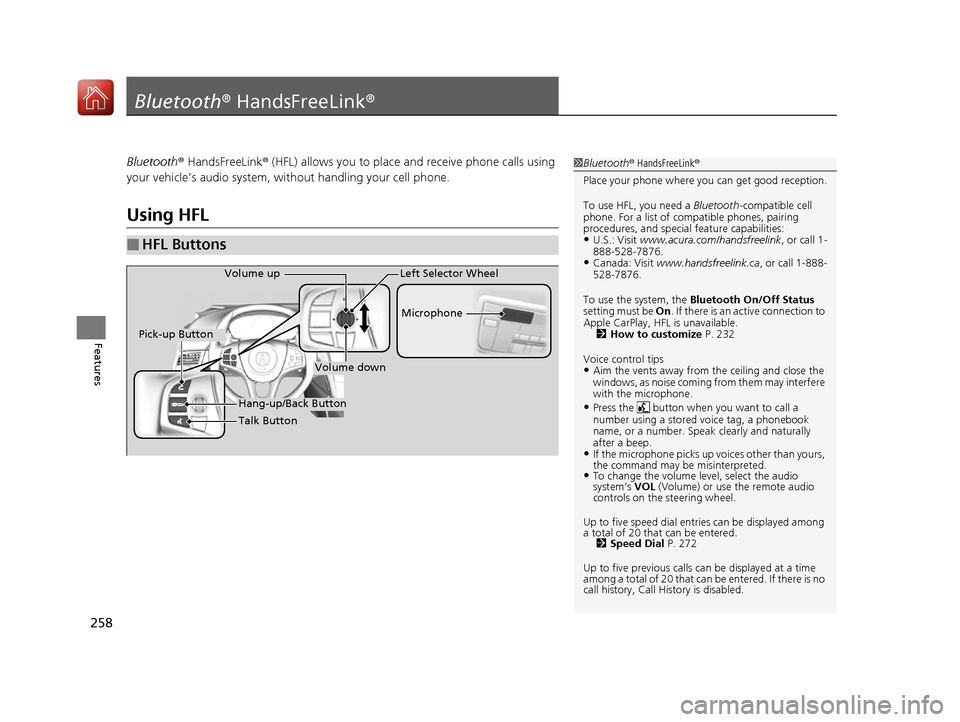
■HFL Buttons
1 Bluetooth ® HandsFreeLink ®
Place your phone where y ou can get good reception.
To use HFL, you need a Bluetooth-compatible cell
phone. For a list of compatible phones, pairing
procedures, and special feature capabilities:
•U.S.: Visit www.acura.com/handsfreelink , or call 1-
888-528-7876.
•Canada: Visit www.handsfreelink.ca , or call 1-888-
528-7876.
To use the system, the Bluetooth On/Off Status
setting must be On . If there is an active connection to
Apple CarPlay, H FL is unavailable.
2 How to customize P. 232
Voice control tips
•Aim the vents away from the ceiling and close the
windows, as noise coming fr om them may interfere
with the microphone.
•Press the button when you want to call a
number using a stored voice tag, a phonebook
name, or a number. Spe ak clearly and naturally
after a beep.
•If the microphone picks up vo ices other than yours,
the command may be misinterpreted.
•To change the volume level, select the audio
system’s VOL (Volume) or use the remote audio
controls on the steering wheel.
Up to five speed dial entries can be displayed among
a total of 20 that can be entered. 2 Speed Dial P. 272
Up to five previous calls can be displayed at a time
among a total of 20 that can be entered. If there is no
call history, Call History is disabled.
Talk Button Microphone
Hang-up/Back Button
Pick-up Button
Volume up
Volume down
Left Selector Wheel
17 NSX-31T6N6000.book 258 ページ 2016年4月22日 金曜日 午後3時44分
Page 285 of 473
uuBluetooth ® HandsFreeLink ®u HFL Menus
284
Features
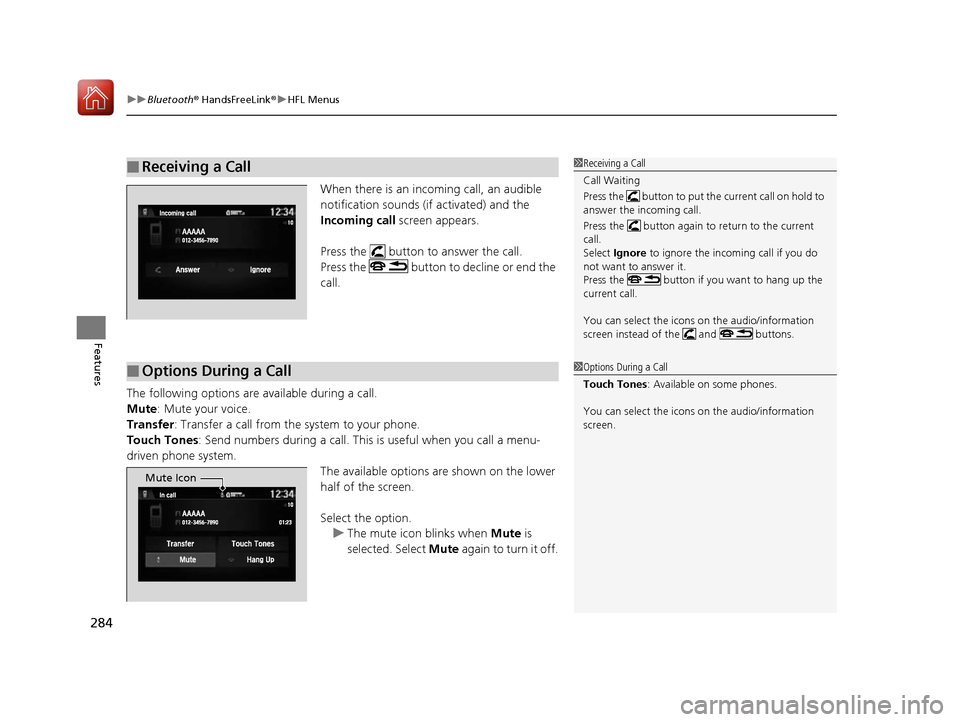
When there is an incoming call, an audible
notification sounds (if activated) and the
Incoming call screen appears.
Press the button to answer the call.
Press the button to decline or end the
call.
The following options are available during a call.
Mute : Mute your voice.
Transfer : Transfer a call from the system to your phone.
Touch Tones: Send numbers during a call. This is useful when you call a menu-
driven phone system.
The available options are shown on the lower
half of the screen.
Select the option.u The mute icon blinks when Mute is
selected. Select Mute again to turn it off.
■Receiving a Call1Receiving a Call
Call Waiting
Press the button to put the current call on hold to
answer the incoming call.
Press the button again to return to the current
call.
Select Ignore to ignore the incoming call if you do
not want to answer it.
Press the button if you want to hang up the
current call.
You can select the icons on the audio/information
screen instead of the and buttons.
■Options During a Call1 Options During a Call
Touch Tones : Available on some phones.
You can select the icons on the audio/information
screen.
Mute Icon
17 NSX-31T6N6000.book 284 ページ 2016年4月22日 金曜日 午後3時44分
Page 315 of 473
314
uuWhen Driving uShifting
Driving
Shifting
Change the gear position in acco rdance with your driving needs.
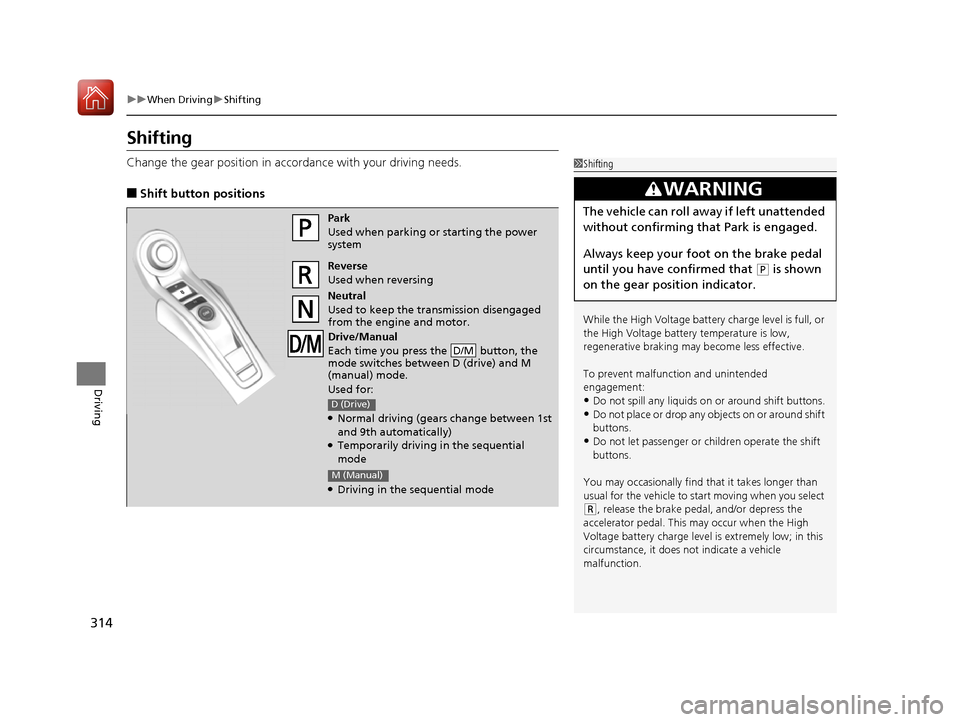
■Shift button positions
1Shifting
While the High Voltage battery charge level is full, or
the High Voltage battery temperature is low,
regenerative braking ma y become less effective.
To prevent malfunc tion and unintended
engagement:
•Do not spill any liquids on or around shift buttons.
•Do not place or drop any objects on or around shift
buttons.
•Do not let passenger or children operate the shift
buttons.
You may occasionally find th at it takes longer than
usual for the vehicle to start moving when you select
( R, release the brake peda l, and/or depress the
accelerator pedal. This may occur when the High
Voltage battery charge level is extremely low; in this
circumstance, it does not indicate a vehicle
malfunction.
3WARNING
The vehicle can roll aw ay if left unattended
without confirming that Park is engaged.
Always keep your foot on the brake pedal
until you have confirmed that
( P is shown
on the gear position indicator.
Park
Used when parking or starting the power
system
Reverse
Used when reversing
Neutral
Used to keep the transmission disengaged
from the engine and motor.
Drive/Manual
Each time you press the button, the
mode switches between D (drive) and M
(manual) mode.
Used for:
●Normal driving (gears change between 1st
and 9th automatically)
●Temporarily driving in the sequential
mode
●Driving in the sequential mode
D/M
D (Drive)
M (Manual)
17 NSX-31T6N6000.book 314 ページ 2016年4月22日 金曜日 午後3時44分
Page 405 of 473
404
Maintenance
Remote Transmitter Care
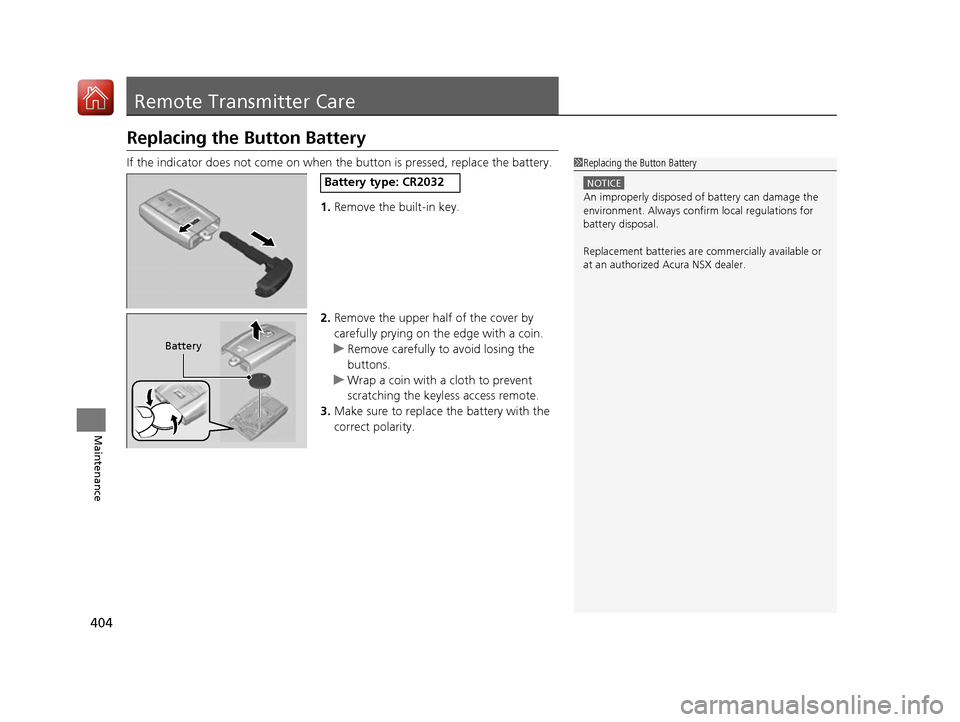
Replacing the Button Battery
If the indicator does not come on when the button is pressed, replace the battery.
1.Remove the built-in key.
2. Remove the upper half of the cover by
carefully prying on the edge with a coin.
u Remove carefully to avoid losing the
buttons.
u Wrap a coin with a cloth to prevent
scratching the keyle ss access remote.
3. Make sure to replace the battery with the
correct polarity.1 Replacing the Button Battery
NOTICE
An improperly disposed of battery can damage the
environment. Always conf irm local regulations for
battery disposal.
Replacement batteries are commercially available or
at an authorized Acura NSX dealer.
Battery type: CR2032
Battery
17 NSX-31T6N6000.book 404 ページ 2016年4月22日 金曜日 午後3時44分
Page 433 of 473

432
uuPower System Won’t Start uIf the Keyless Access Remote Battery is Weak
Handling the Unexpected
If the Keyless Access Re mote Battery is Weak
If the beeper sounds, the ENGINE START/STOP button flashes, and the READY
indicator does not come on.
The To Start, Hold Remote Near Start Button message appears on the driver
information interface.
Turn on the power system as follows. 1.Touch the center of the ENGINE START/
STOP button with the A logo on the keyless
access remote while the ENGINE START/
STOP button is flashing. The buttons on
the keyless access remo te should be facing
you.
u The ENGINE START/STOP button
flashes for about 30 seconds.
2. Depress the brake pedal and press the
ENGINE START/STOP button within 10
seconds after the beeper sounds and the
ENGINE START/STOP button changes
from flashing to on.
u If you don’t depress the pedal, the mode
will change to ACCESSORY.
17 NSX-31T6N6000.book 432 ページ 2016年4月22日 金曜日 午後3時44分
Page 469 of 473
468
Index
Refueling ................................................. 357
Requirement .................................... 357, 454
Fuel Economy ............................................ 359
Fuel Fill Door ....................................... 25, 358
Fuses .......................................................... 443
Inspecting and Changing ......................... 447
Locations ................................. 443, 445, 446
G
Gasoline (Fuel) Economy ................................................. 359
Gauge ....................................................... 95
Information ............................................. 357
Instant Fuel Economy ............................... 101
Low Fuel Indicator ..................................... 77
Refueling ................................................. 357
Gauges ......................................................... 95
Gear Position Indicator ....................... 76, 316
Gear Shift Positions Dual Clutch Transmission ......................... 314
Glass (care) ........................................ 406, 409
Glove Box .................................................. 151
H
Handling the Unexpected ........................ 417
HandsFreeLink® (HFL)............................... 258
Automatic Import of Ce llular Phonebook and
Call History ............................................ 271
Displaying Messages ................................ 287 HFL Buttons............................................. 258
HFL Menus .............................................. 261
HFL Status Display ................................... 260
Limitations for Manual Operation ............ 260
Making a Call .......................................... 280
Options During a Call .............................. 284
Phone Setup............................................ 266
Phonebook Phonetic
Modification ........... 275
Receiving a Call ....................................... 284
Receiving a Text/E-mail Message.............. 285
Ring Tone................................................ 270
Roadside Assistance ................................ 291
Selecting a Mail Account ......................... 286
Speed Dial ............................................... 272
To Set Up Text/E-mail Message Options ... 269
Hatch ......................................................... 119
Unable to Open....................................... 450
Hazard Warning Button .............................. 4
Headlights ................................................. 131
Aiming .................................................... 387
Automatic Operation (automatic lighting control) ................................................. 132
Dimming ......................................... 131, 134
Operating................................................ 131
Heaters (Seat) ........................................... 155
HFL (HandsFreeLink® )............................... 258
High Beam Indicator .................................. 81
High Voltage Battery ............................... 343
High-Performance Driving ....................... 303
Hill Start Assist System ............................. 311
HomeLink ® Universal Transceiver ............ 255Hybrid Vehicle
SPORT HYBRID Super Handling-All Wheel
Drive
TM (SPORT HYBRID SH-AWD ®)............ 9
I
Identification Numbers
Engine, Motor, and Transmission ............ 456
Vehicle Identification............................... 456
Immobilizer System .................................. 122
Indicator ................................................... 81
Indicators .................................................... 70
12-Volt Battery Charging System ...... 75, 438
Active Damper System .............................. 74
Anti-lock Brake System (ABS) .................... 78
Automatic Brake Hold ....................... 72, 347
Automatic Brake Hold System ........... 72, 347
Brake System (Amber) ............................... 73
Brake System (Red) ........................... 70, 439
Brake Wear ............................................... 74
CRUISE CONTROL ............................. 82, 331
CRUISE MAIN.................................... 82, 330
Door and Trunk (Hatch) Open ................... 35
Electric Parking Brake ................................ 71
Electric Parking Brake System ............ 71, 440
Electric Power Steering (EPS) System ............................................ 78, 439
Gear Position ............................................ 76
High Beam ................................................ 81
Immobilizer System ................................... 81
Keyless Access System............................... 82
17 NSX-31T6N6000.book 468 ページ 2016年4月22日 金曜日 午後3時44分