transmission Acura NSX 2017 User Guide
[x] Cancel search | Manufacturer: ACURA, Model Year: 2017, Model line: NSX, Model: Acura NSX 2017Pages: 473, PDF Size: 16.01 MB
Page 93 of 473
92
uuIndicators uDriver Information Interface Wa rning and Information Messages
Instrument Panel
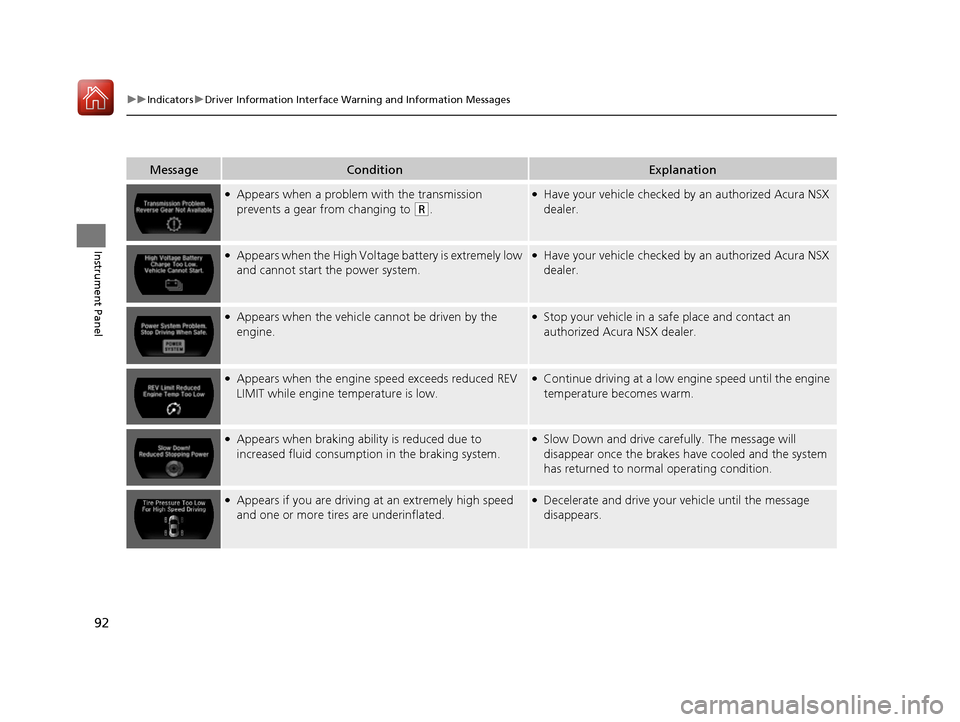
MessageConditionExplanation
●Appears when a problem with the transmission
prevents a gear from changing to
(R.
●Have your vehicle checked by an authorized Acura NSX
dealer.
●Appears when the High Voltag e battery is extremely low
and cannot start the power system.●Have your vehicle checked by an authorized Acura NSX
dealer.
●Appears when the vehicle ca nnot be driven by the
engine.●Stop your vehicle in a sa fe place and contact an
authorized Acura NSX dealer.
●Appears when the engine speed exceeds reduced REV
LIMIT while engine temperature is low.●Continue driving at a low engine speed until the engine
temperature becomes warm.
●Appears when braking ability is reduced due to
increased fluid consumption in the braking system.●Slow Down and drive carefully. The message will
disappear once the brakes have cooled and the system
has returned to normal operating condition.
●Appears if you are driving at an extremely high speed
and one or more tires are underinflated.●Decelerate and drive your vehicle until the message
disappears.
17 NSX-31T6N6000.book 92 ページ 2016年4月22日 金曜日 午後3時44分
Page 94 of 473
93
uuIndicators uDriver Information Interface Wa rning and Information Messages
Continued
Instrument Panel
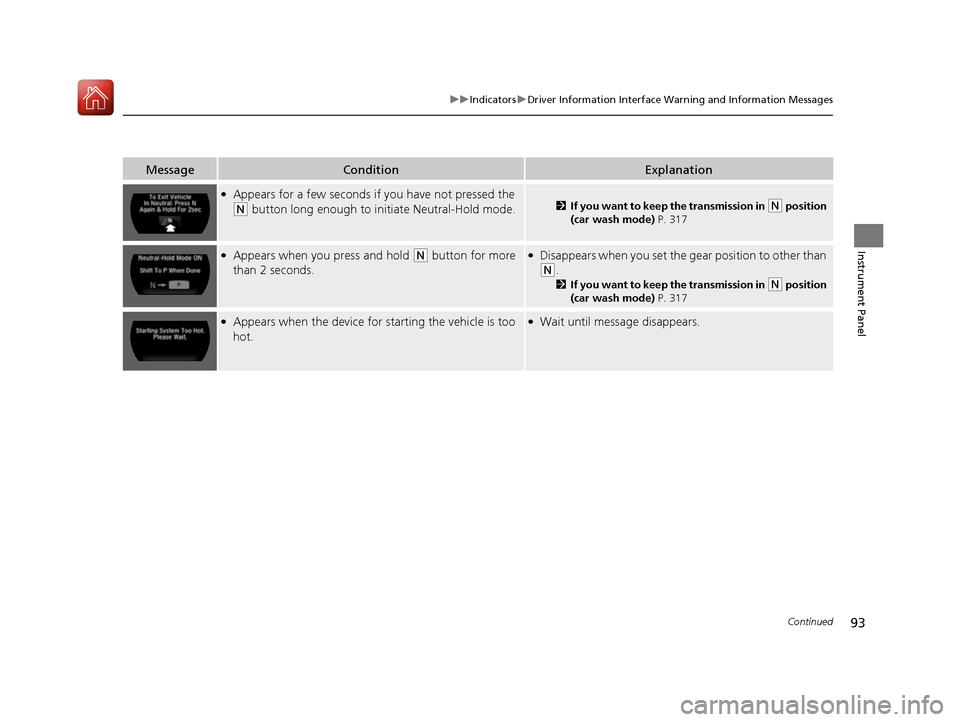
MessageConditionExplanation
●Appears for a few seconds if you have not pressed the
(N button long enough to initiate Neutral-Hold mode.2If you want to keep the transmission in (N position
(car wash mode) P. 317
●Appears when you press and hold (N button for more
than 2 seconds.●Disappears when you set the g ear position to other than
(N.
2If you want to keep the transmission in (N position
(car wash mode) P. 317
●Appears when the device for starting the vehicle is too
hot.●Wait until message disappears.
17 NSX-31T6N6000.book 93 ページ 2016年4月22日 金曜日 午後3時44分
Page 95 of 473
94
uuIndicators uDriver Information Interface Wa rning and Information Messages
Instrument Panel
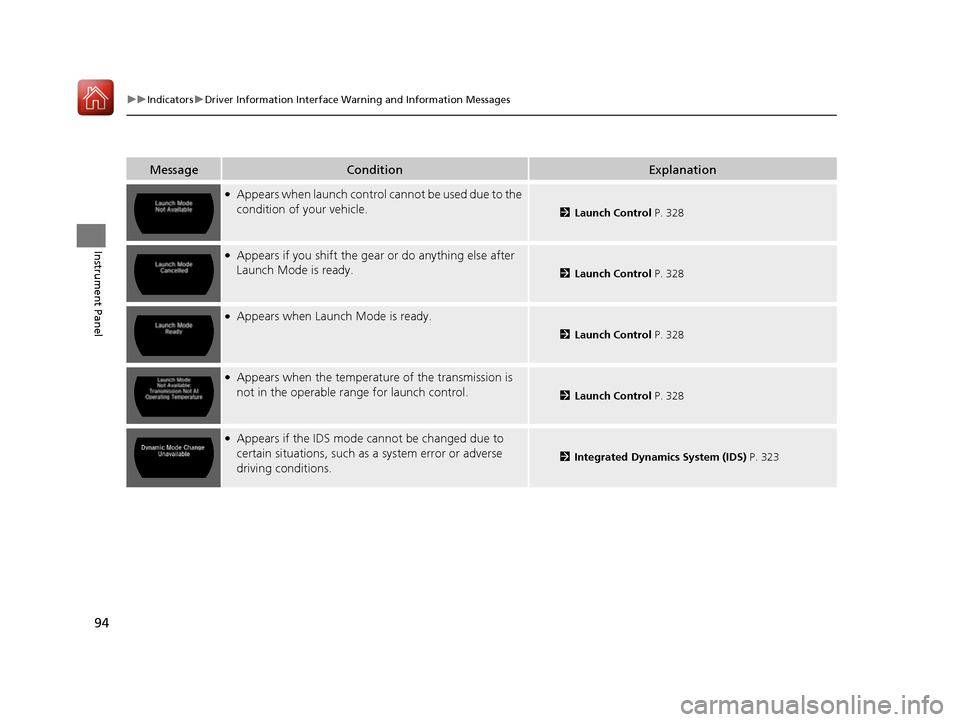
MessageConditionExplanation
●Appears when launch control cannot be used due to the
condition of your vehicle.
2Launch Control P. 328
●Appears if you shift the gear or do anything else after
Launch Mode is ready.
2 Launch Control P. 328
●Appears when Launch Mode is ready.
2Launch Control P. 328
●Appears when the temperatur e of the transmission is
not in the operable ra nge for launch control.
2Launch Control P. 328
●Appears if the IDS mode cannot be changed due to
certain situations, such as a system error or adverse
driving conditions.
2 Integrated Dynamics System (IDS) P. 323
17 NSX-31T6N6000.book 94 ページ 2016年4月22日 金曜日 午後3時44分
Page 129 of 473

128
uuOperating the Switches Around the Steering Wheel uENGINE START/STOP Button
Controls
If you leave the vehicle for more than 30 minutes with the transmission in (P and
the power mode in ACCESSORY, the vehicle will automatically go into VEHICLE OFF
(LOCK) mode to prevent draining the 12-volt battery.
If you open the driver’s doo r when the power mode is set to ACCESSORY, a warning
buzzer will sounds.
■Automatic Power Off
■Power Mode Reminder
17 NSX-31T6N6000.book 128 ページ 2016年4月22日 金曜日 午後3時44分
Page 132 of 473
131
uuOperating the Switches Around the Steering Wheel uLight Switches
Continued
Controls
Light Switches
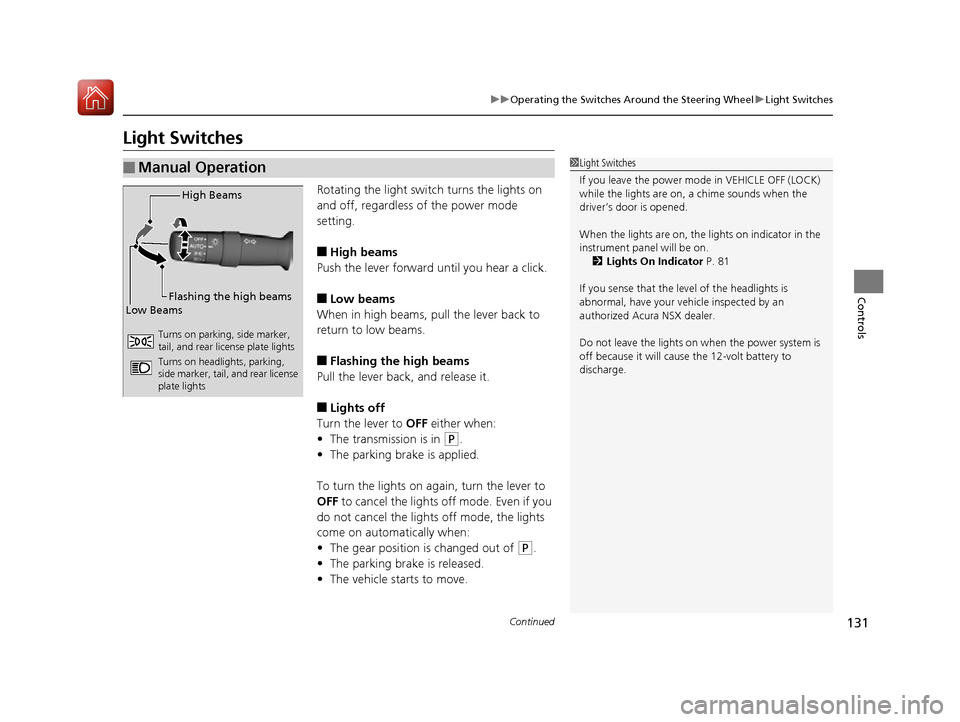
Rotating the light switch turns the lights on
and off, regardless of the power mode
setting.
■High beams
Push the lever forward until you hear a click.
■Low beams
When in high beams, pull the lever back to
return to low beams.
■Flashing the high beams
Pull the lever back, and release it.
■Lights off
Turn the lever to OFF either when:
• The transmission is in
(P.
• The parking brake is applied.
To turn the light s on again, turn the lever to
OFF to cancel the lights off mode. Even if you
do not cancel the lights off mode, the lights
come on automatically when:
• The gear position is changed out of
(P.
• The parking brake is released.
• The vehicle starts to move.
■Manual Operation1Light Switches
If you leave the power mode in VEHICLE OFF (LOCK)
while the lights are on, a chime sounds when the
driver’s door is opened.
When the lights are on, the lights on indicator in the
instrument panel will be on.
2 Lights On Indicator P. 81
If you sense that the le vel of the headlights is
abnormal, have your vehicle inspected by an
authorized Acura NSX dealer.
Do not leave the lights on when the power system is
off because it wi ll cause the 12-volt battery to
discharge.
High Beams
Flashing the high beams
Low Beams
Turns on parking, side marker,
tail, and rear license plate lights
Turns on headlights, parking,
side marker, tail, and rear license
plate lights
17 NSX-31T6N6000.book 131 ページ 2016年4月22日 金曜日 午後3時44分
Page 139 of 473

138
uuOperating the Switches Around the Steering Wheel uDriving Position Memory System*
Controls
Driving Position Memory System*
You can store two driver’s seat (except for power lumbar) and outside door mirrors
position with the driving position memory system.
When you unlock and open the driver’s doo r with a remote transmitter, or keyless
access system, the seat and ou tside door mirrors adjust automatically to one of the
two preset positions.
When you enter the vehicle, the driver in formation interface briefly shows you which
remote transmitter you used to unlock the vehicle.
• DRIVER 1 transmitter is linked to memory button 1.
• DRIVER 2 transmitter is linked to memory button 2.
The driver’s seat moves rearward depending
on the set seating position once you
•Stop the vehicle.
• Put the transmission in
(P.
• Set the power mode to VEHICLE OFF
(LOCK).
• Then open the driver’s door.
Once the power mode is in the ACCESSORY
position, the driver’s seat moves to the
DRIVER 1 or 2 preset position.
1Driving Position Memory System*
Using the audio/informati on screen, you can disable
the automatic seat and d oor mirrors adjustment
function. 2 Customized Features P. 232
The driver’s seat easy exit feature:
•Will tilt slightly forward and then move rearward to
allow you to more easily exit the vehicle.
•Can be turned ON/OFF. 2Customized Features P. 232
System Operation
The system will not operate if:
•The vehicle speed is above 3 mph (5 km/h).
•Either memory position button is pressed while the
seat is in motion.
•The seat position is adjusted while in operation.
•The memory 1 or 2 position is set fully to the rear.
DRIVER 1 DRIVER 2
* Not available on all models
17 NSX-31T6N6000.book 138 ページ 2016年4月22日 金曜日 午後3時44分
Page 142 of 473

141
Controls
Adjusting the Mirrors
Interior Rearview Mirror
Adjust the angle of the rearview mirror when you are sitting in the correct driving
position.
When you are driving after dark, the
automatic dimming rearview mirror reduces
the glare from headlights behind you, based
in inputs from the mirror sensor. This feature
is always active.
■Automatic Dimming Rearview Mirror
1 Adjusting the Mirrors
Keep the inside and out side mirrors clean and
adjusted for best visibility.
Adjust the mirrors before you start driving. 2 Adjusting the Seat Positions P. 144
1Automatic Dimming Rearview Mirror
The auto dimming function cancels when the
transmission is in
(R.
17 NSX-31T6N6000.book 141 ページ 2016年4月22日 金曜日 午後3時44分
Page 218 of 473

Continued217
uuAudio System Basic Operation uApple CarPlay
Features
■Maps
Display Apple CarPlay map and use the navi gation function just as you would on
your iPhone.
Only one navigation system (pre-installed navigation or Apple CarPlay) can give
directions at a time. When you are using one system, directions to any prior
destination set on the other system will be canceled, and the system you are
currently using will direct you to your destination.
After you have connected your iPhone to the system via USB, use the following
procedure to set up Apple CarPlay. Us e of Apple CarPlay will result in the
transmission of certain user and vehicle information (such as vehicle location, speed,
and status) to your iPhone to enhance the Apple CarPlay experience. You will need
to consent to the sharing of this in formation on the audio/information screen.
■Enabling Apple CarPlay
Enable once: Allows only once. (Prompt
shows again next time.)
Always enable: Allows anytime. (Prompt
does not show again.)
Cancel: Does not allow this consent.
You may change the consent settings under
the Smartphone settings menu.
■Setting Up Apple CarPlay
1Apple CarPlay
Apple CarPlay Operating Requirements &
Limitations
Apple CarPlay requi res a compatible iPhone with an
active cellular connecti on and data plan. Your
carrier’s rate plans will apply.
Changes in operating systems, hardware, software,
and other technology integral to providing Apple
CarPlay functionality, as well as new or revised
governmental regulations, may result in a decrease or
cessation of Apple CarPlay functionality and services.
Acura cannot and does not provide any warranty or
guarantee of future Appl e CarPlay performance or
functionality.
It is possible to use 3r d party apps if they are
compatible with Apple CarPlay. Refer to the Apple
homepage for information on compatible apps.
Models with navigation system
1 Setting Up Apple CarPlay
You can also use the method below to set up Apple
CarPlay:
Select Settings Smartphone Apple CarPlay
Use of user and vehicle information
The use and handling of user and vehicle information
transmitted to/from your iP hone by Apple CarPlay is
governed by the Apple iOS terms and conditions and
Apple’s Privacy Policy.
17 NSX-31T6N6000.book 217 ページ 2016年4月22日 金曜日 午後3時44分
Page 298 of 473
297
Driving
This chapter discusses driving, refueling, and information on items such as accessories.
Before Driving
Driving Preparation .......................... 298
Maximum Load Limit........................ 301
High-Performance Driving ................ 303
Towing a Trailer Towing Your Vehicle ........................ 308
When Driving Turning on the Power ...................... 309
Precautions While Driving................. 312
Dual Clutch Transmission ................. 313
Shifting ............................................ 314
Integrated Dynamics System (IDS)..... 323
Launch Control ................................ 328 Cruise Control ................................. 330
Vehicle Stabilit
y Assist (VSA®), aka Electronic
Stability Control (ESC), System........... 333
Agile Handling Assist System............ 337
SPORT HYBRID Super Handling-All Wheel DriveTM (SPORT HYBRID SH-AWD®) .... 338
Tire Pressure Monitoring System (TPMS) ...... 339
Tire Pressure Monitoring System (TPMS) - Required Federal Explanation ......... 341
High Voltage Battery ........................ 343
Braking Brake System ................................... 344 Anti-lock Brake System (ABS) ........... 349
Brake Assist System ......................... 350
Parking Your Vehicle When Stopped ................................ 351
Parking Sensor System
*................... 352
Multi-View Rear Camera .................. 356
Refueling Fuel Information .............................. 357
How to Refuel ................................. 358
Fuel Economy and CO
2 Emissions .... 359
Turbo Engine Vehicle ....................... 360
* Not available on all models
17 NSX-31T6N6000.book 297 ページ 2016年4月22日 金曜日 午後3時44分
Page 310 of 473

309Continued
Driving
When Driving
Turning on the Power
1.Make sure the parkin g brake is applied.
u The electric parking brake indicator
comes on for 15 seconds when you pull
up the electric parking brake switch.
2. Depress the brake pedal.
u Make sure the transmission is in
(P.
1Turning on the Power
Keep your foot firmly on the brake pedal when
starting the power system.
The engine is harder to st art in cold weather and in
thinner air found at altitudes above 8,000 feet (2,400
meters).
When turning on the power system in cold weather,
turn off all electrical accessories such as the lights,
climate control system, and rear defogger in order to
reduce 12-volt battery drain.
If the exhaust system sounds abnormal or you can
smell exhaust gas inside the vehicle, have your vehicle
checked by an authorized Acura NSX dealer. There
may be a problem with the engine or exhaust system.
Electric Parking
Brake Switch
Brake Pedal
17 NSX-31T6N6000.book 309 ページ 2016年4月22日 金曜日 午後3時44分