brake Acura NSX 2017 Owner's Guide
[x] Cancel search | Manufacturer: ACURA, Model Year: 2017, Model line: NSX, Model: Acura NSX 2017Pages: 473, PDF Size: 16.01 MB
Page 90 of 473
89
uuIndicators uDriver Information Interface Wa rning and Information Messages
Continued
Instrument Panel
MessageConditionExplanation
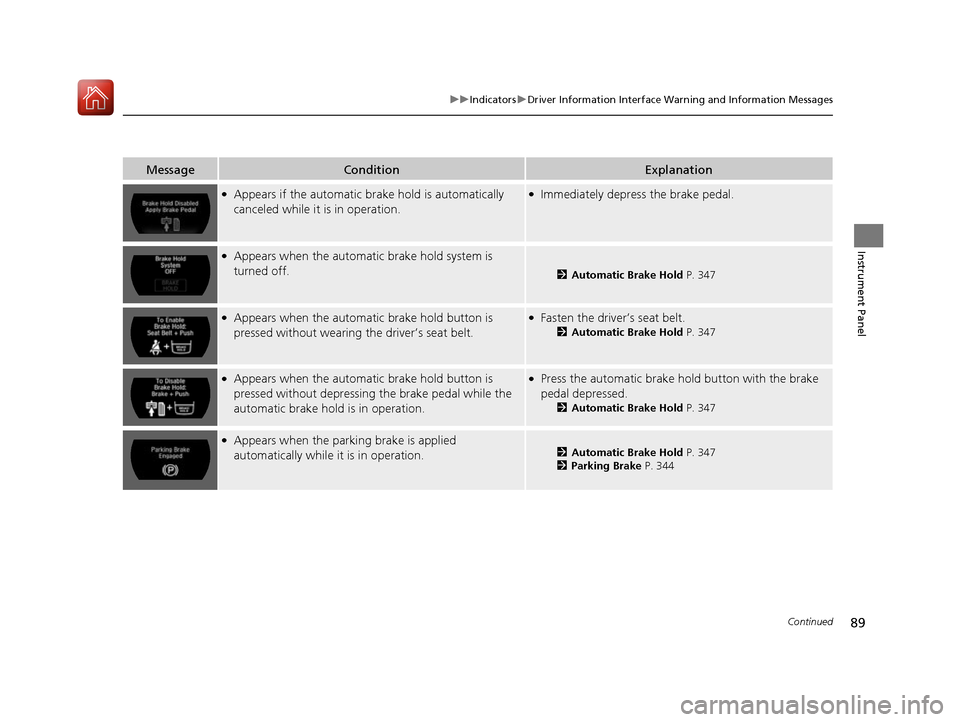
●Appears if the automatic brake hold is automatically
canceled while it is in operation.●Immediately depress the brake pedal.
●Appears when the automati c brake hold system is
turned off.
2 Automatic Brake Hold P. 347
●Appears when the automatic brake hold button is
pressed without wearing the driver’s seat belt.●Fasten the driver’s seat belt.
2Automatic Brake Hold P. 347
●Appears when the automatic brake hold button is
pressed without depressing the brake pedal while the
automatic brake hold is in operation.●Press the automatic brake hold button with the brake
pedal depressed.
2Automatic Brake Hold P. 347
●Appears when the parking brake is applied
automatically while it is in operation.2Automatic Brake Hold P. 347
2 Parking Brake P. 344
17 NSX-31T6N6000.book 89 ページ 2016年4月22日 金曜日 午後3時44分
Page 92 of 473
91
uuIndicators uDriver Information Interface Wa rning and Information Messages
Continued
Instrument Panel
MessageConditionExplanation
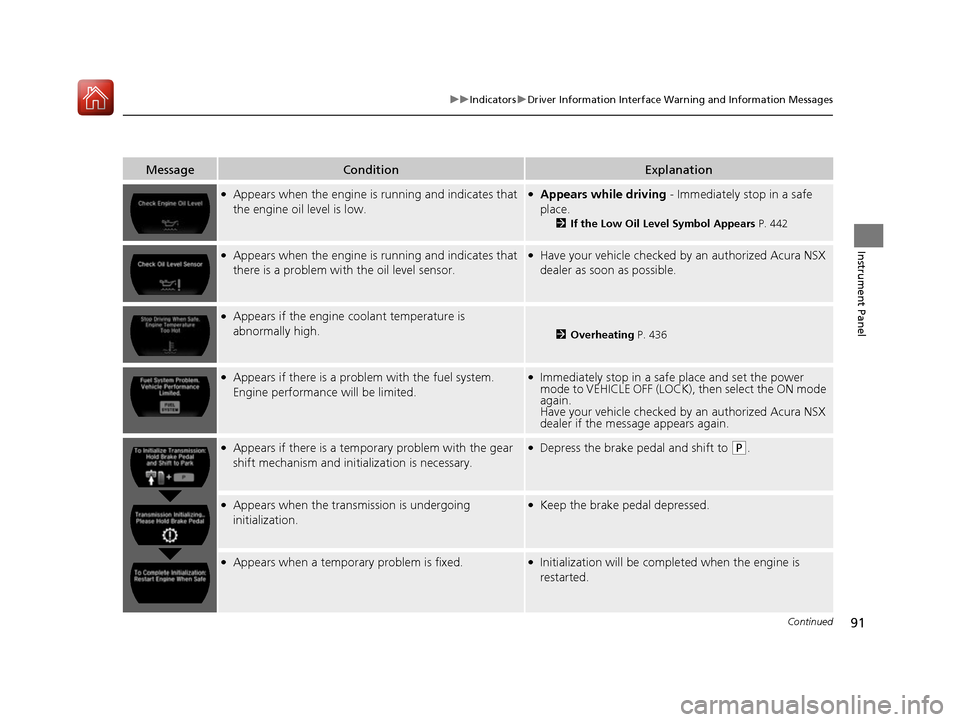
●Appears when the engine is running and indicates that
the engine oil level is low.●Appears while driving - Immediately stop in a safe
place.
2 If the Low Oil Level Symbol Appears P. 442
●Appears when the engine is running and indicates that
there is a problem with the oil level sensor.●Have your vehicle checked by an authorized Acura NSX
dealer as soon as possible.
●Appears if the engine coolant temperature is
abnormally high.
2 Overheating P. 436
●Appears if there is a problem with the fuel system.
Engine performance will be limited.●Immediately stop in a safe place and set the power
mode to VEHICLE OFF (LOCK), then select the ON mode
again.
Have your vehicle checked by an authorized Acura NSX
dealer if the message appears again.
●Appears if there is a temporary problem with the gear
shift mechanism and initialization is necessary.●Depress the brake pedal and shift to (P.
●Appears when the transmission is undergoing
initialization.●Keep the brake pedal depressed.
●Appears when a temporary problem is fixed.●Initialization will be completed when the engine is
restarted.
17 NSX-31T6N6000.book 91 ページ 2016年4月22日 金曜日 午後3時44分
Page 93 of 473
92
uuIndicators uDriver Information Interface Wa rning and Information Messages
Instrument Panel
MessageConditionExplanation
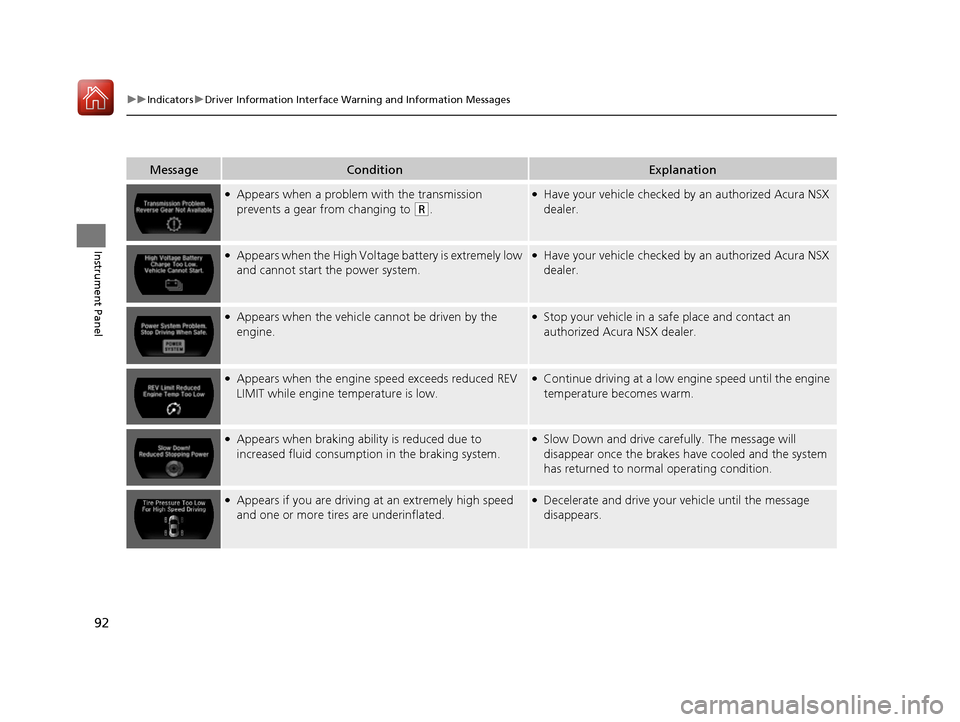
●Appears when a problem with the transmission
prevents a gear from changing to
(R.
●Have your vehicle checked by an authorized Acura NSX
dealer.
●Appears when the High Voltag e battery is extremely low
and cannot start the power system.●Have your vehicle checked by an authorized Acura NSX
dealer.
●Appears when the vehicle ca nnot be driven by the
engine.●Stop your vehicle in a sa fe place and contact an
authorized Acura NSX dealer.
●Appears when the engine speed exceeds reduced REV
LIMIT while engine temperature is low.●Continue driving at a low engine speed until the engine
temperature becomes warm.
●Appears when braking ability is reduced due to
increased fluid consumption in the braking system.●Slow Down and drive carefully. The message will
disappear once the brakes have cooled and the system
has returned to normal operating condition.
●Appears if you are driving at an extremely high speed
and one or more tires are underinflated.●Decelerate and drive your vehicle until the message
disappears.
17 NSX-31T6N6000.book 92 ページ 2016年4月22日 金曜日 午後3時44分
Page 128 of 473

127Continued
Controls
Operating the Switches Around the Steering Wheel
ENGINE START/STOP Button
■Changing the Power Mode1ENGINE START/STOP Button
ENGINE START/STOP Button Operating Range
You can start the power system when the keyless
access remote is inside the vehicle.
The power system may also start if the keyless access
remote is close to the door or window, even if it is
outside the vehicle.
If the keyless access remote battery is weak, beeper
sounds and the To Start, Hold Remote Near Start
Button message appears on th e driver information
interface. 2 If the Keyless Access Remote Battery is
Weak P. 432
Do not leave the power mode in ACCESSORY or ON
when you get out.
Operating RangeVEHICLE OFF (LOCK)
The button is off.
The power to all electrical components is turned off.
Blinking in white (when the door is opened).
Press the button. Without pressing
the brake pedal ACCESSORY
The button blinks (in red).
Operate the audio system and other accessories in
this position.
ON
The button is on in red.
All electrical components can be used.
17 NSX-31T6N6000.book 127 ページ 2016年4月22日 金曜日 午後3時44分
Page 132 of 473
131
uuOperating the Switches Around the Steering Wheel uLight Switches
Continued
Controls
Light Switches
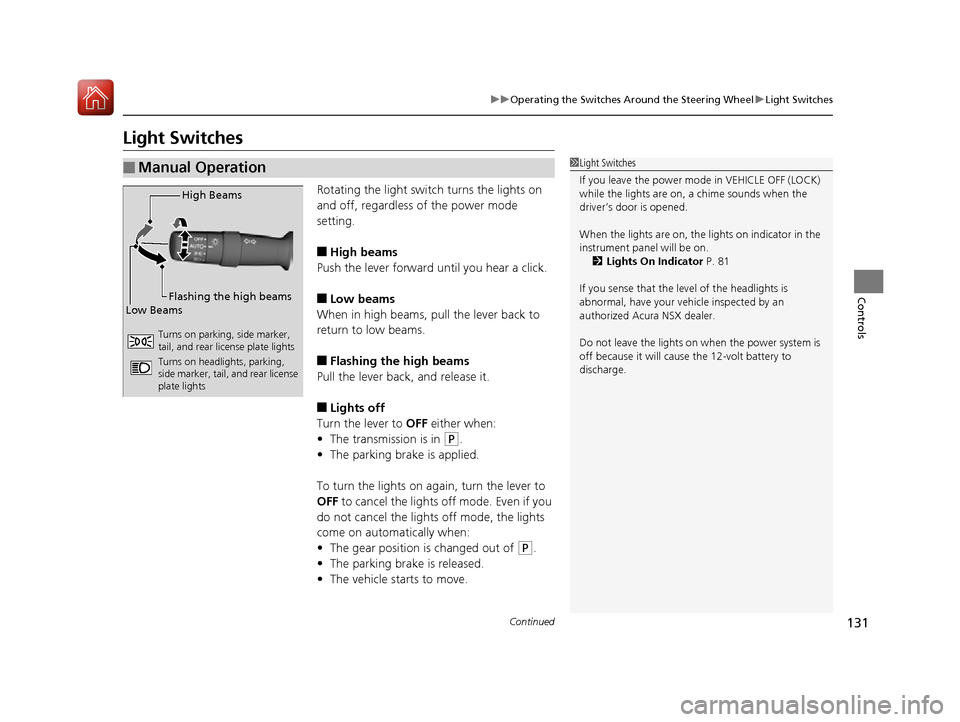
Rotating the light switch turns the lights on
and off, regardless of the power mode
setting.
■High beams
Push the lever forward until you hear a click.
■Low beams
When in high beams, pull the lever back to
return to low beams.
■Flashing the high beams
Pull the lever back, and release it.
■Lights off
Turn the lever to OFF either when:
• The transmission is in
(P.
• The parking brake is applied.
To turn the light s on again, turn the lever to
OFF to cancel the lights off mode. Even if you
do not cancel the lights off mode, the lights
come on automatically when:
• The gear position is changed out of
(P.
• The parking brake is released.
• The vehicle starts to move.
■Manual Operation1Light Switches
If you leave the power mode in VEHICLE OFF (LOCK)
while the lights are on, a chime sounds when the
driver’s door is opened.
When the lights are on, the lights on indicator in the
instrument panel will be on.
2 Lights On Indicator P. 81
If you sense that the le vel of the headlights is
abnormal, have your vehicle inspected by an
authorized Acura NSX dealer.
Do not leave the lights on when the power system is
off because it wi ll cause the 12-volt battery to
discharge.
High Beams
Flashing the high beams
Low Beams
Turns on parking, side marker,
tail, and rear license plate lights
Turns on headlights, parking,
side marker, tail, and rear license
plate lights
17 NSX-31T6N6000.book 131 ページ 2016年4月22日 金曜日 午後3時44分
Page 135 of 473
134
uuOperating the Switches Around the Steering Wheel uDaytime Running Lights
Controls
Daytime Running Lights
The daytime running lights come on when the following conditions have been met:
• The power mode is in ON.
• The headlight switch is in AUTO or .
• The parking brake is released.
The daytime running lights are off the headlight switch is turned on, or when the
headlight switch is in AUTO and it is getting darker outside.1Daytime Running Lights
The brightness of the dayt ime running lights is lower
when the headlight switch is in than when it is
in AUTO . When it is in AUTO, the low-beam
headlights come on once the level of ambient light is
very low.
U.S. models
17 NSX-31T6N6000.book 134 ページ 2016年4月22日 金曜日 午後3時44分
Page 140 of 473
139
uuOperating the Switches Around the Steering Wheel uDriving Position Memory System*
Controls
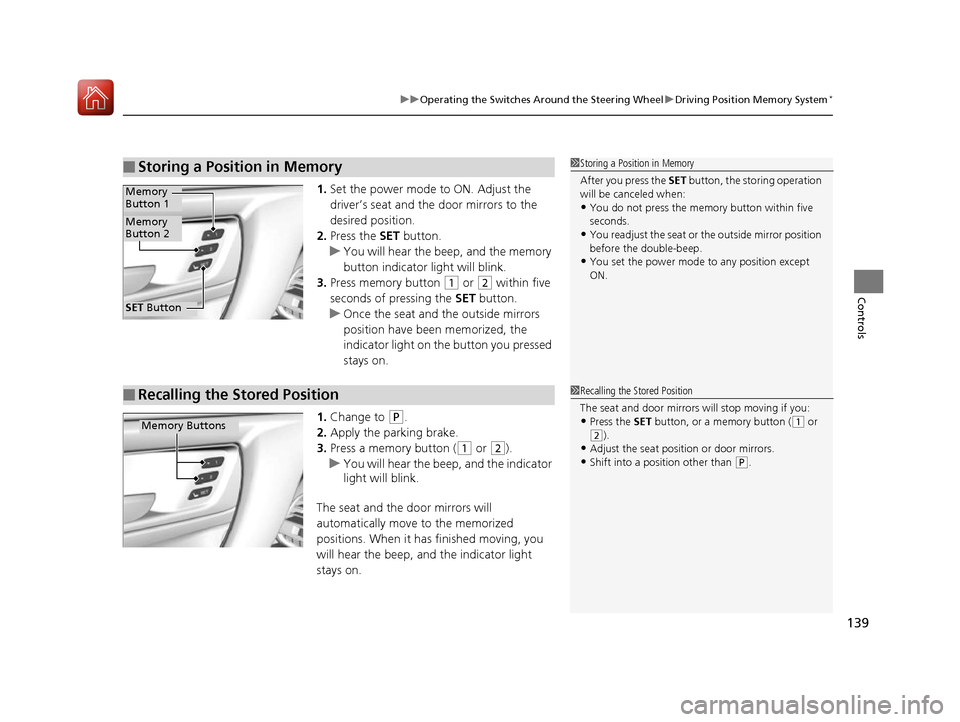
1. Set the power mode to ON. Adjust the
driver’s seat and the door mirrors to the
desired position.
2. Press the SET button.
u You will hear the beep, and the memory
button indicator light will blink.
3. Press memory button
(1 or (2 within five
seconds of pressing the SET button.
u Once the seat and the outside mirrors
position have been memorized, the
indicator light on the button you pressed
stays on.
1. Change to
(P.
2. Apply the parking brake.
3. Press a memory button (
(1 or (2).
u You will hear the beep, and the indicator
light will blink.
The seat and the door mirrors will
automatically move to the memorized
positions. When it has finished moving, you
will hear the beep, and the indicator light
stays on.
■Storing a Position in Memory1 Storing a Position in Memory
After you press the SET button, the storing operation
will be canceled when:
•You do not press the memory button within five
seconds.
•You readjust the seat or the outside mirror position
before the double-beep.
•You set the power mode to any position except
ON.
SET Button
Memory
Button 1
Memory
Button 2
■Recalling the Stored Position1 Recalling the Stored Position
The seat and door mirrors will stop moving if you:
•Press the SET button, or a memory button ((1 or
(2).•Adjust the seat position or door mirrors.
•Shift into a position other than (P.
Memory Buttons
17 NSX-31T6N6000.book 139 ページ 2016年4月22日 金曜日 午後3時44分
Page 298 of 473
297
Driving
This chapter discusses driving, refueling, and information on items such as accessories.
Before Driving
Driving Preparation .......................... 298
Maximum Load Limit........................ 301
High-Performance Driving ................ 303
Towing a Trailer Towing Your Vehicle ........................ 308
When Driving Turning on the Power ...................... 309
Precautions While Driving................. 312
Dual Clutch Transmission ................. 313
Shifting ............................................ 314
Integrated Dynamics System (IDS)..... 323
Launch Control ................................ 328 Cruise Control ................................. 330
Vehicle Stabilit
y Assist (VSA®), aka Electronic
Stability Control (ESC), System........... 333
Agile Handling Assist System............ 337
SPORT HYBRID Super Handling-All Wheel DriveTM (SPORT HYBRID SH-AWD®) .... 338
Tire Pressure Monitoring System (TPMS) ...... 339
Tire Pressure Monitoring System (TPMS) - Required Federal Explanation ......... 341
High Voltage Battery ........................ 343
Braking Brake System ................................... 344 Anti-lock Brake System (ABS) ........... 349
Brake Assist System ......................... 350
Parking Your Vehicle When Stopped ................................ 351
Parking Sensor System
*................... 352
Multi-View Rear Camera .................. 356
Refueling Fuel Information .............................. 357
How to Refuel ................................. 358
Fuel Economy and CO
2 Emissions .... 359
Turbo Engine Vehicle ....................... 360
* Not available on all models
17 NSX-31T6N6000.book 297 ページ 2016年4月22日 金曜日 午後3時44分
Page 300 of 473
Continued299
uuBefore Driving uDriving Preparation
Driving
• Store or secure all items on board properly.
u Carrying too much cargo, or improperly storing it, can affect your vehicle’s
handling, stability, sto pping distance, and tires, and make it unsafe.
2Maximum Load Limit P. 301
•Do not pile items higher than the seat height.
u They can block your view and may be thrown forward in the event of sudden
braking.
• Do not place anything in the seat footwe lls. Make sure to secure the floor mat.
u An object or unsecured floor mat can in terfere with your brake and accelerator
pedal operation while driving.
• If you have any animals on board, do not let them move around in the vehicle.
u They may interfere with driving and a crash could occur.
• Securely close and lock both doors and the hatch.
2 Locking/Unlocking the Doors from the Inside P. 115
•Adjust your seating position properly.
2 Adjusting the Seats P. 144
•Adjust the mirrors and steering wheel properly.
u Adjust them while sitting in the proper driving position.
2 Adjusting the Mirrors P. 141
2 Adjusting the Steering Wheel P. 140
■Interior Checks1Interior Checks
The headlight aim is set by the factory, and does not
need to be adjusted. Howeve r, if you regularly carry
heavy items in the trunk ha ve the aiming readjusted
at an authorized Acura NS X dealer or by a qualified
technician.
17 NSX-31T6N6000.book 299 ページ 2016年4月22日 金曜日 午後3時44分
Page 305 of 473
304
uuBefore Driving uHigh-Performance Driving
Driving
High-performance driving requires special skills, knowledge and experience, as the
safety risks are greatly increased when the NSX is operated at its upper performance
abilities. As a responsible NSX driver, you should not drive above your skill limits or
training, even if the NSX’s performance leve ls would otherwise allow you to do so.
If you intend to engage in high-performance driving, Acura strongly recommends
that:
• You first obtain appropriate, professional training
• Turn off any devices or systems that may distract you from the driving task
High-performance driving in general, and the use of TRACK mode and Launch
Control in particular, puts very high loads on the NSX and its components, and
results in greater wear and tear on the vehicl e. Because of these high loads, if your
NSX is not in top condition or if certain components, such as the brakes or tires, have
undue wear, those components could experience a loss of performance, or fail,
when engaging in high-performance drivin g. Therefore, Acura highly recommends
that you undertake more proactive and frequent maintenance than that required
under normal use and have your vehicle inspected at an authorized Acura NSX
dealer (and all necessary repairs or adju stments made) before you engage in any
high-performance driving. In addition to any required maintenance, there are
certain NSX specific items and protocols that you should pay special attention to
before, during and after engaging in any high-performance driving. Ultimately, the
decision whether to engage in high-performance driving is yours, and depending on
your NSX’s condition and prior usage, the items and protocols listed below may or
may not be sufficient to ensure a safe driving experience.
BEFORE DRIVING
•With the vehicle parked on level gro und, properly bleed brake system after
replacing with Acura Heavy Duty Brake Fluid DOT 4 or equivalent
• Inspect brake pad thickness an d replace if 6.0 mm or less
17 NSX-31T6N6000.book 304 ページ 2016年4月22日 金曜日 午後3時44分