battery Acura NSX 2017 Owner's Guide
[x] Cancel search | Manufacturer: ACURA, Model Year: 2017, Model line: NSX, Model: Acura NSX 2017Pages: 473, PDF Size: 16.01 MB
Page 267 of 473
uuBluetooth ® HandsFreeLink ®u HFL Menus
266
Features
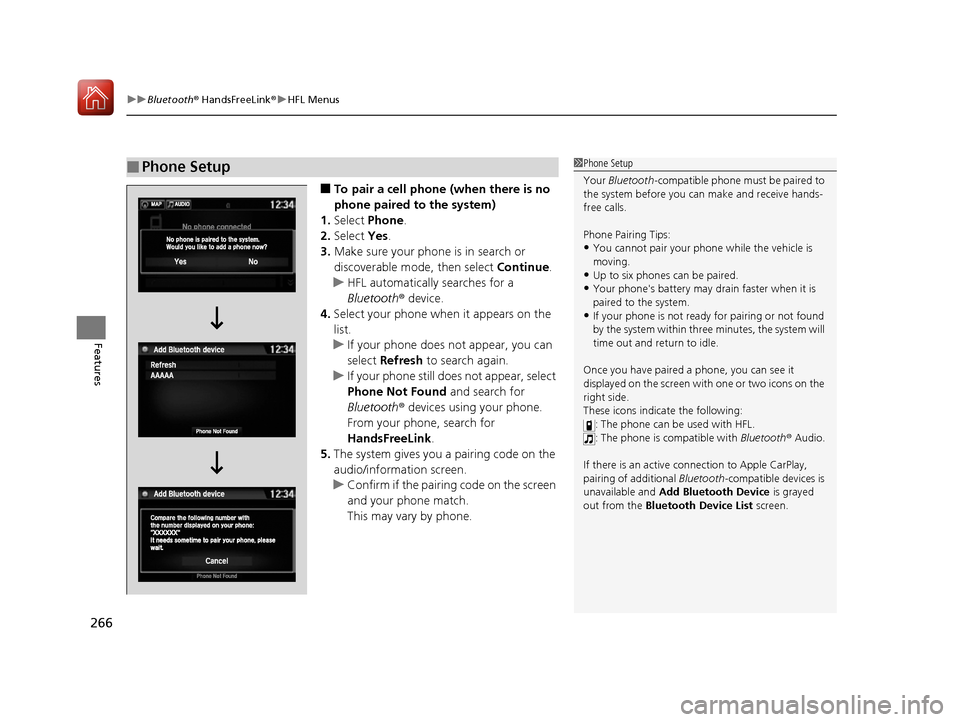
■To pair a cell phone (when there is no
phone paired to the system)
1. Select Phone .
2. Select Yes.
3. Make sure your phone is in search or
discoverable mode, then select Continue.
u HFL automatically searches for a
Bluetooth ® device.
4. Select your phone when it appears on the
list.
u If your phone does not appear, you can
select Refresh to search again.
u If your phone still does not appear, select
Phone Not Found and search for
Bluetooth ® devices using your phone.
From your phone, search for
HandsFreeLink .
5. The system gives you a pairing code on the
audio/information screen.
u Confirm if the pairing code on the screen
and your phone match.
This may vary by phone.
■Phone Setup1Phone Setup
Your Bluetooth -compatible phone must be paired to
the system before you ca n make and receive hands-
free calls.
Phone Pairing Tips:
•You cannot pair your phone while the vehicle is
moving.
•Up to six phones can be paired.
•Your phone's battery may dr ain faster when it is
paired to the system.
•If your phone is not ready for pairing or not found
by the system within three minutes, the system will
time out and return to idle.
Once you have paired a phone, you can see it
displayed on the screen with one or two icons on the
right side.
These icons indicate the following: : The phone can be used with HFL.
: The phone is compatible with Bluetooth® Audio.
If there is an active c onnection to Apple CarPlay,
pairing of additional Bluetooth-compatible devices is
unavailable and Add Bluetooth Device is grayed
out from the Bluetooth Device List screen.
17 NSX-31T6N6000.book 266 ページ 2016年4月22日 金曜日 午後3時44分
Page 293 of 473

292
Features
AcuraLink®*
Is a subscription-based service that provides convenient features such as voice
communication in case of an airbag deployment, online security, and one-on-one
operator assistance.
For information on traffic rerouting and traffi c information updates, provided by the
AcuraLink server, see the Na vigation System Manual.
■Automatic collision notification
If your vehicle’s airbags deploy or if the unit detects that the vehicle is severely
impacted, your vehicle will automatically attempt to connect to the AcuraLink
operator. Once connected, information about your vehicle, its positioning, and its
condition will be sent to the operator; you also can speak to the operator when
connected.
■In Case of a Crash
1 AcuraLink ®*
AcuraLink also provides services you can operate
from the Internet or your smartphone.
To subscribe to AcuraL ink, or to get more
information about all of its features, contact an
authorized Acura NSX dealer, or visit
owners.acura.com (in U.S.) or www.acura.ca (in
Canada).
1 In Case of a Crash
Your vehicle may not be able to connect to the
operator if the battery level is low, the line is
disconnected or you do not have adequate cellular
coverage.
You cannot use the Assist services when:
•You travel outside the AcuraLink service coverage
areas.
•There is a problem with the connecting devices,
such as the ASSIST button, microphone, speakers,
or the unit itself.
•You are not subscribed to the service or your
subscription is no longer valid.
You cannot operate othe r navigation- or phone-
related functions using the screens while talking to
the operator.
Only the operator can terminate the connection to
your vehicle.
1 Automatic collision notification
If the unit fails to connect to the operator, it
repeatedly tries until it succeeds.
* Not available on all models
17 NSX-31T6N6000.book 292 ページ 2016年4月22日 金曜日 午後3時44分
Page 298 of 473
297
Driving
This chapter discusses driving, refueling, and information on items such as accessories.
Before Driving
Driving Preparation .......................... 298
Maximum Load Limit........................ 301
High-Performance Driving ................ 303
Towing a Trailer Towing Your Vehicle ........................ 308
When Driving Turning on the Power ...................... 309
Precautions While Driving................. 312
Dual Clutch Transmission ................. 313
Shifting ............................................ 314
Integrated Dynamics System (IDS)..... 323
Launch Control ................................ 328 Cruise Control ................................. 330
Vehicle Stabilit
y Assist (VSA®), aka Electronic
Stability Control (ESC), System........... 333
Agile Handling Assist System............ 337
SPORT HYBRID Super Handling-All Wheel DriveTM (SPORT HYBRID SH-AWD®) .... 338
Tire Pressure Monitoring System (TPMS) ...... 339
Tire Pressure Monitoring System (TPMS) - Required Federal Explanation ......... 341
High Voltage Battery ........................ 343
Braking Brake System ................................... 344 Anti-lock Brake System (ABS) ........... 349
Brake Assist System ......................... 350
Parking Your Vehicle When Stopped ................................ 351
Parking Sensor System
*................... 352
Multi-View Rear Camera .................. 356
Refueling Fuel Information .............................. 357
How to Refuel ................................. 358
Fuel Economy and CO
2 Emissions .... 359
Turbo Engine Vehicle ....................... 360
* Not available on all models
17 NSX-31T6N6000.book 297 ページ 2016年4月22日 金曜日 午後3時44分
Page 310 of 473

309Continued
Driving
When Driving
Turning on the Power
1.Make sure the parkin g brake is applied.
u The electric parking brake indicator
comes on for 15 seconds when you pull
up the electric parking brake switch.
2. Depress the brake pedal.
u Make sure the transmission is in
(P.
1Turning on the Power
Keep your foot firmly on the brake pedal when
starting the power system.
The engine is harder to st art in cold weather and in
thinner air found at altitudes above 8,000 feet (2,400
meters).
When turning on the power system in cold weather,
turn off all electrical accessories such as the lights,
climate control system, and rear defogger in order to
reduce 12-volt battery drain.
If the exhaust system sounds abnormal or you can
smell exhaust gas inside the vehicle, have your vehicle
checked by an authorized Acura NSX dealer. There
may be a problem with the engine or exhaust system.
Electric Parking
Brake Switch
Brake Pedal
17 NSX-31T6N6000.book 309 ページ 2016年4月22日 金曜日 午後3時44分
Page 311 of 473

uuWhen Driving uTurning on the Power
310
Driving
3. Press the ENGINE START/STOP button
without depressing the accelerator pedal.
u The Ready To Drive message appears
on the driver information interface.
u When the ambient temperature is
extremely low, the vehicle does not move
until certain conditions are met.
A warning message appears instead of
Ready To Drive .
2Driver Information Interface
Warning and Information Messages
P. 90
u If the High Voltage battery is fully ch arged, the gasoline engine may not start.
u The gasoline engine starts either accord ing to the temperature of the engine or
when the High Voltage batte ry charge level is low.
u Regardless of the High Voltage battery charge level, the gasoline engine always
starts.
u Gasoline engine starts with a louder sound than QUIET mode.
When engine temperature or High Volt age battery temperature are low, or
when High Voltage battery charge level is low, gasoline engine starts at the
same sound level as QUIET mode.
You can turn the power system off when the vehicle is completely stopped.
1. Select
(P.
2. Press the ENGINE START/STOP button.
1Turning on the Power
The immobilizer system pr otects your vehicle from
theft.
If an improperly coded de vice is used, the power
system does not activate. 2 Immobilizer System P. 122
Bring the keyless access remote close to the ENGINE
START/STOP button if the battery in the keyless
access remote is weak.
2 If the Keyless Access Remote Battery is
Weak P. 432
The power system may not activate if the keyless
access remote is subjected to strong radio waves.
Do not hold the ENGINE START/STOP button to
start the power system.
If the power system does not start, wait at least 30
seconds before trying again.
You can set the IDS mode to be selected when you
set the power mode to ON.
2 Customized Features P. 232
■Stopping the Power System
When the IDS is in QUIET mode
When the IDS is in SPORT mode
17 NSX-31T6N6000.book 310 ページ 2016年4月22日 金曜日 午後3時44分
Page 313 of 473
312
uuWhen Driving uPrecautions While Driving
Driving
Precautions While Driving
Avoid driving in deep water and on flooded roads. This can damage the power
system or driveline, or cause electrical component failure.
The vehicle is equipped with ultra high performance summer tires that, due to their
decreased tread depth, are at greater risk of hydroplaning on wet roads compared
to regular tires. Exercise caution when driving on wet surfaces.
The vehicle is equipped with ultra high performance summer tires. These tires are
designed for optimum performance and handling in warm climates, and are not
suitable for below freezing, snowy or ic y weather conditions. If you drive under
these circumstances, use of winter tires is recommended and may be mandatory,
depending on your region, province or territory.
2 Winter Tires P. 401
2 Cold Weather Driving P. 402
Due to limitations of the Lithium-ion Hi gh Voltage battery, the minimum starting
temperature for the vehicle is -4°F (-20°C).
Inability to start the vehicle and/or decrea sed performance is expected if the vehicle
is operated at temperatures below -4°F (-20°C).
■In Rain
■In Snow and Ice
1 Precautions While Driving
NOTICE
Do not select a shift button while pressing the
accelerator pedal.
NOTICE
The following can damage the under spoiler, under
covers, front bumper, rear diffuser, brake cooling
components, and side sill:
•Parking the vehicle by a parking block•Parallel pa rking along the road shoulder•Driving toward the bottom of a hill•Driving up or down to a different surface level
(such as a road shoulder)
•Driving on a rutted or bumpy road•Driving on a road with potholes•Driving over speed bump
NOTICE
If you repeatedly turn the steering wheel at an
extremely low speed, or hold the steering wheel on
the full left or right position for a while, the electric
power steering (EPS) system heats up. The system
goes into a protective mode, and limits its
performance. The steering wheel becomes harder
and harder to operate. Once the system cools down,
the EPS system is restored.
Repeated operation under these conditions can
eventually damage the system.
If the power mode is set to ACCESSORY while
driving, the power system will shut down and all
steering and brake power a ssist functions will stop,
making it difficult to control the vehicle.
Driving in snow or icy c onditions may accumulate ice
on the brake disk surface, reducing braking power.
17 NSX-31T6N6000.book 312 ページ 2016年4月22日 金曜日 午後3時44分
Page 315 of 473
314
uuWhen Driving uShifting
Driving
Shifting
Change the gear position in acco rdance with your driving needs.
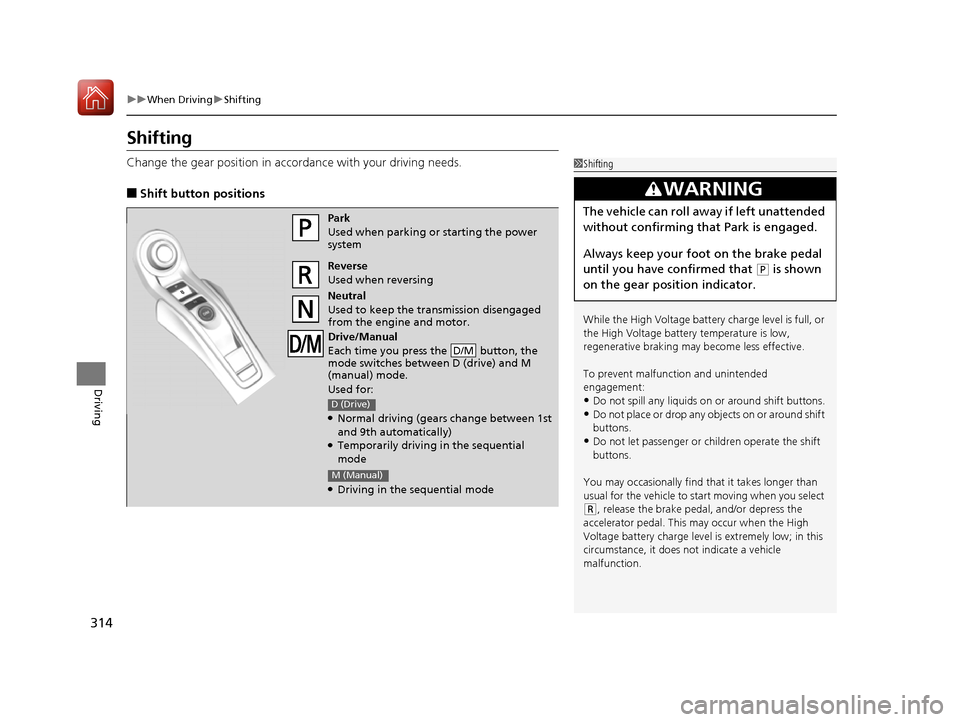
■Shift button positions
1Shifting
While the High Voltage battery charge level is full, or
the High Voltage battery temperature is low,
regenerative braking ma y become less effective.
To prevent malfunc tion and unintended
engagement:
•Do not spill any liquids on or around shift buttons.
•Do not place or drop any objects on or around shift
buttons.
•Do not let passenger or children operate the shift
buttons.
You may occasionally find th at it takes longer than
usual for the vehicle to start moving when you select
( R, release the brake peda l, and/or depress the
accelerator pedal. This may occur when the High
Voltage battery charge level is extremely low; in this
circumstance, it does not indicate a vehicle
malfunction.
3WARNING
The vehicle can roll aw ay if left unattended
without confirming that Park is engaged.
Always keep your foot on the brake pedal
until you have confirmed that
( P is shown
on the gear position indicator.
Park
Used when parking or starting the power
system
Reverse
Used when reversing
Neutral
Used to keep the transmission disengaged
from the engine and motor.
Drive/Manual
Each time you press the button, the
mode switches between D (drive) and M
(manual) mode.
Used for:
●Normal driving (gears change between 1st
and 9th automatically)
●Temporarily driving in the sequential
mode
●Driving in the sequential mode
D/M
D (Drive)
M (Manual)
17 NSX-31T6N6000.book 314 ページ 2016年4月22日 金曜日 午後3時44分
Page 324 of 473
323
uuWhen Driving uIntegrated Dynamics System (IDS)
Continued
Driving
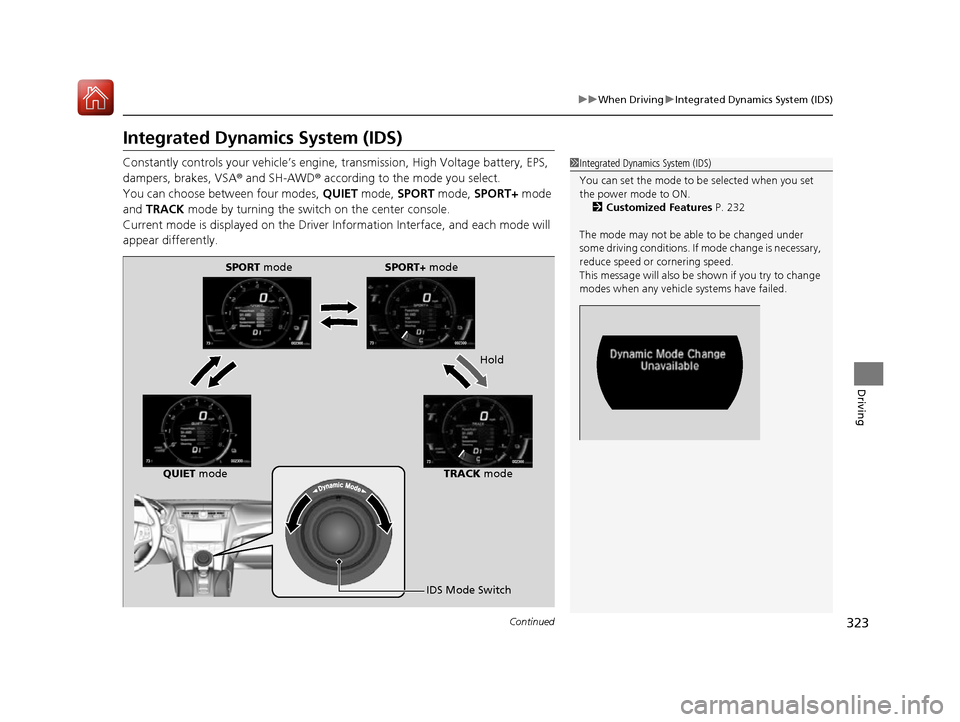
Integrated Dynamics System (IDS)
Constantly controls your vehicle’s engine , transmission, High Voltage battery, EPS,
dampers, brakes, VSA ® and SH-AWD® according to the mode you select.
You can choose between four modes, QUIET mode, SPORT mode, SPORT+ mode
and TRACK mode by turning the switch on the center console.
Current mode is displayed on the Driver Information Interface, and each mode will
appear differently.1 Integrated Dynamics System (IDS)
You can set the mode to be selected when you set
the power mode to ON.
2 Customized Features P. 232
The mode may not be able to be changed under
some driving conditions. If mode change is necessary,
reduce speed or cornering speed.
This message will also be shown if you try to change
modes when any vehicl e systems have failed.
SPORT mode SPORT+ mode
Hold
QUIET mode TRACK mode
IDS Mode Switch
17 NSX-31T6N6000.book 323 ページ 2016年4月22日 金曜日 午後3時44分
Page 326 of 473

325
uuWhen Driving uIntegrated Dynamics System (IDS)
Continued
Driving
Category QUIET SPORT SPORT+ TRACK
Powertrain
Control
Powertrain
Start-upEV operation is
prioritized, starts
quietly.Powerful start-up sound.
Powertrain
SoundMinimum sound for
quiet driving.Balanced sound for city
and highway use.Emotional sound for
increased feedback.Maximum sound for
driving on race track
with helmet on.
Hybrid
Battery
ManagementEfficiency and smooth
quiet operation are
prioritized.Balanced management
for response and
efficiency.Maximum electric assist
for acceleration.Battery charge is
managed to give
consistent lap time
during track use.
Hybrid
Battery A/C
CoolingBattery A/C cooling is
not used in this mode.Battery A/C cooling is active however cabin
cooling is prioritized.Battery A/C cooling is
active and may
compromise cabin
cooling.
EV OperationAvailableAvailableNot availableNot available
Driving Force
CharacterEase of force
modulation for
comfortable operation.Balanced tuning of
drive force request for
all driving scenarios.Maximum response.Linear response for
ease of cornering line
control.
DCT Shift
Map/
ResponseComfortable/low
engine speed priority.Balanced tuning for all
driving scenarios.Quick downshifts on
request, lower gears
are held for maximum
response.Gears are held to
maximize performance
on track. Shifts are very
fast.
SH-AWD®Quiet and comfortable
operation.Balanced setting for
secure every day use in
any condition.Traction and response
are prioritized for
performance on
winding roads.Settings are optimized
for dry surface, high
cornering load with
neutral handling
attitude.
17 NSX-31T6N6000.book 325 ページ 2016年4月22日 金曜日 午後3時44分
Page 328 of 473

327
uuWhen Driving uIntegrated Dynamics System (IDS)
Driving
SPORT+ mode optimizes dynamic response
from all powertrain and chassis systems -
perfect for your favorite winding road.
• EV operation is elimin ated while operating
in SPORT+ .
TRACK mode gives maximum, consistent
performance from dynamic systems during
track day lapping sessions. Hybrid battery
charge is maintained for consistent
performance.
• VSA ® OFF indicator is illuminated in TRACK
mode indicating reduced stability control.
This allows more body side slip and wheel
spin before VSA ® begins to operate.
• Integrated Dynamics switch must be turned
and held to the right for several seconds to
engage TRACK mode.
■SPORT+ Mode
■TRACK Mode1TRACK Mode
Before choosing the TRACK mode, carefully read the
information about high performance driving.
2 High-Performance Driving P. 303
During TRACK mode, the climate control system may
weaken its function to pr ioritize cooling the High
Voltage battery.
17 NSX-31T6N6000.book 327 ページ 2016年4月22日 金曜日 午後3時44分