audio Acura NSX 2017 Workshop Manual
[x] Cancel search | Manufacturer: ACURA, Model Year: 2017, Model line: NSX, Model: Acura NSX 2017Pages: 473, PDF Size: 16.01 MB
Page 196 of 473
Continued195
uuAudio System Basic Operation uPlaying SiriusXM ® Radio*
Features
Suggested channel listing received from SiriusXM ® can be displayed and selected.
1. Select the open/close icon to display a channel list.
2. Select the Channel List tab.
3. Select the featured channel list title you want to listen to.
u The selected channel list of the title is displayed.
4. Select the channel.
■Listening to Featured Channels1Listening to Featured Channels
Up to three featured channels by SiriusXM ® can be
displayed.
Featured channel lists are at the top of the channel
list.
17 NSX-31T6N6000.book 195 ページ 2016年4月22日 金曜日 午後3時44分
Page 197 of 473
uuAudio System Basic Operation uPlaying SiriusXM ® Radio*
196
Features
The system can record up to the last 60 minutes of your currently tuned channel’s
broadcast, as well as the last 30 minutes of your preset channel’s broadcast, starting
from the moment you turn the vehicle on. If you tuned to a preset channel, the
system records up to 60 minutes of a broadcast instead of up to 30 minutes. You
can rewind and replay the last 30 or 60 minutes of a broadcast.
1. Select .
2. Select Playback Position.
3. Move the time marker to the position you want to replay.
To play or pause on playback mode:
1. Select .
2. Select Play/Pause .
■Returning to real-time broadcast
1. Select .
2. Select Play Live Broadcast .
■Replay Function1Replay Function
The system starts storing broadcast in memory when
the power mode is turned ON. You can go back to
the program from that point.
You can no longer repl ay any program once the
power mode is turned off as it erases memory.
You can check how long the program has been
stored in memory from th e audio/information screen.
After 30 or 60 minutes of recording the system will
automatically start deleting the oldest data.
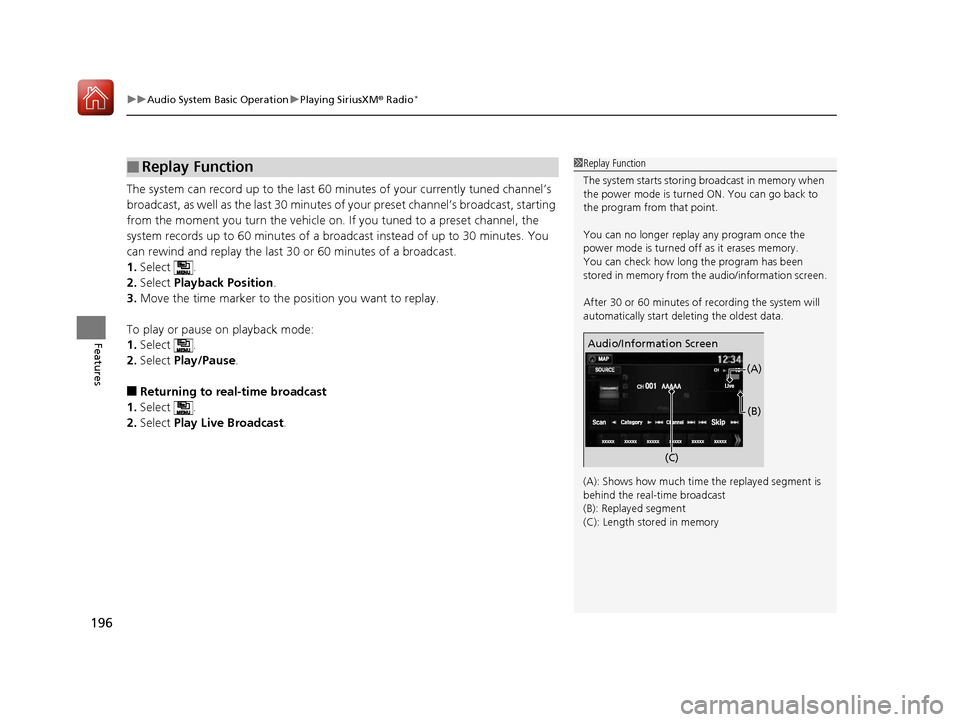
(A): Shows how much time the replayed segment is
behind the real-time broadcast
(B): Replayed segment
(C): Length stored in memory
Audio/Information Screen
(C) (B)
(A)
17 NSX-31T6N6000.book 196 ページ 2016年4月22日 金曜日 午後3時44分
Page 198 of 473
Continued197
uuAudio System Basic Operation uPlaying SiriusXM ® Radio*
Features
While listening to other channels, you can re ceive sports alerts such as scores from
the games of your favorite teams.
■To set up a favorite team 1.Select .
2. Select Settings .
3. Select Audio .
4. Select the SXM tab.
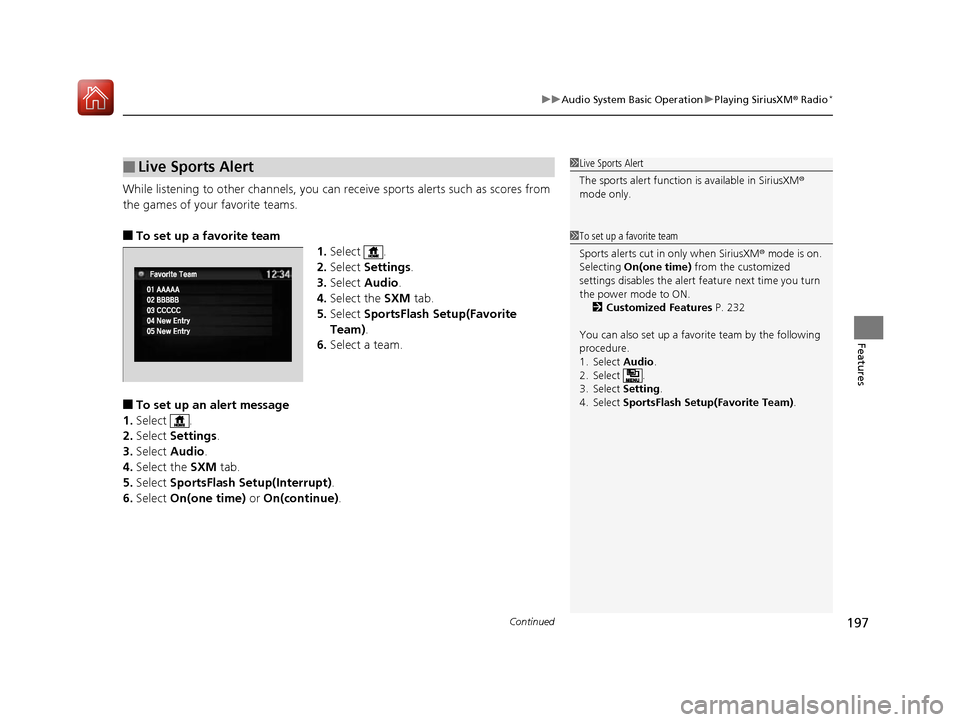
5. Select SportsFlash Set up(Favorite
Team) .
6. Select a team.
■To set up an alert message
1. Select .
2. Select Settings .
3. Select Audio .
4. Select the SXM tab.
5. Select SportsFlash Setup(Interrupt) .
6. Select On(one time) or On(continue) .
■Live Sports Alert1Live Sports Alert
The sports alert function is available in SiriusXM®
mode only.
1 To set up a favorite team
Sports alerts cut in only when SiriusXM ® mode is on.
Selecting On(one time) from the customized
settings disables the alert feature next time you turn
the power mode to ON.
2 Customized Features P. 232
You can also set up a favori te team by the following
procedure.
1. Select Audio .
2. Select .
3. Select Setting .
4. Select SportsFlash Setup(Favorite Team) .
17 NSX-31T6N6000.book 197 ページ 2016年4月22日 金曜日 午後3時44分
Page 199 of 473
uuAudio System Basic Operation uPlaying SiriusXM ® Radio*
198
Features
■To set up an alert beep
1. Select .
2. Select Settings .
3. Select Audio .
4. Select the SXM tab.
5. Select SportsFlash Setup( Interrupt Beep).
6. Select On.
■Traffic and Weather Information
You can receive traffic and weather information.
1. Select .
2. Select Settings .
3. Select Audio .
4. Select the SXM tab.
5. Select Traffic & Weather Setup .
6. Select the region.
u When you do not want to rece ive the information, select Unset.
Sample each channel on the selected mode for 10 seconds.
1. Select Scan.
2. Select Scan Channels .
u You can select the desired channel by songs using Scan Songs in Presets .
To turn off scan, select Cancel.
■Scan
1To set up an alert beep
You can also set up a alert beep by the following
procedure.
1. Select Audio .
2. Select .
3. Select Setting .
4. Select SportsFlash Setup(Interrupt Beep) .
1Traffic and Weather Information
The traffic and weather information function in
SiriusXM ® mode only.
You can also set up th e traffic and weather
information by the following procedure.
1. Select Audio .
2. Select .
3. Select Setting .
4. Select Traffic & Weather Setup .
1Scan
The “Scan Songs in Preset” function is based on
TuneScan
TM technology of SiriusXM ®.
The “Featured Channels ” function is based on
Featured Favorites
TM technology of SiriusXM ®.
TuneScan
TM and Featured FavoritesTM are registered
trademarks of SiriusXM ® Radio, Inc.
17 NSX-31T6N6000.book 198 ページ 2016年4月22日 金曜日 午後3時44分
Page 200 of 473

199
uuAudio System Basic Operation uPlaying an iPod
Continued
Features
Playing an iPod
Connect the iPod using your dock connector to the USB port, then select the iPod
mode.
2 USB Ports P. 163
*1:Some or all of the lists may not be displayed.
VOL (Volume) Icons
Select to adjust the volume.
(Back) Icon
Select to go back to the previous
display.
Song Icons
Select or to change songs.
Select and hold to move rapidly
within a song.
(Power/Audio) Icon
Select to turn th e audio system on
and off.
Open/Close Icon*1
Displays/hides the detailed
information.
(Menu) Icon
Select to display the menu items.
Cover Art Audio/Information ScreenPlay/Pause Icon
17 NSX-31T6N6000.book 199 ページ 2016年4月22日 金曜日 午後3時44分
Page 201 of 473
uuAudio System Basic Operation uPlaying an iPod
200
Features
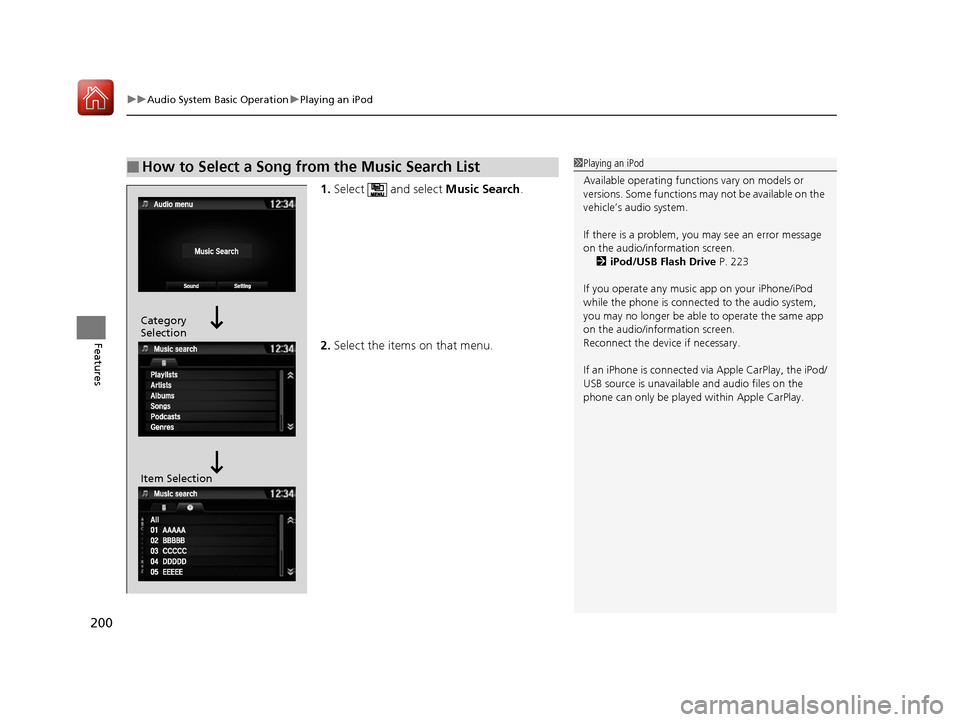
1. Select and select Music Search.
2. Select the items on that menu.
■How to Select a Song from the Music Search List1Playing an iPod
Available operating functi ons vary on models or
versions. Some functions ma y not be available on the
vehicle’s audio system.
If there is a problem, you may see an error message
on the audio/information screen. 2 iPod/USB Flash Drive P. 223
If you operate any musi c app on your iPhone/iPod
while the phone is connected to the audio system,
you may no longer be able to operate the same app
on the audio/information screen.
Reconnect the devi ce if necessary.
If an iPhone is connected via Apple CarP lay, the iPod/
USB source is unavailable and audio files on the
phone can only be played within Apple CarPlay.
Category
Selection
Item Selection
17 NSX-31T6N6000.book 200 ページ 2016年4月22日 金曜日 午後3時44分
Page 202 of 473
201
uuAudio System Basic Operation uPlaying an iPod
Features
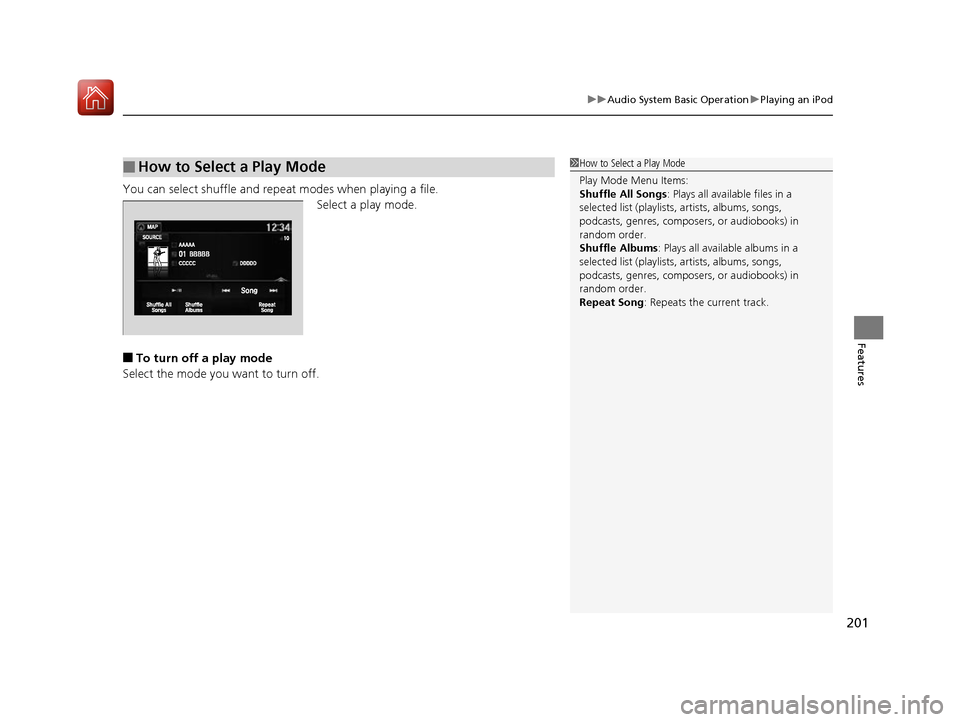
You can select shuffle and repeat modes when playing a file.
Select a play mode.
■To turn off a play mode
Select the mode you want to turn off.
■How to Select a Play Mode1 How to Select a Play Mode
Play Mode Menu Items:
Shuffle All Songs : Plays all available files in a
selected list (playlists, artists, albums, songs,
podcasts, genres, composers, or audiobooks) in
random order.
Shuffle Albums : Plays all available albums in a
selected list (playlists, artists, albums, songs,
podcasts, genres, composers, or audiobooks) in
random order.
Repeat Song : Repeats the current track.
17 NSX-31T6N6000.book 201 ページ 2016年4月22日 金曜日 午後3時44分
Page 203 of 473

202
uuAudio System Basic Operation uSong By VoiceTM (SBV)
Features
Song By VoiceTM (SBV)
Use SBV to search for and play music from your USB flash drive or iPod using voice
commands.
■To enable SBV
1.Select .
2. Select Settings .
3. Select System .
4. Select the Voice Recog tab.
5. Select Song by Voice .
6. Select On or Off .
Models with navigation system
1Song By VoiceTM (SBV)
Setting options:
•On (factory default): Song By VoiceTM commands
are available.
•Off : Disable the feature.
17 NSX-31T6N6000.book 202 ページ 2016年4月22日 金曜日 午後3時44分
Page 204 of 473
Continued203
uuAudio System Basic Operation uSong By VoiceTM (SBV)
Features
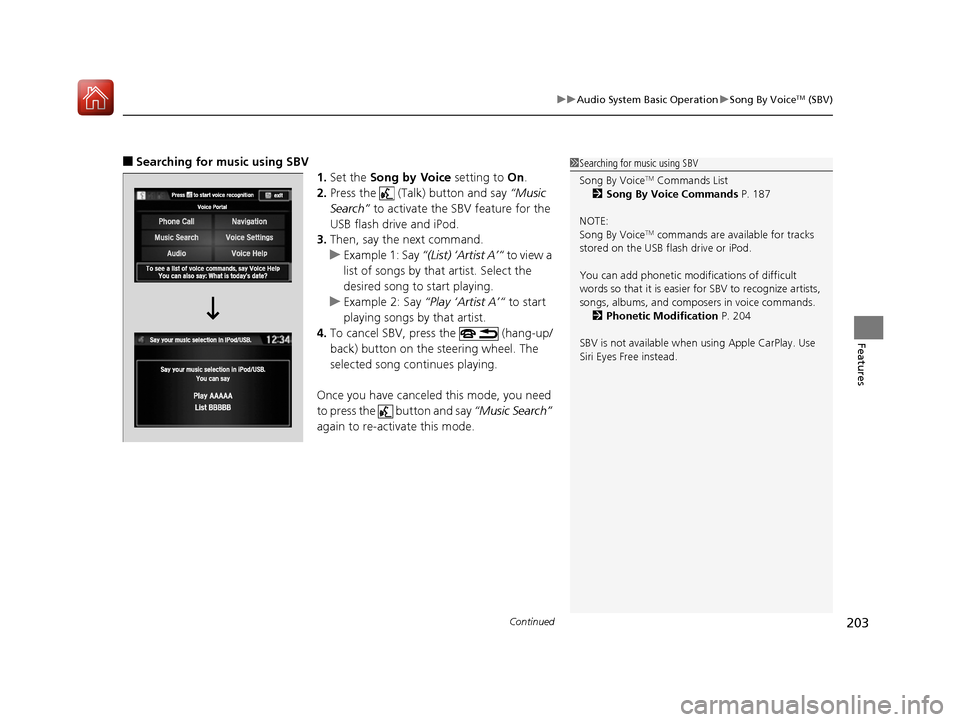
■Searching for music using SBV
1.Set the Song by Voice setting to On.
2. Press the (Talk) button and say “Music
Search” to activate the SBV feature for the
USB flash drive and iPod.
3. Then, say the next command.
u Example 1: Say “(List) ‘Artist A’“ to view a
list of songs by that artist. Select the
desired song to start playing.
u Example 2: Say “Play ‘Artist A’“ to start
playing songs by that artist.
4. To cancel SBV, press the (hang-up/
back) button on the steering wheel. The
selected song continues playing.
Once you have canceled this mode, you need
to press the button and say “Music Search”
again to re-activate this mode.1 Searching for music using SBV
Song By Voice
TM Commands List
2 Song By Voice Commands P. 187
NOTE:
Song By Voice
TM commands are available for tracks
stored on the USB flash drive or iPod.
You can add phonetic modi fications of difficult
words so that it is easier for SBV to recognize artists,
songs, albums, and composers in voice commands. 2 Phonetic Modification P. 204
SBV is not available when using Apple CarPlay. Use
Siri Eyes Free instead.
17 NSX-31T6N6000.book 203 ページ 2016年4月22日 金曜日 午後3時44分
Page 205 of 473
uuAudio System Basic Operation uSong By VoiceTM (SBV)
204
Features
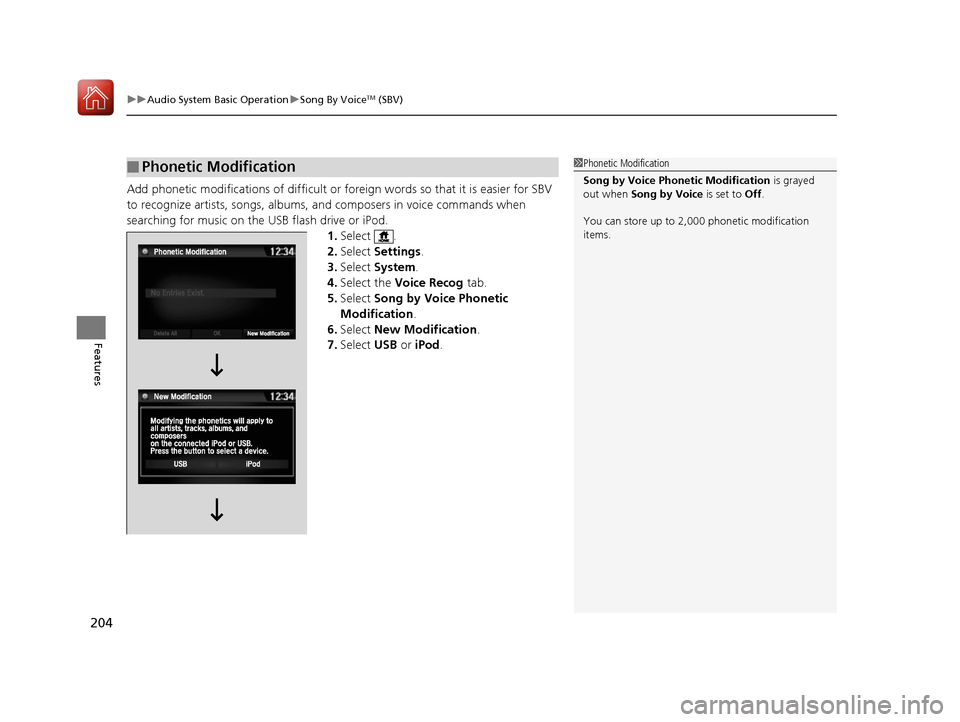
Add phonetic modifications of difficult or foreign words so that it is easier for SBV
to recognize artists, songs, albums, and composers in voice commands when
searching for music on the USB flash drive or iPod. 1.Select .
2. Select Settings .
3. Select System .
4. Select the Voice Recog tab.
5. Select Song by Voice Phonetic
Modification .
6. Select New Modification .
7. Select USB or iPod .
■Phonetic Modification1Phonetic Modification
Song by Voice Phonetic Modification is grayed
out when Song by Voice is set to Off.
You can store up to 2, 000 phonetic modification
items.
17 NSX-31T6N6000.book 204 ページ 2016年4月22日 金曜日 午後3時44分