Maintenance Acura NSX 2018 Manual PDF
[x] Cancel search | Manufacturer: ACURA, Model Year: 2018, Model line: NSX, Model: Acura NSX 2018Pages: 489, PDF Size: 27.64 MB
Page 424 of 489

Continued423
uuCleaning uExterior Care
Maintenance
A good coat of automotive body wax helps protect your vehicle’s paint from the
elements. Wax will wear off over time and expose your vehicle’s paint to the
elements, so reapply as necessary.
If you get gasoline, oil, engine coolant, or battery fluid on resin coated parts, they
may be stained or the coating may peel. Prom ptly wipe it away using a soft cloth and
clean water.
Wipe using a glass cleaner.
Aluminum is susceptible to deterioration caused by salt and other road
contaminants. When necessary, as early as possible use a sponge and mild detergent
to wipe away these contaminants. Do no t use a stiff brush or harsh chemicals
(including some commercial wheel cleaners). These can damage the protective finish
on aluminum alloy wheels, resulting in corrosion. Depending on the type of finish,
the wheels also may lo se their luster or appear burn ished. To avoid water stains,
wipe the wheels dry with a cloth while they are still wet.
■Applying Wax
■Maintaining the Bumpers and Other Resin Coated Parts
■Cleaning the Window
■Maintaining Aluminum Wheels
1 Applying Wax
NOTICE
Chemical solvents and strong cleaners can damage
the paint, metal, carbon fiber*, and plastic on your
vehicle. Wipe away spills immediately.
1 Maintaining the Bumpers an d Other Resin Coated Parts
Ask an authorized Acura NSX dealer about the
correct coating material when you want to repair the
painted surface of the parts made of resin.
* Not available on all models
18 NSX-31T6N6100.book 423 ページ 2017年10月27日 金曜日 午後1時39分
Page 425 of 489
424
uuCleaning uExterior Care
Maintenance
The inside lenses of exterior lights (headlig hts, brake lights, etc.) may fog temporarily
if you have driven in the rain. Dew condensation also may build up inside the lenses
when there is a significan t enough difference between the ambient and inside lens
temperatures (similar to vehicle windows fogging up in rainy conditions). These
conditions are natural processes, not stru ctural design problems in the exterior
lights.
Lens design characteristics may result in mo isture developing on the light lens frame
surfaces. This also is not a malfunction.
However, if you see large amounts of wa ter accumulation, or large water drops
building up inside the lenses, have your vehicle inspected by an authorized Acura
NSX dealer.
Keep the brake pads and rotors free of subs tances that are either abrasive or oil
based, as these substances can reduce braking power.
When driving in the presence of salt and/ or sand, briefly wash the rotor/pad surfaces
with low-pressure water, and then brake th e system dry to help maintain the brake
system’s performance.
Brake maintenance requires specialized kn owledge. We recommend maintenance
to be carried out by an au thorized Acura NSX dealer.
■Fogged Exterior Light Lenses
■Carbon Ceramic Brakes*
* Not available on all models
18 NSX-31T6N6100.book 424 ページ 2017年10月27日 金曜日 午後1時39分
Page 426 of 489
425
uuCleaning uExterior Care
Maintenance
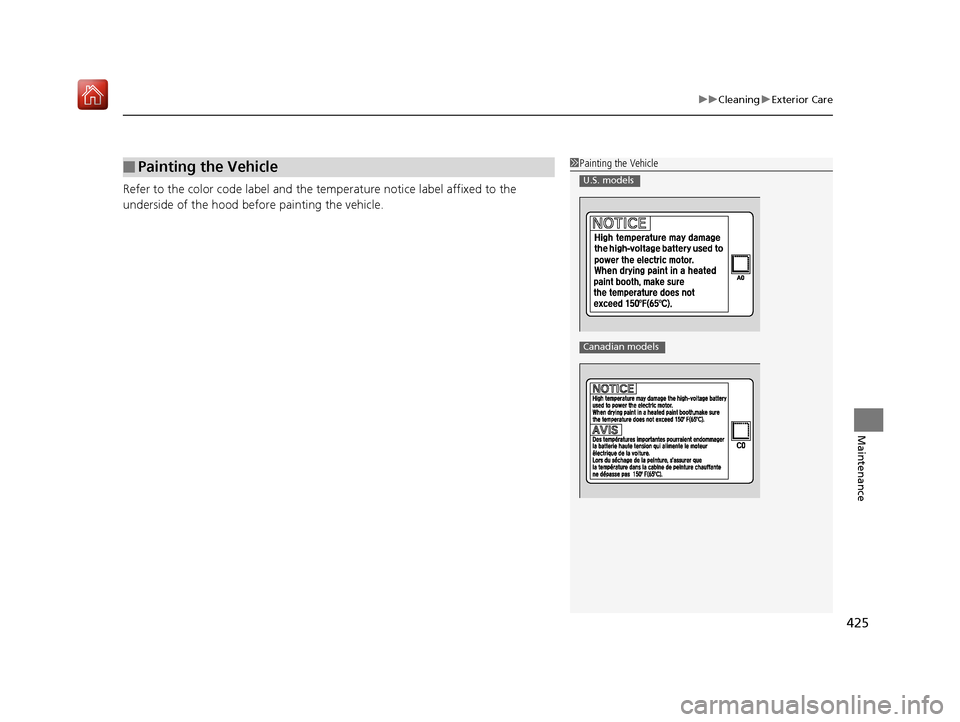
Refer to the color code label and the te mperature notice label affixed to the
underside of the hood before painting the vehicle.
■Painting the Vehicle1 Painting the Vehicle
U.S. models
Canadian models
18 NSX-31T6N6100.book 425 ページ 2017年10月27日 金曜日 午後1時39分
Page 427 of 489
426
Maintenance
Accessories and Modifications
Accessories
When installing accessories, check the following:
• Do not install accessories on the windshie ld. They can obstruct your view and
delay your reaction to driving conditions.
• Do not install any access ories over areas marked SRS AIRBAG, on the sides or
backs of the seats, on front or side pillars, or near the side windows.
Accessories installed in these areas may interfere with proper operation of the
vehicle’s airbags or may be propelled into you or another occupant if the airbags
deploy.
• Be sure electronic accessories do not over load electrical circuits or interfere with
proper operation of your vehicle.
2 Fuses P. 457
•Before installing any electronic accessory, have the installer contact an authorized
Acura NSX dealer for assistance. If possibl e, have an authorized Acura NSX dealer
inspect the final installation.
1 Accessories and Modifications
3WARNING
Improper accessories or modifications can
affect your vehicle’s handling, stability, and
performance, and cause a crash in which
you can be seriously hurt or killed.
Follow all instruction s in this owner’s
manual regarding accessories and
modifications.
3WARNING
Use of improperly designed, engineered or
manufactured high-voltage battery
assemblies could cause a fire in your
vehicle.
A vehicle fire could result in a crash or
injury.
Only use a genuine Acura high-voltage
battery assembly, or it s equivalent, in your
vehicle.
18 NSX-31T6N6100.book 426 ページ 2017年10月27日 金曜日 午後1時39分
Page 428 of 489
427
uuAccessories and Modifications uModifications
Maintenance
Modifications
Do not modify your vehicle in a manner that may affect its handling, stability, or
reliability, or install non-genuine Acura pa rts or accessories that may have a similar
effect.
Even minor modifications to vehicle systems can affect overall vehicle performance.
Always make sure all equipment is properly installed and maintained, and do not
make any modification to your vehicle or its systems that might cause your vehicle
to no longer meet federal, state, pr ovince, territory, and local regulations.
The on-board diagnostic port (OBD-II/SAE J1 962 connector) installed on this vehicle
is intended to be used with automobile system diagnostic devices or with other
devices that Acura has approved. Use of any other type of device may adversely
affect the vehicle’s electronic systems or allow them to be compromised, possibly
resulting in a system malfunction, drained battery, or other unexpected problems.
Do not modify or attempt to repair your vehicle’s high-voltage hybrid power system
or otherwise modify vehicle electrical syst ems. Disassembling or modifying electrical
equipment can result in a crash or a fire.
If you ever need to replace your vehicle's high-voltage battery assembly outside of
warranty coverage, we highly recommend that you only use a genuine Acura high-
voltage battery assembly. Genuine Acura high-voltage battery assemblies are
designed to work with your vehicle's hybrid power system and have been designed,
engineered and manufactured to avoid overcharging situations. Non-genuine high-
voltage battery assemblies may not have b een similarly designed, engineered and
manufactured, and installation of such assemb lies could result in overcharging, fires,
loss of power, or other conditions that may increase the likelihood of a crash or
injury.
18 NSX-31T6N6100.book 427 ページ 2017年10月27日 金曜日 午後1時39分
Page 429 of 489
428
Maintenance
Storage
Vehicle Storage
If you need to park your vehicle for an extended period (more than one month),
there are several things you should do to prepare it for storage. This helps reduce
possible deterioration of vehicle components and overall condition, which allows
you to get the vehicle back on the road with minimal delay. These are:
• If possible, store your NSX in a garage or enclosed area.
• Fill the fuel tank completely.
• Change the engine oil and filter.
• Wash and dry the exterior completely.
• Clean the interior. Make sure the carpeti ng, floor mats, etc., are completely dry.
• Put the transmission in
(P.
Release the parking brake.
• Leave one window open slightly (if the vehicle is being stored indoors).
• To maintain the low-voltage 12-volt battery, connect it to an accessory battery
charger. For more information on how to maintain your 12-volt battery, consult
an authorized Acura NSX dealer.
2 Checking the 12-Volt Battery P. 417
•If the vehicle is to be stored for a longer period of time, it should be supported on
jack stands to raise the tires off the ground to prevent tire flat spotting.
2Handling of the Jack P. 444
•Support the front wiper blad e arms with a folded towel or rag so they do not
touch the windshield.
• Cover the vehicle with a “breathable” co ver, one made from a porous material
such as cotton. Nonporous materials (suc h as plastic sheeting) may trap moisture,
which can damage the paint.
• If possible, remove the vehicle from th e garage or enclosed area, remove
covering, and periodically run the engi ne until it reaches full operating
temperature (the cooling fa n cycles on and off twice).
Preferably, do this once a month.
18 NSX-31T6N6100.book 428 ページ 2017年10月27日 金曜日 午後1時39分
Page 430 of 489
429
uuStorage uVehicle Storage
Maintenance
• To maintain the High Voltage battery, driv e your vehicle for more than 30 minutes
at least once every three months.
If road conditions are not suitable or de sirable for driving, the following alternate
procedure can be used to maintain the vehi cle's High Voltage battery if local idling
by-laws permit:
1. Remove the vehicle from the garage or enclosed area to prevent carbon
monoxide accumulation.
2 Carbon Monoxide Gas P. 67
2.Depress the brake pedal and press the ENGINE START/STOP button as you
normally would to start the vehicle.
3. Allow the vehicle to run for 30 minutes. Time spent at idle stop still counts as part
of this 30-minute run.
18 NSX-31T6N6100.book 429 ページ 2017年10月27日 金曜日 午後1時39分
Page 449 of 489
448
Handling the Unexpected
Jump Starting
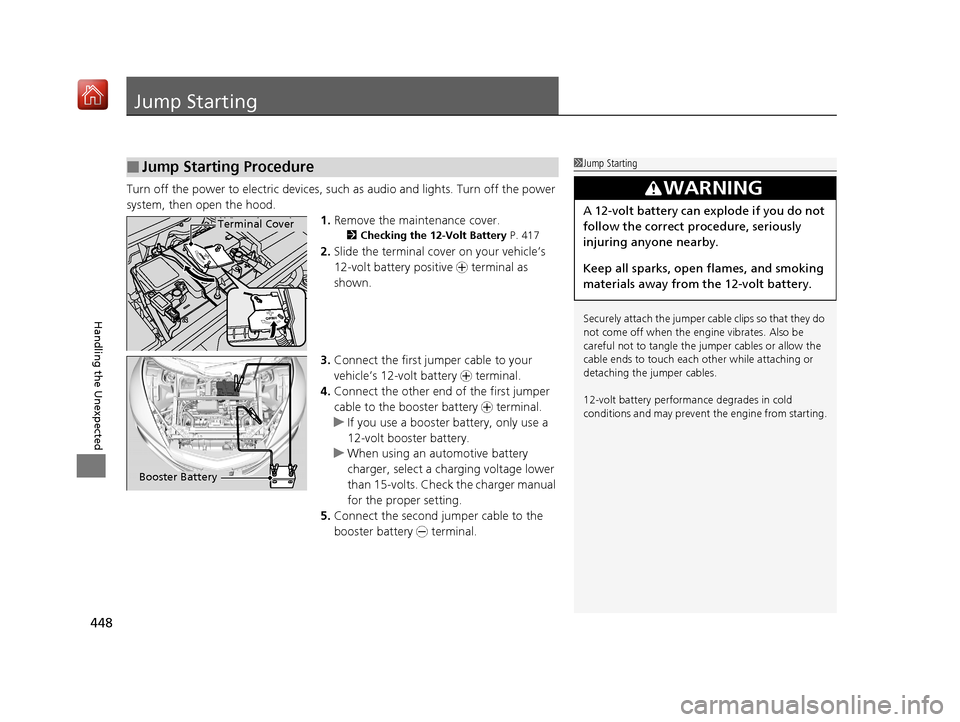
Turn off the power to electric devices, such as audio and lights. Turn off the power
system, then open the hood.1.Remove the maintenance cover.
2 Checking the 12-Volt Battery P. 417
2.Slide the terminal cover on your vehicle’s
12-volt battery positive + terminal as
shown.
3. Connect the first jump er cable to your
vehicle’s 12-volt battery + terminal.
4. Connect the other end of the first jumper
cable to the booster battery + terminal.
u If you use a booster battery, only use a
12-volt booster battery.
u When using an automotive battery
charger, select a charging voltage lower
than 15-volts. Check the charger manual
for the proper setting.
5. Connect the second jumper cable to the
booster battery - terminal.
■Jump Starting Procedure1Jump Starting
Securely attach the jumper cable clips so that they do
not come off when the engine vibrates. Also be
careful not to tangle the ju mper cables or allow the
cable ends to touch each other while attaching or
detaching the jumper cables.
12-volt battery performa nce degrades in cold
conditions and may prevent the engine from starting.
3WARNING
A 12-volt battery can explode if you do not
follow the correct procedure, seriously
injuring anyone nearby.
Keep all sparks, open flames, and smoking
materials away from the 12-volt battery.Terminal Cover
Booster Battery
18 NSX-31T6N6100.book 448 ページ 2017年10月27日 金曜日 午後1時39分
Page 459 of 489
458
uuFuses uFuse Locations
Handling the Unexpected
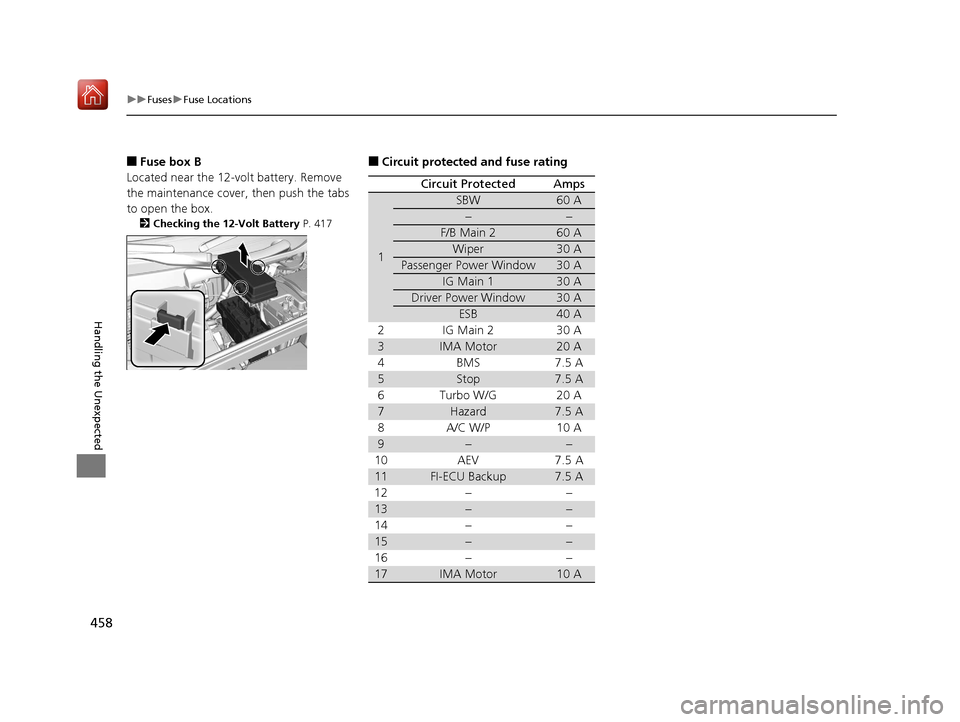
■Fuse box B
Located near the 12-volt battery. Remove
the maintenance cover, then push the tabs
to open the box.
2 Checking the 12-Volt Battery P. 417
■Circuit protected and fuse rating
Circuit ProtectedAmps
1
SBW60 A
−−
F/B Main 260 A
Wiper30 A
Passenger Power Window30 A
IG Main 130 A
Driver Power Window30 A
ESB40 A
2IG Main 230 A
3IMA Motor20 A
4BMS 7.5A
5Stop7.5 A
6 Turbo W/G 20 A
7Hazard7.5 A
8A/C W/P 10A
9−−
10 AEV 7.5 A
11FI-ECU Backup7.5 A
12 − −
13−−
14 − −
15−−
16 − −
17IMA Motor10 A
18 NSX-31T6N6100.book 458 ページ 2017年10月27日 金曜日 午後1時39分
Page 480 of 489
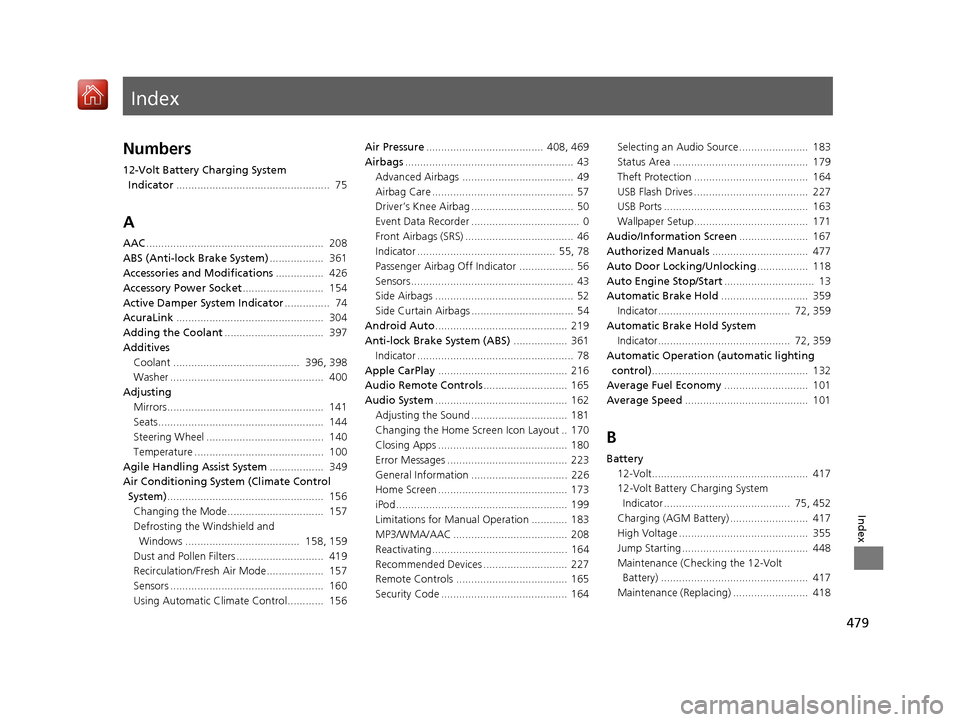
Index
479
Index
Index
Numbers
12-Volt Battery Charging System Indicator ................................................... 75
A
AAC........................................................... 208
ABS (Anti-lock Brake System) .................. 361
Accessories and Modifications ................ 426
Accessory Power Socket ........................... 154
Active Damper System Indicator ............... 74
AcuraLink ................................................. 304
Adding the Coolant ................................. 397
Additives Coolant .......................................... 396, 398
Washer ................................................... 400
Adjusting Mirrors.................................................... 141
Seats....................................................... 144
Steering Wheel ....................................... 140
Temperature ........................................... 100
Agile Handling Assist System .................. 349
Air Conditioning System (Climate Control System) .................................................... 156
Changing the Mode................................ 157
Defrosting the Windshield and Windows ...................................... 158, 159
Dust and Pollen Filters ............................. 419
Recirculation/Fresh Air Mode................... 157
Sensors ................................................... 160
Using Automatic Climate Control............ 156 Air Pressure
....................................... 408, 469
Airbags ........................................................ 43
Advanced Airbags ..................................... 49
Airbag Care ............................................... 57
Driver’s Knee Airbag .................................. 50
Event Data Recorder .................................... 0
Front Airbags (SRS) .................................... 46
Indicator .............................................. 55, 78
Passenger Airbag Off Indicator .................. 56
Sensors ...................................................... 43
Side Airbags .............................................. 52
Side Curtain Airbags .................................. 54
Android Auto ............................................ 219
Anti-lock Brake System (ABS) .................. 361
Indicator .................................................... 78
Apple CarPlay ........................................... 216
Audio Remote Controls ............................ 165
Audio System ............................................ 162
Adjusting the Sound ................................ 181
Changing the Home Screen Icon Layout .. 170
Closing Apps ........................................... 180
Error Messages ........................................ 223
General Information ................................ 226
Home Screen ........................................... 173
iPod ......................................................... 199
Limitations for Manua l Operation ............ 183
MP3/WMA/AAC ...................................... 208
Reactivating ............................................. 164
Recommended Devices ............................ 227
Remote Controls ..................................... 165
Security Code .......................................... 164 Selecting an Audio Source ....................... 183
Status Area ............................................. 179
Theft Protection ...................................... 164
USB Flash Drives ...................................... 227
USB Ports ................................................ 163
Wallpaper Setup...................................... 171
Audio/Information Screen ....................... 167
Authorized Manuals ................................ 477
Auto Door Locking/Unlocking ................. 118
Auto Engine Stop/Start .............................. 13
Automatic Brake Hold ............................. 359
Indicator............................................ 72, 359
Automatic Brake Hold System Indicator............................................ 72, 359
Automatic Operation (automatic lighting control) .................................................... 132
Average Fuel Economy ............................ 101
Average Speed ......................................... 101
B
Battery
12-Volt.................................................... 417
12-Volt Battery Charging System
Indicator .......................................... 75, 452
Charging (AGM Battery) .......................... 417
High Voltage ........................................... 355
Jump Starting .......................................... 448
Maintenance (Checking the 12-Volt Battery) ................................................. 417
Maintenance (Replacing) ......................... 418
18 NSX-31T6N6100.book 479 ページ 2017年10月27日 金曜日 午後1時39分