change time Acura NSX 2019 Owner's Guide
[x] Cancel search | Manufacturer: ACURA, Model Year: 2019, Model line: NSX, Model: Acura NSX 2019Pages: 485, PDF Size: 27.6 MB
Page 264 of 485
263
uuCustomized Features u
Features
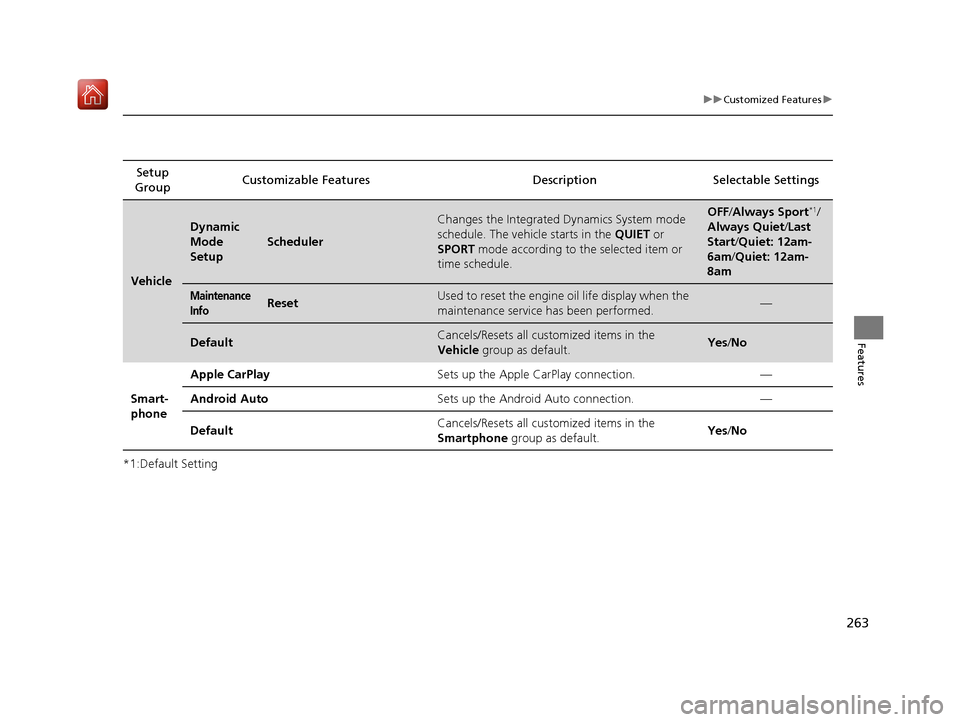
*1:Default SettingSetup
Group Customizable Features Description Selectable Settings
Vehicle
Dynamic
Mode
Setup
Scheduler
Changes the Integrated Dynamics System mode
schedule. The vehicle starts in the
QUIET or
SPORT mode according to the selected item or
time schedule.OFF /Always Sport*1/
Always Quiet /Last
Start/ Quiet: 12am-
6am/ Quiet: 12am-
8am
Maintenance
InfoResetUsed to reset the engine oil life display when the
maintenance service has been performed.—
DefaultCancels/Resets all customized items in the
Vehicle group as default.Yes/No
Smart-
phone Apple CarPlay
Sets up the Apple CarPlay connection. —
Android Auto Sets up the Android Auto connection. —
Default Cancels/Resets all customized items in the
Smartphone
group as default. Yes
/No
19 NSX-31T6N6200.book 263 ページ 2018年8月9日 木曜日 午前11時12分
Page 269 of 485
268
Features
Bluetooth® HandsFreeLink ®
Bluetooth® HandsFreeLink ® (HFL) allows you to place and receive phone calls using
your vehicle’s audio system, without handling your cell phone.
Using HFL
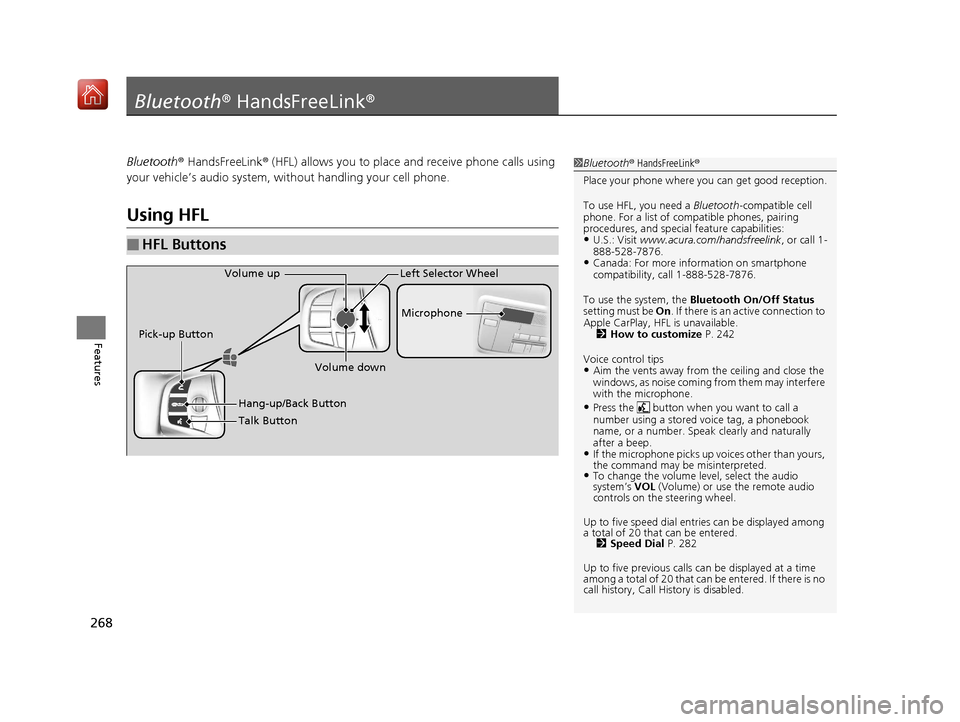
■HFL Buttons
1 Bluetooth ® HandsFreeLink ®
Place your phone where y ou can get good reception.
To use HFL, you need a Bluetooth-compatible cell
phone. For a list of compatible phones, pairing
procedures, and special feature capabilities:
•U.S.: Visit www.acura.com/handsfreelink , or call 1-
888-528-7876.
•Canada: For more info rmation on smartphone
compatibility, call 1-888-528-7876.
To use the system, the Bluetooth On/Off Status
setting must be On . If there is an active connection to
Apple CarPlay, H FL is unavailable.
2 How to customize P. 242
Voice control tips
•Aim the vents away from the ceiling and close the
windows, as noise coming fr om them may interfere
with the microphone.
•Press the button when you want to call a
number using a stored voice tag, a phonebook
name, or a number. Spe ak clearly and naturally
after a beep.
•If the microphone picks up vo ices other than yours,
the command may be misinterpreted.
•To change the volume level, select the audio
system’s VOL (Volume) or use the remote audio
controls on the steering wheel.
Up to five speed dial entries can be displayed among
a total of 20 that can be entered. 2 Speed Dial P. 282
Up to five previous calls can be displayed at a time
among a total of 20 that can be entered. If there is no
call history, Call History is disabled.
Talk Button Microphone
Hang-up/Back Button
Pick-up Button
Volume up
Volume down
Left Selector Wheel
19 NSX-31T6N6200.book 268 ページ 2018年8月9日 木曜日 午前11時12分
Page 278 of 485
Continued277
uuBluetooth ® HandsFreeLink ®u HFL Menus
Features
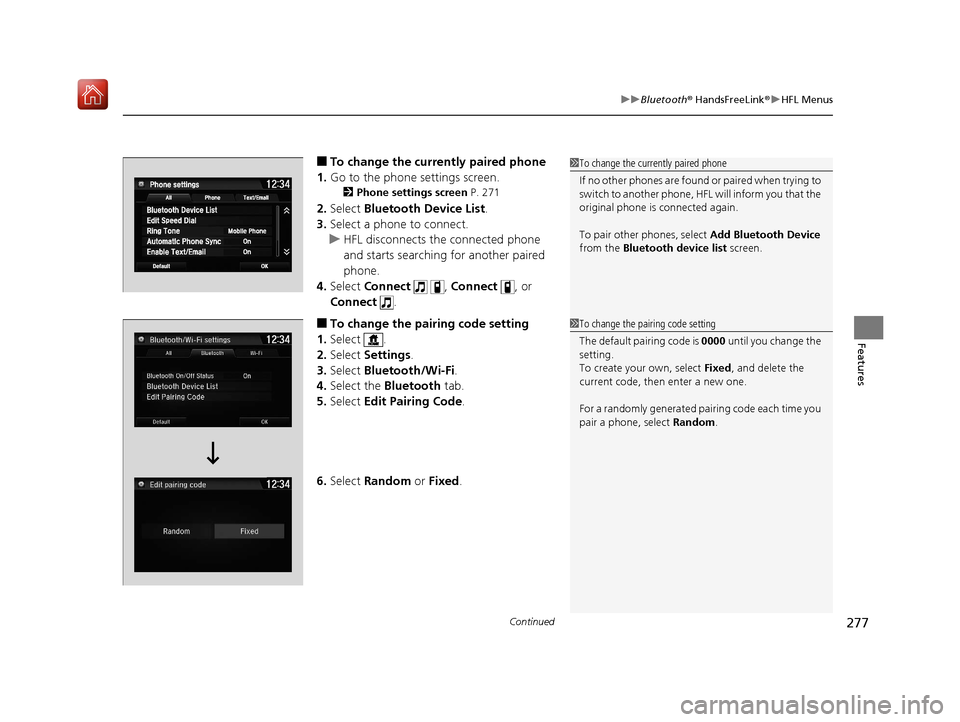
■To change the currently paired phone
1. Go to the phone settings screen.
2 Phone settings screen P. 271
2.Select Bluetooth Device List .
3. Select a phone to connect.
u HFL disconnects the connected phone
and starts searching for another paired
phone.
4. Select Connect , Connect , or
Connect .
■To change the pairing code setting
1. Select .
2. Select Settings .
3. Select Bluetooth/Wi-Fi .
4. Select the Bluetooth tab.
5. Select Edit Pairing Code .
6. Select Random or Fixed .
1To change the currently paired phone
If no other phones are found or paired when trying to
switch to another phone, HFL will inform you that the
original phone is connected again.
To pair other phones, select Add Bluetooth Device
from the Bluetooth device list screen.
1To change the pairing code setting
The default pair ing code is 0000 until you change the
setting.
To create your own, select Fixed, and delete the
current code, then enter a new one.
For a randomly generated pa iring code each time you
pair a phone, select Random.
19 NSX-31T6N6200.book 277 ページ 2018年8月9日 木曜日 午前11時12分
Page 325 of 485
324
uuWhen Driving uShifting
Driving
Shifting
Change the gear position in acco rdance with your driving needs.
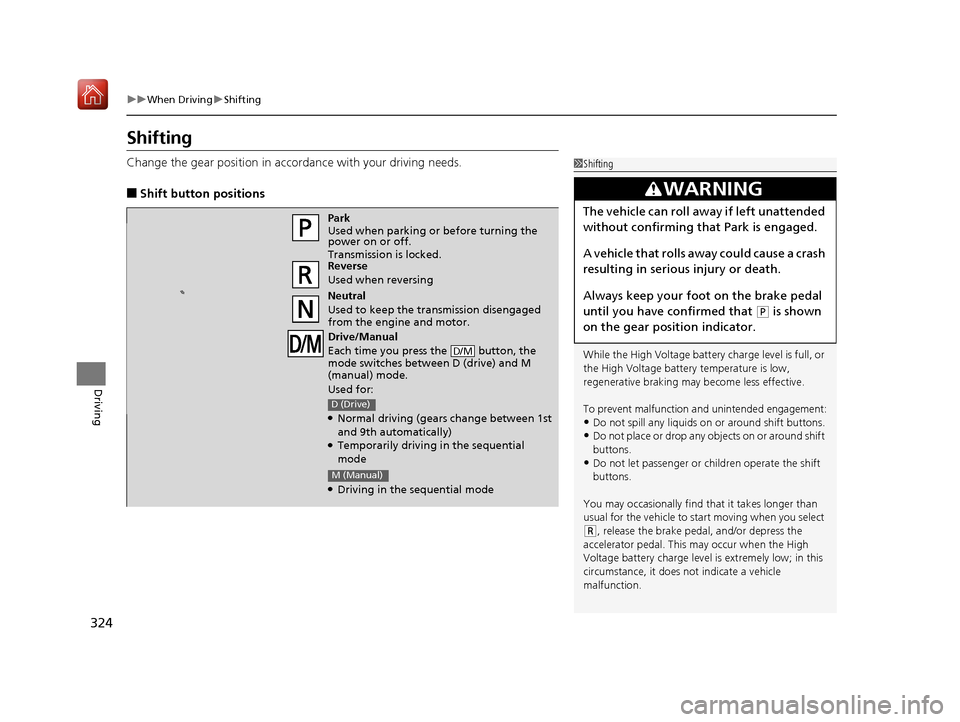
■Shift button positions
1Shifting
While the High Voltage battery charge level is full, or
the High Voltage battery temperature is low,
regenerative braking ma y become less effective.
To prevent malfunction an d unintended engagement:
•Do not spill any liquids on or around shift buttons.•Do not place or drop any objects on or around shift
buttons.
•Do not let passenger or children operate the shift
buttons.
You may occasionally find th at it takes longer than
usual for the vehicle to st art moving when you select
(R, release the brake peda l, and/or depress the
accelerator pedal. This may occur when the High
Voltage battery charge level is extremely low; in this
circumstance, it does not indicate a vehicle
malfunction.
3WARNING
The vehicle can roll aw ay if left unattended
without confirming that Park is engaged.
A vehicle that rolls away could cause a crash
resulting in seriou s injury or death.
Always keep your foot on the brake pedal
until you have confirmed that
( P is shown
on the gear position indicator.
Park
Used when parking or before turning the
power on or off.
Transmission is locked.
Reverse
Used when reversing
Neutral
Used to keep the transmission disengaged
from the engine and motor.
Drive/Manual
Each time you press the button, the
mode switches between D (drive) and M
(manual) mode.
Used for:
●Normal driving (gears change between 1st
and 9th automatically)
●Temporarily driving in the sequential
mode
●Driving in the sequential mode
D/M
D (Drive)
M (Manual)
19 NSX-31T6N6200.book 324 ページ 2018年8月9日 木曜日 午前11時12分
Page 327 of 485
uuWhen Driving uShifting
326
Driving
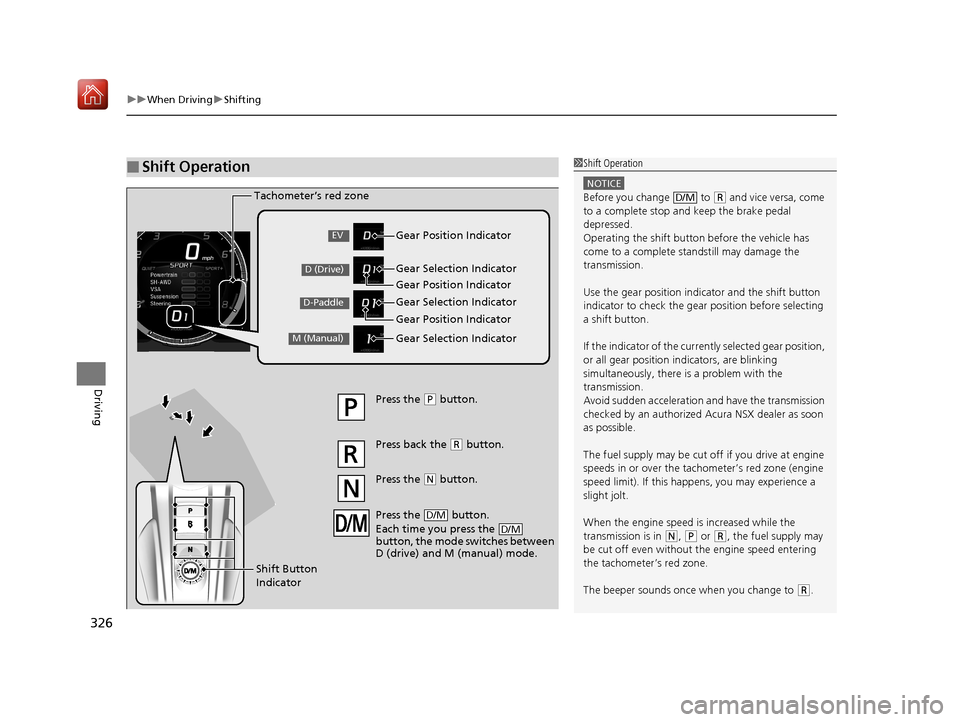
■Shift Operation1Shift Operation
NOTICE
Before you change to (R and vice versa, come
to a complete stop and keep the brake pedal
depressed.
Operating the shift button before the vehicle has
come to a complete standstill may damage the
transmission.
Use the gear position indicator and the shift button
indicator to check the gear position before selecting
a shift button.
If the indicator of the curren tly selected gear position,
or all gear position in dicators, are blinking
simultaneously, there is a problem with the
transmission.
Avoid sudden acceleration and have the transmission
checked by an authorized Acura NSX dealer as soon
as possible.
The fuel supply may be cut of f if you drive at engine
speeds in or over the tac hometer’s red zone (engine
speed limit). If this happe ns, you may experience a
slight jolt.
When the engine speed is increased while the
transmission is in
( N, (P or (R, the fuel supply may
be cut off even without the engine speed entering
the tachometer’s red zone.
The beeper sounds once when you change to
( R.
D/M
Gear Position Indicator
Tachometer’s red zone
Press the (
P button.
Press back the ( R button.
Press the
( N button.
Press the button.
Each time you press the
button, the mode switches between
D (drive) and M (manual) mode.
D/M
D/M
Shift Button
Indicator Gear Selection Indicator
Gear Position Indicator
Gear Selection Indicator
Gear Position Indicator
Gear Selection IndicatorEV
D (Drive)
D-Paddle
M (Manual)
19 NSX-31T6N6200.book 326 ページ 2018年8月9日 木曜日 午前11時12分
Page 345 of 485
uuWhen Driving uVehicle Stability Assist ® (VSA ®), aka Electronic Stability Control (ESC), System
344
Driving
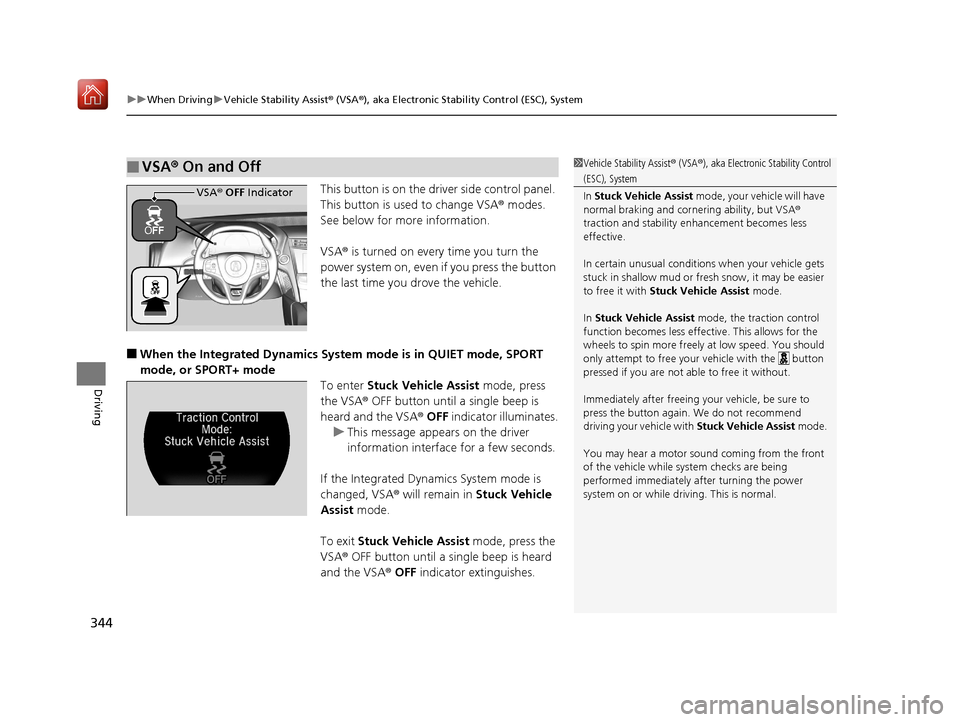
This button is on the driver side control panel.
This button is used to change VSA ® modes.
See below for more information.
VSA ® is turned on every time you turn the
power system on, even if you press the button
the last time you drove the vehicle.
■When the Integrated Dynamics System mode is in QUIET mode, SPORT
mode, or SPORT+ mode To enter Stuck Vehicle Assist mode, press
the VSA® OFF button until a single beep is
heard and the VSA ® OFF indicator illuminates.
u This message appears on the driver
information interface for a few seconds.
If the Integrated Dynamics System mode is
changed, VSA® will remain in Stuck Vehicle
Assist mode.
To exit Stuck Vehicle Assist mode, press the
VSA ® OFF button until a single beep is heard
and the VSA ® OFF indicator extinguishes.
■VSA ® On and Off1 Vehicle Stability Assist ® (VSA ®), aka Electronic Stability Control
(ESC), System
In Stuck Vehicle Assist mode, your vehicle will have
normal braking and corn ering ability, but VSA®
traction and stability enhancement becomes less
effective.
In certain unusual conditions when your vehicle gets
stuck in shallow mud or fr esh snow, it may be easier
to free it with Stuck Vehicle Assist mode.
In Stuck Vehicle Assist mode, the traction control
function becomes less effective. This allows for the
wheels to spin more freely at low speed. You should
only attempt to free your vehicle with the button
pressed if you are not able to free it without.
Immediately after freeing your vehicle, be sure to
press the button again. We do not recommend
driving your vehicle with Stuck Vehicle Assist mode.
You may hear a motor sound coming from the front
of the vehicle while system checks are being
performed immediately after turning the power
system on or while driving. This is normal.
VSA ® OFF Indicator
19 NSX-31T6N6200.book 344 ページ 2018年8月9日 木曜日 午前11時12分
Page 368 of 485
367
uuMulti-View Rear Camera uAbout Your Multi-View Rear Camera
Driving
You can view three different camera mo des on the rearview display. Touch the
appropriate icon to switch the mode. : Wide view mode
: Normal view mode
: Top down view mode
• If the last used viewing mode was Wide or Normal view mode, the same mode is
selected the next time you put the transmission into
(R.
• If Top down view mode was last used before you turned off the power system,
Wide view mode is selected next time you turn the power system on and put the
transmission into
(R.
• If Top down view mode was last used more than 10 seconds after you change
from
(R, Wide view mode is selected the ne xt time you put the transmission into
(R.
19 NSX-31T6N6200.book 367 ページ 2018年8月9日 木曜日 午前11時12分
Page 391 of 485
390
uuMaintenance Under the Hood and Hatch uOil Check
Maintenance
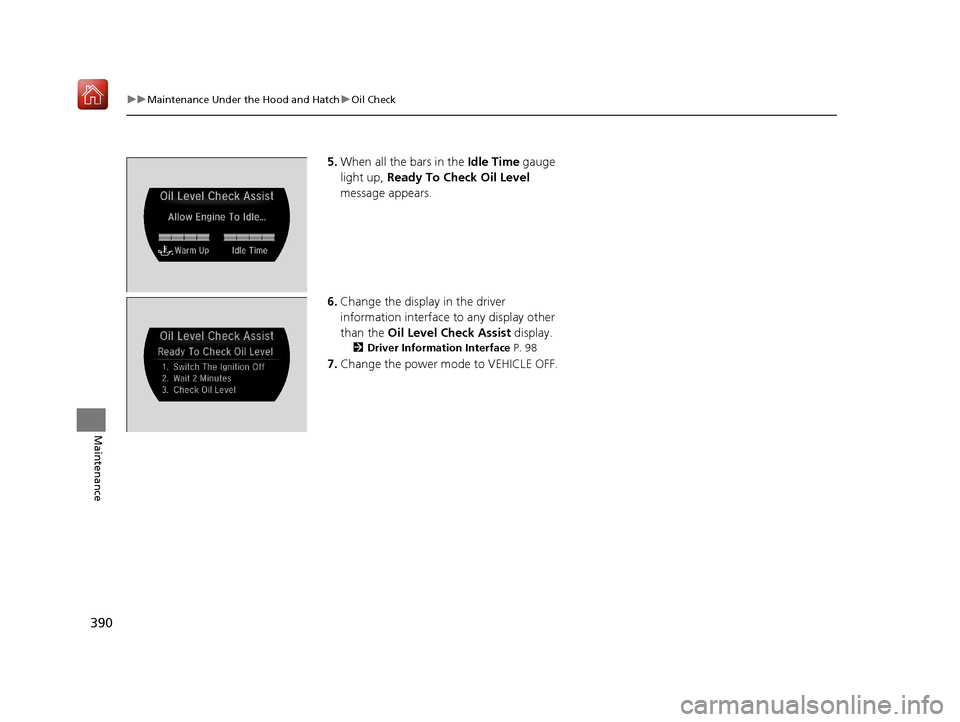
5. When all the bars in the Idle Time gauge
light up, Ready To Check Oil Level
message appears.
6. Change the display in the driver
information interface to any display other
than the Oil Level Check Assist display.
2Driver Information Interface P. 98
7.Change the power mode to VEHICLE OFF.
19 NSX-31T6N6200.book 390 ページ 2018年8月9日 木曜日 午前11時12分
Page 427 of 485
426
Maintenance
Storage
Vehicle Storage
If you need to park your vehicle for an extended period (more than one month),
there are several things you should do to prepare it for storage. This helps reduce
possible deterioration of vehicle components and overall condition, which allows
you to get the vehicle back on the road with minimal delay. These are:
• If possible, store your NSX in a garage or enclosed area.
• Fill the fuel tank completely.
• Change the engine oil and filter.
• Wash and dry the exterior completely.
• Clean the interior. Make sure the carpeti ng, floor mats, etc., are completely dry.
• Put the transmission in
(P.
Release the parking brake.
• Leave one window open slightly (if th e vehicle is being stored indoors).
• To maintain the low-voltage 12-volt battery, connect it to an accessory battery
charger. For more information on how to maintain your 12-volt battery, consult
an authorized Acura NSX dealer.
2 Checking the 12-Volt Battery P. 415
•If the vehicle is to be stored for a longer period of time, it should be supported on
jack stands to raise the tires off th e ground to prevent tire flat spotting.
2Handling of the Jack P. 442
•Support the front wiper blade arms with a folded towel or rag so they do not
touch the windshield.
• Cover the vehicle with a “breathable” co ver, one made from a porous material
such as cotton. Nonporous materials (suc h as plastic sheeting) may trap moisture,
which can damage the paint.
• If possible, remove the vehicle from th e garage or enclosed area, remove
covering, and periodically run the engi ne until it reaches full operating
temperature (the cooling fa n cycles on and off twice).
Preferably, do this once a month.
19 NSX-31T6N6200.book 426 ページ 2018年8月9日 木曜日 午前11時12分
Page 446 of 485
445
uuPower System Won’t Start uEmergency Power System Off
Handling the Unexpected
Emergency Power System Off
The ENGINE START/STOP button may be used to turn the power system off due to
an emergency situation even while driving. If you must turn the power system off,
do either of the following operations:
• Press and hold the ENGINE START/STOP button for about two seconds.
• Firmly press the ENGINE START/STOP button three times.
The steering wheel will not lock. However, because turning off the engine disables
the power assist the engine provides to the steering and braking systems, it will
require significantly more physical effort an d time to steer and slow the vehicle. Use
both feet on the brake pedal to slow down the vehicle and stop immediately in a
safe place.
The gear position auto matically changes to
(P after the vehicle comes to a complete
stop. Then, the power mode changes to VEHICLE OFF.
1 Emergency Power System Off
Do not press the button while driving unless it is
absolutely necessary for the power system to be
turned off.
19 NSX-31T6N6200.book 445 ページ 2018年8月9日 木曜日 午前11時12分