light Acura NSX 2019 Workshop Manual
[x] Cancel search | Manufacturer: ACURA, Model Year: 2019, Model line: NSX, Model: Acura NSX 2019Pages: 485, PDF Size: 27.6 MB
Page 320 of 485
319Continued
Driving
When Driving
Turning on the Power
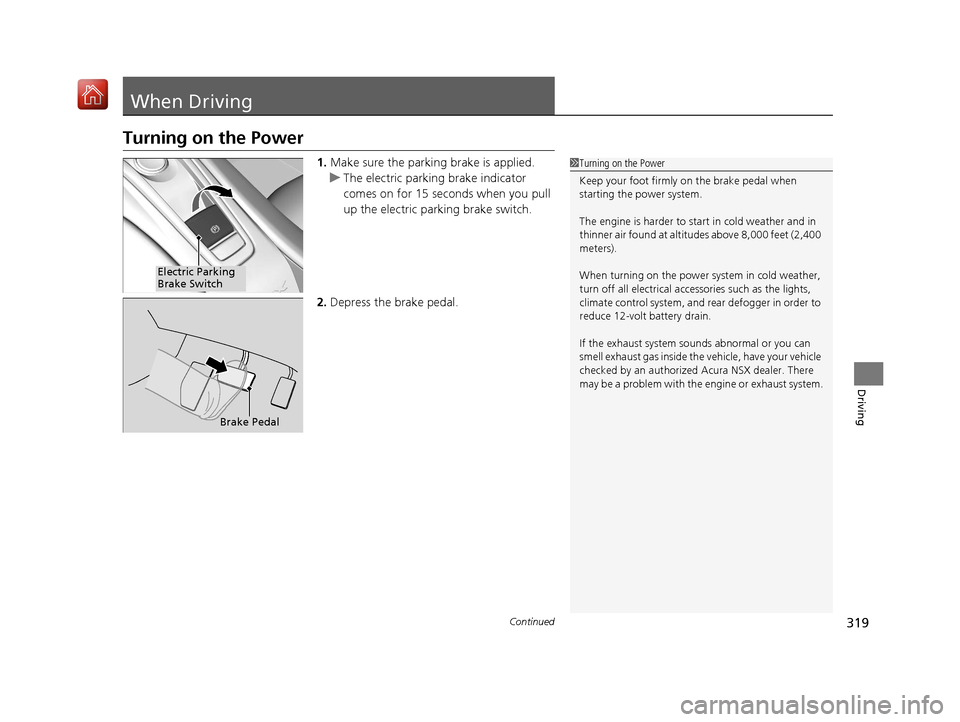
1.Make sure the parkin g brake is applied.
u The electric parking brake indicator
comes on for 15 seconds when you pull
up the electric parking brake switch.
2. Depress the brake pedal.1Turning on the Power
Keep your foot firmly on the brake pedal when
starting the power system.
The engine is harder to st art in cold weather and in
thinner air found at altitudes above 8,000 feet (2,400
meters).
When turning on the power system in cold weather,
turn off all electrical accessories such as the lights,
climate control system, and rear defogger in order to
reduce 12-volt battery drain.
If the exhaust system sounds abnormal or you can
smell exhaust gas inside the vehicle, have your vehicle
checked by an authorized Acura NSX dealer. There
may be a problem with the engine or exhaust system.
Electric Parking
Brake Switch
Brake Pedal
19 NSX-31T6N6200.book 319 ページ 2018年8月9日 木曜日 午前11時12分
Page 327 of 485
uuWhen Driving uShifting
326
Driving
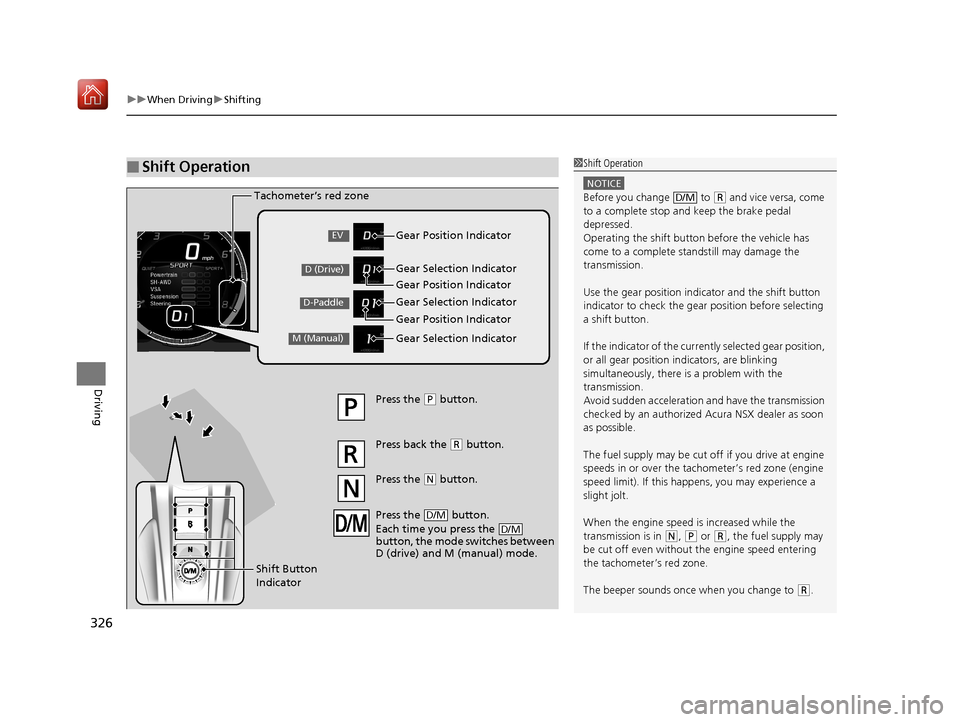
■Shift Operation1Shift Operation
NOTICE
Before you change to (R and vice versa, come
to a complete stop and keep the brake pedal
depressed.
Operating the shift button before the vehicle has
come to a complete standstill may damage the
transmission.
Use the gear position indicator and the shift button
indicator to check the gear position before selecting
a shift button.
If the indicator of the curren tly selected gear position,
or all gear position in dicators, are blinking
simultaneously, there is a problem with the
transmission.
Avoid sudden acceleration and have the transmission
checked by an authorized Acura NSX dealer as soon
as possible.
The fuel supply may be cut of f if you drive at engine
speeds in or over the tac hometer’s red zone (engine
speed limit). If this happe ns, you may experience a
slight jolt.
When the engine speed is increased while the
transmission is in
( N, (P or (R, the fuel supply may
be cut off even without the engine speed entering
the tachometer’s red zone.
The beeper sounds once when you change to
( R.
D/M
Gear Position Indicator
Tachometer’s red zone
Press the (
P button.
Press back the ( R button.
Press the
( N button.
Press the button.
Each time you press the
button, the mode switches between
D (drive) and M (manual) mode.
D/M
D/M
Shift Button
Indicator Gear Selection Indicator
Gear Position Indicator
Gear Selection Indicator
Gear Position Indicator
Gear Selection IndicatorEV
D (Drive)
D-Paddle
M (Manual)
19 NSX-31T6N6200.book 326 ページ 2018年8月9日 木曜日 午前11時12分
Page 333 of 485
uuWhen Driving uShifting
332
Driving
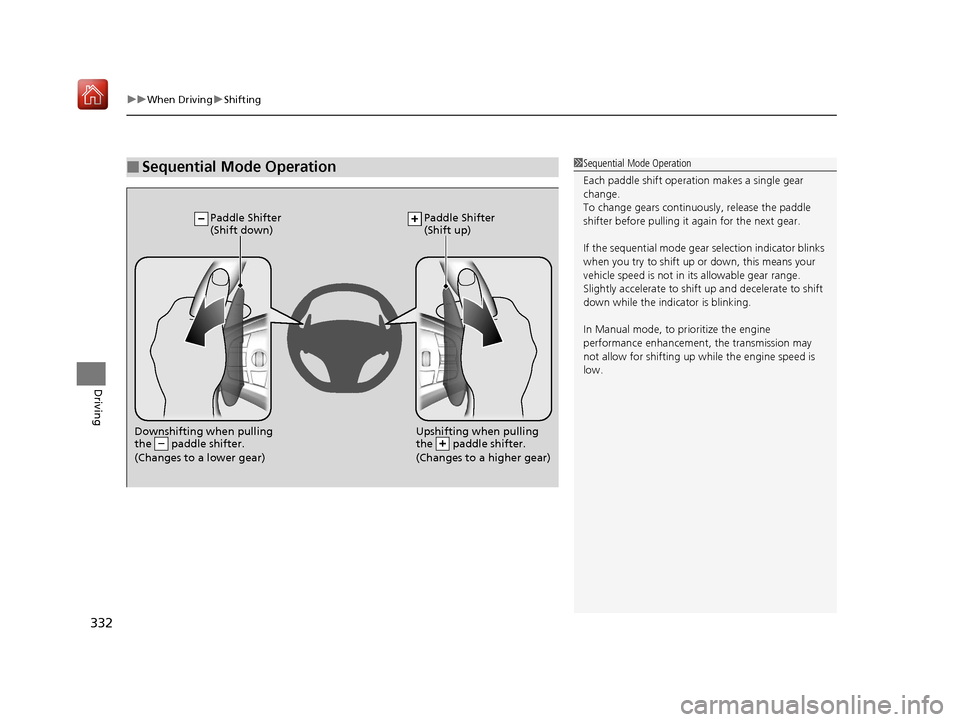
■Sequential Mode Operation1Sequential Mode Operation
Each paddle shift operation makes a single gear
change.
To change gears continuously, release the paddle
shifter before pulling it again for the next gear.
If the sequential mode gear selection indicator blinks
when you try to shift up or down, this means your
vehicle speed is not in its allowable gear range.
Slightly accelerate to shift up and decelerate to shift
down while the indi cator is blinking.
In Manual mode, to pr ioritize the engine
performance enhancement, the transmission may
not allow for shifting up while the engine speed is
low.
Downshifting when pulling
the paddle shifter.
(Changes to a lower gear)Upshifting when pulling
the paddle shifter.
(Changes to a higher gear)
Paddle Shifter
(Shift down) Paddle Shifter
(Shift up)
19 NSX-31T6N6200.book 332 ページ 2018年8月9日 木曜日 午前11時12分
Page 348 of 485
347
uuWhen Driving uAgile Handling Assist
Driving
Agile Handling Assist
Lightly brakes each of the front and rear wheels, as needed, when you turn the
steering wheel, and helps support the vehicle’s stability and performance during
cornering.1 Agile Handling Assist
The agile handling assist ca nnot enhance stability in
all driving situations. You still need to drive and
corner at speeds appropriate for the conditions and
always leave a sufficient margin of safety.
When the VSA ® system indicator comes on and stays
on while driving, the agil e handling assist does not
activate.
You may hear a sound coming from the front of the
car while the agile handling assi st is activated. This is
normal.
19 NSX-31T6N6200.book 347 ページ 2018年8月9日 木曜日 午前11時12分
Page 351 of 485
uuWhen Driving uTire Pressure Monitoring System (TPMS)
350
Driving
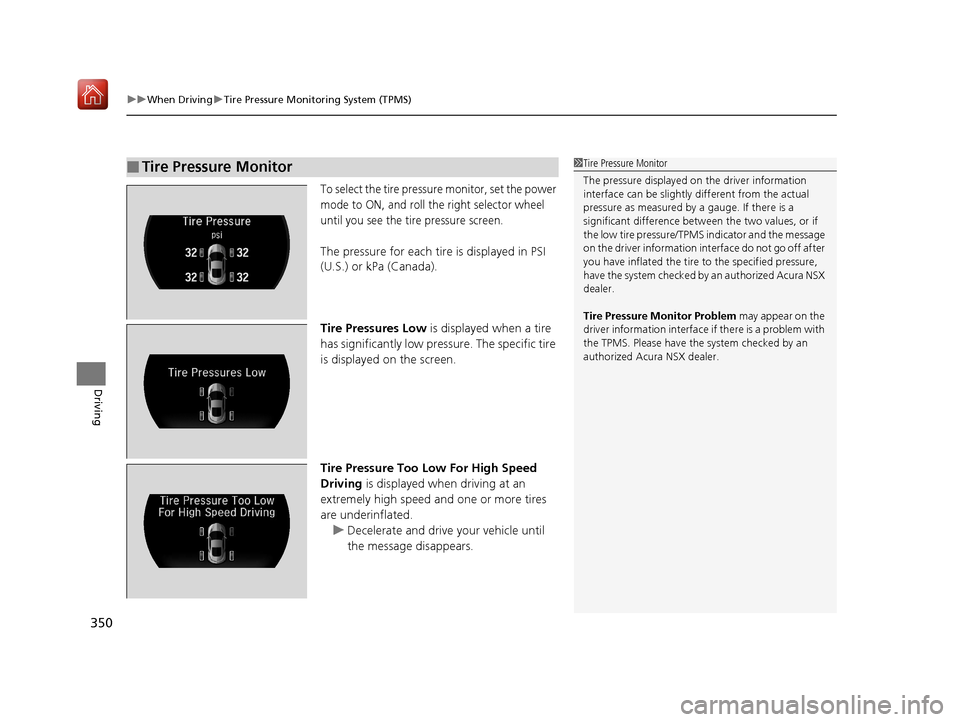
To select the tire pressure monitor, set the power
mode to ON, and roll the right selector wheel
until you see the tire pressure screen.
The pressure for each tire is displayed in PSI
(U.S.) or kPa (Canada).
Tire Pressures Low is displayed when a tire
has significantly low pressure. The specific tire
is displayed on the screen.
Tire Pressure Too Low For High Speed
Driving is displayed when driving at an
extremely high speed and one or more tires
are underinflated.
u Decelerate and drive your vehicle until
the message disappears.
■Tire Pressure Monitor1Tire Pressure Monitor
The pressure displayed on the driver information
interface can be slightly different from the actual
pressure as measured by a gauge. If there is a
significant di fference between the two values, or if
the low tire pressure/TPMS indicator and the message
on the driver information in terface do not go off after
you have inflated the tire to the specified pressure,
have the system checked by an authorized Acura NSX
dealer.
Tire Pressure Monitor Problem may appear on the
driver information interface if there is a problem with
the TPMS. Please have the system checked by an
authorized Acura NSX dealer.
19 NSX-31T6N6200.book 350 ページ 2018年8月9日 木曜日 午前11時12分
Page 354 of 485
353
uuWhen Driving uHigh Voltage Battery
Driving
High Voltage Battery
The High Voltage battery gradually discharges when the vehicle is not in use. As a
result, if your vehicle is parked for an ex tended period of time, the battery level may
get low. Keeping the High Voltage battery’s charge level low can shorten its life.
To maintain the High Voltage battery, driv e your vehicle for more than 30 minutes
to recharge it at least once every three mo nths. Also, try to park in shaded areas
instead of direct sunlight.
2 Storage P. 426
19 NSX-31T6N6200.book 353 ページ 2018年8月9日 木曜日 午前11時12分
Page 357 of 485
uuBraking uBrake System
356
Driving
Your vehicle is equipped with disc brakes at all four wh eels. The brake assist system
increases the stopping force when you depress the brake pedal hard in an
emergency situation. The anti-lock brake system (ABS) helps you retain steering
control when braking very hard.
2 Brake Assist System P. 360
2 Anti-lock Brake System (ABS) P. 359
■Brake squeal
To satisfy the performance under a wide range of driving conditions, a high-
performance braking system is equipped on your vehicle. You may hear the brake
squeal under certain conditions, such as vehicle speed, deceleration, humidity, and
so on. This is not a malfunction.
■Foot Brake1 Foot Brake
Check the brakes after driving through deep water,
or if there is a buildup of road surface water. If
necessary, dry the brakes by lightly depressing the
pedal several times.
If you hear a continuous me tallic friction sound when
applying the brakes, this is caused by the brake wear
indicator rubbing on the brake rotor and indicates
that the brake pads need to replaced. Have your
vehicle checked by an authorized Acura NSX dealer.
If you hear only an occasion al squeak or squeal when
you initially apply the brake pedal, this may be normal
and caused by high frequen cy vibration of the brake
pads against the rotating brake disc.
Constantly using the brak e pedal while going down a
long hill builds up heat, which reduces the brake
effectiveness. Apply regene rative braking by taking
your foot off the accelera tor pedal and downshifting
to a lower gear.
Do not rest your foot on the brake pedal while
driving, as it will lightly apply the brakes and cause
them to lose effectiveness over time and reduce pad
life. It will also conf use drivers behind you.
Models with iron brake discs
Models with iron brake discs
19 NSX-31T6N6200.book 356 ページ 2018年8月9日 木曜日 午前11時12分
Page 358 of 485
Continued357
uuBraking uBrake System
Driving
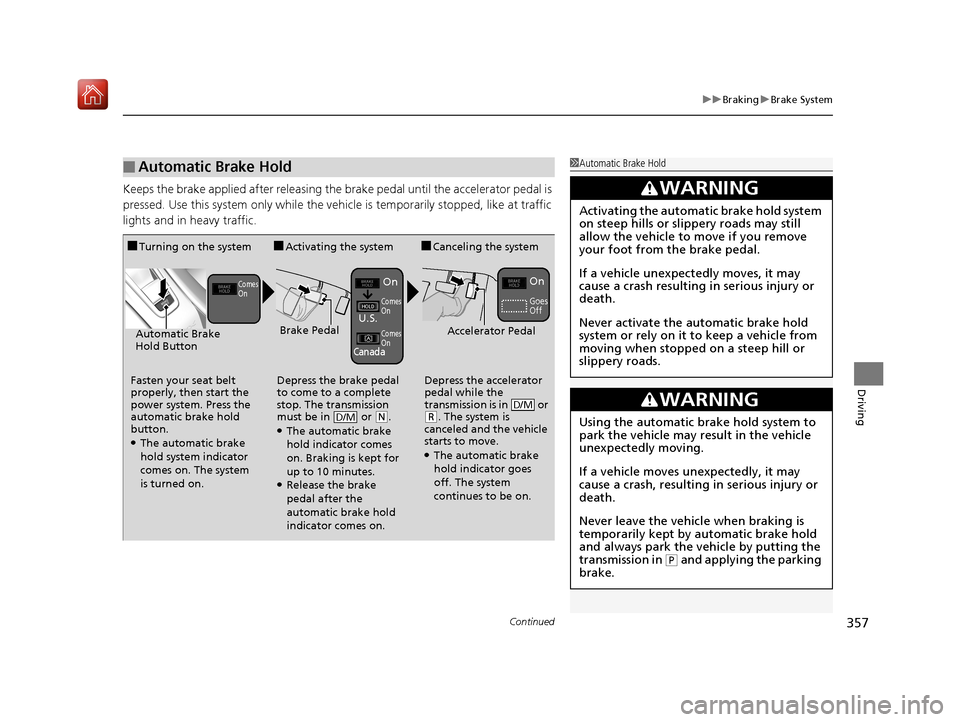
Keeps the brake applied after releasing the brake pedal until the accelerator pedal is
pressed. Use this system only while the ve hicle is temporarily stopped, like at traffic
lights and in heavy traffic.
■Automatic Brake Hold1 Automatic Brake Hold
3WARNING
Activating the automatic brake hold system
on steep hills or slippery roads may still
allow the vehicle to move if you remove
your foot from the brake pedal.
If a vehicle unexpectedly moves, it may
cause a crash resulting in serious injury or
death.
Never activate the automatic brake hold
system or rely on it to keep a vehicle from
moving when stopped on a steep hill or
slippery roads.
3WARNING
Using the automatic brake hold system to
park the vehicle may result in the vehicle
unexpectedly moving.
If a vehicle moves unexpectedly, it may
cause a crash, resulting in serious injury or
death.
Never leave the vehicle when braking is
temporarily kept by automatic brake hold
and always park the vehicle by putting the
transmission in
( P and applying the parking
brake.
■Turning on the system
Fasten your seat belt
properly, then start the
power system. Press the
automatic brake hold
button.
●The automatic brake
hold system indicator
comes on. The system
is turned on.
■Activating the system
Depress the brake pedal
to come to a complete
stop. The transmission
must be in or
( N.●The automatic brake
hold indicator comes
on. Braking is kept for
up to 10 minutes.
●Release the brake
pedal after the
automatic brake hold
indicator comes on.
D/M
■Canceling the system
Depress the accelerator
pedal while the
transmission is in or
( R. The system is
canceled and the vehicle
starts to move.
●The automatic brake
hold indicator goes
off. The system
continues to be on.
D/M
Accelerator PedalBrake PedalAutomatic Brake
Hold Button
Goes
Off
On On
U.S.
Canada
Comes
On
Comes
On
Comes
On
19 NSX-31T6N6200.book 357 ページ 2018年8月9日 木曜日 午前11時12分
Page 365 of 485
364
uuParking Your Vehicle uParking Sensor System*
Driving
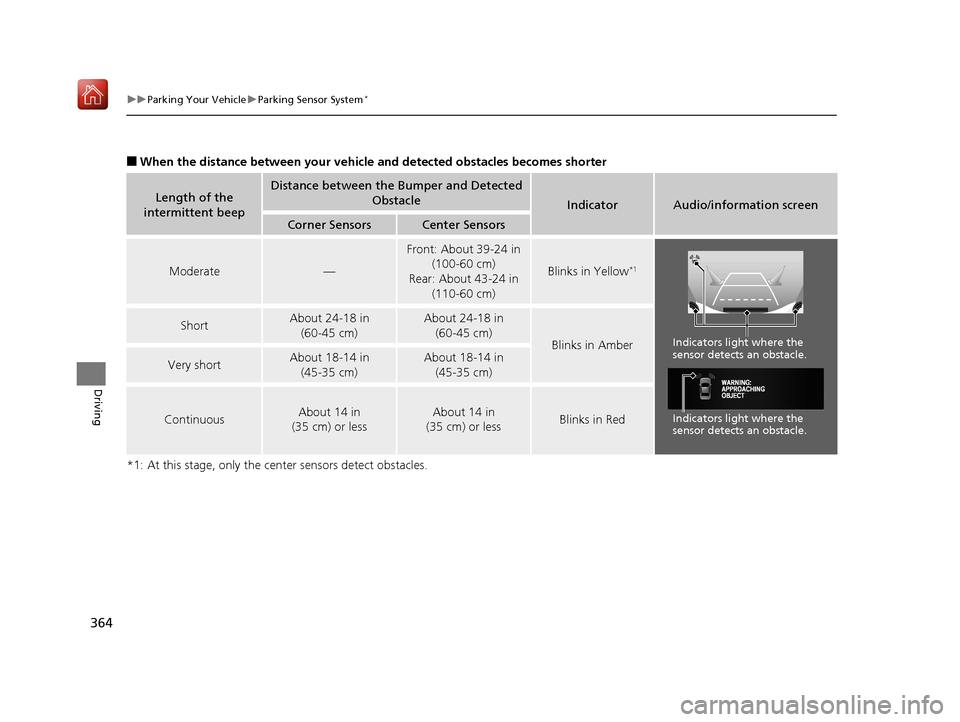
■When the distance between your vehicle and detected obstacles becomes shorter
*1: At this stage, only the center sensors detect obstacles.
Length of the
intermittent beepDistance between the Bumper and Detected Obstacle
IndicatorAudio/information screen
Corner SensorsCenter Sensors
Moderate—
Front: About 39-24 in (100-60 cm)
Rear: About 43-24 in (110-60 cm)
Blinks in Yellow*1
ShortAbout 24-18 in (60-45 cm) About 24-18 in (60-45 cm)
Blinks in Amber
Very shortAbout 18-14 in
(45-35 cm) About 18-14 in (45-35 cm)
ContinuousAbout 14 in
(35 cm) or lessAbout 14 in
(35 cm) or lessBlinks in Red
Indicators light where the
sensor detects an obstacle.
Indicators light where the
sensor detects an obstacle.
19 NSX-31T6N6200.book 364 ページ 2018年8月9日 木曜日 午前11時12分
Page 367 of 485
366
Driving
Multi-View Rear Camera
About Your Multi-View Rear Camera
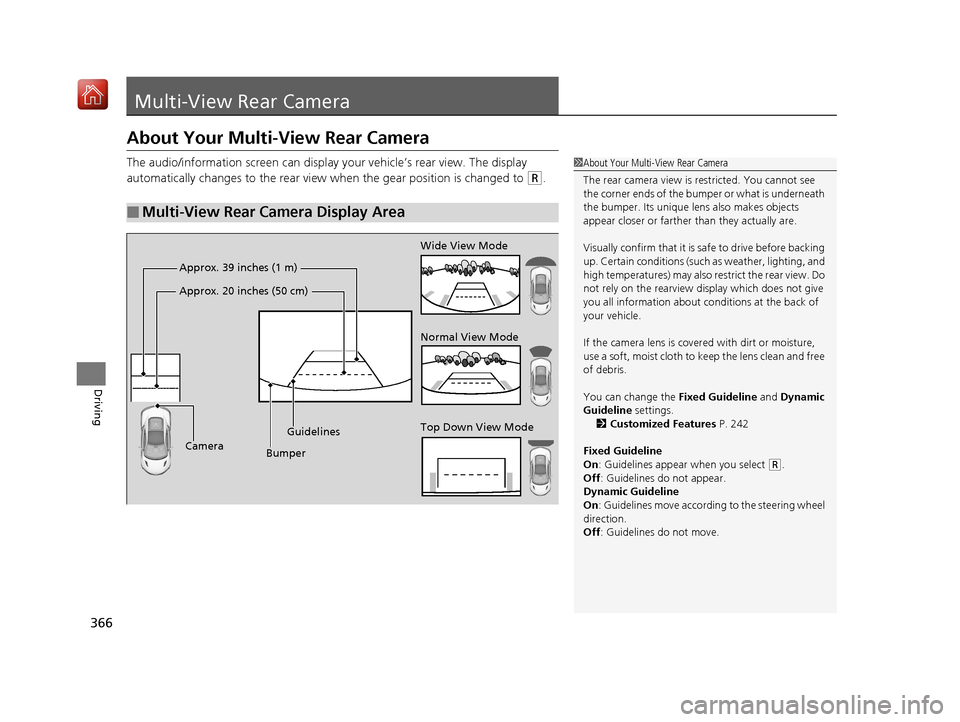
The audio/information screen can display your vehicle’s rear view. The display
automatically changes to the rear view when the gear position is changed to
(R.
■Multi-View Rear Camera Display Area
1About Your Multi-View Rear Camera
The rear camera view is restricted. You cannot see
the corner ends of the bum per or what is underneath
the bumper. Its unique le ns also makes objects
appear closer or farther than they actually are.
Visually confirm that it is safe to drive before backing
up. Certain conditions (such as weather, lighting, and
high temperatures) may also restrict the rear view. Do
not rely on the rearview display which does not give
you all information about conditions at the back of
your vehicle.
If the camera lens is cove red with dirt or moisture,
use a soft, moist cloth to keep the lens clean and free
of debris.
You can change the Fixed Guideline and Dynamic
Guideline settings. 2 Customized Features P. 242
Fixed Guideline
On : Guidelines appear when you select
(R.
Off : Guidelines do not appear.
Dynamic Guideline
On : Guidelines move according to the steering wheel
direction.
Off : Guidelines do not move.
Top Down View Mode Normal View Mode Wide View Mode
Guidelines
Bumper
Camera
Approx. 39 inches (1 m)
Approx. 20 inches (50 cm)
19 NSX-31T6N6200.book 366 ページ 2018年8月9日 木曜日 午前11時12分