set Acura NSX 2019 Workshop Manual
[x] Cancel search | Manufacturer: ACURA, Model Year: 2019, Model line: NSX, Model: Acura NSX 2019Pages: 485, PDF Size: 27.6 MB
Page 150 of 485
149Continued
Controls
Interior Lights/Interior Convenience Items
Interior Lights
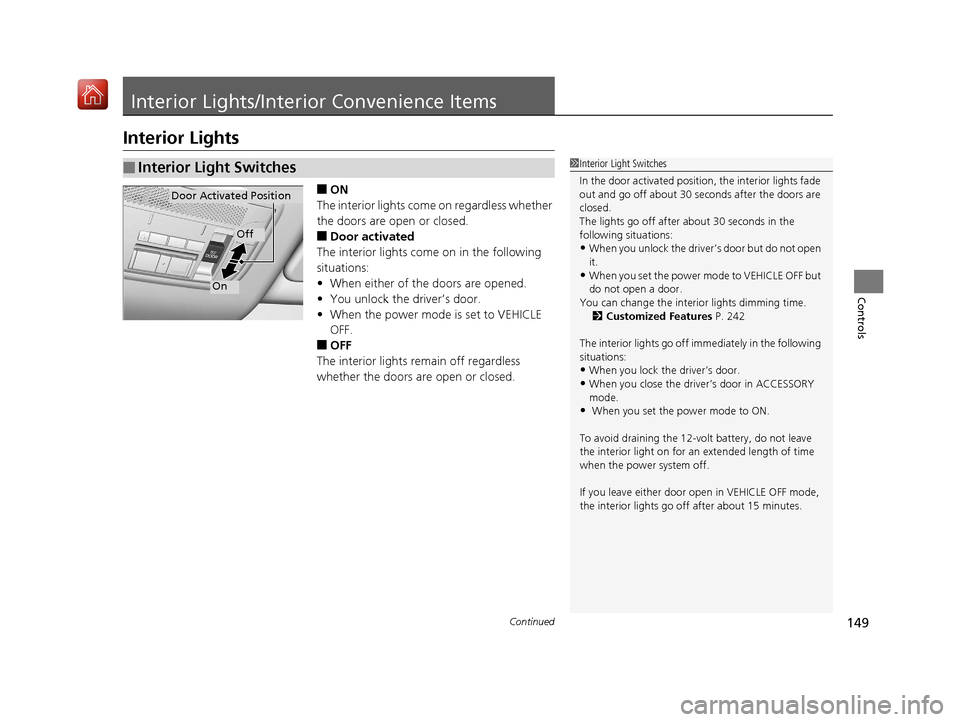
■ON
The interior lights come on regardless whether
the doors are open or closed.
■Door activated
The interior lights come on in the following
situations:
• When either of the doors are opened.
• You unlock the driver’s door.
• When the power mode is set to VEHICLE
OFF.
■OFF
The interior lights remain off regardless
whether the doors are open or closed.
■Interior Light Switches1 Interior Light Switches
In the door activated position, the interior lights fade
out and go off about 30 seconds after the doors are
closed.
The lights go off after about 30 seconds in the
following situations:
•When you unlock the driver’s door but do not open
it.
•When you set the power mode to VEHICLE OFF but
do not open a door.
You can change the interi or lights dimming time.
2 Customized Features P. 242
The interior lights go off i mmediately in the following
situations:
•When you lock the driver’s door.
•When you close the driver’s door in ACCESSORY
mode.
• When you set the power mode to ON.
To avoid draining the 12-vo lt battery, do not leave
the interior light on for an extended length of time
when the power system off.
If you leave either door open in VEHICLE OFF mode,
the interior lights go of f after about 15 minutes.
Door Activated Position
Off
On
19 NSX-31T6N6200.book 149 ページ 2018年8月9日 木曜日 午前11時12分
Page 154 of 485
153
uuInterior Lights/Interior Convenience Items uInterior Convenience Items
Controls
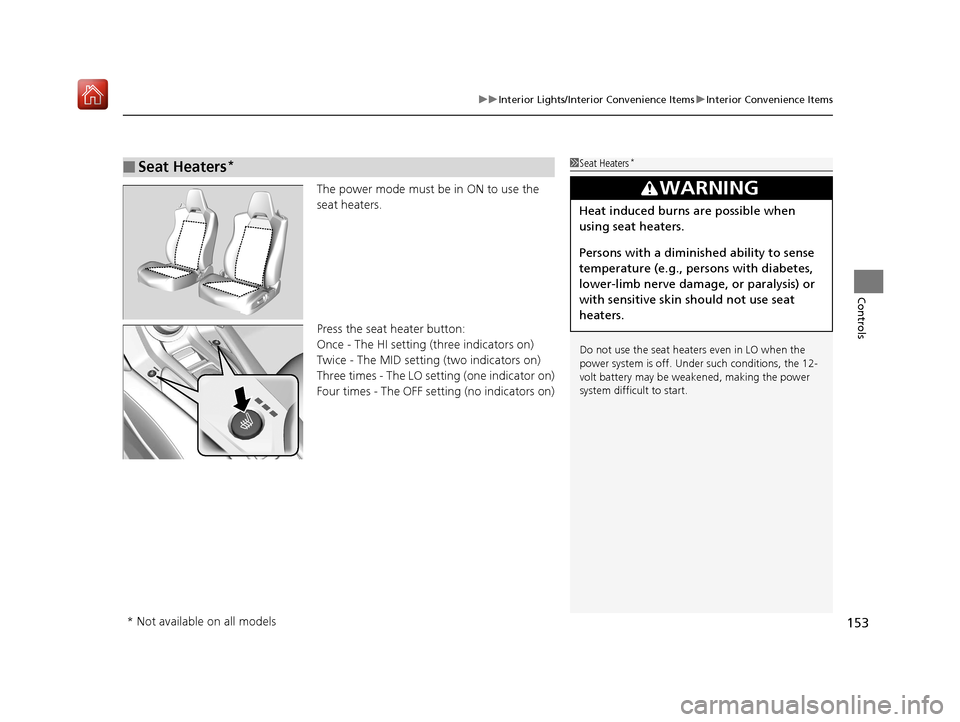
The power mode must be in ON to use the
seat heaters.
Press the seat heater button:
Once - The HI setting (three indicators on)
Twice - The MID setting (two indicators on)
Three times - The LO setting (one indicator on)
Four times - The OFF setting (no indicators on)
■Seat Heaters*1Seat Heaters*
Do not use the seat heaters even in LO when the
power system is off. U nder such conditions, the 12-
volt battery may be weakened, making the power
system difficult to start.
3WARNING
Heat induced burns are possible when
using seat heaters.
Persons with a diminished ability to sense
temperature (e.g., persons with diabetes,
lower-limb nerve damage, or paralysis) or
with sensitive skin should not use seat
heaters.
* Not available on all models
19 NSX-31T6N6200.book 153 ページ 2018年8月9日 木曜日 午前11時12分
Page 155 of 485
154
Controls
Climate Control System
Using Automatic Climate Control
The automatic climate control system maintains the interior temperature you select.
The system also selects the proper mix of heated or cooled air to raise or lower the
interior temperature to your pr eference as quickly as possible.
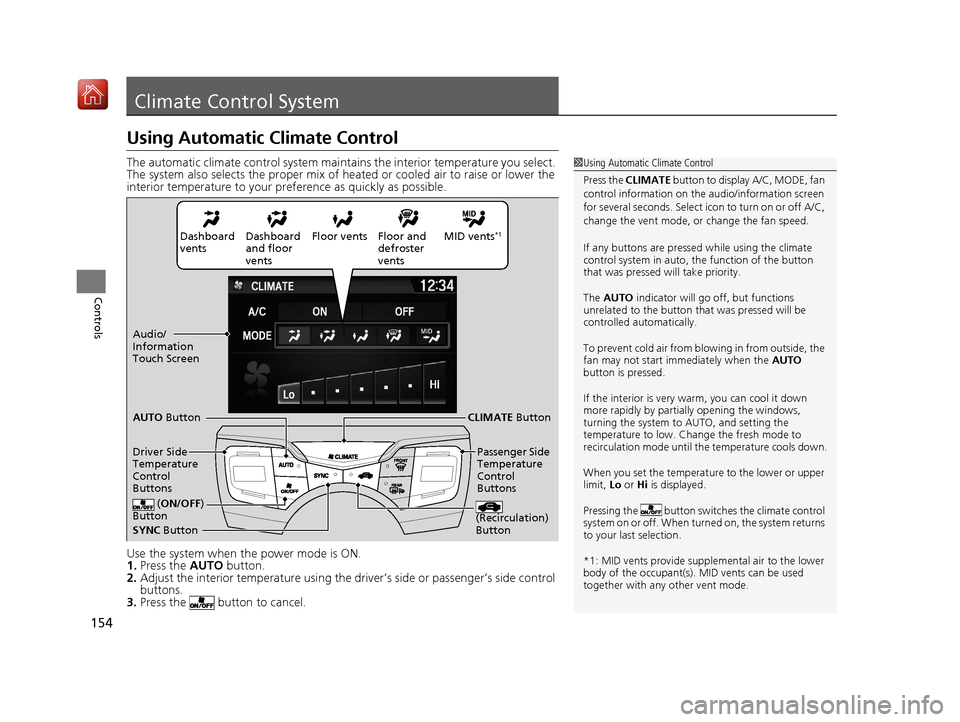
Use the system when the power mode is ON.
1. Press the AUTO button.
2. Adjust the interior temperature using the dr iver’s side or passenger’s side control
buttons.
3. Press the butto n to cancel.1Using Automatic Climate Control
Press the CLIMATE button to display A/C, MODE, fan
control information on the audio/information screen
for several seconds. Select icon to turn on or off A/C,
change the vent mode, or change the fan speed.
If any buttons are presse d while using the climate
control system in auto, the function of the button
that was pressed will take priority.
The AUTO indicator will go off, but functions
unrelated to the button th at was pressed will be
controlled automatically.
To prevent cold air from bl owing in from outside, the
fan may not start i mmediately when the AUTO
button is pressed.
If the interior is very warm, you can cool it down
more rapidly by partial ly opening the windows,
turning the system to AUTO, and setting the
temperature to low. Change the fresh mode to
recirculation mode until the temperature cools down.
When you set the temperat ure to the lower or upper
limit, Lo or Hi is displayed.
Pressing the butt on switches the climate control
system on or off. When turned on, the system returns
to your last selection.
*1: MID vents provide supple mental air to the lower
body of the occupant(s). MID vents can be used
together with any other vent mode.
Dashboard
vents Dashboard
and floor
vents Floor vents Floor and
defroster
ventsMID vents*1
SYNC
Button
AUTO
Button
CLIMATE Button
Driver Side
Temperature
Control
Buttons Passenger Side
Temperature
Control
Buttons
( ON/OFF )
Button
(Recirculation)
Button
Audio/
Information
Touch Screen
19 NSX-31T6N6200.book 154 ページ 2018年8月9日 木曜日 午前11時12分
Page 157 of 485
uuClimate Control System u
156
Controls
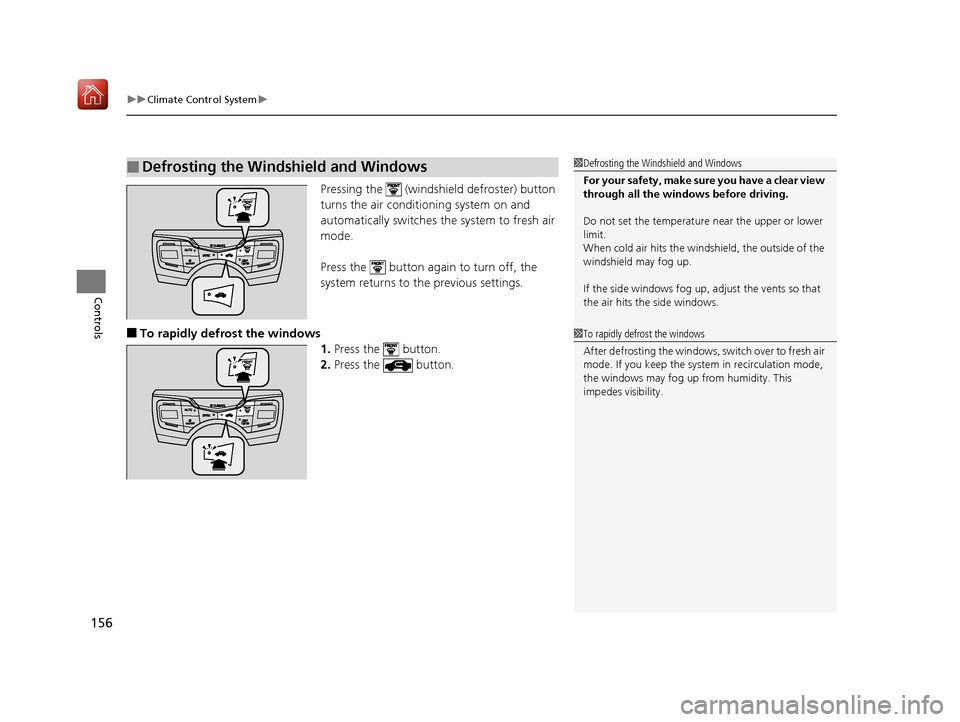
Pressing the (windshield defroster) button
turns the air conditioning system on and
automatically switches the system to fresh air
mode.
Press the button again to turn off, the
system returns to the previous settings.
■To rapidly defrost the windows 1.Press the button.
2. Press the button.
■Defrosting the Windshield and Windows1Defrosting the Windshield and Windows
For your safety, make sure you have a clear view
through all the windows before driving.
Do not set the temperatur e near the upper or lower
limit.
When cold air hits the windshield, the outside of the
windshield may fog up.
If the side windows fog up, adjust the vents so that
the air hits the side windows.
1 To rapidly defrost the windows
After defrosting the windows, switch over to fresh air
mode. If you keep the syst em in recirculation mode,
the windows may fog up from humidity. This
impedes visibility.
19 NSX-31T6N6200.book 156 ページ 2018年8月9日 木曜日 午前11時12分
Page 158 of 485
157
uuClimate Control System u
Controls
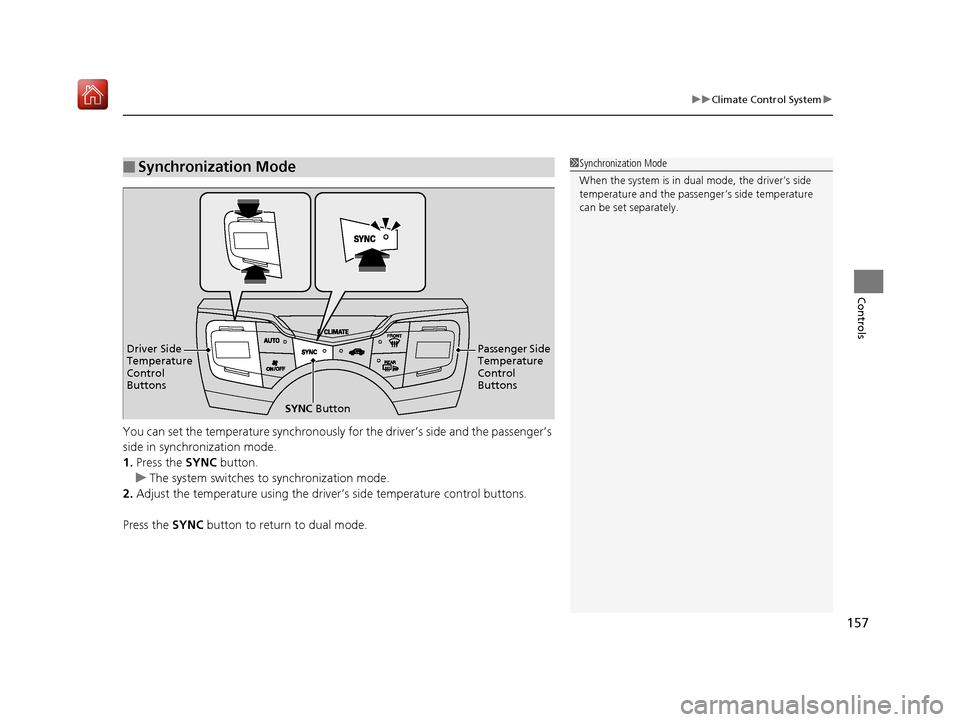
You can set the temperature synchronously for the driver’s side and the passenger’s
side in synchronization mode.
1.Press the SYNC button.
u The system switches to synchronization mode.
2. Adjust the temperature using the driver’s side temperature control buttons.
Press the SYNC button to return to dual mode.
■Synchronization Mode1Synchronization Mode
When the system is in dua l mode, the driver’s side
temperature and the passe nger’s side temperature
can be set separately.
SYNC Button
Driver Side
Temperature
Control
Buttons
Passenger Side
Temperature
Control
Buttons
19 NSX-31T6N6200.book 157 ページ 2018年8月9日 木曜日 午前11時12分
Page 160 of 485
159
Features
This chapter describes how to operate technology features.
Audio SystemAbout Your Audio System ................ 160
USB Ports ......................................... 161
Audio System Theft Protection ......... 162
Audio Remote Controls .................... 163
Audio System Basic Operation ........ 164
Audio/Information Screen ................ 165
Adjusting the Sound ........................ 179
Display Setup ................................... 180
Voice Control Operation .................. 182
Playing FM Radio ............................. 186
Playing SiriusXM ® Radio
*................. 190
Playing an iPod ................................ 197 Song By Voice
TM (SBV) ...................... 200
Playing Pandora ®*1........................... 204
Playing a USB Flash Drive ................. 206
Playing Bluetooth ® Audio................. 209
Wi-Fi Connection ............................. 211
Siri ® Eyes Free .................................. 213
Apple CarPlay
TM............................... 214
Android AutoTM................................ 217
Audio Error Messages iPod/USB Flash Drive ........................ 221
Pandora ®
*1....................................... 222
Android/Apps .................................. 223
General Information on the Audio SystemSiriusXM ® Radio Service*................. 224 Compatible iPod, iP
hone, and USB Flash
Drives ............................................ 225
Honda App License Agreement........ 226
Legal Information on Apple CarPlay/
Android Auto................................. 238
About Open Source Licenses............ 240
License Information ......................... 241
Customized Features ........................ 242
Defaulting All the Settings ............... 264
HomeLink ® Universal Transceiver ... 265
Bluetooth® HandsFreeLink®
Using HFL ........................................ 268
HFL Menus ...................................... 271
AcuraLink®
*....................................... 302
*1:Available only on U.S. models.
* Not available on all models
19 NSX-31T6N6200.book 159 ページ 2018年8月9日 木曜日 午前11時12分
Page 162 of 485
161
uuAudio System uUSB Ports
Features
USB Ports
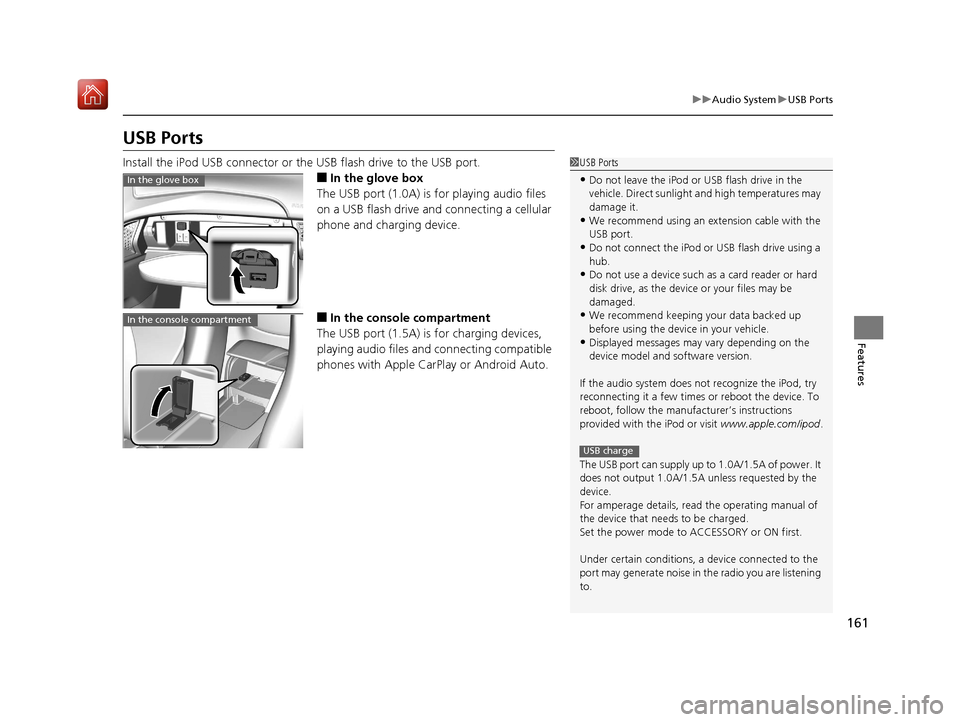
Install the iPod USB connector or the USB flash drive to the USB port.
■In the glove box
The USB port (1.0A) is for playing audio files
on a USB flash drive and connecting a cellular
phone and charging device.
■In the consol e compartment
The USB port (1.5A) is for charging devices,
playing audio files and connecting compatible
phones with Apple CarPlay or Android Auto.
1 USB Ports
•Do not leave the iPod or USB flash drive in the
vehicle. Direct sunlight and high temperatures may
damage it.
•We recommend using an ex tension cable with the
USB port.
•Do not connect the iPod or USB flash drive using a
hub.
•Do not use a device such as a card reader or hard
disk drive, as the device or your files may be
damaged.
•We recommend k eeping your data backed up
before using the device in your vehicle.
•Displayed messages may vary depending on the
device model and software version.
If the audio system does not recognize the iPod, try
reconnecting it a few times or reboot the device. To
reboot, follow the manufac turer’s instructions
provided with the iPod or visit www.apple.com/ipod.
The USB port can supply up to 1.0A/1.5A of power. It
does not output 1.0A/1.5A unless requested by the
device.
For amperage details, read the operating manual of
the device that ne eds to be charged.
Set the power mode to ACCESSORY or ON first.
Under certain condi tions, a device connected to the
port may generate noise in the radio you are listening
to.
USB charge
In the glove box
In the console compartment
19 NSX-31T6N6200.book 161 ページ 2018年8月9日 木曜日 午前11時12分
Page 163 of 485
162
uuAudio System uAudio System Theft Protection
Features
Audio System Theft Protection
The audio system is disabled when it is di sconnected from the power source, such as
when the 12-volt battery is disconnected or goes dead. In certain conditions, the
system may display a code entry screen. If this occurs, reactivate the audio system.
■Reactivating th e audio system
1. Set the power mode to ON.
2. Turn on the audio system.
3. Select and hold the (power/audio) icon for more than two seconds.
u The audio system is reac tivated when the audio co ntrol unit establishes a
connection with the vehicle control unit. If the control unit fails to recognize
the audio unit, you must go to an authorized Acura NSX dealer and have the
audio unit checked.
19 NSX-31T6N6200.book 162 ページ 2018年8月9日 木曜日 午前11時12分
Page 164 of 485
163
uuAudio System uAudio Remote Controls
Features
Audio Remote Controls
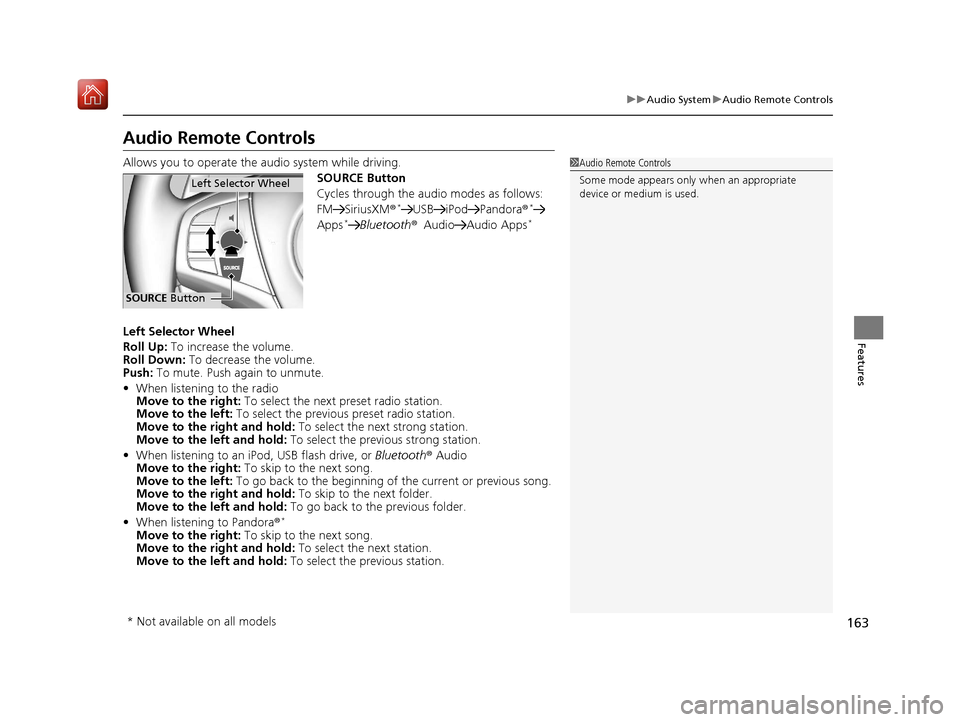
Allows you to operate the audio system while driving.
SOURCE Button
Cycles through the audio modes as follows:
FM SiriusXM®
*USB iPod Pandora®*
Apps*Bluetooth®Audio Audio Apps*
Left Selector Wheel
Roll Up: To increase the volume.
Roll Down: To decrease the volume.
Push: To mute. Push again to unmute.
• When listening to the radio
Move to the right: To select the next preset radio station.
Move to the left: To select the previous preset radio station.
Move to the right and hold: To select the next strong station.
Move to the left and hold: To select the previous strong station.
• When listening to an iPod, USB flash drive, or Bluetooth® Audio
Move to the right: To skip to the next song.
Move to the left: To go back to the beginning of the current or previous song.
Move to the right and hold: To skip to the next folder.
Move to the left and hold: To go back to the previous folder.
• When listening to Pandora ®
*
Move to the right: To skip to the next song.
Move to the right and hold: To select the next station.
Move to the left and hold: To select the previous station.
1Audio Remote Controls
Some mode appears only when an appropriate
device or medium is used.
Left Selector Wheel
SOURCE Button
* Not available on all models
19 NSX-31T6N6200.book 163 ページ 2018年8月9日 木曜日 午前11時12分
Page 166 of 485
165
uuAudio System Basic Operation uAudio/Information Screen
Continued
Features
Audio/Information Screen
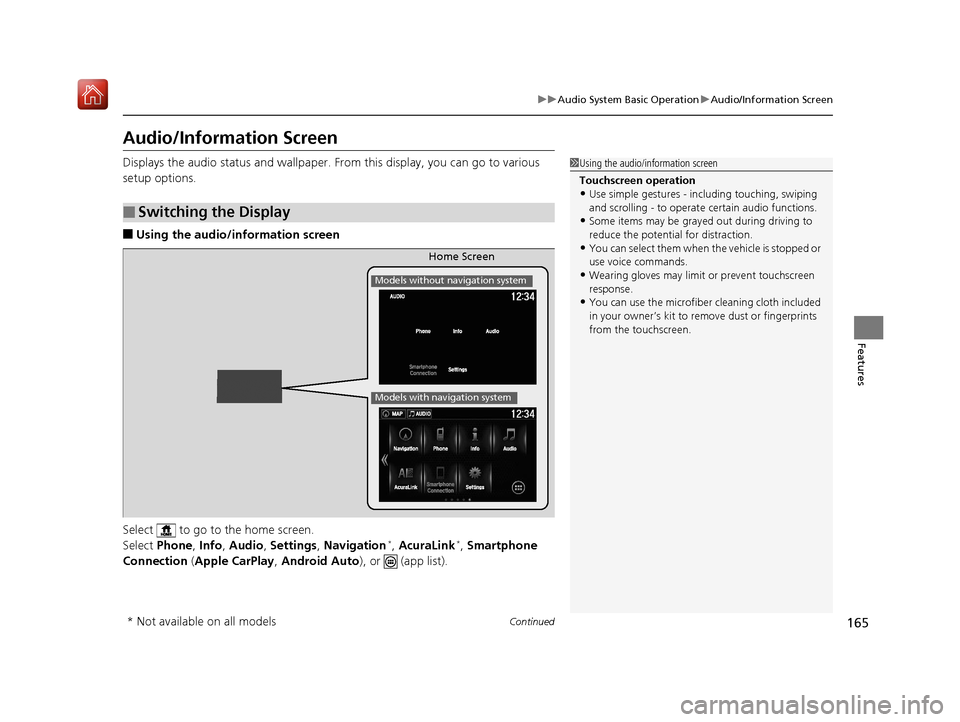
Displays the audio status and wallpaper. From this display, you can go to various
setup options.
■Using the audio/in formation screen
Select to go to the home screen.
Select Phone , Info , Audio , Settings , Navigation
*, AcuraLink*, Smartphone
Connection (Apple CarPlay, Android Auto), or (app list).
■Switching the Display
1Using the audio/in formation screen
Touchscreen operation
•Use simple gestures - in cluding touching, swiping
and scrolling - to operate certain audio functions.
•Some items may be grayed out during driving to
reduce the potential for distraction.
•You can select them when the vehicle is stopped or
use voice commands.
•Wearing gloves may limit or prevent touchscreen
response.
•You can use the microfiber cleaning cloth included
in your owner’s kit to remo ve dust or fingerprints
from the touchscreen.
Home Screen
Models without navigation system
Models with navigation system
* Not available on all models
19 NSX-31T6N6200.book 165 ページ 2018年8月9日 木曜日 午前11時12分