lock Acura NSX 2019 Repair Manual
[x] Cancel search | Manufacturer: ACURA, Model Year: 2019, Model line: NSX, Model: Acura NSX 2019Pages: 485, PDF Size: 27.6 MB
Page 252 of 485
251
uuCustomized Features u
Continued
Features
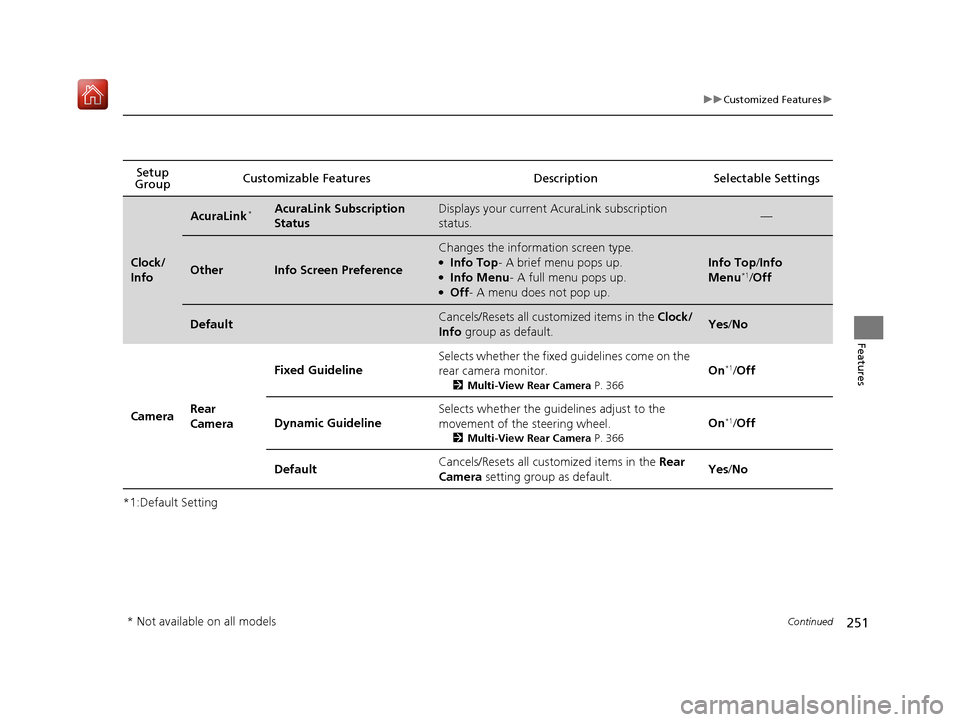
*1:Default SettingSetup
Group Customizable Features Desc
ription Selectable Settings
Clock/
Info
AcuraLink*AcuraLink Subscription
StatusDisplays your current AcuraLink subscription
status.—
OtherInfo Screen Preference
Changes the information screen type.●Info Top- A brief menu pops up.●Info Menu- A full menu pops up.●Off- A menu does not pop up.
Info Top /Info
Menu*1/ Off
DefaultCancels/Resets all cust omized items in the Clock/
Info group as default.Yes/No
Camera Rear
Camera Fixed Guideline
Selects whether the fixed guidelines come on the
rear camera monitor.
2
Multi-View Rear Camera P. 366
On*1/Off
Dynamic Guideline Selects whether the guidelines adjust to the
movement of the steering wheel.
2
Multi-View Rear Camera P. 366
On*1/Off
Default Cancels/Resets all cust
omized items in the Rear
Camera setting group as default. Yes
/No
* Not available on all models
19 NSX-31T6N6200.book 251 ページ 2018年8月9日 木曜日 午前11時12分
Page 259 of 485
258
uuCustomized Features u
Features
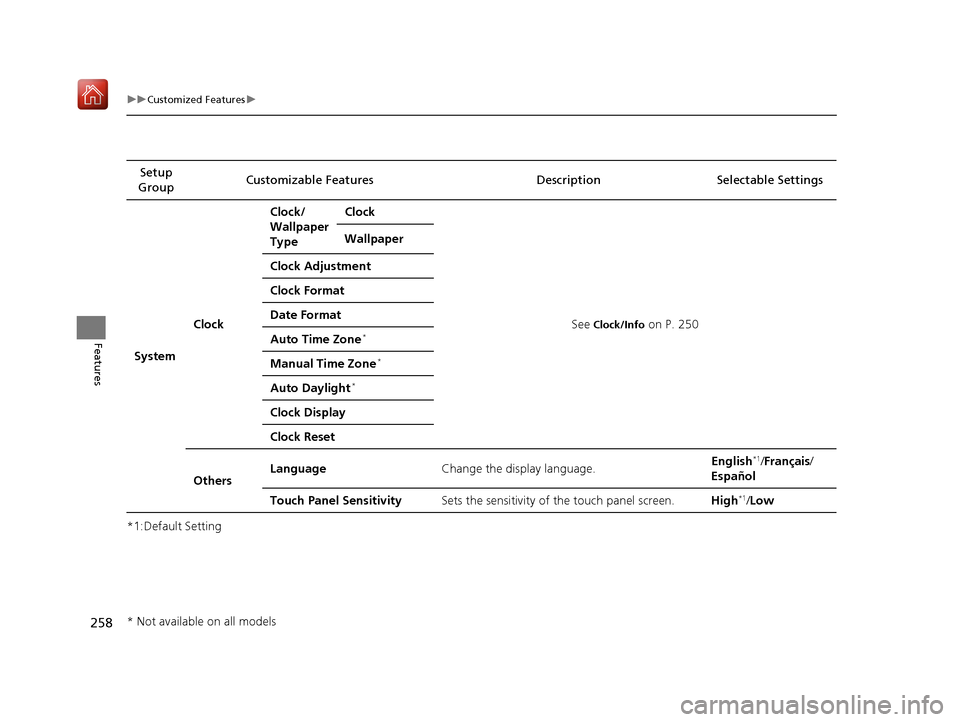
*1:Default SettingSetup
Group Customizable Features Description Selectable Settings
System Clock Clock/
Wallpaper
Type
Clock
See
Clock/Info on P. 250
Wallpaper
Clock Adjustment
Clock Format
Date Format
Auto Time Zone*
Manual Time Zone*
Auto Daylight*
Clock Display
Clock Reset
Others Language
Change the display language. English
*1/
Français /
Español
Touch Panel Sensitivity Sets the sensitivity of the touch panel screen. High
*1/Low
* Not available on all models
19 NSX-31T6N6200.book 258 ページ 2018年8月9日 木曜日 午前11時12分
Page 262 of 485
261
uuCustomized Features u
Continued
Features
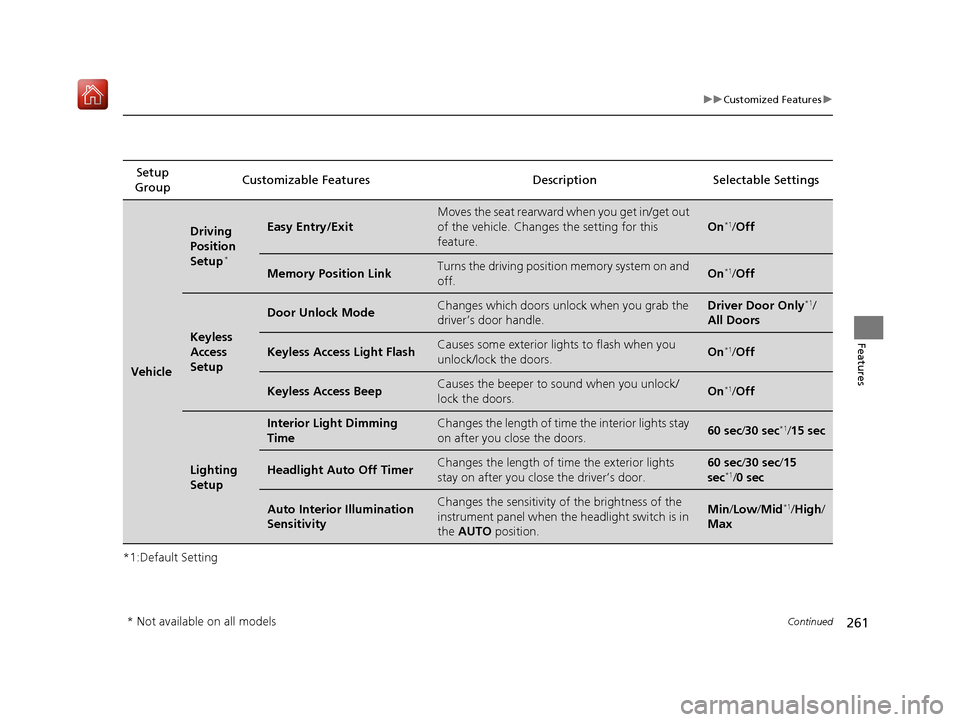
*1:Default SettingSetup
Group Customizable Features Description Selectable Settings
Vehicle
Driving
Position
Setup
*
Easy Entry/Exit
Moves the seat rearward when you get in/get out
of the vehicle. Changes the setting for this
feature.
On*1/
Off
Memory Position LinkTurns the driving position memory system on and
off.On*1/ Off
Keyless
Access
Setup
Door Unlock ModeChanges which doors unlock when you grab the
driver’s door handle.Driver Door Only*1/
All Doors
Keyless Access Light FlashCauses some exterior lights to flash when you
unlock/lock the doors.On*1/ Off
Keyless Access BeepCauses the beeper to sound when you unlock/
lock the doors.On*1/Off
Lighting
Setup
Interior Light Dimming
TimeChanges the length of time the interior lights stay
on after you close the doors.60 sec /30 sec*1/15 sec
Headlight Auto Off TimerChanges the length of time the exterior lights
stay on after you clos e the driver’s door.60 sec/30 sec/15
sec*1/ 0 sec
Auto Interior Illumination
SensitivityChanges the sensitivity of the brightness of the
instrument panel when the headlight switch is in
the AUTO position.Min/Low/ Mid*1/High /
Max
* Not available on all models
19 NSX-31T6N6200.book 261 ページ 2018年8月9日 木曜日 午前11時12分
Page 263 of 485
262
uuCustomized Features u
Features
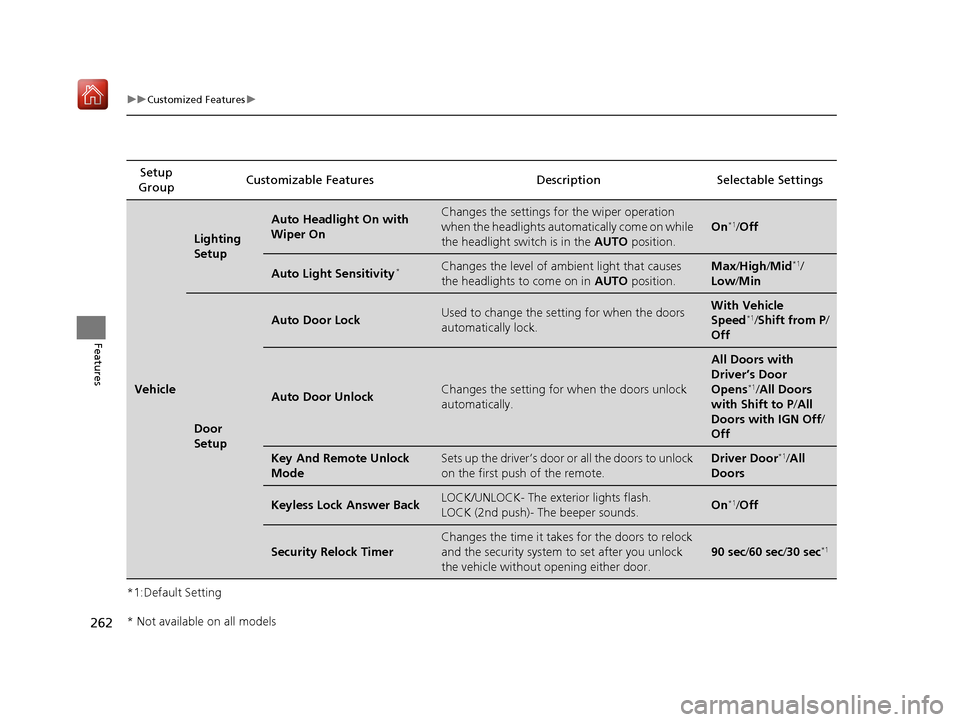
*1:Default SettingSetup
Group Customizable Features Desc
ription Selectable Settings
Vehicle
Lighting
Setup
Auto Headlight On with
Wiper OnChanges the settings for the wiper operation
when the headlights automa tically come on while
the headlight switch is in the AUTO position.
On*1/Off
Auto Light Sensitivity*Changes the level of ambient light that causes
the headlights to come on in AUTO position.Max/High/ Mid*1/
Low/ Min
Door
Setup
Auto Door LockUsed to change the se tting for when the doors
automatically lock.With Vehicle
Speed*1/ Shift from P /
Off
Auto Door UnlockChanges the setting for when the doors unlock
automatically.
All Doors with
Driver’s Door
Opens
*1/ All Doors
with Shift to P /All
Doors with IGN Off /
Off
Key And Remote Unlock
ModeSets up the driver’s door or all the doors to unlock
on the first push of the remote.Driver Door*1/ All
Doors
Keyless Lock Answer BackLOCK/UNLOCK- The exterior lights flash.
LOCK (2nd push)- The beeper sounds.On*1/ Off
Security Relock Timer
Changes the time it takes for the doors to relock
and the security system to set after you unlock
the vehicle without op ening either door.
90 sec/60 sec /30 sec*1
* Not available on all models
19 NSX-31T6N6200.book 262 ページ 2018年8月9日 木曜日 午前11時12分
Page 305 of 485
uuAcuraLink ®*u
304
Features
Your subscribed telematics service provider can track your vehicle’s location,
remotely lock or unlock doors, and help you find your vehicle.
To use these features, you need your us er ID and personal identification number
(PIN).
■Stolen vehicle tracking
This feature searches and tracks down your ve hicle position even if it is on the move.
If you believe that your vehicle has been stolen, contact the police as well as the
provider. Tracking requests must be initiated by the police.
■Remote door lock/unlock
The provider can remotely lock or unlock doors upon your request.
■Vehicle finder
This feature is convenient to use when trying to locate yo ur vehicle in large areas,
such as a crowded parking lot. If you cannot locate your vehicle after using the
remote transmitter’s answerback function, you can contact the provider which can
then flash your vehicle’s exterior lights and sound the horn.
■Security alarm notification
If the security system in your vehicle detects an abnormal condition, such as
someone tampering with the lock on your vehicle, the provider notifies you by email
or SMS.
■Security Features1 Security Features
The contact information of your provider, your user
ID and PIN will be given when you subscribe to
AcuraLink. If you forget any of the above, contact an
authorized Acura NSX dealer, or go to
owners.acura.com (in U.S.) or www.acura.ca (in
Canada).
You can also activate the remote door lock/unlock
and vehicle finder features from the Internet or using
your smartphone app. Ask an authorized Acura NSX
dealer, or visit owners.acura.com (in U.S.) or
www.acura.ca (in Canada) for details.
1Vehicle finder
The lights will stop flas hing and horn will stop
sounding under the foll owing conditions:
•When 30 seconds have elapsed.
•You unlock the doors using the remote transmitter.•You unlock the doors using the keyless access
system.
•You unlock the doors us ing the built-in key.•The power mode is set to ACCESSORY or ON.
19 NSX-31T6N6200.book 304 ページ 2018年8月9日 木曜日 午前11時12分
Page 308 of 485
307
Driving
This chapter discusses driving and refueling.
Before DrivingDriving Preparation .......................... 308
Maximum Load Limit........................ 311
High-Performance Driving ................ 313
Towing a Trailer Towing Your Vehicle ........................ 318
When Driving Turning on the Power ...................... 319
Precautions While Driving................. 322
Dual Clutch Transmission ................. 323
Shifting ............................................ 324
Integrated Dynamics System............. 333
Launch Control ................................ 338 Cruise Control ................................. 340
Vehicle Stability Assist® (VSA®), aka
Electronic Stability Control (ESC), System .
343
Agile Handling Assist ....................... 347
SPORT HYBRID Super Handling-All Wheel DriveTM (SPORT HYBRID SH-AWD®) .... 348
Tire Pressure Monitoring System (TPMS) ...... 349
Tire Pressure Monitoring System (TPMS) - Required Federal Explanation ......... 351
High Voltage Battery ........................ 353
Braking Brake System ................................... 354
Anti-lock Brake System (ABS) ........... 359
Brake Assist System ......................... 360
Parking Your Vehicle When Stopped ................................ 361
Parking Sensor System
*................... 362
Multi-View Rear Camera .................. 366
Refueling Fuel Information .............................. 368
How to Refuel ................................. 369
Fuel Economy and CO
2 Emissions .... 370
Turbo Engine Vehicle ....................... 371
* Not available on all models
19 NSX-31T6N6200.book 307 ページ 2018年8月9日 木曜日 午前11時12分
Page 309 of 485
308
Driving
Before Driving
Driving Preparation
Check the following items before you start driving.
• Make sure there are no obstructions on the windows, door mirrors, exterior
lights, or other parts of the vehicle.
u Remove any frost, snow, or ice.
u Remove any snow on the roof, as this can slip down and obstruct your field of
vision while driving. If frozen solid , remove ice once it has softened.
u When removing ice from around the wheels, be sure not to damage the wheel
or wheel components.
• Make sure the hood is securely closed.
u If the hood opens while driving, your front view will be blocked.
• Make sure the tires are in good condition.
u Check air pressures, and check for damage and excessive wear.
2Checking and Maintaining Tires P. 405
•Make sure there are no people or ob jects behind or around the vehicle.
u There are blind spots from the inside.
• Check the front bumper ducts and side intercooler ducts for mud, leaves, and
road debris that could build up and prevent proper cooling performance.
■Exterior Checks1Exterior Checks
NOTICE
When doors are frozen s hut, use warm water around
the door edges to melt any ice. Do not try to force
them open, as this can damage the rubber trim
around the doors. When done, wipe dry to avoid
further freezing.
Do not pour warm water into the key cylinder.
You will be unable to insert the key if the water
freezes in the hole.
Heat from the engine and exhaust can ignite
flammable materials left und er the hatch, causing a
fire. If you’ve parked y our vehicle for an extended
period, inspect and remove any debris that may have
collected, such as dried grass and leaves that have
fallen or have been carried in for use as a nest by a
small animal.
Also check under the hatch for leftover flammable
materials after you or so meone else has performed
maintenance on your vehicle.
19 NSX-31T6N6200.book 308 ページ 2018年8月9日 木曜日 午前11時12分
Page 310 of 485
Continued309
uuBefore Driving uDriving Preparation
Driving
• Store or secure all items on board properly.
u Carrying too much cargo, or improperly storing it, can affect your vehicle’s
handling, stability, sto pping distance, and tires, and make it unsafe.
2Maximum Load Limit P. 311
•Do not pile items higher than the seat height.
u They can block your view and may be thrown forward in the event of sudden
braking.
• Do not place anything in the seat footwe lls. Make sure to secure the floor mat.
u An object or unsecured floor mat can in terfere with your brake and accelerator
pedal operation while driving.
• If you have any animals on board, do not let them move around in the vehicle.
u They may interfere with driving and a crash could occur.
• Securely close and lock both doors and the hatch.
2 Locking/Unlocking the Doors from the Inside P. 115
•Adjust your seating position properly.
2 Adjusting the Seats P. 144
•Adjust the mirrors and steering wheel properly.
u Adjust them while sitting in the proper driving position.
2 Adjusting the Mirrors P. 141
2 Adjusting the Steering Wheel P. 140
■Interior Checks1Interior Checks
The headlight aim is set by the factory, and does not
need to be adjusted. Howeve r, if you regularly carry
heavy items in the trunk ha ve the aiming readjusted
at an authorized Acura NS X dealer or by a qualified
technician.
19 NSX-31T6N6200.book 309 ページ 2018年8月9日 木曜日 午前11時12分
Page 323 of 485
322
uuWhen Driving uPrecautions While Driving
Driving
Precautions While Driving
Avoid driving in deep water and on flooded roads. This can damage the power
system or driveline, or cause electrical component failure.
The vehicle is equipped with ultra high performance summer tires that, due to their
decreased tread depth, are at greater risk of hydroplaning on wet roads compared
to regular tires. Exercise caution when driving on wet surfaces.
The vehicle is equipped with ultra high performance summer tires. These tires are
designed for optimum performance and handling in warm climates, and are not
suitable for below freezing, snowy or ic y weather conditions. If you drive under
these circumstances, use of winter tires is recommended and may be mandatory,
depending on your region, province or territory.
2 Winter Tires P. 413
2 Cold Weather Driving P. 414
Due to limitations of the Lithium-ion Hi gh Voltage battery, the minimum starting
temperature for the vehicle is -4°F (-20°C).
Inability to start the vehicle and/or decrea sed performance is expected if the vehicle
is operated at temperatures below -4°F (-20°C).
■In Rain
■In Snow and Ice
1 Precautions While Driving
NOTICE
Do not select a shift button while pressing the
accelerator pedal.
NOTICE
The following can damage the under spoiler, under
covers, front bumper, rear diffuser, brake cooling
components, and side sill:
•Parking the vehicle by a parking block•Parallel pa rking along the road shoulder•Driving toward the bottom of a hill•Driving up or down to a different surface level
(such as a road shoulder)
•Driving on a rutted or bumpy road•Driving on a road with potholes•Driving over speed bump
NOTICE
If you repeatedly turn the steering wheel at an
extremely low speed, or hold the steering wheel in
the full left or right position for a while, the electric
power steering (EPS) system heats up. The system
goes into a protective mode, and limits its
performance. The steering wheel becomes harder
and harder to operate. Once the system cools down,
the EPS system is restored.
Repeated operation under these conditions can
eventually damage the system.
If the power mode is set to ACCESSORY while
driving, the power system will shut down and all
steering and brake power a ssist functions will stop,
making it difficult to control the vehicle.
Driving in snow or icy c onditions may accumulate ice
on the brake disk surface, reducing braking power.
19 NSX-31T6N6200.book 322 ページ 2018年8月9日 木曜日 午前11時12分
Page 325 of 485
324
uuWhen Driving uShifting
Driving
Shifting
Change the gear position in acco rdance with your driving needs.
■Shift button positions
1Shifting
While the High Voltage battery charge level is full, or
the High Voltage battery temperature is low,
regenerative braking ma y become less effective.
To prevent malfunction an d unintended engagement:
•Do not spill any liquids on or around shift buttons.•Do not place or drop any objects on or around shift
buttons.
•Do not let passenger or children operate the shift
buttons.
You may occasionally find th at it takes longer than
usual for the vehicle to st art moving when you select
(R, release the brake peda l, and/or depress the
accelerator pedal. This may occur when the High
Voltage battery charge level is extremely low; in this
circumstance, it does not indicate a vehicle
malfunction.
3WARNING
The vehicle can roll aw ay if left unattended
without confirming that Park is engaged.
A vehicle that rolls away could cause a crash
resulting in seriou s injury or death.
Always keep your foot on the brake pedal
until you have confirmed that
( P is shown
on the gear position indicator.
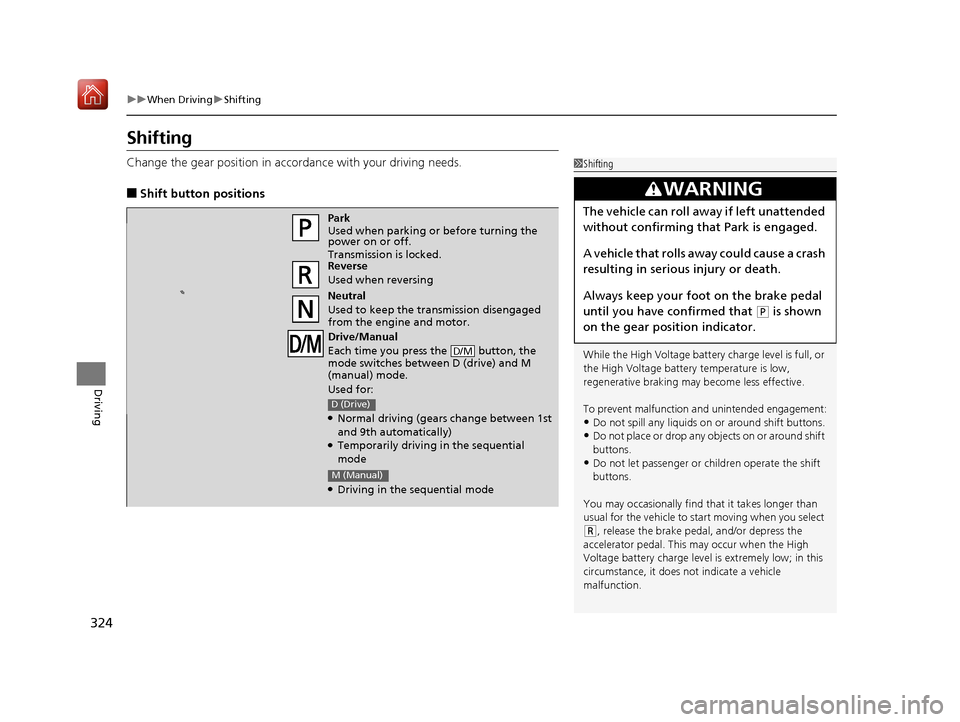
Park
Used when parking or before turning the
power on or off.
Transmission is locked.
Reverse
Used when reversing
Neutral
Used to keep the transmission disengaged
from the engine and motor.
Drive/Manual
Each time you press the button, the
mode switches between D (drive) and M
(manual) mode.
Used for:
●Normal driving (gears change between 1st
and 9th automatically)
●Temporarily driving in the sequential
mode
●Driving in the sequential mode
D/M
D (Drive)
M (Manual)
19 NSX-31T6N6200.book 324 ページ 2018年8月9日 木曜日 午前11時12分