audio ACURA NSX 2020 Owner's Manual
[x] Cancel search | Manufacturer: ACURA, Model Year: 2020, Model line: NSX, Model: ACURA NSX 2020Pages: 491, PDF Size: 20.24 MB
Page 168 of 491
166
Features
Audio System Basic Operation
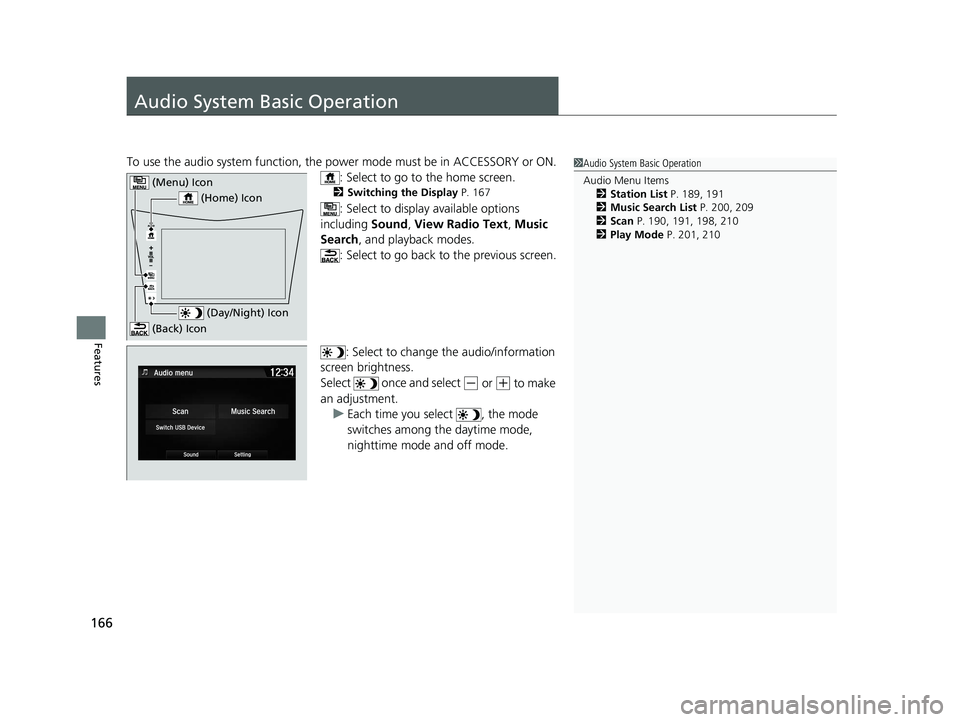
To use the audio system function, the power mode must be in ACCESSORY or ON.
: Select to go to the home screen.
2 Switching the Display P. 167
: Select to display available options
including Sound, View Radio Text , Music
Search , and playback modes.
: Select to go back to the previous screen.
: Select to change the audio/information
screen brightness.
Select once and select
(- or (+ to make
an adjustment.
uEach time you select , the mode
switches among the daytime mode,
nighttime mode and off mode.
1Audio System Basic Operation Audio Menu Items 2 Station List P. 189, 191
2 Music Search List P. 200, 209
2 Scan P. 190, 191, 198, 210
2 Play Mode P. 201, 210
(Home) Icon
(Menu) Icon
(Day/Night) Icon
(Back) Icon
20 ACURA NSX PMC-31T6N6300.book 166 ページ 2019年9月11日 水曜日 午後4時51分
Page 169 of 491
167
uuAudio System Basic OperationuAudio/Information Screen
Continued
Features
Audio/Information Screen
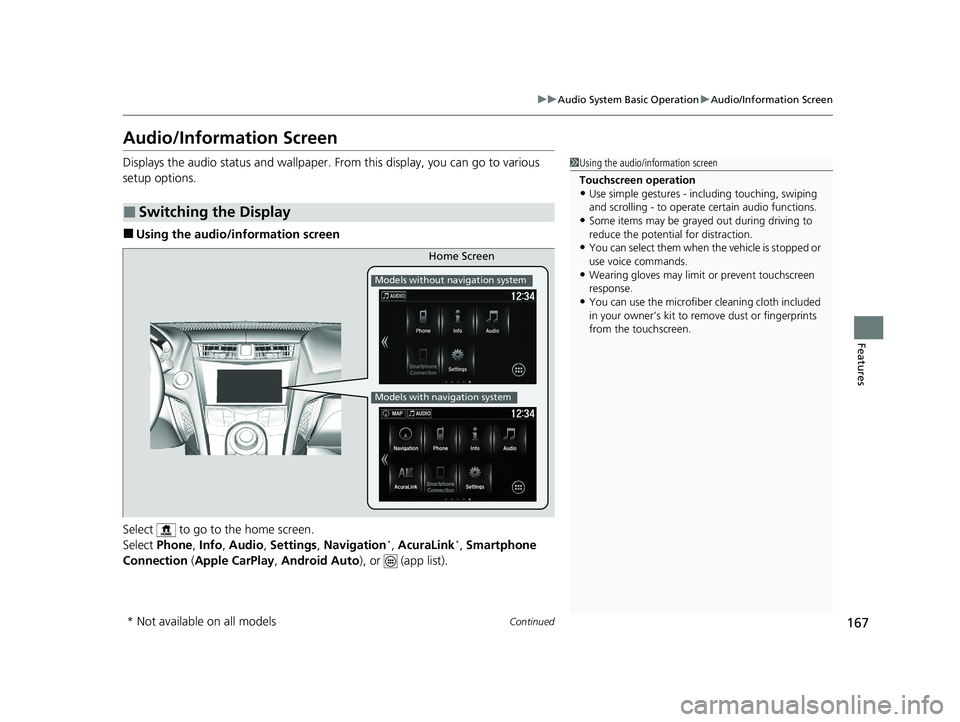
Displays the audio status and wallpaper. From this display, you can go to various
setup options. ■Using the audio/in formation screen
Select to go to the home screen.
Select Phone , Info , Audio , Settings , Navigation *
, AcuraLink *
, Smartphone
Connection (Apple CarPlay , Android Auto ), or (app list).
■Switching the Display
1Using the audio/information screen
Touchscreen operation • Use simple gestures - in cluding touching, swiping
and scrolling - to operate certain audio functions.
• Some items may be grayed out during driving to
reduce the potential for distraction.
• You can select them when the vehicle is stopped or
use voice commands.
• Wearing gloves may limit or prevent touchscreen
response.
• You can use the microfiber cleaning cloth included
in your owner’s kit to remo ve dust or fingerprints
from the touchscreen.
Home Screen
Models without navigation system
Models with navigation system
* Not available on all models
20 ACURA NSX PMC-31T6N6300.book 167 ページ 2019年9月11日 水曜日 午後4時51分
Page 170 of 491
168
uuAudio System Basic OperationuAudio/Information Screen
Features
■Phone
Displays the HFL information. 2 Bluetooth ® HandsFreeLink ® P. 270
■ Info
Displays Trip Computer or Clock/Wallpaper . Select on the Info Menu screen
to see all available options: Trip Computer, Voice Info , Clock/Wallpaper and
System/Device Information .
Trip Computer :
• Current Drive tab: Displays the current trip information.
• History of Trip A tab: Displays information for the three previous drives. The
information is stored every time you reset Trip A.
To delete the history manually, select Delete History on the History of Trip A
tab. The confirmation message ap pears on the screen, then select Yes.
Voice Info : Displays a list of all voice commands.
Clock/Wallpaper : Displays the clock and wallpaper.
System/Device Information :
• System Info : Displays the software version of the audio system.
• USB Info : Displays the memory usage of the USB device.
■ Audio
Displays the current audio information.
■ Settings
Enters the customiz ing menu screen.
2 Customized Features P. 244
20 ACURA NSX PMC-31T6N6300.book 168 ページ 2019年9月11日 水曜日 午後4時51分
Page 171 of 491
169
uuAudio System Basic OperationuAudio/Information Screen
Continued
Features
■Navigation *
Displays the navigation screen. 2 Refer to the Navigation System Manual
■ AcuraLink *
Is a subscription-based service that can pr ovide convenient features such as voice
communication if an airbag deploys, online security, and one-on-one operator
assistance. 2 AcuraLink ®*
P. 304
■ Smartphone Connection
Displays Apple CarPlay or Android Auto. 2 Apple CarPlay TM
P. 216
2 Android Auto TM
P. 219
■ App List
Adds or removes apps or widgets on the home screen. 2 Home Screen P. 173
* Not available on all models
20 ACURA NSX PMC-31T6N6300.book 169 ページ 2019年9月11日 水曜日 午後4時51分
Page 172 of 491
170
uuAudio System Basic OperationuAudio/Information Screen
Features
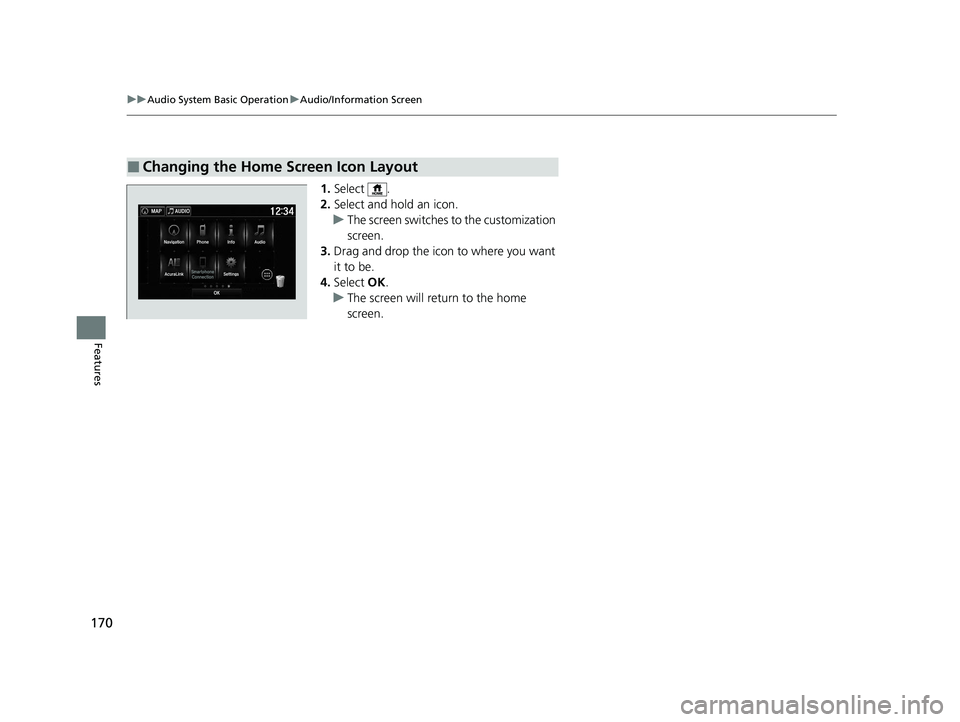
1.Select .
2. Select and hold an icon.
uThe screen switches to the customization screen.
3. Drag and drop the icon to where you want it to be.
4. Select OK.
uThe screen will return to the home screen.
■Changing the Home Screen Icon Layout
20 ACURA NSX PMC-31T6N6300.book 170 ページ 2019年9月11日 水曜日 午後4時51分
Page 173 of 491
Continued171
uuAudio System Basic OperationuAudio/Information Screen
Features
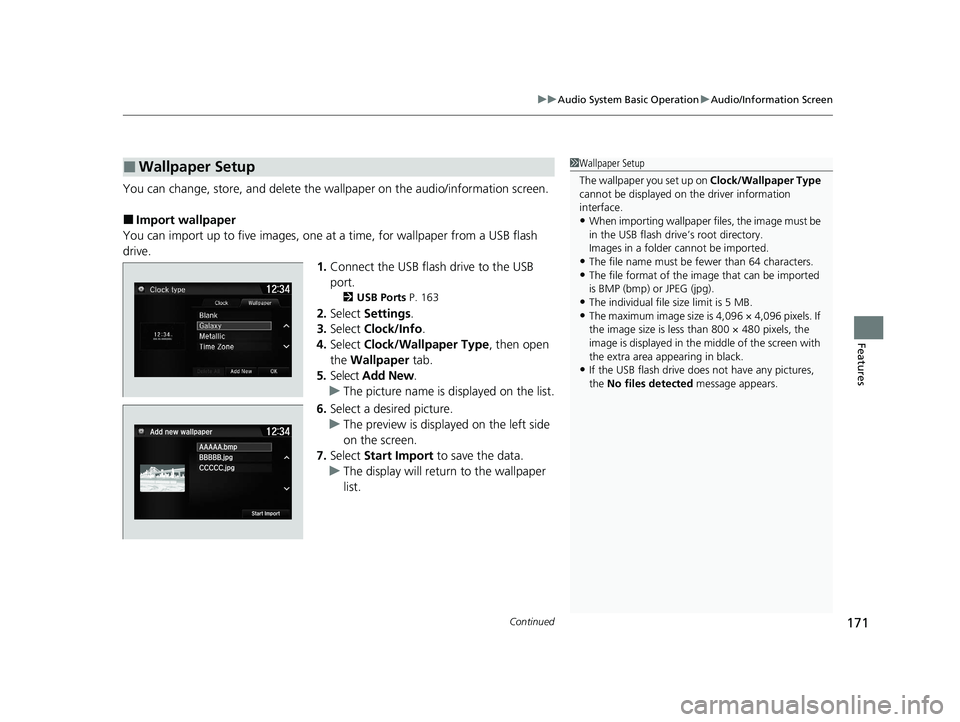
You can change, store, and delete the wallpaper on the audio/information screen.
■ Import wallpaper
You can import up to five images, one at a time, for wallpaper from a USB flash
drive.
1.Connect the USB flash drive to the USB
port.
2 USB Ports P. 163
2. Select Settings .
3. Select Clock/Info .
4. Select Clock/Wallpaper Type , then open
the Wallpaper tab.
5. Select Add New .
uThe picture name is displayed on the list.
6. Select a desired picture.
uThe preview is displayed on the left side
on the screen.
7. Select Start Import to save the data.
uThe display will return to the wallpaper
list.
■Wallpaper Setup1Wallpaper Setup
The wallpaper you set up on Clock/Wallpaper Type
cannot be displayed on th e driver information
interface. • When importing wallpaper f iles, the image must be
in the USB flash driv e’s root directory.
Images in a folder cannot be imported.
• The file name must be fewer than 64 characters.
• The file format of the im age that can be imported
is BMP (bmp) or JPEG (jpg).
• The individual file size limit is 5 MB.
• The maximum image size is 4,096 × 4,096 pixels. If
the image size is less than 800 × 480 pixels, the
image is displayed in the middle of the screen with
the extra area appearing in black.
• If the USB flash drive doe s not have any pictures,
the No files detected message appears.
20 ACURA NSX PMC-31T6N6300.book 171 ページ 2019年9月11日 水曜日 午後4時51分
Page 174 of 491
uuAudio System Basic OperationuAudio/Information Screen
172
Features
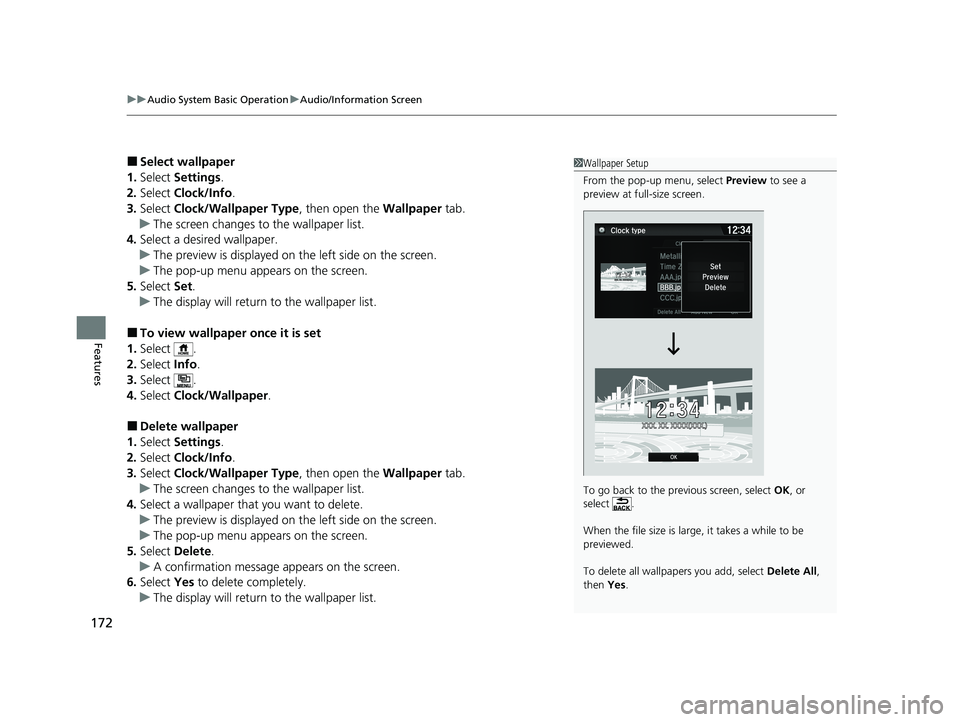
■ Select wallpaper
1. Select Settings .
2. Select Clock/Info .
3. Select Clock/Wallpaper Type , then open the Wallpaper tab.
uThe screen changes to the wallpaper list.
4. Select a desired wallpaper.
uThe preview is displayed on the left side on the screen.
uThe pop-up menu appears on the screen.
5. Select Set.
uThe display will return to the wallpaper list.
■ To view wallpaper once it is set
1. Select .
2. Select Info.
3. Select .
4. Select Clock/Wallpaper .
■ Delete wallpaper
1. Select Settings .
2. Select Clock/Info .
3. Select Clock/Wallpaper Type , then open the Wallpaper tab.
uThe screen changes to the wallpaper list.
4. Select a wallpaper that you want to delete.
uThe preview is displayed on the left side on the screen.
uThe pop-up menu appears on the screen.
5. Select Delete .
uA confirmation message appears on the screen.
6. Select Yes to delete completely.
uThe display will return to the wallpaper list.
1Wallpaper Setup
From the pop-up menu, select Preview to see a
preview at full-size screen.
To go back to the previous screen, select OK, or
select .
When the file size is large, it takes a while to be previewed.
To delete all wallpapers you add, select Delete All,
then Yes.
20 ACURA NSX PMC-31T6N6300.book 172 ページ 2019年9月11日 水曜日 午後4時51分
Page 175 of 491
Continued173
uuAudio System Basic OperationuAudio/Information Screen
Features
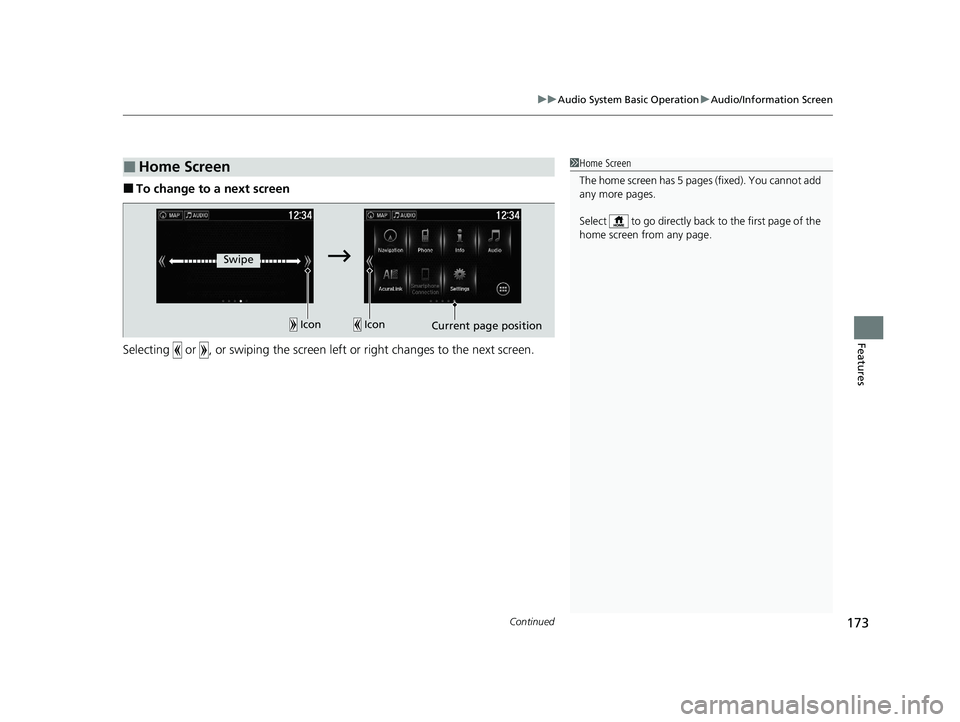
■To change to a next screen
Selecting or , or swiping the screen le ft or right changes to the next screen.
■Home Screen1Home Screen
The home screen has 5 pages (fixed). You cannot add
any more pages.
Select to go directly back to the first page of the
home screen from any page.
Swipe
Icon
IconCurrent page position
20 ACURA NSX PMC-31T6N6300.book 173 ページ 2019年9月11日 水曜日 午後4時51分
Page 176 of 491

uuAudio System Basic OperationuAudio/Information Screen
174
Features
■ To use apps or widgets
1.Select .
2. Select (app list) icon.
uThe Apps screen appears.
3. Select the app or widget you want to use.
Pre-installed app list: • Browser : Displays the web browser utilized
by smartphone and Wi-Fi connection.
• Calculator : Displays Calculator.
• Downloads : Displays the data
downloaded from the web browser and so
on.
• Install USB : Installs the driver for the USB
flash drive.
• Search : Displays various retrieval screen.
• Settings : Displays the Android setting
screen.
1To use apps or widgets
Select and hold a selected app or widget to add that
app’s or widget’s shortcut on the home screen.
Pre-installed apps may not start up normally. If this
occurs, you need to reset the system.
2 Defaulting All the Settings P. 266
If you perform Factory Data Reset , it may reset all
the settings to their factory default.
2 Defaulting All the Settings P. 266
In case those apps still do not startup normally even
after Factory Data Reset , contact an authorized
Acura NSX dealer.
There is a possibility that a browser is shut down in
the situation of the use. In that situation, the screen
will return to before the browser startup.
You can delete user installed apps by the following
procedure.
1. Select .
2. Select Settings.
3. Select System.
4. Select the Others tab.
5. Select Detail Information .
6. Select Apps.
7. Select an app that you want to delete.
8. Select Delete.
Pre-installed apps cannot be deleted.
(App List)
Icon
20 ACURA NSX PMC-31T6N6300.book 174 ページ 2019年9月11日 水曜日 午後4時51分
Page 177 of 491
175
uuAudio System Basic OperationuAudio/Information Screen
Continued
Features
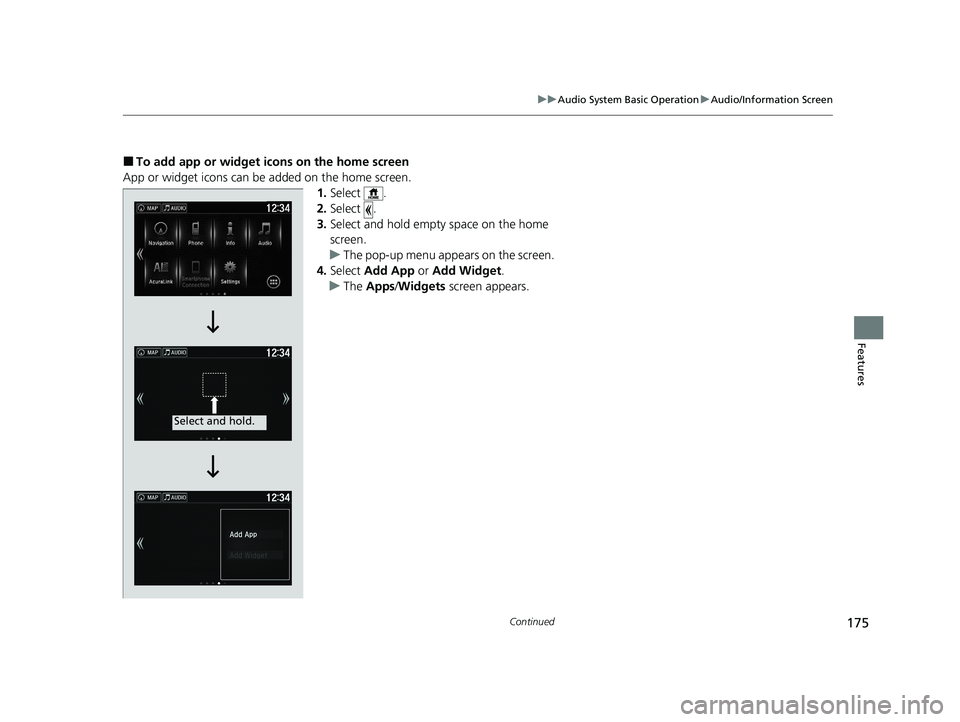
■To add app or widget icons on the home screen
App or widget icons can be added on the home screen. 1.Select .
2. Select .
3. Select and hold empty space on the home
screen.
uThe pop-up menu appears on the screen.
4. Select Add App or Add Widget .
uThe Apps /Widgets screen appears.
Select and hold.
20 ACURA NSX PMC-31T6N6300.book 175 ページ 2019年9月11日 水曜日 午後4時51分