wheel ACURA NSX 2020 Service Manual
[x] Cancel search | Manufacturer: ACURA, Model Year: 2020, Model line: NSX, Model: ACURA NSX 2020Pages: 491, PDF Size: 20.24 MB
Page 273 of 491
Continued271
uuBluetooth® HandsFreeLink ®uUsing HFL
Features
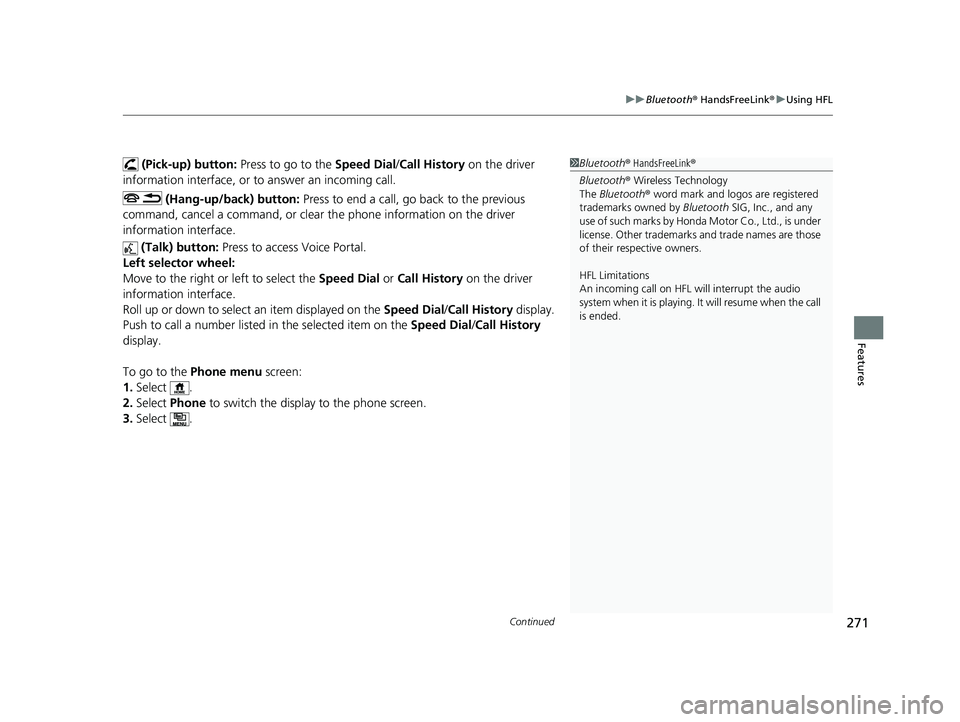
(Pick-up) button: Press to go to the Speed Dial/Call History on the driver
information interface, or to answer an incoming call.
(Hang-up/back) button: Press to end a call, go back to the previous
command, cancel a command, or clear th e phone information on the driver
information interface.
(Talk) button: Press to access Voice Portal.
Left selector wheel:
Move to the right or left to select the Speed Dial or Call History on the driver
information interface.
Roll up or down to select an item displayed on the Speed Dial/Call History display.
Push to call a number listed in the selected item on the Speed Dial/Call History
display.
To go to the Phone menu screen:
1. Select .
2. Select Phone to switch the displa y to the phone screen.
3. Select .1Bluetooth ® HandsFreeLink ®
Bluetooth ® Wireless Technology
The Bluetooth ® word mark and logos are registered
trademarks owned by Bluetooth SIG, Inc., and any
use of such marks by Honda Motor Co., Ltd., is under
license. Other trademarks and trade names are those
of their respective owners.
HFL Limitations
An incoming call on HFL will interrupt the audio
system when it is playing. It will resume when the call is ended.
20 ACURA NSX PMC-31T6N6300.book 271 ページ 2019年9月11日 水曜日 午後4時51分
Page 296 of 491
uuBluetooth® HandsFreeLink ®uHFL Menus
294
Features
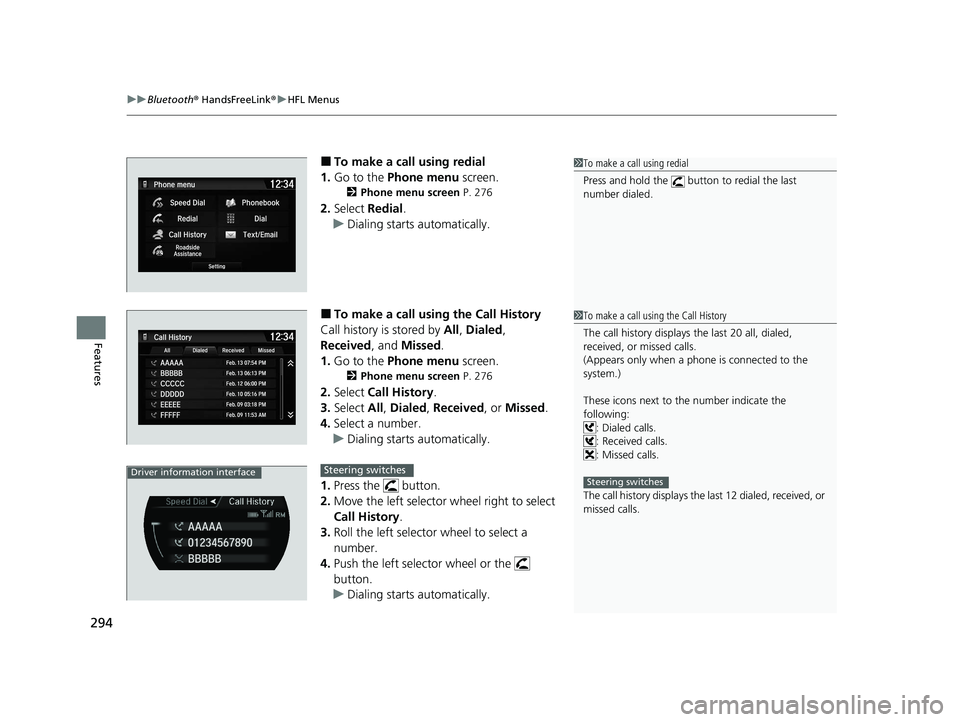
■ To make a call using redial
1. Go to the Phone menu screen.
2 Phone menu screen P. 276
2. Select Redial .
uDialing starts automatically.
■ To make a call using the Call History
Call history is stored by All, Dialed ,
Received , and Missed .
1. Go to the Phone menu screen.
2 Phone menu screen P. 276
2. Select Call History .
3. Select All, Dialed , Received , or Missed .
4. Select a number.
uDialing starts automatically.
1. Press the button.
2. Move the left selector wheel right to select
Call History .
3. Roll the left selector wheel to select a number.
4. Push the left selector wheel or the
button.
uDialing starts automatically.
1To make a call using redial
Press and hold the button to redial the last number dialed.
1To make a call using the Call History
The call history displays the last 20 all, dialed,
received, or missed calls.
(Appears only when a phone is connected to the system.)
These icons next to th e number indicate the
following: : Dialed calls. : Received calls.
: Missed calls.
The call history displays the last 12 dialed, received, or
missed calls.
Steering switchesDriver information interfaceSteering switches
20 ACURA NSX PMC-31T6N6300.book 294 ページ 2019年9月11日 水曜日 午後4時51分
Page 297 of 491

Continued295
uuBluetooth® HandsFreeLink ®uHFL Menus
Features
■
To make a call using a Speed Dial entry
1. Go to the Phone menu screen.
2 Phone menu screen P. 276
2. Select Speed Dial .
3. Select a number.
uDialing starts automatically.
1. Press the button.
2. Move the left selector wheel left to select
Speed Dial .
3. Roll the left selector wheel to select a
number.
4. Push the left selector wheel or the
button.
uDialing starts automatically.
1To make a call using a Speed Dial entry
When a voice tag is stored, press the button to
call the number using the voice tag.
2 Speed Dial P. 284
Any voice-tagged speed dial entry can be dialed by
voice from any screen.
Press the button and follow the prompts.
The speed dial displays the 20 speed dial entries.
Steering switchesDriver information interfaceSteering switches
20 ACURA NSX PMC-31T6N6300.book 295 ページ 2019年9月11日 水曜日 午後4時51分
Page 309 of 491

307
uuAcuraLink®*u
Features
Connect to the AcuraLink operator when trying to find a destination or for roadside
assistance.
1.Press the LINK button.
uConnection to the operator begins.
2. Talk to the operator.
uTo disconnect, select End Call on the
audio/information screen or press the
button on the steering wheel.
■Operator Assistance1Operator Assistance
Remain attentive to road conditions and driving
during operator assistance.
LINK Button
Audio/information screen
when connected to the
AcuraLink operator.
20 ACURA NSX PMC-31T6N6300.book 307 ページ 2019年9月11日 水曜日 午後4時51分
Page 311 of 491
309
Driving
This chapter discusses driving and refueling.
Before Driving Driving Preparation .......................... 310
Maximum Load Limit........................ 313
High-Performance Driving ................ 315
Towing a Trailer Towing Your Vehicle ........................ 320
When Driving Turning on the Power ...................... 321
Precautions While Driving................. 324
Dual Clutch Transmission ................. 325
Shifting ............................................ 326Acoustic Vehicle Al erting System ...... 335 Integrated Dynamics System ............ 336
Launch Control ................................ 341
Cruise Control ................................. 343
Vehicle Stability AssistTM (VSA®), aka Electronic
Stability Control (ESC), System .............. 346
Agile Handling Assist ....................... 350
SPORT HYBRID Super Handling All-Wheel- DriveTM (SPORT HYBRID SH-AWD®) .... 351
Tire Pressure Monitoring System (TPMS) ...... 352
Tire Pressure Monitoring System (TPMS) - Required Federal Explanation ......... 354
High Voltage Battery ........................ 356 Braking
Brake System ................................... 357
Anti-lock Brake System (ABS) ........... 362
Brake Assist System ......................... 363
Parking Your Vehicle
When Stopped ................................ 364
Parking Sensor System *
................... 365
Multi-View Rear Camera .................. 369
Refueling
Fuel Information .............................. 371
How to Refuel ................................. 372
Fuel Economy and CO 2 Emissions
.... 373
Turbo Engine Vehicle ....................... 374
* Not available on all models
20 ACURA NSX PMC-31T6N6300.book 309 ページ 2019年9月11日 水曜日 午後4時51分
Page 312 of 491

310
Driving
Before Driving
Driving Preparation
Check the following items before you start driving.
• Make sure there are no obstructions on the windows, door mirrors, exterior
lights, or other parts of the vehicle.
uRemove any frost, snow, or ice.
uRemove any snow on the roof, as this can slip down and obstruct your field of
vision while driving. If frozen solid , remove ice once it has softened.
uWhen removing ice from around the wheels, be sure not to damage the wheel
or wheel components.
• Make sure the hood is securely closed.
uIf the hood opens while driving, your front view will be blocked.
• Make sure the tires are in good condition.
uCheck air pressures, and check for damage and excessive wear.
2 Checking and Maintaining Tires P. 407
• Make sure there are no people or ob jects behind or around the vehicle.
uThere are blind spots from the inside.
• Check the front bumper ducts and side intercooler ducts for mud, leaves, and
road debris that could build up and prevent proper cooling performance.
■Exterior Checks1Exterior Checks
NOTICE
When doors are frozen s hut, use warm water around
the door edges to melt any ice. Do not try to force
them open, as this can damage the rubber trim
around the doors. When done, wipe dry to avoid further freezing.
Do not pour warm water into the key cylinder.
You will be unable to insert the key if the water
freezes in the hole.
Heat from the engine and exhaust can ignite
flammable materials left und er the hatch, causing a
fire. If you’ve parked y our vehicle for an extended
period, inspect and remove any debris that may have
collected, such as dried grass and leaves that have
fallen or have been carried in for use as a nest by a
small animal.
Also check under the hatch for leftover flammable
materials after you or so meone else has performed
maintenance on your vehicle.
20 ACURA NSX PMC-31T6N6300.book 310 ページ 2019年9月11日 水曜日 午後4時51分
Page 313 of 491

Continued311
uuBefore DrivinguDriving Preparation
Driving
•Store or secure all items on board properly.
uCarrying too much cargo, or improperly storing it, can affect your vehicle’s
handling, stability, sto pping distance, and tires, and make it unsafe.
2 Maximum Load Limit P. 313
• Do not pile items higher than the seat height.
uThey can block your view and may be thrown forward in the event of sudden
braking.
• Do not place anything in the seat footwe lls. Make sure to secure the floor mat.
uAn object or unsecured floor mat can interfere with your brake and accelerator
pedal operation while driving.
• If you have any animals on board, do not let them move around in the vehicle.
uThey may interfere with driving and a crash could occur.
• Securely close and lock both doors and the hatch.
2 Locking/Unlocking the Doors from the Inside P. 115
• Adjust your seating position properly.
2 Adjusting the Seats P. 144
• Adjust the mirrors and steering wheel properly.
uAdjust them while sitting in the proper driving position.
2 Adjusting the Mirrors P. 141
2 Adjusting the Steering Wheel P. 140
■Interior Checks1Interior Checks
The headlight aim is set by the factory, and does not
need to be adjusted. Howeve r, if you regularly carry
heavy items in the trunk ha ve the aiming readjusted
at an authorized Acura NS X dealer or by a qualified
technician.
20 ACURA NSX PMC-31T6N6300.book 311 ページ 2019年9月11日 水曜日 午後4時51分
Page 319 of 491

Continued317
uuBefore DrivinguHigh-Performance Driving
Driving
•Burnish the brake pads shortly before high -performance driving so that they have
the performance characteristics necessary to repeatedly and quickly slow the NSX
when it is being operated at signific antly high speeds. (While the NSX’s brake
pads are properly burnished for the demands expected in ordinary day-to-day driving, high-performance driving puts unique demands on the brake system
which require further burnishing.)
• Inspect ALL cooling openings to confirm th ey are open and free of debris such as
leaves, etc. Cooling openings include engine undercover ducts, heat resistance
ducts, brake ducts, radi ators, and intercoolers
• Remove Tire Repair Kit from the trunk, along with any other cargo area contents
• Check tire wear and tire pressure, and m ake certain wheel lug bolts are properly
torqued, as driving at high speed puts additional strain on tires and wheels. Never
use slick tires, and do not use Summer Only tires and Ultra High Performance tires
if temperatures will be lower than 45°F (7°C)
• If you anticipate sustained driving at speeds greater than 168 mph/270 km/h,
adjust the cold tire pressure as shown on the driver door jamb warning label. This
will help avoid heat build-up and sudden tire failure1High-Performance Driving
3WARNING
Use of slick tires/racing slicks may subject the chassis and body components to higher
dynamic loads than they were designed for.
Higher than intended dynamic loads could
result in component fail ure, loss of control,
and serious injury or death to you or others.
Do not install slick tires on the NSX.
Canadian models
U.S. models
20 ACURA NSX PMC-31T6N6300.book 317 ページ 2019年9月11日 水曜日 午後4時51分
Page 326 of 491

324
uuWhen DrivinguPrecautions While Driving
Driving
Precautions While Driving
Avoid driving in deep water and on flooded roads. This can damage the power
system or driveline, or cause electrical component failure.
The vehicle is equipped with ultra high performance summer tires that, due to their
decreased tread depth, are at greater risk of hydroplaning on wet roads compared
to regular tires. Exercise caution when driving on wet surfaces.
The vehicle is equipped with ultra high performance summer tires. These tires are
designed for optimum performance and handling in warm climates, and are not
suitable for below freezing, snowy or ic y weather conditions. If you drive under
these circumstances, use of winter tires is recommended and may be mandatory,
depending on your region, province or territory. 2 Winter Tires P. 415
2 Cold Weather Driving P. 416
Due to limitations of the Lithium-ion Hi gh Voltage battery, the minimum starting
temperature for the vehicle is -4°F (-20°C).
Inability to start the vehicle and/or decrea sed performance is expected if the vehicle
is operated at temperatures below -4°F (-20°C).
■In Rain
■In Snow and Ice
1Precautions While Driving
NOTICE
Do not select a shift button while pressing the
accelerator pedal.
NOTICE
The following can damage the under spoiler, under
covers, front bumper, rear diffuser, brake cooling
components, and side sill: • Parking the vehicle by a parking block
• Parallel pa rking along the road shoulder
• Driving toward the bottom of a hill
• Driving up or down to a different surface level
(such as a road shoulder)
• Driving on a rutted or bumpy road
• Driving on a road with potholes
• Driving over speed bump
NOTICE
If you repeatedly turn the steering wheel at an
extremely low speed, or hold the steering wheel in
the full left or right position for a while, the electric
power steering (EPS) system heats up. The system
goes into a protective mode, and limits its
performance. The steering wheel becomes harder
and harder to operate. Once the system cools down,
the EPS system is restored. Repeated operation under these conditions can
eventually damage the system.
If the power mode is set to ACCESSORY while
driving, the power system will shut down and all
steering and brake power a ssist functions will stop,
making it difficult to control the vehicle.
Driving in snow or icy c onditions may accumulate ice
on the brake disk surface, reducing braking power.
20 ACURA NSX PMC-31T6N6300.book 324 ページ 2019年9月11日 水曜日 午後4時51分
Page 333 of 491

Continued331
uuWhen DrivinguShifting
Driving
Use the paddle shifters to change between 1st and 9th gears without removing your
hands from the steering wheel. The transmission will switch to the sequential mode. ■ When the transmi ssion is in
(D (D-paddle shift mode):
The vehicle will go into the sequential m ode momentarily, and the gear selection
indicator becomes more prominent.
The sequential mode is automatically canc eled and the gear selection indicator
returns to ordinary display under the following conditions. • Hold the
(+ paddle shifter for a few seconds.
• Once you start traveling at a constant speed.
• The vehicle comes to a complete stop.
• When you change to another Integrated Dynamics System mode.
The sequential mode automatically shifts under following condition • Accelerator pedal depressed beyond the click.
• Engine speed reaches near the tachometer’s red zone.
• Engine speed reaches idle speed while deceleration.
■Sequential Mode1Sequential Mode
When sequential mode is selected, the gasoline
engine powers the vehicle.
20 ACURA NSX PMC-31T6N6300.book 331 ページ 2019年9月11日 水曜日 午後4時51分