audio ACURA NSX 2021 Owners Manual
[x] Cancel search | Manufacturer: ACURA, Model Year: 2021, Model line: NSX, Model: ACURA NSX 2021Pages: 494, PDF Size: 16.57 MB
Page 252 of 494

250
uuCustomized Features u
Features
Text/Email
Bluetooth Device List
Edit Speed Dial
Ring Tone
Phone
Automatic Phone Sync
Enable Text/Email
Select Account
New Message Notification
Phone
HD Radio Mode
RDS INFO
Audio
FM
Default
Sound
Audio Source Pop-Up
Common
Cover Art
Bluetooth Device List
Tune Start
SportsFlash Setup(Interrupt)
Traffic & Weather Setup
SXM*
Default
SportsFlash Setup(Interrupt
Beep)
SportsFlash Setup(Favorite Team)
* Not available on all models
21 ACURA NSX PMC-31T6N6400.book 250 ページ 2020年10月8日 木曜日 午後3時7分
Page 262 of 494

260
uuCustomized Features u
Features
*1:Default SettingSetup
Group Customizable Features Description Selectable Settings
Audio
Common
Sound
Adjusts the settings of the audio
speakers’ sound.
2
Adjusting the Sound P. 185
-6~0*1~+6 (BASS and TREBLE),
RR9 ~0*1~FR9 ( FADER ),
L9 ~0*1~R9 (BALANCE ),
-6 ~0*1~+6 (Center* and Subwoofer ),
Off /Low /Mid*1/High
( Speed Volume Compensation ),
Off
*1/ On (Neural*)
Audio Source Pop-Up
Selects whether the list of
selectable audio sources comes on
when Audio is selected on the
home screen.
On /Off*1
[Your selected media]
Cover ArtTurns the cover art display on and
off.On*1/ Off
Bluetooth Device List
Pairs a new phone to HFL, edits or
deletes a paired phone.
2 Phone Setup P. 282
—
FM
HD Radio Mode
Selects whether the audio system
automatically switches to the
digital radio waves or receives the
analog waves only.
Auto*1/Analog
RDS INFOTurns on and off the RDS
information.On*1/Off
FM mode
* Not available on all models
21 ACURA NSX PMC-31T6N6400.book 260 ページ 2020年10月8日 木曜日 午後3時7分
Page 263 of 494

261
uuCustomized Features u
Continued
Features
*1:Default SettingSetup
Group Customizable Features Description Selectable Settings
AudioSXM*
Tune StartTurns on and off, starts the song from the
beginning as you chan
ge preset stations.On*1/Off
SportsFlash
Setup(Interrupt)Turns on and off the sports alert function.Off*1/On(one time) /
On(continue)
SportsFlash
Setup(Interrupt Beep)Causes the system to beep when the sports alert
is notified.On*1/ Off
SportsFlash
Setup(Favorite Team)Selects your favorite sports teams.
2 Live Sports Alert P. 201—
Traffic & Weather SetupSelects the region you want to receive the
information.—
DefaultCancels/Resets all customized items in the Audio
settings group as default.Yes /No
SiriusXM® mode
* Not available on all models
21 ACURA NSX PMC-31T6N6400.book 261 ページ 2020年10月8日 木曜日 午後3時7分
Page 264 of 494

262
uuCustomized Features u
Features
*1:Default SettingSetup
Group Customizable Features Description Selectable Settings
System Display Display
Settings
Brightness
Changes the brightness of the audio/information
screen. 0
~5 ~10
*1
(Daytime mode)
0 ~5
*1~10
(Nighttime mode)
Contrast Changes the contrast of the audio/information
screen. -5
~0
*1~+5
Black Level Changes the black level of the audio/information
screen.
-5
~0
*1~+5
Background Color Changes the background color of the audio/
information screen. Blue
*1/
Amber /Red /
Violet
Track Mode Display Turns the limitation screen for the
TRACK mode
on and off.
2 Limitations for Manual Operation P. 187
On*1/Off
Sound/
Beep Guidance Volume
*Changes the sound volume.
Adjusts the guidance volume of the navigation
system.
1
~6*1~11
Text Message Volume Changes the text/e-mail message reading
volume. 1
~6
*1~11
* Not available on all models
21 ACURA NSX PMC-31T6N6400.book 262 ページ 2020年10月8日 木曜日 午後3時7分
Page 276 of 494
274
Features
Bluetooth® HandsFreeLink ®
Bluetooth® HandsFreeLink ® (HFL) allows you to place and receive phone calls using
your vehicle’s audio system, without handling your cell phone.
Using HFL
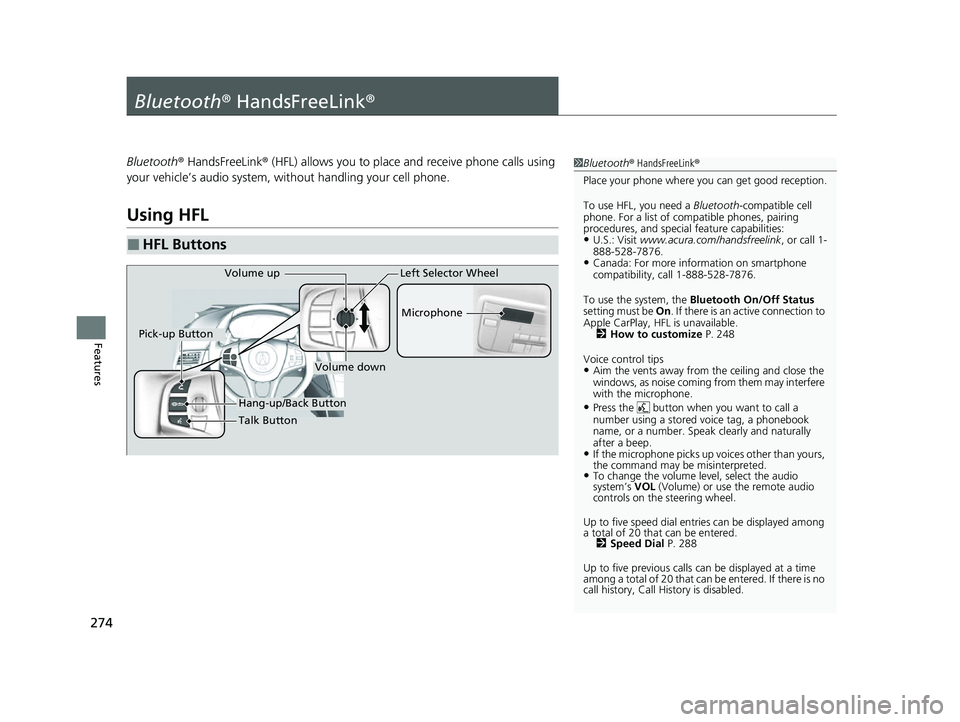
■HFL Buttons
1 Bluetooth ® HandsFreeLink ®
Place your phone where y ou can get good reception.
To use HFL, you need a Bluetooth-compatible cell
phone. For a list of compatible phones, pairing
procedures, and special feature capabilities:
•U.S.: Visit www.acura.com/handsfreelink , or call 1-
888-528-7876.
•Canada: For more info rmation on smartphone
compatibility, call 1-888-528-7876.
To use the system, the Bluetooth On/Off Status
setting must be On. If there is an active connection to
Apple CarPlay, H FL is unavailable.
2 How to customize P. 248
Voice control tips
•Aim the vents away from the ceiling and close the
windows, as noise coming from them may interfere
with the microphone.
•Press the button when you want to call a
number using a stored voice tag, a phonebook
name, or a number. Spe ak clearly and naturally
after a beep.
•If the microphone picks up vo ices other than yours,
the command may be misinterpreted.
•To change the volume level, select the audio
system’s VOL (Volume) or use the remote audio
controls on the steering wheel.
Up to five speed dial entries can be displayed among
a total of 20 that can be entered. 2 Speed Dial P. 288
Up to five previous calls can be displayed at a time
among a total of 20 that can be entered. If there is no
call history, Call History is disabled.
Talk Button Microphone
Hang-up/Back Button
Pick-up Button
Volume up
Volume down
Left Selector Wheel
21 ACURA NSX PMC-31T6N6400.book 274 ページ 2020年10月8日 木曜日 午後3時7分
Page 277 of 494
Continued275
uuBluetooth ® HandsFreeLink ®u Using HFL
Features
(Pick-up) button: Press to go to the Speed Dial/Call History on the driver
information interface, or to answer an incoming call.
(Hang-up/back) button: Press to end a call, go back to the previous
command, cancel a command, or clear th e phone information on the driver
information interface.
(Talk) button: Press to access Voice Portal.
Left selector wheel:
Move to the right or left to select the Speed Dial or Call History on the driver
information interface.
Roll up or down to select an item displayed on the Speed Dial/Call History display.
Push to call a number listed in the selected item on the Speed Dial/Call History
display.
To go to the Phone menu screen:
1. Select .
2. Select Phone to switch the displa y to the phone screen.
3. Select .1Bluetooth ® HandsFreeLink ®
Bluetooth ® Wireless Technology
The Bluetooth ® word mark and logos are registered
trademarks owned by Bluetooth SIG, Inc., and any
use of such marks by Honda Motor Co., Ltd., is under
license. Other trademarks and trade names are those
of their respective owners.
HFL Limitations
An incoming call on HFL will interrupt the audio
system when it is playing. It will resume when the call
is ended.
21 ACURA NSX PMC-31T6N6400.book 275 ページ 2020年10月8日 木曜日 午後3時7分
Page 278 of 494
uuBluetooth ® HandsFreeLink ®u Using HFL
276
Features
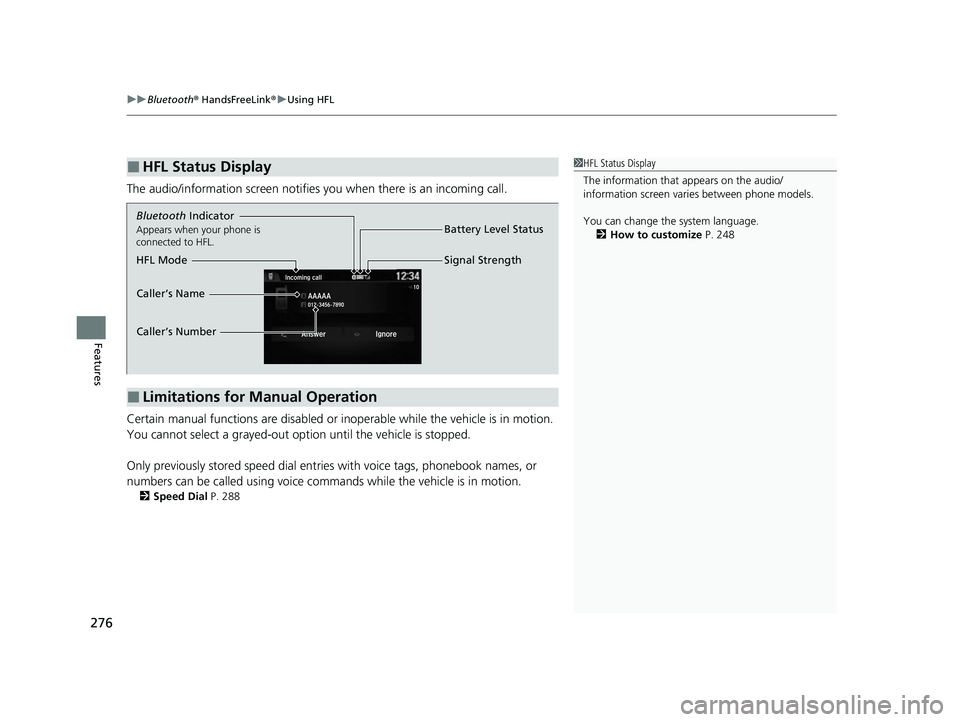
The audio/information screen notifies you when there is an incoming call.
Certain manual functions are disabled or in operable while the vehicle is in motion.
You cannot select a grayed-out option until the vehicle is stopped.
Only previously stored speed dial entries with voice tags, phonebook names, or
numbers can be called using voice commands while the vehicle is in motion.
2 Speed Dial P. 288
■HFL Status Display1HFL Status Display
The information that appears on the audio/
information screen vari es between phone models.
You can change the system language. 2 How to customize P. 248
■Limitations for Manual Operation
Bluetooth Indicator
Appears when your phone is
connected to HFL.
Signal Strength
HFL Mode Battery Level Status
Caller’s Name
Caller’s Number
21 ACURA NSX PMC-31T6N6400.book 276 ページ 2020年10月8日 木曜日 午後3時7分
Page 284 of 494

uuBluetooth ® HandsFreeLink ®u HFL Menus
282
Features
■To pair a cell phone (when there is no
phone paired to the system)
1. Select Phone .
2. Select Yes.
3. Make sure your phone is in search or
discoverable mode, then select Continue.
u HFL automatically searches for a
Bluetooth® device.
4. Select your phone when it appears on the
list.
u If your phone does not appear, you can
select Refresh to search again.
u If your phone still does not appear, select
Phone Not Found and search for
Bluetooth® devices using your phone.
From your phone, search for
HandsFreeLink .
5. The system gives you a pairing code on the
audio/information screen.
u Confirm if the pairing code on the screen
and your phone match.
This may vary by phone.
■Phone Setup1Phone Setup
Your Bluetooth -compatible phone must be paired to
the system before you ca n make and receive hands-
free calls.
Phone Pairing Tips:
•You cannot pair your phone while the vehicle is
moving.
•Up to six phones can be paired.
•Your phone's battery may dr ain faster when it is
paired to the system.
•If your phone is not ready for pairing or not found
by the system within three minutes, the system will
time out and return to idle.
Once you have paired a phone, you can see it
displayed on the screen with one or two icons on the
right side.
These icons indicate the following: : The phone can be used with HFL.
: The phone is compatible with Bluetooth ® Audio.
If there is an active c onnection to Apple CarPlay,
pairing of additional Bluetooth -compatible devices is
unavailable and Add Bluetooth Device is grayed
out from the Bluetooth Device List screen.
21 ACURA NSX PMC-31T6N6400.book 282 ページ 2020年10月8日 木曜日 午後3時7分
Page 298 of 494

uuBluetooth ® HandsFreeLink ®u HFL Menus
296
Features
You can make calls by inputting any phone
number, or by using the imported
phonebook, call history, speed dial entries, or
redial.
■Making a Call1 Making a Call
Any voice-tagged speed dial entry can be dialed by
voice from most screens.
Press the button and say the voice tag name.
Once a call is connected, you can hear the voice of
the person you are call ing through the audio
speakers.
While there is an active connection with Apple
CarPlay, phone calls ca nnot be made with
HandsFreeLink ® and are only made from Apple
CarPlay.
21 ACURA NSX PMC-31T6N6400.book 296 ページ 2020年10月8日 木曜日 午後3時7分
Page 302 of 494

uuBluetooth ® HandsFreeLink ®u HFL Menus
300
Features
When there is an incoming call, an audible
notification sounds (i f activated) and the
Incoming call screen appears.
Press the button to answer the call.
Press the button to decline or end the
call.
The following options are available during a call.
Mute: Mute your voice.
Transfer : Transfer a call from the system to your phone.
Touch Tones: Send numbers during a call. This is useful when you call a menu-
driven phone system. The available options are shown on the lower
half of the screen.
Select the option.
u The mute icon blinks when Mute is
selected. Select Mute again to turn it off.
■Receiving a Call1Receiving a Call
Call Waiting
Press the button to put the current call on hold to
answer the incoming call.
Press the button again to return to the current
call.
Select Ignore to ignore the incoming call if you do
not want to answer it.
Press the button if you want to hang up the
current call.
You can select the icons on the audio/information
screen instead of the and buttons.
■Options During a Call1 Options During a Call
Touch Tones : Available on some phones.
You can select the icons on the audio/information
screen.
Mute Icon
21 ACURA NSX PMC-31T6N6400.book 300 ページ 2020年10月8日 木曜日 午後3時7分