audio ACURA NSX 2021 User Guide
[x] Cancel search | Manufacturer: ACURA, Model Year: 2021, Model line: NSX, Model: ACURA NSX 2021Pages: 494, PDF Size: 16.57 MB
Page 122 of 494
uuLocking and Unlocking the Doors uLocking/Unlocking the Doors from the Inside
120
Controls
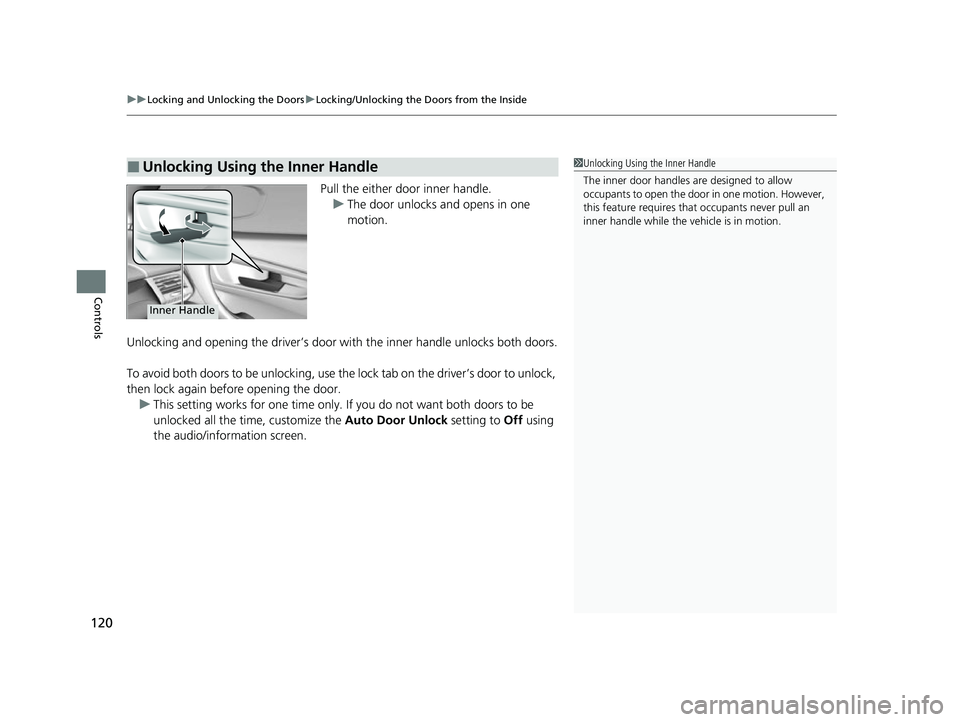
Pull the either door inner handle.
u The door unlocks and opens in one
motion.
Unlocking and opening the driver’s door with the inner handle unlocks both doors.
To avoid both doors to be unlocking, use the lock tab on the driver’s door to unlock,
then lock again before opening the door. u This setting works for one time only. If you do not want both doors to be
unlocked all the time, customize the Auto Door Unlock setting to Off using
the audio/information screen.
■Unlocking Using the Inner Handle1 Unlocking Using the Inner Handle
The inner door handles are designed to allow
occupants to open the door in one motion. However,
this feature requires that occupants never pull an
inner handle while the vehicle is in motion.
Inner Handle
21 ACURA NSX PMC-31T6N6400.book 120 ページ 2020年10月8日 木曜日 午後3時7分
Page 124 of 494
122
uuLocking and Unlocking the Doors uAuto Door Locking/Unlocking
Controls
Auto Door Locking/Unlocking
Your vehicle locks and unlocks both doors automatically when a certain condition is
met.
■Drive lock mode
Both doors lock when the vehicle’s speed reaches about 10 mph (15 km/h).
■Driver’s door open mode
Both doors unlock when the driver’s door is opened.
■Auto Door Locking
■Auto Door Unlocking
1 Auto Door Locking/Unlocking
You can turn off or cha nge to another auto door
locking/unlocking sett ing using the audio/
information screen. 2 Customized Features P. 248
21 ACURA NSX PMC-31T6N6400.book 122 ページ 2020年10月8日 木曜日 午後3時7分
Page 128 of 494

126
Controls
Security System
Immobilizer System
The immobilizer system prevents a key that has not been pre-registered from
starting the power system. Each key cont ains electronic transmitters that use
electronic signals to verify the key.
Pay attention to the follo wing when pressing the ENGINE START/STOP button:
• Do not allow objects that emit strong radio waves near the ENGINE START/
STOP button.
• Make sure the key is not covered by or touching a metal object.
• Do not bring a key from another vehicle’s immobilizer system near the ENGINE
START/STOP button.
• Do not put the key near magnetic items. Electronic devices, such as a televisions
and audio systems emit strong magnetic fields. Note that even a key chain can
become magnetic.
Security System Alarm
The security system alarm activates when the hood, hatch or doors are forcibly
opened. The alarm does not go off if the hatch or doors are opened with the key,
remote transmitter or keyless access system.
However, the alarm goes off when a door is opened with the key, then select other
than
(P or the hood is opened before the power mode is set to ON.
■When the security sy stem alarm activates
The horn sounds intermittently, and some exterior lights flash.
■To deactivate the security system alarm
Unlock the vehicle using the remote transm itter or keyless access system, or the
power mode is set to ON. The system, along with the horn and flashing lights, is
deactivated.
1 Immobilizer System
NOTICE
Leaving the keyless access re mote in the vehicle can
result in theft or accident al movement of the vehicleM
Always take the remote with you whenever you leave
the vehicle unattendedM
Do not alter the system or add other devices to itM
Doing so may damage the system and make your
vehicle inoperableM
1 Security System Alarm
The security alarm continues for a maximum of two
minutes until the security system deactivates.
21 ACURA NSX PMC-31T6N6400.book 126 ページ 2020年10月8日 木曜日 午後3時7分
Page 133 of 494

131Continued
Controls
Operating the Switches Around the Steering Wheel
ENGINE START/STOP Button
■Changing the Power Mode1ENGINE START/STOP Button
ENGINE START/STOP Button Operating Range
You can start the power system when the keyless
access remote is inside the vehicle.
The power system may also start if the keyless access
remote is close to the door or window, even if it is
outside the vehicle.
If the battery of the keyless access remote is getting
low, the power system may not start when you push
the ENGINE START/STOP button. If the power
system does not start, refer to the following link. 2 If the Keyless Access Remote Battery is
Weak P. 450
Do not leave the power mode in ACCESSORY or ON
when you get out.
Operating RangeVEHICLE OFF (LOCK)
The button is off.
The power to all electrical components is turned off.
Press the button. Without pressing
the brake pedal ACCESSORY
The button blinks (in red).
Operate the audio system and other accessories in
this position.
ON
The button blinks (in red).
All electrical components can be used.
21 ACURA NSX PMC-31T6N6400.book 131 ページ 2020年10月8日 木曜日 午後3時7分
Page 144 of 494
142
uuOperating the Switches Around the Steering Wheel uDriving Position Memory System*
Controls
Driving Position Memory System*
You can store two driver’s seat (except for power lumbar) and outside door mirrors
position with the driving position memory system.
When you unlock and open th e driver’s door with a remote transmitter, or keyless
access system, door mirrors adjust to one of the two preset positions and the seat
adjusts to retracted positions of one of the two preset positions automatically.
The seat will move to th e stored position when you set the power mode to
ACCESSORY.
When you enter the vehicle, the driver in formation interface briefly shows you which
remote transmitter you used to unlock the vehicle.
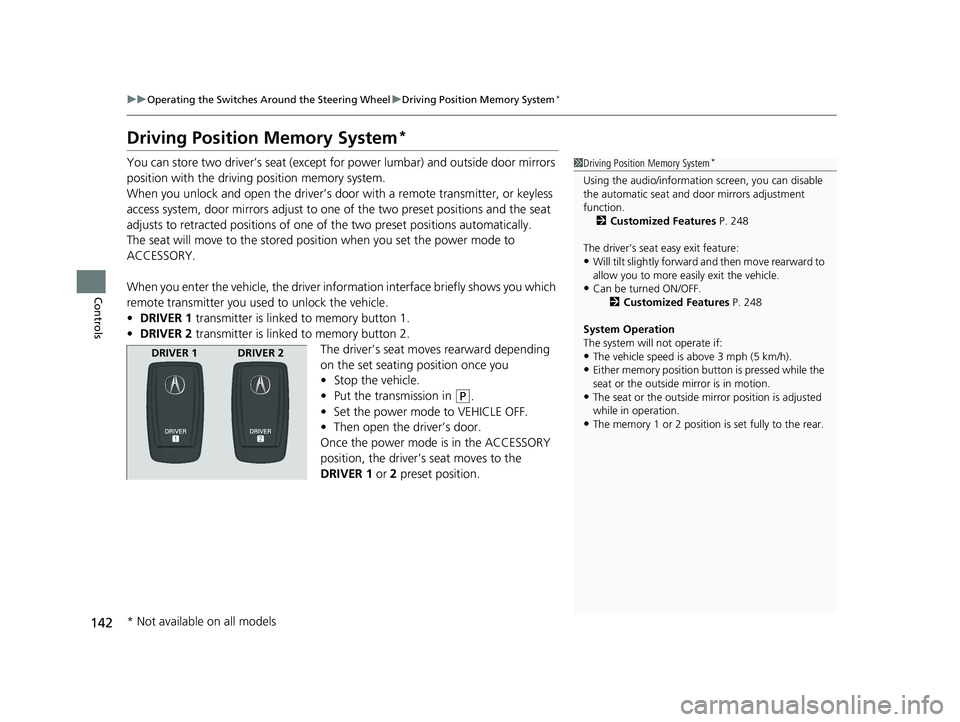
• DRIVER 1 transmitter is linked to memory button 1.
• DRIVER 2 transmitter is linked to memory button 2.
The driver’s seat moves rearward depending
on the set seating position once you
•Stop the vehicle.
• Put the transmission in
(P.
• Set the power mode to VEHICLE OFF.
• Then open the driver’s door.
Once the power mode is in the ACCESSORY
position, the driver’s seat moves to the
DRIVER 1 or 2 preset position.
1Driving Position Memory System*
Using the audio/informati on screen, you can disable
the automatic seat and d oor mirrors adjustment
function. 2 Customized Features P. 248
The driver’s seat easy exit feature:
•Will tilt slightly forward and then move rearward to
allow you to more easily exit the vehicle.
•Can be turned ON/OFF. 2Customized Features P. 248
System Operation
The system will not operate if:
•The vehicle speed is above 3 mph (5 km/h).
•Either memory position button is pressed while the
seat or the outside mirror is in motion.
•The seat or the outside mi rror position is adjusted
while in operation.
•The memory 1 or 2 position is set fully to the rear.
DRIVER 1 DRIVER 2
* Not available on all models
21 ACURA NSX PMC-31T6N6400.book 142 ページ 2020年10月8日 木曜日 午後3時7分
Page 161 of 494

159Continued
Controls
Climate Control System
Using Automatic Climate Control
The automatic climate control system maintains the interior temperature you select.
The system also selects the proper mix of h eated or cooled air to raise or lower the
interior temperature to your pref erence as quickly as possible.
Use the system when the power mode is ON.
1. Press the AUTO button.
2. Adjust the interior temperature using the dr iver’s side or passenger’s side control
buttons.
3. Press the button to cancel.1Using Automatic Climate Control
Press the CLIMATE button to display A/C, MODE, fan
control information on the audio/information screen
for several seconds. Select ic on to turn on or off A/C,
change the vent mode, or change the fan speed.
If any buttons are presse d while using the climate
control system in auto, the function of the button
that was pressed will take priority.
The AUTO indicator will go off, but functions
unrelated to the button th at was pressed will be
controlled automatically.
To prevent cold air from bl owing in from outside, the
fan may not start i mmediately when the AUTO
button is pressed.
If the interior is very warm, you can cool it down
more rapidly by partial ly opening the windows,
turning the system to AUTO, and setting the
temperature to low. Change the fresh mode to
recirculation mode until the temperature cools down.
When you set the temperature to the lower or upper
limit, Lo or Hi is displayed.
Pressing the button switch es the climate control
system on or off. When tu rned on, the system returns
to your last selection.
*1: MID vents provide supple mental air to the lower
body of the occupant(s). MID vents can be used
together with any other vent mode.
Dashboard
vents Dashboard
and floor
vents Floor vents Floor and
defroster
ventsMID vents*1
SYNC
Button
AUTO
Button
CLIMATE Button
Driver Side
Temperature
Control
Buttons Pa
ssenger
Side
Temperature
Control
Buttons
( ON/OFF )
Button
(Recirculation)
Button
Audio/
Information
Touch Screen
21 ACURA NSX PMC-31T6N6400.book 159 ページ 2020年10月8日 木曜日 午後3時7分
Page 167 of 494
165
Features
This chapter describes how to operate technology features.
Audio System
About Your Audio System ................ 166
USB Ports ......................................... 167
Audio System Theft Protection ......... 168
Audio Remote Controls .................... 169
Audio System Basic Operation ........ 170
Audio/Information Screen ................ 171
Adjusting the Sound ........................ 185
Display Setup ................................... 186
Voice Control Operation .................. 188
Playing FM Radio ............................. 192
Playing SiriusXM ® Radio
*................. 196
Playing an iPod ................................ 203 Song By Voice
TM (SBV) ...................... 206
Playing Pandora ®*1........................... 210
Playing a USB Flash Drive ................. 212
Playing Bluetooth ® Audio................. 215
Wi-Fi Connection ............................. 217
Siri ® Eyes Free .................................. 219
Apple CarPlay
TM............................... 220
Android AutoTM................................ 223
Audio Error Messages iPod/USB Flash Drive ........................ 227
Pandora ®
*1....................................... 228
Android/Apps .................................. 229
General Information on the Audio SystemSiriusXM ® Radio Service*................. 230 Compatible iPod, iP
hone, and USB Flash
Drives ............................................ 231
Honda App License Agreement........ 232
Legal Information on Apple CarPlay/
Android Auto................................. 244
About Open Source Licenses............ 246
License Information ......................... 247
Customized Features ........................ 248
Defaulting All the Settings ............... 270
HomeLink ® Universal Transceiver ... 271
Bluetooth ® HandsFreeLink®
Using HFL ........................................ 274
HFL Menus ...................................... 277
AcuraLink®
*....................................... 308
*1: Available only on U.S. models.
* Not available on all models
21 ACURA NSX PMC-31T6N6400.book 165 ページ 2020年10月8日 木曜日 午後3時7分
Page 168 of 494
166
Features
Audio System
About Your Audio System
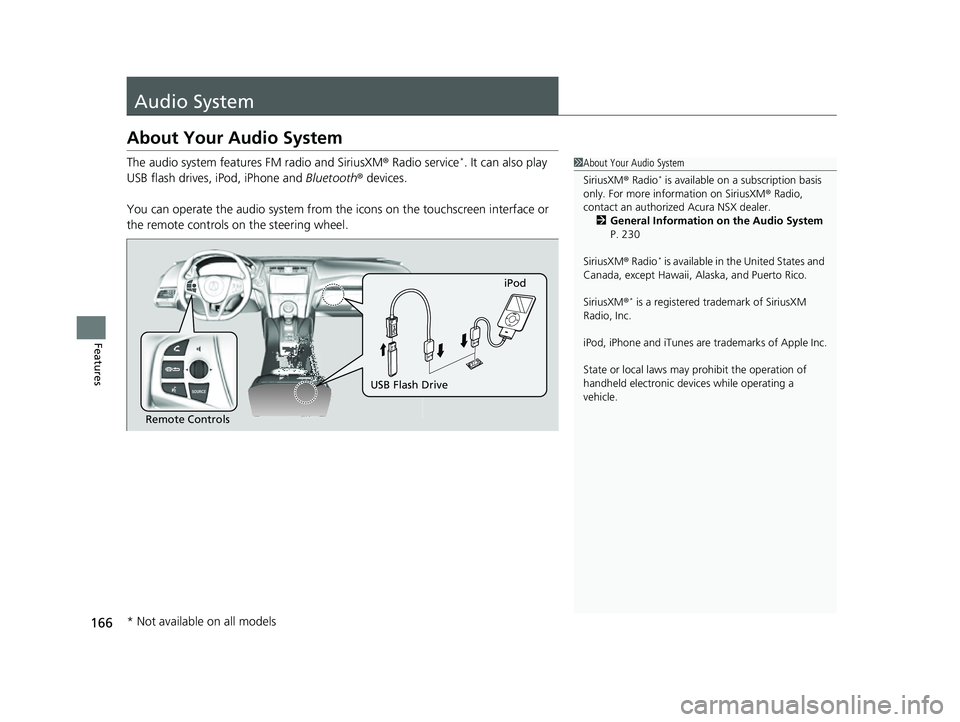
The audio system features FM radio and SiriusXM® Radio service*. It can also play
USB flash drives, iPod, iPhone and Bluetooth® devices.
You can operate the audio sy stem from the icons on the touchscreen interface or
the remote controls on the steering wheel.1About Your Audio System
SiriusXM ® Radio
* is available on a subscription basis
only. For more information on SiriusXM ® Radio,
contact an authorized Acura NSX dealer.
2 General Information on the Audio System
P. 230
SiriusXM ® Radio
* is available in the United States and
Canada, except Ha waii, Alaska, and Puerto Rico.
SiriusXM ®
* is a registered tra demark of SiriusXM
Radio, Inc.
iPod, iPhone and iTunes are trademarks of Apple Inc.
State or local laws may prohibit the operation of
handheld electronic devi ces while operating a
vehicle.
Remote Controls iPod
USB Flash Drive
* Not available on all models
21 ACURA NSX PMC-31T6N6400.book 166 ページ 2020年10月8日 木曜日 午後3時7分
Page 169 of 494
167
uuAudio System uUSB Ports
Features
USB Ports
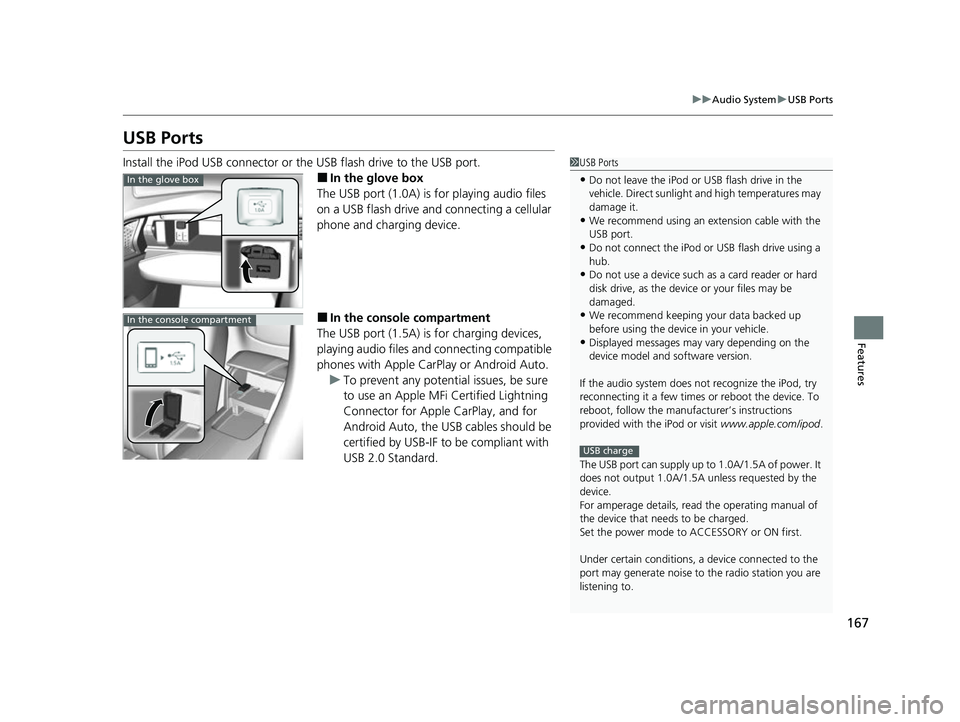
Install the iPod USB connector or the USB flash drive to the USB port.
■In the glove box
The USB port (1.0A) is for playing audio files
on a USB flash drive and connecting a cellular
phone and charging device.
■In the consol e compartment
The USB port (1.5A) is for charging devices,
playing audio files and connecting compatible
phones with Apple CarPlay or Android Auto. u To prevent any potenti al issues, be sure
to use an Apple MFi Certified Lightning
Connector for Apple CarPlay, and for
Android Auto, the USB cables should be
certified by USB-IF to be compliant with
USB 2.0 Standard.
1 USB Ports
•Do not leave the iPod or USB flash drive in the
vehicle. Direct sunlight and high temperatures may
damage it.
•We recommend using an extension cable with the
USB port.
•Do not connect the iPod or USB flash drive using a
hub.
•Do not use a device such as a card reader or hard
disk drive, as the device or your files may be
damaged.
•We recommend keeping y our data backed up
before using the device in your vehicle.
•Displayed messages may vary depending on the
device model and software version.
If the audio system does not recognize the iPod, try
reconnecting it a few times or reboot the device. To
reboot, follow the manufac turer’s instructions
provided with the iPod or visit www.apple.com/ipod.
The USB port can supply up to 1.0A/1.5A of power. It
does not output 1.0A/1.5A unless requested by the
device.
For amperage details, read the operating manual of
the device that ne eds to be charged.
Set the power mode to ACCESSORY or ON first.
Under certain condi tions, a device connected to the
port may generate noise to the radio station you are
listening to.
USB charge
In the glove box
In the console compartment
21 ACURA NSX PMC-31T6N6400.book 167 ページ 2020年10月8日 木曜日 午後3時7分
Page 170 of 494

168
uuAudio System uAudio System Theft Protection
Features
Audio System Theft Protection
The audio system is disabled when it is disconnected from the power source, such as
when the 12-volt battery is disconnected or goes dead. In certain conditions, the
system may display a code entry screen. If this occurs, reactivate the audio system.
■Reactivating the audio system
1. Set the power mode to ON.
2. Turn on the audio system.
3. Select and hold the (power/audio) icon for more than two seconds.
u The audio system is reac tivated when the audio co ntrol unit establishes a
connection with the vehicle control unit. If the control unit fails to recognize
the audio unit, you must go to an auth orized Acura NSX dealer and have the
audio unit checked.
21 ACURA NSX PMC-31T6N6400.book 168 ページ 2020年10月8日 木曜日 午後3時7分