remote control ACURA NSX 2021 Owner's Manual
[x] Cancel search | Manufacturer: ACURA, Model Year: 2021, Model line: NSX, Model: ACURA NSX 2021Pages: 494, PDF Size: 16.57 MB
Page 133 of 494

131Continued
Controls
Operating the Switches Around the Steering Wheel
ENGINE START/STOP Button
■Changing the Power Mode1ENGINE START/STOP Button
ENGINE START/STOP Button Operating Range
You can start the power system when the keyless
access remote is inside the vehicle.
The power system may also start if the keyless access
remote is close to the door or window, even if it is
outside the vehicle.
If the battery of the keyless access remote is getting
low, the power system may not start when you push
the ENGINE START/STOP button. If the power
system does not start, refer to the following link. 2 If the Keyless Access Remote Battery is
Weak P. 450
Do not leave the power mode in ACCESSORY or ON
when you get out.
Operating RangeVEHICLE OFF (LOCK)
The button is off.
The power to all electrical components is turned off.
Press the button. Without pressing
the brake pedal ACCESSORY
The button blinks (in red).
Operate the audio system and other accessories in
this position.
ON
The button blinks (in red).
All electrical components can be used.
21 ACURA NSX PMC-31T6N6400.book 131 ページ 2020年10月8日 木曜日 午後3時7分
Page 135 of 494

133
uuOperating the Switches Around the Steering Wheel uENGINE START/STOP Button
Controls
When the power mode is set to any mode
other than OFF and yo u remove the keyless
access remote from the vehicle and shut the
door, an alarm will sound. If the alarm
continues to sound, place the keyless access
remote in another location.
■When the power mode is in
ACCESSORY
The alarm will sound from outside the vehicle.
■When the power mode is in ON
An alarm will sound both inside and outside
the vehicle. In additi on, a warning indicator
will appear on the instrument panel.
■Keyless Access Remote Reminder1 Keyless Access Remote Reminder
When the keyless access remote is within the
system’s operational ra nge, and both doors are
closed, the warni ng function cancels.
If the keyless access remote is taken out of the vehicle
after the power system has been turned on, you can
no longer change the ENGINE START/STOP button
mode or restart the power system. Always make sure
if the remote is in your vehicle when you operate the
ENGINE START/STOP button.
Removing the keyless access remote from the vehicle
through a window does not activate the warning
buzzer.
Do not put the keyless access remote on the
dashboard or in the glove box. It may cause the
warning buzzer to go of f. Under some other
conditions that can prevent the vehicle from locating
the remote, the warning buzzer may also go off even
if the remote is within the system’s operational
range.
21 ACURA NSX PMC-31T6N6400.book 133 ページ 2020年10月8日 木曜日 午後3時7分
Page 139 of 494

137
uuOperating the Switches Around the Steering Wheel uLight Switches
Controls
The headlights automatically come on when the wipers are used several times within
a certain interval with the headlight switch in AUTO.
The headlights automatically go off a few minutes later if the wipers are stopped.
The headlights, all other exterior lights, a nd the instrument panel lights turn off 15
seconds after you set the power mode to VEHICLE OFF, take the remote with you,
and close the driver’s door.
If you set the power mode to VEHICLE OFF with the headli ght switch on, but do not
open the door, the lights turn off after 10 minu tes (3 minutes, if the switch is in the
AUTO position).
The lights turn on again when you unlock or open the driver’s door. If you unlock
the door, but do not open it within 15 seconds, the lights go off. If you open the
driver’s door, you will hear a reminder chime alerting you that the lights are on.
■Headlight Integration with Wipers
■Automatic Lighting Off Feature
1Headlight Integration with Wipers
This feature activates when the headlights are off in
AUTO .
The instrument panel br ightness does not change
when the headlights come on.
At dark ambient light levels, the automatic lighting
control feature turns on the headlights, regardless of
the number of wiper sweeps.
You can turn the headlight integration with wipers
function on and off.
2 Customized Features P. 248
1Automatic Lighting Off Feature
You can change the headli ght auto off timer setting.
2 Customized Features P. 248
21 ACURA NSX PMC-31T6N6400.book 137 ページ 2020年10月8日 木曜日 午後3時7分
Page 144 of 494
142
uuOperating the Switches Around the Steering Wheel uDriving Position Memory System*
Controls
Driving Position Memory System*
You can store two driver’s seat (except for power lumbar) and outside door mirrors
position with the driving position memory system.
When you unlock and open th e driver’s door with a remote transmitter, or keyless
access system, door mirrors adjust to one of the two preset positions and the seat
adjusts to retracted positions of one of the two preset positions automatically.
The seat will move to th e stored position when you set the power mode to
ACCESSORY.
When you enter the vehicle, the driver in formation interface briefly shows you which
remote transmitter you used to unlock the vehicle.
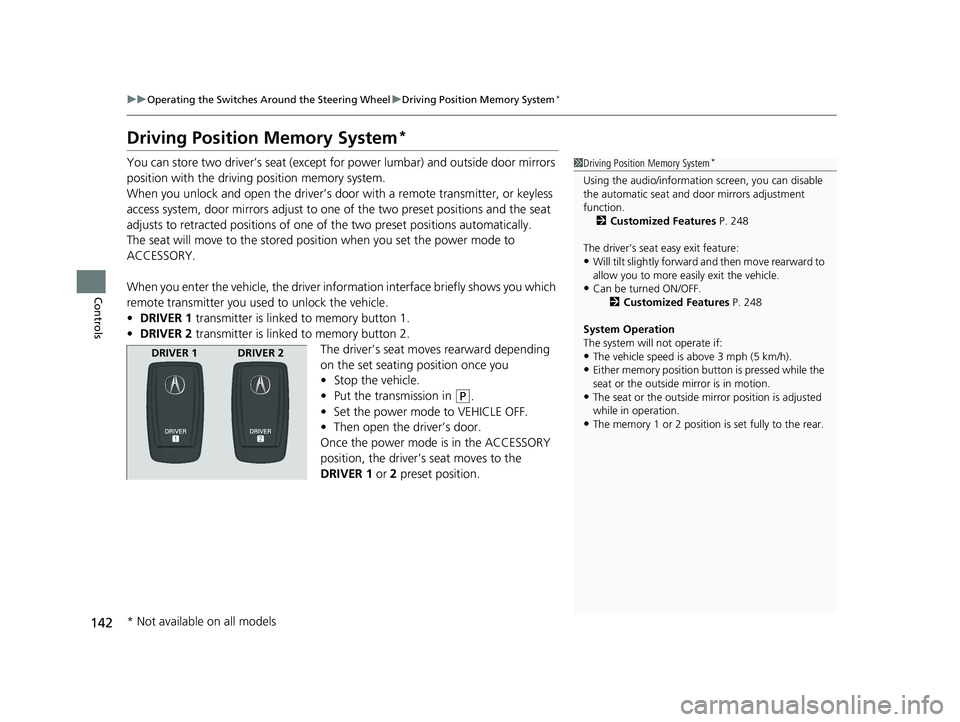
• DRIVER 1 transmitter is linked to memory button 1.
• DRIVER 2 transmitter is linked to memory button 2.
The driver’s seat moves rearward depending
on the set seating position once you
•Stop the vehicle.
• Put the transmission in
(P.
• Set the power mode to VEHICLE OFF.
• Then open the driver’s door.
Once the power mode is in the ACCESSORY
position, the driver’s seat moves to the
DRIVER 1 or 2 preset position.
1Driving Position Memory System*
Using the audio/informati on screen, you can disable
the automatic seat and d oor mirrors adjustment
function. 2 Customized Features P. 248
The driver’s seat easy exit feature:
•Will tilt slightly forward and then move rearward to
allow you to more easily exit the vehicle.
•Can be turned ON/OFF. 2Customized Features P. 248
System Operation
The system will not operate if:
•The vehicle speed is above 3 mph (5 km/h).
•Either memory position button is pressed while the
seat or the outside mirror is in motion.
•The seat or the outside mi rror position is adjusted
while in operation.
•The memory 1 or 2 position is set fully to the rear.
DRIVER 1 DRIVER 2
* Not available on all models
21 ACURA NSX PMC-31T6N6400.book 142 ページ 2020年10月8日 木曜日 午後3時7分
Page 167 of 494
165
Features
This chapter describes how to operate technology features.
Audio System
About Your Audio System ................ 166
USB Ports ......................................... 167
Audio System Theft Protection ......... 168
Audio Remote Controls .................... 169
Audio System Basic Operation ........ 170
Audio/Information Screen ................ 171
Adjusting the Sound ........................ 185
Display Setup ................................... 186
Voice Control Operation .................. 188
Playing FM Radio ............................. 192
Playing SiriusXM ® Radio
*................. 196
Playing an iPod ................................ 203 Song By Voice
TM (SBV) ...................... 206
Playing Pandora ®*1........................... 210
Playing a USB Flash Drive ................. 212
Playing Bluetooth ® Audio................. 215
Wi-Fi Connection ............................. 217
Siri ® Eyes Free .................................. 219
Apple CarPlay
TM............................... 220
Android AutoTM................................ 223
Audio Error Messages iPod/USB Flash Drive ........................ 227
Pandora ®
*1....................................... 228
Android/Apps .................................. 229
General Information on the Audio SystemSiriusXM ® Radio Service*................. 230 Compatible iPod, iP
hone, and USB Flash
Drives ............................................ 231
Honda App License Agreement........ 232
Legal Information on Apple CarPlay/
Android Auto................................. 244
About Open Source Licenses............ 246
License Information ......................... 247
Customized Features ........................ 248
Defaulting All the Settings ............... 270
HomeLink ® Universal Transceiver ... 271
Bluetooth ® HandsFreeLink®
Using HFL ........................................ 274
HFL Menus ...................................... 277
AcuraLink®
*....................................... 308
*1: Available only on U.S. models.
* Not available on all models
21 ACURA NSX PMC-31T6N6400.book 165 ページ 2020年10月8日 木曜日 午後3時7分
Page 168 of 494
166
Features
Audio System
About Your Audio System
The audio system features FM radio and SiriusXM® Radio service*. It can also play
USB flash drives, iPod, iPhone and Bluetooth® devices.
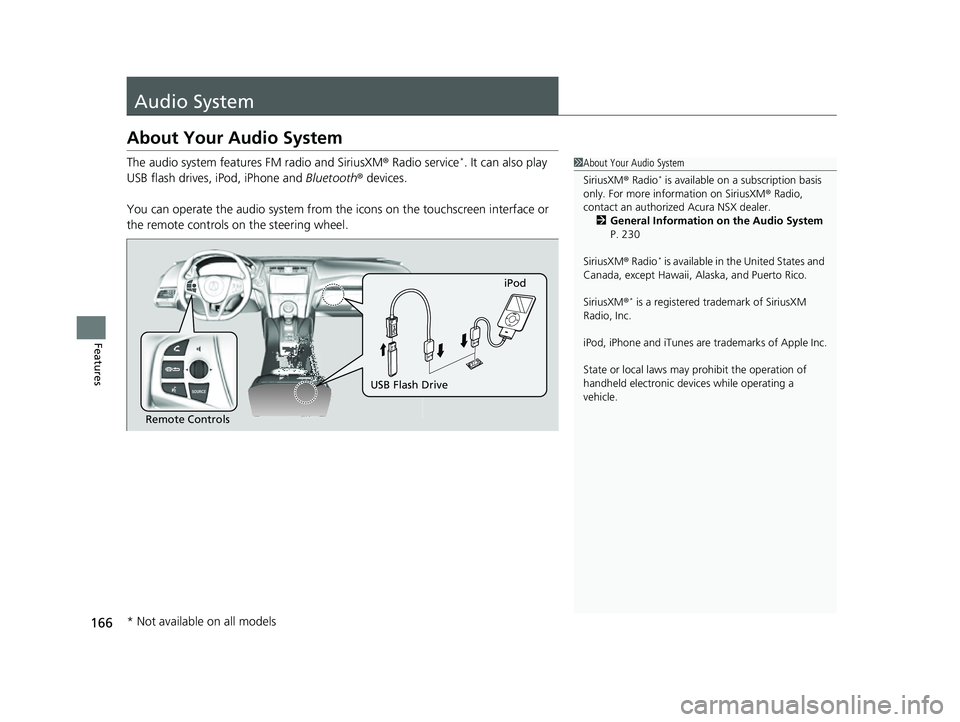
You can operate the audio sy stem from the icons on the touchscreen interface or
the remote controls on the steering wheel.1About Your Audio System
SiriusXM ® Radio
* is available on a subscription basis
only. For more information on SiriusXM ® Radio,
contact an authorized Acura NSX dealer.
2 General Information on the Audio System
P. 230
SiriusXM ® Radio
* is available in the United States and
Canada, except Ha waii, Alaska, and Puerto Rico.
SiriusXM ®
* is a registered tra demark of SiriusXM
Radio, Inc.
iPod, iPhone and iTunes are trademarks of Apple Inc.
State or local laws may prohibit the operation of
handheld electronic devi ces while operating a
vehicle.
Remote Controls iPod
USB Flash Drive
* Not available on all models
21 ACURA NSX PMC-31T6N6400.book 166 ページ 2020年10月8日 木曜日 午後3時7分
Page 171 of 494
169
uuAudio System uAudio Remote Controls
Features
Audio Remote Controls
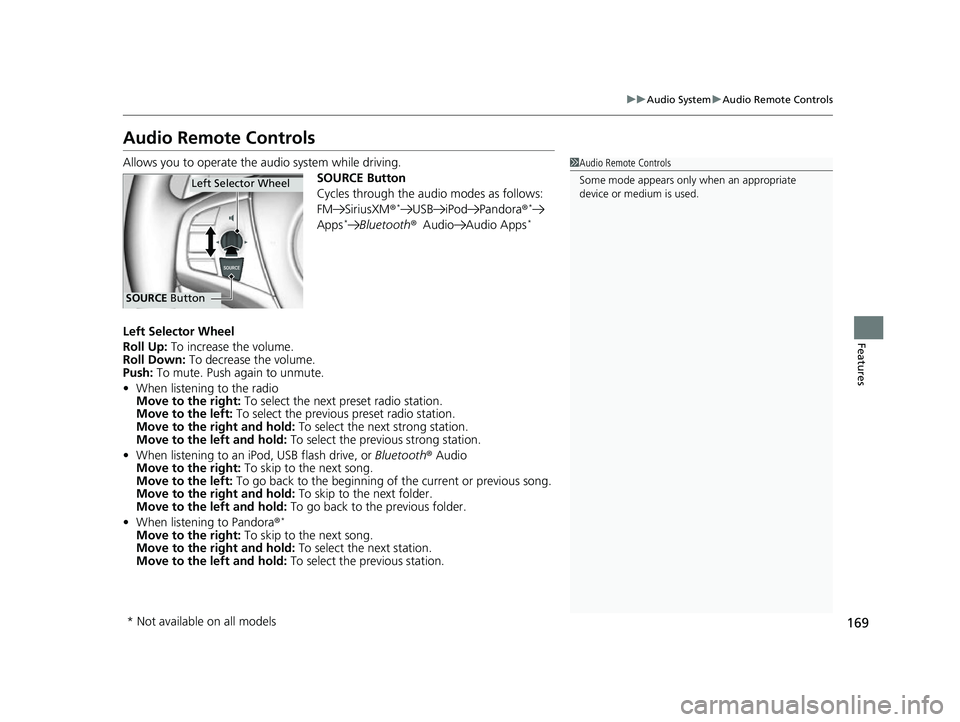
Allows you to operate the audio system while driving.
SOURCE Button
Cycles through the audio modes as follows:
FM SiriusXM®
*USB iPod Pandora ®*
Apps*Bluetooth®Audio Audio Apps*
Left Selector Wheel
Roll Up: To increase the volume.
Roll Down: To decrease the volume.
Push: To mute. Push again to unmute.
• When listening to the radio
Move to the right: To select the next preset radio station.
Move to the left: To select the previous preset radio station.
Move to the right and hold: To select the next strong station.
Move to the left and hold: To select the previous strong station.
• When listening to an iPod, USB flash drive, or Bluetooth® Audio
Move to the right: To skip to the next song.
Move to the left: To go back to the beginning of the current or previous song.
Move to the right and hold: To skip to the next folder.
Move to the left and hold: To go back to the previous folder.
• When listening to Pandora ®
*
Move to the right: To skip to the next song.
Move to the right and hold: To select the next station.
Move to the left and hold: To select the previous station.
1Audio Remote Controls
Some mode appears only when an appropriate
device or medium is used.
Left Selector Wheel
SOURCE Button
* Not available on all models
21 ACURA NSX PMC-31T6N6400.book 169 ページ 2020年10月8日 木曜日 午後3時7分
Page 195 of 494
Continued193
uuAudio System Basic Operation uPlaying FM Radio
Features
To store a station:
1. Tune to the selected station.
2. Select and hold the preset number for the station you want to store.
You can also store a preset station by the following procedure.
1. Tune to the selected station.
2. Select the open/close icon to display a list.
3. Select the Preset tab.
4. Select and hold the preset number for the station you want to store.
Lists the strongest stations on the selected band.
1. Select the open/close icon to display a list.
2. Select the Station List tab.
3. Select the station.
■Manual update
Updates your available st ation list at any time.
1. Select the open/close icon to display a list.
2. Select the Station List tab.
3. Select Refresh .
■Preset Memory
■Station List
1Preset Memory
The ST indicator appears on the display indicating
stereo FM broadcasts.
Switching the Audio Mode
Press the SOURCE button on the steering wheel or
select SOURCE on the screen.
2 Audio Remote Controls P. 169
You can store 12 FM stati ons into preset memory.
HD Radio Technology manufactured under license
from iBiquity Digital Cor poration. U.S. and Foreign
Patents. HD Radio
TM and the HD, HD Radio, and
“Arc” logos are proprietary trademarks of iBiquity
Digital Corp.
21 ACURA NSX PMC-31T6N6400.book 193 ページ 2020年10月8日 木曜日 午後3時7分
Page 199 of 494

Continued197
uuAudio System Basic Operation uPlaying SiriusXM ® Radio*
Features
1. Select .
2. Select Tune Mode .
3. Select Channel Mode or Category Mode .
■To Change the Tune Mode1Playing SiriusXM ® Radio*
In the channel mode, all available channels are
selectable. In the category mode, you can select a
channel within a ca tegory (Jazz, Rock, Classical, etc.).
There may be instances when SiriusXM ® Radio does
not broadcast all the data fi elds (artist name, title).
This does not indicate a problem with your audio
system.
SiriusXM ® Radio stations load in ascending order,
which can take about a minute. Once they have
loaded you will be able to scroll up or down to make
your selections.
Switching the Audio Mode
Press the SOURCE button on the steering wheel or
select SOURCE on the screen.
2 Audio Remote Controls P. 169
Tune Start:
When you change to a preset channel, a song being
played on that channel restarts from the beginning
with this function. This can be turned on or off from
the Audio settings screen.
2 Customized Features P. 248
* Not available on all models
21 ACURA NSX PMC-31T6N6400.book 197 ページ 2020年10月8日 木曜日 午後3時7分
Page 273 of 494
271
Features
HomeLink® Universal Transceiver
The HomeLink ® Universal Transceiver can be programmed to operate up to three
remote controlled devices around your home, such as garage doors, lighting, or
home security systems.
Refer to the safety information that came wi th your garage door opener to test that
the safety features are functioning prope rly. If you do not have the safety
information, contact the manufacturer.
Before programming HomeLink, make sure that people and objects are out of the
way of the garage or gate to prevent potential injury or damage.
When programming a garage door opener, pa rk just outside the garage door’s path.
■Important Safety Precautions
1HomeLink ® Universal Transceiver
Before programming HomeLi nk to operate a garage
door opener, confirm that the opener has an external
entrapment protection system , such as an “electronic
eye,” or other safety and re verse stop features. If it
does not, HomeLink may not be able to operate it.
21 ACURA NSX PMC-31T6N6400.book 271 ページ 2020年10月8日 木曜日 午後3時7分