light ACURA NSX 2021 Owner's Guide
[x] Cancel search | Manufacturer: ACURA, Model Year: 2021, Model line: NSX, Model: ACURA NSX 2021Pages: 494, PDF Size: 16.57 MB
Page 145 of 494

143
uuOperating the Switches Around the Steering Wheel uDriving Position Memory System*
Controls
1. Set the power mode to ON. Adjust the
driver’s seat and the door mirrors to the
desired position.
2. Press the SET button.
u You will hear the beeper, and the
memory button indicator light will blink.
3. Press memory button
(1 or (2 within five
seconds of pressing the SET button.
u Once the seat and the outside mirrors
position have been memorized, you will
hear the beeper twic e, and the indicator
light on the button you pressed stays on.
1. Put the transmission into
(P.
2. Apply the parking brake.
3. Press a memory button (
(1 or (2).
u You will hear the beep, and the indicator
light will blink.
The seat and the door mirrors will
automatically move to the memorized
positions. When it has finished moving, you
will hear the beeper tw ice, and the indicator
light stays on.
■Storing a Position in Memory1 Storing a Position in Memory
After you press the SET button, the storing operation
will be canceled when:
•You do not press the memory button within five
seconds.
•You readjust the seat or the outside mirror position
before the double-beep.
•You set the power mode to any position except
ON.
SET Button
Memory
Button 1
Memory
Button 2
■Recalling the Stored Position1Recalling the Stored Position
The seat and door mirrors will stop moving if you:
•Press the SET button, or a memory button ((1 or (2).
•Adjust the seat position or door mirrors.
•Put the transmission into a position other than (P.
Memory Buttons
21 ACURA NSX PMC-31T6N6400.book 143 ページ 2020年10月8日 木曜日 午後3時7分
Page 147 of 494

145
Controls
Adjusting the Mirrors
Interior Rearview Mirror
Adjust the angle of the rearview mirror when you are sitting in the correct driving
position.
When you are driving after dark, the
automatic dimming rearview mirror reduces
the glare from headlights behind you, based
in inputs from the mirror sensor. This feature
is always active.
■Automatic Dimming Rearview Mirror
1 Adjusting the Mirrors
Keep the inside and out side mirrors clean and
adjusted for best visibility.
Adjust the mirrors befo re you start driving.
2 Adjusting the Seat Positions P. 148
1Automatic Dimming Rearview Mirror
The auto dimming function cancels when the
transmission is in
(R.
21 ACURA NSX PMC-31T6N6400.book 145 ページ 2020年10月8日 木曜日 午後3時7分
Page 155 of 494

153Continued
Controls
Interior Convenience Items
Interior Lights
■ON
The interior lights come on regardless whether
the doors are open or closed.
■Door activated
The interior lights come on in the following
situations:
• When either of the doors are opened.
• You unlock the driver’s door.
• When the power mode is set to VEHICLE
OFF.
■OFF
The interior lights remain off regardless
whether the doors are open or closed.
■Interior Light Switches1 Interior Light Switches
In the door activated position, the interior lights fade
out and go off about 30 se conds after the doors are
closed.
The lights go off after about 30 seconds in the
following situations:
•When you unlock the driver’s door but do not open
it.
•When you set the power mode to VEHICLE OFF but
do not open a door.
You can change the interi or lights dimming time.
2 Customized Features P. 248
The interior lights go off im mediately in the following
situations:
•When you lock the driver’s door.
•When you close the driver’s door in ACCESSORY
mode.
•When you set the power mode to ON.
To avoid draining the 12-vo lt battery, do not leave
the interior light on for an extended length of time
when the power system off.
If you leave either door open in VEHICLE OFF mode,
the interior lights go of f after about 15 minutes.
Door Activated Position
Off
On
21 ACURA NSX PMC-31T6N6400.book 153 ページ 2020年10月8日 木曜日 午後3時7分
Page 156 of 494

uuInterior Convenience Items uInterior Lights
154
Controls
The map lights can be turned on and off by
pressing the (map light) button.
■Map Lights1Map Lights
When the ceiling light switch is in the door activated
position and either door is open, the map light will
not go off when you press the (map light) button.
21 ACURA NSX PMC-31T6N6400.book 154 ページ 2020年10月8日 木曜日 午後3時7分
Page 159 of 494

157
uuInterior Convenience Items uOther Interior Convenience Items
Continued
Controls
Other Interior Convenience Items
The accessory power socket can be used when the power mode is in ACCESSORY or
ON.
■Accessory power socket
Open the cover to use it.
■Accessory Power Socket1 Accessory Power Socket
NOTICE
Do not insert an automotive type cigarette lighter
element.
The accessory power socket can overheat.
The accessory power socket is designed to supply
power for 12-volt DC accessories that are rated 180
watts (15 amps) or less.
To prevent draining the 12-volt battery, use the
accessory power socket only when the power system
on.
When the accessory power soc ket is not in use, close
the cover to prevent any small foreign objects from
getting into the accessory power socket.
21 ACURA NSX PMC-31T6N6400.book 157 ページ 2020年10月8日 木曜日 午後3時7分
Page 169 of 494
167
uuAudio System uUSB Ports
Features
USB Ports
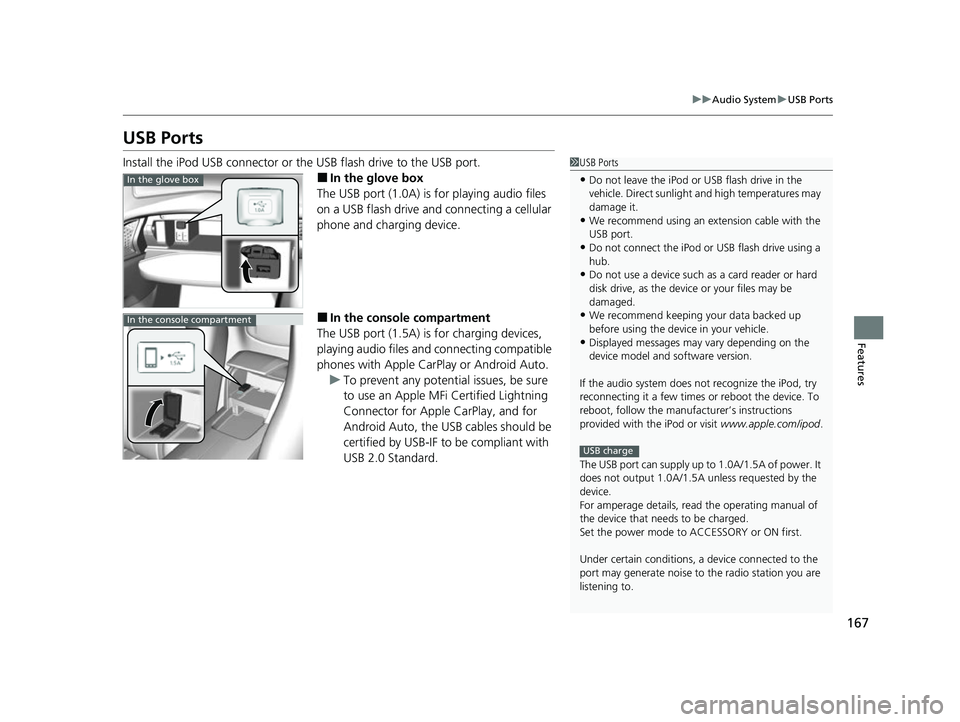
Install the iPod USB connector or the USB flash drive to the USB port.
■In the glove box
The USB port (1.0A) is for playing audio files
on a USB flash drive and connecting a cellular
phone and charging device.
■In the consol e compartment
The USB port (1.5A) is for charging devices,
playing audio files and connecting compatible
phones with Apple CarPlay or Android Auto. u To prevent any potenti al issues, be sure
to use an Apple MFi Certified Lightning
Connector for Apple CarPlay, and for
Android Auto, the USB cables should be
certified by USB-IF to be compliant with
USB 2.0 Standard.
1 USB Ports
•Do not leave the iPod or USB flash drive in the
vehicle. Direct sunlight and high temperatures may
damage it.
•We recommend using an extension cable with the
USB port.
•Do not connect the iPod or USB flash drive using a
hub.
•Do not use a device such as a card reader or hard
disk drive, as the device or your files may be
damaged.
•We recommend keeping y our data backed up
before using the device in your vehicle.
•Displayed messages may vary depending on the
device model and software version.
If the audio system does not recognize the iPod, try
reconnecting it a few times or reboot the device. To
reboot, follow the manufac turer’s instructions
provided with the iPod or visit www.apple.com/ipod.
The USB port can supply up to 1.0A/1.5A of power. It
does not output 1.0A/1.5A unless requested by the
device.
For amperage details, read the operating manual of
the device that ne eds to be charged.
Set the power mode to ACCESSORY or ON first.
Under certain condi tions, a device connected to the
port may generate noise to the radio station you are
listening to.
USB charge
In the glove box
In the console compartment
21 ACURA NSX PMC-31T6N6400.book 167 ページ 2020年10月8日 木曜日 午後3時7分
Page 190 of 494

188
uuAudio System Basic Operation uVoice Control Operation
Features
Voice Control Operation
Your vehicle has a voice control system that allows hands-free operation.
The voice control system uses the ( Talk) and (hang-up/back) buttons on
the steering wheel and a microphone near the map lights on the ceiling.
To achieve optimum voice recognition when using the voice control system:
• Make sure the correct screen is displa yed for the voice command that you are
using.
The system recognizes only certain commands. Available voice commands.
2 Voice Portal Screen P. 189
•Close the windows.
• Adjust the dashboard and side vents so air does not blow onto the microphone
on the ceiling.
• Speak clearly in a natural speaking vo ice without pausing between words.
• Reduce any background noise if possible. The system may misinterpret your
command if more than one person is speaking at the same time.
■Voice Recognition
1Voice Control Operation
When you press the button, a helpful prompt asks
what you would like to do. Press and release the
button again to bypass th is prompt and give a
command.
1 Voice Recognition
The voice control system can only be used from the
driver’s seat because the microphone unit removes
noises from the front passenger’s side.
21 ACURA NSX PMC-31T6N6400.book 188 ページ 2020年10月8日 木曜日 午後3時7分
Page 251 of 494
249
uuCustomized Features u
Continued
Features
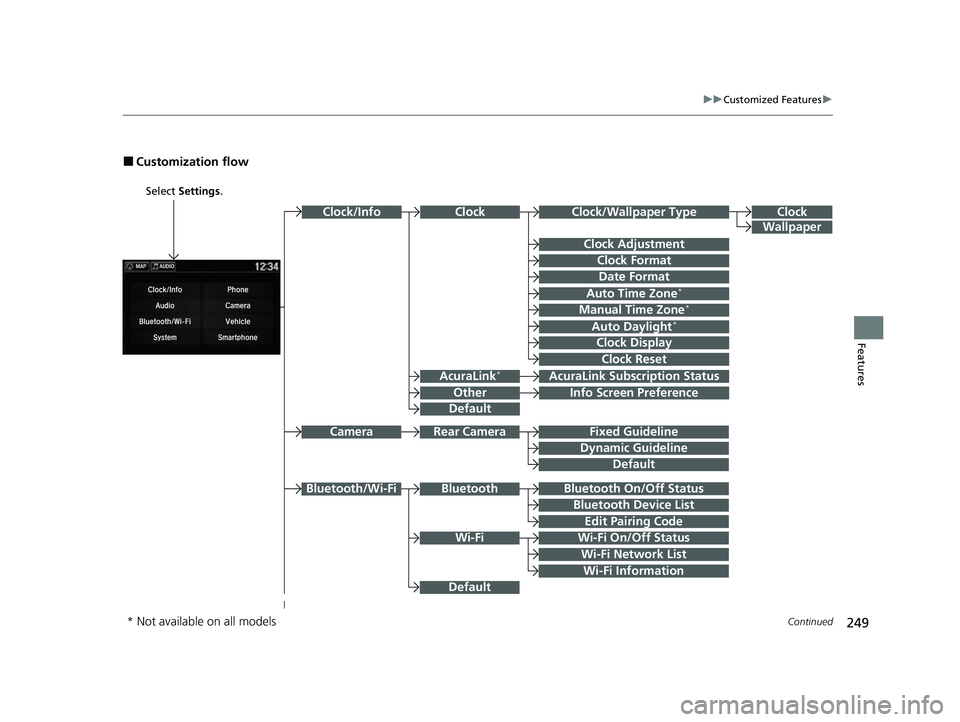
■Customization flow
Select Settings .
Clock
Wallpaper
Other
Clock/Wallpaper Type
Clock Adjustment
Clock Format
ClockClock/Info
Auto Time Zone*
Manual Time Zone*
Auto Daylight*
Clock Display
Clock Reset
Info Screen Preference
AcuraLink*AcuraLink Subscr iption Status
Date Format
Default
Bluetooth On/Off Status
Bluetooth Device List
Edit Pairing Code
Wi-Fi On/Off Status
Wi-Fi Network List
Wi-Fi
BluetoothBluetooth/Wi-Fi
Wi-Fi Information
Fixed Guideline
Dynamic Guideline
Rear CameraCamera
Default
Default
* Not available on all models
21 ACURA NSX PMC-31T6N6400.book 249 ページ 2020年10月8日 木曜日 午後3時7分
Page 255 of 494
253
uuCustomized Features u
Continued
Features
ClockClock/Wallpaper Type
Clock Adjustment
Clock Format
Auto Time Zone*
Manual Time Zone*
Auto Daylight*
Clock Display
Clock Reset
Clock
Wallpaper
Language
Touch Panel Sensitivity
Factory Data Reset
Climate Screen Timeout
Detail Information
Others
Date Format
Default
* Not available on all models
21 ACURA NSX PMC-31T6N6400.book 253 ページ 2020年10月8日 木曜日 午後3時7分
Page 257 of 494

255
uuCustomized Features u
Continued
Features
Lighting SetupInterior Light Dimming Time
Headlight Auto Off Timer
Auto Light Sensitivity*
Auto Interior Illumination Sensitivity
Auto Door Lock
Key and Remote Unlock Mode
Door Setup
Apple CarPlay
Android Auto
Auto Headlight On with Wiper On
Keyless Lock Answer Back
Security Relock Timer
Keyless Access SetupDoor Unlock Mode
Keyless Access Light Flash
Keyless Access Beep
Smartphone
Auto Door Unlock
Maintenance Info
Default
Default
Reset
Dynamic Mode SetupScheduler
* Not available on all models
21 ACURA NSX PMC-31T6N6400.book 255 ページ 2020年10月8日 木曜日 午後3時7分