glove box ACURA NSX 2021 Owners Manual
[x] Cancel search | Manufacturer: ACURA, Model Year: 2021, Model line: NSX, Model: ACURA NSX 2021Pages: 494, PDF Size: 16.57 MB
Page 10 of 494
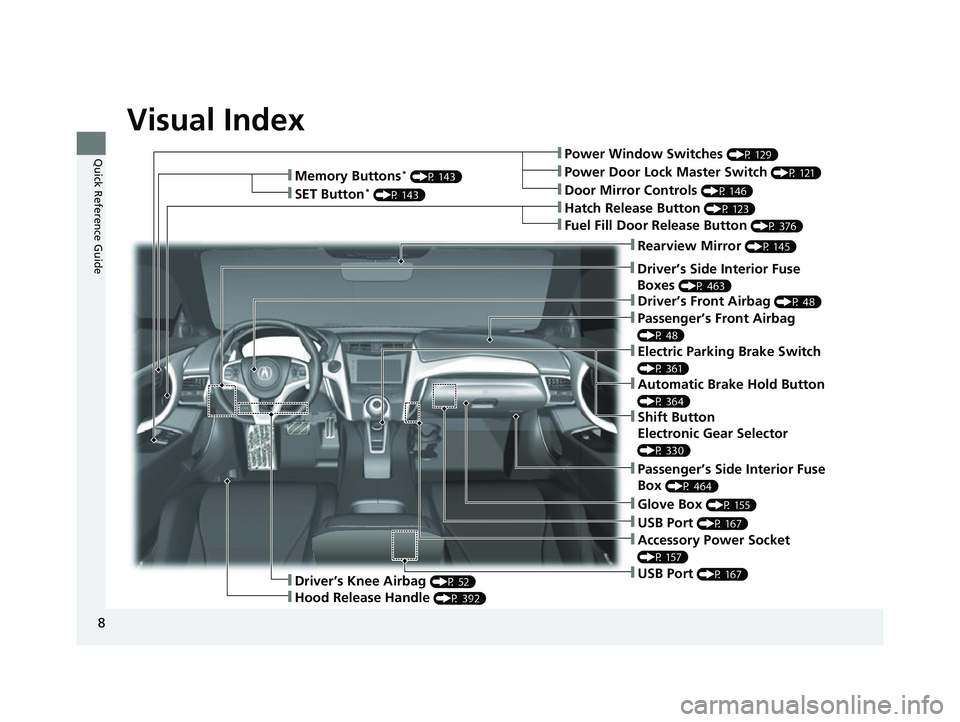
Visual Index
8
Quick Reference Guide❚Power Window Switches (P 129)
❚Driver’s Front Airbag (P 48)
❚Hatch Release Button (P 123)
❚Hood Release Handle (P 392)
❚Passenger’s Front Airbag
(P 48)
❚Glove Box (P 155)
❚Driver’s Knee Airbag (P 52)
❚Door Mirror Controls (P 146)
❚Power Door Lock Master Switch (P 121)
❚Fuel Fill Door Release Button (P 376)
❚USB Port (P 167)
❚Memory Buttons* (P 143)
❚SET Button* (P 143)
❚Rearview Mirror (P 145)
❚Driver’s Side Interior Fuse
Boxes
(P 463)
❚Passenger’s Side Interior Fuse
Box
(P 464)
❚USB Port (P 167)
❚Accessory Power Socket
(P 157)
❚Electric Parking Brake Switch
(P 361)
❚Automatic Brake Hold Button
(P 364)
❚Shift Button
Electronic Gear Selector
(P 330)
21 ACURA NSX PMC-31T6N6400.book 8 ページ 2020年10月8日 木曜日 午後3時7分
Page 117 of 494

Continued115
uuLocking and Unlocking the Doors uLocking/Unlocking the Doors from the Outside
Controls
By switching the auto pop-out main switch to OFF, you can disable the auto pop-out
function. For the purpose of safety and to prevent damaging the vehicle, disable this
function and manually operate the handle, especially when the vehicle is:
• being shipped by train, truck, or boat.
• going through a car wash.
• having maintenance performed on it.
■To temporarily deactivate the auto pop-out function:
Turn off the auto pop-out main switch in the
glove box.
■Auto Pop-Out Main Switch1Auto Pop-Out Main Switch
The auto pop-out function is deactivated in the
following situations:
•The auto pop-out main sw itch is turned off.
•The keyless access remote is not within a 6-foot
(2m) radius of the outside door handle.
•The keyless access remote is in the vehicle.
•The power mode is in ACCESSORY or ON.
Main Switch
ON
OFF
21 ACURA NSX PMC-31T6N6400.book 115 ページ 2020年10月8日 木曜日 午後3時7分
Page 127 of 494
125
uuOpening and Closing the Hatch uHatch Main Switch
Controls
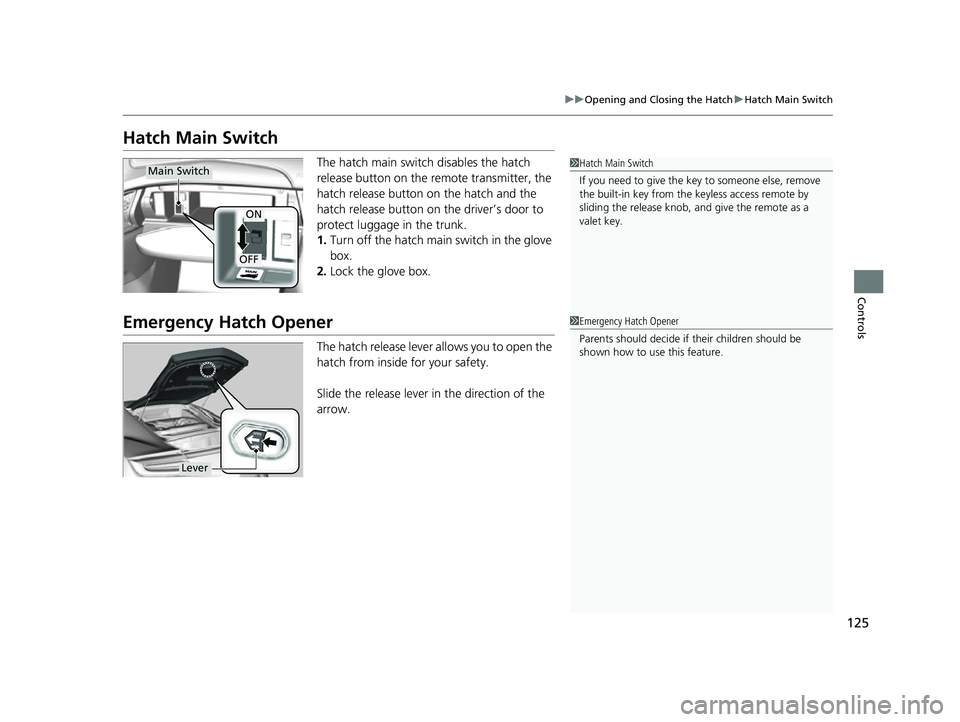
Hatch Main Switch
The hatch main switch disables the hatch
release button on the remote transmitter, the
hatch release button on the hatch and the
hatch release button on the driver’s door to
protect luggage in the trunk.
1. Turn off the hatch main switch in the glove
box.
2. Lock the glove box.
Emergency Hatch Opener
The hatch release lever allows you to open the
hatch from inside for your safety.
Slide the release lever in the direction of the
arrow.
1Hatch Main Switch
If you need to give the ke y to someone else, remove
the built-in key from the keyless access remote by
sliding the release knob, and give the remote as a
valet key.Main Switch
ON
OFF
1 Emergency Hatch Opener
Parents should deci de if their children should be
shown how to use this feature.
Lever
21 ACURA NSX PMC-31T6N6400.book 125 ページ 2020年10月8日 木曜日 午後3時7分
Page 135 of 494

133
uuOperating the Switches Around the Steering Wheel uENGINE START/STOP Button
Controls
When the power mode is set to any mode
other than OFF and yo u remove the keyless
access remote from the vehicle and shut the
door, an alarm will sound. If the alarm
continues to sound, place the keyless access
remote in another location.
■When the power mode is in
ACCESSORY
The alarm will sound from outside the vehicle.
■When the power mode is in ON
An alarm will sound both inside and outside
the vehicle. In additi on, a warning indicator
will appear on the instrument panel.
■Keyless Access Remote Reminder1 Keyless Access Remote Reminder
When the keyless access remote is within the
system’s operational ra nge, and both doors are
closed, the warni ng function cancels.
If the keyless access remote is taken out of the vehicle
after the power system has been turned on, you can
no longer change the ENGINE START/STOP button
mode or restart the power system. Always make sure
if the remote is in your vehicle when you operate the
ENGINE START/STOP button.
Removing the keyless access remote from the vehicle
through a window does not activate the warning
buzzer.
Do not put the keyless access remote on the
dashboard or in the glove box. It may cause the
warning buzzer to go of f. Under some other
conditions that can prevent the vehicle from locating
the remote, the warning buzzer may also go off even
if the remote is within the system’s operational
range.
21 ACURA NSX PMC-31T6N6400.book 133 ページ 2020年10月8日 木曜日 午後3時7分
Page 157 of 494
155
uuInterior Convenience Items uStorage Items
Continued
Controls
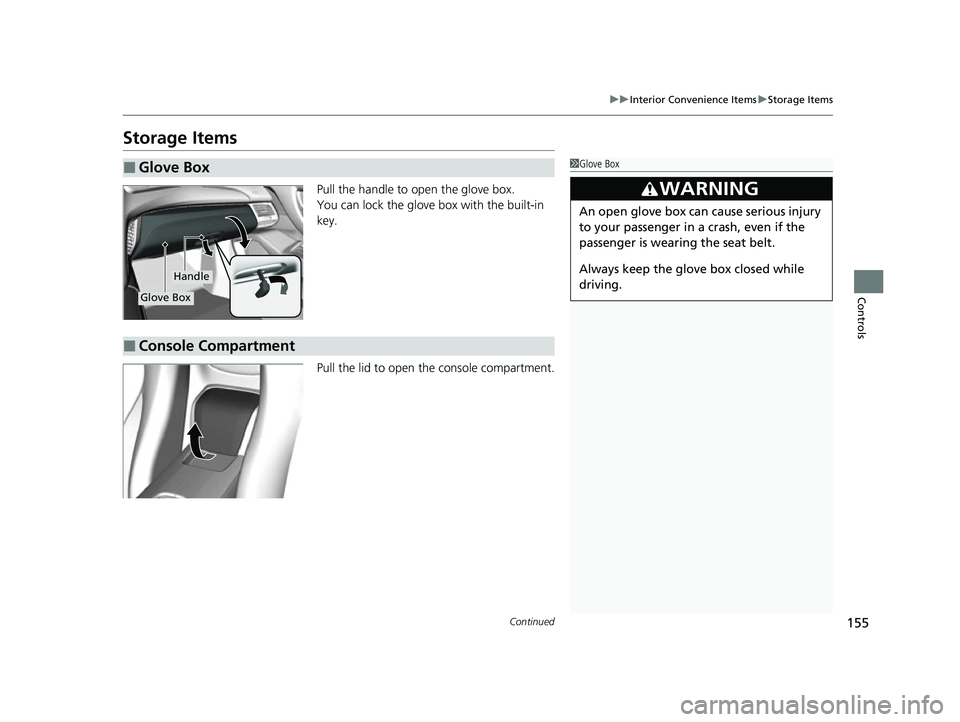
Storage Items
Pull the handle to open the glove box.
You can lock the glove box with the built-in
key.
Pull the lid to open the console compartment.
■Glove Box1Glove Box
3WARNING
An open glove box can cause serious injury
to your passenger in a crash, even if the
passenger is wearing the seat belt.
Always keep the glove box closed while
driving.
Glove Box
Handle
■Console Compartment
21 ACURA NSX PMC-31T6N6400.book 155 ページ 2020年10月8日 木曜日 午後3時7分
Page 169 of 494
167
uuAudio System uUSB Ports
Features
USB Ports
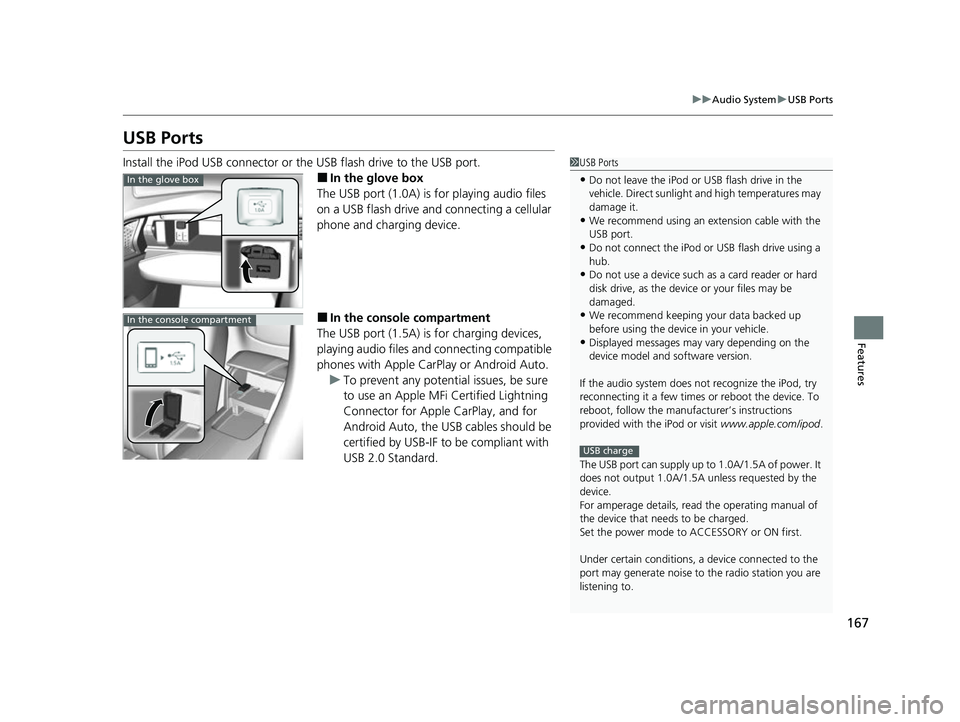
Install the iPod USB connector or the USB flash drive to the USB port.
■In the glove box
The USB port (1.0A) is for playing audio files
on a USB flash drive and connecting a cellular
phone and charging device.
■In the consol e compartment
The USB port (1.5A) is for charging devices,
playing audio files and connecting compatible
phones with Apple CarPlay or Android Auto. u To prevent any potenti al issues, be sure
to use an Apple MFi Certified Lightning
Connector for Apple CarPlay, and for
Android Auto, the USB cables should be
certified by USB-IF to be compliant with
USB 2.0 Standard.
1 USB Ports
•Do not leave the iPod or USB flash drive in the
vehicle. Direct sunlight and high temperatures may
damage it.
•We recommend using an extension cable with the
USB port.
•Do not connect the iPod or USB flash drive using a
hub.
•Do not use a device such as a card reader or hard
disk drive, as the device or your files may be
damaged.
•We recommend keeping y our data backed up
before using the device in your vehicle.
•Displayed messages may vary depending on the
device model and software version.
If the audio system does not recognize the iPod, try
reconnecting it a few times or reboot the device. To
reboot, follow the manufac turer’s instructions
provided with the iPod or visit www.apple.com/ipod.
The USB port can supply up to 1.0A/1.5A of power. It
does not output 1.0A/1.5A unless requested by the
device.
For amperage details, read the operating manual of
the device that ne eds to be charged.
Set the power mode to ACCESSORY or ON first.
Under certain condi tions, a device connected to the
port may generate noise to the radio station you are
listening to.
USB charge
In the glove box
In the console compartment
21 ACURA NSX PMC-31T6N6400.book 167 ページ 2020年10月8日 木曜日 午後3時7分
Page 222 of 494

220
uuAudio System Basic Operation uApple CarPlayTM
Features
Apple CarPlayTM
If you connect an Apple CarPlay-compatible iPhone to the system via USB, you can
use the audio/information screen, instead of the iPhone display, to make a phone
call, listen to music, view maps (navigation), and access messages.
2USB Ports P. 167
■Phone
Access the contact list, make phone calls, or listen to voice mail.
■Messages
Check and reply to text messages, or have messages read to you.
■Music
Play music stored on your iPhone.
■Apple CarPlay Menu
1Apple CarPlayTM
Only iPhone 5 or newer versi ons with iOS 8.4 or later
are compatible with Apple CarPlay.
Park in a safe place before connecting your iPhone to
Apple CarPlay and when launching any compatible
apps.
To use Apple CarPlay, connect the USB cable to the
USB port located in the console compartment. The
USB port located in the glove box will not enable
Apple CarPla y operation.
2 USB Ports P. 167
To directly access the Appl e CarPlay phone function,
select Phone on the home screen. While connected
to Apple CarPlay, calls are only made through Apple
CarPlay. If you want to make a call with
HandsFreeLink, turn Apple CarPlay OFF or detach the
USB cable from your iPhone. 2 Setting Up Apple CarPlay P. 221
When your iPhone is connected to Apple CarPlay, it is
not possible to use the Bluetooth® Audio or
Bluetooth ® HandsFreeLink ®. However, other
previously paired phones can stream audio via
Bluetooth ® while Apple CarPlay is connected.
2 Phone Setup P. 282
For details on c ountries and regions where Apple
CarPlay is available, as well as information pertaining
to function, refer to the Apple homepage.
Home screen
Apple CarPlay icon Apple CarPlay menu screen
: Go back to the Apple CarPlay
TM Dashboard screen
: Go back to the Apple CarPlayTM menu screen
Go back to the
home screen
21 ACURA NSX PMC-31T6N6400.book 220 ページ 2020年10月8日 木曜日 午後3時7分
Page 225 of 494

223
uuAudio System Basic Operation uAndroid AutoTM
Continued
Features
Android AutoTM
When you connect an Android phone to the audio system via USB, Android Auto is
automatically initiated. When connected via Android Auto, you can use the audio/
information screen to acce ss the Phone, Google Maps (Navigation), Google Play
Music, and Google Now functions. When you first use Android Auto, a tutorial will
appear on the screen.
We recommend that you comple te this tutorial while safely parked before using
Android Auto.
2 USB Ports P. 167
2 Auto Pairing Connection P. 225
1Android AutoTM
To use Android Auto, you need to download the
Android Auto app from Google Play to your
smartphone.
Only Android 5.0 (Lollipop) or later versions are
compatible with Android Auto.
Bluetooth A2DP cannot be used on your phone while
connected to Android Auto.
Park in a safe place befo re connecting your Android
phone to Android Auto and when launching any
compatible apps.
To use Android Auto, connect the USB cable to the
USB port located in the console compartment. The
USB port in the glove box will not enable Android
Auto operation.
2 USB Ports P. 167
When your Android phone is connected to Android
Auto, it is not possible to use the Bluetooth® Audio.
However, other previously paired phones can stream
audio via Bluetooth ® while Android Auto is
connected. 2 Phone Setup P. 282
21 ACURA NSX PMC-31T6N6400.book 223 ページ 2020年10月8日 木曜日 午後3時7分
Page 474 of 494

472
Information
Specifications
■Vehicle Specifications
■ Air Conditioning
ModelAcura NSX
No. of Passengers:
Front 2
Rear 0
Total 2
Weights:Gross Vehicle Weight
RatingSee the certification label on the driver’s
doorjamb
Gross Axle Weight
Rating (Front)See the certification label on the driver’s
doorjamb
Gross Axle Weight
Rating (Rear)See the certification label on the driver’s
doorjamb
Refrigerant TypeHFO-1234yf (R-1234yf)
Charge Quantity 14.3 - 16.0 oz (405 - 455 g)
Lubricant TypeND-OIL 11
Quantity 6.1 - 7.0 cu-in (100 - 115 cm3)
■ Engine Specifications
■ Fuel
■ Washer Fluid
Displacement213 cu-in (3,493 cm3)
Spark Plugs NGK SILZKAR8F7S
TypeUnleaded premium gasoline, Pump octane
number of 91 or higher
Fuel Tank Capacity 15.6 US gal (59.0 L)
Tank Capacity2.6 US qt (2.5 L)
■ Light Bulbs
Headlights (Low Beam)LED
Headlights (High Beam) LED
Front Turn Signal/Parking LightsLED
Front Side Marker Lights LED
Side Turn Signal Lights
(on Door Mirrors)LED
Daytime Running Lights LED
Rear Turn Signal LightsLED
Brake/Taillights LED
Rear Side Marker LightsLED
Taillights LED
Back-Up LightsLED
Rear License Plate Lights LED
High-Mount Brake LightLEDInterior LightsMap LightsLEDAmbient LightsLEDDoor Courtesy LightsLEDGlove Box LightLEDTrunk LightLED
21 ACURA NSX PMC-31T6N6400.book 472 ページ 2020年10月8日 木曜日 午後3時7分
Page 489 of 494

487
Index
Fuel Economy........................................... 377
Fuel Fill Door ...................................... 27, 376
Fuses ......................................................... 461
Inspecting and Changing ........................ 465
Locations ................................ 461, 463, 464
G
Gasoline (Fuel) Economy................................................. 377
Gauge ...................................................... 99
Information............................................. 375
Instant Fuel Economy .............................. 105
Low Fuel Indicator..................................... 81
Refueling ................................................ 375
Gauges ........................................................ 99
Gear Position Indicator ...................... 80, 332
Gear Shift Positions
Dual Clutch Transmission ........................ 330
Glass (care) ....................................... 424, 428
Glove Box ................................................. 155
H
Handling of the Jack ................................ 448
Handling the Unexpected ....................... 435
HandsFreeLink ® (HFL) .............................. 274
Automatic Import of Cellular Phonebook and Call History ........................................... 287
Displaying Messages ............................... 303 HFL Buttons ............................................. 274
HFL Menus .............................................. 277
HFL Status Display ................................... 276
Limitations for Manua
l Operation ............ 276
Making a Call .......................................... 296
Options During a Call .............................. 300
Phone Setup ............................................ 282
Phonebook Phonetic M odification ........... 291
Receiving a Call ....................................... 300
Receiving a Text/E-mail Message .............. 301
Ring Tone ................................................ 286
Roadside Assistance ................................. 307
Selecting a Mail Account ......................... 302
Speed Dial ............................................... 288
To Set Up Text/E-mail Message Options ... 285
Hatch ......................................................... 123
Unable to Open ....................................... 468
Hazard Warning Button ............................... 6
Headlights ................................................. 135
Aiming .................................................... 405
Automatic Operation (automatic lighting control).................................................. 136
Dimming ......................................... 135, 138
Operating ................................................ 135
Heaters (Seat) ........................................... 158
HFL (HandsFreeLink ®)............................... 274
High Beam Indicator .................................. 85
High Voltage Battery ............................... 360
High-Performance Driving ....................... 319
Hill Start Assist System ............................. 327 HomeLink
® Universal Transceiver ............ 271
Honda App License Agreement .............. 232
Hybrid Vehicle SPORT HYBRID Super Handling All-Wheel-
Drive
TM (SPORT HYBRID SH-AWD ®).......... 11
I
Identification Numbers
Engine, Motor, and Transmission............. 474
Vehicle Identification ............................... 474
If the 12-Volt Battery Is Dead .................. 452
Immobilizer System .................................. 126
Indicator.................................................... 85
Indicators .................................................... 74
12-Volt Battery Charging System ....... 79, 456
Active Damper System............................... 78
Anti-lock Brake System (ABS)..................... 82
Automatic Brake Hold ....................... 76, 364
Automatic Brake Hold System ........... 76, 364
Brake System (Amber) ............................... 77
Brake System (Red) ............................ 74, 457
Brake Wear ............................................... 78
CRUISE CONTROL ............................. 86, 348
CRUISE MAIN .................................... 86, 347
Door and Trunk (Hatch) Open ................... 37
Electric Parking Brake ................................ 75
Electric Parking Brake System ............ 75, 458
Electric Power Steering (EPS) System ............................................ 82, 457
21 ACURA NSX PMC-31T6N6400.book 487 ページ 2020年10月8日 木曜日 午後3時7分