brakes ACURA RDX 2010 User Guide
[x] Cancel search | Manufacturer: ACURA, Model Year: 2010, Model line: RDX, Model: ACURA RDX 2010Pages: 514, PDF Size: 30.21 MB
Page 392 of 514
The anti-lock brake system (ABS)
helps prevent the wheels from
locking up, and helps you retain
steering control by pumping the
brakes rapidly, much faster than a
person can do it.
The electronic brake distribution
(EBD) system, which is part of the
ABS, also balances the front-to-rear
braking distribution according to
vehicle loading.You should never pump the brake pedal.Let the ABS work for you by always
keeping firm, steady pressure on the
brake pedal. This is sometimes
referred to as‘‘stomp and steer. ’’You will feel a pulsation in the brake
pedal when the ABS activates, and
you may hear some noise. This is
normal: it is the ABS rapidly
pumping the brakes. On dry
pavement, you will need to press on
the brake pedal very hard before the
ABS activates. However, you may
feel the ABS activate immediately if
you are trying to stop on snow or ice.
ABS Indicator
If this indicator comes on, the anti-
lock function of the braking system
has shut down. The brakes still work
like a conventional system, but
without anti-lock. You should have
your dealer inspect your vehicle as
soon as possible.
You will also see a ‘‘CHECK ABS
SYSTEM ’’message on the multi-
information display (see page 80).
If the indicator comes on while
driving, test the brakes as instructed
on page 467.
Anti-lock Brakes (ABS)38809/07/07 15:02:04 10 ACURA RDX MMC North America Owner's M 50 31STK630 enu
ProCarManuals.com
2010 RDX
Page 393 of 514
If the ABS indicator and the brake
system indicator come on together,
and the parking brake is fully
released, the EBD system may also
be shut down.
Test your brakes as instructed on
page467. If the brakes feel normal,
drive slowly and have your vehicle
repaired by your dealer as soon as
possible. Avoid sudden hard braking
which could cause the rear wheels to
lock up and possibly lead to a loss of
control.
The VSA indicator will come on
along with the ABS indicator. Important Safety Reminders
ABS does not reduce the time or
distance it takes to stop the
vehicle.
It only helps with the
steering control during braking.
ABS will not prevent a skid that
results from changing direction
abruptly, such as trying to take a
corner too fast or making a sudden
lane change. Always drive at a safe
speed for the road and weather
conditions.
ABS cannot prevent a loss of
stability. Always steer moderately
when you are braking hard. Severe
or sharp steering wheel movement
can still cause your vehicle to veer
into oncoming traffic or off the road. A vehicle with ABS may require a
longer distance to stop
on loose or
uneven surfaces, such as gravel or
snow, than a vehicle without anti-
lock.
Anti-lock Brakes (ABS)
389
Driving
09/07/07 15:02:04 10 ACURA RDX MMC North America Owner's M 50 31STK630 enu
ProCarManuals.com
2010 RDX
Page 399 of 514
The vehicle stability assist (VSA)
system helps to stabilize the vehicle
during cornering if the vehicle turns
more or less than desired. It also
assists you in maintaining traction
while accelerating on loose or
slippery road surfaces. It does this by
regulating the engine's output and by
selectively applying the brakes.
When VSA activates, you may notice
that the engine does not respond to
the accelerator in the same way it
does at other times. There may also
be some noise from the VSA
hydraulic system. You will also see
the VSA activation indicator blink.
The VSA system cannot enhance the
vehicle's driving stability in all
situations and does not control your
vehicle's entire braking system. It is
still your responsibility to drive and
corner at reasonable speeds and to
leave a sufficient margin of safety.
VSA Activation Indicator
When VSA activates, you will see the
VSA activation indicator blink (see
page 69).Vehicle Stability Assist
(VSA) System Indicator
If this indicator comes on while
driving, pull to the side of the road
when it is safe, and turn off the
engine. Reset the system by
restarting the engine. If the VSA
system indicator stays on or comes
back on while driving, have the VSA
system inspected by your dealer.
NOTE : The main function of the VSA
system is generally known as
Electronic Stability Control (ESC).
The system also includes a traction
control function. If the indicator does not come on
when the ignition switch is turned to
the ON (II) position, there may be a
problem with the VSA system. Have
your dealer inspect your vehicle as
soon as possible.
You will also see a
‘‘CHECK VSA
SYSTEM ’’message on the multi-
information display if there is a
problem with the VSA system.
If the low tire pressure/TPMS
indicator comes on (see page 390),
or the multi-information display
shows a ‘‘CHECK TPMS SYSTEM ’’
message with the indicator flashing
(see page 393), the VSA system
automatically turns on even if the
VSA system is turned off with the
VSA OFF switch. In this case, you
cannot turn the VSA system off by
pressing the VSA OFF switch again.
CONTINUED
Vehicle Stability Assist (VSA
®), aka Electronic Stability Control (ESC), System
395
Driving
09/07/07 15:02:04 10 ACURA RDX MMC North America Owner's M 50 31STK630 enu
ProCarManuals.com
2010 RDX
Page 404 of 514
Trailer BrakesAcura recommends that any trailer
with a total trailer weight of 1,000 lbs
(450 kg) or more has its own brakes.
There are two common types of
trailer brakes: surge and electric.
Surge brakes are common for boat
trailers, since the brakes will get wet.
If you choose electric brakes, be sure
they are electronically actuated. Do
not attempt to tap into your vehicle's
hydraulic system. No matter how
successful it may seem, any attempt
to attach trailer brakes to your
vehicle's hydraulic system will lower
braking effectiveness and create a
potential hazard.
See your trailer dealer or rental
agency for more information on
installing electric brakes.
Trailer LightsTrailer lights and equipment must
comply with federal, provincial,
territorial, and local regulations.
Check with your local trailer sales or
rental agencies for the requirements
in the area where you plan to tow,
and use only equipment designed for
your vehicle.
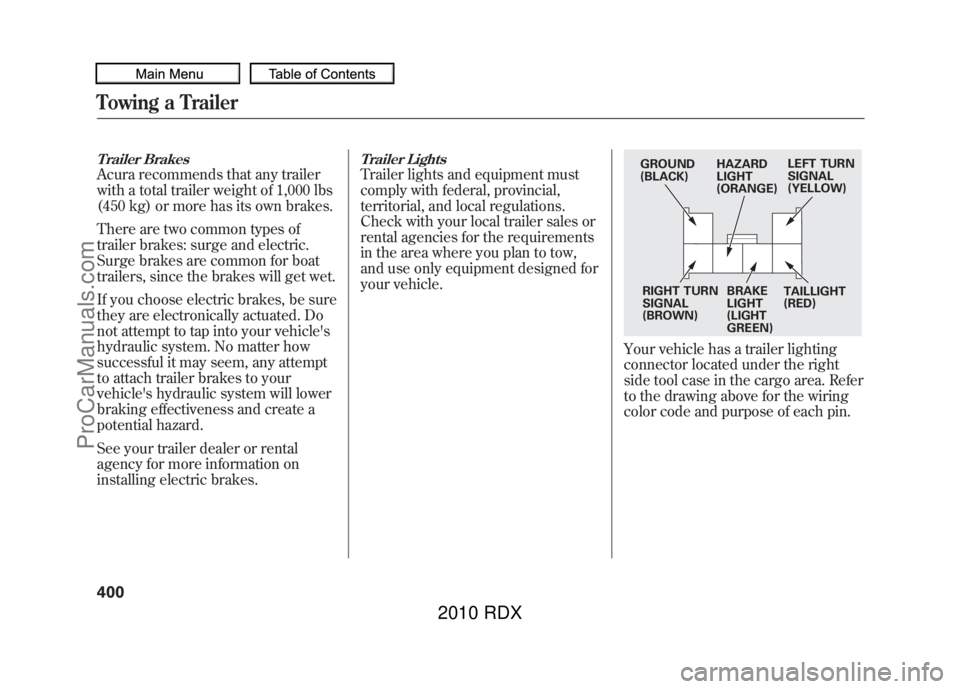
Your vehicle has a trailer lighting
connector located under the right
side tool case in the cargo area. Refer
to the drawing above for the wiring
color code and purpose of each pin.
GROUND
(BLACK)HAZARD
LIGHT
(ORANGE)LEFT TURN
SIGNAL
(YELLOW)
RIGHT TURN
SIGNAL
(BROWN) BRAKE
LIGHT
(LIGHT
GREEN)TAILLIGHT
(RED)
Towing a Trailer40009/07/07 15:02:04 10 ACURA RDX MMC North America Owner's M 50 31STK630 enu
ProCarManuals.com
2010 RDX
Page 406 of 514
●The trailer has been properly
serviced and is in good condition.●All weights and loads are within
limits.●The hitch, safety chains, and any
other attachments are secure.●All items in or on the trailer are
properly secured and cannot shift
while you drive.
●The lights and brakes on your
vehicle and the trailer are working
properly.●Your vehicle tires and spare are
properly inflated, and the trailer
tires and spare are inflated as
recommended by the trailer
maker.Driving Safely With a Trailer
The added weight, length, and
height of a trailer will affect your
vehicle's handling and performance,
so driving with a trailer requires
some special driving skills and
techniques.
For your safety and the safety of
others, take time to practice driving
maneuvers before heading for the
open road, and follow the guidelines
in this section.
Towing a Trailer40209/07/07 15:02:04 10 ACURA RDX MMC North America Owner's M 50 31STK630 enu
ProCarManuals.com
2010 RDX
Page 408 of 514
Driving on HillsWhen climbing hills, closely watch
your temperature gauge (see page
78). If it nears the H (Hot) mark, turn
the A/C off, reduce speed and, if
necessary, pull to the side of the road
to let the engine cool.
When driving down hills, reduce
your speed, and shift down to S
position, or use the paddle shifters to
the lower gear (3, 2 or 1)in the S
position. When towing a trailer, do
not‘‘ride ’’the brakes, and remember,
it will take longer to slow down and
stop when towing a trailer.
If you must stop when facing uphill,
use the foot brake or parking brake.
Do not try to hold the vehicle in place
by pressing on the accelerator, as
this can cause the automatic
transmission to overheat.
Handling Crosswinds and BuffetingCrosswinds and air turbulence
caused by passing trucks can disrupt
your steering and cause the trailer to
sway. When being passed by a large
vehicle, keep a constant speed, and
steer straight ahead. Do not try to
make quick steering or braking
corrections.
Backing UpAlways drive slowly and have
someone guide you when backing
up. Grip the
bottom
of the steering
wheel; then turn the wheel to the left
to get the trailer to move to the left,
and turn the wheel right to move the
trailer to the right.
ParkingFollow all normal precautions when
parking, including putting the
transmission in Park and firmly
setting the parking brake. Also, place
wheel chocks at each of the trailer's
tires.Towing Your VehicleYour vehicle is not designed to be
towed behind a motor home. If your
vehicle needs to be towed in an
emergency, see page 475.
Towing a Trailer40409/07/07 15:02:04 10 ACURA RDX MMC North America Owner's M 50 31STK630 enu
ProCarManuals.com
2010 RDX
Page 410 of 514
Check Out Your Vehicle
Before you leave the pavement, be
sure to do all scheduled maintenance
and service, and inspect your vehicle
for any problems. Pay special
attention to the condition of the tires,
and check the tire pressures.
After you return to the pavement,
carefully inspect your vehicle to
make sure there is no damage that
could make driving it unsafe.
Recheck the condition of the tires
and the tire pressures.
Remember
The route presents limits (too steep
or bumpy roads). You have limits
(driving skill and comfort). And your
vehicle has limits (traction, stability,
and power).
Driving off-highway can be
hazardous if you fail to recognize
limits and take the proper
precautions.Accelerating and Braking
For better traction on all surfaces,
accelerate slowly and gradually build
up speed. If you try to start too fast
on wet soil, mud, snow, or ice, you
might not have enough traction to
get underway, and you may dig
yourself a hole. Starting with the shift
lever in D position will help you have
a smoother start on snow or ice.
Keep in mind that you will usually
need more time and distance to
brake to a stop on unpaved surfaces.
Avoid hard braking. Do not
‘‘pump ’’
the brakes; let the anti-lock braking
system pump them for you. Avoiding Obstacles
Debris in the road can damage your
suspension or other components.
Because your vehicle has a high
center of gravity, driving over a large
obstacle, or allowing a wheel to drop
into a deep hole can cause your
vehicle to tip or roll over.
Driving on Slopes
If you can't clearly see all conditions
or obstacles on a slope, walk the
slope before you drive on it. If you
have any doubt whether or not you
can safely drive on the slope, don't
do it. Find another route.
If you are driving up a hill and find
that you cannot continue,
do not try to
turn around.
Your vehicle could roll
over. Slowly back down the hill,
following the same route you took up
the hill.
Off-Highway Driving Guidelines40609/07/07 15:02:04 10 ACURA RDX MMC North America Owner's M 50 31STK630 enu
ProCarManuals.com
2010 RDX
Page 421 of 514

U.S. Vehicles:Maintenance,
replacement, or repair of
emissions control devices and
systems may be done by any
automotive repair establishment
or individual using parts that are
‘‘ certified ’’to EPA standards.
According to state and federal
regulations, failure to perform
maintenance on the items marked
with #will not void your emissions
warranties. However, Acura
recommends that all maintenance
services be performed in accordance
with the intervals indicated by the
multi-information display. Owner's Maintenance Checks
You should check the following
items at the specified intervals. If you
are unsure of how to perform any
check, turn to the appropriate page
listed.
●Engine oil level
-Check every
time you fill the fuel tank. See page
356.●Engine coolant level -Check the
radiator reserve tank every time
you fill the fuel tank. See page 357.●Automatic transmission-Check
the fluid level monthly. See page
427.
●Brakes -Check the fluid level
monthly. See page 429.●Tires-Check the tire pressure
monthly. Examine the tread for
wear and foreign objects. See page
445.●Lights -Check the operation of
the headlights, parking lights,
taillights, high-mount brake light,
and license plate lights monthly.
See page 431.
Maintenance Minder
417
Maintenance
09/07/07 15:02:04 10 ACURA RDX MMC North America Owner's M 50 31STK630 enu
ProCarManuals.com
2010 RDX
Page 422 of 514

SymbolMaintenance Main Items
A
●Replace engine oil
ꭧ 1
B
●Replace engine oil
ꭧ1and oil filter
●Inspect front and rear brakes●Check parking brake adjustment●Inspect these items:●Tie rod ends, steering gear box, and boots●Suspension components●Driveshaft boots●Brake hoses and lines (including ABS/VSA)●All fluid levels and condition of fluids●Exhaust system
#
●Fuel lines and connections
#
ꭧ1: If the message ‘‘SERVICE ’’does not appear more than 12 months after
the display is reset, change the engine oil every year.
#: See information on maintenance and emissions warranty on page 417.
NOTE:
●Independent of maintenance message in the information display,
replace the brake fluid every 3 years.●Inspect idle speed every 160,000 miles (256,000 km).●Adjust the valves during services A, B, 1, 2, or 3 only if they are noisy. Symbol
Maintenance Sub Items
1
●Rotate tires
2●Replace air cleaner element If you drive in dusty conditions, replace every 15,000
miles (24,000 km).●Replace dust and pollen filterIf you drive primarily in urban areas that have high
concentrations of soot in the air from industry and from
diesel-powered vehicles, replace every 15,000 miles
(24,000 km).●Inspect drive belt
3●Replace transmission and transfer fluid Driving in mountainous areas at very low vehicle speeds
or trailer towing results in higher transmission and
transfer temperatures. This requires transmission and
transfer fluid changes more frequently than
recommended by the Maintenance Minder. If you
regularly drive your vehicle under these conditions, have
the transmission and transfer fluid changed at 60,000
miles (100,000 km), then every 30,000 miles (48,000 km).
4●Replace spark plugs●Inspect valve clearance
5●Replace engine coolant
6●Replace rear differential fluid Driving in mountainous areas at very low vehicle speeds
or trailer towing results in higher level of mechanical
(shear) stress to fluid. This requires differential fluid
changes more frequently than recommended by the
Maintenance Minder. If you regularly drive your vehicle
under these conditions, have the differential fluid
changed at 7,500 miles (12,000 km), then every 15,000
miles (24,000 km).
Maintenance Minder
Maintenance Minder
41809/07/07 15:02:04 10 ACURA RDX MMC North America Owner's M 50 31STK630 enu
ProCarManuals.com
2010 RDX
Page 502 of 514
A
Accessories andModifications
..........................
362
ACCESSORY (Ignition Key Position)
.................................
125
Accessory Power Sockets
..........
157
AcuraLink
®(U.S. models
only)
.......................................
332
Additives, Engine Oil
.................
421
Adjusting the Sound
............
177, 224
Adjusting the Steering Wheel....
122
Advanced Airbags
........................
28
Air Conditioning System
............
164
Usage
......................................
165
Air Pressure, Tires
..............
444, 445
Airbag (SRS)
..........................
10, 24
Alcohol in Gasoline
....................
352
Anti-lock Brakes (ABS) Indicator Light
..................
66, 388
Operation
................................
388
Anti-theft Steering Column Lock
.......................................
125
Anti-theft, Audio System
.............
292
Antifreeze
...................................
424 Armrests
....................................
138
Audio Antenna
...........................
439
Audio System
......................
172, 216
Automatic Lighting Off
Feature
...................................
118
Automatic Seat Belt Tensioners...
22
Automatic Speed Control
...........
300
Automatic Transmission
............
376
Capacity, Fluid
........................
480
Checking Fluid Level
..............
427
Driving with the Paddle Shifters
................................
380
Shift Lever Position Indicators
............................
376
Shift Lever Positions
...............
377
Shift Lock Release
...................
379
Shifting
...................................
376
Auxiliary Input Jack
...................
291
B
Battery Charging System
Indicator
........................
65, 465
Jump Starting
..........................
461 Maintenance
...........................
450
Specifications
..........................
481
Before Driving
...........................
351
Belts, Seat
................................
9, 20
Beverage Holders
......................
156
Bluetooth
®Audio
................
212, 280
Bluetooth
®HandsFreeLink
®......
306
Booster Seats
...............................
54
Brakes Anti-lock Brakes (ABS)
...........
388
Break-in, New Linings
.............
352
Bulb Replacement
...................
433
Fluid
.......................................
429
Parking
...................................
150
System Design
........................
387
System Indicator (Amber)
.......
468
System Indicator (Red)
...........
467
Wear Indicators
.......................
387
Braking System
..........................
387
Break-in, New Vehicle
................
352
Brightness Control,
Instruments
............................
120
CONTINUED
Index
I
INDEX
09/07/07 15:02:04 10 ACURA RDX MMC North America Owner's M 50 31STK630 enu
ProCarManuals.com
2010 RDX