door lock ACURA RDX 2010 Owner's Manual
[x] Cancel search | Manufacturer: ACURA, Model Year: 2010, Model line: RDX, Model: ACURA RDX 2010Pages: 514, PDF Size: 30.21 MB
Page 116 of 514
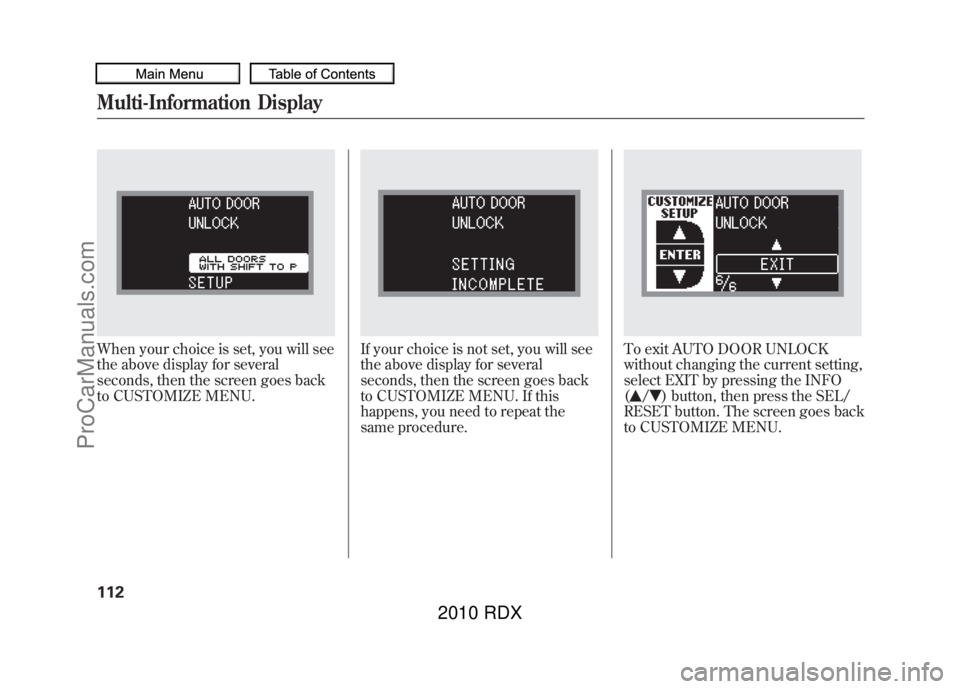
When your choice is set, you will see
the above display for several
seconds, then the screen goes back
to CUSTOMIZE MENU.
If your choice is not set, you will see
the above display for several
seconds, then the screen goes back
to CUSTOMIZE MENU. If this
happens, you need to repeat the
same procedure.
To exit AUTO DOOR UNLOCK
without changing the current setting,
select EXIT by pressing the INFO
(
/
) button, then press the SEL/
RESET button. The screen goes back
to CUSTOMIZE MENU.
Multi-Information Display11209/07/07 15:02:04 10 ACURA RDX MMC North America Owner's M 50 31STK630 enu
ProCarManuals.com
2010 RDX
Page 120 of 514
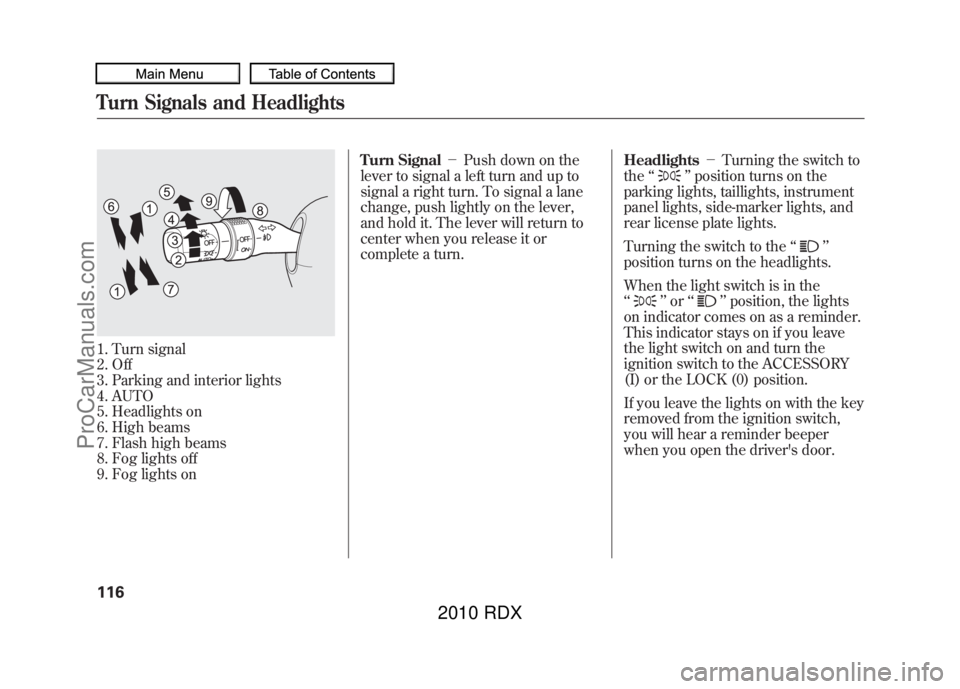
1. Turn signal
2. Off
3. Parking and interior lights
4. AUTO
5. Headlights on
6. High beams
7. Flash high beams
8. Fog lights off
9. Fog lights onTurn Signal
-Push down on the
lever to signal a left turn and up to
signal a right turn. To signal a lane
change, push lightly on the lever,
and hold it. The lever will return to
center when you release it or
complete a turn. Headlights
-Turning the switch to
the ‘‘
’’position turns on the
parking lights, taillights, instrument
panel lights, side-marker lights, and
rear license plate lights.
Turning the switch to the ‘‘
’’
position turns on the headlights.
When the light switch is in the
‘‘
’’ or ‘‘
’’position, the lights
on indicator comes on as a reminder.
This indicator stays on if you leave
the light switch on and turn the
ignition switch to the ACCESSORY
(I) or the LOCK (0) position.
If you leave the lights on with the key
removed from the ignition switch,
you will hear a reminder beeper
when you open the driver's door.
Turn Signals and Headlights11609/07/07 15:02:04 10 ACURA RDX MMC North America Owner's M 50 31STK630 enu
ProCarManuals.com
2010 RDX
Page 123 of 514
If you remove the key from the
ignition switch with the headlight
switch on, but do not open the door,
the lights will turn off after 10
minutes.
The lights will turn on again when
you unlock or open the driver’s door.
If you unlock the door, but do not
open it within 15 seconds, the lights
will go off. With the driver’ s door
open, you will hear a lights on
reminder beeper.
You can change the ‘‘HEADLIGHT
AUTO OFF TIMER ’’setting on the
multi-information display (see page
100). Daytime Running Lights
With the headlight switch off or in
the
position, the high beam
headlights and the high beam
indicator come on with reduced
brightness when you turn the
ignition switch to the ON (II)
position and release the parking
brake. They remain on until you turn
the ignition switch off, even if you set
the parking brake.
The headlights revert to normal
operation when you turn them on
with the switch.
If you see a ‘‘CHECK DRL SYSTEM ’’
message on the multi-information
display, there is a problem with the
daytime running light system. Take
your vehicle to a dealer to have it
checked. Fog Lights
Turn the fog lights on and off by
turning the switch next to the
headlight switch.
You can use the fog lights only when
the headlights are on low beam.
They will go off when the headlights
are turned off.
Turn Signals and Headlights
119
Instruments and Controls
09/07/07 15:02:04 10 ACURA RDX MMC North America Owner's M 50 31STK630 enu
ProCarManuals.com
2010 RDX
Page 126 of 514

Steering Wheel Adjustments
Make any steering wheel
adjustments before you start driving.
Adjusting the steering wheel
position while driving may
cause you to lose control of the
vehicle and be seriously injured
in a crash.
Adjust the steering wheel only
when the vehicle is stopped.
1. Push the lever under the steering column all the way down.
2. Move the steering wheel up or down, and in or out, so it points
toward your chest, not toward your
face. Make sure you can see the
instrument panel gauges and
indicators.
3. Push the lever up to lock thesteering wheel in position.
4. Make sure you have securely locked the steering wheel in place
by trying to move it up, down, in,
and out. Keys and Locks
The master key fits all the locks on
your vehicle. The valet key works
only in the ignition and the door
locks. You can keep the glove box
and console compartment locked
when you leave your vehicle and the
valet key at a parking facility.
LEVER
VALET KEY
(Light Gray)
MASTER KEYS
WITH REMOTE
TRANSMITTER
KEY
NUMBER
TAG
Steering Wheel Adjustments, Keys and Locks12209/07/07 15:02:04 10 ACURA RDX MMC North America Owner's M 50 31STK630 enu
ProCarManuals.com
2010 RDX
Page 129 of 514
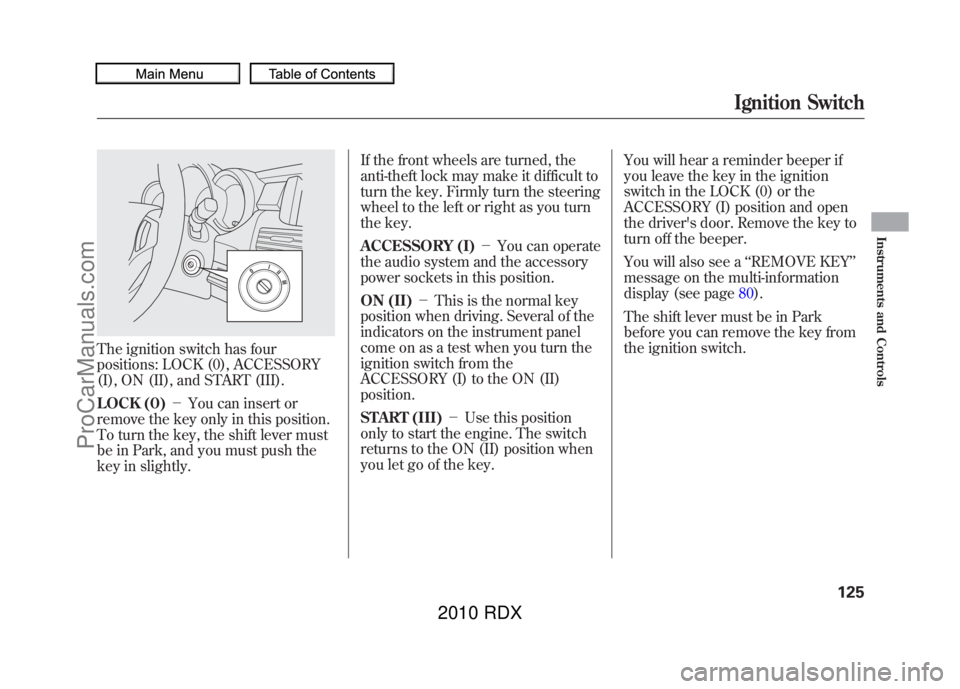
The ignition switch has four
positions: LOCK (0), ACCESSORY
(I), ON (II), and START (III).
LOCK (0)-You can insert or
remove the key only in this position.
To turn the key, the shift lever must
be in Park, and you must push the
key in slightly. If the front wheels are turned, the
anti-theft lock may make it difficult to
turn the key. Firmly turn the steering
wheel to the left or right as you turn
the key.
ACCESSORY (I)
-You can operate
the audio system and the accessory
power sockets in this position.
ON (II) -This is the normal key
position when driving. Several of the
indicators on the instrument panel
come on as a test when you turn the
ignition switch from the
ACCESSORY (I) to the ON (II)
position.
START (III) -Use this position
only to start the engine. The switch
returns to the ON (II) position when
you let go of the key. You will hear a reminder beeper if
you leave the key in the ignition
switch in the LOCK (0) or the
ACCESSORY (I) position and open
the driver's door. Remove the key to
turn off the beeper.
You will also see a
‘‘REMOVE KEY ’’
message on the multi-information
display (see page 80).
The shift lever must be in Park
before you can remove the key from
the ignition switch.
Ignition Switch
125
Instruments and Controls
09/07/07 15:02:04 10 ACURA RDX MMC North America Owner's M 50 31STK630 enu
ProCarManuals.com
2010 RDX
Page 130 of 514
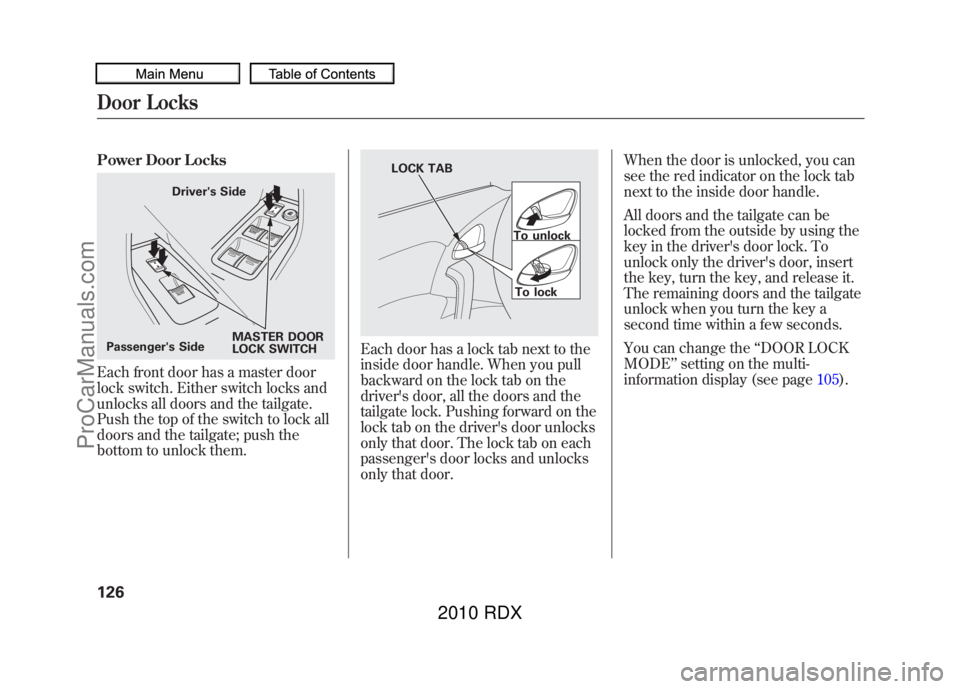
Power Door LocksEach front door has a master door
lock switch. Either switch locks and
unlocks all doors and the tailgate.
Push the top of the switch to lock all
doors and the tailgate; push the
bottom to unlock them.
Each door has a lock tab next to the
inside door handle. When you pull
backward on the lock tab on the
driver's door, all the doors and the
tailgate lock. Pushing forward on the
lock tab on the driver's door unlocks
only that door. The lock tab on each
passenger's door locks and unlocks
only that door.When the door is unlocked, you can
see the red indicator on the lock tab
next to the inside door handle.
All doors and the tailgate can be
locked from the outside by using the
key in the driver's door lock. To
unlock only the driver's door, insert
the key, turn the key, and release it.
The remaining doors and the tailgate
unlock when you turn the key a
second time within a few seconds.
You can change the
‘‘DOOR LOCK
MODE ’’setting on the multi-
information display (see page 105).
MASTER DOOR
LOCK SWITCH
Passenger's Side Driver's Side
To unlock
To lock
LOCK TAB
Door Locks12609/07/07 15:02:04 10 ACURA RDX MMC North America Owner's M 50 31STK630 enu
ProCarManuals.com
2010 RDX
Page 131 of 514
When the vehicle speed reaches
about 9 mph (about 15 km/h) or
more, all the doors lock
automatically.
You can change the‘‘AUTO DOOR
LOCK ’’setting on the multi-
information display (see page 103).
When you shift to P after driving, the
driver's door unlocks.
You can change the ‘‘AUTO DOOR
UNLOCK ’’setting on the multi-
information display (see page 111).To lock any passenger's door when
getting out of the vehicle, pull
backward on the lock tab and close
the door. To lock the driver's door,
remove the key from the ignition
switch and pull backward on the lock
tab. Then close the door.
Lockout PreventionWith the driver's door open and the
key in the ignition, both master door
lock switches are disabled. They are
not disabled if the driver's door is
closed. Pushing the switch down on
the open front passenger's door will
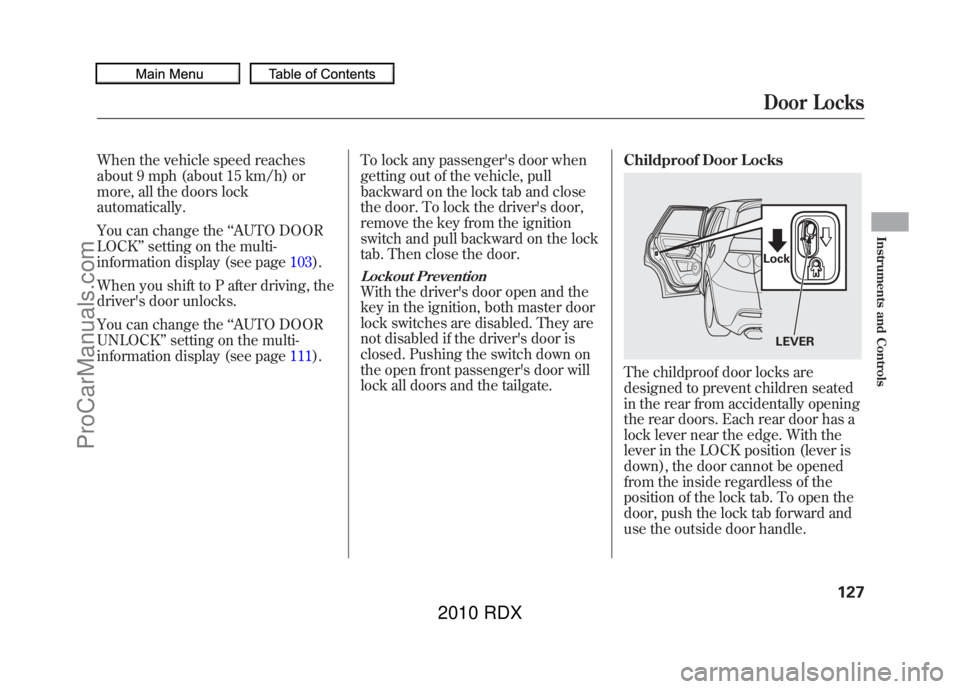
lock all doors and the tailgate. Childproof Door Locks
The childproof door locks are
designed to prevent children seated
in the rear from accidentally opening
the rear doors. Each rear door has a
lock lever near the edge. With the
lever in the LOCK position (lever is
down), the door cannot be opened
from the inside regardless of the
position of the lock tab. To open the
door, push the lock tab forward and
use the outside door handle.
LEVER
LockDoor Locks
127
Instruments and Controls
09/07/07 15:02:04 10 ACURA RDX MMC North America Owner's M 50 31STK630 enu
ProCarManuals.com
2010 RDX
Page 132 of 514
The tailgate will lock when you lock
the driver's door, and will unlock
when you unlock all doors.
You can change the‘‘DOOR LOCK
MODE ’’setting on the multi-
information display (see page 105).
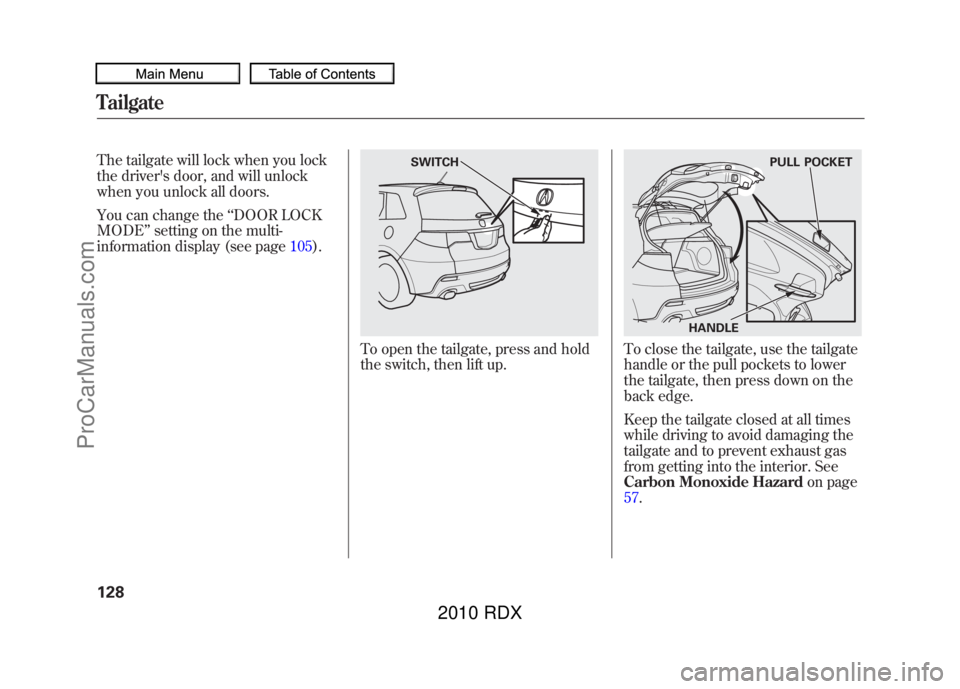
To open the tailgate, press and hold
the switch, then lift up.
To close the tailgate, use the tailgate
handle or the pull pockets to lower
the tailgate, then press down on the
back edge.
Keep the tailgate closed at all times
while driving to avoid damaging the
tailgate and to prevent exhaust gas
from getting into the interior. See
Carbon Monoxide Hazardon page
57.
SWITCH
HANDLE PULL POCKET
Tailgate12809/07/07 15:02:04 10 ACURA RDX MMC North America Owner's M 50 31STK630 enu
ProCarManuals.com
2010 RDX
Page 133 of 514
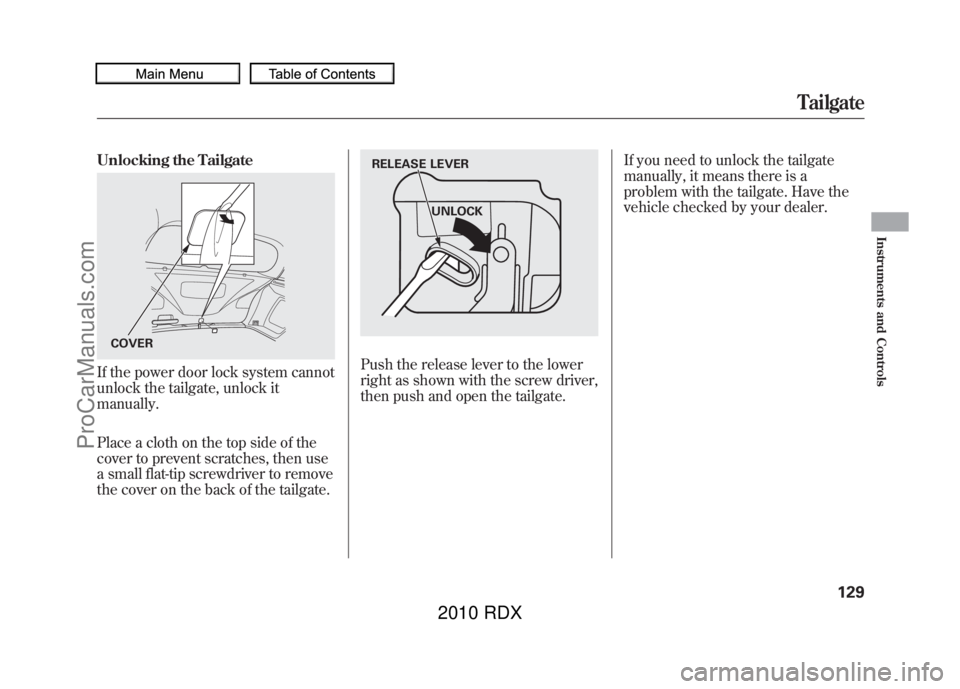
Unlocking the TailgateIf the power door lock system cannot
unlock the tailgate, unlock it
manually.
Place a cloth on the top side of the
cover to prevent scratches, then use
a small flat-tip screwdriver to remove
the cover on the back of the tailgate.
Push the release lever to the lower
right as shown with the screw driver,
then push and open the tailgate.If you need to unlock the tailgate
manually, it means there is a
problem with the tailgate. Have the
vehicle checked by your dealer.
COVER
UNLOCK
RELEASE LEVER
Tailgate
129
Instruments and Controls
09/07/07 15:02:04 10 ACURA RDX MMC North America Owner's M 50 31STK630 enu
ProCarManuals.com
2010 RDX
Page 134 of 514
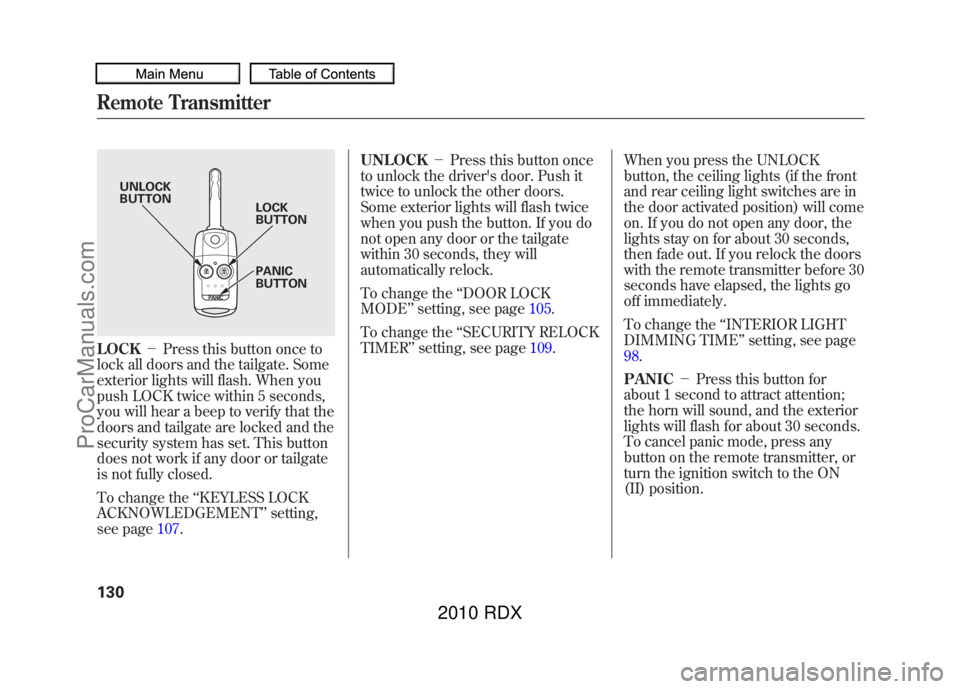
LOCK-Press this button once to
lock all doors and the tailgate. Some
exterior lights will flash. When you
push LOCK twice within 5 seconds,
you will hear a beep to verify that the
doors and tailgate are locked and the
security system has set. This button
does not work if any door or tailgate
is not fully closed.
To change the ‘‘KEYLESS LOCK
ACKNOWLEDGEMENT ’’setting,
see page 107. UNLOCK
-Press this button once
to unlock the driver's door. Push it
twice to unlock the other doors.
Some exterior lights will flash twice
when you push the button. If you do
not open any door or the tailgate
within 30 seconds, they will
automatically relock.
To change the ‘‘DOOR LOCK
MODE ’’setting, see page 105.
To change the ‘‘SECURITY RELOCK
TIMER ’’setting, see page 109.When you press the UNLOCK
button, the ceiling lights (if the front
and rear ceiling light switches are in
the door activated position) will come
on. If you do not open any door, the
lights stay on for about 30 seconds,
then fade out. If you relock the doors
with the remote transmitter before 30
seconds have elapsed, the lights go
off immediately.
To change the
‘‘INTERIOR LIGHT
DIMMING TIME’’ setting, see page
98.
PANIC -Press this button for
about 1 second to attract attention;
the horn will sound, and the exterior
lights will flash for about 30 seconds.
To cancel panic mode, press any
button on the remote transmitter, or
turn the ignition switch to the ON
(II) position.
UNLOCK
BUTTON LOCK
BUTTON
PANIC
BUTTON
Remote Transmitter13009/07/07 15:02:04 10 ACURA RDX MMC North America Owner's M 50 31STK630 enu
ProCarManuals.com
2010 RDX