wheel ACURA RDX 2010 Owner's Manual
[x] Cancel search | Manufacturer: ACURA, Model Year: 2010, Model line: RDX, Model: ACURA RDX 2010Pages: 514, PDF Size: 30.21 MB
Page 293 of 514

Three controls for the audio system
are mounted in the steering wheel
hub. They let you control basic
functions without removing your
hand from the steering wheel.
The VOL button adjusts the volume
up (
) or down (
). Press the top or
bottom of the button, hold it until the
desired volume is reached, then
release it.
The MODE button changes the mode.On vehicles without navigation systemPressing the MODE button
repeatedly cycles through all
possible media sources whether they
are present or not.On vehicles with navigation systemPressing the MODE button
repeatedly cycles through all
present, connected media sources.
Media sources that are not present
or connected will not appear when
cycling with the MODE button. If you are listening to the radio, use
the CH button to change stations.
Each time you press and release the
top (+
) of the button, the system
goes to the next preset station on the
band you are listening to. Press and
release the bottom (- ) to go back to
the previous station.
To activate the seek function, press
and hold the top (+) or bottom (- )
of the CH button until you hear a
beep. The system searches up or
down from the current frequency to
find a station with a strong signal.
MODE BUTTON
VOL BUTTON CH BUTTON
CONTINUED
Remote Audio Controls
289
Features
09/07/07 15:02:04 10 ACURA RDX MMC North America Owner's M 50 31STK630 enu
ProCarManuals.com
2010 RDX
Page 304 of 514
Cruise control allows you to maintain
a set speed above 25 mph (40 km/h)
without keeping your foot on the
accelerator pedal. It should be used
for cruising on straight, open
highways. It is not recommended for
city driving, winding roads, slippery
roads, heavy rain, or bad weather.
Improper use of the cruise
control can lead to a crash.
Use the cruise control only
when traveling on open
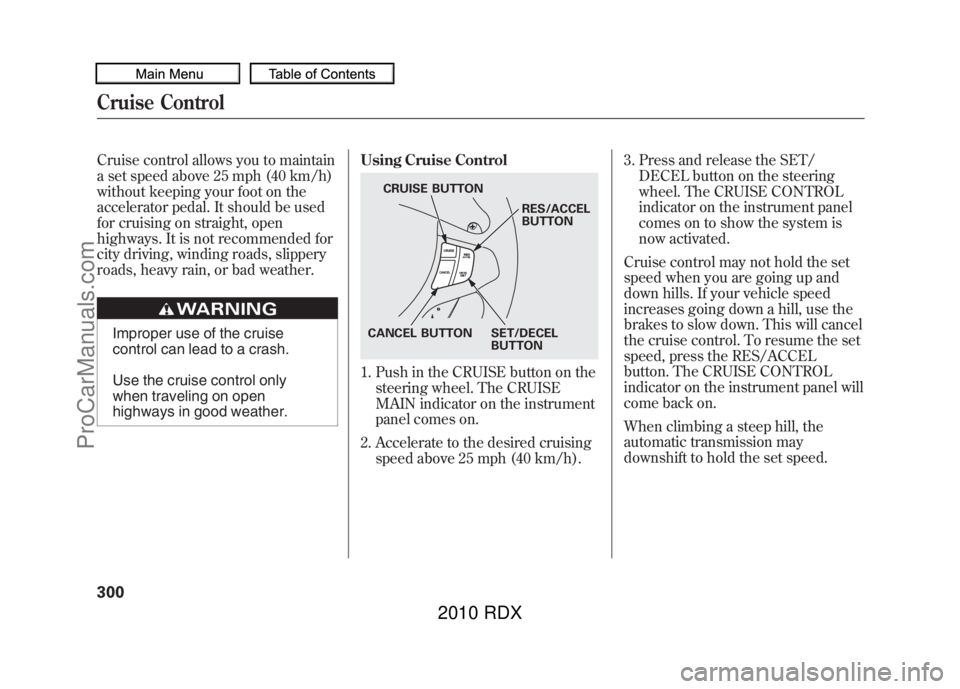
highways in good weather.Using Cruise Control
1. Push in the CRUISE button on the
steering wheel. The CRUISE
MAIN indicator on the instrument
panel comes on.
2. Accelerate to the desired cruising speed above 25 mph (40 km/h). 3. Press and release the SET/
DECEL button on the steering
wheel. The CRUISE CONTROL
indicator on the instrument panel
comes on to show the system is
now activated.
Cruise control may not hold the set
speed when you are going up and
down hills. If your vehicle speed
increases going down a hill, use the
brakes to slow down. This will cancel
the cruise control. To resume the set
speed, press the RES/ACCEL
button. The CRUISE CONTROL
indicator on the instrument panel will
come back on.
When climbing a steep hill, the
automatic transmission may
downshift to hold the set speed.
CRUISE BUTTON
RES/ACCEL
BUTTON
SET/DECEL
BUTTON
CANCEL BUTTON
Cruise Control30009/07/07 15:02:04 10 ACURA RDX MMC North America Owner's M 50 31STK630 enu
ProCarManuals.com
2010 RDX
Page 306 of 514
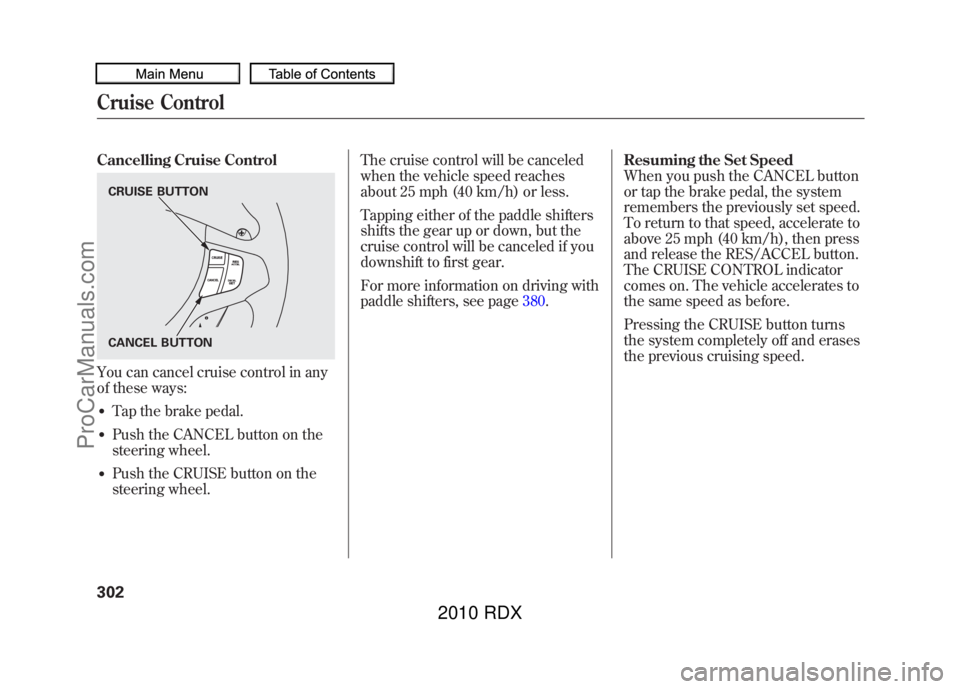
Cancelling Cruise ControlYou can cancel cruise control in any
of these ways:●Tap the brake pedal.●Push the CANCEL button on the
steering wheel.●Push the CRUISE button on the
steering wheel.The cruise control will be canceled
when the vehicle speed reaches
about 25 mph (40 km/h) or less.
Tapping either of the paddle shifters
shifts the gear up or down, but the
cruise control will be canceled if you
downshift to first gear.
For more information on driving with
paddle shifters, see page
380.Resuming the Set Speed
When you push the CANCEL button
or tap the brake pedal, the system
remembers the previously set speed.
To return to that speed, accelerate to
above 25 mph (40 km/h), then press
and release the RES/ACCEL button.
The CRUISE CONTROL indicator
comes on. The vehicle accelerates to
the same speed as before.
Pressing the CRUISE button turns
the system completely off and erases
the previous cruising speed.CRUISE BUTTON
CANCEL BUTTONCruise Control30209/07/07 15:02:04 10 ACURA RDX MMC North America Owner's M 50 31STK630 enu
ProCarManuals.com
2010 RDX
Page 311 of 514
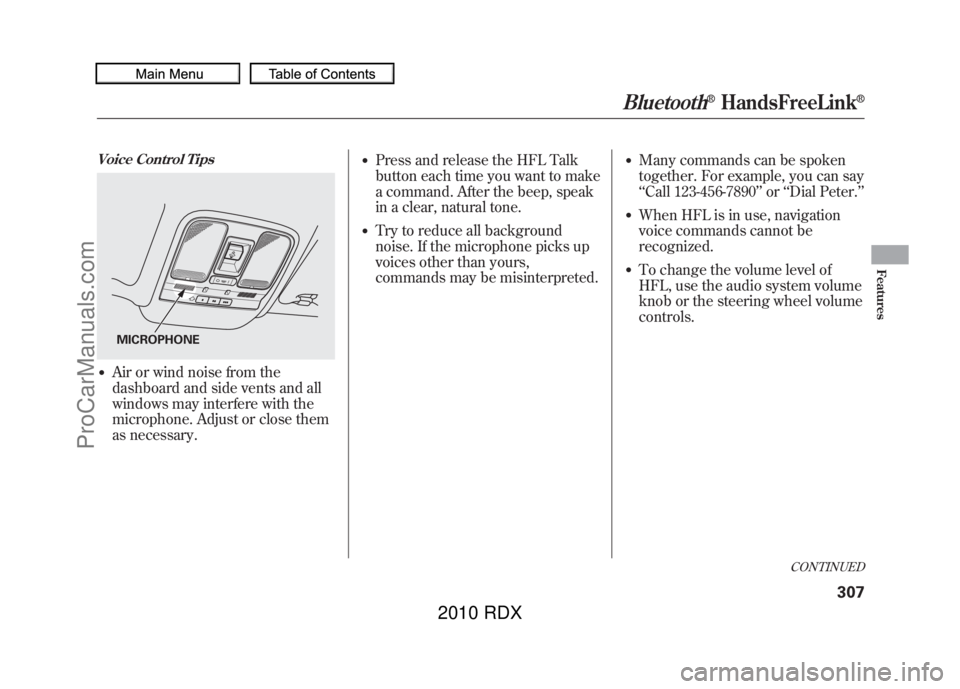
Voice Control Tips●Air or wind noise from the
dashboard and side vents and all
windows may interfere with the
microphone. Adjust or close them
as necessary.
●Press and release the HFL Talk
button each time you want to make
a command. After the beep, speak
in a clear, natural tone.●Try to reduce all background
noise. If the microphone picks up
voices other than yours,
commands may be misinterpreted.
●Many commands can be spoken
together. For example, you can say
‘‘Call 123-456-7890 ’’or ‘‘Dial Peter. ’’●When HFL is in use, navigation
voice commands cannot be
recognized.●To change the volume level of
HFL, use the audio system volume
knob or the steering wheel volume
controls.
MICROPHONE
CONTINUED
Bluetooth
®HandsFreeLink
®
307
Features
09/07/07 15:02:04 10 ACURA RDX MMC North America Owner's M 50 31STK630 enu
ProCarManuals.com
2010 RDX
Page 367 of 514
Modifying Your Vehicle
Removing parts from your vehicle, or
replacing components with non-
Acura components could seriously
affect your vehicle's handling,
stability, and reliability.
Here are some examples:●Lowering the vehicle with a non-
Acura suspension kit that
significantly reduces ground
clearance can allow the
undercarriage to hit speed bumps
or other raised objects, which
could cause the airbags to deploy.●Raising your vehicle with a non-
Acura suspension kit can affect the
handling and stability.
●Non-Acura wheels, because they
are a universal design, can cause
excessive stress on suspension
components and will not be
compatible with the tire pressure
monitoring system (TPMS).●Larger or smaller wheels and tires
can interfere with the operation of
your vehicle's anti-lock brakes and
other systems.●Modifying your steering wheel or
any other part of your vehicle's
safety features can make the
systems ineffective.
If you plan to modify your vehicle,
consult your dealer.
Accessories and Modifications
363
Before Driving
09/07/07 15:02:04 10 ACURA RDX MMC North America Owner's M 50 31STK630 enu
ProCarManuals.com
2010 RDX
Page 375 of 514
This section gives you tips on
starting the engine under various
conditions, and how to operate the
automatic transmission. It also
includes important information on
parking your vehicle, the braking
system, the Super Handling-All
Wheel Drive™(SH-AWD
®) system,
the vehicle stability assist (VSA
®)
system, the tire pressure monitoring
system (TPMS), and facts you need
if you are planning to tow a trailer or
drive off-highway. Driving Guidelines
......................
372
Preparing to Drive
......................
373
Starting the Engine
.....................
374
Automatic Transmission
.............
376
Driving with the Paddle Shifters
...................................
380
Super Handling-All Wheel Drive ™(SH-AWD
®)
System
................................
384
Parking
.......................................
386
Braking System
..........................
387
Anti-lock Brakes (ABS)
...............
388
Tire Pressure Monitoring System
(TPMS)
...................................
390
Vehicle Stability Assist (VSA
®),
aka Electronic Stability Control (ESC), System
.....................
395
Towing a Trailer
..........................
397
Off-Highway Driving Guidelines
...............................
405
Driving
371
Driving
09/07/07 15:02:04 10 ACURA RDX MMC North America Owner's M 50 31STK630 enu
ProCarManuals.com
2010 RDX
Page 376 of 514
Your vehicle has higher ground
clearance that allows you to travel
over bumps, obstacles, and rough
terrain. It also provides good
visibility so you can anticipate
problems earlier.
Because your vehicle rides higher off
the ground, it has a high center of
gravity that can cause it to roll over if
you make abrupt turns. Utility
vehicles have a significantly higher
roll over rate than other types of
vehicles.To prevent rollovers or loss of
control:
●Take corners at slower speeds
than you would with a passenger
vehicle.●Avoid sharp turns and abrupt
maneuvers whenever possible.●Do not modify your vehicle in any
way that would raise the center of
gravity.●Do not carry heavy cargo on the
roof.Your vehicle is equipped with a super
handling-all wheel drive (SH-AWD)
system. When the system senses a
loss of one or more wheel traction, it
automatically transfers some power
to the other wheels. This gives you
better traction and mobility.
You still need to exercise the same
care when accelerating, steering, and
braking that you would in a two-
wheel drive vehicle.
See page
405for off-highway driving
guidelines.
Driving Guidelines37209/07/07 15:02:04 10 ACURA RDX MMC North America Owner's M 50 31STK630 enu
ProCarManuals.com
2010 RDX
Page 377 of 514
You should do these checks and
adjustments before you drive your
vehicle:1. Make sure all windows, mirrors, and outside lights are clean and
unobstructed. Remove frost, snow,
or ice.
2. Check that the hood is fully closed.
3. Visually check the tires. If a tire looks low, use a gauge to check its
pressure.
4. Check that any items you may be carrying are stored properly or
fastened down securely. 5. Check the seat adjustment (see
page 134).
6. Check the adjustment of the inside and outside mirrors (see page
146).
7. Check the steering wheel adjustment (see page 122).
8. Make sure the doors and the tailgate are securely closed and
locked.
9. Fasten your seat belt. Check that your passengers have fastened
their seat belts (see page 15).10. When you start the engine, check
the gauges and indicators in the
instrument panel, and the
messages on the multi-information
display (see pages 63,73and 74).
Preparing to Drive
373
Driving
09/07/07 15:02:04 10 ACURA RDX MMC North America Owner's M 50 31STK630 enu
ProCarManuals.com
2010 RDX
Page 384 of 514
Using the Paddle Shifters in the D
position (D-Paddle Shift Mode)
When you are driving in the D
position, pulling either paddle shifter
switches from the ordinary automatic
transmission [drive mode (D)] to the
D-paddle shift mode. You can shift
the transmission up or down
manually with the paddle shifters.
Downshifting gives you more power
when climbing, and provides engine
braking when going down a steep
hill.
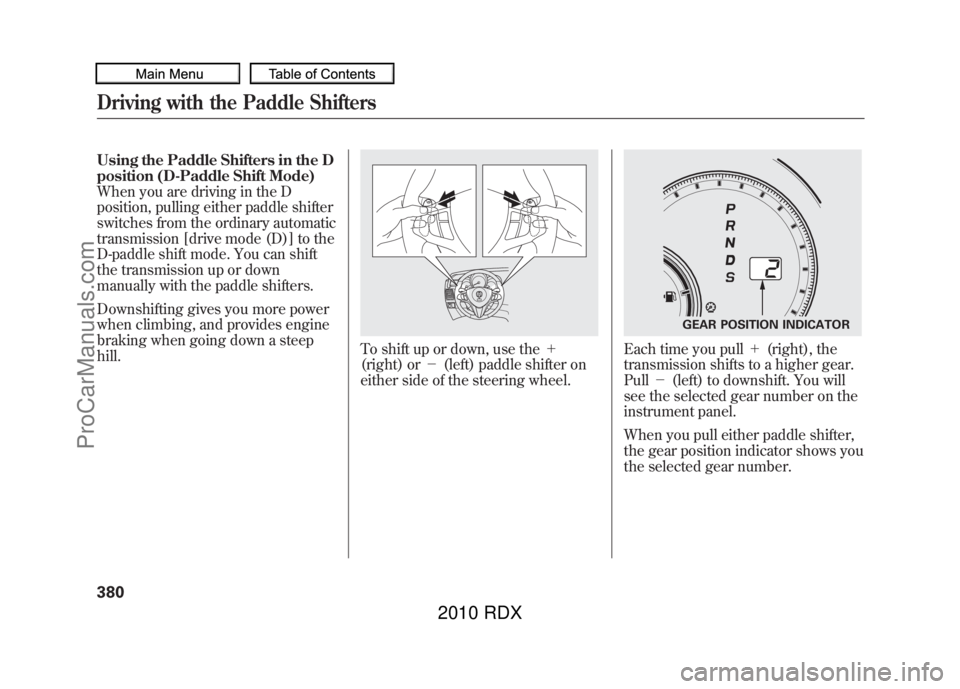
To shift up or down, use the+
(right) or -(left) paddle shifter on
either side of the steering wheel.
Each time you pull +(right), the
transmission shifts to a higher gear.
Pull -(left) to downshift. You will
see the selected gear number on the
instrument panel.
When you pull either paddle shifter,
the gear position indicator shows you
the selected gear number.
GEAR POSITION INDICATOR
Driving with the Paddle Shifters38009/07/07 15:02:04 10 ACURA RDX MMC North America Owner's M 50 31STK630 enu
ProCarManuals.com
2010 RDX
Page 388 of 514

Starting in Second GearWhen you are in sequential shift
mode, and the vehicle is stopped,
pull the+(right) paddle shifter to
shift to second gear. You will see
‘‘ M2’’ in the display. Starting in
second gear helps to reduce
wheelspin in deep snow or on a
slippery surface.Recommended Shift PointsDrive in the highest gear that lets the
engine run and accelerate smoothly.
This will give you good fuel economy
and effective emissions control. The
following shift points are
recommended:
Shift up Normal acceleration
1st to 2nd 15 mph (24 km/h)
2nd to 3rd 25mph (40 km/h)
3rd to 4th 40 mph (64 km/h)4th to 5th 47 mph (76 km/h) Super Handling-All Wheel Drive
™
(SH-AWD
®) System
If equippedThe super handling-all wheel drive
(SH-AWD) system is a full time all-
wheel-drive system that
automatically controls and transfers
varying amounts of engine torque to
all wheels independently, according
to the driving conditions.
While the SH-AWD system helps to
enhance the vehicle's driving
stability in all situations, it is still
your responsibility to drive and
corner at reasonable speeds and to
leave a sufficient margin of safety. SH-AWD Torque Distribution
Monitor
The SH-AWD torque distribution
monitor on the multi-information
display shows you the amount of
torque being sent to the wheels.
Each wheel
ꭚright front (RF), left
front (LF), right rear (RR), and left
rear (LR) ꭚhas its own torque
indicator.
TORQUE INDICATOR
TORQUE INDICATOR
Driving with the Paddle Shifters, Super Handling-All Wheel Drive ™(SH-AWD
®) System
38409/07/07 15:02:04 10 ACURA RDX MMC North America Owner's M 50 31STK630 enu
ProCarManuals.com
2010 RDX