light ACURA RDX 2010 Service Manual
[x] Cancel search | Manufacturer: ACURA, Model Year: 2010, Model line: RDX, Model: ACURA RDX 2010Pages: 514, PDF Size: 30.21 MB
Page 163 of 514
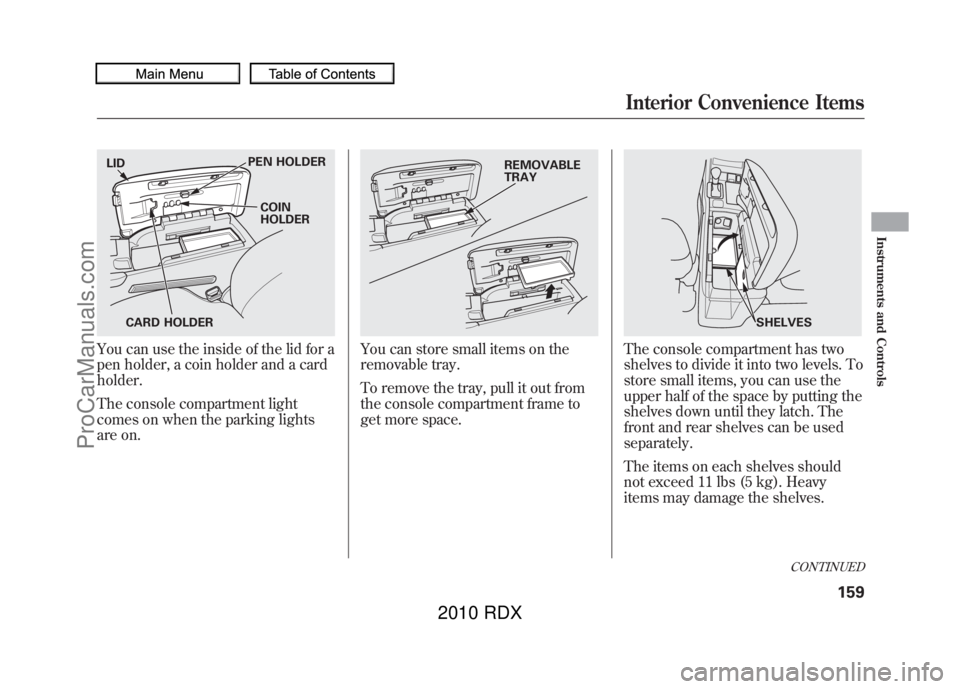
You can use the inside of the lid for a
pen holder, a coin holder and a card
holder.
The console compartment light
comes on when the parking lights
are on.
You can store small items on the
removable tray.
To remove the tray, pull it out from
the console compartment frame to
get more space.
The console compartment has two
shelves to divide it into two levels. To
store small items, you can use the
upper half of the space by putting the
shelves down until they latch. The
front and rear shelves can be used
separately.
The items on each shelves should
not exceed 11 lbs (5 kg). Heavy
items may damage the shelves.
LIDPEN HOLDER
COIN
HOLDER
CARD HOLDER
REMOVABLE
TRAY
SHELVES
CONTINUED
Interior Convenience Items
159
Instruments and Controls
09/07/07 15:02:04 10 ACURA RDX MMC North America Owner's M 50 31STK630 enu
ProCarManuals.com
2010 RDX
Page 164 of 514
When you store a large item like a
briefcase, lift the shelves up to create
a large space.
The maximum dimensions of the
item you can store in the console
compartment are:
Length: 16.9 in (430 mm)
Height: 12.2 in (310 mm)
Width: 5.5 in (140 mm)Cargo Area Cover
Your vehicle has a cargo area cover
to conceal your luggage and protect
them from direct sunlight.
Do not put any items on top of the
cargo area cover. They can block
your view and be thrown around the
vehicle during a crash.
The cargo area cover may be
removed to give you more cargo
space.
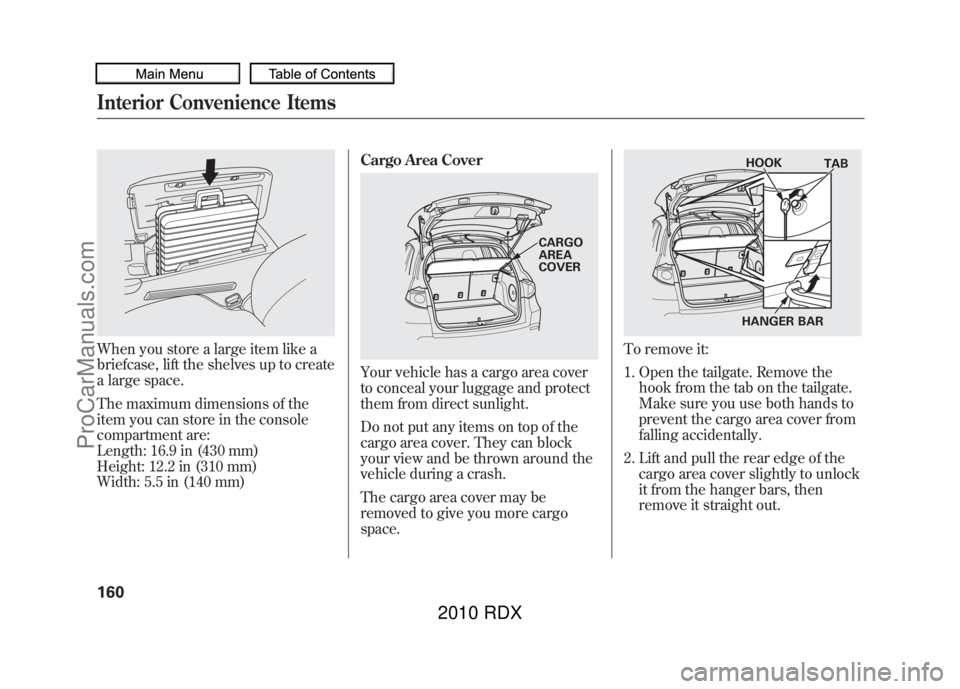
To remove it:
1. Open the tailgate. Remove the
hook from the tab on the tailgate.
Make sure you use both hands to
prevent the cargo area cover from
falling accidentally.
2. Lift and pull the rear edge of the cargo area cover slightly to unlock
it from the hanger bars, then
remove it straight out.
CARGO
AREA
COVER
HOOK TAB
HANGER BAR
Interior Convenience Items16009/07/07 15:02:04 10 ACURA RDX MMC North America Owner's M 50 31STK630 enu
ProCarManuals.com
2010 RDX
Page 169 of 514

Proper use of the climate control
system can make the interior dry and
comfortable, and keep the windows
clear for best visibility.
For the climate control system to
provide heating and cooling, the
engine must be running.
You can adjust the temperatures of
the driver's side and the passenger's
side independently (see page169).
Voice Control SystemOn models with navigation systemThe climate control system can also
be operated by voice control. See the
navigation system manual for
complete details. Using Automatic Climate Control
The automatic climate control system
adjusts the fan speed and airflow
levels to maintain the interior
temperature you select.
On models with navigation systemIn AUTO mode, the vehicle's interior
temperature is independently
regulated for the driver and
passenger, based on inputs from
sunlight and temperature sensors
(see page
171). If one side of the
vehicle is getting too much sun, the
system lowers the temperature only
on that side.
1. Press the AUTO button. The indicator in the button comes on. 2. Set the desired temperature by
pushing the driver's side
temperature control buttons (
or
). The selected temperature will
show in the display.
When you push the passenger's side
temperature control buttons, the
indicator in the DUAL button comes
on and the driver's side and
passenger's side temperature can be
controlled independently (see page
169).
The system automatically selects the
proper mix of conditioned and/or
heated air that will, as quickly as
possible, raise or lower the interior
temperature to your preference.
CONTINUED
Climate Control System
165
Features
09/07/07 15:02:04 10 ACURA RDX MMC North America Owner's M 50 31STK630 enu
ProCarManuals.com
2010 RDX
Page 175 of 514
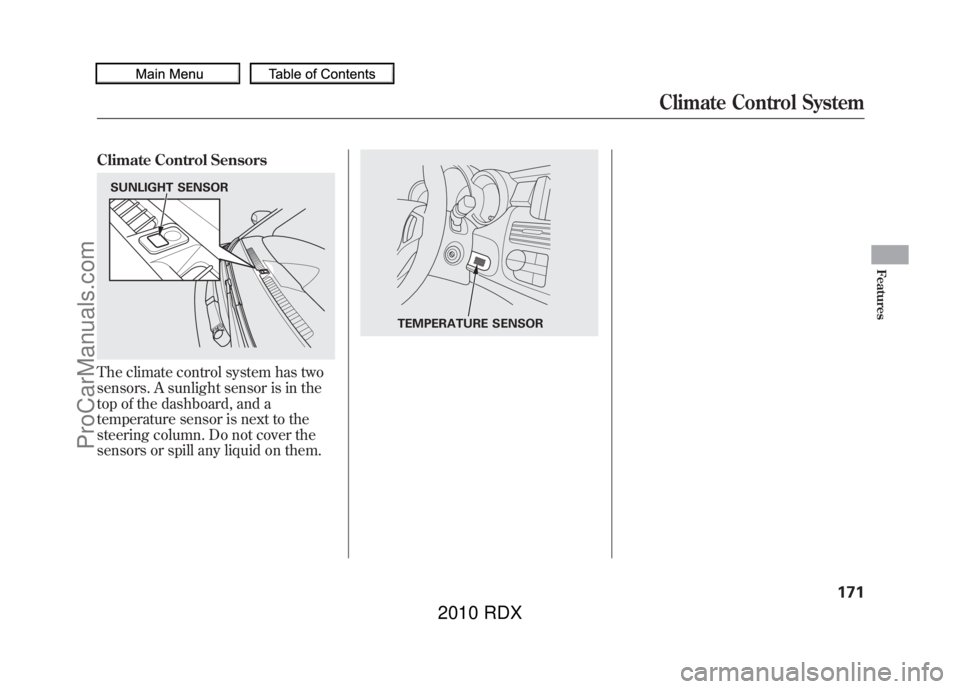
Climate Control SensorsThe climate control system has two
sensors. A sunlight sensor is in the
top of the dashboard, and a
temperature sensor is next to the
steering column. Do not cover the
sensors or spill any liquid on them.SUNLIGHT SENSOR
TEMPERATURE SENSOR
Climate Control System
171
Features
09/07/07 15:02:04 10 ACURA RDX MMC North America Owner's M 50 31STK630 enu
ProCarManuals.com
2010 RDX
Page 182 of 514

SUBWOOFER-Use the
SUBWOOFER mode to adjust the
strength of the sound from the
subwoofer speaker. Turn the PWR/
VOL knob to the desired level (- 6to
+ 6). Even if the adjustment level
reaches -6, the subwoofer is not
turned off. Speed-sensitive volume
compensation (SVC)
-The SVC
mode controls the volume based on
vehicle speed. The faster you go, the
louder the audio volume becomes.
As you slow down, the audio volume
decreases.
The SVC has four modes: SVC OFF,
SVC LOW, SVC MID, and SVC
HIGH. The default setting is MID.
Turn the PWR/VOL knob to adjust
the setting to your liking. Audio System Lighting
You can use the instrument panel
brightness control knob to adjust the
illumination of the audio system (see
page
120). The audio system
illuminates when the parking lights
are on, even if the system is turned
off.Playing the FM/AM Radio (Models without navigation system)17809/07/07 15:02:04 10 ACURA RDX MMC North America Owner's M 50 31STK630 enu
ProCarManuals.com
2010 RDX
Page 202 of 514
To Play an iPod
®
This audio system can operate the
audio files on the iPod
®with the
same controls used for the disc
player. To play an iPod, connect it to
the USB adapter cable in the console
compartment by using your dock
connector, then press the CD/AUX
button. The ignition switch must be
in the ACCESSORY (I) or ON (II)
position. The iPod will also be
charged with the ignition switch in
these positions.
The audio system reads and plays
sound files to be playable on the
iPod. The system cannot operate an
iPod as a mass storage device. The
system will only play songs stored on
the iPod with iTunes.
iPod and iTunes are registered
trademarks owned by Apple Inc. iPods compatible with your audio
system using the USB adapter cable
are:
Model Software
iPod classic Ver. 1.0 or more
iPod with
video
(iPod 5th
generation) Ver. 1.2 or more
iPod nano Ver. 1.2 or more
iPod nano 2nd
generation Ver. 1.1.2 or more
iPod nano 3rd
generation Ver. 1.0 or more
iPod nano 4th
generation Ver. 1.0.2 or more
iPod touch Ver. 1.1.1 or more
iPod touch
2nd generation Ver. 2.1.1 or more
Use only compatible iPods with the
latest software. iPods that are not
compatible will not work in this audio
unit. NOTE:
●Do not connect your iPod using a
hub.●Do not keep the iPod in the
vehicle. Direct sunlight and high
heat will damage it.●Do not use an extension cable
between the USB adapter cable
equipped with your vehicle and
your dock connector.●We recommend backing up your
data before playing it.●Some devices cannot be powered
or charged via the USB adapter, if
this is the case use the accessory
adapter to supply power to your
device.
Playing an iPod (Models without navigation system)19809/07/07 15:02:04 10 ACURA RDX MMC North America Owner's M 50 31STK630 enu
ProCarManuals.com
2010 RDX
Page 209 of 514

To Play a USB Flash Memory
Device
This audio system can operate the
audio files on a USB flash memory
device with the same controls used
for the in-dash disc changer. To play
a USB flash memory device, connect
it to the USB adapter cable in the
console compartment, then press the
CD/AUX button. The ignition switch
must be in the ACCESSORY (I) or
ON (II) position.
The audio system reads and plays
the audio files on the USB flash
memory device in MP3, WMA or
AAC
ꭧformats. Depending on the
format, the display shows MP3,
WMA or AAC when a USB flash
memory device is playing. The USB
flash memory device limit is up to
700 folders or up to 65535 files.
ꭧ : Only AAC format files recorded
with iTunes are playable on this
audio unit. The recommended USB flash
memory devices are 256 MB or
higher, and formatted with the FAT
file system. Some digital audio
players may be compatible as well.
Some USB flash memory devices
(such as devices with security lock-
out features, etc.) will not work in
this audio unit.
NOTE:
●Do not use a device such as a card
reader or hard drive as the device
or your files may be damaged.●Do not connect your USB flash
memory device using a hub.●Do not use an extension cable to
the USB adapter cable equipped
with your vehicle.●Do not keep a USB flash memory
device in the vehicle. Direct
sunlight and high heat will damage
it.
●We recommend backing up your
data before playing a USB flash
memory device.●Depending on the type and
number of files, it may take some
time before they begin to play.●Depending on the software the
files were made with, it may not be
possible to play some files, or
display some text data.●Some devices cannot be powered
or charged via the USB adapter, if
this is the case use the accessory
adapter to supply power to your
device.
CONTINUED
Playing a USB Flash Memory Device (Models without navigation system)
205
Features
09/07/07 15:02:04 10 ACURA RDX MMC North America Owner's M 50 31STK630 enu
ProCarManuals.com
2010 RDX
Page 220 of 514

Interface DialMost audio system functions can still
be controlled by standard buttons,
bars, and knob, but some functions
can only be accessed using the
interface dial. The interface dial has
two parts, a knob and a selector.
When you operate the audio system
with the interface dial, press the
AUDIO button on the control panel
to display the audio control on the
navigation display.The knob turns left and right. Use it
to make selections or adjustments to
a list or menu on the screen.
The selector can be pushed left,
right, up, down, and in. Use the
selector to scroll through lists, to
select menus, and to highlight menu
items. When you make a selection,
push the center of the selector
(ENTER) to go to that selection.
You can operate the audio system
with the control buttons on the CD
changer unit without displaying the
audio control display on the
navigation display. The audio setting
will be shown on the upper display.
Voice Control System
The audio system for your vehicle
can also be operated by voice
control. See the navigation system
manual for complete details.SELECTOR
ENTER
DIALAudio System (Models with navigation system)21609/07/07 15:02:04 10 ACURA RDX MMC North America Owner's M 50 31STK630 enu
ProCarManuals.com
2010 RDX
Page 226 of 514
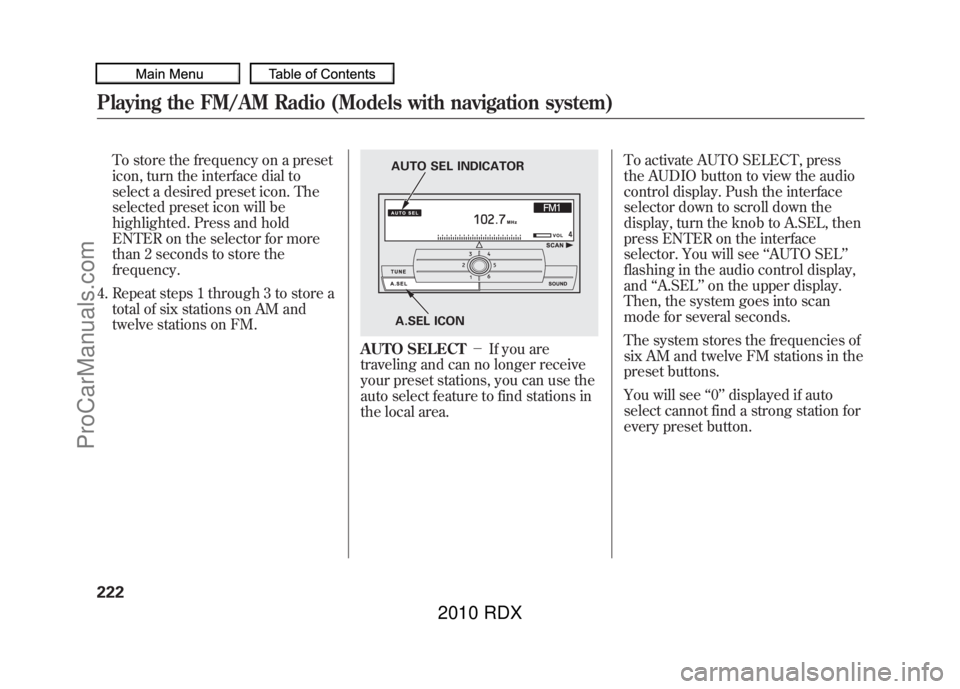
To store the frequency on a preset
icon, turn the interface dial to
select a desired preset icon. The
selected preset icon will be
highlighted. Press and hold
ENTER on the selector for more
than 2 seconds to store the
frequency.
4. Repeat steps 1 through 3 to store a total of six stations on AM and
twelve stations on FM.
AUTO SELECT -If you are
traveling and can no longer receive
your preset stations, you can use the
auto select feature to find stations in
the local area. To activate AUTO SELECT, press
the AUDIO button to view the audio
control display. Push the interface
selector down to scroll down the
display, turn the knob to A.SEL, then
press ENTER on the interface
selector. You will see
‘‘AUTO SEL’’
flashing in the audio control display,
and ‘‘A.SEL ’’on the upper display.
Then, the system goes into scan
mode for several seconds.
The system stores the frequencies of
six AM and twelve FM stations in the
preset buttons.
You will see ‘‘0’’ displayed if auto
select cannot find a strong station for
every preset button.
A.SEL ICON
AUTO SEL INDICATOR
Playing the FM/AM Radio (Models with navigation system)22209/07/07 15:02:04 10 ACURA RDX MMC North America Owner's M 50 31STK630 enu
ProCarManuals.com
2010 RDX
Page 237 of 514
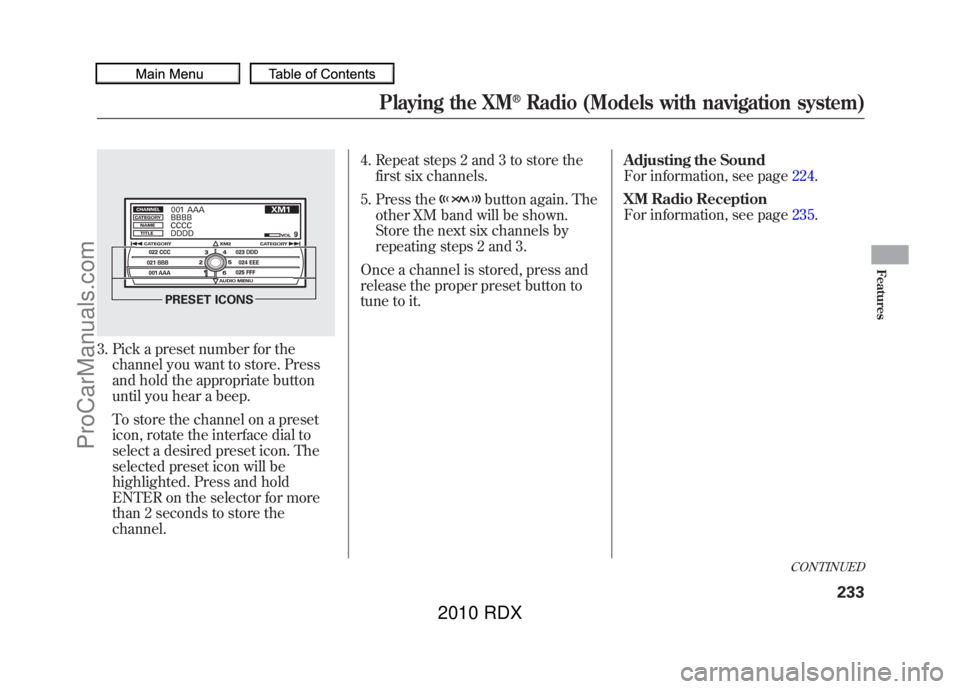
3. Pick a preset number for thechannel you want to store. Press
and hold the appropriate button
until you hear a beep.
To store the channel on a preset
icon, rotate the interface dial to
select a desired preset icon. The
selected preset icon will be
highlighted. Press and hold
ENTER on the selector for more
than 2 seconds to store the
channel. 4. Repeat steps 2 and 3 to store the
first six channels.
5. Press the
button again. The
other XM band will be shown.
Store the next six channels by
repeating steps 2 and 3.
Once a channel is stored, press and
release the proper preset button to
tune to it. Adjusting the Sound
For information, see page
224.
XM Radio Reception
For information, see page 235.
PRESET ICONS
CONTINUED
Playing the XM
®Radio (Models with navigation system)
233
Features
09/07/07 15:02:04 10 ACURA RDX MMC North America Owner's M 50 31STK630 enu
ProCarManuals.com
2010 RDX