maintenance Acura RDX 2011 User Guide
[x] Cancel search | Manufacturer: ACURA, Model Year: 2011, Model line: RDX, Model: Acura RDX 2011Pages: 517, PDF Size: 27.89 MB
Page 341 of 517

Delete-Select this option to delete
the current message.
Voice -Select this option to hear a
voice read the entire message. This
gives you more information than the
screen can display at one time. When
you select the Voice option, it
changes to a Stop Reading option.
Select the option again to stop the
voice.
Call -Select this button to call a
phone number embedded in the
message. When you select Call,theBluetooth
®HandsFreeLink
®(HFL)
dials the number for you.
To make a call, your
Bluetooth
®
compatible phone must be paired to
your vehicle's HandsFreeLink
system, have its power on, and be
inside the vehicle (see page 313). Find Nearest Acura Dealer
-
Select this option to find the nearest
Acura dealer using the navigation
system.
Call Your Acura Dealer -Select
this button to call the Acura dealer
you purchased your vehicle from.
AcuraLink also directs you to this
dealer so you can schedule a
maintenance appointment or receive
information about a message. If you
visit another dealer for service two
times within a 14-month period,
AcuraLink will reset to call that
dealer.
Diagnostic Info -Select this
button to get more information about
the current diagnostic message. To
use this option, your cell phone must
be linked to the HFL and have a
compatible data service available.
Access the Owner Link website to
find out which data services are
currently compatible with AcuraLink. Message Preferences
To set your AcuraLink preferences
(the types of messages you want to
receive, if any), visit the My Acura
website at
www.owners.acura.com
If you do not have internet access,
call Acura Client Services at
(800) 382-2238; they can set your
message preferences for you.
AcuraLink
®(U.S. models only)
33610/06/08 17:42:32 11 ACURA RDX MMC North America Owner's M 50 31STK640 enu
Page 343 of 517

NOTE:For the Phone Data
Connection button to be active, you
need a
Bluetooth
®compatible and
enabled cell phone paired to the
Bluetooth
®HandsFreeLink
®(HFL).
To complete the data connection
setup, the paired phone must have a
compatible data service.
To find more information on
Bluetooth
®compatible and enabled
cell phones, visit
www.acura.com/
handsfreelink
or call the
HandsFreeLink®consumer support
at 1-888-528-7876. Connect to the Acura Server
-
The default setting is prompt. When
a diagnostic info message appears,
and you select the Check Now
option, the system will prompt you
before connecting to the Acura
server. If you do not wish to connect
at that time, select No at the prompt,
and you will see the information from
the onboard database. The ‘‘Auto ’’
setting will remove the prompt when
you select the Check Now option and
will automatically connect to the
Acura server. This setting only
applies when you have a
Bluetooth
®
enabled phone that is paired with
HFL and you have completed the
Phone-Data Connection setup. Message Categories
There are six message categories in
AcuraLink: Quick Tips, Feature
Guides, Maintenance Minders,
Recalls/Campaigns, Diagnostic Info,
and Scheduled Dealer Appointment.
The system can store up to 255
messages.
Message categories can be added,
revised, or deleted through
broadcast messages from Acura.
AcuraLink
®(U.S. models only)
33810/06/08 17:42:32 11 ACURA RDX MMC North America Owner's M 50 31STK640 enu
Page 344 of 517
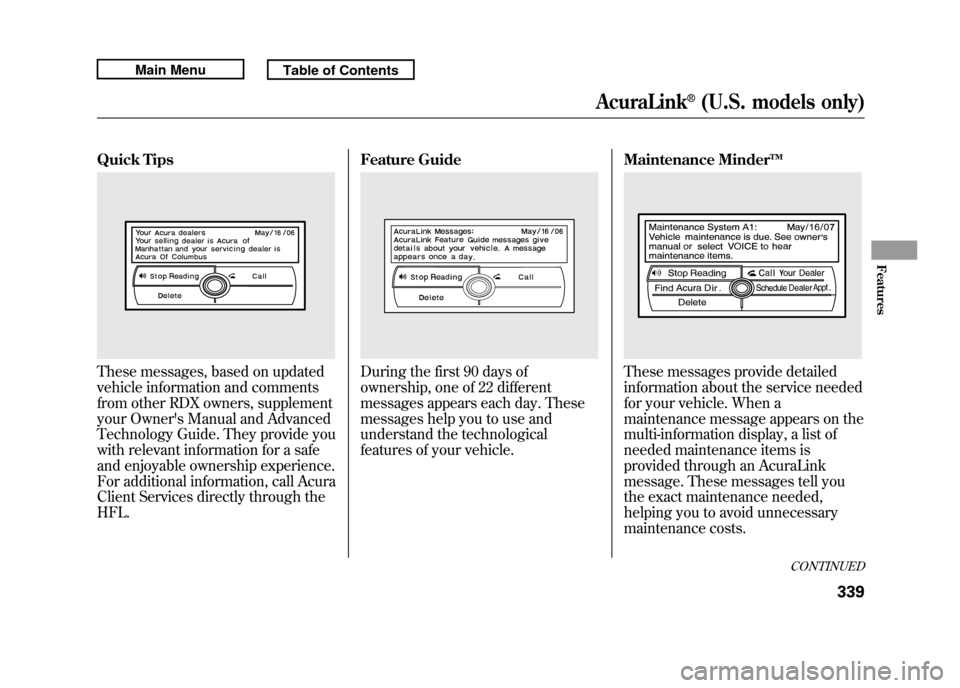
Quick TipsThese messages, based on updated
vehicle information and comments
from other RDX owners, supplement
your Owner's Manual and Advanced
Technology Guide. They provide you
with relevant information for a safe
and enjoyable ownership experience.
For additional information, call Acura
Client Services directly through the
HFL.Feature Guide
During the first 90 days of
ownership, one of 22 different
messages appears each day. These
messages help you to use and
understand the technological
features of your vehicle.
Maintenance Minder
TM
These messages provide detailed
information about the service needed
for your vehicle. When a
maintenance message appears on the
multi-information display, a list of
needed maintenance items is
provided through an AcuraLink
message. These messages tell you
the exact maintenance needed,
helping you to avoid unnecessary
maintenance costs.
CONTINUED
AcuraLink
®(U.S. models only)
339
Features
10/06/08 17:42:32 11 ACURA RDX MMC North America Owner's M 50 31STK640 enu
Page 345 of 517
You can use the following message
options:●Make an appointment from the
schedule at the dealer.●Reschedule the appointment with
the dealer.●Call your dealer for an
appointment.●Find the nearest dealer.
Automated AppointmentYou can make an appointment with
your dealer through the AcuraLink
when you receive a maintenance
minder message.
To use the automated appointment
function, you should visit the Owner
Link website at
www.owners.acura.
com,
register some required settings,
and complete the Phone-Data
Connection set-up (see page 337).
YourBluetooth
®compatible phone
should also be paired and linked to
your vehicle's
Bluetooth
®HFL (see
page 313).
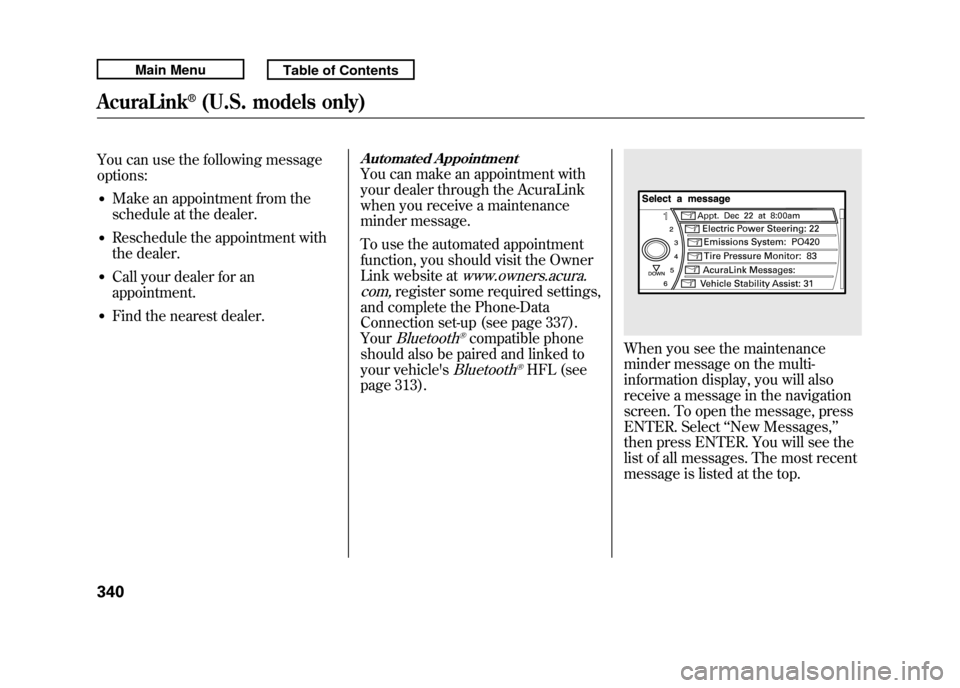
When you see the maintenance
minder message on the multi-
information display, you will also
receive a message in the navigation
screen. To open the message, press
ENTER. Select ‘‘New Messages, ’’
then press ENTER. You will see the
list of all messages. The most recent
message is listed at the top.
AcuraLink
®(U.S. models only)
34010/06/08 17:42:32 11 ACURA RDX MMC North America Owner's M 50 31STK640 enu
Page 349 of 517
Using automated appointment, your
registered dealer through Owner
Link is automatically selected. If you
want to select another dealer, such as
in case of an emergency, find the
nearest dealer and call the dealer
directly with HFL.
When a maintenance appointment is
due soon, you will also receive an
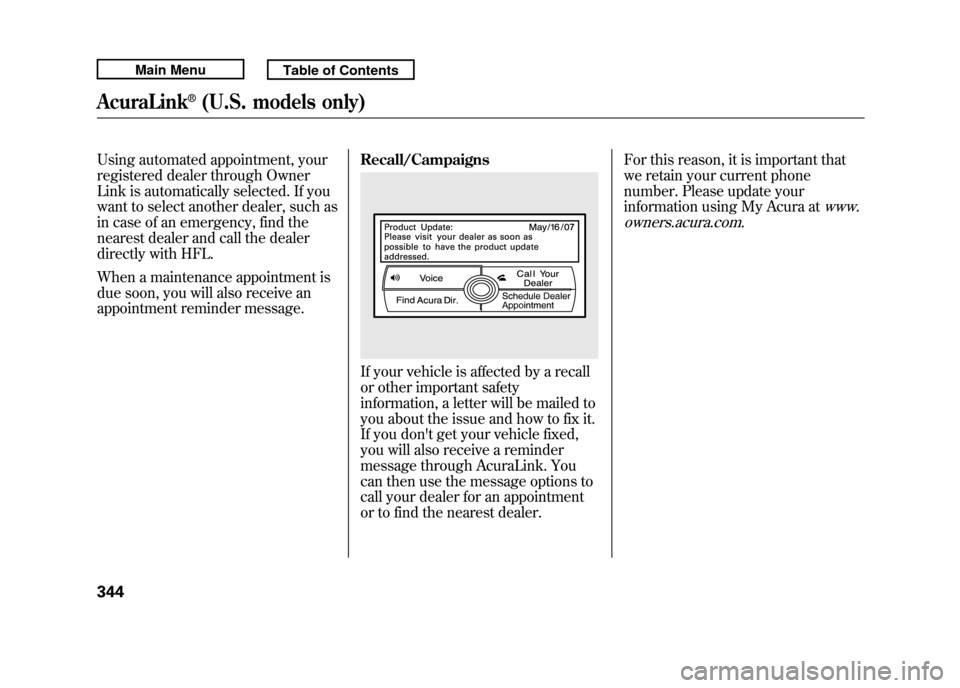
appointment reminder message.Recall/Campaigns
If your vehicle is affected by a recall
or other important safety
information, a letter will be mailed to
you about the issue and how to fix it.
If you don't get your vehicle fixed,
you will also receive a reminder
message through AcuraLink. You
can then use the message options to
call your dealer for an appointment
or to find the nearest dealer.For this reason, it is important that
we retain your current phone
number. Please update your
information using My Acura at
www.
owners.acura.com.
AcuraLink
®(U.S. models only)
34410/06/08 17:42:32 11 ACURA RDX MMC North America Owner's M 50 31STK640 enu
Page 357 of 517
Break-in Period
Help assure your vehicle's future
reliability and performance by paying
extra attention to how you drive
during the first 600 miles (1,000 km).
During this period:●Avoid full-throttle starts and rapid
acceleration.●Avoid hard braking for the first 200
miles (300 km).●Do not change the oil until the
scheduled maintenance time.●Do not tow a trailer.
You should also follow these
recommendations with an
overhauled or exchanged engine, or
when the brakes are replaced. Fuel Recommendation
Your vehicle is designed to operate
on premium unleaded gasoline with
a pump octane of 91 or higher. If this
octane grade is unavailable, regular
unleaded gasoline with a pump
octane of 87 or higher may be used
temporarily. The use of regular
unleaded gasoline can cause metallic
knocking noises in the engine and
will result in decreased engine
performance. The long-term use of
regular-grade gasoline can lead to
engine damage.
Avoid driving with an extremely low
fuel level. Running out of fuel could
cause the engine to misfire, damaging
the catalytic converter.We recommend using quality
gasolines containing detergent
additives that help prevent fuel
system and engine deposits.
In addition, in order to maintain good
performance, fuel economy, and
emissions control, we strongly
recommend, in areas where it is
available, the use of gasoline that
does NOT contain manganese-based
fuel additives such as MMT.
Use of gasoline with these additives
may adversely affect performance,
and cause the malfunction indicator
lamp on your instrument panel to
come on. If this happens, contact
your authorized dealer for service.
Break-in Period, Fuel Recommendation35210/06/08 17:42:32 11 ACURA RDX MMC North America Owner's M 50 31STK640 enu
Page 362 of 517
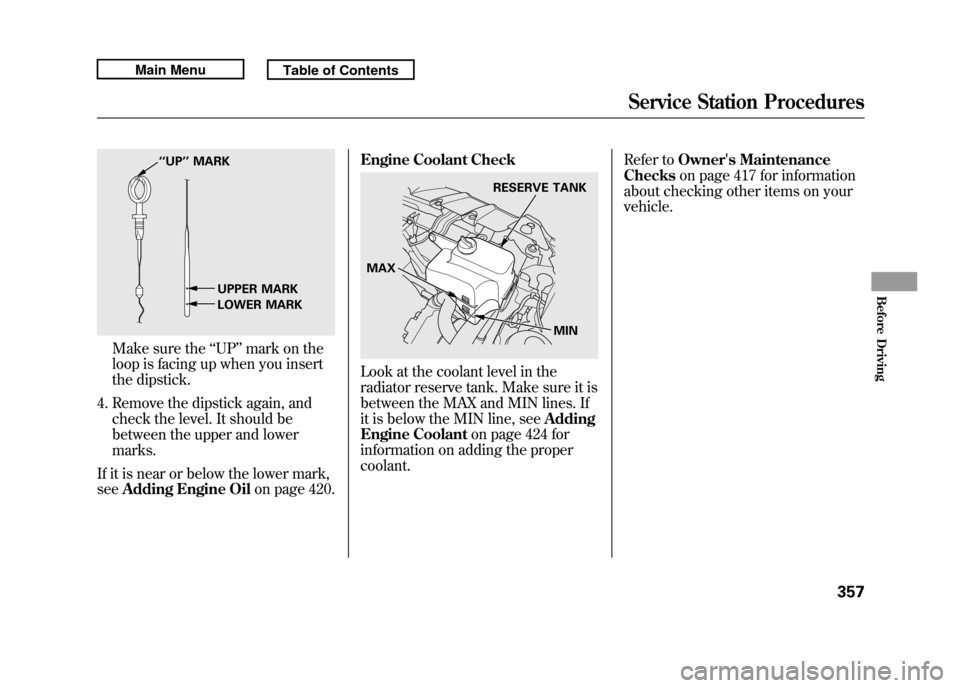
Make sure the‘‘UP ’’mark on the
loop is facing up when you insert
the dipstick.
4. Remove the dipstick again, and check the level. It should be
between the upper and lower
marks.
If it is near or below the lower mark,
see Adding Engine Oil on page 420.Engine Coolant Check
Look at the coolant level in the
radiator reserve tank. Make sure it is
between the MAX and MIN lines. If
it is below the MIN line, see
Adding
Engine Coolant on page 424 for
information on adding the proper
coolant. Refer to
Owner's Maintenance
Checks on page 417 for information
about checking other items on your
vehicle.
‘‘ UP’’ MARK
UPPER MARK
LOWER MARK
RESERVE TANK
MAX MIN
Service Station Procedures
357
Before Driving
10/06/08 17:42:32 11 ACURA RDX MMC North America Owner's M 50 31STK640 enu
Page 364 of 517

Fuel Economy FactorsThe following factors can lower your
vehicle's fuel economy:●Aggressive driving (hard
acceleration and braking)●Excessive idling, accelerating and
braking in stop-and-go traffic●Cold engine operation (engines are
more efficient when warmed up)●Driving with a heavy load or the air
conditioner running●Improperly inflated tires
Improving Fuel EconomyVehicle MaintenanceA properly maintained vehicle
maximizes fuel economy. Poor
maintenance can significantly reduce
fuel economy. Always maintain your
vehicle according to the maintenance
messages displayed on the
information display (seeOwner's
Maintenance Checks on page 417).
For example:●Use the required engine oil (see
page 420).●Maintain proper tire inflation -
An underinflated tire increases
‘‘ rolling resistance, ’’which reduces
fuel economy.●Avoid carrying excess weight in
your vehicle -It puts a heavier
load on the engine, increasing fuel
consumption.
●Keep your vehicle clean -In
particular, a build-up of snow or
mud on your vehicle's underside
adds weight and rolling resistance.
Frequent cleaning helps your fuel
economy.
CONTINUED
Fuel Economy
359
Before Driving
10/06/08 17:42:32 11 ACURA RDX MMC North America Owner's M 50 31STK640 enu
Page 411 of 517

Check Out Your Vehicle
Before you leave the pavement, be
sure to do all scheduled maintenance
and service, and inspect your vehicle
for any problems. Pay special
attention to the condition of the tires,
and check the tire pressures.
After you return to the pavement,
carefully inspect your vehicle to
make sure there is no damage that
could make driving it unsafe.
Recheck the condition of the tires
and the tire pressures.
Remember
The route presents limits (too steep
or bumpy roads). You have limits
(driving skill and comfort). And your
vehicle has limits (traction, stability,
and power).
Driving off-highway can be
hazardous if you fail to recognize
limits and take the proper
precautions.Accelerating and Braking
For better traction on all surfaces,
accelerate slowly and gradually build
up speed. If you try to start too fast
on wet soil, mud, snow, or ice, you
might not have enough traction to
get underway, and you may dig
yourself a hole. Starting with the shift
lever in the D position will help you
have a smoother start on snow or ice.
Keep in mind that you will usually
need more time and distance to
brake to a stop on unpaved surfaces.
Avoid hard braking. Do not
‘‘pump ’’
the brakes; let the anti-lock braking
system pump them for you. Avoiding Obstacles
Debris in the road can damage your
suspension or other components.
Because your vehicle has a high
center of gravity, driving over a large
obstacle, or allowing a wheel to drop
into a deep hole can cause your
vehicle to tip or roll over.
Driving on Slopes
If you can't clearly see all conditions
or obstacles on a slope, walk the
slope before you drive on it. If you
have any doubt whether or not you
can safely drive on the slope, don't
do it. Find another route.
If you are driving up a hill and find
that you cannot continue,
do not try to
turn around.
Your vehicle could roll
over. Slowly back down the hill,
following the same route you took up
the hill.
Off-Highway Driving Guidelines40610/06/08 17:42:32 11 ACURA RDX MMC North America Owner's M 50 31STK640 enu
Page 414 of 517

This section explains why it is
important to keep your vehicle well
maintained and how to follow basic
maintenance safety precautions.
This section also includes
instructions on how to read the
maintenance minder messages on
the multi-information display, and
instructions for simple maintenance
tasks you may want to take care of
yourself.
If you have the skills and tools to
perform more complex maintenance
tasks on your vehicle, you may want
to purchase the service manual. See
page 497 for information on how to
obtain a copy, or see your dealer.U.S. Vehicles:
Maintenance,
replacement, or repair of
emissions control devices and
systems may be done by any
automotive repair establishment
or individual using parts that are
‘‘certified’’ to EPA standards. Maintenance Safety
.....................
410
Maintenance Minder ™
................
411
Fluid Locations
...........................
419
Adding Engine Oil
......................
420
Required Engine Oil
...............
420
Changing the Engine Oil and
Filter
.......................................
422
Engine Coolant
...........................
424
Windshield Washers
...................
426
Automatic Transmission Fluid
....
427
Brake Fluid
.................................
429
Power Steering Fluid
..................
430
Lights
..........................................
431
Cleaning the Seat Belts
...............
438
Floor Mats
..................................
438
Audio Antenna
............................
439
Intercooler
..................................
439
Dust and Pollen Filter
.................
439
Wiper Blades
..............................
440
Wheels
........................................
443
Tires
...........................................
444
Checking the Battery
..................
450
Vehicle Storage
...........................
451
Interior Care
...............................
452
Maintenance
409
Maintenance
10/06/08 17:42:32 11 ACURA RDX MMC North America Owner's M 50 31STK640 enu