sat nav Acura RDX 2011 User Guide
[x] Cancel search | Manufacturer: ACURA, Model Year: 2011, Model line: RDX, Model: Acura RDX 2011Pages: 517, PDF Size: 27.89 MB
Page 240 of 517
Satellite Radio Signals
Satellite radio receives signals from
two satellites to produce clear, high-
quality digital reception. It offers
many channels in several categories.
Along with a large selection of
different types of music, satellite
radio also allows you to view channel
and category selections in the audio
display.
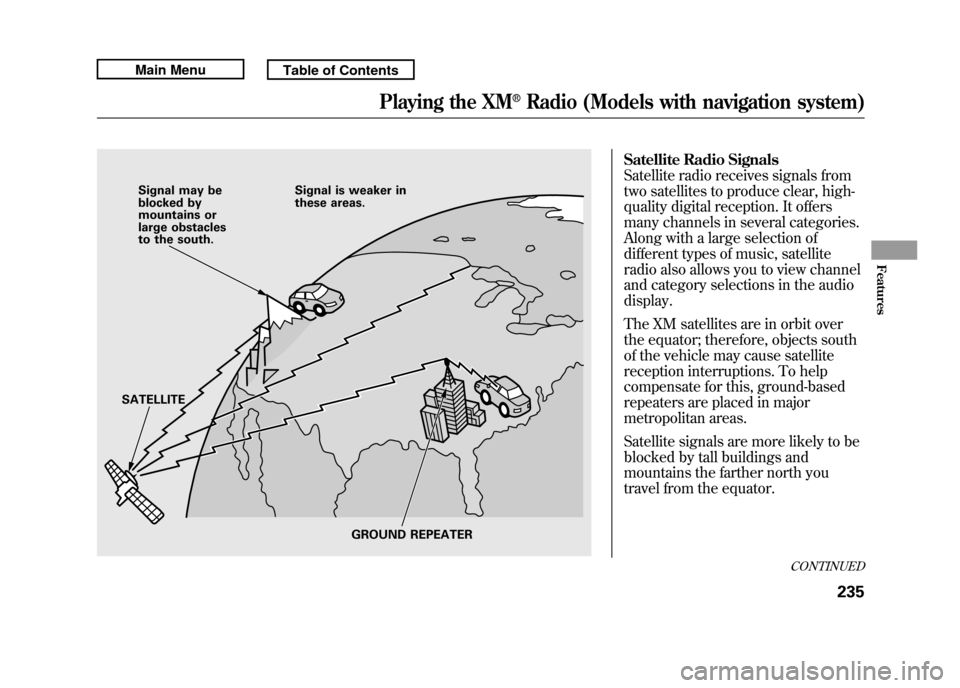
The XM satellites are in orbit over
the equator; therefore, objects south
of the vehicle may cause satellite
reception interruptions. To help
compensate for this, ground-based
repeaters are placed in major
metropolitan areas.
Satellite signals are more likely to be
blocked by tall buildings and
mountains the farther north you
travel from the equator.
Signal may be
blocked by
mountains or
large obstacles
to the south.Signal is weaker in
these areas.
SATELLITE GROUND REPEATER
CONTINUED
Playing the XM
®Radio (Models with navigation system)
235
Features
10/06/08 17:42:32 11 ACURA RDX MMC North America Owner's M 50 31STK640 enu
Page 241 of 517

Depending on where you drive, you
may experience reception problems.
Interference can be caused by any of
these conditions:●Driving on the north side of an
east/west mountain road.●Driving on the north side of a large
commercial truck on an east/west
road.●Driving in tunnels.
●Driving on a road beside a vertical
wall, steep cliff, or hill to the south
of you.●Driving on the lower level of a
multi-tiered road.●Driving on a single lane road
alongside dense trees taller than
50 ft. (15 m) to the south of you.
There may also be other geographic
situations or structures that could
affect satellite radio reception.
As required by the FCC: Changes or modifications not expresslyapproved by the party responsible for
compliance could void the user'sauthority to operate the equipment.
Playing the XM
®Radio (Models with navigation system)
23610/06/08 17:42:32 11 ACURA RDX MMC North America Owner's M 50 31STK640 enu
Page 243 of 517
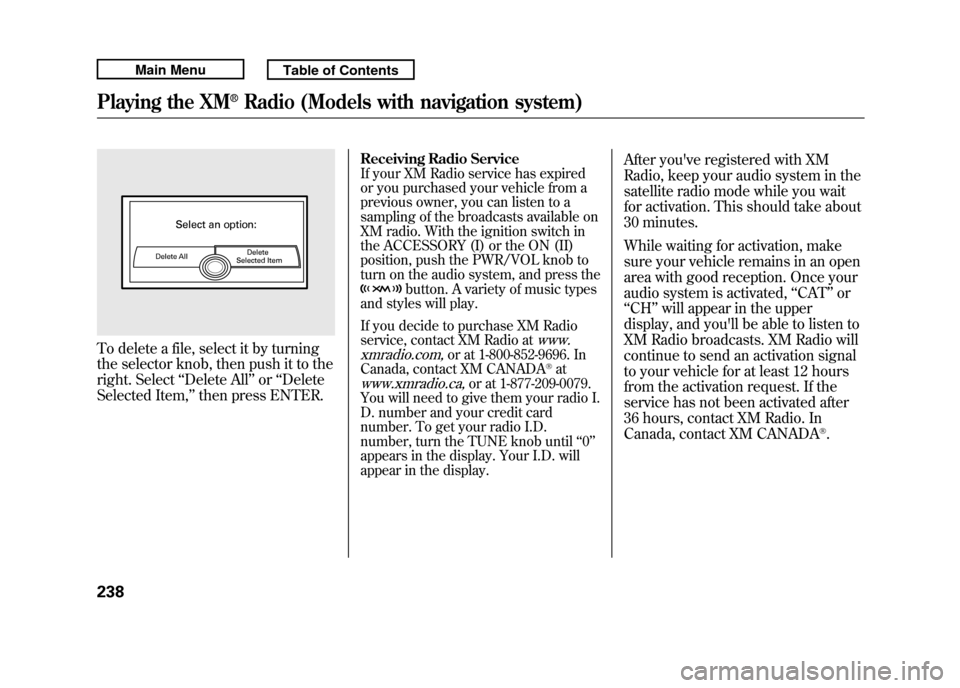
To delete a file, select it by turning
the selector knob, then push it to the
right. Select‘‘Delete All ’’or ‘‘Delete
Selected Item, ’’then press ENTER.
Receiving Radio ServiceIf your XM Radio service has expired
or you purchased your vehicle from a
previous owner, you can listen to a
sampling of the broadcasts available on
XM radio. With the ignition switch in
the ACCESSORY (I) or the ON (II)
position, push the PWR/VOL knob to
turn on the audio system, and press the
button. A variety of music types
and styles will play.
If you decide to purchase XM Radio
service, contact XM Radio at
www.
xmradio.com,
or at 1-800-852-9696. In
Canada, contact XM CANADA
®at
www.xmradio.ca,
or at 1-877-209-0079.
You will need to give them your radio I.
D. number and your credit card
number. To get your radio I.D.
number, turn the TUNE knob until ‘‘0 ’’
appears in the display. Your I.D. will
appear in the display.
After you've registered with XM
Radio, keep your audio system in the
satellite radio mode while you wait
for activation. This should take about
30 minutes.
While waiting for activation, make
sure your vehicle remains in an open
area with good reception. Once your
audio system is activated, ‘‘CAT’’ or
‘‘ CH ’’will appear in the upper
display, and you'll be able to listen to
XM Radio broadcasts. XM Radio will
continue to send an activation signal
to your vehicle for at least 12 hours
from the activation request. If the
service has not been activated after
36 hours, contact XM Radio. In
Canada, contact XM CANADA
®.
Playing the XM
®Radio (Models with navigation system)
23810/06/08 17:42:32 11 ACURA RDX MMC North America Owner's M 50 31STK640 enu
Page 258 of 517

Playing a DVD-A Disc
You can play a DVD-A disc in the CD
changer. The disc controls are same
as previously described.
To Pause a Disc
To pause a disc, press the preset
button which corresponds to the
current disc. To play the disc again,
press the preset button again.To Stop Playing a Disc
If you turn the system off while a disc
is playing, either with the PWR/VOL
knob or by turning off the ignition
switch, the disc will stay in the drive.
When you turn the system back on,
the disc will begin playing where it
left off.
To take the system out of disc mode,
press the AM/FM, or DISC/AUX, or
button to switch to the radio,
or satellite radio, or auxiliary input
while a disc is playing. When you
return to disc mode by pressing the
DISC/AUX button, play will continue
at the same point that it left off. Removing Discs from the Changer
To remove the disc that is currently
playing, press and release the eject
(
) button. You will see
‘‘EJECT ’’
on the upper display. When you
remove the disc from the slot, the
system begins the load sequence so
you can load another disc in that
position. If you do not load another
disc within 10 seconds, the system
selects the previous mode (AM,
FM1, FM2, or XM Radio).
If you do not remove the disc from
the slot, the system will reload the
disc after 10 seconds and put the CD
changer in pause mode. To begin
playing the disc, press the DISC/
AUX button.
CONTINUED
Playing Discs (Models with navigation system)
253
Features
10/06/08 17:42:32 11 ACURA RDX MMC North America Owner's M 50 31STK640 enu
Page 337 of 517
On models with navigation systemexcept Alaska, Hawaii, and Puerto RicoAcuraLink enhances your ownership
experience by providing a direct
communication link between your
vehicle and the Acura Server.
Working through the XM radio
satellite, AcuraLink works in
conjunction with the navigation
system,
Bluetooth
®HandsFreeLink
®
(HFL), and audio system in your
vehicle. It displays and receives
several kinds of messages, including:●Operating tips and information on
your vehicle's features.●Important recall and safety
information.●Maintenance information to keep
your vehicle in top condition.●Diagnostic information to provide
information about any problems
with your vehicle. Interface Dial
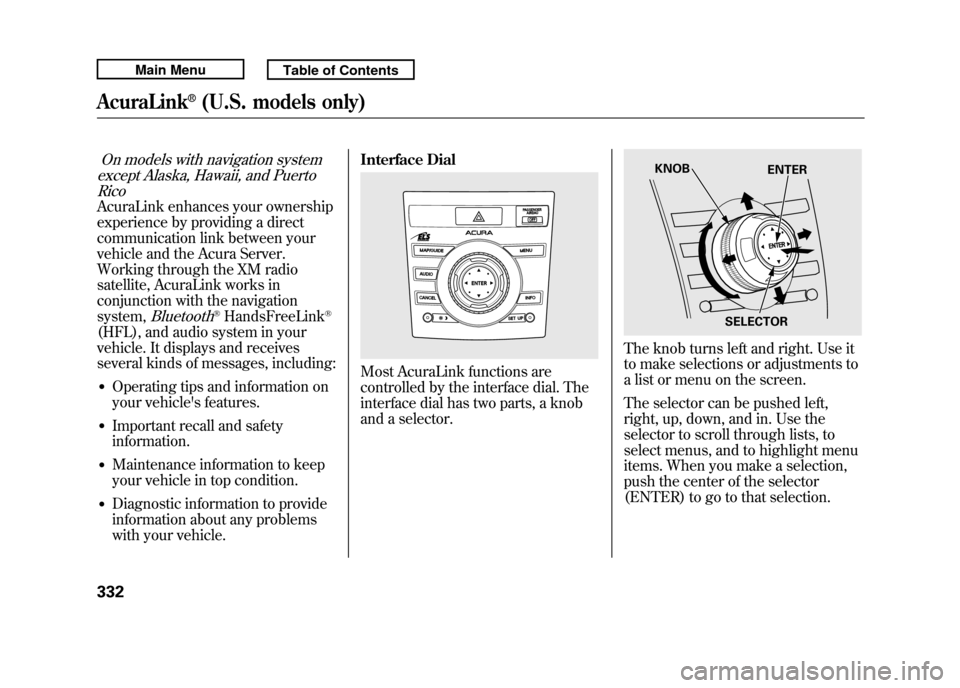
Most AcuraLink functions are
controlled by the interface dial. The
interface dial has two parts, a knob
and a selector.
The knob turns left and right. Use it
to make selections or adjustments to
a list or menu on the screen.
The selector can be pushed left,
right, up, down, and in. Use the
selector to scroll through lists, to
select menus, and to highlight menu
items. When you make a selection,
push the center of the selector
(ENTER) to go to that selection.
KNOB
ENTER
SELECTOR
AcuraLink
®(U.S. models only)
33210/06/08 17:42:32 11 ACURA RDX MMC North America Owner's M 50 31STK640 enu