tire Acura RDX 2011 Owner's Guide
[x] Cancel search | Manufacturer: ACURA, Model Year: 2011, Model line: RDX, Model: Acura RDX 2011Pages: 517, PDF Size: 27.89 MB
Page 397 of 517
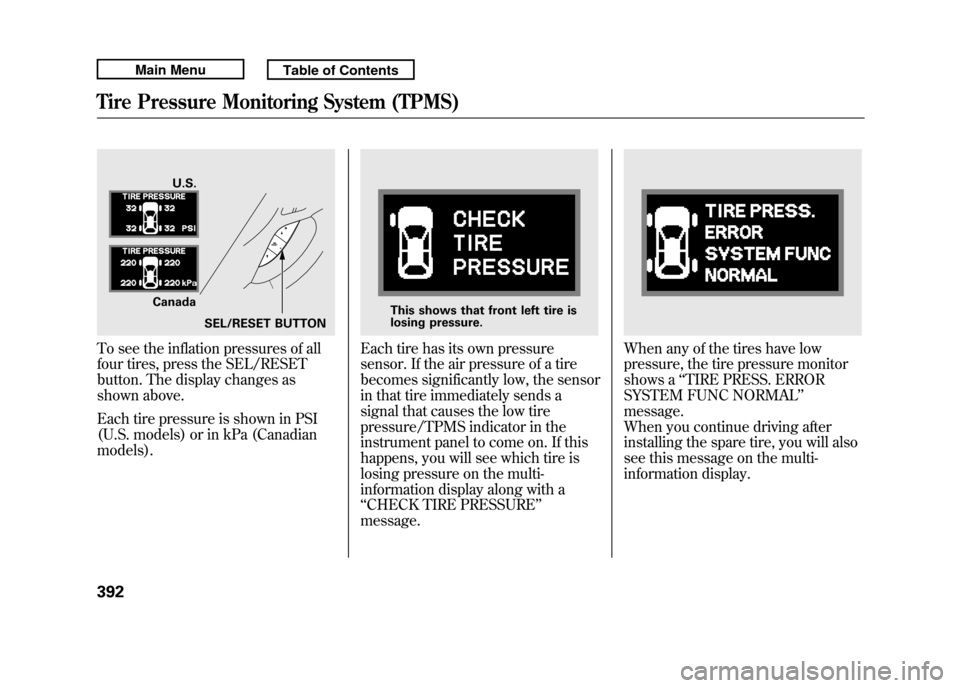
To see the inflation pressures of all
four tires, press the SEL/RESET
button. The display changes as
shown above.
Each tire pressure is shown in PSI
(U.S. models) or in kPa (Canadian
models).
Each tire has its own pressure
sensor. If the air pressure of a tire
becomes significantly low, the sensor
in that tire immediately sends a
signal that causes the low tire
pressure/TPMS indicator in the
instrument panel to come on. If this
happens, you will see which tire is
losing pressure on the multi-
information display along with a
‘‘CHECK TIRE PRESSURE ’’
message.
When any of the tires have low
pressure, the tire pressure monitor
shows a ‘‘TIRE PRESS. ERROR
SYSTEM FUNC NORMAL ’’
message.
When you continue driving after
installing the spare tire, you will also
see this message on the multi-
information display.
U.S.
Canada SEL/RESET BUTTON
This shows that front left tire is
losing pressure.
Tire Pressure Monitoring System (TPMS)39210/06/08 17:42:32 11 ACURA RDX MMC North America Owner's M 50 31STK640 enu
Page 398 of 517

If there is a problem with the TPMS,
the tire pressure monitor shows a
‘‘SYSTEM FUNCTION ERROR’’
message and the tire pressure
readings are not displayed. If this
happens, you will first see a system
warning message ‘‘CHECK TPMS
SYSTEM ’’on the multi-information
display. TPMS System Failure
If there is a problem with the TPMS,
you will see the above message on
the multi-information display.
If you see this message, the system
is off and is not monitoring the tire
pressures. Have the system checked
by your dealer as soon as possible.
Also, the low tire pressure/TPMS
indicator begins to flash (see page
71).If the low tire pressure/TPMS
indicator comes on, or the multi-
information display shows a
‘‘CHECK
TPMS SYSTEM ’’message, the VSA
system automatically turns on even
when the VSA system is turned off
by pressing the VSA OFF switch
(see page 396). If this happens, you
cannot turn the VSA system off by
pressing the VSA OFF switch again.
When you restart the vehicle with
the compact spare tire, the TPMS
system message will also be
displayed on the multi-information
display after several miles
(kilometers) driving.
CONTINUED
Tire Pressure Monitoring System (TPMS)
393
Driving
10/06/08 17:42:32 11 ACURA RDX MMC North America Owner's M 50 31STK640 enu
Page 399 of 517

Changing a Tire with TPMS
If you have a flat tire, the low tire
pressure/TPMS and tire monitor
indicators will come on. Replace the
indicated flat tire with the compact
spare tire (see page 454).
After the flat tire is replaced with the
spare tire, the low tire pressure/
TPMS indicator stays on while
driving. After several miles
(kilometers) driving, this indicator
begins to flash, then stays on again.
You will also see a‘‘CHECK TPMS
SYSTEM ’’message on the multi-
information display. This is normal;
the system cannot monitor the spare
tire pressure. Manually check the
spare tire pressure to be sure it is
correct. This indicator and the warning
message on the multi-information
display will go off, after several miles
(kilometers) driving, when the spare
tire is replaced with the specified
regular tire equipped with the tire
pressure monitor sensor.
Each wheel is equipped with a tire
pressure sensor. You must use
TPMS specific wheels. It is
recommended that you always have
your tires serviced by your dealer or
a qualified technician.
Never use a puncture-repairing agent
in a flat tire. If used, you will have to
replace the tire pressure sensor.
Have the flat tire repaired by your
dealer as soon as possible.
As required by the FCC:
This device complies with Part 15 of theFCC rules. Operation is subject to the
following two conditions: (1) This devicemay not cause harmful interference, and(2) this device must accept any
interference received, includinginterference that may cause undesiredoperation.
Changes or modifications not expresslyapproved by the party responsible for
compliance could void the user'sauthority to operate the equipment.
This device complies with IndustryCanada Standard RSS-210.
Operation is subject to the following twoconditions: (1) this device may not causeinterference, and (2) this device must
accept any interference that may causeundesired operation of the device.
Tire Pressure Monitoring System (TPMS)39410/06/08 17:42:32 11 ACURA RDX MMC North America Owner's M 50 31STK640 enu
Page 400 of 517

The vehicle stability assist (VSA)
system helps to stabilize the vehicle
during cornering if the vehicle turns
more or less than desired. It also
assists you in maintaining traction
while accelerating on loose or
slippery road surfaces. It does this by
regulating the engine's output and by
selectively applying the brakes.
When VSA activates, you may notice
that the engine does not respond to
the accelerator in the same way it
does at other times. There may also
be some noise from the VSA
hydraulic system. You will also see
the VSA activation indicator blink.
The VSA system cannot enhance the
vehicle's driving stability in all
situations and does not control your
vehicle's entire braking system. It is
still your responsibility to drive and
corner at reasonable speeds and to
leave a sufficient margin of safety.
VSA Activation Indicator
When VSA activates, you will see the
VSA activation indicator blink (see
page 69).Vehicle Stability Assist
(VSA) System Indicator
If this indicator comes on while
driving, pull to the side of the road
when it is safe, and turn off the
engine. Reset the system by
restarting the engine. If the VSA
system indicator stays on or comes
back on while driving, have the VSA
system inspected by your dealer.
NOTE : The main function of the VSA
system is generally known as
Electronic Stability Control (ESC).
The system also includes a traction
control function. If the indicator does not come on
when the ignition switch is turned to
the ON (II) position, there may be a
problem with the VSA system. Have
your dealer inspect your vehicle as
soon as possible.
You will also see a
‘‘CHECK VSA
SYSTEM ’’message on the multi-
information display if there is a
problem with the VSA system.
If the low tire pressure/TPMS
indicator comes on (see page 390),
or the multi-information display
shows a ‘‘CHECK TPMS SYSTEM ’’
message with the indicator flashing
(see page 393), the VSA system
automatically turns on even if the
VSA system is turned off with the
VSA OFF switch. In this case, you
cannot turn the VSA system off by
pressing the VSA OFF switch again.
CONTINUED
Vehicle Stability Assist (VSA
®), aka Electronic Stability Control (ESC), System
395
Driving
10/06/08 17:42:32 11 ACURA RDX MMC North America Owner's M 50 31STK640 enu
Page 401 of 517
Without VSA, your vehicle will have
normal braking and cornering ability,
but it will not have VSA traction and
stability enhancement.
VSA OFF Switch
In certain unusual conditions when
your vehicle gets stuck in shallow
mud or fresh snow, it may be easier
to free it with the VSA temporarily
switched off. When the VSA system
is off, the traction control system is
also off. You should only attempt to
free your vehicle with the VSA off if
you are not able to free it when the
VSA is on.
Immediately after freeing your
vehicle, be sure to switch the VSA on
again. We do not recommend driving
your vehicle with the VSA and
traction control systems switched off.
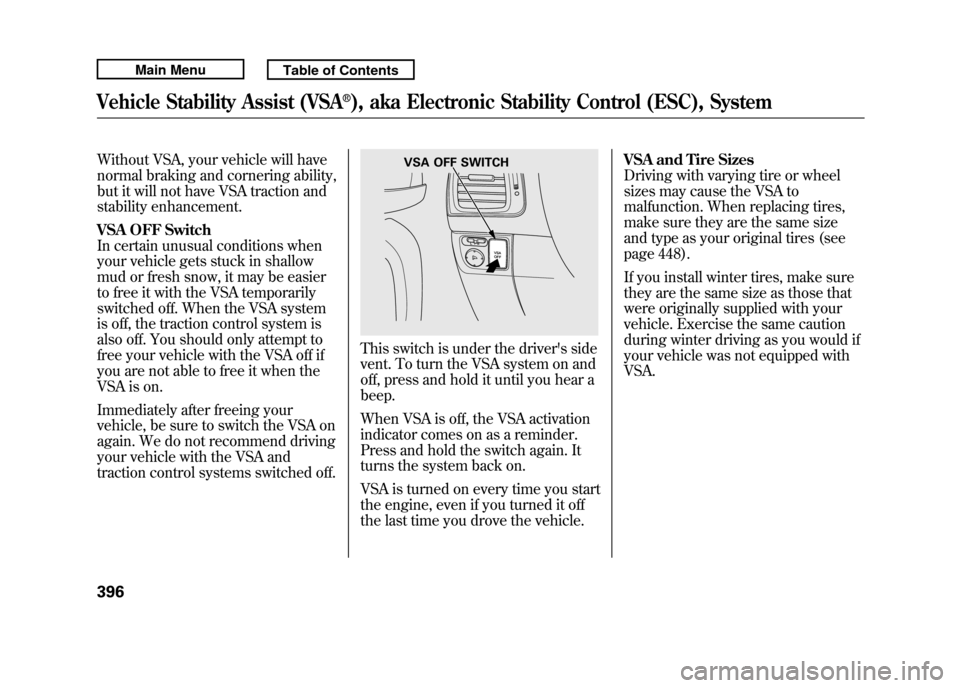
This switch is under the driver's side
vent. To turn the VSA system on and
off, press and hold it until you hear a
beep.
When VSA is off, the VSA activation
indicator comes on as a reminder.
Press and hold the switch again. It
turns the system back on.
VSA is turned on every time you start
the engine, even if you turned it off
the last time you drove the vehicle.VSA and Tire Sizes
Driving with varying tire or wheel
sizes may cause the VSA to
malfunction. When replacing tires,
make sure they are the same size
and type as your original tires (see
page 448).
If you install winter tires, make sure
they are the same size as those that
were originally supplied with your
vehicle. Exercise the same caution
during winter driving as you would if
your vehicle was not equipped with
VSA.
VSA OFF SWITCH
Vehicle Stability Assist (VSA
®), aka Electronic Stability Control (ESC), System
39610/06/08 17:42:32 11 ACURA RDX MMC North America Owner's M 50 31STK640 enu
Page 403 of 517
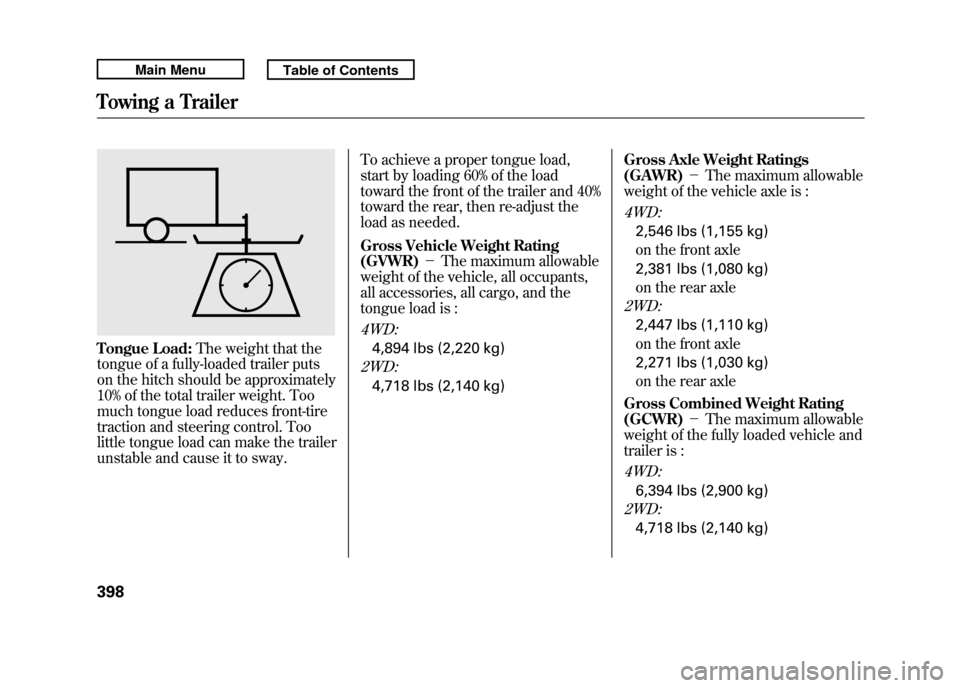
Tongue Load:The weight that the
tongue of a fully-loaded trailer puts
on the hitch should be approximately
10% of the total trailer weight. Too
much tongue load reduces front-tire
traction and steering control. Too
little tongue load can make the trailer
unstable and cause it to sway. To achieve a proper tongue load,
start by loading 60% of the load
toward the front of the trailer and 40%
toward the rear, then re-adjust the
load as needed.
Gross Vehicle Weight Rating
(GVWR)
-The maximum allowable
weight of the vehicle, all occupants,
all accessories, all cargo, and the
tongue load is :
4WD:4,894 lbs (2,220 kg)2WD:4,718 lbs (2,140 kg) Gross Axle Weight Ratings
(GAWR)
-The maximum allowable
weight of the vehicle axle is :
4WD:2,546 lbs (1,155 kg)
on the front axle
2,381 lbs (1,080 kg)
on the rear axle2WD:2,447 lbs (1,110 kg)
on the front axle
2,271 lbs (1,030 kg)
on the rear axle
Gross Combined Weight Rating
(GCWR) -The maximum allowable
weight of the fully loaded vehicle and
trailer is :4WD:6,394 lbs (2,900 kg)2WD:4,718 lbs (2,140 kg)
Towing a Trailer39810/06/08 17:42:32 11 ACURA RDX MMC North America Owner's M 50 31STK640 enu
Page 407 of 517

●The trailer has been properly
serviced and is in good condition.●All weights and loads are within
limits.●The hitch, safety chains, and any
other attachments are secure.●All items in or on the trailer are
properly secured and cannot shift
while you drive.
●The lights and brakes on your
vehicle and the trailer are working
properly.●Your vehicle tires and spare are
properly inflated, and the trailer
tires and spare are inflated as
recommended by the trailer
maker.Driving Safely With a Trailer
The added weight, length, and
height of a trailer will affect your
vehicle's handling and performance,
so driving with a trailer requires
some special driving skills and
techniques.
For your safety and the safety of
others, take time to practice driving
maneuvers before heading for the
open road, and follow the guidelines
in this section.
Towing a Trailer40210/06/08 17:42:32 11 ACURA RDX MMC North America Owner's M 50 31STK640 enu
Page 409 of 517

Driving on HillsWhen climbing hills, closely watch
your temperature gauge (see page
78). If it nears the H (Hot) mark, turn
the A/C off, reduce speed and, if
necessary, pull to the side of the road
to let the engine cool.
When driving down hills, reduce
your speed, and shift down to S
position, or use the paddle shifters to
the lower gear (3, 2 or 1)in the S
position. When towing a trailer, do
not‘‘ride ’’the brakes, and remember,
it will take longer to slow down and
stop when towing a trailer.
If you must stop when facing uphill,
use the foot brake or parking brake.
Do not try to hold the vehicle in place
by pressing on the accelerator, as
this can cause the automatic
transmission to overheat.
Handling Crosswinds and BuffetingCrosswinds and air turbulence
caused by passing trucks can disrupt
your steering and cause the trailer to
sway. When being passed by a large
vehicle, keep a constant speed, and
steer straight ahead. Do not try to
make quick steering or braking
corrections.
Backing UpAlways drive slowly and have
someone guide you when backing
up. Grip the
bottom
of the steering
wheel; then turn the wheel to the left
to get the trailer to move to the left,
and turn the wheel right to move the
trailer to the right.
ParkingFollow all normal precautions when
parking, including putting the
transmission in Park and firmly
setting the parking brake. Also, place
wheel chocks at each of the trailer's
tires.Towing Your VehicleYour vehicle is not designed to be
towed behind a motor home. If your
vehicle needs to be towed in an
emergency, see page 475.
Towing a Trailer40410/06/08 17:42:32 11 ACURA RDX MMC North America Owner's M 50 31STK640 enu
Page 411 of 517

Check Out Your Vehicle
Before you leave the pavement, be
sure to do all scheduled maintenance
and service, and inspect your vehicle
for any problems. Pay special
attention to the condition of the tires,
and check the tire pressures.
After you return to the pavement,
carefully inspect your vehicle to
make sure there is no damage that
could make driving it unsafe.
Recheck the condition of the tires
and the tire pressures.
Remember
The route presents limits (too steep
or bumpy roads). You have limits
(driving skill and comfort). And your
vehicle has limits (traction, stability,
and power).
Driving off-highway can be
hazardous if you fail to recognize
limits and take the proper
precautions.Accelerating and Braking
For better traction on all surfaces,
accelerate slowly and gradually build
up speed. If you try to start too fast
on wet soil, mud, snow, or ice, you
might not have enough traction to
get underway, and you may dig
yourself a hole. Starting with the shift
lever in the D position will help you
have a smoother start on snow or ice.
Keep in mind that you will usually
need more time and distance to
brake to a stop on unpaved surfaces.
Avoid hard braking. Do not
‘‘pump ’’
the brakes; let the anti-lock braking
system pump them for you. Avoiding Obstacles
Debris in the road can damage your
suspension or other components.
Because your vehicle has a high
center of gravity, driving over a large
obstacle, or allowing a wheel to drop
into a deep hole can cause your
vehicle to tip or roll over.
Driving on Slopes
If you can't clearly see all conditions
or obstacles on a slope, walk the
slope before you drive on it. If you
have any doubt whether or not you
can safely drive on the slope, don't
do it. Find another route.
If you are driving up a hill and find
that you cannot continue,
do not try to
turn around.
Your vehicle could roll
over. Slowly back down the hill,
following the same route you took up
the hill.
Off-Highway Driving Guidelines40610/06/08 17:42:32 11 ACURA RDX MMC North America Owner's M 50 31STK640 enu
Page 414 of 517

This section explains why it is
important to keep your vehicle well
maintained and how to follow basic
maintenance safety precautions.
This section also includes
instructions on how to read the
maintenance minder messages on
the multi-information display, and
instructions for simple maintenance
tasks you may want to take care of
yourself.
If you have the skills and tools to
perform more complex maintenance
tasks on your vehicle, you may want
to purchase the service manual. See
page 497 for information on how to
obtain a copy, or see your dealer.U.S. Vehicles:
Maintenance,
replacement, or repair of
emissions control devices and
systems may be done by any
automotive repair establishment
or individual using parts that are
‘‘certified’’ to EPA standards. Maintenance Safety
.....................
410
Maintenance Minder ™
................
411
Fluid Locations
...........................
419
Adding Engine Oil
......................
420
Required Engine Oil
...............
420
Changing the Engine Oil and
Filter
.......................................
422
Engine Coolant
...........................
424
Windshield Washers
...................
426
Automatic Transmission Fluid
....
427
Brake Fluid
.................................
429
Power Steering Fluid
..................
430
Lights
..........................................
431
Cleaning the Seat Belts
...............
438
Floor Mats
..................................
438
Audio Antenna
............................
439
Intercooler
..................................
439
Dust and Pollen Filter
.................
439
Wiper Blades
..............................
440
Wheels
........................................
443
Tires
...........................................
444
Checking the Battery
..................
450
Vehicle Storage
...........................
451
Interior Care
...............................
452
Maintenance
409
Maintenance
10/06/08 17:42:32 11 ACURA RDX MMC North America Owner's M 50 31STK640 enu