engine oil Acura RDX 2011 Owner's Manual
[x] Cancel search | Manufacturer: ACURA, Model Year: 2011, Model line: RDX, Model: Acura RDX 2011Pages: 517, PDF Size: 27.89 MB
Page 62 of 517
Your vehicle's exhaust contains
carbon monoxide gas. Carbon
monoxide should not enter the
vehicle in normal driving if you
maintain your vehicle properly and
follow the information on this page.
Have the exhaust system inspected
for leaks whenever:●The vehicle is raised for an oil
change.●You notice a change in the sound
of the exhaust.●The vehicle was in a collision that
may have damaged the underside.
Carbon monoxide gas is toxic.
Breathing it can cause
unconsciousness and even kill
you.
Avoid any enclosed areas or
activities that expose you to
carbon monoxide.
High levels of carbon monoxide can
collect rapidly in enclosed areas,
such as a garage. Do not run the
engine with the garage door closed.
Even with the door open, run the
engine only long enough to move the
vehicle out of the garage. With the tailgate open, airflow can
pull exhaust gas into your vehicle's
interior and create a hazardous
condition. If you must drive with the
tailgate open, open all the windows,
and set the climate control system as
shown below.
If you must sit in your parked vehicle
with the engine running, even in an
unconfined area, adjust the climate
control system as follows:
1. Select the fresh air mode.
2. Select the
mode.
3. Set the fan speed to high.
4. Set the temperature control to a comfortable setting.
Carbon Monoxide Hazard
57
Driver and Passenger Safety
10/06/08 17:42:32 11 ACURA RDX MMC North America Owner's M 50 31STK640 enu
Page 70 of 517
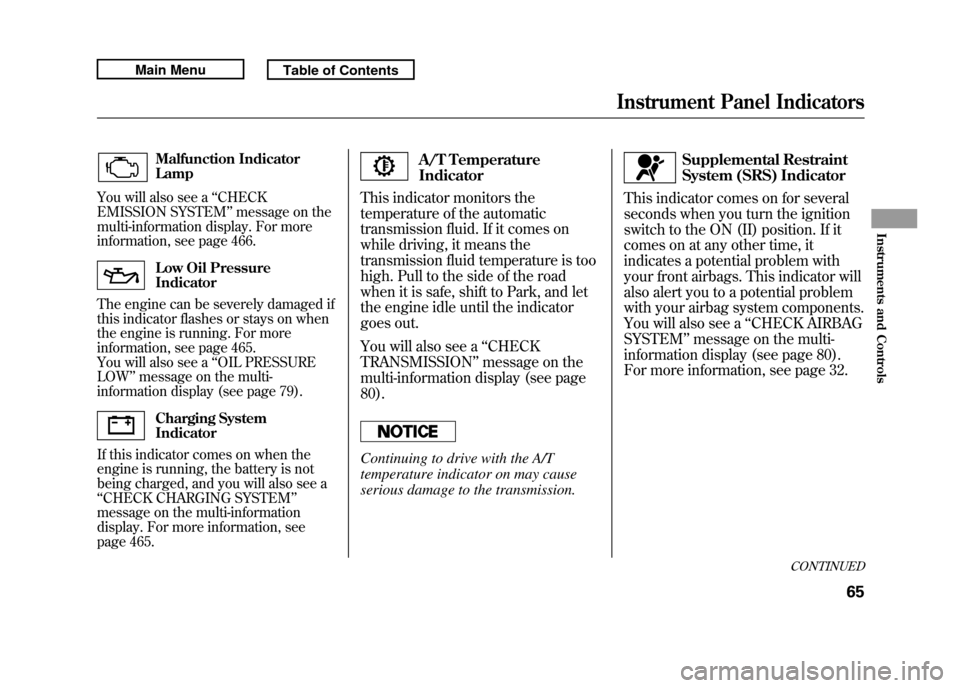
Malfunction Indicator
Lamp
You will also see a ‘‘CHECK
EMISSION SYSTEM ’’message on the
multi-information display. For more
information, see page 466.Low Oil Pressure
Indicator
The engine can be severely damaged if
this indicator flashes or stays on when
the engine is running. For more
information, see page 465.
You will also see a ‘‘OIL PRESSURE
LOW ’’message on the multi-
information display (see page 79).Charging System
Indicator
If this indicator comes on when the
engine is running, the battery is not
being charged, and you will also see a
‘‘ CHECK CHARGING SYSTEM ’’
message on the multi-information
display. For more information, see
page 465.
A/T Temperature
Indicator
This indicator monitors the
temperature of the automatic
transmission fluid. If it comes on
while driving, it means the
transmission fluid temperature is too
high. Pull to the side of the road
when it is safe, shift to Park, and let
the engine idle until the indicator
goes out.
You will also see a ‘‘CHECK
TRANSMISSION ’’message on the
multi-information display (see page
80).
Continuing to drive with the A/T
temperature indicator on may cause
serious damage to the transmission.
Supplemental Restraint
System (SRS) Indicator
This indicator comes on for several
seconds when you turn the ignition
switch to the ON (II) position. If it
comes on at any other time, it
indicates a potential problem with
your front airbags. This indicator will
also alert you to a potential problem
with your airbag system components.
You will also see a ‘‘CHECK AIRBAG
SYSTEM ’’message on the multi-
information display (see page 80).
For more information, see page 32.
CONTINUED
Instrument Panel Indicators
65
Instruments and Controls
10/06/08 17:42:32 11 ACURA RDX MMC North America Owner's M 50 31STK640 enu
Page 82 of 517

Maintenance Minder
TM
The multi-information display in the
instrument panel shows you the
engine oil life and maintenance
service items when the ignition
switch is in the ON (II) position. This
information helps to keep you aware
of the periodic maintenance your
vehicle needs for continued trouble-
free driving. Refer to page 411 for
more information.
INST. MPG (U.S. models)/INST.
L/100 km (Canadian models)
This shows your instant fuel
economy.
When you turn off the engine, INST.
MPG or INST. L/100 km is also
reset.RANGE
This shows the estimated distance
you can travel on the fuel remaining
in the fuel tank. This distance is
estimated from the fuel economy you
received over the last several miles
(U.S.) or kilometers (Canada), so it
will vary with changes in speed,
traffic, etc.
When the battery is disconnected, or
you refuel, RANGE is also reset.
ELAPSED TIME
This shows the accumulated
traveling time since you last reset it.
When you turn the ignition switch to
the ON (II) position, ELAPSED
TIME is reset.
You can customize the ELAPSED
TIME reset condition on the multi-
information display (see page 95).AVG. SPEED
This shows the average speed you
are traveling in miles per hour (mph)
for U.S. models or kilometers per
hour (km/h) for Canadian models.
When you reset Trip A, AVG. SPEED
is also reset.
AVG. FUEL A/B
This shows your vehicle's average
fuel economy in mpg (U.S. models)
or liter/100 km (Canadian models)
since you last reset Trip A or Trip B.
You can customize the Trip A and
AVG. FUEL A reset condition on the
multi-information display (see page
93).
The average fuel economy will be
reset when you reset the trip meter,
or if the vehicle's battery goes dead
or is disconnected.
CONTINUED
Multi-Information Display
77
Instruments and Controls
10/06/08 17:42:32 11 ACURA RDX MMC North America Owner's M 50 31STK640 enu
Page 84 of 517
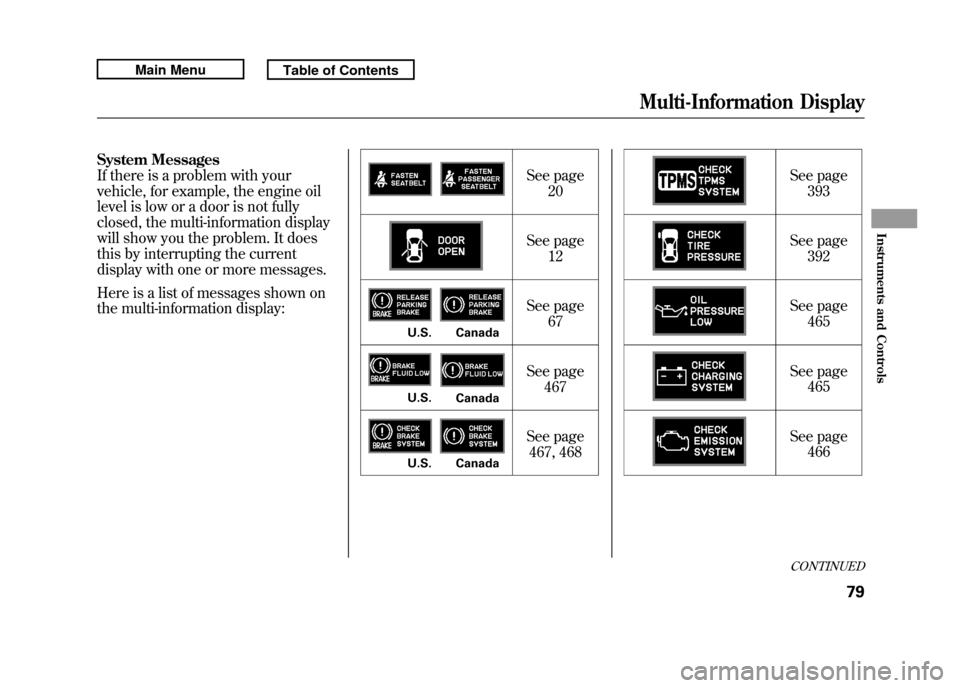
System Messages
If there is a problem with your
vehicle, for example, the engine oil
level is low or a door is not fully
closed, the multi-information display
will show you the problem. It does
this by interrupting the current
display with one or more messages.
Here is a list of messages shown on
the multi-information display:See page
20
See page 12
See page 67
See page 467
See page 467, 468 See page
393
See page 392
See page 465
See page 465
See page 466
U.S. CanadaU.S. CanadaU.S. Canada
CONTINUED
Multi-Information Display
79
Instruments and Controls
10/06/08 17:42:32 11 ACURA RDX MMC North America Owner's M 50 31STK640 enu
Page 356 of 517

Before you begin driving your
vehicle, you should know what
gasoline to use and how to check the
levels of important fluids. You also
need to know how to properly store
luggage or packages. The
information in this section will help
you. If you plan to add any
accessories to your vehicle, please
read the information in this section
first.Break-in Period
...........................
352
Fuel Recommendation
................
352
Service Station Procedures
.........
353
Refueling
.................................
353
Tighten Fuel Cap Message
.....
354
Opening and Closing the
Hood
...................................
355
Oil Check
................................
356
Engine Coolant Check
............
357
Fuel Economy
.............................
358
Accessories and
Modifications
..........................
362
Carrying Cargo
...........................
364
Before Driving
351
Before Driving
10/06/08 17:42:32 11 ACURA RDX MMC North America Owner's M 50 31STK640 enu
Page 357 of 517
Break-in Period
Help assure your vehicle's future
reliability and performance by paying
extra attention to how you drive
during the first 600 miles (1,000 km).
During this period:●Avoid full-throttle starts and rapid
acceleration.●Avoid hard braking for the first 200
miles (300 km).●Do not change the oil until the
scheduled maintenance time.●Do not tow a trailer.
You should also follow these
recommendations with an
overhauled or exchanged engine, or
when the brakes are replaced. Fuel Recommendation
Your vehicle is designed to operate
on premium unleaded gasoline with
a pump octane of 91 or higher. If this
octane grade is unavailable, regular
unleaded gasoline with a pump
octane of 87 or higher may be used
temporarily. The use of regular
unleaded gasoline can cause metallic
knocking noises in the engine and
will result in decreased engine
performance. The long-term use of
regular-grade gasoline can lead to
engine damage.
Avoid driving with an extremely low
fuel level. Running out of fuel could
cause the engine to misfire, damaging
the catalytic converter.We recommend using quality
gasolines containing detergent
additives that help prevent fuel
system and engine deposits.
In addition, in order to maintain good
performance, fuel economy, and
emissions control, we strongly
recommend, in areas where it is
available, the use of gasoline that
does NOT contain manganese-based
fuel additives such as MMT.
Use of gasoline with these additives
may adversely affect performance,
and cause the malfunction indicator
lamp on your instrument panel to
come on. If this happens, contact
your authorized dealer for service.
Break-in Period, Fuel Recommendation35210/06/08 17:42:32 11 ACURA RDX MMC North America Owner's M 50 31STK640 enu
Page 361 of 517
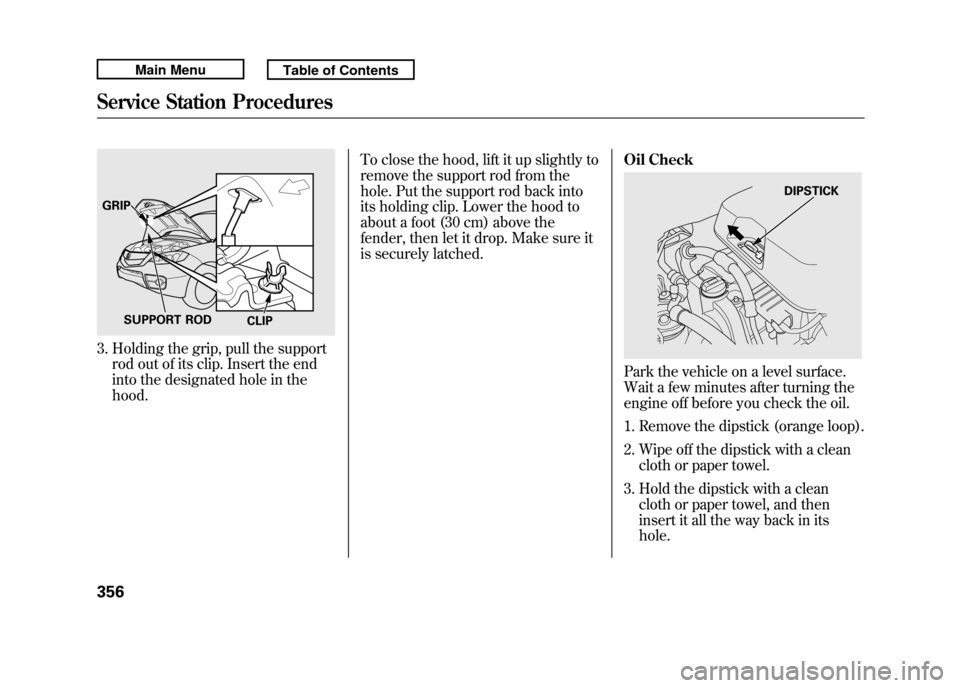
3. Holding the grip, pull the supportrod out of its clip. Insert the end
into the designated hole in the
hood. To close the hood, lift it up slightly to
remove the support rod from the
hole. Put the support rod back into
its holding clip. Lower the hood to
about a foot (30 cm) above the
fender, then let it drop. Make sure it
is securely latched.
Oil Check
Park the vehicle on a level surface.
Wait a few minutes after turning the
engine off before you check the oil.
1. Remove the dipstick (orange loop).
2. Wipe off the dipstick with a clean
cloth or paper towel.
3. Hold the dipstick with a clean cloth or paper towel, and then
insert it all the way back in its
hole.
GRIP
SUPPORT ROD CLIP
DIPSTICK
Service Station Procedures35610/06/08 17:42:32 11 ACURA RDX MMC North America Owner's M 50 31STK640 enu
Page 362 of 517
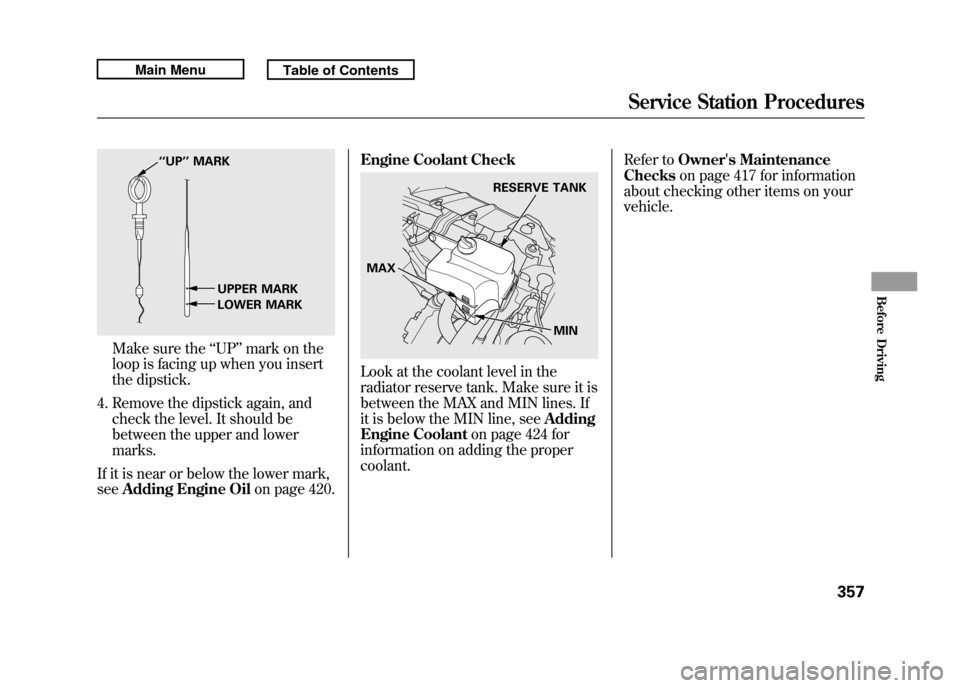
Make sure the‘‘UP ’’mark on the
loop is facing up when you insert
the dipstick.
4. Remove the dipstick again, and check the level. It should be
between the upper and lower
marks.
If it is near or below the lower mark,
see Adding Engine Oil on page 420.Engine Coolant Check
Look at the coolant level in the
radiator reserve tank. Make sure it is
between the MAX and MIN lines. If
it is below the MIN line, see
Adding
Engine Coolant on page 424 for
information on adding the proper
coolant. Refer to
Owner's Maintenance
Checks on page 417 for information
about checking other items on your
vehicle.
‘‘ UP’’ MARK
UPPER MARK
LOWER MARK
RESERVE TANK
MAX MIN
Service Station Procedures
357
Before Driving
10/06/08 17:42:32 11 ACURA RDX MMC North America Owner's M 50 31STK640 enu
Page 364 of 517

Fuel Economy FactorsThe following factors can lower your
vehicle's fuel economy:●Aggressive driving (hard
acceleration and braking)●Excessive idling, accelerating and
braking in stop-and-go traffic●Cold engine operation (engines are
more efficient when warmed up)●Driving with a heavy load or the air
conditioner running●Improperly inflated tires
Improving Fuel EconomyVehicle MaintenanceA properly maintained vehicle
maximizes fuel economy. Poor
maintenance can significantly reduce
fuel economy. Always maintain your
vehicle according to the maintenance
messages displayed on the
information display (seeOwner's
Maintenance Checks on page 417).
For example:●Use the required engine oil (see
page 420).●Maintain proper tire inflation -
An underinflated tire increases
‘‘ rolling resistance, ’’which reduces
fuel economy.●Avoid carrying excess weight in
your vehicle -It puts a heavier
load on the engine, increasing fuel
consumption.
●Keep your vehicle clean -In
particular, a build-up of snow or
mud on your vehicle's underside
adds weight and rolling resistance.
Frequent cleaning helps your fuel
economy.
CONTINUED
Fuel Economy
359
Before Driving
10/06/08 17:42:32 11 ACURA RDX MMC North America Owner's M 50 31STK640 enu
Page 414 of 517

This section explains why it is
important to keep your vehicle well
maintained and how to follow basic
maintenance safety precautions.
This section also includes
instructions on how to read the
maintenance minder messages on
the multi-information display, and
instructions for simple maintenance
tasks you may want to take care of
yourself.
If you have the skills and tools to
perform more complex maintenance
tasks on your vehicle, you may want
to purchase the service manual. See
page 497 for information on how to
obtain a copy, or see your dealer.U.S. Vehicles:
Maintenance,
replacement, or repair of
emissions control devices and
systems may be done by any
automotive repair establishment
or individual using parts that are
‘‘certified’’ to EPA standards. Maintenance Safety
.....................
410
Maintenance Minder ™
................
411
Fluid Locations
...........................
419
Adding Engine Oil
......................
420
Required Engine Oil
...............
420
Changing the Engine Oil and
Filter
.......................................
422
Engine Coolant
...........................
424
Windshield Washers
...................
426
Automatic Transmission Fluid
....
427
Brake Fluid
.................................
429
Power Steering Fluid
..................
430
Lights
..........................................
431
Cleaning the Seat Belts
...............
438
Floor Mats
..................................
438
Audio Antenna
............................
439
Intercooler
..................................
439
Dust and Pollen Filter
.................
439
Wiper Blades
..............................
440
Wheels
........................................
443
Tires
...........................................
444
Checking the Battery
..................
450
Vehicle Storage
...........................
451
Interior Care
...............................
452
Maintenance
409
Maintenance
10/06/08 17:42:32 11 ACURA RDX MMC North America Owner's M 50 31STK640 enu