CD changer Acura RDX 2012 Owner's Guide
[x] Cancel search | Manufacturer: ACURA, Model Year: 2012, Model line: RDX, Model: Acura RDX 2012Pages: 518, PDF Size: 26.43 MB
Page 263 of 518
General Information●When using CD-R/CD-RW discs,
use only high quality CDs labeled
for audio use.●When recording a CD-R/CD-RW,
the recording must be closed for it
to be used by the system.●Play only standard round CDs.
Odd-shaped CDs may jam in the
drive or cause other problems.●Handle your CDs properly to
prevent damage and skipping.
Protecting CDsWhen a CD is not being played, store
it in its case to protect it from dust
and other contamination. To prevent
warpage, keep CDs out of direct
sunlight and extreme heat.
To clean a CD, use a clean soft cloth.
Wipe across the CD from the center
to the outside edge.
A new CD may be rough on the inner
and outer edges. The small plastic
pieces causing this roughness can
flake off and fall on the recording
surface of the CD, causing skipping
or other problems. Remove these
pieces by rubbing the inner and
outer edges with the side of a pencil
or pen.
Never try to insert foreign objects in
the disc changer.
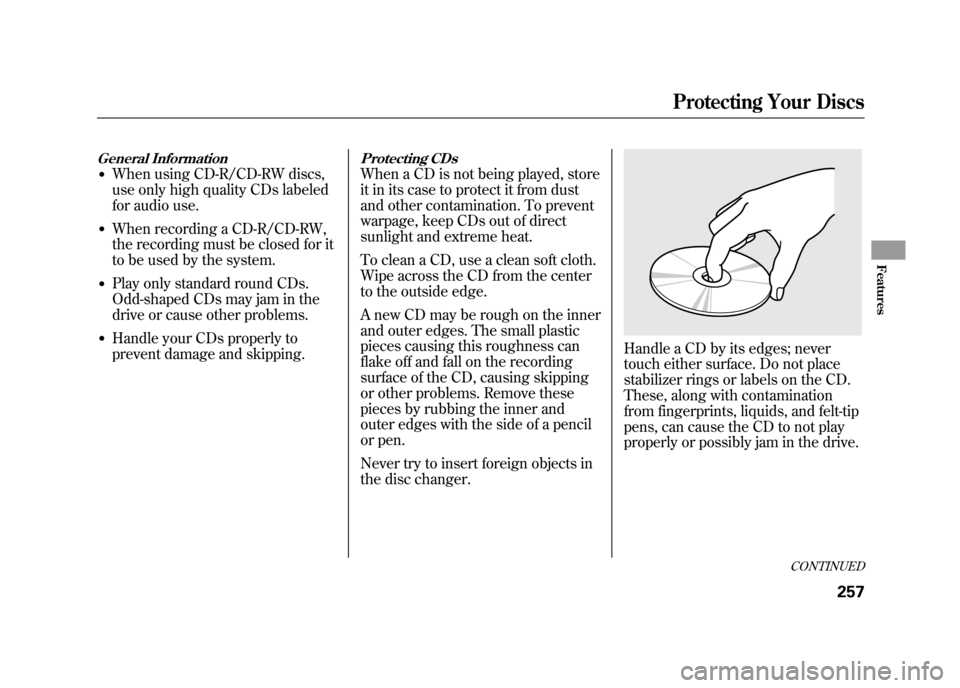
Handle a CD by its edges; never
touch either surface. Do not place
stabilizer rings or labels on the CD.
These, along with contamination
from fingerprints, liquids, and felt-tip
pens, can cause the CD to not play
properly or possibly jam in the drive.
CONTINUED
Protecting Your Discs
257
Features
11/06/16 17:42:51 12 ACURA RDX MMC North America Owner's M 50 31STK650 enu
Page 264 of 518

Additional Information on
Recommended Discs
The in-dash disc player/changer has
a sophisticated and delicate
mechanism. If you insert a damaged
disc as indicated in this section, it
may become stuck inside and
damage the audio unit.
Examples of these discs are shown to
the right:1. Bubbled, wrinkled, labeled, and excessively thick discs
2. Damaged discs
3. Poor quality discs
Bubbled/
Wrinkled
With Label/
Sticker Using Printer
Label Kit Sealed With Plastic
RingChipped/
Cracked Warped
Burrs
Protecting Your Discs25811/06/16 17:42:51 12 ACURA RDX MMC North America Owner's M 50 31STK650 enu
Page 268 of 518

To Play an iPod
®
This audio system can operate the
audio files on the iPod
®with the
same controls used for the in-dash
disc changer. To play an iPod,
connect it to the USB adapter cable
in the console compartment by using
your dock connector, then press the
DISC/AUX button. The ignition
switch must be in the ACCESSORY
(I) or ON (II) position. The iPod will
also be recharged with the ignition
switch in these positions.
The system will only play songs
stored on the iPod with iTunes.
iPod and iTunes are registered
trademarks owned by Apple Inc.
Voice Control SystemYou can select the AUX mode by
using the navigation system voice
control buttons, but cannot operate
the play mode functions. iPod models confirmed to be
compatible with your audio system
using the USB adapter cable are:
Model
iPod classic 80/160 G
iPod classic 120 G
iPod classic 160 G (launch in 2009)
iPod (5th generation)
iPod nano
iPod touch
This system may not work with all
software versions of these devices. NOTE:
●Do not connect your iPod using a
hub.●Do not keep the iPod in the
vehicle. Direct sunlight and high
heat will damage it.●Do not use an extension cable
between the USB adapter cable
equipped with your vehicle and
your dock connector.●We recommend backing up your
data before playing it.●Some devices cannot be powered
or charged via the USB adapter, if
this is the case use the accessory
adapter to supply power to your
device.
Playing an iPod
®(Models with navigation system)
26211/06/16 17:42:51 12 ACURA RDX MMC North America Owner's M 50 31STK650 enu
Page 278 of 518

To Play a USB Flash Memory
Device
This audio system can operate the
audio files on a USB flash memory
device with the same controls used
for the in-dash disc changer. To play
a USB flash memory device, connect
it to the USB adapter cable in the
console compartment, then press the
DISC/AUX button. The ignition
switch must be in the ACCESSORY
(I) or ON (II) position.The audio system reads and plays
the audio files on the USB flash
memory device in MP3, WMA or
AAC
ᤳformats. Depending on the
format, the audio control display
shows MP3, WMA or AAC when a
USB flash memory device is playing.
ᤳ : Only AAC format files recorded
with iTunes are playable on this
audio unit. The recommended USB flash
memory devices are 256 MB or
higher, and formatted with the FAT
file system. Some digital audio
players may be compatible as well.
Some USB flash memory devices
(such as devices with security lock-
out features, etc.) will not work in
this audio unit.
Even if recorded in MP3, WMA or
AAC format, unsupported files
cannot be played. If the system finds
it, the audio unit displays
UNPLAYABLE, and then skips to the
next file.
Playing a USB Flash Memory Device (Models with navigation system)27211/06/16 17:42:51 12 ACURA RDX MMC North America Owner's M 50 31STK650 enu
Page 297 of 518

Auxiliary Input Jack
The auxiliary input jack is on the disc
changer unit. The system will accept
auxiliary input from standard audio
accessories.
When the audio system is on and you
plug in a mini-jack cable between a
compatible audio unit and the jack,
you will see AUX in the display and
the system automatically switches to
AUX mode.Radio Theft Protection
If your vehicle
’s battery is
disconnected or goes dead, the audio
system disables itself. If this
happens, you will see ‘‘ENTER
CODE ’’in the frequency display next
time you turn on the system. Use the
preset bars (Icons on models with
navigation system) to enter the five-
digit code. The code is on the Anti-
theft Identification Card included in
your owner ’s manual kit. When it is
entered correctly, the radio will start
playing.
The Anti-theft Identification Card
also lists your audio serial number. It
is best to store the card in a safe
place at home. In addition, you
should write the audio system ’s
serial number in this owner ’s manual
CONTINUED
Auxiliary Input Jack, Radio Theft Protection
291
Features
11/06/16 17:42:51 12 ACURA RDX MMC North America Owner's M 50 31STK650 enu
Page 507 of 518

Customized Settings
....................
82
D
DANGER, Explanation of
.............
iii
Dashboard
...............................
3, 62
Daytime Running Lights
............
119
Dead Battery
..............................
461
Defogger, Rear Window
.............
121
Defrosting the Windows
............
167
Dimensions
................................
480
Dimming the Headlights
............
116
Dipstick Automatic Transmission
.........
427
Engine Oil
...............................
357
Directional Signals
...............
69, 116
Disc Brake Wear Indicators.......
387
Disc Care
...................................
257
Disc Changer
......................
185, 239
Disc Changer Error Messages
........................
195, 255
Disc Player
..........................
185, 239
Disposal of Used Oil
...................
423
Doors Childproof Door Locks
............
127 Locking and Unlocking
...........
126
Power Door Locks
..................
126
DOT Tire Quality Grading (U.S. Vehicles)
................................
482
Driver and Passenger Safety
..........
5
Driving
.......................................
371
Economy
.................................
358
Driving Guidelines
.....................
372
Driving Position Memory System
...................................
148
Driving with the Paddle Shifters
...................................
380
Dust and Pollen Filter
................
439
E
Economy, Fuel
...........................
358
Emergencies on the Road
..........
453
Battery, Jump Starting
.............
461
Brake System Indicator
...
467, 468
Changing a Flat Tire
...............
455
Charging System Indicator
........................
65, 465
Checking the Fuses
................
470
Driving with a Flat Tire
...........
455 Hazard Warning Flashers
.......
121
Jump Starting
..........................
461
Low Oil Pressure Indicator
........................
65, 465
Malfunction Indicator Lamp
.............................
65, 466
Overheated Engine
.................
463
Towing
....................................
475
Emergency Brake
......................
150
Emergency Flashers
..................
121
Emergency Towing
....................
475
Emissions Controls
....................
487
Emissions Testing
......................
490
Engine Adding Engine Coolant
...........
424
If it Won't Start
........................
459
Malfunction Indicator Lamp
.............................
65, 466
Oil Life Indicator
.....................
411
Oil Pressure Indicator
.......
65, 465
Overheating
............................
463
Specifications
..........................
480
Speed Limiter
..........................
378
Starting
...................................
374
Engine Coolant
..........................
424
CONTINUED
Index
III
INDEX
11/06/16 17:42:51 12 ACURA RDX MMC North America Owner's M 50 31STK650 enu