instrument panel Acura RDX 2012 Owner's Guide
[x] Cancel search | Manufacturer: ACURA, Model Year: 2012, Model line: RDX, Model: Acura RDX 2012Pages: 518, PDF Size: 26.43 MB
Page 87 of 518
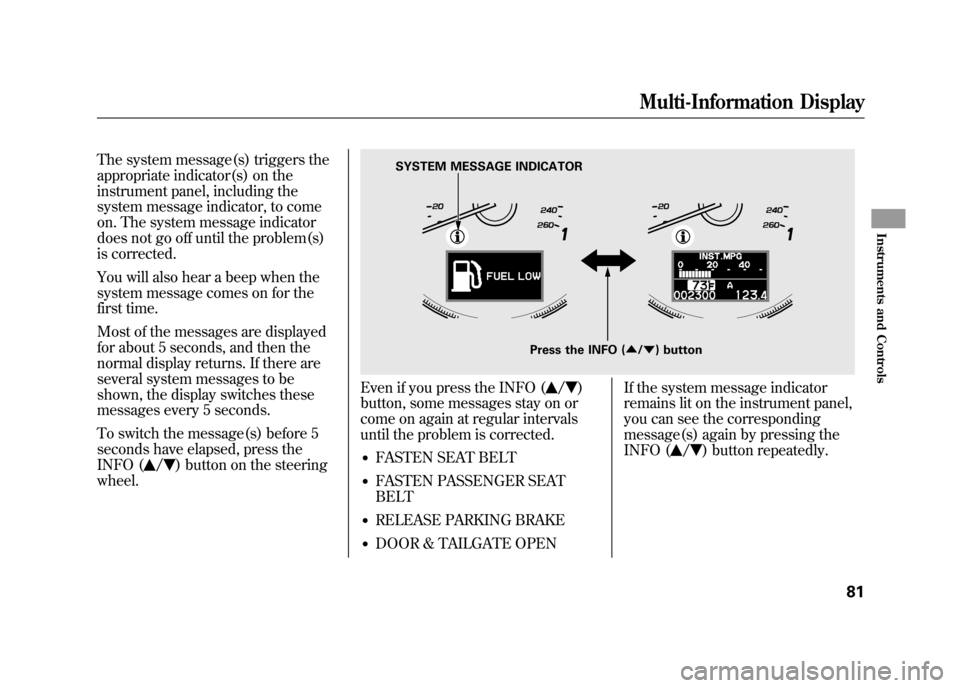
The system message(s) triggers the
appropriate indicator(s) on the
instrument panel, including the
system message indicator, to come
on. The system message indicator
does not go off until the problem(s)
is corrected.
You will also hear a beep when the
system message comes on for the
first time.
Most of the messages are displayed
for about 5 seconds, and then the
normal display returns. If there are
several system messages to be
shown, the display switches these
messages every 5 seconds.
To switch the message(s) before 5
seconds have elapsed, press the
INFO (
/
) button on the steering
wheel.
Even if you press the INFO (
/
)
button, some messages stay on or
come on again at regular intervals
until the problem is corrected.
●FASTEN SEAT BELT●FASTEN PASSENGER SEAT
BELT●RELEASE PARKING BRAKE●DOOR & TAILGATE OPEN If the system message indicator
remains lit on the instrument panel,
you can see the corresponding
message(s) again by pressing the
INFO (
/
) button repeatedly.
Press the INFO (
▲/▼ ) button
SYSTEM MESSAGE INDICATOR
Multi-Information Display
81
Instruments and Controls
11/06/16 17:42:51 12 ACURA RDX MMC North America Owner's M 50 31STK650 enu
Page 122 of 518

1. Turn signal
2. Off
3. Parking and interior lights
4. AUTO
5. Headlights on
6. High beams
7. Flash high beams
8. Fog lights off
9. Fog lights onTurn Signal
-Push down on the
lever to signal a left turn and up to
signal a right turn. To signal a lane
change, push lightly on the lever,
and hold it. The lever will return to
center when you release it or
complete a turn. Headlights
-Turning the switch to
the
position turns on the parking
lights, taillights, instrument panel
lights, side-marker lights, and rear
license plate lights.
Turning the switch to the
position
turns on the headlights.
When the light switch is in the
or
position, the lights on indicator
comes on as a reminder. This
indicator stays on if you leave the
light switch on and turn the ignition
switch to the ACCESSORY (I) or the
LOCK (0) position.
If you leave the lights on with the key
removed from the ignition switch,
you will hear a reminder beeper
when you open the driver's door.
Turn Signals and Headlights11611/06/16 17:42:51 12 ACURA RDX MMC North America Owner's M 50 31STK650 enu
Page 124 of 518

Even with the automatic lighting
feature turned on, we recommend
that you turn on the lights manually
when driving at night or in a dense
fog, or when you enter dark areas
such as long tunnels or parking
facilities.
The automatic lighting feature is
controlled by a sensor located on top
of the dashboard. Do not cover this
sensor or spill liquids on it.Automatic Lighting Off Feature
This feature turns off the headlights,
fog lights, parking lights, taillights,
side marker lights, license plate
lights, and instrument panel lights
within 15 seconds of removing the
key from the ignition switch and
closing the driver's door.
This feature activates if you leave the
headlight switch in the
or
position, remove the key, then open
and close the driver's door.
LIGHT SENSOR
Turn Signals and Headlights11811/06/16 17:42:51 12 ACURA RDX MMC North America Owner's M 50 31STK650 enu
Page 126 of 518

The knob on the instrument panel
controls the brightness of the
instrument panel lights. Turn the
knob to adjust the brightness.
Separate adjustments can be made
when the headlights are on and off.You will hear a beep when maximum
or minimum brightness is reached.
You will also hear a beep when the
maximum level is canceled by
turning the knob a click to the left.
To reduce glare at night, the
instrument panel illumination dims
when you turn the light switch to the
or
position.
The level of brightness is shown on
the multi-information display while
you adjust it. It goes out 5 seconds
after you finish adjusting.
INSTRUMENT PANEL BRIGHTNESS
CONTROL KNOB
U.S. model is shown
Instrument Panel Brightness12011/06/16 17:42:51 12 ACURA RDX MMC North America Owner's M 50 31STK650 enu
Page 127 of 518
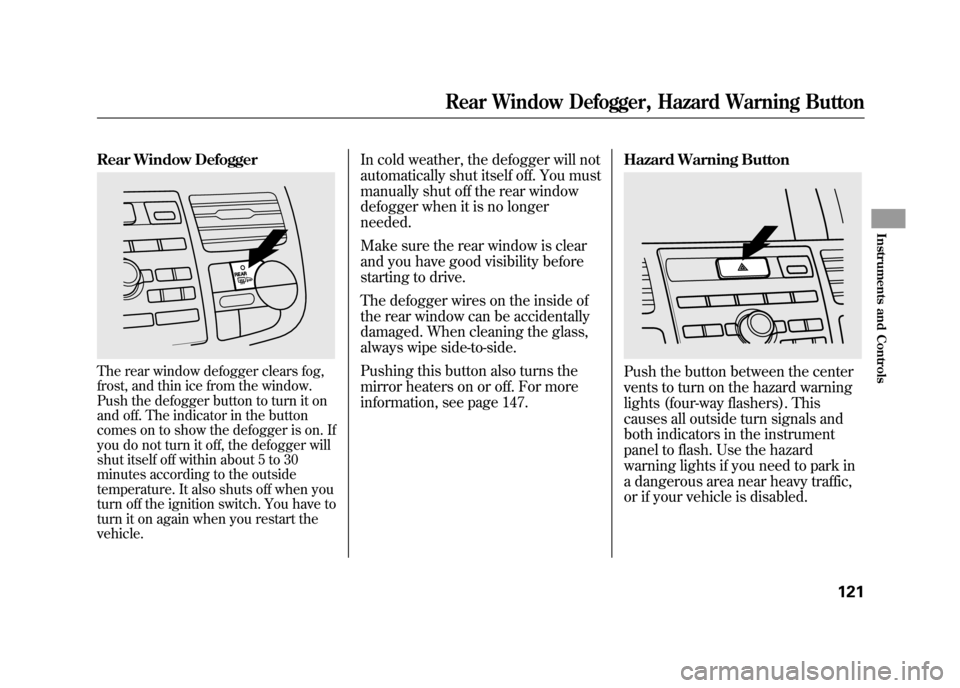
Rear Window DefoggerThe rear window defogger clears fog,
frost, and thin ice from the window.
Push the defogger button to turn it on
and off. The indicator in the button
comes on to show the defogger is on. If
you do not turn it off, the defogger will
shut itself off within about 5 to 30
minutes according to the outside
temperature. It also shuts off when you
turn off the ignition switch. You have to
turn it on again when you restart the
vehicle.
In cold weather, the defogger will not
automatically shut itself off. You must
manually shut off the rear window
defogger when it is no longer
needed.
Make sure the rear window is clear
and you have good visibility before
starting to drive.
The defogger wires on the inside of
the rear window can be accidentally
damaged. When cleaning the glass,
always wipe side-to-side.
Pushing this button also turns the
mirror heaters on or off. For more
information, see page 147.Hazard Warning Button
Push the button between the center
vents to turn on the hazard warning
lights (four-way flashers). This
causes all outside turn signals and
both indicators in the instrument
panel to flash. Use the hazard
warning lights if you need to park in
a dangerous area near heavy traffic,
or if your vehicle is disabled.
Rear Window Defogger, Hazard Warning Button
121
Instruments and Controls
11/06/16 17:42:51 12 ACURA RDX MMC North America Owner's M 50 31STK650 enu
Page 128 of 518

Steering Wheel Adjustments
Make any steering wheel
adjustments before you start driving.
Adjusting the steering wheel
position while driving may
cause you to lose control of the
vehicle and be seriously injured
in a crash.
Adjust the steering wheel only
when the vehicle is stopped.
1. Push the lever under the steering column all the way down.
2. Move the steering wheel up or down, and in or out, so it points
toward your chest, not toward your
face. Make sure you can see the
instrument panel gauges and
indicators.
3. Push the lever up to lock thesteering wheel in position.
4. Make sure you have securely locked the steering wheel in place
by trying to move it up, down, in,
and out. Keys and Locks
The master key fits all the locks on
your vehicle. The valet key works
only in the ignition and the door
locks. You can keep the glove box
and console compartment locked
when you leave your vehicle and the
valet key at a parking facility.
LEVER
VALET KEY
(Light Gray)
MASTER KEYS
WITH REMOTE
TRANSMITTER
KEY
NUMBER
TAG
Steering Wheel Adjustments, Keys and Locks12211/06/16 17:42:51 12 ACURA RDX MMC North America Owner's M 50 31STK650 enu
Page 131 of 518

The ignition switch has four
positions: LOCK (0), ACCESSORY
(I), ON (II), and START (III).
LOCK (0)-You can insert or
remove the key only in this position.
To turn the key, the shift lever must
be in Park, and you must push the
key in slightly. If the front wheels are turned, the
anti-theft lock may make it difficult to
turn the key. Firmly turn the steering
wheel to the left or right as you turn
the key.
ACCESSORY (I)
-You can operate
the audio system and the accessory
power sockets in this position.
ON (II) -This is the normal key
position when driving. Several of the
indicators on the instrument panel
come on as a test when you turn the
ignition switch from the
ACCESSORY (I) to the ON (II)
position.
START (III) -Use this position
only to start the engine. The switch
returns to the ON (II) position when
you let go of the key. You will hear a reminder beeper if
you leave the key in the ignition
switch in the LOCK (0) or the
ACCESSORY (I) position and open
the driver's door. Remove the key to
turn off the beeper.
You will also see a
‘‘REMOVE KEY ’’
message on the multi-information
display (see page 80).
The shift lever must be in Park
before you can remove the key from
the ignition switch.
Ignition Switch
125
Instruments and Controls
11/06/16 17:42:51 12 ACURA RDX MMC North America Owner's M 50 31STK650 enu
Page 151 of 518

Opening or closing the
moonroof on someone's hands
or fingers can cause serious
injury.
Make sure all hands and fingers
are clear of the moonroof
before opening or closing it.The moonroof has a key-off delay.
You can open and close the
moonroof for up to 10 minutes after
you turn off the ignition switch. The
key-off delay cancels as soon as you
open either front door. You must
then turn the ignition switch to the
ON (II) position for the moonroof to
operate.
If you try to open the moonroof in
below-freezing temperatures, or when it
is covered with snow or ice, you can
damage the moonroof panel or motor. Auto Reverse
If the moonroof runs into any
obstacle while it is closing
automatically, it will reverse
direction, and then stop. To close the
moonroof, remove the obstacle, then
use the moonroof switch again.
Auto reverse stops sensing when the
moonroof is almost closed. You
should always check that all
passengers and objects are away
from the moonroof before closing it.
Moonroof
145
Instruments and Controls
11/06/16 17:42:51 12 ACURA RDX MMC North America Owner's M 50 31STK650 enu
Page 156 of 518

To stop the system's automatic
adjustment, do any of these actions:●Press any button on the control
panel: SET, 1, or 2.●Push any of the adjustment
switches for the seat.●Shift out of Park.●Adjust the outside mirrors.
If desired, you can use the
adjustment switches to change the
positions of the seat or outside
mirrors after they are in their
memorized positions. If you change
the memorized position, the indicator
in the memory button will go out. To
keep this driving position for later
use, you must store it in the driving
position memory. Parking Brake
To apply the parking brake, push the
pedal down with your foot. To
release it, push on the pedal again.
The parking brake indicator on the
instrument panel should go out when
the parking brake is fully released
(see page 67).
Driving the vehicle with the parking
brake applied can damage the rear
brakes and axles. A beeper will sound if
the vehicle is driven with the parking
brake on.
You will also see a
‘‘RELEASE
PARKING BRAKE ’’message on the
multi-information display (see page
79).
Push
PARKING BRAKE PEDAL
Driving Position Memory System, Parking Brake15011/06/16 17:42:51 12 ACURA RDX MMC North America Owner's M 50 31STK650 enu
Page 159 of 518

Courtesy LightsThe courtesy lights in the ceiling
console come on when the parking
lights are turned on. You can adjust
their brightness by turning the
select/reset knob on the instrument
panel.
In addition to the courtesy lights on
the ceiling, the driver's and front
passenger's ambient foot lights come
on.The courtesy light in each front door
comes on when the door is opened,
and goes out when the door is
closed.
Your vehicle also has a courtesy light
in the ignition switch. This light
comes on when you:
●Open any door.●Unlock the driver's door.●Remove the key from the ignition
switch.
After all doors are closed tightly, the
light fades out in about 30 seconds.
To change the ‘‘INTERIOR LIGHT
DIMMING TIME ’’setting, see page
98. Cargo Area Light
The cargo area light has a two
position switch. In the OFF (right)
position, the light does not come on.
In the ON (left) position, the light
comes on when you open the
tailgate.
COURTESY LIGHTS
ON
OFF
Interior Lights
153
Instruments and Controls
11/06/16 17:42:51 12 ACURA RDX MMC North America Owner's M 50 31STK650 enu