lights Acura RDX 2012 Owner's Guide
[x] Cancel search | Manufacturer: ACURA, Model Year: 2012, Model line: RDX, Model: Acura RDX 2012Pages: 518, PDF Size: 26.43 MB
Page 158 of 518

In the door activated position, both
front and rear ceiling lights come on
when you:●Open any door.●Remove the key from the ignition
switch.●Unlock the doors with the key,
lock tab on the driver's door,
master door lock switch, or remote
transmitter.
After all doors are closed tightly, the
light(s) dims slightly, then fades out
in about 30 seconds. If you do not open any door after
unlocking the driver's door or
removing the key from the ignition
switch, the light(s) fade out in about
30 seconds. If you leave any door
open without the key in the ignition
switch, the light(s) will go off after 3
minutes.
To change the
‘‘INTERIOR LIGHT
DIMMING TIME ’’setting, see page
98. Individual Map Lights
You can use the front ceiling lights
whenever the lights are off.
To turn a light on or off, push its
lens.
LENSES
Interior Lights15211/06/16 17:42:51 12 ACURA RDX MMC North America Owner's M 50 31STK650 enu
Page 159 of 518

Courtesy LightsThe courtesy lights in the ceiling
console come on when the parking
lights are turned on. You can adjust
their brightness by turning the
select/reset knob on the instrument
panel.
In addition to the courtesy lights on
the ceiling, the driver's and front
passenger's ambient foot lights come
on.The courtesy light in each front door
comes on when the door is opened,
and goes out when the door is
closed.
Your vehicle also has a courtesy light
in the ignition switch. This light
comes on when you:
●Open any door.●Unlock the driver's door.●Remove the key from the ignition
switch.
After all doors are closed tightly, the
light fades out in about 30 seconds.
To change the ‘‘INTERIOR LIGHT
DIMMING TIME ’’setting, see page
98. Cargo Area Light
The cargo area light has a two
position switch. In the OFF (right)
position, the light does not come on.
In the ON (left) position, the light
comes on when you open the
tailgate.
COURTESY LIGHTS
ON
OFF
Interior Lights
153
Instruments and Controls
11/06/16 17:42:51 12 ACURA RDX MMC North America Owner's M 50 31STK650 enu
Page 161 of 518

Glove BoxOpen the glove box by pulling the
handle to the left. Close it with a firm
push. Lock or unlock the glove box
with the master key.
An open glove box can cause
serious injury to your passenger
in a crash, even if the
passenger is wearing the seat
belt.
Always keep the glove box
closed while driving.
The glove box light comes on when
the parking lights are on. Front Door Pockets
The interior of each front door has an
extendable pocket for maps and
other small, lightweight items. For
safety, be sure both front door
pockets are closed while driving.
Lock
FRONT DOOR POCKET
Interior Convenience Items
155
Instruments and Controls
11/06/16 17:42:51 12 ACURA RDX MMC North America Owner's M 50 31STK650 enu
Page 165 of 518
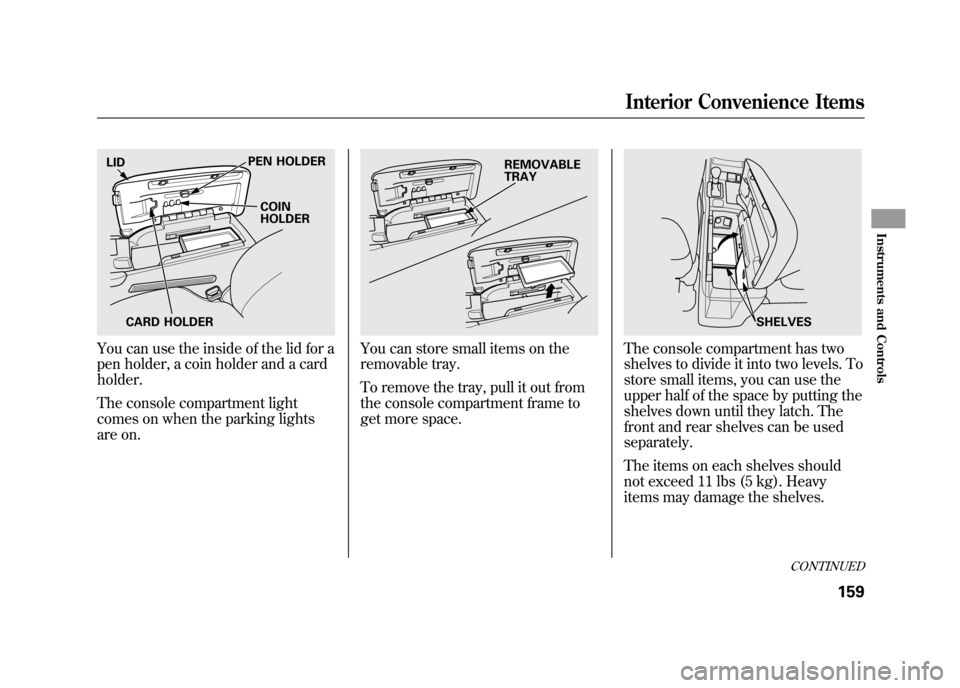
You can use the inside of the lid for a
pen holder, a coin holder and a card
holder.
The console compartment light
comes on when the parking lights
are on.
You can store small items on the
removable tray.
To remove the tray, pull it out from
the console compartment frame to
get more space.
The console compartment has two
shelves to divide it into two levels. To
store small items, you can use the
upper half of the space by putting the
shelves down until they latch. The
front and rear shelves can be used
separately.
The items on each shelves should
not exceed 11 lbs (5 kg). Heavy
items may damage the shelves.
LIDPEN HOLDER
COIN
HOLDER
CARD HOLDER
REMOVABLE
TRAY
SHELVES
CONTINUED
Interior Convenience Items
159
Instruments and Controls
11/06/16 17:42:51 12 ACURA RDX MMC North America Owner's M 50 31STK650 enu
Page 184 of 518

SUBWOOFER-Use the
SUBWOOFER mode to adjust the
strength of the sound from the
subwoofer speaker. Turn the PWR/
VOL knob to the desired level (- 6to
+ 6). Even if the adjustment level
reaches -6, the subwoofer is not
turned off. Speed-sensitive volume
compensation (SVC)
-The SVC
mode controls the volume based on
vehicle speed. The faster you go, the
louder the audio volume becomes.
As you slow down, the audio volume
decreases.
The SVC has four modes: SVC OFF,
SVC LOW, SVC MID, and SVC
HIGH. Turn the PWR/VOL knob to
adjust the setting to your liking. Audio System Lighting
You can use the instrument panel
brightness control knob to adjust the
illumination of the audio system (see
page 120). The audio system
illuminates when the parking lights
are on, even if the system is turned
off.Playing the FM/AM Radio (Models without navigation system)17811/06/16 17:42:51 12 ACURA RDX MMC North America Owner's M 50 31STK650 enu
Page 300 of 518

The security system helps to protect
your vehicle and valuables from
theft. The horn sounds and a
combination of headlights, parking
lights, side marker lights, and
taillights flashes if someone attempts
to break into your vehicle or remove
the audio unit. This alarm continues
for two minutes, then the system
resets. To deactivate the system
before the two minutes have elapsed,
unlock the driver's door with the key
or the remote transmitter.
The security system automatically
sets 15 seconds after you lock the
doors, hood, and the tailgate. For the
system to activate, you must lock the
doors and the tailgate from the
outside with the key, or use driver's
lock tab, door lock master switch, or
remote transmitter. The security
system indicator on the instrument
panel starts blinking immediately to
show you the system is setting itself.
Once the security system sets,
opening any door, the tailgate, or the
hood without using the key or the
remote transmitter, will cause the
alarm to activate. It also activates if
the audio unit is removed from the
dashboard or the wiring is cut.The alarm also activates if a
passenger inside the locked vehicle
turns the ignition switch on.
The security system does not set if
the hood, tailgate, or any door is not
fully closed. Before you leave the
vehicle, make sure the doors,
tailgate, and hood are securely
closed.
NOTE:
To see if the system is set
after you exit the vehicle, press the
LOCK button on the remote
transmitter within five seconds. If the
system is set, a beep will sound.
Do not attempt to alter this system or
add other devices to it.
SECURITY SYSTEM INDICATOR
Security System29411/06/16 17:42:51 12 ACURA RDX MMC North America Owner's M 50 31STK650 enu
Page 369 of 518

Improper accessories or
modifications can affect your
vehicle's handling, stability, and
performance, and cause a
crash in which you can be hurt
or killed.
Follow all instructions in this
owner's manual regarding
accessories and modifications.
When properly installed, cellular
phones, alarms, two-way radios, and
low-powered audio systems should
not interfere with your vehicle's
computer controlled systems, such
as your airbags, anti-lock brakes, and
tire pressure monitoring system. Before installing any accessory:
●Make sure the accessory does not
obscure any lights, or interfere
with proper vehicle operation or
performance.●Be sure electronic accessories do
not overload electrical circuits (see
page 469) or interfere with proper
operation of your vehicle.●Before installing any electronic
accessory, have the installer
contact your dealer for assistance.
If possible, have your dealer
inspect the final installation.●Do not install accessories on the
side pillars or across the rear
windows. Accessories installed in
these areas may interfere with
proper operation of the side
curtain airbags.Modifying Your Vehicle
Removing parts from your vehicle, or
replacing components with non-
Acura components could seriously
affect your vehicle's handling,
stability, and reliability.
Here are some examples:
●Lowering the vehicle with a non-
Acura suspension kit that
significantly reduces ground
clearance can allow the
undercarriage to hit speed bumps
or other raised objects, which
could cause the airbags to deploy.●Raising your vehicle with a non-
Acura suspension kit can affect the
handling, stability, and reliability.
CONTINUED
Accessories and Modifications
363
Before Driving
11/06/16 17:42:51 12 ACURA RDX MMC North America Owner's M 50 31STK650 enu
Page 379 of 518

You should do these checks and
adjustments before you drive your
vehicle:1. Make sure all windows, mirrors, and outside lights are clean and
unobstructed. Remove frost, snow,
or ice.
2. Check that the hood is fully closed.
3. Visually check the tires. If a tire looks low, use a gauge to check its
pressure.
4. Check that any items you may be carrying are stored properly or
fastened down securely. 5. Check the seat adjustment (see
page 134).
6. Check the adjustment of the inside and outside mirrors (see page
146).
7. Check the steering wheel adjustment (see page 122).
8. Make sure the doors and the tailgate are securely closed and
locked.
9. Fasten your seat belt. Check that your passengers have fastened
their seat belts (see page 15). 10. When you start the engine, check
the gauges and indicators in the
instrument panel, and the
messages on the multi-information
display (see pages 63, 73 and 74).
Preparing to Drive
373
Driving
11/06/16 17:42:51 12 ACURA RDX MMC North America Owner's M 50 31STK650 enu
Page 392 of 518

Always use the parking brake when
you park your vehicle. Make sure the
parking brake is set firmly, or your
vehicle may roll if it is parked on an
incline.
Set the parking brake before you put
the transmission in Park. This keeps
the vehicle from moving and putting
pressure on the parking mechanism
in the transmission.Parking Tips
●Make sure the moonroof and the
windows are closed.●Turn off the lights.●Place any packages, valuables, etc.
in the cargo area or take them with
you.●Lock the doors and the tailgate.●Never park over dry leaves, tall
grass, or other flammable
materials. The hot three way
catalytic converter could cause
these materials to catch on fire.
●If the vehicle is facing uphill, turn
the front wheels away from the
curb.●If the vehicle is facing downhill,
turn the front wheels toward the
curb.●Check the indicator on the
instrument panel to verify that the
security system is set.●Make sure the parking brake is
fully released before driving away.
Driving with the parking brake
partially set can overheat or
damage the rear brakes.
Parking38611/06/16 17:42:51 12 ACURA RDX MMC North America Owner's M 50 31STK650 enu
Page 393 of 518

Your vehicle is equipped with disc
brakes at all four wheels. A power
assist using negative pressure
generated by the engine and the
electric vacuum pump helps reduce
the effort needed on the brake pedal.
The anti-lock brake system (ABS)
helps you retain steering control
when braking very hard.
When the electric vacuum pump is in
operation, it makes some mechanical
noises come from the engine
compartment. This is normal.
When you drive in cold weather or
thinner air at high altitude, the
electric vacuum pump operates more
frequently after the engine is started.
For more information about the
electric vacuum pump, see page 468.Resting your foot on the pedal keeps
the brakes applied lightly, builds up
heat, and reduces their effectiveness
and reduces brake pad life. In
addition, fuel economy can be
reduced. It also keeps your brake
lights on all the time, confusing
drivers behind you.
Constant application of the brakes
when going down a long hill builds
up heat and reduces their
effectiveness. Use the engine to
assist the brakes by taking your foot
off the accelerator and downshifting
to a lower gear.
Check your brakes after driving
through deep water. Apply the
brakes moderately to see if they feel
normal. If not, apply them gently and
frequently until they do. Be extra
cautious and alert in your driving.Braking System Design
The hydraulic system that operates
the brakes has two separate circuits.
Each circuit works diagonally across
the vehicle (the left-front brake is
connected with the right-rear brake,
etc.). If one circuit should develop a
problem, you will still have braking
at two wheels.
Brake Pad Wear Indicators
All four brakes have audible brake
wear indicators.
If the brake pads need replacing, you
will hear a distinctive, metallic
screeching sound when you apply
the brake pedal. If you do not have
the brake pads replaced, they will
screech all the time. It is normal for
the brakes to occasionally squeal or
squeak when you apply them.
Braking System
387
Driving
11/06/16 17:42:51 12 ACURA RDX MMC North America Owner's M 50 31STK650 enu