reset Acura RDX 2012 Service Manual
[x] Cancel search | Manufacturer: ACURA, Model Year: 2012, Model line: RDX, Model: Acura RDX 2012Pages: 518, PDF Size: 26.43 MB
Page 186 of 518

Operating the XM Radio
To listen to the XM Radio, turn the
ignition switch to the ACCESSORY
(I) or ON (II) position. Push the
PWR/VOL knob to turn on the audio
system, and press the
button.
Adjust the volume by turning the
PWR/VOL knob. The last channel
you listened to will show on the
audio display.
DISP -Each time you press and
release the DISP/MODE button, the
center display changes in the
following sequence: Channel name,
category, artist name, and music title.
MODE -To switch between the
category mode and channel mode,
press and hold the DISP/MODE
button until the mode changes. A
‘‘ CH ’’(channel) or ‘‘CAT’’ (category)
mode indicator appears on the center
display. To Select a Channel
When in the satellite radio mode, you
can use any of four methods to find
channels: TUNE, SEEK/SKIP
(CATEGORY), SCAN, and the preset
bars.
TUNE
-Press the TUNE/FOLDER
bar to change channel selections.
Press the
side of the bar to tune
to higher numbered channels, and
the
side of the bar to tune to
lower numbered channels. In the
category mode, you can only select
channels within that category.
SEEK/SKIP (CATEGORY) -
Press either side of the SEEK/SKIP
(CATEGORY) bar (
or
)to
select another category. SCAN
-The scan function gives
you a sampling of all channels while
in the channel mode. In the category
mode, only the channels within that
category are scanned. To activate
scan, press the SCAN button. The
system plays each channel in
numerical order for a few seconds,
then selects the next channel. When
you hear a channel you want to
continue listening to, press the
button again.
Playing the XM
®Radio (Models without navigation system)
18011/06/16 17:42:51 12 ACURA RDX MMC North America Owner's M 50 31STK650 enu
Page 187 of 518

Preset-You can store up to 12
preset channels using each side of
the preset bar. Each side of the bar
stores one channel from the XM1
band and one channel from the XM2
band.
To store a channel:
1. Press the
button. Either
XM1 or XM2 will be shown on the
center display.
2. Use the tune, seek, or scan function to tune to a desired
channel.
In category mode, only channels
within that category can be
selected. In channel mode, all
channels can be selected. 3. Pick a preset number for the
channel you want to store. Press
and hold the appropriate side of
the preset bar until you hear a
beep.
4. Repeat steps 2 and 3 to store the first six channels.
5. Press the
button again. The
other XM band will be shown.
Store the next six channels by
repeating steps 2 and 3.
Once a channel is stored, press and
release the proper side of the preset
bar to tune to it.
Adjusting the Sound
For information, see page 177.
XM Radio Reception
For information, see page 182. XM Radio Display Messages
‘‘
LOADING ’’- XM is loading the
audio or program information.
‘‘ OFF AIR ’’- The channel currently
selected is no longer broadcasting.
CONTINUED
Playing the XM
®Radio (Models without navigation system)
181
Features
11/06/16 17:42:51 12 ACURA RDX MMC North America Owner's M 50 31STK650 enu
Page 192 of 518
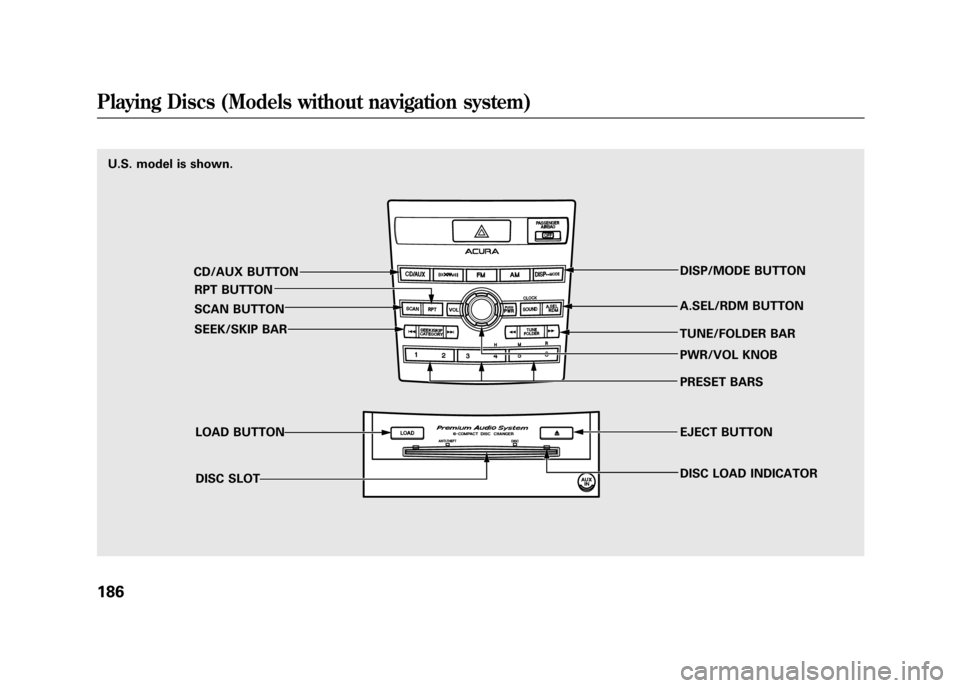
U.S. model is shown.CD/AUX BUTTONRPT BUTTON
SCAN BUTTON
SEEK/SKIP BAR
LOAD BUTTONDISC SLOT DISP/MODE BUTTON
A.SEL/RDM BUTTON
TUNE/FOLDER BAR PWR/VOL KNOB
PRESET BARS
EJECT BUTTON
DISC LOAD INDICATORPlaying Discs (Models without navigation system)18611/06/16 17:42:51 12 ACURA RDX MMC North America Owner's M 50 31STK650 enu
Page 195 of 518

3. You will see‘‘DISC READ ’’on the
center display, then the system
begins to play the CD.
You can load a CD into an empty
position while a CD is playing. Select
the empty position (the disc indicator
is not shown on the center display)
by pressing the appropriate side of
the preset bars. The current CD
stops playing and starts the loading
sequence. The CD just loaded will
play.
You can load a disc(s) in any mode
(AM, FM, XM, or AUX) if you do not
select an empty position.
If you press the LOAD button while a
disc is playing, the system will stop
playing that disc and start the loading
sequence. It will then play the disc
just loaded. To Play a CD
Select the CD changer by pressing
the CD/AUX button. You will see
‘‘
CD ’’on the center display. The
system will begin playing the last
selected CD in the CD changer. You
will see the disc and track numbers
displayed.
When the system reaches the end of
the disc, the system will advance to
the next disc and begin to play. To
select a different disc, press an
appropriate side of the preset bar
(1 - 6). If you select an empty
position in the CD changer, the
system will try to load the CD in the
empty slot. Playing an MP3/WMA Disc
The CD changer can play CD-Rs and
CD-RWs compressed in MP3 and
WMA format. When playing a disc in
MP3 or WMA, you will see
‘‘MP3 ’’or
‘‘ WMA ’’on the center display. A disc
can support more than 99 folders,
and each folder can hold up to 255
playable files.
When there are more than 99 folders
on a disc, the center display only
shows two digits.
CONTINUED
Playing Discs (Models without navigation system)
189
Features
11/06/16 17:42:51 12 ACURA RDX MMC North America Owner's M 50 31STK650 enu
Page 200 of 518

To Pause a Disc
To pause a disc, press the
corresponding number of the current
disc on the appropriate side of the
preset bars. To play the disc again,
press the preset bar again.
To Stop Playing a Disc
If you turn the system off while a CD
is playing, either with the PWR/VOL
knob or by turning off the ignition
switch, the disc will stay in the drive.
When you turn the system back on,
the CD will begin playing where it
left off.
To take the system out of CD mode,
press the AM or FM, CD/AUX, or
button. To return to CD mode,
press the CD/AUX button. The
system will continue at the same
point that it left off. Removing CDs from the Changer
To remove the disc that is currently
playing, press and release the eject
(
) button. You will see
‘‘EJECT ’’
on the center display. When you
remove the disc from the slot, the
system begins the load sequence so
you can load another disc in that
position. If you do not load another
CD within 10 seconds, the system
selects the previous mode (AM,
FM1, FM2, or XM).
If you do not remove the CD from
the slot, the system will reload the
CD after 10 seconds and put the CD
changer in pause mode. To begin
playing the CD, press the CD/AUX
button.
To remove a different CD from the
changer, select it with the
appropriate side of the preset bar.
When that CD begins playing, press
the eject button. Press and hold the eject button until
you hear a beep to remove all the
discs from the changer.
You can also eject discs when the
ignition switch is off by pressing the
eject button. The disc that was last
selected is ejected first. You can eject
the rest of the discs one at a time.
Protecting Discs
For information on how to handle
and protect compact discs, see page
257.
Disc Changer Error Messages
For information, see page 195.
Adjusting the Sound
For information, see page 177.
Playing Discs (Models without navigation system)19411/06/16 17:42:51 12 ACURA RDX MMC North America Owner's M 50 31STK650 enu
Page 205 of 518
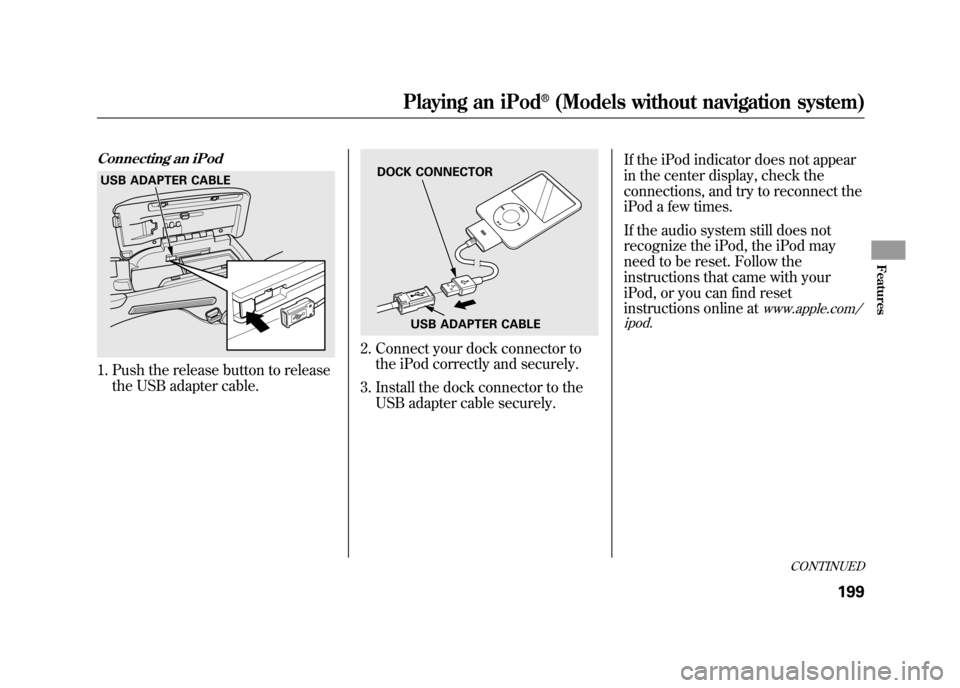
Connecting an iPod1. Push the release button to releasethe USB adapter cable.
2. Connect your dock connector tothe iPod correctly and securely.
3. Install the dock connector to the USB adapter cable securely. If the iPod indicator does not appear
in the center display, check the
connections, and try to reconnect the
iPod a few times.
If the audio system still does not
recognize the iPod, the iPod may
need to be reset. Follow the
instructions that came with your
iPod, or you can find reset
instructions online at
www.apple.com/
ipod.
USB ADAPTER CABLE
DOCK CONNECTOR
USB ADAPTER CABLE
CONTINUED
Playing an iPod
®(Models without navigation system)
199
Features
11/06/16 17:42:51 12 ACURA RDX MMC North America Owner's M 50 31STK650 enu
Page 218 of 518
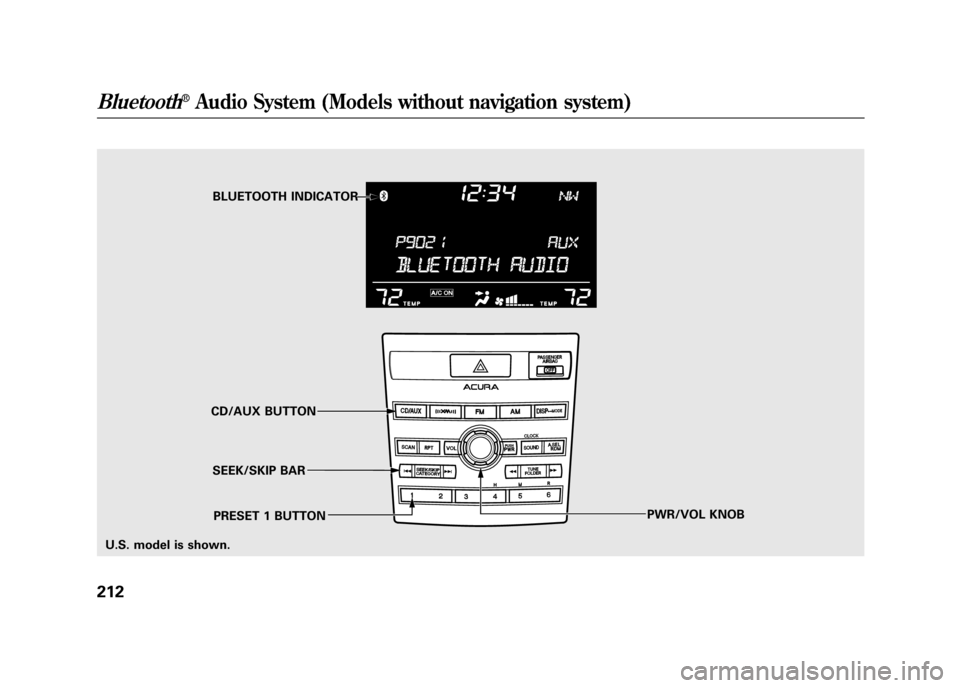
BLUETOOTH INDICATOR
SEEK/SKIP BAR
CD/AUX BUTTON
PWR/VOL KNOB
PRESET 1 BUTTON
U.S. model is shown.
Bluetooth
®Audio System (Models without navigation system)
21211/06/16 17:42:51 12 ACURA RDX MMC North America Owner's M 50 31STK650 enu
Page 220 of 518

In the following conditions, If you
cannot see the
Bluetooth
®indicator
on the center display.
●The phone is not linked to HFL.●The phone is not turned on.●The phone is not in the vehicle.●Another HFL compatible phone,
which is not compatible forBluetooth
®Audio, is already
connected.
If your
Bluetooth
®Audio compatible
phone does not operate as described,
make sure it is an Acura approved
phone. To find out if your phone is
approved, go to
www.acura.com/
handsfreelink
(in Canada,
www.acura.
ca
), or call the HandsFreeLink
®
consumer support at (888) 528-7876.
To skip a filePress the
side of the SEEK/SKIP
bar to skip forward, and press the
side to skip backward to the
beginning of the current file. Push
the
side again to skip to the
previous file.
To pause or resume a fileThe resume/pause mode can stop
playing a file temporarily. Press the
preset 1 button to pause and press it
again to resume a file.
NOTE: The pause function may not
be available on some phone devices.
To switch to HFL modeIf you receive a call when theBluetooth
®Audio is playing, press
the Talk button on the steering
wheel. The display switches to the
HFL mode (see page 309).
After ending the call, press the HFL
Back button to go back to the
Bluetooth
®Audio mode.
If you receive a call while the system
is in the pause mode, the mode will
be canceled and
Bluetooth
®Audio
will continue to play.
Bluetooth
®Audio System (Models without navigation system)
21411/06/16 17:42:51 12 ACURA RDX MMC North America Owner's M 50 31STK650 enu
Page 223 of 518
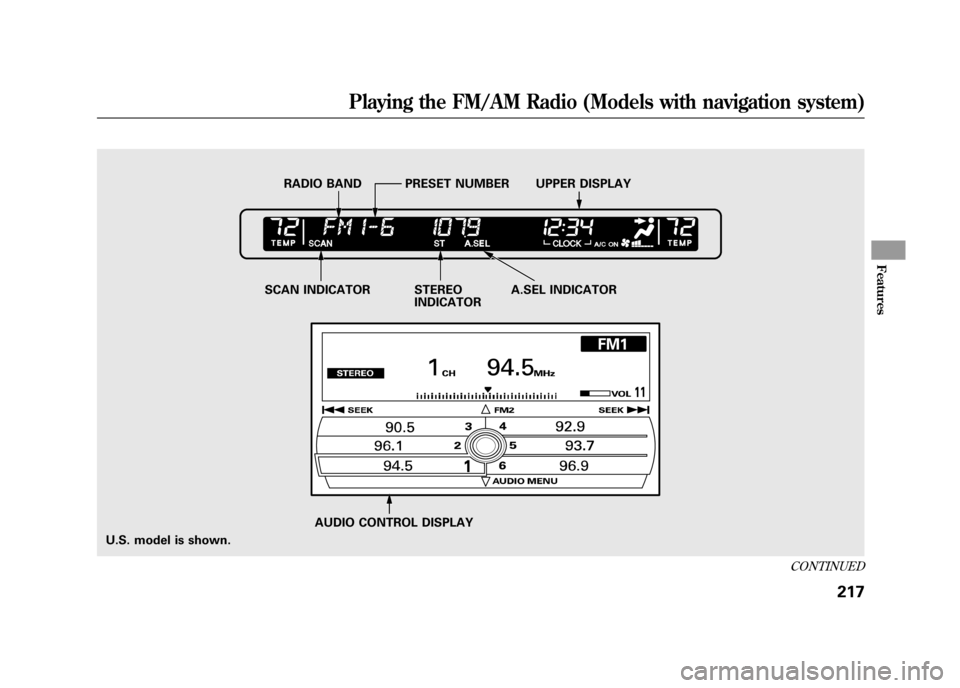
U.S. model is shown.AUDIO CONTROL DISPLAY
SCAN INDICATOR STEREO
INDICATORA.SEL INDICATOR
RADIO BAND PRESET NUMBER UPPER DISPLAY
CONTINUED
Playing the FM/AM Radio (Models with navigation system)
217
Features
11/06/16 17:42:51 12 ACURA RDX MMC North America Owner's M 50 31STK650 enu
Page 224 of 518
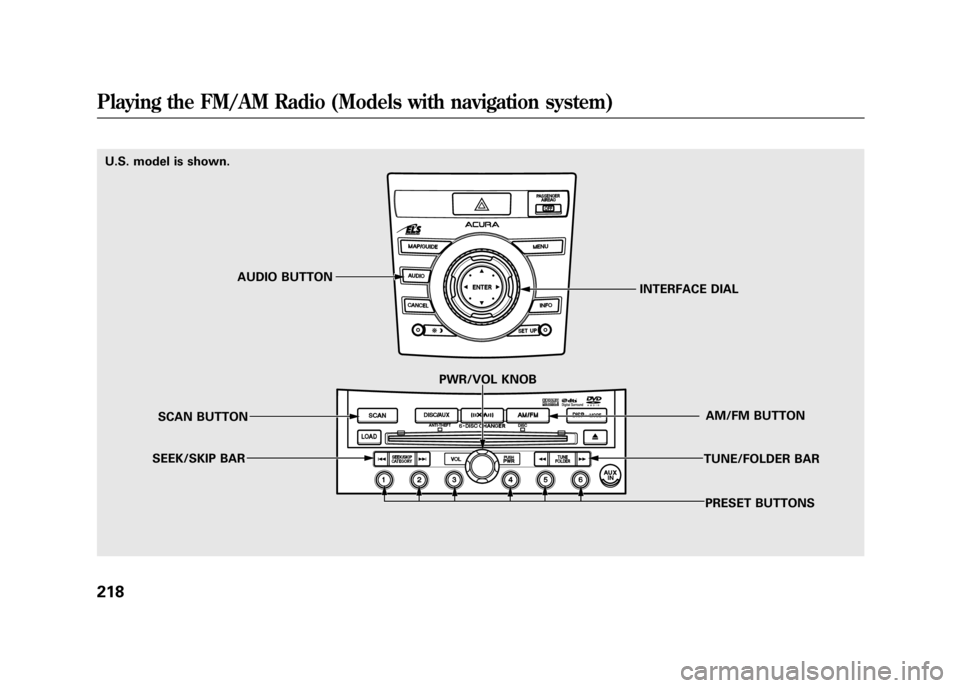
U.S. model is shown.PRESET BUTTONS
TUNE/FOLDER BAR
AM/FM BUTTON
PWR/VOL KNOB
SCAN BUTTON
SEEK/SKIP BAR INTERFACE DIAL
AUDIO BUTTONPlaying the FM/AM Radio (Models with navigation system)21811/06/16 17:42:51 12 ACURA RDX MMC North America Owner's M 50 31STK650 enu