USB Acura RDX 2012 Owner's Manual
[x] Cancel search | Manufacturer: ACURA, Model Year: 2012, Model line: RDX, Model: Acura RDX 2012Pages: 518, PDF Size: 26.43 MB
Page 9 of 518
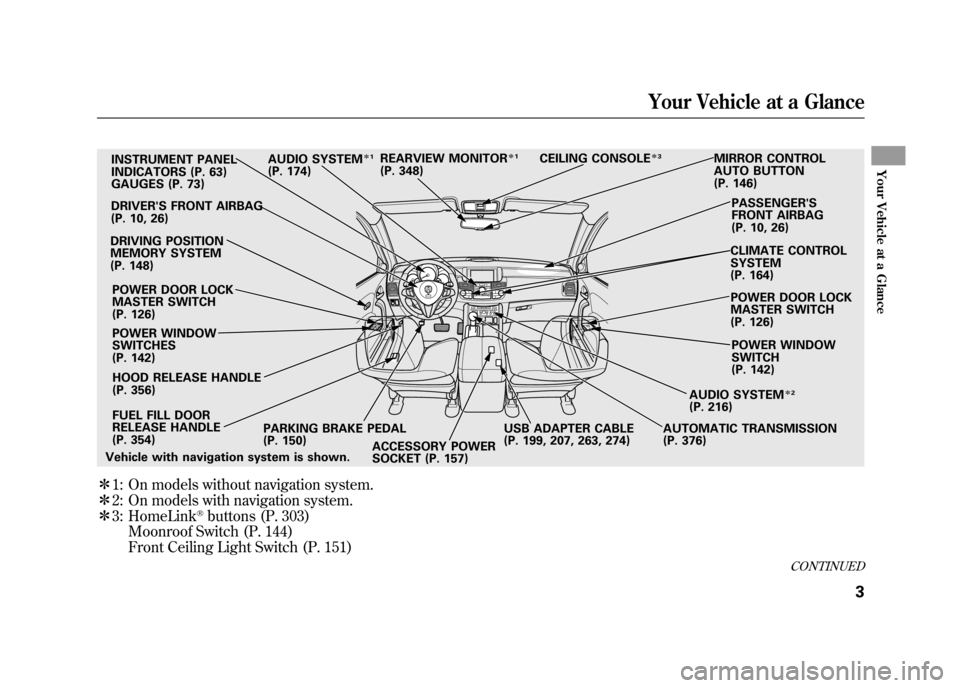
ᤳ1:
ᤳ 2:
ᤳ 3: On models without navigation system.
On models with navigation system.
HomeLink
®buttons (P. 303)
Moonroof Switch (P. 144)
Front Ceiling Light Switch (P. 151)
INSTRUMENT PANEL
INDICATORS (P. 63)
GAUGES (P. 73)
DRIVER'S FRONT AIRBAG
(P. 10, 26)
DRIVING POSITION
MEMORY SYSTEM
(P. 148)
POWER DOOR LOCK
MASTER SWITCH
(P. 126)
POWER WINDOW
SWITCHES
(P. 142)
FUEL FILL DOOR
RELEASE HANDLE
(P. 354) PARKING BRAKE PEDAL
(P. 150) AUTOMATIC TRANSMISSION
(P. 376)
HOOD RELEASE HANDLE
(P. 356) AUDIO SYSTEM
ᤳ
1
(P. 174) CEILING CONSOLE
ᤳ
3
MIRROR CONTROL
AUTO BUTTON
(P. 146)
PASSENGER'S
FRONT AIRBAG
(P. 10, 26)
CLIMATE CONTROL
SYSTEM
(P. 164) POWER DOOR LOCK
MASTER SWITCH
(P. 126)
POWER WINDOW
SWITCH
(P. 142)
AUDIO SYSTEM
ᤳ 2
(P. 216)
ACCESSORY POWER
SOCKET (P. 157)
Vehicle with navigation system is shown. REARVIEW MONITOR
ᤳ
1
(P. 348)
USB ADAPTER CABLE
(P. 199, 207, 263, 274)
CONTINUED
Your Vehicle at a Glance
3
Your Vehicle at a Glance
11/06/16 17:42:51 12 ACURA RDX MMC North America Owner's M 50 31STK650 enu
Page 68 of 518
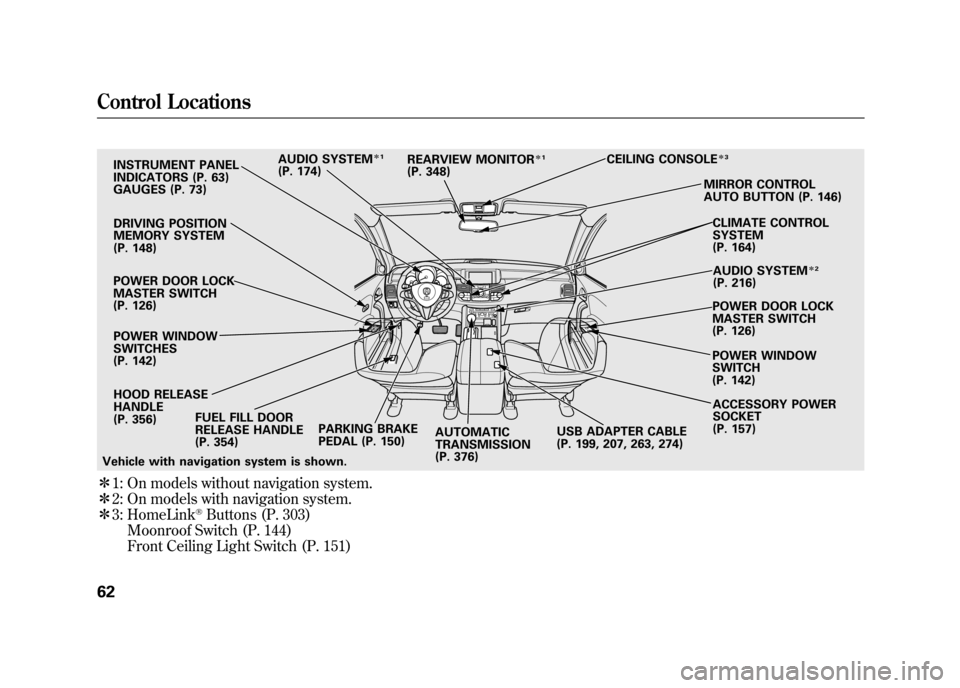
ᤳ1: On models without navigation system.
ᤳ 2: On models with navigation system.
ᤳ 3: HomeLink
®Buttons (P. 303)
Moonroof Switch (P. 144)
Front Ceiling Light Switch (P. 151)
INSTRUMENT PANEL
INDICATORS (P. 63)
GAUGES (P. 73)
DRIVING POSITION
MEMORY SYSTEM
(P. 148)
POWER DOOR LOCK
MASTER SWITCH
(P. 126) POWER WINDOW
SWITCHES
(P. 142)
HOOD RELEASE
HANDLE
(P. 356) FUEL FILL DOOR
RELEASE HANDLE
(P. 354) PARKING BRAKE
PEDAL (P. 150)
AUTOMATIC
TRANSMISSION
(P. 376) ACCESSORY POWER
SOCKET
(P. 157)
AUDIO SYSTEM
ᤳ
1
(P. 174) CEILING CONSOLE
ᤳ
3MIRROR CONTROL
AUTO BUTTON (P. 146)
CLIMATE CONTROL
SYSTEM
(P. 164)AUDIO SYSTEM
ᤳ 2
(P. 216)
POWER DOOR LOCK
MASTER SWITCH
(P. 126)
POWER WINDOW
SWITCH
(P. 142)
REARVIEW MONITOR
ᤳ
1
(P. 348)
Vehicle with navigation system is shown. USB ADAPTER CABLE
(P. 199, 207, 263, 274)
Control Locations6211/06/16 17:42:51 12 ACURA RDX MMC North America Owner's M 50 31STK650 enu
Page 160 of 518
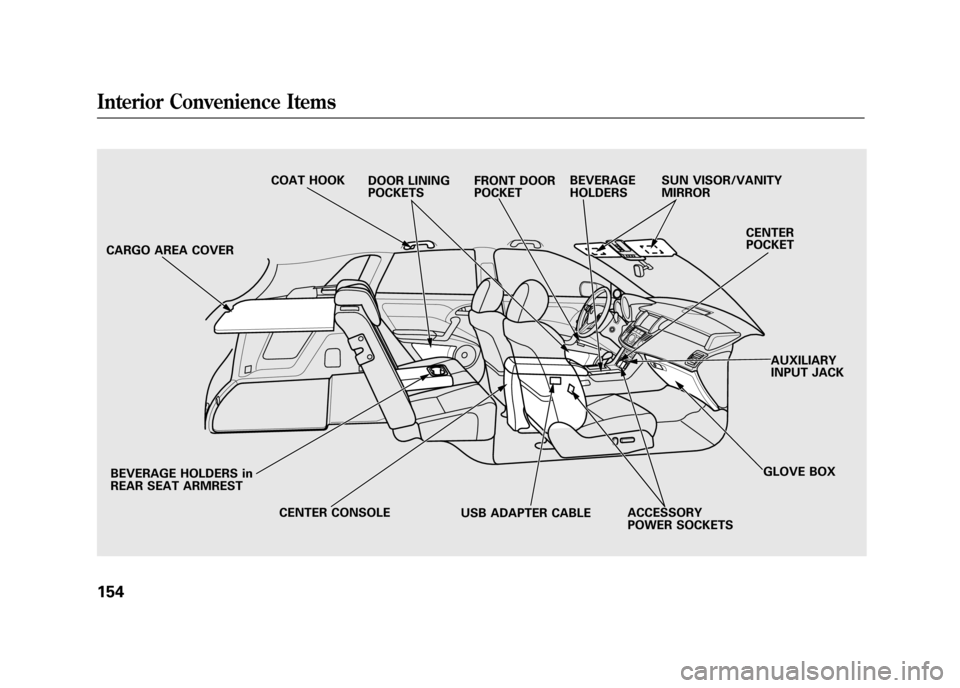
CARGO AREA COVERBEVERAGE HOLDERS in
REAR SEAT ARMREST CENTER CONSOLE ACCESSORY
POWER SOCKETSGLOVE BOX
CENTER
POCKET
SUN VISOR/VANITY
MIRROR
BEVERAGE
HOLDERS
FRONT DOOR
POCKET
DOOR LINING
POCKETS
COAT HOOK
AUXILIARY
INPUT JACK
USB ADAPTER CABLEInterior Convenience Items15411/06/16 17:42:51 12 ACURA RDX MMC North America Owner's M 50 31STK650 enu
Page 169 of 518

The climate control system in your vehicle
provides a comfortable driving
environment in all weather conditions.
The standard audio system has many
features. This section describes those
features and how to use them.
Your vehicle has an anti-theft audio system
that requires a code number to enable it.
The security system helps to discourage
vandalism and theft of your vehicle.On models with navigation systemThe climate control system and the audiosystem have a voice control feature. Referto the navigation system manual for more
information.Climate Control System
....................
164
Dual Temperature Control
.............
169
Climate Control Sensors
................
171
Audio System
..................................
172
Playing the FM/AM Radio (Models without navigation system)
........
174
To Play the Radio
.........................
174
Adjusting the Sound
.....................
177
Playing the XM
®Radio (Models
without navigation system)
............
179
Playing Discs (Models without navigation system)
.......................
185 Disc Changer Error Messages
(Models without navigationsystem)
..................................
195
Playing an iPod
®(Models without
navigation system)
.......................
197
iPod
®Error Messages (Models
without navigation system)
............
203
Playing a USB Flash Memory Device (Models without navigationsystem)
..................................
204
USB Flash Memory Device Error Messages (Models without
navigation system)
...................
211
Bluetooth
®Audio System (Models
without navigation system)
............
212
Audio System (Models with navigation system)
..................................
216
Interface Dial
..............................
216
Playing the FM/AM Radio (Models
with navigation system)
.............
217
Adjusting the Sound
.....................
224
Playing the XM
®Radio (Models with
navigation system)
.......................
228
Playing Discs (Models with navigation system)
......................................
239
Disc Changer Error Messages
(Models with navigationsystem)
..................................
255 Protecting Your Discs
.......................
257
Playing an iPod
®(Models with
navigation system)
.......................
260
iPod
®Error Messages (Models with
navigation system)
.......................
269
Playing a USB Flash Memory Device (Models with navigation
system)
..................................
270
USB Flash Memory Device Error Messages (Models with navigation
system)
..................................
279
Bluetooth
®Audio System (Models with
navigation system)
.......................
280
FM/AM Radio Reception
..................
287
Remote Audio Controls
.....................
289
Auxiliary Input Jack
..........................
291
Radio Theft Protection
......................
291
Setting the Clock
.............................
293
Security System
...............................
294
Compass
........................................
295
Compass Operation
....................
295
Cruise Control
.................................
300
HomeLink
®Universal Transceiver
......
303
Bluetooth
®HandsFreeLink
®..............
306
AcuraLink
®(U.S. models only)
...........
332
Rearview Mirror with Rearview
Camera Display
...........................
348
Features
163
Features
11/06/16 17:42:51 12 ACURA RDX MMC North America Owner's M 50 31STK650 enu
Page 203 of 518
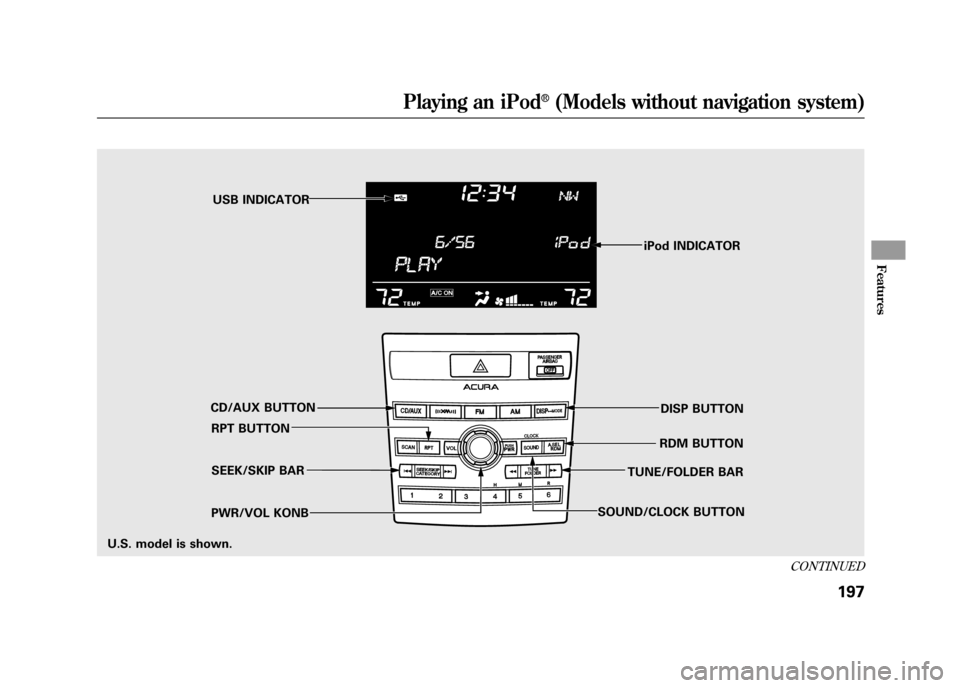
iPod INDICATOR
RPT BUTTON SEEK/SKIP BAR
PWR/VOL KONB RDM BUTTON
CD/AUX BUTTON USB INDICATOR
DISP BUTTON
SOUND/CLOCK BUTTON TUNE/FOLDER BAR
U.S. model is shown.
CONTINUED
Playing an iPod
®(Models without navigation system)
197
Features
11/06/16 17:42:51 12 ACURA RDX MMC North America Owner's M 50 31STK650 enu
Page 204 of 518

To Play an iPod
®
This audio system can operate the
audio files on the iPod
®with the
same controls used for the disc
player. To play an iPod, connect it to
the USB adapter cable in the console
compartment by using your dock
connector, then press the CD/AUX
button. The ignition switch must be
in the ACCESSORY (I) or ON (II)
position. The iPod will also be
charged with the ignition switch in
these positions.
The audio system reads and plays
sound files to be playable on the
iPod. The system cannot operate an
iPod as a mass storage device. The
system will only play songs stored on
the iPod with iTunes.
iPod and iTunes are registered
trademarks owned by Apple Inc. iPod models confirmed to be
compatible with your audio system
using the USB adapter cable are:
Model
iPod classic 80/160 G
iPod classic 120 G
iPod classic 160 G (launch in 2009)
iPod (5th generation)
iPod nano
iPod touch
This system may not work with all
software versions of these devices. NOTE:
●Do not connect your iPod using a
hub.●Do not keep the iPod in the
vehicle. Direct sunlight and high
heat will damage it.●Do not use an extension cable
between the USB adapter cable
equipped with your vehicle and
your dock connector.●We recommend backing up your
data before playing it.●Some devices cannot be powered
or charged via the USB adapter, if
this is the case use the accessory
adapter to supply power to your
device.
Playing an iPod
®(Models without navigation system)
19811/06/16 17:42:51 12 ACURA RDX MMC North America Owner's M 50 31STK650 enu
Page 205 of 518
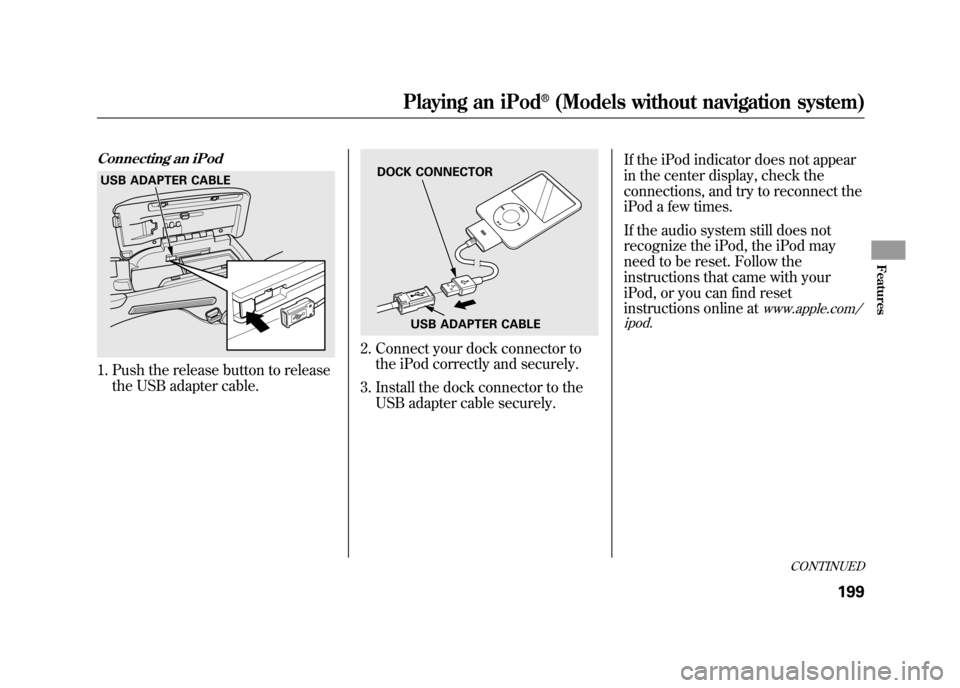
Connecting an iPod1. Push the release button to releasethe USB adapter cable.
2. Connect your dock connector tothe iPod correctly and securely.
3. Install the dock connector to the USB adapter cable securely. If the iPod indicator does not appear
in the center display, check the
connections, and try to reconnect the
iPod a few times.
If the audio system still does not
recognize the iPod, the iPod may
need to be reset. Follow the
instructions that came with your
iPod, or you can find reset
instructions online at
www.apple.com/
ipod.
USB ADAPTER CABLE
DOCK CONNECTOR
USB ADAPTER CABLE
CONTINUED
Playing an iPod
®(Models without navigation system)
199
Features
11/06/16 17:42:51 12 ACURA RDX MMC North America Owner's M 50 31STK650 enu
Page 208 of 518

To Stop Playing Your iPod
To play the radio, press the AM/FM,
or
button. Press the CD/AUX
button to switch between disc (if a
disc is loaded),
Bluetooth
®Audio,
and the iPod.
Disconnecting an iPodYou can disconnect the iPod at any
time when you see the ‘‘OK to
disconnect ’’message
ᤳin the iPod
display. Always make sure you see
the ‘‘OK to disconnect ’’message in
the iPod display before you
disconnect it. Make sure to follow
the iPod's instructions on how to
disconnect the dock connector from
the USB adapter cable.
ᤳ : The displayed message may
vary on the model or version.
On some models, there is no
message to disconnect. If you reconnect the same iPod, the
system may begin playing where it
left off, depending on what mode the
iPod is in when it is reconnected.
iPod Error Messages
For information, see page 203.
Playing an iPod
®(Models without navigation system)
20211/06/16 17:42:51 12 ACURA RDX MMC North America Owner's M 50 31STK650 enu
Page 209 of 518

If you see an error message in the
center display while playing an iPod,
find the solution in the chart to the
right. If you cannot clear the error
message, take your vehicle to your
dealer.Error Message
Cause Solution
USB ERRORUSB ROM error There is a problem with the USB adapter
unit.
BAD USB DEVICE PLEASE CHECK OWNERSMANUAL Abnormal power
source Appears when the overcurrent protection
feature of the system stops supplying
power to USB because an incompatible
device is connected. Disconnect the
device. Then, turn the audio system off,
and turn it on again. Do not reconnect the
device that caused the error.
NO SONG No files in iPod Appears when the iPod is empty. Store
some files in the iPod.
UNSUPPORTED VER. Use of unsupported
iPod Appears when an unsupported iPod is
connected. See page 198 for specification
information on iPods. If it appears when a
supported iPod is connected, update the
iPod software to the newer version.
CONNECT RETRY Recognition failure of
iPod Appears when the system does not
acknowledge the iPod. Reconnect the
iPod.
iPod
®Error Messages (Models without navigation system)
203
Features
11/06/16 17:42:51 12 ACURA RDX MMC North America Owner's M 50 31STK650 enu
Page 210 of 518
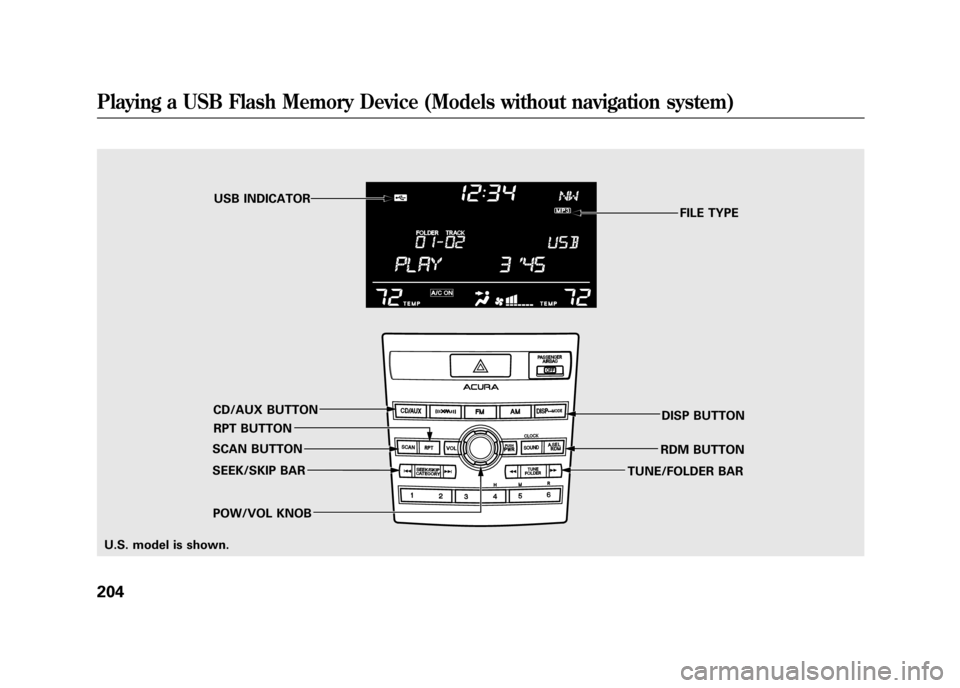
FILE TYPE
POW/VOL KNOB RPT BUTTONUSB INDICATOR
SEEK/SKIP BAR RDM BUTTON
CD/AUX BUTTON
DISP BUTTON
TUNE/FOLDER BAR
SCAN BUTTON
U.S. model is shown.
Playing a USB Flash Memory Device (Models without navigation system)20411/06/16 17:42:51 12 ACURA RDX MMC North America Owner's M 50 31STK650 enu