fuel Acura RDX 2014 User Guide
[x] Cancel search | Manufacturer: ACURA, Model Year: 2014, Model line: RDX, Model: Acura RDX 2014Pages: 363, PDF Size: 13.7 MB
Page 87 of 363
uuGauges and Multi-Information Display uMulti-Information Display
86
Instrument Panel
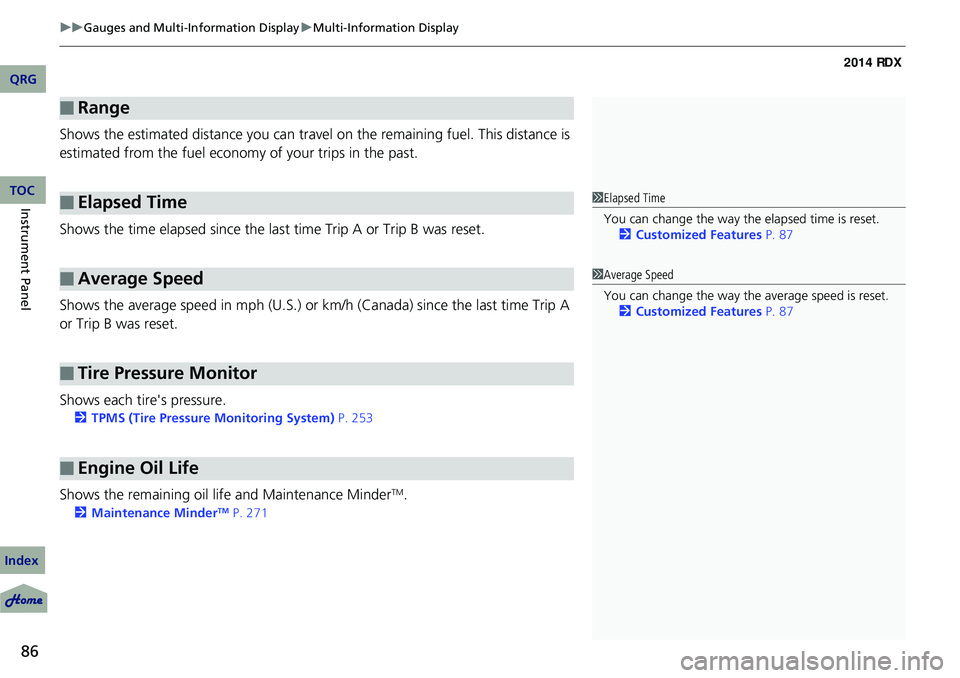
Shows the estimated distance you can travel on the remaining fuel. This distance is
estimated from the fuel econom y of your trips in the past.
Shows the time elapsed since the last time Trip A or Trip B was reset.
Shows the average speed in mph (U.S.) or km /h (Canada) since the last time Trip A
or Trip B was reset.
Shows each tire's pressure.
2 TPMS (Tire Pressure Monitoring System) P. 253
Shows the remaining oil life and Maintenance MinderTM.
2Maintenance MinderTM P. 271
■Range
■Elapsed Time
■Average Speed
■Tire Pressure Monitor
■Engine Oil Life
1Elapsed Time
You can change the way th e elapsed time is reset.
2 Customized Features P. 87
1Average Speed
You can change the way the average speed is reset.
2 Customized Features P. 87
QRG
Index
TOC
Page 91 of 363
90
uuGauges and Multi-Information Display uMulti-Information Display
Instrument Panel
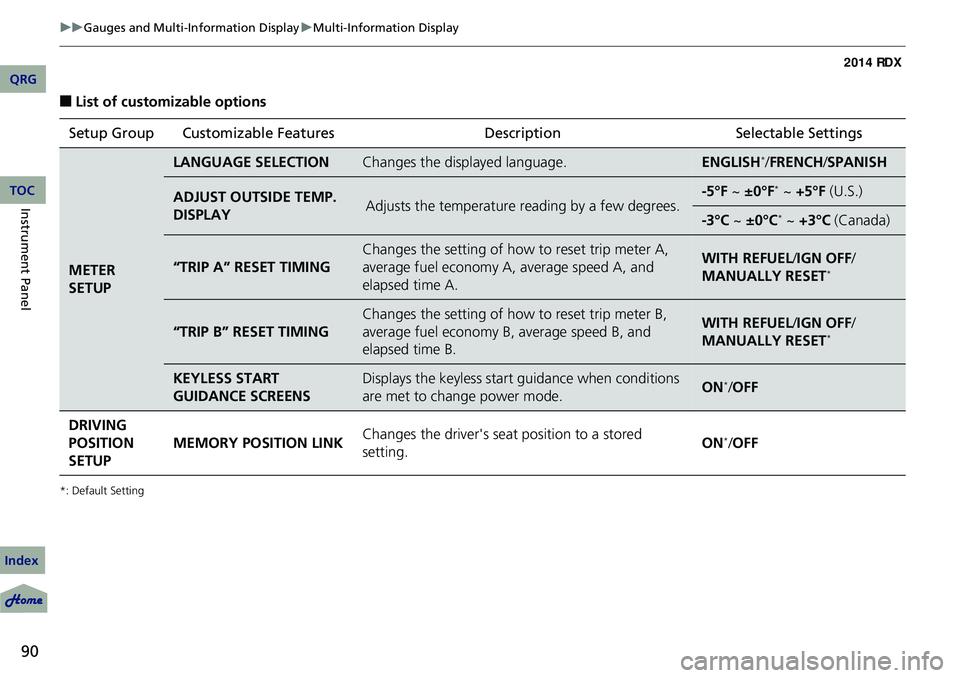
■List of customizable options
*: Default Setting
Setup Group Customizable Features DescriptionSelectable Settings
METER
SETUP
LANGUAGE SELECTIONChanges the displayed language.ENGLISH*/FRENCH /SPANISH
ADJUST OUTSIDE TEMP.
DISPLAYAdjusts the temperature reading by a few degrees.-5°F ~ ±0°F* ~ +5°F (U.S.)
-3°C ~ ±0°C* ~ +3°C (Canada)
“TRIP A” RESET TIMING
Changes the setting of how to reset trip meter A,
average fuel economy A, average speed A, and
elapsed time A.WITH REFUEL/ IGN OFF/
MANUALLY RESET*
“TRIP B” RESET TIMING
Changes the setting of how to reset trip meter B,
average fuel economy B, average speed B, and
elapsed time B.WITH REFUEL/ IGN OFF/
MANUALLY RESET*
KEYLESS START
GUIDANCE SCREENSDisplays the keyless start guidance when conditions
are met to change power mode.ON*/ OFF
DRIVING
POSITION
SETUP MEMORY POSITION LINK
Changes the driver's seat position to a stored
setting. ON
*/
OFF
QRG
Index
TOC
Page 94 of 363

93
uuGauges and Multi-Information Display uMulti-Information Display
Continued
■Example of customization settings
The steps for changing the “TRIP A” RESET TIMING setting to WITH REFUEL are
shown below. The default setting for “TRIP A” RESET TIMING is MANUALLY
RESET .
1.Press / button to select
CUSTOMIZE SETTINGS , then press the
SEL/RESET button.
2. Press the / button until METER
SETUP appears on the display.
3. Press the SEL/RESET button.
u LANGUAGE SELECTION appears first in
the display.
QRG
Index
Instrument PanelTOC
Page 95 of 363

94
uuGauges and Multi-Information Display uMulti-Information Display
Instrument Panel
4. Press the / button until “TRIP A”
RESET TIMING appears on the display,
then press the SEL/RESET button.
u The display switches to the
customization setup screen, where you
can select WITH REFUEL, IGN OFF,
MANUALLY RESET , or EXIT .
5. Press the / button and select WITH
REFUEL , then press the SEL/RESET button.
u The WITH REFUEL setup screen appears,
then the display returns to the
customization menu screen.
6. Press the / button until EXIT
appears on the display, then press the SEL/
RESET button.
7. Repeat Step 6 until you return to the
normal screen.
QRG
Index
TOC
Page 228 of 363
227
Driving
This chapter discusses driving, refueling, and information on items such as accessories.
Before Driving
Driving Preparation .......................... 228
Maximum Load Limit........................ 231
Towing a Trailer Towing Preparation .......................... 233
Driving Safely with a Trailer .............. 236
Towing Your Vehicle ........................ 237
Off-Highway Driving Guidelines General Information ......................... 238
Important Safety Precautions............ 238
Avoiding Trouble ............................. 239
When Driving Starting the Engine .......................... 240 Precautions While Driving ................
242
Automatic Transmission ................... 243
Shifting ............................................ 244
Cruise Control ................................. 248
VSA® (Vehicle Stability Assist), aka ESC
(Electronic Stability Control), System .. 251
AWD (All-Wheel Drive) with Intelligent Control
System*..................................................... 253TPMS (Tire Pressure Monitoring System) ... 253Tire Pressure Monitoring System (TPMS) -
Required Federal Explanation ......... 255
Braking Brake System ................................... 257ABS (Anti-lock Brake System) ...........
259
Brake Assist System ......................... 260
Parking Your Vehicle When Stopped ................................ 261
Multi-View Rear Camera .................. 262
Refueling Fuel Information .............................. 263
How to Refuel ................................. 264
Fuel Economy .................................... 265
Improving Fuel Economy .................. 265
Accessories and Modifications Accessories ...................................... 266
Modifications................................... 266
* Not available on all models
QRG
Index2014 RDX
Page 241 of 363
240
Driving
When Driving
Starting the Engine
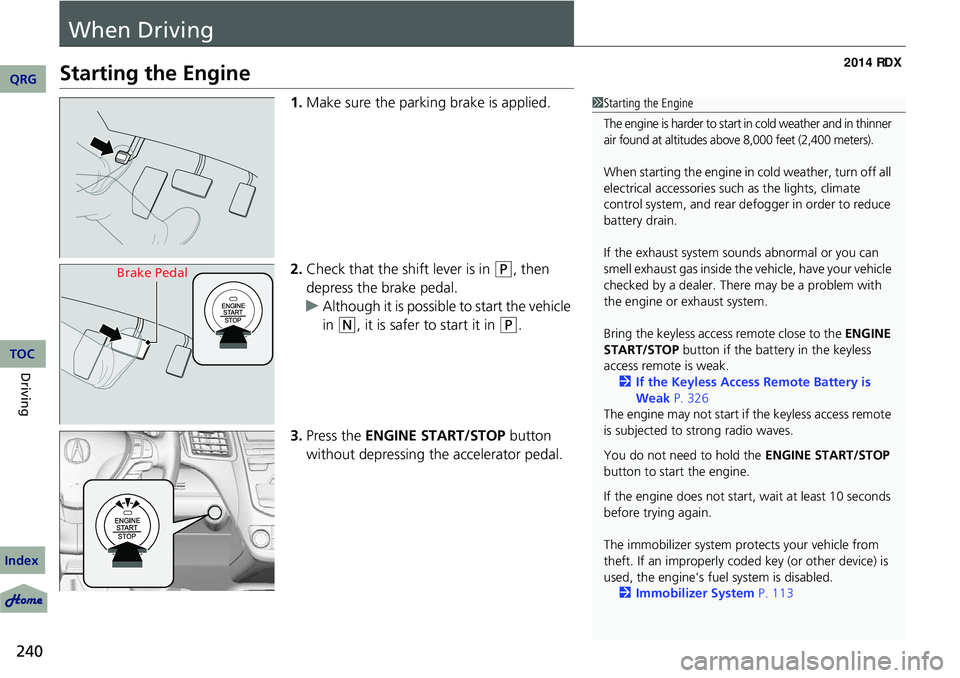
1.Make sure the parking brake is applied.
2. Check that the shift lever is in
(P, then
depress the brake pedal.
u Although it is possible to start the vehicle
in
(N, it is safer to start it in (P.
3. Press the ENGINE START/STOP button
without depressing the accelerator pedal.
1 Starting the Engine
The engine is harder to start in cold weather and in thinner
air found at altitudes above 8,000 feet (2,400 meters).
When starting the engine in cold weather, turn off all
electrical accessories such as the lights, climate
control system, and rear de fogger in order to reduce
battery drain.
If the exhaust system sounds abnormal or you can
smell exhaust gas inside the vehicle, have your vehicle
checked by a dealer. There may be a problem with
the engine or exhaust system.
Bring the keyless access remote close to the ENGINE
START/STOP button if the batte ry in the keyless
access remote is weak. 2 If the Keyless Access Remote Battery is
Weak P. 326
The engine may not start if the keyless access remote
is subjected to strong radio waves.
You do not need to hold the ENGINE START/STOP
button to start the engine.
If the engine does not start, wait at least 10 seconds
before trying again.
The immobilizer system pr otects your vehicle from
theft. If an improperly code d key (or other device) is
used, the engine's fuel system is disabled.
2 Immobilizer System P. 113
Brake Pedal
QRG
Index
TOC
Page 246 of 363
Continued245
uuWhen Driving uShifting
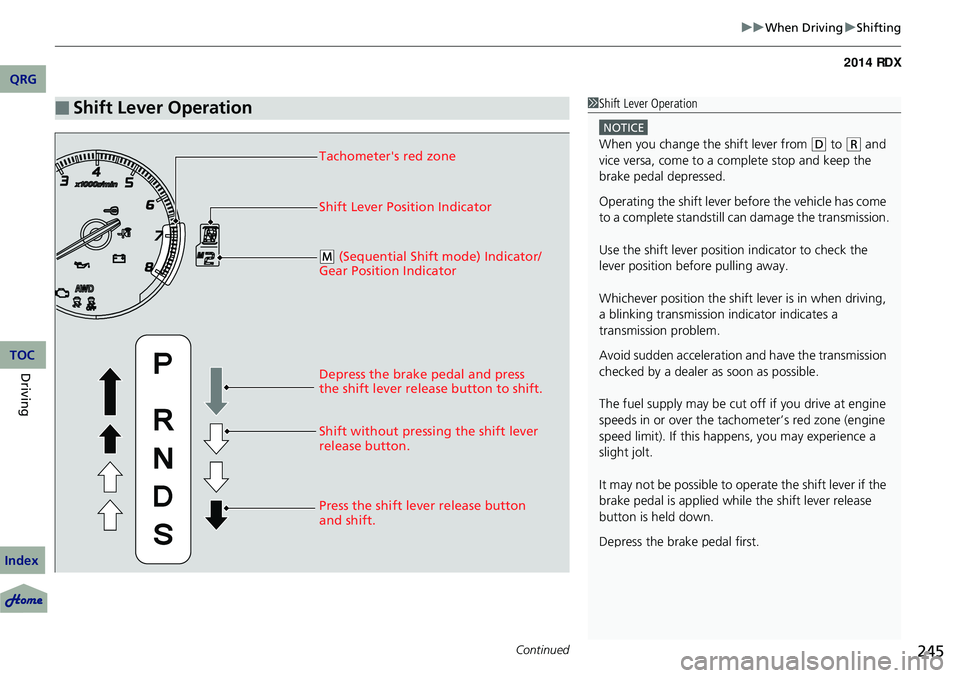
■Shift Lever Operation1Shift Lever Operation
NOTICE
When you change the shift lever from (D to ( R and
vice versa, come to a complete stop and keep the
brake pedal depressed.
Operating the shift lever be fore the vehicle has come
to a complete standstill can damage the transmission.
Use the shift lever position indicator to check the
lever position befo re pulling away.
Whichever position the shift lever is in when driving,
a blinking transmission indicator indicates a
transmission problem.
Avoid sudden acceleration and have the transmission
checked by a dealer as soon as possible.
The fuel supply may be cut of f if you drive at engine
speeds in or over the tac hometer’s red zone (engine
speed limit). If this happe ns, you may experience a
slight jolt.
It may not be possible to operate the shift lever if the
brake pedal is applied while the shift lever release
button is held down.
Depress the brake pedal first.Tachometer's red zone
Shift Lever Position Indicator
Depress the brake pedal and press
the shift lever release button to shift.
Shift without pressing the shift lever
release button.
Press the shift lever release button
and shift.
( M (Sequential Shift mode) Indicator/
Gear Position Indicator
QRG
Index
DrivingTOC
Page 248 of 363

247
uuWhen Driving uShifting
■Second gear lock mode
If you pull the
(+ paddle shifter while stopped or dr iving at 6 mph (10 km/h) or less,
the gear position will be locked in 2nd gear. This makes it easier to pull away on
slippery surfaces such as snow covered roads.
To cancel the 2nd gear lock mode, pull the paddle shifter, or move the shift lever
from
(S to ( D.
■Sequential Shift Mode Operation
-
1 Sequential Shift Mode Operation
Each paddle shift operation makes a single gear
change.
To change gears continuously, release the paddle
shifter before pulling it again for the next gear.
Recommended Shift Points
Use this table as a guideline for efficient fuel
economy and effectiv e emission control.
The gear position indicato r blinks when you cannot
shift up or down. It indicate s that your vehicle speed
is not in its allowabl e gear shifting range.
Slightly accelerate to shift up and decelerate to shift
down while the indi cator is blinking.
Shift Up Normal Acceleration
1st to 2nd15 mph (24 km/h)
2nd to 3rd 25 mph (40 km/h)
3rd to 4th40 mph (64 km/h)
4th to 5th 45 mph (72 km/h)
5th to 6th50 mph (80 km/h)
Paddle Shifter
(Shift down)
Downshifting when
pulling the paddle
shifter.
(Changes to a lower
gear.)
-Upshifting when pulling
the ( + paddle shifter.
(Changes to a higher
gear.)
-(
+
Paddle Shifter
(Shift up)
QRG
Index
DrivingTOC
Page 256 of 363
255
uuWhen Driving uTire Pressure Monitoring System (TPMS) - Required Federal Explanation
Continued
Tire Pressure Monitoring System
(TPMS) - Required Federal ExplanationQRG
Index
DrivingTOC
Each tire, including the spare (if provided), should be checked monthly when
cold and inflated to the inflation pressure recommended by the vehicle
manufacturer on the vehicle placard or tire inflation pressure label.
(If your vehicle has tires of a different size than the size indicated on the vehicle
placard or tire inflation pressure label, you should determine the proper tire
inflat ion pressure for those tires.)
As an added safety feature, your vehicle has been equipped
with a tire pressure monitoring system (TPMS) that
il luminates a low tire pressure telltale when one or more of
your tires is significantly under-inflated.
Accordingly, when the low tire pressure telltale illuminates, you should stop
and check your tires as soon as possible, and inflate them to the proper
pressure.
Driving on a significantly under-inflated tire causes the tire to overheat and can
lead to tire failure. Under-inflation also reduces fuel efficiency and tire tread life,
and may affect the vehicle's handling and stopping ability.
Page 264 of 363
263
Refueling
Fuel Information
■Fuel recommendation
Use of lower octane gasoline can cause occasional metallic knocking noise in the
engine and will result in decreased engine performance.
Use of gasoline with a pump octane less than 87 can lead to engine damage.
■Top tier detergent gasoline
Because the level of detergency and additi ves in gasoline vary in the market, Acura
endorses the use of “TOP TIER Detergent Gasoline” where available to help
maintain the performance and reliability of your vehicle. TOP TIER Detergent
Gasoline meets a new gasoline standard jointly established by leading automotive
manufacturers to meet the needs of today’s advanced engines.
Qualifying gasoline retailers will, in most cases, identify their gasoline as having met
“TOP TIER Detergent Gasoline” standards at the retail location. This fuel is
guaranteed to contain the proper level of de tergent additives and be free of metallic
additives. The proper level of detergent additives, and absence of harmful metallic
additives in gasoline, help avoid build-up of deposits in your engine and emission
control system.
For further important fuel-related informati on for your vehicle, or on information on
gasoline that does not contain MMT, visit Acura Owners at owners.acura.com In
Canada, visit www.acura.ca for additional informati on on gasoline. For more
information on top tier gasoline, visit www.toptiergas.com.
■Fuel tank capacity: 16 US gal (60 liters)
Unleaded premium gasoline, pump octane number 91 or higher
1Fuel Information
NOTICE
We recommend quality ga soline containing
detergent additives that help prevent fuel system and
engine deposits. In addition, in order to maintain
good performance, fuel economy, and emissions
control, we strongly reco mmend the use of gasoline
that does NOT contain harmful manganese-based
fuel additives such as MMT, if such gasoline is
available.
Use of gasoline with these additives may adversely
affect performance, a nd cause the malfunction
indicator lamp on your inst rument panel to come on.
If this happens, contact a dealer for service. Some
gasoline today is blended with oxygenates such as
ethanol. Your vehicle is designed to operate on
oxygenated gasoline containing up to 15% ethanol
by volume. Do not use gaso line containing methanol.
If you notice any undesira ble operating symptoms, try
another service station or sw itch to another brand of
gasoline.
QRG
Index
DrivingTOC