audio Acura RDX 2014 Owner's Guide
[x] Cancel search | Manufacturer: ACURA, Model Year: 2014, Model line: RDX, Model: Acura RDX 2014Pages: 363, PDF Size: 13.7 MB
Page 173 of 363

uuAudio System Basic Operation uPlaying a CD
172
Features
1. Press to switch the display to a folder list.
2. Rotate to select a folder.
3. Press to change the display to a list of
files in that folder.
4. Rotate to select a file, then press .
■How to Select a File from a Folder with the Selector
Knob (MP3/WMA)1Playing a CD
NOTICE
Do not use CDs with adhesive labels. The label can
cause the CD to jam in the unit.
WMA files protected by di gital rights management
(DRM) cannot be played.
The audio system displays Unplayable File, then
skips to the next file.
Text data appears on the di splay under the following
circumstances:
•When you select a new folder, file, or track.
•When you change the audio mode to CD.
•When you insert a CD.
If you eject the CD but do not remove it from the slot,
the system reloads the CD automatically after several
seconds.
Folder Selection
Track Selection
QRG
Index
TOC
Page 174 of 363

173
uuAudio System Basic Operation uPlaying a CD
You can select repeat and random modes when playing a track or file.
1.Press the SETUP button.
2. Rotate to select Play Mode, then
3. Rotate to select a mode, then press .
■To turn off a play mode
1. Press the SETUP button.
2. Rotate to select Play Mode, then press .
3. Rotate to select Normal Play, then press .
■How to Select a Play Mode1How to Select a Play Mode
Press the BACK button to go back to the previous
display, and press the SETUP button to cancel this
setting mode.
Play Mode Menu Items
Normal Play
Repeat One Track: Repeats the current track/file(s).
Repeat One Folder (MP3/WMA/AAC): Repeats all
files in the current folder.
Random in Folder (MP3/WMA/AAC): Plays all files
in the current folder in random order.
Random All : Plays all tracks/files in random order.
Play Mode
Items
QRG
Index
FeaturesTOC
press .
Page 175 of 363
174
uuAudio System Basic Operation uPlaying an iPod ®
Features
Playing an iPod ®
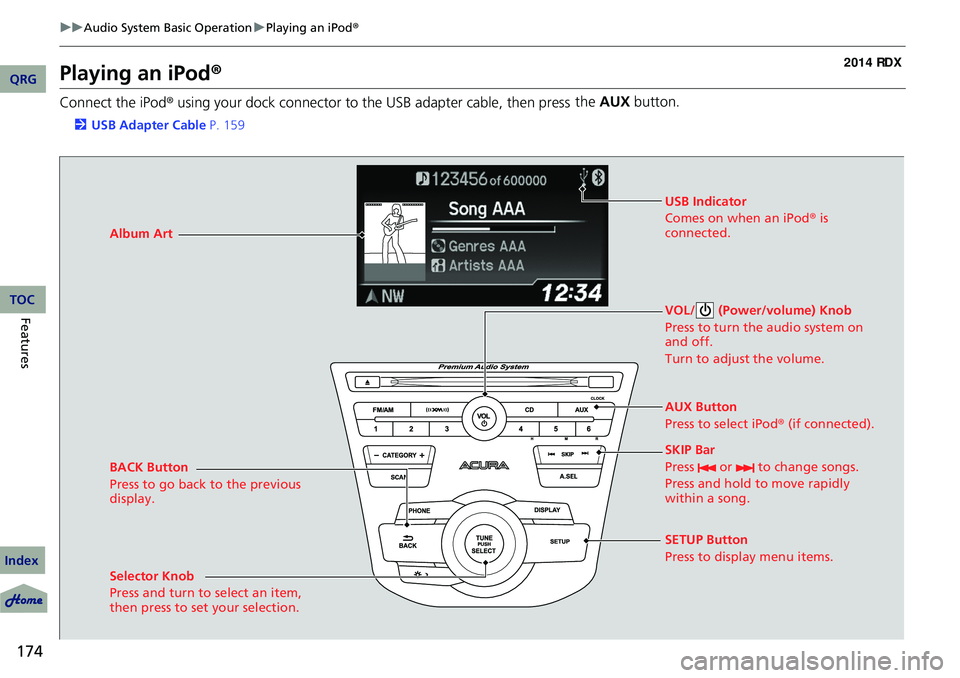
Connect the iPod ® using your dock connector to the USB adapter cable, then press the
AUX button.
2USB Adapter Cable P. 159
BACK Button
Press to go back to the previous
display. VOL/ (Power/volume) Knob
Press to turn the audio system on
and off.
Turn to adjust the volume.
SKIP Bar
Press or to change songs.
Press and hold to move rapidly
within a song.
SETUP Button
Press to display menu items.
Selector Knob
Press and turn to select an item,
then press to set your selection. AUX Button
Press to select iPod
® (if connected).
Album Art
USB Indicator
Comes on when an iPod
® is
connected.
QRG
Index
TOC
Page 176 of 363
Continued175
uuAudio System Basic Operation uPlaying an iPod ®
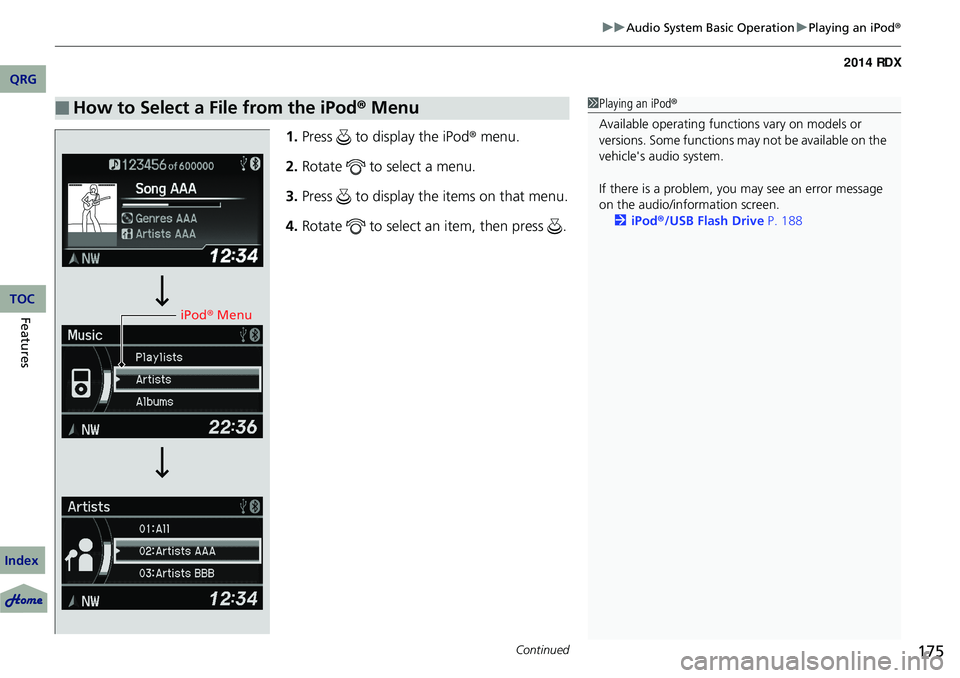
1.Press to display the iPod ® menu.
2. Rotate to select a menu.
3. Press to display the items on that menu.
4. Rotate to select an item, then press .
■How to Select a File from the iPod ® Menu1 Playing an iPod®
Available operating functi ons vary on models or
versions. Some functions ma y not be available on the
vehicle's audio system.
If there is a problem, you may see an error message
on the audio/information screen. 2 iPod ®/USB Flash Drive P. 188
iPod® Menu
QRG
Index
FeaturesTOC
Page 177 of 363

uuAudio System Basic Operation u
176
Features
You can select repeat and shuffle modes when playing a file.
1.Press the SETUP button.
2. Rotate to select Play Mode, then
3. Rotate to select a mode, then press .
■To turn off a play mode
1. Press the SETUP button.
2. Rotate to select Play Mode, then press .
3. Rotate to select Normal Play, then press .
■How to Select a Play Mode1How to Select a Play Mode
Play Mode Menu Items
Normal Play
Repeat Off : Turns off the repeat mode.
Repeat One Track : Repeats the current track.
Shuffle Off : Turns off the shuffle mode.
Shuffle : Plays all available files in a selected list
(playlists, artists, al bums, songs, genres, or
composers) in random order.
Shuffle Albums : Plays all available albums in a
selected list (playlists, ar tists, albums, songs, genres,
or composers) in random order.
Play Mode
Items
QRG
Index
TOC
press .
Page 178 of 363
177
uuAudio System Basic Operation uPlaying Pandora ®
Continued
Playing Pandora ®
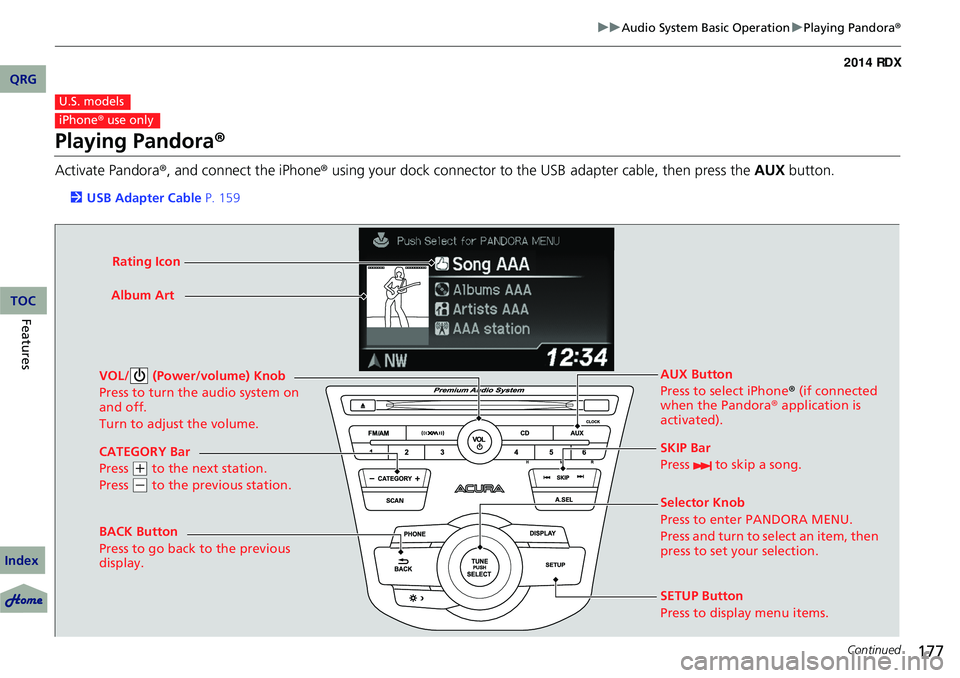
Activate Pandora®, and connect the iPhone ® using your dock connector to the USB
adapter cable, then press the AUX button.
2USB Adapter Cable P. 159
U.S. models
iPhone® use only
CATEGORY Bar
Press
(+ to the next station.
Press
( - to the previous station.
VOL/ (Power/volume) Knob
Press to turn the audio system on
and off.
Turn to adjust the volume.
SKIP Bar
Press to skip a song.
SETUP Button
Press to display menu items. Selector Knob
Press to enter PANDORA MENU.
Press and turn to select an item, then
press to set your selection. AUX Button
Press to select iPhone
® (if connected
when the Pandora ® application is
activated).
Album Art
Rating Icon
BACK Button
Press to go back to the previous
display.
QRG
Index
FeaturesTOC
Page 179 of 363
uuAudio System Basic Operation uPlaying Pandora ®
178
Features
You can operate some of the Pandora menu items from your vehicle’s audio system.
The available items are:
• Station List (QuickMix is also available)
• Like
• Dislike
• Resume/Pause
• SKIP
• Bookmark this song
• Bookmark this artist
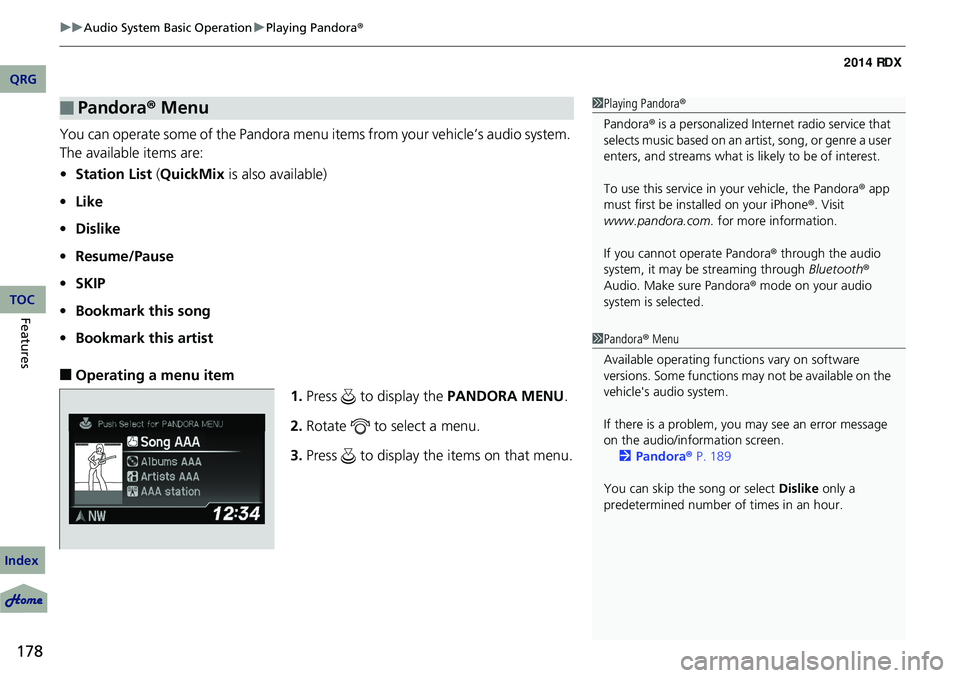
■Operating a menu item
1.Press to display the PANDORA MENU.
2. Rotate to select a menu.
3. Press to display the items on that menu.
■Pandora® Menu1Playing Pandora ®
Pandora ® is a personalized Intern et radio service that
selects music based on an artist, song, or genre a user
enters, and streams what is likely to be of interest.
To use this service in your vehicle, the Pandora ® app
must first be installed on your iPhone ®. Visit
www.pandora.com. for more information.
If you cannot operate Pandora ® through the audio
system, it may be streaming through Bluetooth®
Audio. Make sure Pandora ® mode on your audio
system is selected.
1 Pandora ® Menu
Available operating functi ons vary on software
versions. Some functions ma y not be available on the
vehicle's audio system.
If there is a problem, you may see an error message
on the audio/information screen. 2 Pandora ® P. 189
You can skip the song or select Dislike only a
predetermined number of times in an hour.
QRG
Index
TOC
Page 180 of 363
179
uuAudio System Basic Operation uPlaying a USB Flash Drive
Continued
Playing a USB Flash Drive
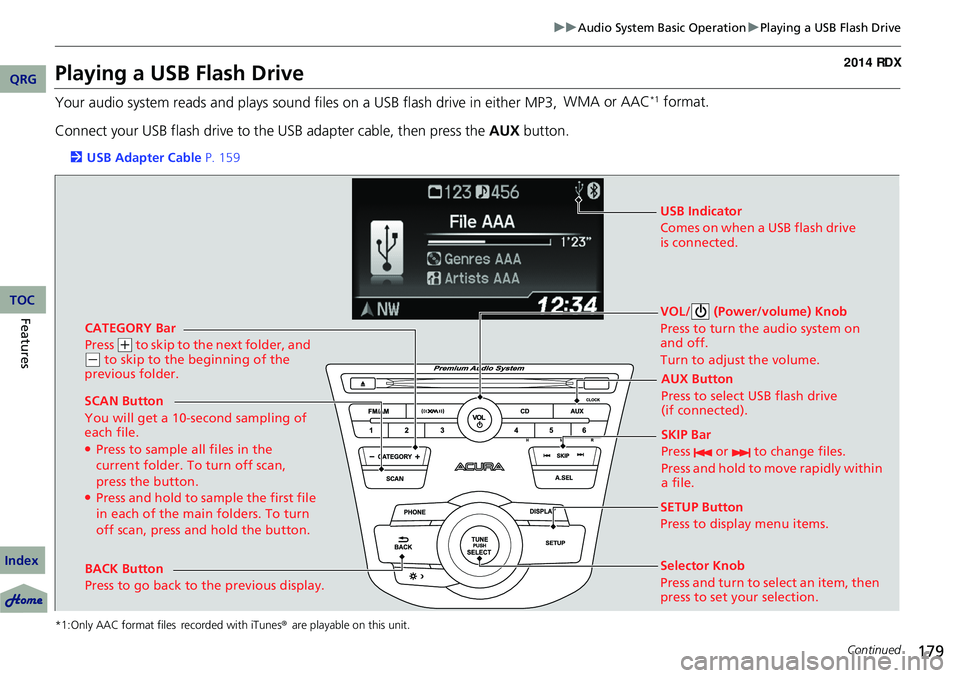
Your audio system reads and plays sound files on a USB flash drive in either MP3, WMA or AAC*1 format.
Connect your USB flash drive to the USB adapter cable, then press the AUX button.
2USB Adapter Cable P. 159
*1:Only AAC format files recorded with iTunes® are playable on this unit.
CATEGORY Bar
Press
(+ to skip to the next folder, and (- to skip to the beginning of the
previous folder.
SCAN Button
You will get a 10-second sampling of
each file.
●Press to sample all files in the
current folder. To turn off scan,
press the button.
●Press and hold to sample the first file
in each of the main folders. To turn
off scan, press and hold the button. VOL/ (Power/volume) Knob
Press to turn the audio system on
and off.
Turn to adjust the volume.
SKIP Bar
Press or to change files.
Press and hold to move rapidly within
a file.
SETUP Button
Press to display menu items.
Selector Knob
Press and turn to se
lect an item, then
press to set your selection. AUX Button
Press to select USB flash drive
(if connected).
USB Indicator
Comes on when a USB flash drive
is connected.
BACK Button
Press to go back to the previous display.
QRG
Index
FeaturesTOC
Page 181 of 363
uuAudio System Basic Operation uPlaying a USB Flash Drive
180
Features
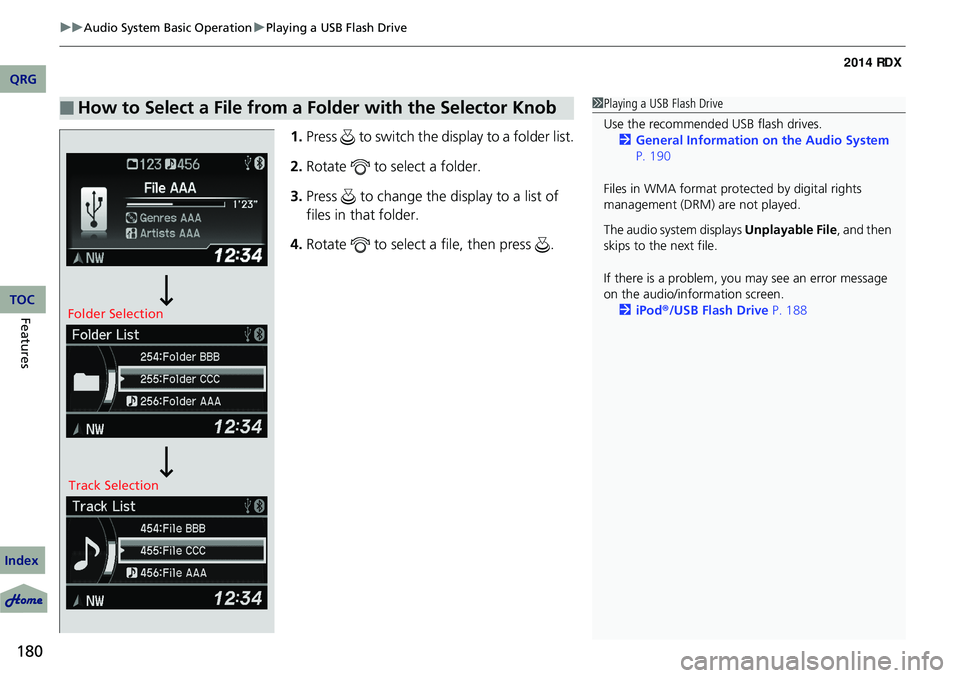
1. Press to switch the display to a folder list.
2. Rotate to select a folder.
3. Press to change the display to a list of
files in that folder.
4. Rotate to select a file, then press .
■How to Select a File from a Folder with the Selector Knob1Playing a USB Flash Drive
Use the recommended USB flash drives.
2 General Information on the Audio System
P. 190
Files in WMA format prot ected by digital rights
management (DRM) are not played.
The audio system displays Unplayable File, and then
skips to the next file.
If there is a problem, you may see an error message
on the audio/information screen.
2 iPod ®/USB Flash Drive P. 188
Folder Selection
Track Selection
QRG
Index
TOC
Page 182 of 363
181
uuAudio System Basic Operation uPlaying a USB Flash Drive
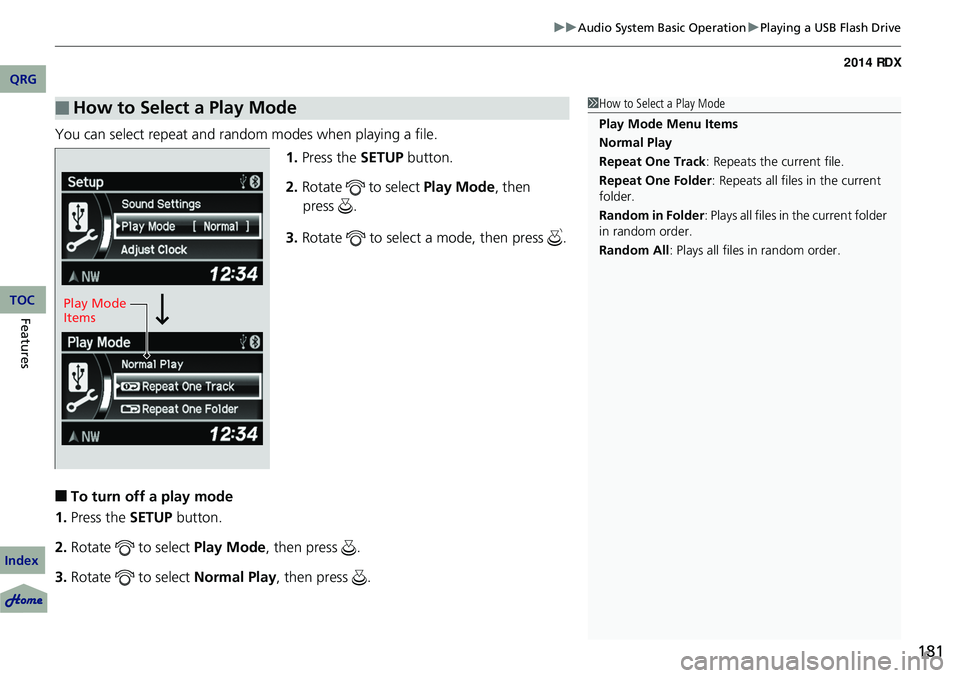
You can select repeat and random modes when playing a file.
1.Press the SETUP button.
2. Rotate to select Play Mode, then
3. Rotate to select a mode, then press .
■To turn off a play mode
1. Press the SETUP button.
2. Rotate to select Play Mode, then press .
3. Rotate to select Normal Play, then press .
■How to Select a Play Mode1How to Select a Play Mode
Play Mode Menu Items
Normal Play
Repeat One Track: Repeats the current file.
Repeat One Folder : Repeats all files in the current
folder.
Random in Folder : Plays all files in the current folder
in random order.
Random All : Plays all files in random order.
Play Mode
Items
QRG
Index
FeaturesTOC
press .