jack Acura RDX 2014 Owner's Manual
[x] Cancel search | Manufacturer: ACURA, Model Year: 2014, Model line: RDX, Model: Acura RDX 2014Pages: 363, PDF Size: 13.7 MB
Page 6 of 363
5
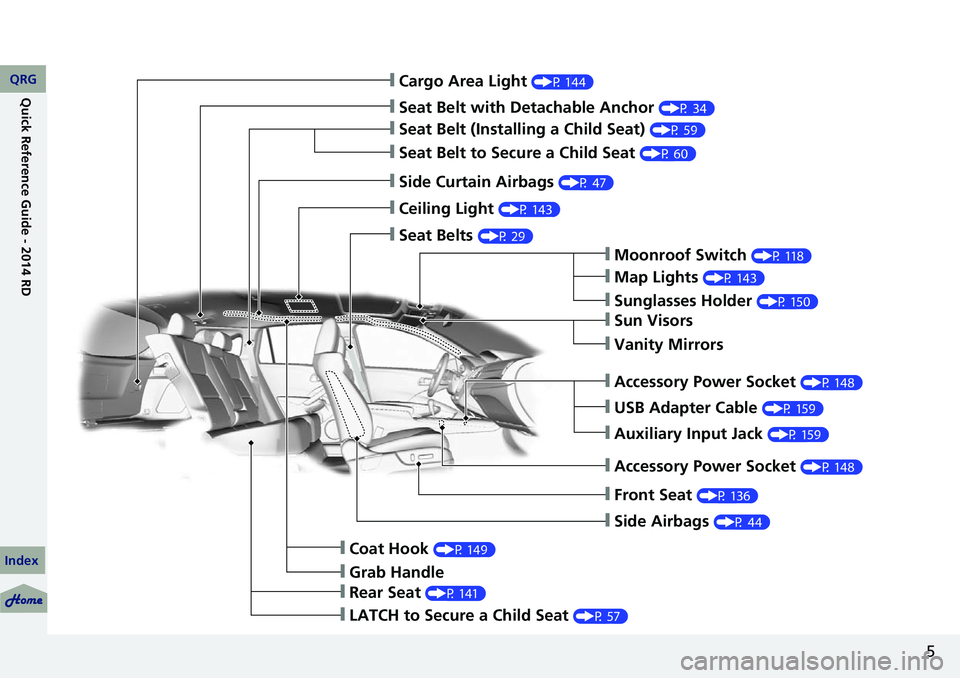
❙Cargo Area Light (P 144)
❙Seat Belt with Detachable Anchor (P 34)
❙Seat Belt (Installing a Child Seat) (P 59)
❙Seat Belt to Secure a Child Seat (P 60)
❙Side Curtain Airbags (P 47)
❙Ceiling Light (P 143)
❙Seat Belts (P 29)
❙Moonroof Switch (P 118)
❙Map Lights (P 143)
❙Sunglasses Holder (P 150)
❙Sun Visors
❙Vanity Mirrors
❙USB Adapter Cable (P 159)
❙Auxiliary Input Jack (P 159)
❙Front Seat (P 136)
❙Side Airbags (P 44)
❙Coat Hook (P 149)
❙Grab Handle
❙Rear Seat (P 141)
❙LATCH to Secure a Child Seat (P 57)
❙Accessory Power Socket (P 148)
❙Accessory Power Socket (P 148)
QRG
Index
Quick Reference Guide - 2014 RDX
Page 158 of 363
157
Features
This chapter describes how to operate technology features on models without the navigation system.
Audio SystemAbout Your Audio System ................ 158
USB Adapter Cable .......................... 159
Auxiliary Input Jack .......................... 159
Audio System Theft Protection ......... 160
Audio System Basic Operation ........ 161
Audio/Information Screen
*.............. 162
Audio Remote Controls .................... 165
Adjusting the Sound ........................ 166
Playing the AM/FM Radio ................. 167
Playing the XM® Radio ..................... 169
Playing a CD .................................... 171
Playing an iPod® ............................... 174Playing Pandora
®............................. 177
Playing a USB Flash Drive ................. 179
Playing Bluetooth ® Audio................. 182
Wallpaper Setup .............................. 184
Display Setup ................................... 186
Audio Error Messages ...................... 187
General Information on the Audio System ............................................. 190
HomeLink ® Universal Transceiver
Training HomeLink ........................... 194
Bluetooth® HandsFreeLink®
Using HFL ........................................ 196
HFL Menus....................................... 198Compass
*.......................................... 225
* Not available on all models
QRG
Index 2014 RDX
Page 160 of 363
159
uuAudio System uUSB Adapter Cable
USB Adapter Cable
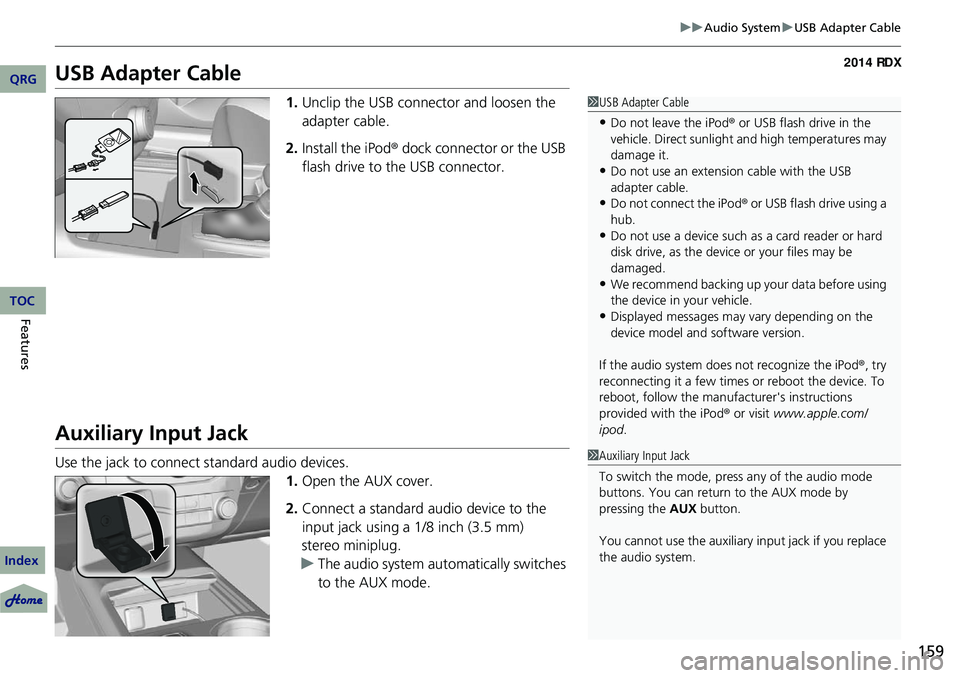
1. Unclip the USB connec tor and loosen the
adapter cable.
2. Install the iPod® dock connector or the USB
flash drive to the USB connector.
Auxiliary Input Jack
Use the jack to connect standard audio devices.
1.Open the AUX cover.
2. Connect a standard audio device to the
input jack using a 1/8 inch (3.5 mm)
stereo miniplug.
u The audio system auto matically switches
to the AUX mode.
1 USB Adapter Cable
•Do not leave the iPod ® or USB flash drive in the
vehicle. Direct sunlight and high temperatures may
damage it.
•Do not use an extension cable with the USB
adapter cable.
•Do not connect the iPod ® or USB flash drive using a
hub.
•Do not use a device such as a card reader or hard
disk drive, as the device or your files may be
damaged.
•We recommend backing up yo ur data before using
the device in your vehicle.
•Displayed messages may vary depending on the
device model and software version.
If the audio system does not recognize the iPod®, try
reconnecting it a few times or reboot the device. To
reboot, follow the manufac turer's instructions
provided with the iPod ® or visit www.apple.com/
ipod .
1Auxiliary Input Jack
To switch the mode, pres s any of the audio mode
buttons. You can return to the AUX mode by
pressing the AUX button.
You cannot use the auxiliary input jack if you replace
the audio system.
QRG
Index
FeaturesTOC
Page 184 of 363
183
uuAudio System Basic Operation uPlaying Bluetooth ® Audio
1. Make sure that your phone is paired and
linked to HFL.
2. Press the AUX button.
If the phone is not recognized, another HFL-
compatible phone, which is not compatible
for Bluetooth ® Audio, may be already linked.
■To pause or resume a file
1. Press the SETUP button.
2. Rotate to select Resume/Pause, then press .
Each time you press , the setting switches between Pause and Resume.
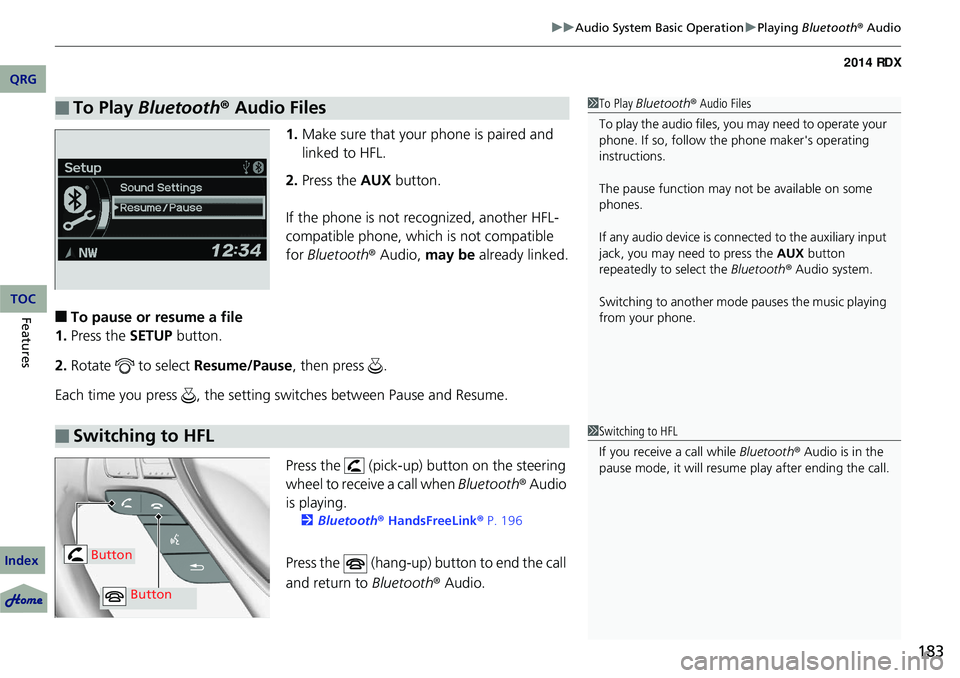
Press the (pick-up) button on the steering
wheel to receive a call when Bluetooth® Audio
is playing.
2 Bluetooth® HandsFreeLink® P. 196
Press the (hang-up) button to end the call
and return to Bluetooth® Audio.
■To Play Bluetooth ® Audio Files1 To Play Bluetooth ® Audio Files
To play the audio files, y ou may need to operate your
phone. If so, follow the phone maker's operating
instructions.
The pause function may no t be available on some
phones.
If any audio device is conne cted to the auxiliary input
jack, you may need to press the AUX button
repeatedly to select the Bluetooth® Audio system.
Switching to another mode pauses the music playing
from your phone.
■Switching to HFL1 Switching to HFL
If you receive a call while Bluetooth® Audio is in the
pause mode, it will resume play after ending the call.
Button
Button
QRG
Index
FeaturesTOC
Page 192 of 363
191
uuGeneral Information on the Audio System uRecommended CDs
Continued
Recommended CDs
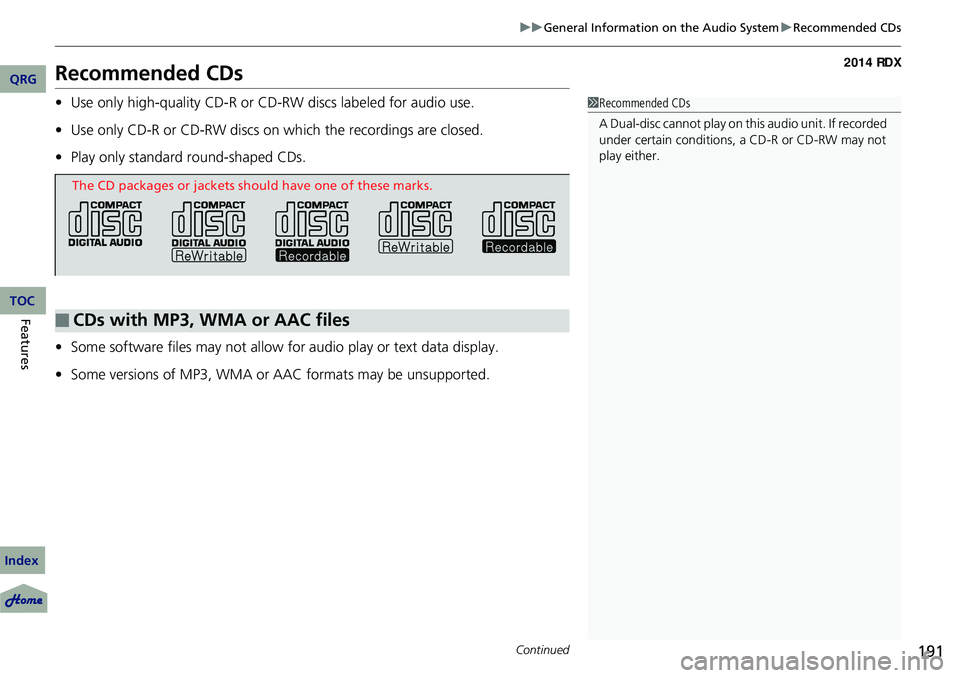
• Use only high-quality CD-R or CD-RW discs labeled for audio use.
• Use only CD-R or CD-RW discs on wh ich the recordings are closed.
• Play only standard round-shaped CDs.
• Some software files may not allow for audio play or text data display.
• Some versions of MP3, WMA or AAC formats may be unsupported.1Recommended CDs
A Dual-disc cannot play on th is audio unit. If recorded
under certain conditions, a CD-R or CD-RW may not
play either.
■CDs with MP3, WMA or AAC files
The CD packages or jackets should have one of these marks.
QRG
Index
FeaturesTOC
Page 319 of 363

318
Handling the Unexpected
Tools
Types of Tools
1Types of Tools
2 How to Set Up the Jack P. 322
Wheel Nut Wrench/
Jack Handle Jack
Jack Handle Bar
QRG
Index
TOC
Page 321 of 363
320
uuIf a Tire Goes Flat uChanging a Flat Tire
Handling the Unexpected
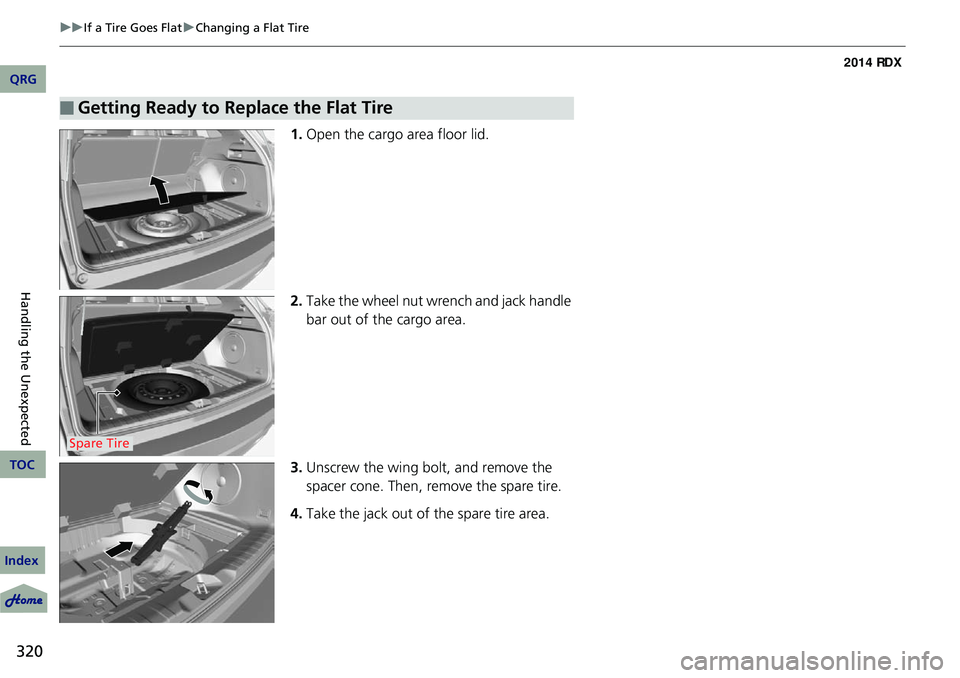
1. Open the cargo area floor lid.
2. Take the wheel nut wrench and jack handle
bar out of the cargo area.
3. Unscrew the wing bolt, and remove the
spacer cone. Then, remove the spare tire.
4. Take the jack out of the spare tire area.
■Getting Ready to Replace the Flat Tire
Spare Tire
QRG
Index
TOC
Page 323 of 363
uuIf a Tire Goes Flat uChanging a Flat Tire
322
Handling the Unexpected
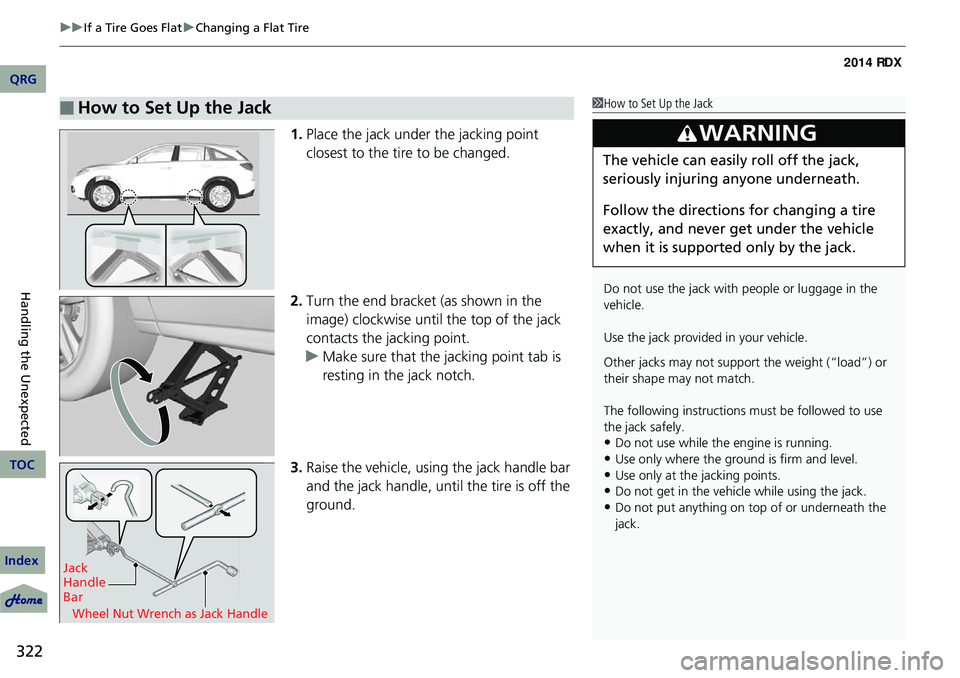
1. Place the jack under the jacking point
closest to the tire to be changed.
2. Turn the end bracket (as shown in the
image) clockwise until the top of the jack
contacts the jacking point.
u Make sure that the jacking point tab is
resting in the jack notch.
3. Raise the vehicle, using the jack handle bar
and the jack handle, until the tire is off the
ground.
■How to Set Up the Jack1How to Set Up the Jack
Do not use the jack with people or luggage in the
vehicle.
Use the jack provided in your vehicle.
Other jacks may not support the weight (“load”) or
their shape may not match.
The following instructions must be followed to use
the jack safely.
•Do not use while the engine is running.
•Use only where the ground is firm and level.
•Use only at the jacking points.•Do not get in the vehicle while using the jack.
•Do not put anything on top of or underneath the
jack.
3WARNING
The vehicle can easily roll off the jack,
seriously injuring anyone underneath.
Follow the directions for changing a tire
exactly, and never get under the vehicle
when it is supported only by the jack.
Jack
Handle
Bar
Wheel Nut Wrench as Jack Handle
QRG
Index
TOC
Page 324 of 363
Continued323
uuIf a Tire Goes Flat uChanging a Flat Tire
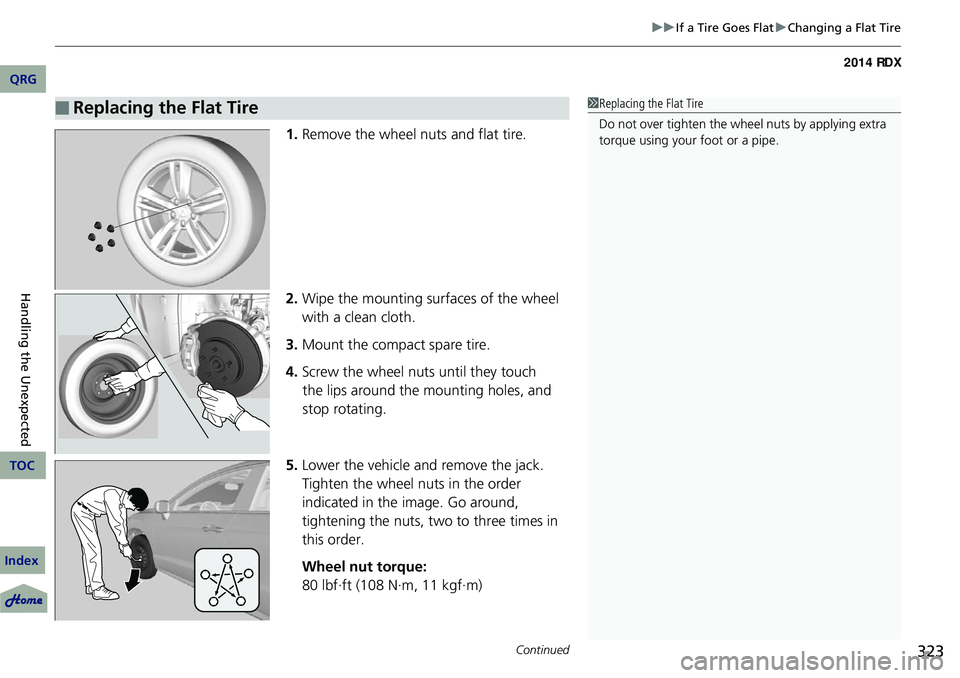
1. Remove the wheel nuts and flat tire.
2. Wipe the mounting surfaces of the wheel
with a clean cloth.
3. Mount the compact spare tire.
4. Screw the wheel nuts until they touch
the lips around the mounting holes, and
stop rotating.
5. Lower the vehicle and remove the jack.
Tighten the wheel nuts in the order
indicated in the image. Go around,
tightening the nuts, two to three times in
this order.
Wheel nut torque:
80 lbf∙ft (108 N∙m, 11 kgf∙m)
■Replacing the Flat Tire1Replacing the Flat Tire
Do not over tighten the wheel nuts by applying extra
torque using your foot or a pipe.
QRG
Index
Handling the Unexpected
TOC
Page 325 of 363
uuIf a Tire Goes Flat uChanging a Flat Tire
324
Handling the Unexpected
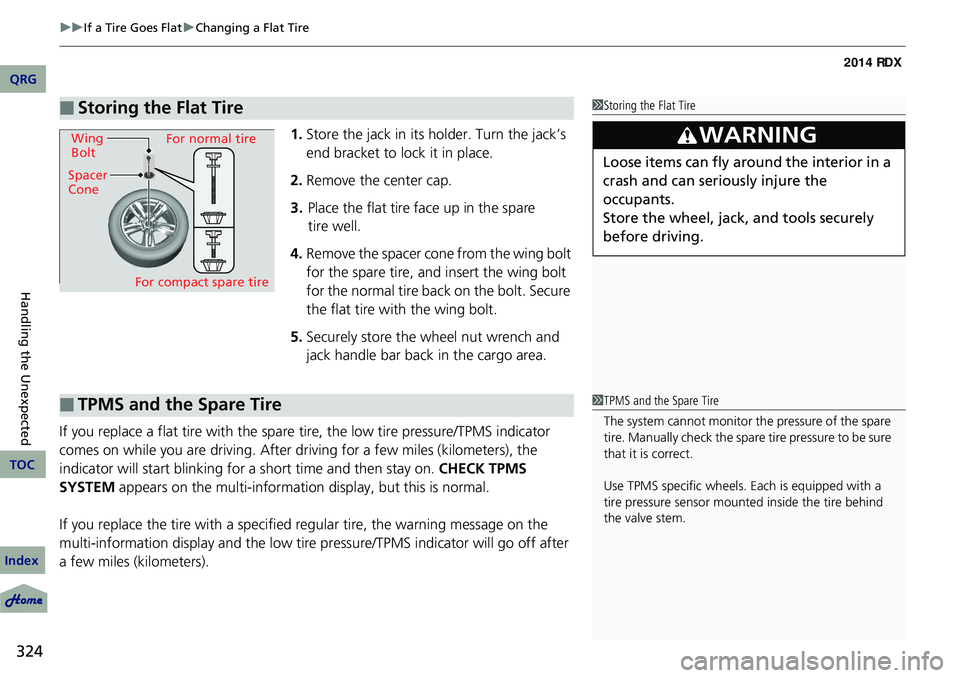
1. Store the jack in its holder. Turn the jack’s
end bracket to lock it in place.
2. Remove the center cap.
3. Place the flat tire face up in the spare
tire well.
4. Remove the spacer cone from the wing bolt
for the spare tire, and insert the wing bolt
for the normal tire back on the bolt. Secure
the flat tire with the wing bolt.
5. Securely store the wheel nut wrench and
jack handle bar back in the cargo area.
If you replace a flat tire with the spare tire, the low tire pressure/TPMS indicator
comes on while you are driving. After driving for a few miles (kilometers), the
indicator will start blinking for a short time and then stay on. CHECK TPMS
SYSTEM appears on the multi-informati on display, but this is normal.
If you replace the tire with a specified regular tire, the warning message on the
multi-information display and the low tire pr essure/TPMS indicator will go off after
a few miles (kilometers).
■Storing the Flat Tire1 Storing the Flat Tire
3WARNING
Loose items can fly around the interior in a
crash and can seriously injure the
occupants.
Store the wheel, jack, and tools securely
before driving.Spacer
ConeWing
Bolt
For compact spare tire For normal tire
■TPMS and the Spare Tire1
TPMS and the Spare Tire
The system cannot monitor th e pressure of the spare
tire. Manually check the spare tire pressure to be sure
that it is correct.
Use TPMS specific wheels. Each is equipped with a
tire pressure sensor mounted inside the tire behind
the valve stem.
QRG
Index
TOC