ECU Acura RDX 2015 User Guide
[x] Cancel search | Manufacturer: ACURA, Model Year: 2015, Model line: RDX, Model: Acura RDX 2015Pages: 71, PDF Size: 18.23 MB
Page 53 of 71

98 || 99
HANDLING THE UNEXPECTED
HANDLING THE UNEXPECTED
TABLE OF
CONTENTS
VISUAL INDEX
SAFETY
INFORMATION
INSTRUMENT PANEL
VEHICLE
CONTROLS
AUDIO AND
CONNECTIVITY
BLUETOOTH®
HANDSFREELINK®
ACURALINK®
INDEX
VOICE COMMAND INDEX
CLIENT
INFORMATION
SPECIFICATIONS
MAINTENANCE
HANDLING THE UNEXPECTED
DRIVING
NAVIGATION
Replacing the Flat Tire
1. Remove the wheel nuts and flat tire.
2. Mount the compact spare tire. Replace the wheel
nuts, and lightly tighten them.
3. Lower the vehicle and remove the jack. Tighten
the wheel nuts in the order indicated in the
image. Go around, tightening the nuts, two to
three times in this order. Do not overtighten the
wheel nuts.
Storing the Flat Tire
1. Remove the center cap and place the flat tire
face up in the spare tire well.
2. Remove the spacer cone from the wing bolt for
the spare tire, and insert the wing bolt for the
regular tire back on the bolt. Secure the flat tire
with the wing bolt.
3. Securely store the jack and wheel nut wrench
back in the tool case. Store the case in the cargo
area.
Loose items can fly around the interior in a crash and can seriously injure the
occupants.
Store the wheel, jack, and tools securely before driving.
WARNING
Wing
bolt
Spacer
cone For normal
tire
For compact
spare tire
Fuse Locations
If any electrical devices are not working, turn the vehicle off and check to see if any
applicable fuse is blown. Fuse locations are shown on the fuse box cover. Locate the
fuse by the fuse number and box cover number.
Engine Compartment Fuse Box Located near the brake fluid reservoir. Push the tabs to open the box.
*1: Models with halogen low beam
headlight bulb s
*2: Models with high voltage discharge tube
bulb s
9
10
11Oil Leve l7.5A
12 Fog Lights*(20A )
13Power Tailgate Closer*(20A )
14 Hazar
d10A
15IGP215A
16 IG Coil 15A
17Stop10A
18 Horn 10A
19ACM10A
20 Right Headlight Low Beam 10
A*1
15A*2
21MG Clutch7.5A
22 DB
W15A
23Left Headlight Low Beam10A*1
15A*2
24 ACC10A
25FI Main(15A )
26 Trailer (20A )
27Small20A
28 Interior Lights 7.5A
29Back Up10 A
Circuit ProtectedAmps
Circuit Protecte dAmps
1
EPS70A
Power Tailgate Motor*(40A )
ABS/VSA FS R20A
ABS/VSA Motor40A
E-DPS30A
Main Fuse120A
2
ST CUT50 A
Fuse Box Main 160A
Fuse Box Main 260A
IG Main 50A
Headlight Washer(30A )
Sub Fan Moto r30A
Rear Defogger 40A
Main Fan Motor 30A
Headlight Main 30A
Blowe r4 0A
3
Driver's Power Seat Sliding 20A
Driver's Power Seat Reclinin g20A
Passenger's Power Seat Sliding20 A
Passenger' s Power Seat Recl ining20 A
4
5STR Diagnosis Fuse7.5A
6
7
8
Page 57 of 71
106 || 107
MAINTENANCE
MAINTENANCE
TABLE OF
CONTENTS
VISUAL INDEX
SAFETY
INFORMATION
INSTRUMENT PANEL
VEHICLE
CONTROLS
AUDIO AND
CONNECTIVITY
BLUETOOTH®
HANDSFREELINK®
ACURALINK®
INDEX
VOICE COMMAND INDEX
CLIENT
INFORMATION
SPECIFICATIONS
MAINTENANCE
HANDLING THE UNEXPECTED
DRIVING
NAVIGATION
Engine Oil
Park the vehicle on level ground, and wait approximately three minutes after
turning the engine off before you check the oil.
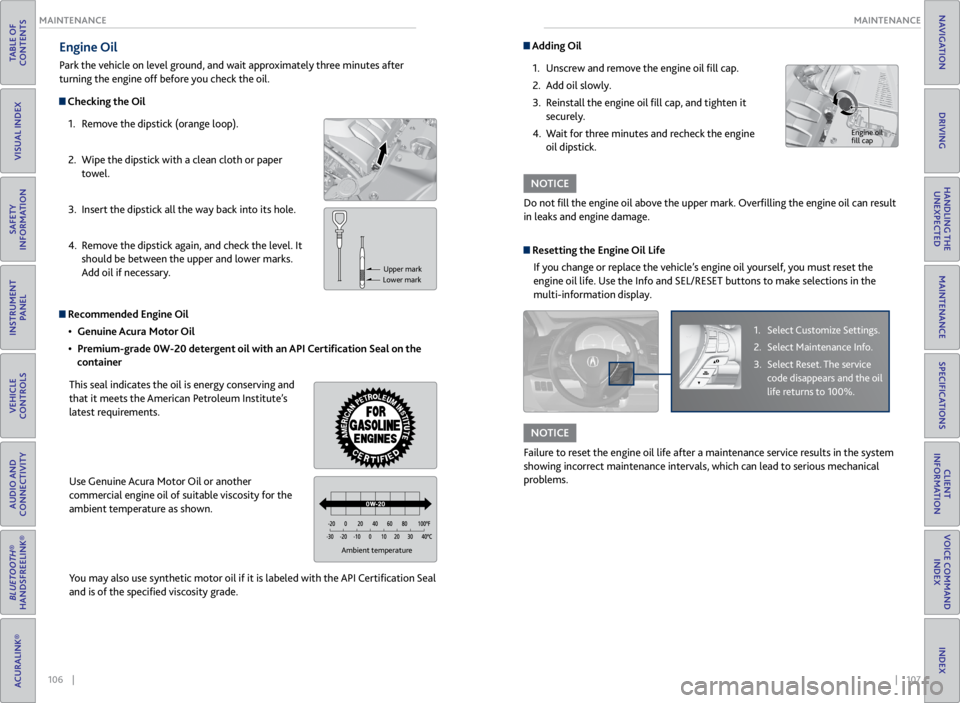
Checking the Oil
1. Remove the dipstick (orange loop).
2. Wipe the dipstick with a clean cloth or paper
towel.
3. Insert the dipstick all the way back into its hole.
4. Remove the dipstick again, and check the level. It
should be between the upper and lower marks.
Add oil if necessary.
Recommended Engine Oil
• Genuine Acura Motor Oil
• Premium-grade 0W-20 detergent oil with an API Certification Seal on the
container
This seal indicates the oil is energy conserving and
that it meets the American Petroleum Institute’s
latest requirements.
Use Genuine Acura Motor Oil or another
commercial engine oil of suitable viscosity for the
ambient temperature as shown.
You may also use synthetic motor oil if it is labeled with the API Certification Seal
and is of the specified viscosity grade.
Upper mark
Lower mark
Ambient temperature
Adding Oil
1. Unscrew and remove the engine oil fill cap.
2. Add oil slowly.
3. Reinstall the engine oil fill cap, and tighten it
securely.
4. Wait for three minutes and recheck the engine
oil dipstick.
Do not fill the engine oil above the upper mark. Overfilling the engine oil can result
in leaks and engine damage.
NOTICE
Engine oil
fill cap
Resetting the Engine Oil Life If you change or replace the vehicle’s engine oil yourself, you must reset the
engine oil life. Use the Info and SEL/RESET buttons to make selections in the
multi-information display.
1. Select Customize Settings.
2. Select Maintenance Info.
3. Select Reset. The service
code disappears and the oil
life returns to 100%.
Failure to reset the engine oil life after a maintenance service results in the system
showing incorrect maintenance intervals, which can lead to serious mechanical
problems.
NOTICE
Page 58 of 71
108 || 109
MAINTENANCE
MAINTENANCE
TABLE OF
CONTENTS
VISUAL INDEX
SAFETY
INFORMATION
INSTRUMENT PANEL
VEHICLE
CONTROLS
AUDIO AND
CONNECTIVITY
BLUETOOTH®
HANDSFREELINK®
ACURALINK®
INDEX
VOICE COMMAND INDEX
CLIENT
INFORMATION
SPECIFICATIONS
MAINTENANCE
HANDLING THE UNEXPECTED
DRIVING
NAVIGATION
Engine Coolant
Park the vehicle on level ground. Check the reserve tank and the coolant level in the
radiator. We recommend Acura Long Life Antifreeze/Coolant Type 2.
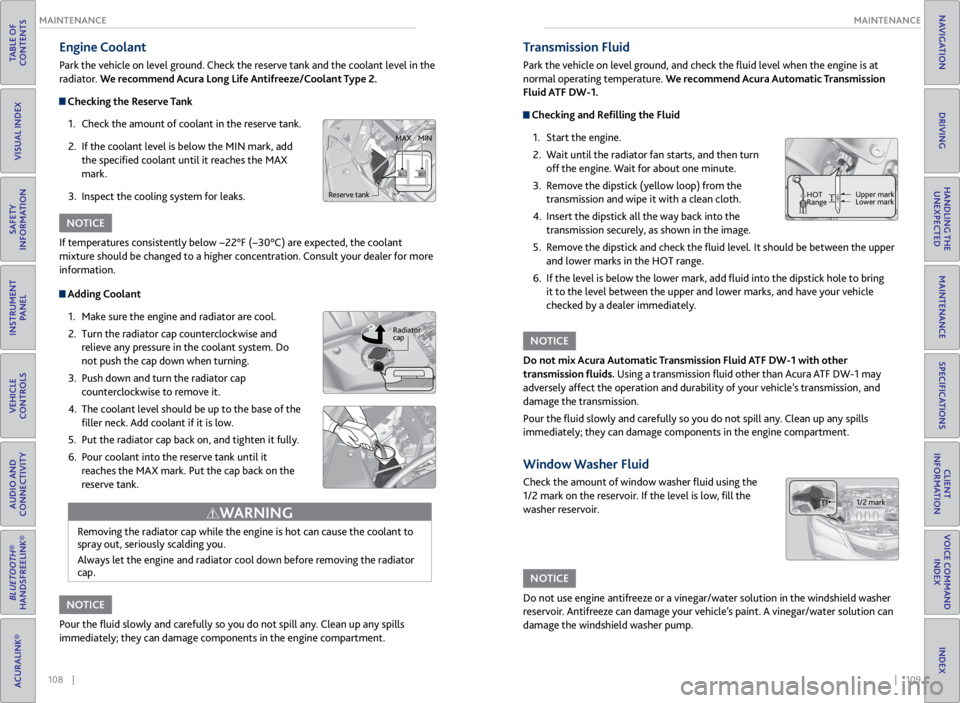
Checking the Reserve Tank
1. Check the amount of coolant in the reserve tank.
2. If the coolant level is below the MIN mark, add
the specified coolant until it reaches the MAX
mark.
3. Inspect the cooling system for leaks.
Adding Coolant
1. Make sure the engine and radiator are cool.
2. Turn the radiator cap counterclockwise and
relieve any pressure in the coolant system. Do
not push the cap down when turning.
3. Push down and turn the radiator cap
counterclockwise to remove it.
4. The coolant level should be up to the base of the
filler neck. Add coolant if it is low.
5. Put the radiator cap back on, and tighten it fully.
6. Pour coolant into the reserve tank until it
reaches the MAX mark. Put the cap back on the
reserve tank.
Removing the radiator cap while the engine is hot can cause the coolant to
spray out, seriously scalding you.
Always let the engine and radiator cool down before removing the radiator
cap.
WARNING
If temperatures consistently below −22°F (−30°C) are expected, the coolant
mixture should be changed to a higher concentration. Consult your dealer for more
information.
Pour the fluid slowly and carefully so you do not spill any. Clean up any spills
immediately; they can damage components in the engine compartment.
NOTICE
NOTICE
Reserve tank MAX
MIN
Radiator
cap
Transmission Fluid
Park the vehicle on level ground, and check the fluid level when the engine is at
normal operating temperature. We recommend Acura Automatic Transmission
Fluid ATF DW-1.
Checking and Refilling the Fluid
1. Start the engine.
2. Wait until the radiator fan starts, and then turn
off the engine. Wait for about one minute.
3. Remove the dipstick (yellow loop) from the
transmission and wipe it with a clean cloth.
4. Insert the dipstick all the way back into the
transmission securely, as shown in the image.
5. Remove the dipstick and check the fluid level. It should be between the upper
and lower marks in the HOT range.
6. If the level is below the lower mark, add fluid into the dipstick hole to bring
it to the level between the upper and lower marks, and have your vehicle
checked by a dealer immediately.
Do not mix Acura Automatic Transmission Fluid ATF DW-1 with other
transmission fluids. Using a transmission fluid other than Acura ATF DW-1 may
adversely affect the operation and durability of your vehicle’s transmission, and
damage the transmission.
Pour the fluid slowly and carefully so you do not spill any. Clean up any spills
immediately; they can damage components in the engine compartment.
NOTICE
Window Washer Fluid
Check the amount of window washer fluid using the
1/2 mark on the reservoir. If the level is low, fill the
washer reservoir.
Do not use engine antifreeze or a vinegar/water solution in the windshield washer
reservoir. Antifreeze can damage your vehicle’s paint. A vinegar/water solution can
damage the windshield washer pump.
NOTICE
HOT
Range Upper mark
Lower mark
1/2 mark
Page 69 of 71
130 || 131
INDEX
VOICE COMMAND INDEX
TABLE OF
CONTENTS
VISUAL INDEX
SAFETY
INFORMATION
INSTRUMENT PANEL
VEHICLE
CONTROLS
AUDIO AND
CONNECTIVITY
BLUETOOTH®
HANDSFREELINK®
ACURALINK®
INDEX
VOICE COMMAND INDEX
CLIENT
INFORMATION
SPECIFICATIONS
MAINTENANCE
HANDLING THE UNEXPECTED
DRIVING
NAVIGATION
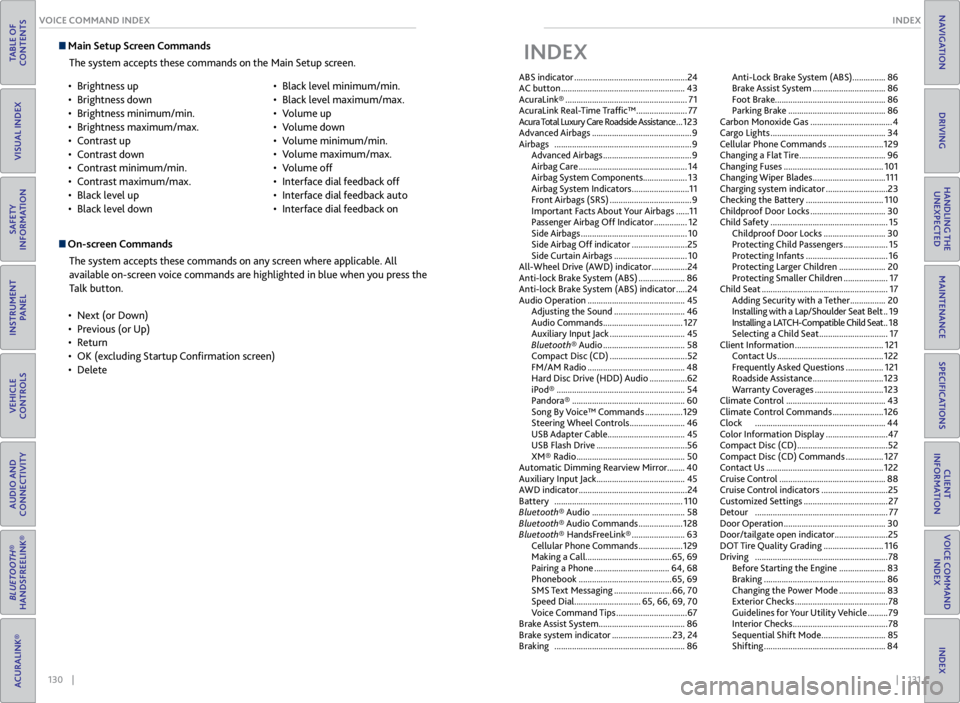
Main Setup Screen Commands
The system accepts these commands on the Main Setup screen.
On-screen CommandsThe system accepts these commands on any screen where applicable. All
available on-screen voice commands are highlighted in blue when you press the
Talk button.
• Next (or Down)
• Previous (or Up)
• Return
• OK (excluding Startup Confirmation screen)
• Delete
•
Brightness up
• Brightness down
• Brightness minimum/min.
• Brightness maximum/max.
• Contrast up
• Contrast down
• Contrast minimum/min.
• Contrast maximum/max.
• Black level up
• Black level down •
Black level minimum/min.
• Black level maximum/max.
• Volume up
• Volume down
• Volume minimum/min.
• Volume maximum/max.
• Volume off
• Interface dial feedback off
• Interface dial feedback auto
• Interface dial feedback on
INDEX
ABS indicator ................................................... 24
AC button ........................................................ 43
AcuraLink® ....................................................... 71
AcuraLink Real-Time Traffic™ ....................... 77
Acura Total Luxury Care Roadside Assistance ... 123
Advanced Airbags ............................................. 9
Airbags .............................................................. 9
Advanced Airbags ........................................ 9
Airbag Care ................................................. 14
Airbag System Components ....................13
Airbag System Indicators .......................... 11
Front Airbags (SRS) ..................................... 9
Important Facts About Your Airbags ...... 11
Passenger Airbag Off Indicator ............... 12
Side Airbags ................................................ 10
Side Airbag Off indicator ......................... 25
Side Curtain Airbags ................................. 10
All-Wheel Drive (AWD) indicator ................ 24
Anti-lock Brake System (ABS) ..................... 86
Anti-lock Brake System (ABS) indicator ..... 24
Audio Operation ............................................ 45
Adjusting the Sound ................................ 46
Audio Commands .................................... 127
Auxiliary Input Jack .................................. 45
Bluetooth® Audio ..................................... 58
Compact Disc (CD) ................................... 52
FM/AM Radio ............................................ 48
Hard Disc Drive (HDD) Audio ................. 62
iPod® .......................................................... 54
Pandora® ................................................... 60
Song By Voice™ Commands ................. 129
Steering Wheel Controls ......................... 46
USB Adapter Cable ................................... 45
USB Flash Drive ......................................... 56
XM® Radio ................................................. 50
Automatic Dimming Rearview Mirror ........40
Auxiliary Input Jack ........................................ 45
AWD indicator ................................................. 24
Battery .......................................................... 110
Bluetooth® Audio .......................................... 58
Bluetooth® Audio Commands .................... 128
Bluetooth® HandsFreeLink® ........................ 63
Cellular Phone Commands .................... 129
Making a Call ....................................... 65, 69
Pairing a Phone .................................. 64, 68
Phonebook .......................................... 65, 69
SMS Text Messaging .......................... 66, 70
Speed Dial .............................. 65, 66, 69, 70
Voice Command Tips ................................ 67
Brake Assist System ....................................... 86
Brake system indicator ........................... 23, 24
Braking ........................................................... 86Anti-Lock Brake System (ABS) ...............
86
Brake Assist System ................................. 86
Foot Brake .................................................. 86
Parking Brake ............................................ 86
Carbon Monoxide Gas ..................................... 4
Cargo Lights .................................................... 34
Cellular Phone Commands ......................... 129
Changing a Flat Tire ....................................... 96
Changing Fuses ............................................. 101
Changing Wiper Blades ................................. 111
Charging system indicator ............................ 23
Checking the Battery ................................... 110
Childproof Door Locks .................................. 30
Child Safety ..................................................... 15
Childproof Door Locks ............................ 30
Protecting Child Passengers .................... 15
Protecting Infants ..................................... 16
Protecting Larger Children ..................... 20
Protecting Smaller Children .................... 17
Child Seat ......................................................... 17
Adding Security with a Tether ................ 20
Installing with a Lap/Shoulder Seat Belt .. 19
Installing a LATCH-Compatible Child Seat .. 18
Selecting a Child Seat ............................... 17
Client Information ........................................ 121
Contact Us ................................................ 122
Frequently Asked Questions ................. 121
Roadside Assistance ................................ 123
Warranty Coverages ............................... 123
Climate Control ............................................. 43
Climate Control Commands ....................... 126
Clock ........................................................... 44
Color Information Display ............................ 47
Compact Disc (CD) ......................................... 52
Compact Disc (CD) Commands ................. 127
Contact Us ..................................................... 122
Cruise Control ................................................ 88
Cruise Control indicators .............................. 25
Customized Settings ...................................... 27
Detour ............................................................ 77
Door Operation .............................................. 30
Door/tailgate open indicator ........................ 25
DOT Tire Quality Grading ........................... 116
Driving ............................................................ 78
Before Starting the Engine ..................... 83
Braking ....................................................... 86
Changing the Power Mode ..................... 83
Exterior Checks .......................................... 78
Guidelines for Your Utility Vehicle ......... 79
Interior Checks ........................................... 78
Sequential Shift Mode ............................. 85
Shifting ....................................................... 84