service Acura RDX 2015 User Guide
[x] Cancel search | Manufacturer: ACURA, Model Year: 2015, Model line: RDX, Model: Acura RDX 2015Pages: 71, PDF Size: 18.23 MB
Page 56 of 71
104 || 105
MAINTENANCE
MAINTENANCE
TABLE OF
CONTENTS
VISUAL INDEX
SAFETY
INFORMATION
INSTRUMENT PANEL
VEHICLE
CONTROLS
AUDIO AND
CONNECTIVITY
BLUETOOTH®
HANDSFREELINK®
ACURALINK®
INDEX
VOICE COMMAND INDEX
CLIENT
INFORMATION
SPECIFICATIONS
MAINTENANCE
HANDLING THE UNEXPECTED
DRIVING
NAVIGATION
*1: If the message SERVICE does not appear more than 12 months after the display is\
reset, change the
engine oil every year .
#: See information on maintenance and emissions warranty.*2:If you drive in dusty conditions, replace the air cleaner element every 15,000 miles (24,000 km).
*3: If you drive primarily in urban areas that have high concentrations of i\
ndustrial soot and pollution from
diesel-powered vehicles, replace the dust and pollen lter every 15,000 miles (24,000 km).
CODE Maintenance Main Items
A
•Replace engine oi l*1
B•Replace engine oil*1 and oil lter•Inspect front and rear brakes, service as necessary•Check parking brake adjustment•Inspect tie rod ends, steering gearbox, and boot s•Inspect suspension components•Inspect driveshaft boots•Inspect brake hoses and lines (Including ABS/VSA)•Inspect all uid levels and condition of uid s•Inspect exhaust system#
•Inspect fuel lines and connections#
*4:If you drive regularly in very high temperatures (over 110 °F, 43 °C), \
in very low temperatures (under -
20 °F, -29 °C), or tow a tra iler, repl ace ever y 60,000 mi les/100,000 km .
CODEMaintenance Sub Item s
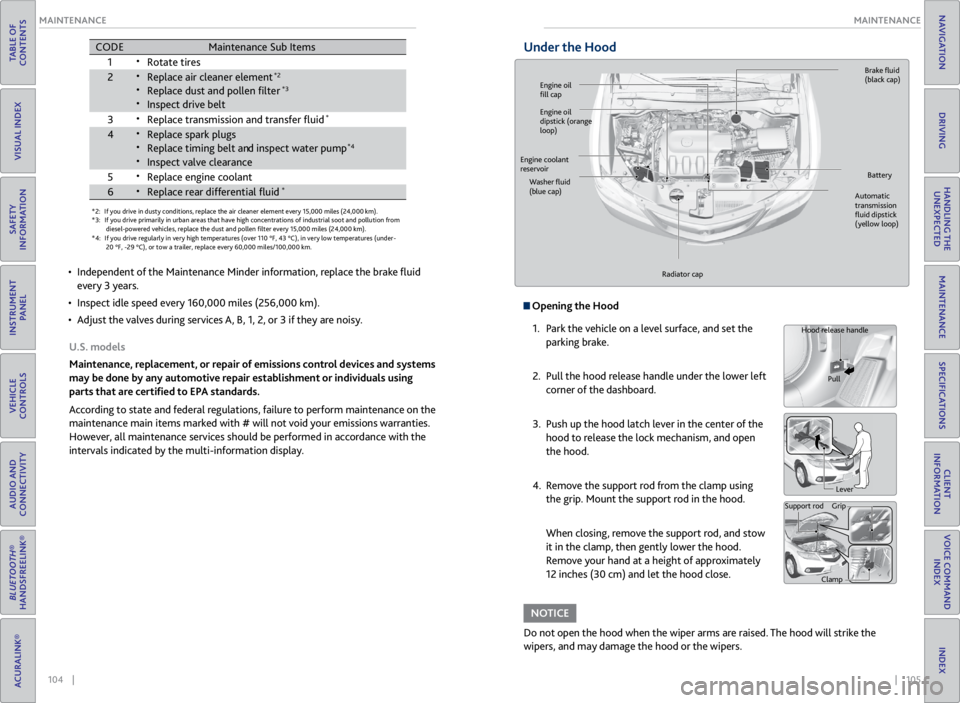
1
•Rotate tires
2•Replace air cleaner element*2
•Replace dust and pollen lte r*3
•Inspect drive belt
3
•Replace transmission and transfer uid*
4•Replace spark plugs•Replace timing belt an d inspect water pump*4
•Inspect valve clearance
5
•Replace engine coolant
6•Replace rear differential uid*
• Independent of the Maintenance Minder information, replace the brake fluid
every 3 years.
• Inspect idle speed every 160,000 miles (256,000 km).
• Adjust the valves during services A, B, 1, 2, or 3 if they are noisy.
U.S. models
Maintenance, replacement, or repair of emissions control devices and systems
may be done by any automotive repair establishment or individuals using
parts that are certified to EPA standards.
According to state and federal regulations, failure to perform maintenance on the
maintenance main items marked with # will not void your emissions warranties.
However, all maintenance services should be performed in accordance with the
intervals indicated by the multi-information display.
Under the Hood
Opening the Hood
1. Park the vehicle on a level surface, and set the
parking brake.
2. Pull the hood release handle under the lower left
corner of the dashboard.
3. Push up the hood latch lever in the center of the
hood to release the lock mechanism, and open
the hood.
4. Remove the support rod from the clamp using
the grip. Mount the support rod in the hood.
When closing, remove the support rod, and stow
it in the clamp, then gently lower the hood.
Remove your hand at a height of approximately
12 inches (30 cm) and let the hood close.
Do not open the hood when the wiper arms are raised. The hood will strike the
wipers, and may damage the hood or the wipers.
NOTICE
Hood release handle
Pull
Lever
Support rod Grip
Clamp
Engine oil
fill cap Brake
fluid
(black cap)
Automatic
transmission
fluid dipstick
(yellow loop)
Washer
fluid
(blue cap) Battery
Engine coolant
reservoir
Radiator cap
Engine oil
dipstick (orange
loop)
Page 57 of 71
106 || 107
MAINTENANCE
MAINTENANCE
TABLE OF
CONTENTS
VISUAL INDEX
SAFETY
INFORMATION
INSTRUMENT PANEL
VEHICLE
CONTROLS
AUDIO AND
CONNECTIVITY
BLUETOOTH®
HANDSFREELINK®
ACURALINK®
INDEX
VOICE COMMAND INDEX
CLIENT
INFORMATION
SPECIFICATIONS
MAINTENANCE
HANDLING THE UNEXPECTED
DRIVING
NAVIGATION
Engine Oil
Park the vehicle on level ground, and wait approximately three minutes after
turning the engine off before you check the oil.
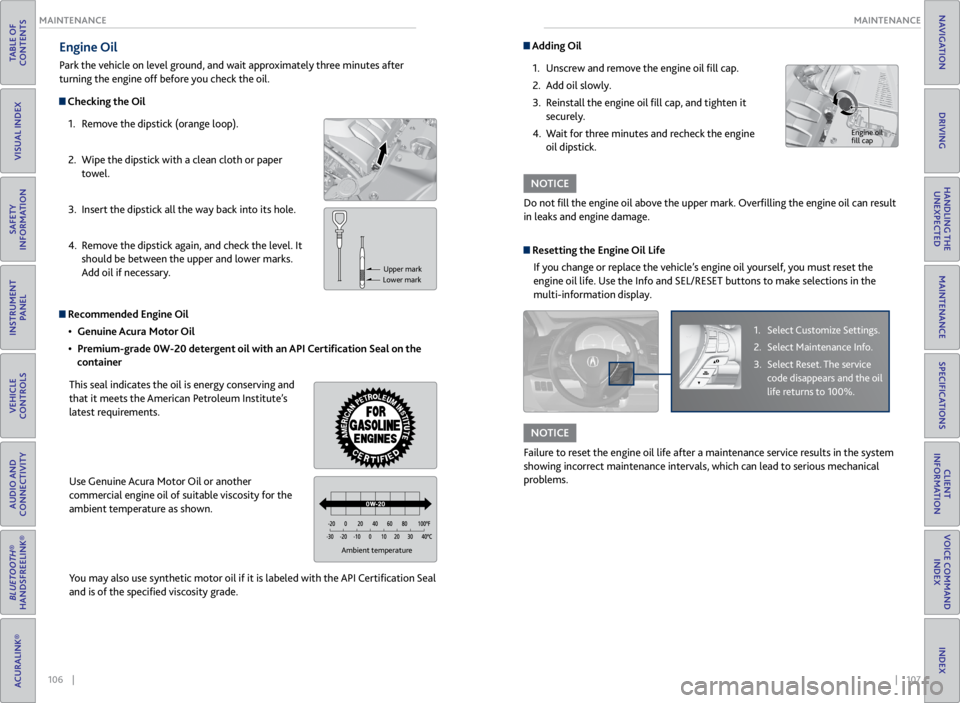
Checking the Oil
1. Remove the dipstick (orange loop).
2. Wipe the dipstick with a clean cloth or paper
towel.
3. Insert the dipstick all the way back into its hole.
4. Remove the dipstick again, and check the level. It
should be between the upper and lower marks.
Add oil if necessary.
Recommended Engine Oil
• Genuine Acura Motor Oil
• Premium-grade 0W-20 detergent oil with an API Certification Seal on the
container
This seal indicates the oil is energy conserving and
that it meets the American Petroleum Institute’s
latest requirements.
Use Genuine Acura Motor Oil or another
commercial engine oil of suitable viscosity for the
ambient temperature as shown.
You may also use synthetic motor oil if it is labeled with the API Certification Seal
and is of the specified viscosity grade.
Upper mark
Lower mark
Ambient temperature
Adding Oil
1. Unscrew and remove the engine oil fill cap.
2. Add oil slowly.
3. Reinstall the engine oil fill cap, and tighten it
securely.
4. Wait for three minutes and recheck the engine
oil dipstick.
Do not fill the engine oil above the upper mark. Overfilling the engine oil can result
in leaks and engine damage.
NOTICE
Engine oil
fill cap
Resetting the Engine Oil Life If you change or replace the vehicle’s engine oil yourself, you must reset the
engine oil life. Use the Info and SEL/RESET buttons to make selections in the
multi-information display.
1. Select Customize Settings.
2. Select Maintenance Info.
3. Select Reset. The service
code disappears and the oil
life returns to 100%.
Failure to reset the engine oil life after a maintenance service results in the system
showing incorrect maintenance intervals, which can lead to serious mechanical
problems.
NOTICE
Page 59 of 71
110 || 111
MAINTENANCE
MAINTENANCE
TABLE OF
CONTENTS
VISUAL INDEX
SAFETY
INFORMATION
INSTRUMENT PANEL
VEHICLE
CONTROLS
AUDIO AND
CONNECTIVITY
BLUETOOTH®
HANDSFREELINK®
ACURALINK®
INDEX
VOICE COMMAND INDEX
CLIENT
INFORMATION
SPECIFICATIONS
MAINTENANCE
HANDLING THE UNEXPECTED
DRIVING
NAVIGATION
Checking the Battery
Check the battery terminals for corrosion monthly.
For jump starting the battery, see page 91.
The battery gives off explosive hydrogen gas during normal operation.
A spark or flame can cause the battery to explode with enough force to kill or
seriously hurt you.
When conducting any battery maintenance, wear protective clothing and a
face shield, or have a skilled technician do it.
WARNING
WARNING: Battery posts, terminals, and related accessories contain lead and lead
compounds. Wash your hands after handling.
Air Conditioning
To ensure proper and safe operation, the Society of Automotive Engineers
recommends that the refrigerant system only be serviced by trained and certified
technicians (SAE Standard J2845).
Never repair or replace the air conditioning evaporator (cooling coil) with one
removed from a used or salvaged vehicle. New replacement mobile air conditioning
evaporators must be certified (and labeled) as meeting SAE Standard J2842.
Vented refrigerant is harmful to the environment. To avoid refrigerant from venting,
never replace the evaporator with one removed from a used or salvaged vehicle.
Refrigerant in your vehicle’s air conditioning system is flammable and can be
ignited during servicing if proper procedures are not followed.
NOTICE
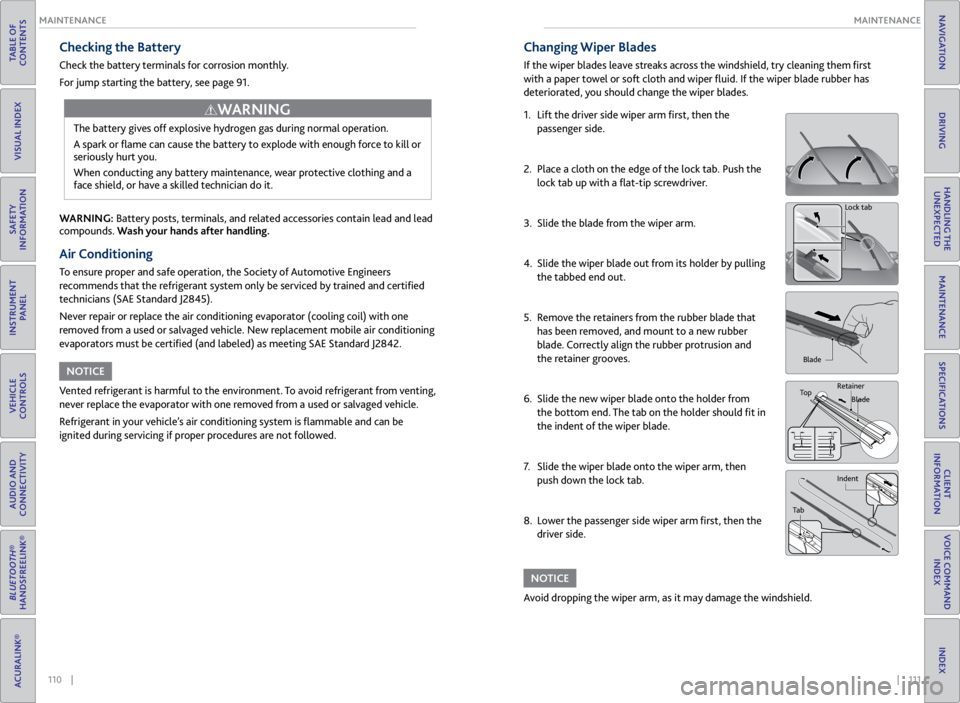
Changing Wiper Blades
If the wiper blades leave streaks across the windshield, try cleaning them first
with a paper towel or soft cloth and wiper fluid. If the wiper blade rubber has
deteriorated, you should change the wiper blades.
1. Lift the driver side wiper arm first, then the
passenger side.
2. Place a cloth on the edge of the lock tab. Push the
lock tab up with a flat-tip screwdriver.
3. Slide the blade from the wiper arm.
4. Slide the wiper blade out from its holder by pulling
the tabbed end out.
5. Remove the retainers from the rubber blade that
has been removed, and mount to a new rubber
blade. Correctly align the rubber protrusion and
the retainer grooves.
6. Slide the new wiper blade onto the holder from
the bottom end. The tab on the holder should fit in
the indent of the wiper blade.
7. Slide the wiper blade onto the wiper arm, then
push down the lock tab.
8. Lower the passenger side wiper arm first, then the
driver side.
Lock tab
Blade
Top Retainer
Blade
Indent
Tab
Avoid dropping the wiper arm, as it may damage the windshield.
NOTICE
Page 61 of 71

114 || 115
MAINTENANCE
MAINTENANCE
TABLE OF
CONTENTS
VISUAL INDEX
SAFETY
INFORMATION
INSTRUMENT PANEL
VEHICLE
CONTROLS
AUDIO AND
CONNECTIVITY
BLUETOOTH®
HANDSFREELINK®
ACURALINK®
INDEX
VOICE COMMAND INDEX
CLIENT
INFORMATION
SPECIFICATIONS
MAINTENANCE
HANDLING THE UNEXPECTED
DRIVING
NAVIGATION
Tire Service Life
The life of your tires is dependent on many factors, including driving habits, road
conditions, vehicle loading, inflation pressure, maintenance history, speed, and
environmental conditions (even when the tires are not in use).
In addition to regular inspections and inflation pressure maintenance, it is
recommended that you have annual inspections performed once the tires reach
five years old. All tires, including the spare, should be removed from service after
10 years from the date of manufacture, regardless of their condition or state of
wear.
Winter Tires
If driving on snowy or frozen roads, mount all season tires marked “M+S”, snow
tires, or tire chains; reduce speed; and maintain sufficient distance between
vehicles when driving. For winter tires, select the size and load ranges that are
the same as the original tires, and mount them to all four wheels. For tire chains,
install them on the front tires only.
Using the wrong chains, or not properly installing chains, can damage the
brake lines and cause a crash in which you can be seriously injured or killed.
Follow all instructions in this guide regarding the selection and use of tire
chains.
WARNING
Traction devices that are the wrong size or improperly installed can damage your
vehicle’s brake lines, suspension, body, and wheels. Stop driving if they are hitting
any part of the vehicle.
NOTICE
Tire Labeling
The tires that came on your vehicle have a number of markings. Those you
should be aware of are described below.
Glossary of Tire Terminology
Cold Tire Pressure – The tire air pressure when the vehicle has been
parked for at least three hours or driven less than 1 mile (1.6 km).
Load Rating – The maximum load that a tire is rated to carry for a given
inflation pressure.
Maximum Inflation Pressure – The maximum tire air pressure that the tire
can hold.
Maximum Load Rating – The load rating for a tire at the maximum
permissible inflation pressure for that tire.
Recommended Inflation Pressure – The cold tire inflation pressure
recommended by the manufacturer.
Treadwear Indicators (TWI) – The projections within the principal grooves
designed to give a visual indication of the degrees of wear of the tread.
Tire Identification Number (TIN)
The tire identification number (TIN)
is a group of numbers and letters
that look like the example below. TIN
is located on the sidewall of the tire.
DO T B97R FW6X 2209DOT: This indicates that the tire meets all requirements of the U.S. Department of
Transportation.
B97R: Manufacturer’s identication mark.
FW6X: Tire type code.
22 09: Date of manufacture.
Year
Week
Tire sizeTire
identication number (TIN)
Maximum
tire load
Maximum
tire pressure
Tire size
Here is an example of what each marking
means:
215/70R16 100S
• 215: tire width in millimeters
• 70: aspect ratio (tire section height as a
percentage of its width)
• R: tire construction code (radial)
• 16: rim diameter in inches
• 100: load index (code indicating
maximum load tire can carry)
• S: speed symbol (code indicating
maximum speed rating)
Page 62 of 71

116 || 117
MAINTENANCE
MAINTENANCE
TABLE OF
CONTENTS
VISUAL INDEX
SAFETY
INFORMATION
INSTRUMENT PANEL
VEHICLE
CONTROLS
AUDIO AND
CONNECTIVITY
BLUETOOTH®
HANDSFREELINK®
ACURALINK®
INDEX
VOICE COMMAND INDEX
CLIENT
INFORMATION
SPECIFICATIONS
MAINTENANCE
HANDLING THE UNEXPECTED
DRIVING
NAVIGATION
DOT Tire Quality Grading
The tires on your vehicle meet all U.S. Federal Safety Requirements. All tires are
also graded for treadwear, traction, and temperature performance according to
Department of Transportation (DOT) standards. The following explains these
gradings.
Uniform Tire Quality Grading
Quality grades can be found where applicable on the tire sidewall between tread
shoulder and maximum section width.
For example:
Treadwear 200
Traction AA
Temperature A
All passenger car tires must conform to Federal Safety Requirements in addition
to these grades.
TreadwearThe treadwear grade is a comparative rating based on the wear rate of the tire
when tested under controlled conditions on a specified government test course.
For example, a tire graded 150 would wear one and one-half (1 1/2) times as
well on the government course as a tire graded 100. The relative performance of
tires depends upon the actual conditions of their use, however, and may depart
significantly from the norm due to variations in driving habits, service practices,
and differences in road characteristics and climate.
TractionThe traction grades, from highest to lowest, are AA, A, B, and C. Those grades
represent the tire’s ability to stop on wet pavement as measured under controlled
conditions on specified government test surfaces of asphalt and concrete. A tire
marked C may have poor traction performance.
WARNING: The traction grade assigned to this tire is based on straight-ahead
braking traction tests, and does not include acceleration, cornering, hydroplaning,
or peak traction characteristics.
TemperatureThe temperature grades are A (the highest), B, and C, representing the tire’s
resistance to the generation of heat and its ability to dissipate heat when
tested under controlled conditions on a specified indoor laboratory test wheel.
Sustained high temperature can cause the material of the tire to degenerate and
reduce tire life, and excessive temperature can lead to sudden tire failure. The
grade C corresponds to a level of performance which all passenger car tires must
meet under the Federal Motor Vehicle Safety Standard No. 109. Grades B and
A represent higher levels of performance on the laboratory test wheel than the
minimum required by law.
WARNING: The temperature grade for this tire is established for a tire that
is properly inflated and not overloaded. Excessive speed, underinflation, or
excessive loading, either separately or in combination, can cause heat buildup
and possible tire failure.
Page 65 of 71
122 || 123
CLIENT INFORMATION
CLIENT INFORMATION
TABLE OF
CONTENTS
VISUAL INDEX
SAFETY
INFORMATION
INSTRUMENT PANEL
VEHICLE
CONTROLS
AUDIO AND
CONNECTIVITY
BLUETOOTH®
HANDSFREELINK®
ACURALINK®
INDEX
VOICE COMMAND INDEX
CLIENT
INFORMATION
SPECIFICATIONS
MAINTENANCE
HANDLING THE UNEXPECTED
DRIVING
NAVIGATION
Contact Us
Acura dealer personnel are trained professionals. They should be able to answer
all your questions. If you encounter a problem that your dealership does not solve
to your satisfaction, please discuss it with the dealership’s service manager or
general manager. If you are dissatisfied with the decision made by the dealership’s
management, contact Acura Client Relations/Services.
U.S. owners:
American Honda Motor Co., Inc.
Acura Client Relations
1919 Torrance Blvd.
Mail Stop 500-2N-7E
Torrance, CA 90501-2746
Tel: (800) 382-2238
In Puerto Rico and
the U.S. Virgin Islands:
Bella International
P.O. Box 190816
San Juan, PR 00919-0816
Tel: (787) 620-7546 Canadian owners:
Honda Canada, Inc.
Acura Client Services
180 Honda Blvd.
Markham, ON
L6C 0H9
Tel: (888) 922-8729
Fax: (877) 939-0909
e-mail: [email protected]
When you call or write, please give us the following information:
• Vehicle Identification Number
• Date of purchase
• Odometer reading of your vehicle
• Your name, address, and telephone number
• A detailed description of the problem
• Name of the dealer who sold the vehicle to you
Q: Every
time I press the Talk button, the system gives me voice prompts. Can I turn
these off?*
A: Press INFO. Use the interface dial to select Setup > Other > Basic Settings >
Voice Recognition Tutor. Select Off.
Q: Why can’t I select an item using the interface dial?*
A: To prevent driver distraction, certain items are limited are inoperable while the
vehicle is moving. Use voice commands or pull over to select the items.
Q: Where can I find the vehicle identification number (VIN)?
A: Check the label on the driver’s doorjamb.
*if equipped
Acura Total Luxury Care Roadside Assistance
Your Acura TLC Roadside Assistance representative is here to help you 24 hours a
day, 7 days a week by calling (800) 594-8500 (U.S.) or (800) 565-7587 (Canada).
Under your 4-year/50,000-mile (80,000 km) warranty, the following benefits are
available:
• Towing services—full cost of towing to the closest Acura dealer
• Roadside assistance—jump starting, fuel delivery, lockout, and flat tire
• Trip planning—detailed trip routing, emergency services, and more
Warranty Coverages
Below is a brief summary of the warranties covering your new vehicle.
New Vehicle Limited Warranty: Covers your new vehicle, except for the emissions
control system and accessories, against defects in materials and workmanship.
Emissions Control Systems Defects Warranty and Emissions Performance
Warranty: Covers your vehicle’s emissions control systems. Time, mileage, and
coverage are conditional.
Seat Belt Limited Warranty: Covers seat belts that fail to function properly.
Rust Perforation Limited Warranty: Covers all exterior body panels that rust
through from the inside.
Accessory Limited Warranty: Covers Acura accessories.
Replacement Parts Limited Warranty: Covers all Acura replacement parts against
defects in materials and workmanship.
Replacement Battery Limited Warranty: Provides prorated coverage for a
replacement battery purchased from an Acura dealer.
Replacement Muffler Lifetime Limited Warranty: Covers a replacement muffler
for the duration of the ownership.
Restrictions and exclusions apply to all these warranties. See the Owner
Information CD or visit owners.acura.com (U.S.) or www.myacura.ca (Canada)
for complete descriptions of each warranty, including time, mileage, and other
conditional limitations.
Your vehicle’s original tires are covered by their manufacturer. Tire warranty
information can be found on the Owner Information CD or owners.acura.com (U.S.)
or www.myacura.ca (Canada).
Page 66 of 71
124 || 125
VOICE COMMAND INDEX
VOICE COMMAND INDEX
TABLE OF
CONTENTS
VISUAL INDEX
SAFETY
INFORMATION
INSTRUMENT PANEL
VEHICLE
CONTROLS
AUDIO AND
CONNECTIVITY
BLUETOOTH®
HANDSFREELINK®
ACURALINK®
INDEX
VOICE COMMAND INDEX
CLIENT
INFORMATION
SPECIFICATIONS
MAINTENANCE
HANDLING THE UNEXPECTED
DRIVING
NAVIGATION
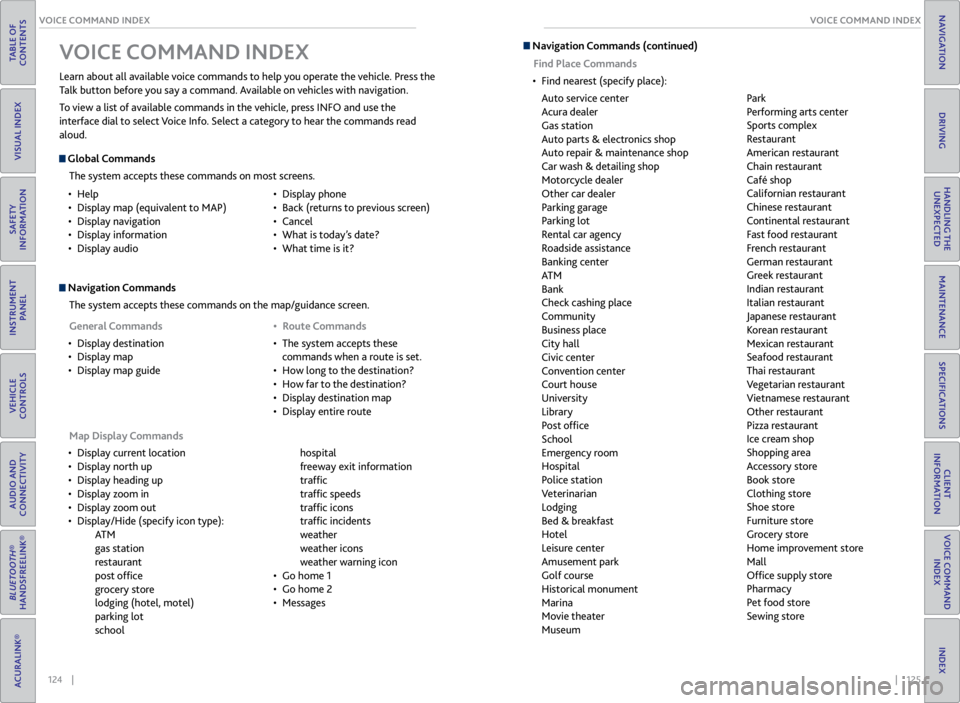
Navigation Commands
The system accepts these commands on the map/guidance screen.
Map Display Commands
• Display current location
• Display north up
• Display heading up
• Display zoom in
• Display zoom out
• Display/Hide (specify icon type):
AT M
gas station
restaurant
post office
grocery store
lodging (hotel, motel)
parking lot
school hospital
freeway exit information
traffic
traffic speeds
traffic icons
traffic incidents
weather
weather icons
weather warning icon
• Go home 1
• Go home 2
• Messages
Learn about all available voice commands to help you operate the vehicle. Press the
Talk button before you say a command. Available on vehicles with navigation.
To view a list of available commands in the vehicle, press INFO and use the
interface dial to select Voice Info. Select a category to hear the commands read
aloud.
V
OICE COMMAND INDEX
Global Commands
The system accepts these commands on most screens.
• Help
• Display map (equivalent to MAP)
• Display navigation
• Display information
• Display audio •
Display phone
• Back (returns to previous screen)
• Cancel
• What is today’s date?
• What time is it?
General Commands
• Display destination
• Display map
• Display map guide •
Route Commands
• The system accepts these
commands when a route is set.
• How long to the destination?
• How far to the destination?
• Display destination map
• Display entire route
Navigation Commands (continued)
Find Place Commands
• Find nearest (specify place):
Auto service center
Acura dealer
Gas station
Auto parts & electronics shop
Auto repair & maintenance shop
Car wash & detailing shop
Motorcycle dealer
Other car dealer
Parking garage
Parking lot
Rental car agency
Roadside assistance
Banking center
AT M
Bank
Check cashing place
Community
Business place
City hall
Civic center
Convention center
Court house
University
Library
Post office
School
Emergency room
Hospital
Police station
Veterinarian
Lodging
Bed & breakfast
Hotel
Leisure center
Amusement park
Golf course
Historical monument
Marina
Movie theater
Museum Park
Performing arts center
Sports complex
Restaurant
American restaurant
Chain restaurant
Café shop
Californian restaurant
Chinese restaurant
Continental restaurant
Fast food restaurant
French restaurant
German restaurant
Greek restaurant
Indian restaurant
Italian restaurant
Japanese restaurant
Korean restaurant
Mexican restaurant
Seafood restaurant
Thai restaurant
Vegetarian restaurant
Vietnamese restaurant
Other restaurant
Pizza restaurant
Ice cream shop
Shopping area
Accessory store
Book store
Clothing store
Shoe store
Furniture store
Grocery store
Home improvement store
Mall
Office supply store
Pharmacy
Pet food store
Sewing store
Page 70 of 71
132 || 133
INDEX
INDEX
TABLE OF
CONTENTS
VISUAL INDEX
SAFETY
INFORMATION
INSTRUMENT PANEL
VEHICLE
CONTROLS
AUDIO AND
CONNECTIVITY
BLUETOOTH®
HANDSFREELINK®
ACURALINK®
INDEX
VOICE COMMAND INDEX
CLIENT
INFORMATION
SPECIFICATIONS
MAINTENANCE
HANDLING THE UNEXPECTED
DRIVING
NAVIGATION
Driving Position Memory System ................ 41
Electric Power Steering indicator .................24
Electronic Stability Control (ESC)................ 87
Emergency Engine Stop ................................ 94
Emergency Towing ......................................... 94
Engine Compartment Fuse Box ................... 99
Engine Coolant ............................................. 108
Engine Oil ...................................................... 106
Engine Specifications ................................... 120
Engine Start/Stop button ............................. 83
Entering a Destination ................................... 75
EPS indicator .................................................... 24
ESC ............................................................ 87
Fan speed ......................................................... 43
FAQs .......................................................... 121
Find Nearest Place .......................................... 76
Flat Tire ........................................................... 96
Floor Mats ....................................................... 39
Fluids .......................................................... 120
Engine Coolant ....................................... 108
Engine Oil ................................................ 106
Transmission Fluid ................................. 109
Window Washer Fluid ........................... 109
FM/AM Radio .................................................. 48
FM/AM Radio Commands ........................... 127
Foot Brake ....................................................... 86
Frequently Asked Questions ....................... 121
Front Airbags ..................................................... 9
Front Wipers .................................................... 35
Fuel Information ............................................ 90
Fuel Specifications ........................................ 120
Fuse Locations ................................................ 99
Engine Compartment Fuse Box ............. 99
Inspecting and Changing Fuses .............101
Interior Fuse Box .................................... 100
Gararge Opener ............................................. 42
Hard Disc Drive (HDD) Audio ....................... 62
Hard Disc Drive (HDD) Audio Commands .. 127
Hazard indicator .............................................. 25
Hazard Warning button ................................... 2
Headlight-Wiper Integration ........................ 35
Head Restraints .............................................. 38
Home Address ................................................. 75
HomeLink® ..................................................... 42
Immobilizer indicator ..................................... 25
Instrument Panel ............................................ 23
Condition Indicators ................................. 24
Malfunction Indicators ............................. 23
On/Off Indicators ..................................... 25
Interface Dial Feedback ................................. 74
Interior Fuse Box .......................................... 100
iPod® ........................................................... 54
iPod® Commands ......................................... 128
Jump Starting .................................................. 91
Keyless Access Remote Battery ................... 91Keyless Access System ..................................
28
Keyless Access System indicator ..................24
Lap/Shoulder Seat Belts .................................. 5
LATCH-compatible child seat ....................... 18
Light Bulbs ...................................................... 120
Lights ........................................................... 33
Brightness Control ................................... 33
Cargo Lights .............................................. 34
Exterior Lights ........................................... 33
Interior Lights ............................................ 34
Lights indicators .............................................. 25
Lock Tab ........................................................... 30
Low fuel indicator ........................................... 24
Low oil pressure indicator ............................. 23
Low tire pressure indicator ............................25
Maintenance .................................................. 102
Air Conditioning ...................................... 110
Changing Wiper Blades ........................... 111
Checking the Battery .............................. 110
Engine Coolant ....................................... 108
Engine Oil ................................................ 106
Fluids ......................................................... 120
Maintenance Minder™ .......................... 103
Opening the Hood .................................. 105
Resetting the Engine Oil Life ................. 107
Safety Precautions .................................. 102
Service Codes .......................................... 103
Transmission Fluid ................................. 109
Under the Hood ....................................... 105
Window Washer Fluid ........................... 109
Maintenance Minder™ ............................... 103
Making a Call ............................................ 65, 69
Malfunction indicator lamp .......................... 23
Map Legend ............................................... 73, 76
Master Door Lock Switch ............................. 30
Maximum Load Limit .................................... 80
Mirrors ........................................................... 40
Automatic Dimming Rearview Mirror .. 40
Power Door Mirrors .................................. 41
Reverse Tilt Door Mirrors ......................... 41
Moonroof ......................................................... 32
Multi-Information Display ............................ 26
Multi-View Rear Camera .............................. 89
Navigation ....................................................... 72
AcuraLink Real-Time Traffic™ ................. 77
Detour ......................................................... 77
Entering a Destination ............................. 75
Find Nearest Place .................................... 76
Home Address ............................................ 75
Interface Dial Feedback ........................... 74
Map Legend ......................................... 73, 76
Navigation Commands .......................... 124
Place Category ........................................... 76
Routing ........................................................ 76
Steering Wheel Controls .......................... 72Street Address ............................................
75
System Volume.......................................... 74
Voice Command Tips ................................ 72
Voice Recognition Tutor .......................... 74
One-Touch Turn Signal ................................. 34
Opening the Hood ........................................ 105
Overheating .................................................... 93
Pairing a Phone ........................................ 64, 68
Pandora® ......................................................... 60
Pandora® Commands .................................. 128
Parking Brake .................................................. 86
Parking brake indicator .................................. 24
Passenger Airbag Off indicator .....................12
Phone Commands ........................................ 129
Phone Operation ...................................... 63, 67
Phonebook ................................................ 65, 69
Place Category ................................................ 76
Power Door Mirrors ........................................ 41
Power Moonroof ............................................. 32
Power Tailgate ................................................. 29
Power Windows .............................................. 31
Radiator ........................................................... 93
Radio ........................................................... 45
Readiness Codes
............................................ 119
Rear Camera ................................................... 89
Rear Seats ........................................................ 39
Rear Window Defogger ................................ 43
Rear Wiper ....................................................... 36
Rearview Mirror .............................................. 40
Refueling .......................................................... 90
Fuel Information ....................................... 90
How to Refuel ........................................... 90
Remote Transmitter ...................................... 28
Remote Transmitter Battery ......................... 91
Reporting Safety Defects .............................. 22
Reverse Tilt Door Mirrors .............................. 41
Roadside Assistance ..................................... 123
Routing ............................................................ 76
Safety Information ........................................... 3
Carbon Monoxide Gas ................................ 4
Important Handling Information ............. 3
Important Safety Information .................. 3
Important Safety Precautions .................. 3
Reporting Safety Defects ......................... 22
Safety Messages .......................................... 4
Safety Label Locations ................................... 21
Seat Belts ........................................................... 5
Adjusting the Shoulder Anchor .................7
Fastening a Seat Belt .................................. 7
Lap/Shoulder Seat Belts .............................5
Proper Use of Seat Belts ............................ 5
Seat Belt Inspection .................................... 6
Seat belt reminder .................................... 24
Seat Belt with Detachable Anchor ........... 8
Seat Heaters ................................................... 43Seats
............................................................ 37
Adjusting the Front Seat .......................... 37
Adjusting the Head Restraints ............... 38
Rear Seats .................................................. 39
Sequential Shift Mode .................................. 85
Setting the Clock ........................................... 44
Shifting ........................................................... 84
Shift Lever Does Not Move ........................... 92
Side Airbag Off indicator ............................... 25
Side Airbags ..................................................... 10
Side Curtain Airbags ....................................... 10
SMS Text Messaging ................................ 66, 70
Song By Voice™ Commands ....................... 129
Sound ........................................................... 46
Specifications ................................................ 120
Speed Dial ................................... 65, 66, 69, 70
SRS indicator ................................................... 24
Steering Wheel ............................................... 40
Adjusting the Steering Wheel ................ 40
Steering Wheel Controls ................... 46, 72
Street Address ................................................. 75
Supplemental Restraint System indicator ..... 24
SYNC button .................................................. 43
System message indicator ............................ 25
System Volume ............................................... 74
Text Messaging ......................................... 66, 70
Tire Information ............................................ 112
DOT Tire Quality Grading ...................... 116
Inflation Guidelines ................................ 112
Inspection Guidelines ............................. 112
Tire and Loading Information Label ..... 113
Tire and Wheel Replacement ................ 113
Tire Identification Number (TIN) ......... 115
Tire Labeling ............................................. 115
Tire Service Life ........................................ 114
Tire Specifications ................................... 120
Tire Terminology ...................................... 115
Wear Indicators ....................................... 113
Winter Tires .............................................. 114
Tire Pressure Monitoring System
(TPMS) ................................................... 95, 118
Total Luxury Care .......................................... 123
Towing ........................................................... 94
Towing a Trailer .............................................. 82
Pre-tow Checklist ..................................... 82
Tongue Load .............................................. 82
Towing Load Limits .................................. 82
TPMS indicator ................................................ 24
Traffic ............................................................ 77
Transmission Fluid ....................................... 109
Troubleshooting ............................................ 121
Turn Signal ...................................................... 34
Turn Signal indicator ...................................... 25
Under the Hood ............................................ 105
Unlocking/Locking the Doors ................ 28, 30