Low fuel Acura RDX 2015 Owner's Guide
[x] Cancel search | Manufacturer: ACURA, Model Year: 2015, Model line: RDX, Model: Acura RDX 2015Pages: 71, PDF Size: 18.23 MB
Page 3 of 71
TABLE OF
CONTENTS
VISUAL INDEX
SAFETY
INFORMATION
INSTRUMENT PANEL
VEHICLE
CONTROLS
AUDIO AND
CONNECTIVITY
BLUETOOTH®
HANDSFREELINK®
ACURALINK®
INDEX
VOICE COMMAND INDEX
CLIENT
INFORMATION
SPECIFICATIONS
MAINTENANCE
HANDLING THE UNEXPECTED
DRIVING
NAVIGATION
This Owner’s Guide is intended to help you quickly get acquainted with your 2015
Acura RDX. It provides basic information and instructions on technology and
convenience features, as well as emergency procedures and how to get assistance.
This guide is for vehicles sold in the United States and Canada. It covers all RDX
models, so you may find descriptions of features and equipment that are not in
your vehicle.
Images throughout this guide are from U.S. vehicles and represent features and
equipment that are available on some, but not all, models. Images shown in this
guide should be considered examples and used for demonstration purposes only.
This guide is not intended to be a substitute for the Owner’s Manual. The Owner
Information CD enclosed in your glove box kit includes the Owner’s Manual,
Navigation Manual, Consumer Information Book, and vehicle and tire warranties
in electronic format. This information can be viewed on a computer (PC or Mac
platform) and saved or printed for your reference. In addition, you can visit
owners.acura.com to view the complete and most current information.
If you are the first registered owner of your vehicle, you may request a
complimentary printed copy of the Owner’s Manual, Navigation Manual, Vehicle
Warranty, or Consumer Information Book. To request a copy, visit owners.acura.
com and create or log in to your account. In Canada, please request a copy from
your Acura dealer.
American Honda Motor Company strives to be proactive in protecting our
environment and natural resources. By using electronic delivery for a considerable
portion of the information typically found in a vehicle owner’s manual, we are
further reducing our impact on the environment.
Acura Total Luxury Care Roadside Assistance
Your Acura TLC Roadside Assistance representative is here to help you 24 hours
a day, 7 days a week. Under your 4-year/50,000-mile (80,000 km) warranty, the
following benefits are available:
• Towing services—full cost of towing to the closest Acura dealer
• Roadside assistance—jump starting, fuel delivery, lockout, and flat tire
• Trip planning—detailed trip routing, emergency services, and more
Call (800) 594-8500 (U.S.) or (800) 565-7587 (Canada)
Acura Client Relations Your authorized Acura dealer should be able to answer any questions you have
about your vehicle. However, if you are dissatisfied with the information you
receive, you can call Acura Client Relations (see page 122).
Call (800) 382-2238 (U.S.) or (888) 922-8729 (Canada)
INTRODUCTION TABLE OF CONTENTS
VISUAL INDEX ................................... 1
Steering Wheel and Nearby
Controls ................................................. 1
Dashboard and Ceiling Controls ........ 2
SAFETY INFORMATION .................. 3
Important Safety Information ........... 3
Seat Belts ............................................... 5
Airbags ................................................... 9
Child Safety ......................................... 15
Safety Label Locations ...................... 21
Reporting Safety Defects .................. 22
INSTRUMENT P ANEL .................... 23
Malfunction Indicators ...................... 23
Condition Indicators .......................... 24
On/Off Indicators .............................. 25
Multi-Information Display ...............26
Customized Settings .......................... 27
VEHICLE CONTROLS ..................... 28
Using the Remote Transmitter ....... 28
Keyless Access System ..................... 28
Power Tailgate Operation* ............... 29
Door Operation from Inside the
Vehicle ................................................. 30
Power Window Operation ................ 31
Power Moonroof Operation ............32
Interior and Exterior Lights ............. 33
One-Touch Turn Signal ..................... 34
Wiper Operation ................................ 35
Adjusting the Seats ............................ 37
Adjusting the Steering Wheel ......... 40
Adjusting the Mirrors ........................ 40
Driving Position Memory
System ................................................. 41
HomeLink® Garage Opener ............ 42Climate Control System ..................
43
Seat Heaters ....................................... 43
Setting the Clock ............................... 44
AUDIO AND CONNECTIVITY ...... 45
Basic Audio Operation ...................... 45
FM/AM Radio ..................................... 48
XM® Radio .......................................... 50
Compact Disc (CD) ............................ 52
iPod® ................................................... 54
USB Flash Drive .................................. 56
Bluetooth® Audio .............................. 58
Pandora®* .......................................... 60
Hard Disc Drive (HDD) Audio* ........62
BLUETOOTH® HANDSFREELINK ® 63
Basic HFL Operation ......................... 63
Pairing a Phone ........................... 64, 68
Making a Call ................................ 65, 69
SMS Text Messaging ................... 66, 70
A CURALINK
®* .................................. 71
AcuraLink Messages ........................... 71
NAVIGATION* ............................... 72
Basic Navigation Operation ............. 72
Entering a Destination ...................... 75
Routing ................................................. 76
DRIVING .......................................... 78
Before Driving ..................................... 78
Maximum Load Limit ........................ 80
Towing a Trailer .................................. 82
Starting to Drive ................................ 83
Braking ................................................ 86
Vehicle Stability Assist (VSA®), aka
Electronic Stability Control (ESC)
System ................................................. 87
Cruise Control .................................... 88
*if equipped
Page 15 of 71
22 || 23
INSTRUMENT P
ANEL
SAFETY
TABLE OF
CONTENTS
VISUAL INDEX
SAFETY
INFORMATION
INSTRUMENT PANEL
VEHICLE
CONTROLS
AUDIO AND
CONNECTIVITY
BLUETOOTH®
HANDSFREELINK®
ACURALINK®
INDEX
VOICE COMMAND INDEX
CLIENT
INFORMATION
SPECIFICATIONS
MAINTENANCE
HANDLING THE UNEXPECTED
DRIVING
NAVIGATION
Reporting Safety Defects
In the U.S.
If you believe that your vehicle has a defect which could cause a crash or could
cause injury or death, you should immediately inform the National Highway Traffic
Safety Administration (NHTSA) in addition to notifying American Honda Motor
Co., Inc.
If NHTSA receives similar complaints, it may open an investigation, and if it finds
that a safety defect exists in a group of vehicles, it may order a recall and remedy
campaign. However, NHTSA cannot become involved in individual problems
between you, your dealer, or American Honda Motor Co., Inc.
To contact NHTSA, you may call the Vehicle Safety Hotline toll-free at (888)
327-4236 (TTY: 1-800-424-9153); go to http://www.safercar.gov; or write to:
Administrator, NHTSA, 1200 New Jersey Avenue, SE., Washington, DC 20590. You
can also obtain other information about motor vehicle safety from http://www.
safercar.gov.
In Canada
If you believe that your vehicle has a defect which could cause a crash or could
cause injury or death, you should immediately inform Honda Canada, Inc., and you
may also inform Transport Canada.
If Transport Canada receives similar complaints, it may open an investigation, and
if it finds that a safety defect exists in a group of vehicles, it may lead to a recall
and remedy campaign. However, Transport Canada cannot become involved in
individual problems between you, your dealer, or Honda Canada, Inc.
To contact Transport Canada’s Defect Investigations and Recalls Division, you may
call (800) 333-0510. For more information on reporting safety defects or about
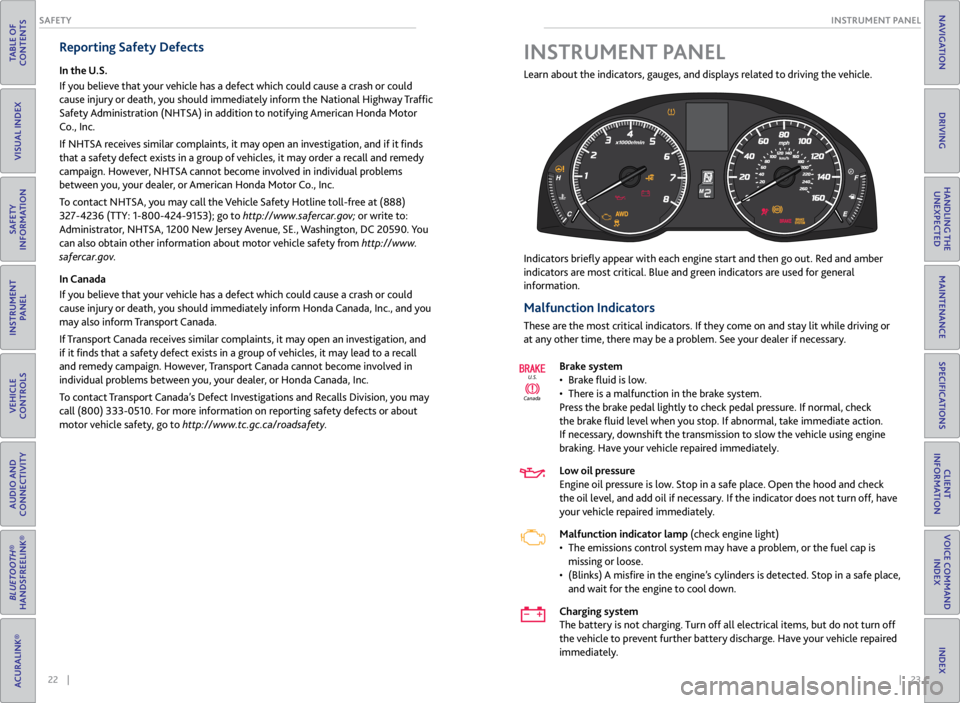
motor vehicle safety, go to http://www.tc.gc.ca/roadsafety. Learn about the indicators, gauges, and displays related to driving the vehicle.
Indicators briefly appear
with each engine start and then go out. Red and amber
indicators are most critical. Blue and green indicators are used for general
information.
Malfunction Indicators
These are the most critical indicators. If they come on and stay lit while driving or
at any other time, there may be a problem. See your dealer if necessary.
Brake system
• Brake fluid is low.
• There is a malfunction in the brake system.
Press the brake pedal lightly to check pedal pressure. If normal, check
the brake fluid level when you stop. If abnormal, take immediate action.
If necessary, downshift the transmission to slow the vehicle using engine
braking. Have your vehicle repaired immediately.
Low oil pressure
Engine oil pressure is low. Stop in a safe place. Open the hood and check
the oil level, and add oil if necessary. If the indicator does not turn off, have
your vehicle repaired immediately.
Malfunction indicator lamp (check engine light)
• The emissions control system may have a problem, or the fuel cap is
missing or loose.
• (Blinks) A misfire in the engine’s cylinders is detected. Stop in a safe place,
and wait for the engine to cool down.
Charging system
The battery is not charging. Turn off all electrical items, but do not turn off
the vehicle to prevent further battery discharge. Have your vehicle repaired
immediately.
Canada U.S.
INSTRUMENT P
ANEL
Page 16 of 71
24 || 25
INSTRUMENT P
ANEL
INSTRUMENT P ANEL
TABLE OF
CONTENTS
VISUAL INDEX
SAFETY
INFORMATION
INSTRUMENT PANEL
VEHICLE
CONTROLS
AUDIO AND
CONNECTIVITY
BLUETOOTH®
HANDSFREELINK®
ACURALINK®
INDEX
VOICE COMMAND INDEX
CLIENT
INFORMATION
SPECIFICATIONS
MAINTENANCE
HANDLING THE UNEXPECTED
DRIVING
NAVIGATION
Anti-Lock Brake Sysytem (ABS)
There is a problem with the anti-lock brake system. Your vehicle still has
normal braking ability, but no anti-lock function.
Supplemental Restraint System (SRS)
There is a problem with one of the airbag systems or seat belt tensioners.
Electric Power Steering (EPS)
There is a problem with the electric power steering system.
Tire Pressure Monitoring System (TPMS)
(Blinks and stays on) There is a problem with the tire pressure monitoring
system, or the vehicle is fitted with the spare tire.
Keyless Access system
There is a problem with the keyless access system.
All-Wheel Drive (AWD) system*
• There is a problem with the AWD system. Only the front wheels are
powered.
• (Blinks) The AWD system has overheated and is inactive. Stop in a safe
place, shift to Park (P), and idle the engine until the indicator goes off.
Vehicle Stability Assist® (VSA®) system
• There is a problem with the VSA system or the hill start assist system.
• (Blinks) VSA is active.
Brake system
There is a problem with the hydraulic brake boost system.
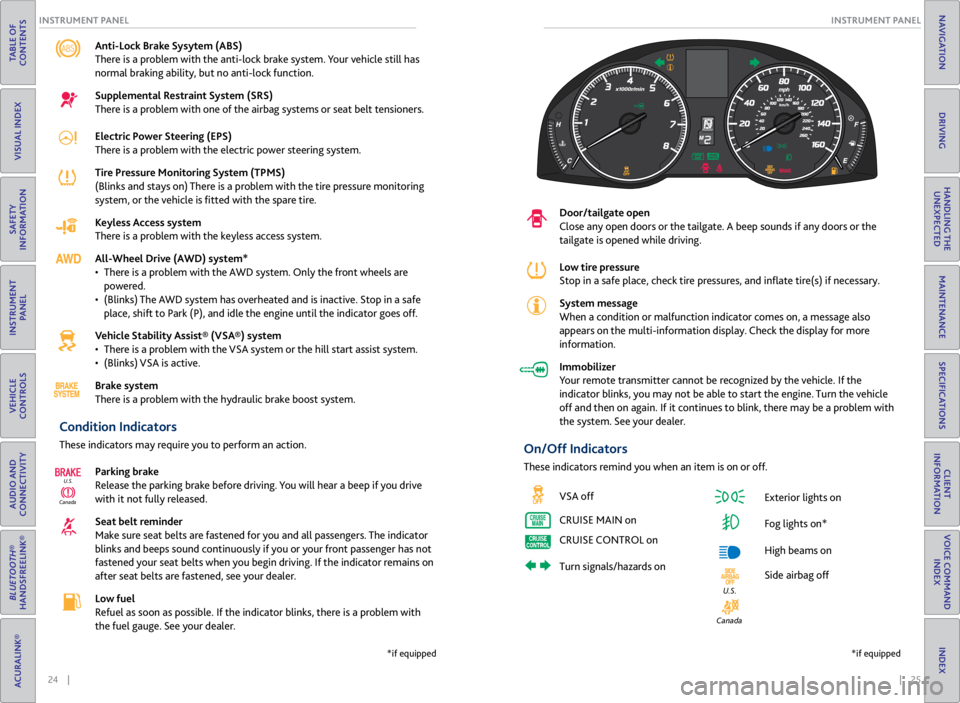
Condition Indicators
These indicators may require you to perform an action.
Parking brake
Release the parking brake before driving. You will hear a beep if you drive
with it not fully released.
Seat belt reminder
Make sure seat belts are fastened for you and all passengers. The indicator
blinks and beeps sound continuously if you or your front passenger has not
fastened your seat belts when you begin driving. If the indicator remains on
after seat belts are fastened, see your dealer.
Low fuel
Refuel as soon as possible. If the indicator blinks, there is a problem with
the fuel gauge. See your dealer.
CanadaU.S.
*if equipped
Door/tailgate open
Close any open doors or the tailgate. A beep sounds if any doors or the
tailgate is opened while driving.
Low tire pressure
Stop in a safe place, check
tire pressures, and inflate tire(s) if necessary.
System message
When a condition or malfunction indicator comes on, a message also
appears on the multi-information display. Check the display for more
information.
Immobilizer
Your remote transmitter cannot be recognized by the vehicle. If the
indicator blinks, you may not be able to start the engine. Turn the vehicle
off and then on again. If it continues to blink, there may be a problem with
the system. See your dealer.
On/Off Indicators
These indicators remind you when an item is on or off.
VSA off
CRUISE MAIN on
CRUISE CONTROL on
Turn signals/hazards on Exterior lights on
Fog lights on*
High beams on
Side airbag off
Canada
U.S.
*if equipped
Page 17 of 71
26 || 27
INSTRUMENT P
ANEL
INSTRUMENT P ANEL
TABLE OF
CONTENTS
VISUAL INDEX
SAFETY
INFORMATION
INSTRUMENT PANEL
VEHICLE
CONTROLS
AUDIO AND
CONNECTIVITY
BLUETOOTH®
HANDSFREELINK®
ACURALINK®
INDEX
VOICE COMMAND INDEX
CLIENT
INFORMATION
SPECIFICATIONS
MAINTENANCE
HANDLING THE UNEXPECTED
DRIVING
NAVIGATION
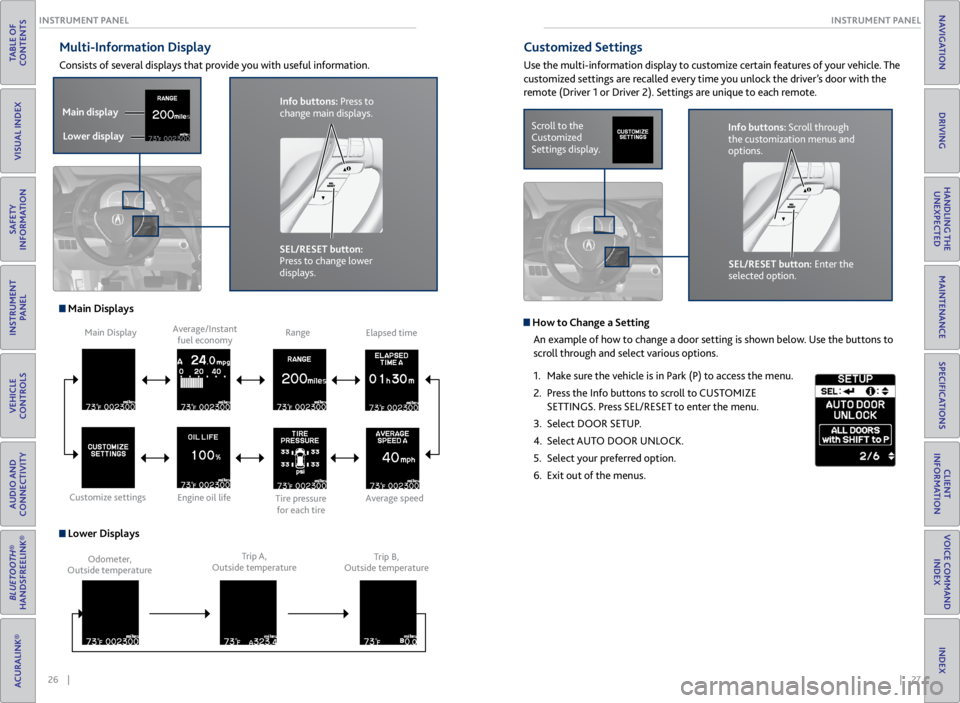
Multi-Information Display
Consists of several displays that provide you with useful information.
Main Displays
Lower Displays
Main Display
Customize settings Average/Instant
fuel economy
Engine oil life Range
Tire pressure for each tireElapsed time
Average speed
Odometer,
Outside temperature Trip A,
Outside temperature Trip B,
Outside temperature
Customized Settings
Use the multi-information display to customize certain features of your vehicle. The
customized settings are recalled every time you unlock the driver’s door with the
remote (Driver 1 or Driver 2). Settings are unique to each remote.
Scroll to the
Customized
Settings display.
SEL/RESET button: Enter the
selected option.Info buttons: Scroll through
the customization menus and
options.
Info buttons: Press to
change main displays.
Main display
Lower display
SEL/RESET button:
Press to change lower
displays.
How to Change a Setting
An example of how to change a door setting is shown below. Use the buttons to
scroll through and select various options.
1. Make sure the vehicle is in Park (P) to access the menu.
2. Press the Info buttons to scroll to CUSTOMIZE
SETTINGS. Press SEL/RESET to enter the menu.
3. Select DOOR SETUP.
4. Select AUTO DOOR UNLOCK.
5. Select your preferred option.
6. Exit out of the menus.
Page 49 of 71
90 || 91
HANDLING THE UNEXPECTED
DRIVING
TABLE OF
CONTENTS
VISUAL INDEX
SAFETY
INFORMATION
INSTRUMENT PANEL
VEHICLE
CONTROLS
AUDIO AND
CONNECTIVITY
BLUETOOTH®
HANDSFREELINK®
ACURALINK®
INDEX
VOICE COMMAND INDEX
CLIENT
INFORMATION
SPECIFICATIONS
MAINTENANCE
HANDLING THE UNEXPECTED
DRIVING
NAVIGATION
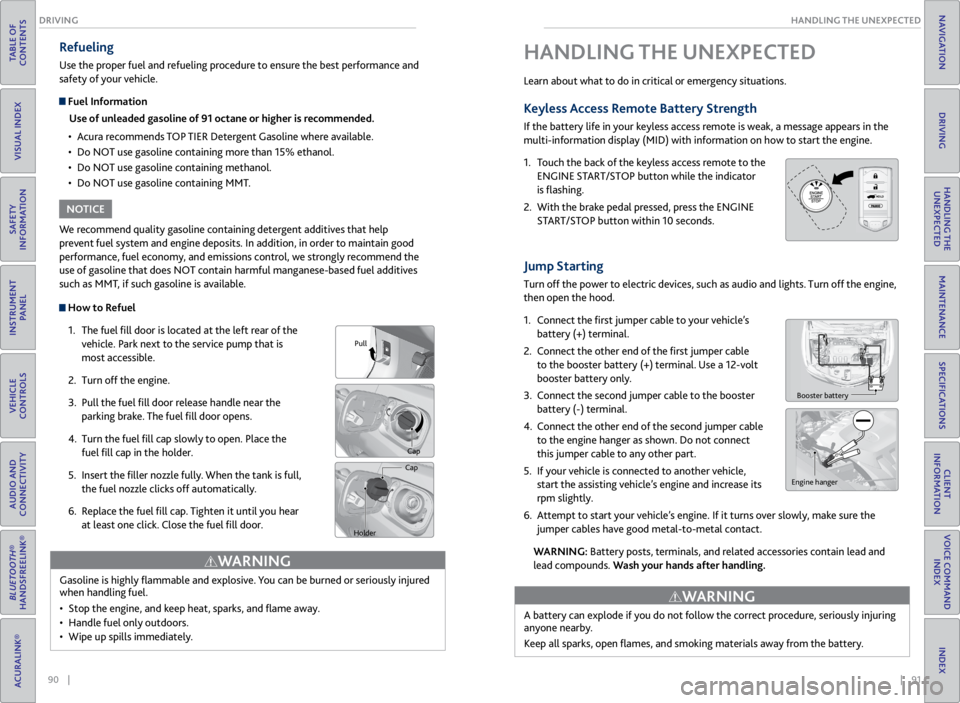
How to Refuel
1. The fuel fill door is located at the left rear of the
vehicle. Park next to the service pump that is
most accessible.
2. Turn off the engine.
3. Pull the fuel fill door release handle near the
parking brake. The fuel fill door opens.
4. Turn the fuel fill cap slowly to open. Place the
fuel fill cap in the holder.
5. Insert the filler nozzle fully. When the tank is full,
the fuel nozzle clicks off automatically.
6. Replace the fuel fill cap. Tighten it until you hear
at least one click. Close the fuel fill door.
Refueling
Use the proper fuel and refueling procedure to ensure the best performance and
safety of your vehicle.
Fuel Information
Use of unleaded gasoline of 91 octane or higher is recommended.
• Acura recommends TOP TIER Detergent Gasoline where available.
• Do NOT use gasoline containing more than 15% ethanol.
• Do NOT use gasoline containing methanol.
• Do NOT use gasoline containing MMT.
We recommend quality gasoline containing detergent additives that help
prevent fuel system and engine deposits. In addition, in order to maintain good
performance, fuel economy, and emissions control, we strongly recommend the
use of gasoline that does NOT contain harmful manganese-based fuel additives
such as MMT, if such gasoline is available.
NOTICE
Gasoline is highly flammable and explosive. You can be burned or seriously injured
when handling fuel.
• Stop the engine, and keep heat, sparks, and flame away.
• Handle fuel only outdoors.
• Wipe up spills immediately.
WARNING
Pull
Cap
Cap
Holder
Learn about what to do in critical or emergency situations.
Keyless Access Remote Battery Strength
If the battery life in your keyless access remote is weak, a message appears in the
multi-information display (MID) with information on how to start the engine.
1. Touch the back of the keyless access remote to the
ENGINE START/STOP button while the indicator
is flashing.
2. With the brake pedal pressed, press the ENGINE
START/STOP button within 10 seconds.
Jump Starting
Turn off the power to electric devices, such as audio and lights. Turn off the engine,
then open the hood.
1. Connect the first jumper cable to your vehicle’s
battery (+) terminal.
2. Connect the other end of the first jumper cable
to the booster battery (+) terminal. Use a 12-volt
booster battery only.
3. Connect the second jumper cable to the booster
battery (-) terminal.
4. Connect the other end of the second jumper cable
to the engine hanger as shown. Do not connect
this jumper cable to any other part.
5. If your vehicle is connected to another vehicle,
start the assisting vehicle’s engine and increase its
rpm slightly.
6. Attempt to start your vehicle’s engine. If it turns over slowly, make sure the
jumper cables have good metal-to-metal contact.
WARNING: Battery posts, terminals, and related accessories contain lead and
lead compounds. Wash your hands after handling.
HANDLING THE UNEXPECTED
Booster battery
HOLD
Engine hanger
A battery can explode if you do not follow the correct procedure, seriously injuring
anyone nearby.
Keep all sparks, open flames, and smoking materials away from the battery.
WARNING
Page 54 of 71

100 || 101
HANDLING THE UNEXPECTED
HANDLING THE UNEXPECTED
TABLE OF
CONTENTS
VISUAL INDEX
SAFETY
INFORMATION
INSTRUMENT PANEL
VEHICLE
CONTROLS
AUDIO AND
CONNECTIVITY
BLUETOOTH®
HANDSFREELINK®
ACURALINK®
INDEX
VOICE COMMAND INDEX
CLIENT
INFORMATION
SPECIFICATIONS
MAINTENANCE
HANDLING THE UNEXPECTED
DRIVING
NAVIGATION
Interior Fuse Box
Located under the dashboard.
Circuit Protecte dAmps
1
2ACG15 A
3SRS10A
4Fuel Pump15A
5Meter7.5A
6Option7.5A
7VB SOL10 A
8Front Right Side
Door Lock Motor (Unlock)15 A
9Rear Left Side
Door Lock Motor (Unlock)15 A
10 Power Lumba r7.5A
11Moonroof20 A
12 Accessory Power Socket
(Center Console )15
A
13Washer Main15A
14 Seat Heaters 15A
15Driver’s Door Lock Motor
(Unlock)10A
16
17
18
19ACC7.5A
20 ACC Key Lock 7.5A
21Daytime Running Lights7.5A
22 A/
C7.5A
23Rear Wipe r10A
24 ABS/VS
A7.5A
25
26 Audio Am
p20A
27Accessory Power Socket
(Front)15 A
28
29ODS7. 5A
30 Driver’s Door Lock Motor
(Lock) 10
A
Circuit Protecte dAmps
31Smart10A
32 Front Right Side
Door Lock Motor (Lock )15
A
33Rear Left Side
Door Lock Motor (Lock )15A
34 Small Lights 7.5A
35Illumination7.5A
36 Rear Wiper Main 10A
37
38 Left Headlight High Beam 10A
39Right Headlight High Beam10 A
40 TPMS 7.5A
41Door Lock20 A
42 Driver’s Power Window 20A
43Rear Right Side Power
Window20A
44 Front Right Side Power
Window 20
A
45Rear Left Side Power
Window20A
46 Wiper 30A
Fuse box
Fuse label
Inspecting and Changing Fuses
1. Turn the vehicle off, including the headlights and
accessories.
2. Remove the fuse box cover.
3. Check the large fuse in the engine compartment.
If the fuse is blown, use a Phillips-head
screwdriver to remove the screws and replace
the fuse with a new one. Reinstall the screws.
4. Inspect the small fuses in the engine
compartment and the vehicle interior.
If there is a burned out fuse, remove it with the
fuse puller and replace it with a new one.
Replacing a fuse with one that has a higher rating greatly increases the chances of
damaging the electrical system.
NOTICE
Blown fuse
Combined
fuse Fuse puller
Page 55 of 71

102 || 103
MAINTENANCE
MAINTENANCE
TABLE OF
CONTENTS
VISUAL INDEX
SAFETY
INFORMATION
INSTRUMENT PANEL
VEHICLE
CONTROLS
AUDIO AND
CONNECTIVITY
BLUETOOTH®
HANDSFREELINK®
ACURALINK®
INDEX
VOICE COMMAND INDEX
CLIENT
INFORMATION
SPECIFICATIONS
MAINTENANCE
HANDLING THE UNEXPECTED
DRIVING
NAVIGATION
Learn about basic maintenance that you can perform on the vehicle yourself, as
well as information about how to best maintain the vehicle.
Safety Precautions
Some of the most important safety precautions are listed below; however,
we cannot warn you of every conceivable hazard that can arise in performing
maintenance. Only you can decide whether or not you should perform a given task.
Maintenance Safety
• To reduce the possibility of fire or explosion, keep cigarettes, sparks, and flames
away from the battery and all fuel-related parts.
• Never leave rags, towels, or other flammable objects under the hood.
• To clean parts, use a commercially available degreaser or parts cleaner, not
gasoline.
• Wear eye protection and protective clothing when working with the battery or
compressed air.
• Do not run the engine in confined spaces where carbon monoxide gas can
accumulate.
Vehicle Safety
• The vehicle must be stationary, and parked on level ground with the parking
brake set and the engine off.
• Be aware that hot parts can burn you.
• Be aware that moving parts can injure you.
MAINTENANCE
Improperly maintaining this vehicle or failing to correct a problem before
driving can cause a crash in which you can be seriously hurt or killed.
Always follow the inspection and maintenance recommendations according to
the schedules in this guide.
WARNING
Failure to properly follow maintenance instructions and precautions can cause
you to be seriously hurt or killed.
Always follow the procedures and precautions in this guide.
WARNING
Maintenance Minder™
Reminds you when indicated maintenance service is due.
When maintenance is due, the system message indicator comes on and the
Maintenance Minder appears on the multi-information display every time you turn
the vehicle on. Press the info button to change displays.
Maintenance Minder Service Codes
These codes indicate what services are due on your vehicle.
*1: If the message SERVICE does not appear more than 12 months after the display is\
reset, change the
engine oil every year .
#: See information on maintenance and emissions warranty.*2:If you drive in dusty conditions, replace the air cleaner element every 15,000 miles (24,000 km).
*3: If you drive primarily in urban areas that have high concentrations of i\
ndustrial soot and pollution from
diesel-powered vehicles, replace the dust and pollen lter every 15,000 miles (24,000 km).
CODEMaintenance Main Items
A•Replace engine oi l*1
B•Replace engine oil*1 and oil lter•Inspect front and rear brakes, service as necessary•Check parking brake adjustment•Inspect tie rod ends, steering gearbox, and boot s•Inspect suspension components•Inspect driveshaft boots•Inspect brake hoses and lines (Including ABS/VSA)•Inspect all uid levels and condition of uid s•Inspect exhaust system#
•Inspect fuel lines and connections#
*4:If you drive regularly in very high temperatures (over 110 °F, 43 °C), \
in very low temperatures (under -
20 °F, -29 °C), or tow a tra iler, repl ace ever y 60,000 mi les/100,000 km .
CODE Maintenance Sub Items
1
•Rotate tires
2
•Replace air cleaner element*2
•Replace dust and pollen lte r*3
•Inspect drive belt
3
•Replace transmission and transfer uid*
4•Replace spark plugs•Replace timing belt an d inspect water pump*4
•Inspect valve clearance
5
•Replace engine coolant
6
•Replace rear differential uid*
System
message
indicator
Main
itemSub item
Maintenance Minder
Page 56 of 71
104 || 105
MAINTENANCE
MAINTENANCE
TABLE OF
CONTENTS
VISUAL INDEX
SAFETY
INFORMATION
INSTRUMENT PANEL
VEHICLE
CONTROLS
AUDIO AND
CONNECTIVITY
BLUETOOTH®
HANDSFREELINK®
ACURALINK®
INDEX
VOICE COMMAND INDEX
CLIENT
INFORMATION
SPECIFICATIONS
MAINTENANCE
HANDLING THE UNEXPECTED
DRIVING
NAVIGATION
*1: If the message SERVICE does not appear more than 12 months after the display is\
reset, change the
engine oil every year .
#: See information on maintenance and emissions warranty.*2:If you drive in dusty conditions, replace the air cleaner element every 15,000 miles (24,000 km).
*3: If you drive primarily in urban areas that have high concentrations of i\
ndustrial soot and pollution from
diesel-powered vehicles, replace the dust and pollen lter every 15,000 miles (24,000 km).
CODE Maintenance Main Items
A
•Replace engine oi l*1
B•Replace engine oil*1 and oil lter•Inspect front and rear brakes, service as necessary•Check parking brake adjustment•Inspect tie rod ends, steering gearbox, and boot s•Inspect suspension components•Inspect driveshaft boots•Inspect brake hoses and lines (Including ABS/VSA)•Inspect all uid levels and condition of uid s•Inspect exhaust system#
•Inspect fuel lines and connections#
*4:If you drive regularly in very high temperatures (over 110 °F, 43 °C), \
in very low temperatures (under -
20 °F, -29 °C), or tow a tra iler, repl ace ever y 60,000 mi les/100,000 km .
CODEMaintenance Sub Item s
1
•Rotate tires
2•Replace air cleaner element*2
•Replace dust and pollen lte r*3
•Inspect drive belt
3
•Replace transmission and transfer uid*
4•Replace spark plugs•Replace timing belt an d inspect water pump*4
•Inspect valve clearance
5
•Replace engine coolant
6•Replace rear differential uid*
• Independent of the Maintenance Minder information, replace the brake fluid
every 3 years.
• Inspect idle speed every 160,000 miles (256,000 km).
• Adjust the valves during services A, B, 1, 2, or 3 if they are noisy.
U.S. models
Maintenance, replacement, or repair of emissions control devices and systems
may be done by any automotive repair establishment or individuals using
parts that are certified to EPA standards.
According to state and federal regulations, failure to perform maintenance on the
maintenance main items marked with # will not void your emissions warranties.
However, all maintenance services should be performed in accordance with the
intervals indicated by the multi-information display.
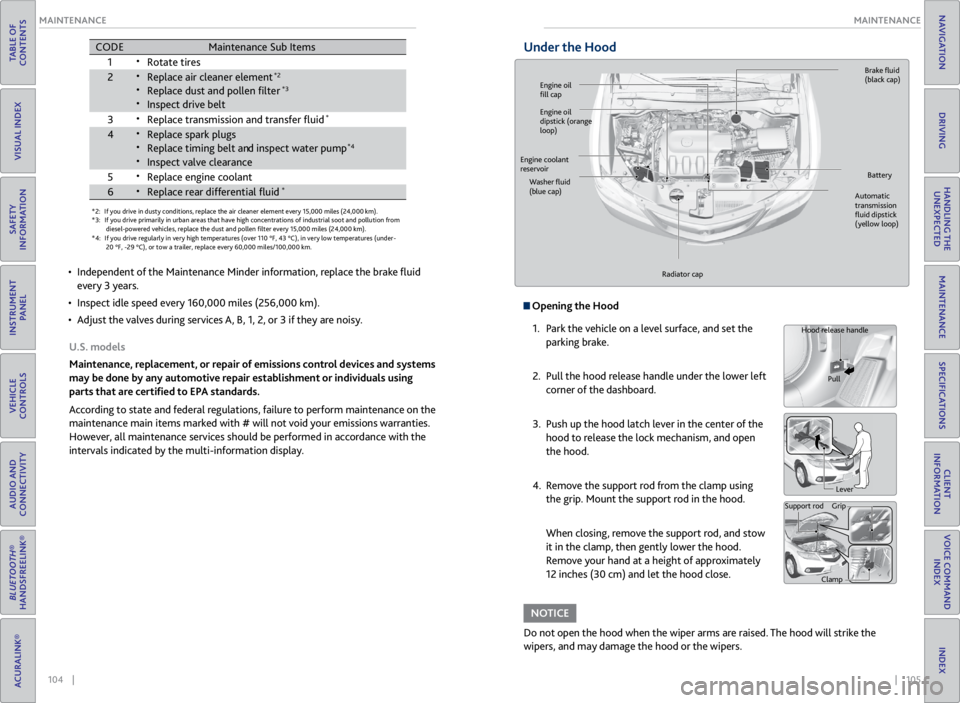
Under the Hood
Opening the Hood
1. Park the vehicle on a level surface, and set the
parking brake.
2. Pull the hood release handle under the lower left
corner of the dashboard.
3. Push up the hood latch lever in the center of the
hood to release the lock mechanism, and open
the hood.
4. Remove the support rod from the clamp using
the grip. Mount the support rod in the hood.
When closing, remove the support rod, and stow
it in the clamp, then gently lower the hood.
Remove your hand at a height of approximately
12 inches (30 cm) and let the hood close.
Do not open the hood when the wiper arms are raised. The hood will strike the
wipers, and may damage the hood or the wipers.
NOTICE
Hood release handle
Pull
Lever
Support rod Grip
Clamp
Engine oil
fill cap Brake
fluid
(black cap)
Automatic
transmission
fluid dipstick
(yellow loop)
Washer
fluid
(blue cap) Battery
Engine coolant
reservoir
Radiator cap
Engine oil
dipstick (orange
loop)
Page 60 of 71

112 || 113
MAINTENANCE
MAINTENANCE
TABLE OF
CONTENTS
VISUAL INDEX
SAFETY
INFORMATION
INSTRUMENT PANEL
VEHICLE
CONTROLS
AUDIO AND
CONNECTIVITY
BLUETOOTH®
HANDSFREELINK®
ACURALINK®
INDEX
VOICE COMMAND INDEX
CLIENT
INFORMATION
SPECIFICATIONS
MAINTENANCE
HANDLING THE UNEXPECTED
DRIVING
NAVIGATION
Tire Information
To safely operate your vehicle, your tires must be of the proper type and size, in
good condition with adequate tread, and properly inflated.
Inflation Guidelines
• Properly inflated tires provide the best combination of handling, tread life, and
comfort. Refer to the driver’s doorjamb label or the specifications (see page
120) for the specified pressure.
• Underinflated tires wear unevenly, adversely affect handling and fuel economy,
and are more likely to fail from overheating.
• Overinflated tires make your vehicle ride harshly, are more prone to road
hazards, and wear unevenly.
• Every day before you drive, look at each of the tires. If one looks lower than the
others, check the pressure with a tire gauge.
• Measure the air pressure when tires are cold. This means the vehicle has been
parked for at least 3 hours, or driven less than 1 mile (1.6 km). If necessary, add
or release air until the specified pressure is reached. If checked when hot, tire
pressure can be as much as 4-6 psi (30-40 kPa, 0.3-0.5 kgf/cm
2) higher than
checked when cold.
• At least once a month or before long trips, use a gauge to measure the pressure
in all tires, including the spare. Even tires in good condition can lose 1-2 psi
(10-20 kPa, 0.1-0.2 kgf/cm
2) per month.
Inspection Guidelines
Every time you inflate the tires, check for the following:
• Any damage to tires, including bumps, bulges, cuts, splits, or cracks in the side
or tread. Remove any foreign objects and inspect for air leaks. Replace tires if
you see fabric or cord.
• Uneven or excessive tread wear. Have a dealer check the wheel alignment.
• Cracks or other damage around the valve stems.
Wear Indicators
The groove where the wear indicator is located is
1/16 inch (1.6 mm) shallower than elsewhere on the
tire. If the tread has worn so low that the indicator
is exposed, replace the tire. Worn out tires have
poor traction on wet roads.
Example of a wear
indicator mark
Tire and Loading Information Label
The label attached to the driver’s doorjamb provides necessary tire and
loading information. Using
tires that are excessively worn or improperly inflated can cause
a crash in which you can be seriously hurt or killed.
Follow all instructions in this owner’s manual regarding tire inflation
and maintenance.
WARNING
Original
tire sizes Number of
people your
vehicle can
carry Proper
cold tire
pressure
Total weight
your vehicle
can carry (do
not exceed)
Tire and Wheel Replacement
Replace your tires with radials of the same size, load range, speed rating, and
maximum cold tire pressure rating (as shown on the tire’s sidewall). Using
tires of a different size or construction can cause certain vehicle systems to
work incorrectly. It is best to replace all four tires at the same time. If that isn’t
possible, replace the front or rear tires in pairs.
If you change or replace a wheel, make sure that the wheel’s specifications match
those of the original wheels. Only use TPMS-specified wheels approved for your
vehicle.
Installing improper tires on your vehicle can affect handling and stability.
This can cause a crash in which you can be seriously hurt or killed.
Always use the size and type of tires recommended in the owner’s manual.
WARNING
Page 63 of 71

118 || 119
MAINTENANCE
MAINTENANCE
TABLE OF
CONTENTS
VISUAL INDEX
SAFETY
INFORMATION
INSTRUMENT PANEL
VEHICLE
CONTROLS
AUDIO AND
CONNECTIVITY
BLUETOOTH®
HANDSFREELINK®
ACURALINK®
INDEX
VOICE COMMAND INDEX
CLIENT
INFORMATION
SPECIFICATIONS
MAINTENANCE
HANDLING THE UNEXPECTED
DRIVING
NAVIGATION
Tire Pressure Monitoring System (TPMS) - Required Federal
Explanation
U.S. models only
Each tire, including the spare (if provided), should be checked monthly
when cold and inflated to the inflation pressure recommended by the
vehicle manufacturer on the vehicle placard or tire inflation pressure label.
(If your vehicle has tires of a different size than the size indicated on the
vehicle placard or tire inflation pressure label, you should determine the
proper tire inflation pressure for those tires.)
As an added safety feature, your vehicle has been equipped with a
tire pressure monitoring system (TPMS) that illuminates a
low tire pressure telltale when one or more of your tires is
significantly under-inflated.
Accordingly, when the low tire pressure telltale illuminates, you should
stop and check your tires as soon as possible, and inflate them to the
proper pressure.
Driving on a significantly under-inflated tire causes the tire to overheat and
can lead to tire failure. Under-inflation also reduces fuel efficiency and tire
tread life, and may affect the vehicle’s handling and stopping ability.
Please note that the TPMS is not a substitute for proper tire maintenance,
and it is the driver’s responsibility to maintain correct tire pressure, even
if under-inflation has not reached the level to trigger illumination of the
TPMS low tire pressure telltale.
Your vehicle has also been equipped with a TPMS malfunction indicator to
indicate when the system is not operating properly. The TPMS malfunction
indicator is combined with the low tire pressure telltale. When the system
detects a malfunction, the telltale will flash for approximately one minute
and then remain continuously illuminated. This sequence will continue
upon subsequent vehicle start-ups as long as the malfunction exists.
When the malfunction indicator is illuminated, the system may not be able
to detect or signal low tire pressure as intended.
TPMS malfunctions may occur for a variety of reasons, including the
installation of replacement or alternate tires or wheels on the vehicle that
prevent the TPMS from functioning properly.
Always check the TPMS malfunction telltale after replacing one or more
tires or wheels on your vehicle to ensure that the replacement or alternate
tires and wheels allow the TPMS to continue to function properly.
Testing of Readiness Codes
Your vehicle has “Readiness Codes” as part of the onboard self-diagnostic system.
Some states refer to these codes as a test to see if your vehicle’s emissions
components are working properly. The codes may not be read if you go through the
testing just after the battery has gone dead or been disconnected.
To check if they are set, turn the vehicle on without starting the engine. The
malfunction indicator lamp will come on for several seconds. If it goes off, the
readiness codes are set. If it blinks five times, the readiness codes are not set.
If you are required to have your vehicle tested before the readiness codes are set,
prepare the vehicle for retesting by doing the following:
1. Fill the gas tank to approximately 3/4 full.
2. Park the vehicle and leave the engine off for 6 hours or more.
3. Make sure the ambient temperature is between 40°F and 95°F (4°C and 35°C).
4. Start the engine without touching the accelerator pedal, and let it idle for 20
seconds.
5. Keep the vehicle in Park (P). Increase the engine speed to 2,000 rpm, and hold it
there for about 3 minutes.
6. Let the engine idle with your foot off the accelerator for 20 seconds.
7. Select a nearby, lightly traveled major highway where you can maintain a speed
of 50 to 60 mph (80 to 97 km/h) for at least 20 minutes. Drive on the highway
with the vehicle in Drive. Do not use cruise control. When traffic allows, drive
for 90 seconds without using the accelerator pedal. (Vehicle speed may vary
slightly; this is OK.) If you cannot do this for a continuous 90 seconds because of
traffic conditions, drive for at least 30 seconds, then repeat two more times (for
a total of 90 seconds).
8. Drive in city/suburban traffic for at least 10 minutes. When traffic conditions
allow, let the vehicle coast for several seconds without using the accelerator
pedal or the brake pedal.
9. Park the vehicle and leave the engine off for 30 minutes.
The readiness codes are erased when the battery is disconnected, and set again
only after several days of driving under a variety of conditions.
If a testing facility determines that the readiness codes are not set, you may be
requested to return at a later date to complete the test, or see your dealer.=