air condition Acura RDX 2015 Owner's Guide
[x] Cancel search | Manufacturer: ACURA, Model Year: 2015, Model line: RDX, Model: Acura RDX 2015Pages: 71, PDF Size: 18.23 MB
Page 2 of 71
TABLE OF
CONTENTS
VISUAL INDEX
SAFETY
INFORMATION
INSTRUMENT PANEL
VEHICLE
CONTROLS
AUDIO AND
CONNECTIVITY
BLUETOOTH®
HANDSFREELINK®
ACURALINK®
INDEX
VOICE COMMAND INDEX
CLIENT
INFORMATION
SPECIFICATIONS
MAINTENANCE
HANDLING THE UNEXPECTED
DRIVING
NAVIGATION
Devices That Emit Radio Waves
The following products and systems on your vehicle emit radio waves when in
operation:
• Audio system
• Bluetooth® Audio
• Bluetooth® HandsFreeLink®
• HomeLink Universal Transceiver •
Immobilizer system
• Remote transmitter
• Keyless Access System
• Tire Pressure Monitoring System
DISCLOSURES
Event Data Recorders
This vehicle is equipped with an event data recorder (EDR). The main purpose
of an EDR is to record, in certain crash or near crash-like situations, such as an air
bag deployment or hitting a road obstacle, data that will assist in understanding
how a vehicle’s systems performed. The EDR is designed to record data related
to vehicle dynamics and safety systems for a short period of time, typically
30 seconds or less. The EDR in this vehicle is designed to record such data as:
• How various systems in your vehicle were operating;
• Whether or not the driver and passenger safety belts were buckled/
fastened;
• How far (if at all) the driver was depressing the accelerator and/or brake
pedal; and,
• How fast the vehicle was traveling.
These data can help provide a better understanding of the circumstances in which
crashes and injuries occur. NOTE: EDR data are recorded by your vehicle only if a
non-trivial crash situation occurs; no data are recorded by the EDR under normal
driving conditions and no personal data (e.g., name, gender, age, and crash
location) are recorded. However, other parties, such as law enforcement, could
combine the EDR data with the type of personally identifying data routinely
acquired during a crash investigation.
To read data recorded by an EDR, special equipment is required, and access to
the vehicle or the EDR is needed. In addition to the vehicle manufacturer, other
parties such as law enforcement that have the special equipment can read the
information if they have access to the vehicle or the EDR.
The data belong to the vehicle owner and may not be accessed by anyone else
except as legally required or with the permission of the vehicle owner.
Service Diagnostic Recorders This vehicle is equipped with service-related devices that record information
about powertrain performance. The data can be used to verify emissions law
requirements and/or help technicians diagnose and solve service problems. It
may also be combined with data from other sources for research purposes, but it
remains confidential.
Each of the above complies with the appropriate requirements or the required
standards of FCC (Federal Communications Commission) and Industry Canada,
described below:
As required by
the FCC:
This device complies with Part 15 of the FCC rules. Operation is subject to the
following two conditions: (1) This device may not cause harmful interference, and
(2) this device must accept any interference received, including interference that
may cause undesired operation.
Changes or modifications not expressly approved by the party responsible for
compliance could void the user’s authority to operate the equipment.
As required by Industry Canada:
This device complies with Industry Canada Standard RSS-Gen/210/310. Operation is
subject to the following two conditions: (1) this device may not cause interference,
and (2) this device must accept any interference, including interference that may
cause undesired operation of the device.
California Perchlorate Contamination Prevention Act
The airbags, seat belt tensioners, and CR-type batteries in this vehicle may
contain perchlorate materials—special handling may apply. See www.dtsc.ca.gov/
hazardouswaste/perchlorate/ for more information.
California Proposition 65 WarningWARNING: This product contains or emits chemicals known to the state of
California to cause cancer and birth defects or other reproductive harm.
Page 3 of 71
TABLE OF
CONTENTS
VISUAL INDEX
SAFETY
INFORMATION
INSTRUMENT PANEL
VEHICLE
CONTROLS
AUDIO AND
CONNECTIVITY
BLUETOOTH®
HANDSFREELINK®
ACURALINK®
INDEX
VOICE COMMAND INDEX
CLIENT
INFORMATION
SPECIFICATIONS
MAINTENANCE
HANDLING THE UNEXPECTED
DRIVING
NAVIGATION
This Owner’s Guide is intended to help you quickly get acquainted with your 2015
Acura RDX. It provides basic information and instructions on technology and
convenience features, as well as emergency procedures and how to get assistance.
This guide is for vehicles sold in the United States and Canada. It covers all RDX
models, so you may find descriptions of features and equipment that are not in
your vehicle.
Images throughout this guide are from U.S. vehicles and represent features and
equipment that are available on some, but not all, models. Images shown in this
guide should be considered examples and used for demonstration purposes only.
This guide is not intended to be a substitute for the Owner’s Manual. The Owner
Information CD enclosed in your glove box kit includes the Owner’s Manual,
Navigation Manual, Consumer Information Book, and vehicle and tire warranties
in electronic format. This information can be viewed on a computer (PC or Mac
platform) and saved or printed for your reference. In addition, you can visit
owners.acura.com to view the complete and most current information.
If you are the first registered owner of your vehicle, you may request a
complimentary printed copy of the Owner’s Manual, Navigation Manual, Vehicle
Warranty, or Consumer Information Book. To request a copy, visit owners.acura.
com and create or log in to your account. In Canada, please request a copy from
your Acura dealer.
American Honda Motor Company strives to be proactive in protecting our
environment and natural resources. By using electronic delivery for a considerable
portion of the information typically found in a vehicle owner’s manual, we are
further reducing our impact on the environment.
Acura Total Luxury Care Roadside Assistance
Your Acura TLC Roadside Assistance representative is here to help you 24 hours
a day, 7 days a week. Under your 4-year/50,000-mile (80,000 km) warranty, the
following benefits are available:
• Towing services—full cost of towing to the closest Acura dealer
• Roadside assistance—jump starting, fuel delivery, lockout, and flat tire
• Trip planning—detailed trip routing, emergency services, and more
Call (800) 594-8500 (U.S.) or (800) 565-7587 (Canada)
Acura Client Relations Your authorized Acura dealer should be able to answer any questions you have
about your vehicle. However, if you are dissatisfied with the information you
receive, you can call Acura Client Relations (see page 122).
Call (800) 382-2238 (U.S.) or (888) 922-8729 (Canada)
INTRODUCTION TABLE OF CONTENTS
VISUAL INDEX ................................... 1
Steering Wheel and Nearby
Controls ................................................. 1
Dashboard and Ceiling Controls ........ 2
SAFETY INFORMATION .................. 3
Important Safety Information ........... 3
Seat Belts ............................................... 5
Airbags ................................................... 9
Child Safety ......................................... 15
Safety Label Locations ...................... 21
Reporting Safety Defects .................. 22
INSTRUMENT P ANEL .................... 23
Malfunction Indicators ...................... 23
Condition Indicators .......................... 24
On/Off Indicators .............................. 25
Multi-Information Display ...............26
Customized Settings .......................... 27
VEHICLE CONTROLS ..................... 28
Using the Remote Transmitter ....... 28
Keyless Access System ..................... 28
Power Tailgate Operation* ............... 29
Door Operation from Inside the
Vehicle ................................................. 30
Power Window Operation ................ 31
Power Moonroof Operation ............32
Interior and Exterior Lights ............. 33
One-Touch Turn Signal ..................... 34
Wiper Operation ................................ 35
Adjusting the Seats ............................ 37
Adjusting the Steering Wheel ......... 40
Adjusting the Mirrors ........................ 40
Driving Position Memory
System ................................................. 41
HomeLink® Garage Opener ............ 42Climate Control System ..................
43
Seat Heaters ....................................... 43
Setting the Clock ............................... 44
AUDIO AND CONNECTIVITY ...... 45
Basic Audio Operation ...................... 45
FM/AM Radio ..................................... 48
XM® Radio .......................................... 50
Compact Disc (CD) ............................ 52
iPod® ................................................... 54
USB Flash Drive .................................. 56
Bluetooth® Audio .............................. 58
Pandora®* .......................................... 60
Hard Disc Drive (HDD) Audio* ........62
BLUETOOTH® HANDSFREELINK ® 63
Basic HFL Operation ......................... 63
Pairing a Phone ........................... 64, 68
Making a Call ................................ 65, 69
SMS Text Messaging ................... 66, 70
A CURALINK
®* .................................. 71
AcuraLink Messages ........................... 71
NAVIGATION* ............................... 72
Basic Navigation Operation ............. 72
Entering a Destination ...................... 75
Routing ................................................. 76
DRIVING .......................................... 78
Before Driving ..................................... 78
Maximum Load Limit ........................ 80
Towing a Trailer .................................. 82
Starting to Drive ................................ 83
Braking ................................................ 86
Vehicle Stability Assist (VSA®), aka
Electronic Stability Control (ESC)
System ................................................. 87
Cruise Control .................................... 88
*if equipped
Page 4 of 71
| 1
VISUAL INDEX
INDEX
VOICE COMMAND
INDEX
CLIENT
INFORMATION
SPECIFICATIONS
MAINTENANCE
HANDLING THE UNEXPECTED
DRIVING
NAVIGATION
TABLE OF
CONTENTS
VISUAL INDEX
SAFETY
INFORMATION
INSTRUMENT PANEL
VEHICLE
CONTROLS
AUDIO AND
CONNECTIVITY
BLUETOOTH®
HANDSFREELINK®
ACURALINK®
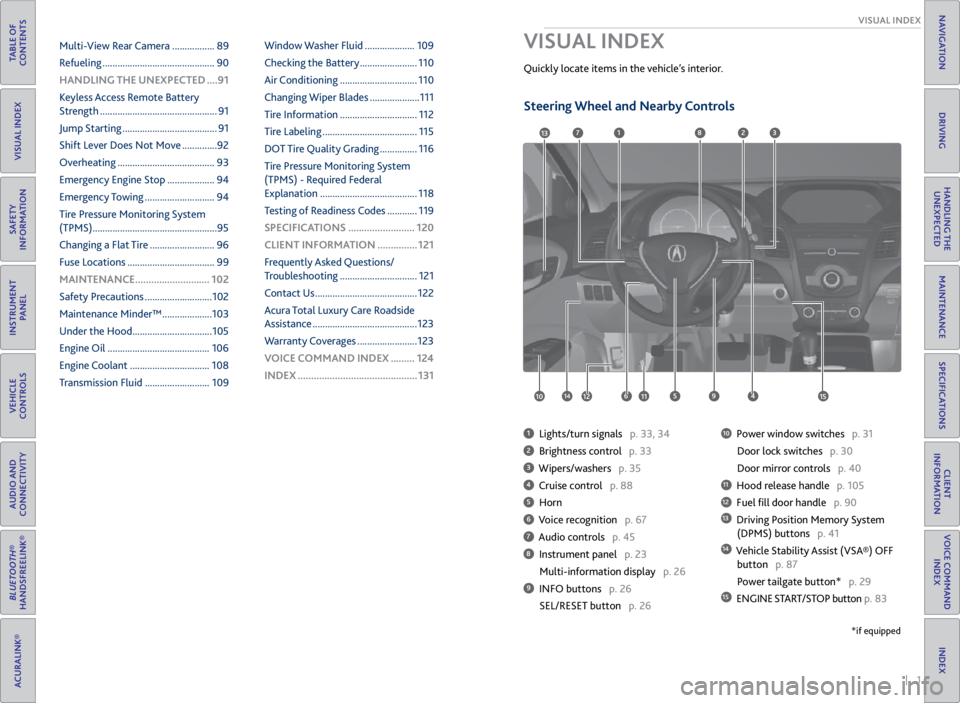
1 Lights/turn signals p. 33, 34
2 Brightness control p. 33
3 Wipers/washers p. 35
4 Cruise control p. 88
5 Horn
6 Voice recognition p. 67
7 Audio controls p. 45
8 Instrument panel p. 23
Multi-information display p. 26
9 INFO buttons p. 26
SEL/RESET button p. 26
10 Power window switches p. 31
Door lock switches p. 30
Door mirror controls p. 40
11 Hood release handle p. 105
12 Fuel fill door handle p. 90
13 Driving Position Memory System
(DPMS) buttons p. 41
14 Vehicle Stability Assist (VSA®) OFF
button p. 87
Power tailgate button* p. 29
15 ENGINE START/STOP button p. 83
VISUAL INDEX
Quickly locate items in the vehicle’s interior.
1
45961012
7283
11
13
1415
*if equipped
Multi-View Rear Camera ................. 89
Refueling ............................................. 90
HANDLING THE UNEXPECTED ....91
Keyless Access Remote Battery
Strength ............................................... 91
Jump Starting ...................................... 91
Shift Lever Does Not Move .............. 92
Overheating ....................................... 93
Emergency Engine Stop ................... 94
Emergency Towing ............................ 94
Tire Pressure Monitoring System
(TPMS) .................................................. 95
Changing a Flat Tire .......................... 96
Fuse Locations ................................... 99
MAINTENANCE ............................ 102
Safety Precautions ........................... 102
Maintenance Minder™ .................... 103
Under the Hood ................................ 105
Engine Oil ......................................... 106
Engine Coolant ................................ 108
Transmission Fluid .......................... 109Window Washer Fluid ....................
109
Checking the Battery ....................... 110
Air Conditioning ............................... 110
Changing Wiper Blades .................... 111
Tire Information ............................... 112
Tire Labeling ...................................... 115
DOT Tire Quality Grading ............... 116
Tire Pressure Monitoring System
(TPMS) - Required Federal
Explanation ....................................... 118
Testing of Readiness Codes ............ 119
SPECIFICATIONS ......................... 120
CLIENT INFORMATION ............... 121
Frequently Asked Questions/
Troubleshooting ............................... 121
Contact Us ......................................... 122
Acura Total Luxury Care Roadside
Assistance .......................................... 123
Warranty Coverages ........................ 123
V OICE COMMAND INDEX ......... 124
INDEX ............................................. 131
Steering Wheel and Nearby Controls
Page 5 of 71
2 || 3
SAFETY
VISUAL INDEX
TABLE OF
CONTENTS
VISUAL INDEX
SAFETY
INFORMATION
INSTRUMENT PANEL
VEHICLE
CONTROLS
AUDIO AND
CONNECTIVITY
BLUETOOTH®
HANDSFREELINK®
ACURALINK®
INDEX
VOICE COMMAND INDEX
CLIENT
INFORMATION
SPECIFICATIONS
MAINTENANCE
HANDLING THE UNEXPECTED
DRIVING
NAVIGATION
Dashboard and Ceiling Controls
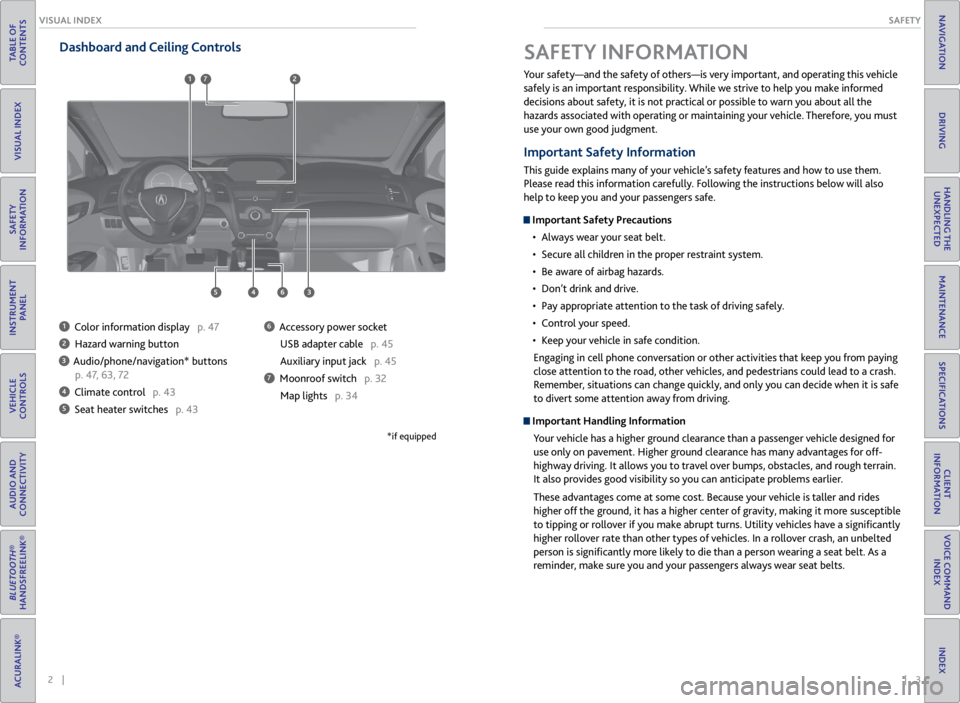
1 Color information display p. 47
2 Hazard warning button
3 Audio/phone/navigation* buttons
p. 47, 63, 72
4 Climate control p. 43
5 Seat heater switches p. 43
6 Accessory power socket
USB adapter cable p. 45
Auxiliary input jack p. 45
7 Moonroof switch p. 32Map lights p. 34
*if equipped
Your safety—and the safety of others—is very important, and operating this vehicle
safely is an important responsibility. While we strive to help you make informed
decisions about safety, it is not practical or possible to warn you about all the
hazards associated with operating or maintaining your vehicle. Therefore, you must
use your own good judgment.
Important Safety Information
This guide explains many of your vehicle’s safety features and how to use them.
Please read this information carefully. Following the instructions below will also
help to keep you and your passengers safe.
Important Safety Precautions• Always wear your seat belt.
• Secure all children in the proper restraint system.
• Be aware of airbag hazards.
• Don’t drink and drive.
• Pay appropriate attention to the task of driving safely.
• Control your speed.
• Keep your vehicle in safe condition.
Engaging in cell phone conversation or other activities that keep you from paying
close attention to the road, other vehicles, and pedestrians could lead to a crash.
Remember, situations can change quickly, and only you can decide when it is safe
to divert some attention away from driving.
Important Handling Information Your vehicle has a higher ground clearance than a passenger vehicle designed for
use only on pavement. Higher ground clearance has many advantages for off-
highway driving. It allows you to travel over bumps, obstacles, and rough terrain.
It also provides good visibility so you can anticipate problems earlier.
These advantages come at some cost. Because your vehicle is taller and rides
higher off the ground, it has a higher center of gravity, making it more susceptible
to tipping or rollover if you make abrupt turns. Utility vehicles have a significantly
higher rollover rate than other types of vehicles. In a rollover crash, an unbelted
person is significantly more likely to die than a person wearing a seat belt. As a
reminder, make sure you and your passengers always wear seat belts.
SAFETY INFORMATION
6453
712
Page 6 of 71
4 || 5
SAFETY
SAFETY
TABLE OF
CONTENTS
VISUAL INDEX
SAFETY
INFORMATION
INSTRUMENT PANEL
VEHICLE
CONTROLS
AUDIO AND
CONNECTIVITY
BLUETOOTH®
HANDSFREELINK®
ACURALINK®
INDEX
VOICE COMMAND INDEX
CLIENT
INFORMATION
SPECIFICATIONS
MAINTENANCE
HANDLING THE UNEXPECTED
DRIVING
NAVIGATION
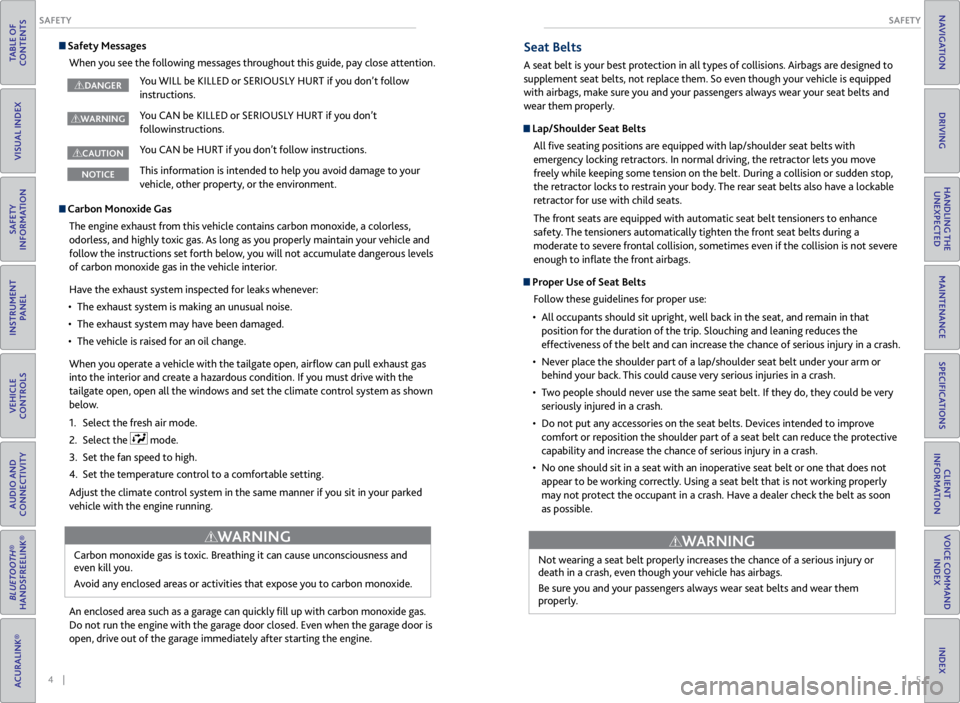
Safety Messages
When you see the following messages throughout this guide, pay close attention.
You WILL be KILLED or SERIOUSLY HURT if you don’t follow
instructions.
You CAN be KILLED or SERIOUSLY HURT if you don’t
followinstructions.
You CAN be HURT if you don’t follow instructions.
This information is intended to help you avoid damage to your
vehicle, other property, or the environment.
WARNING
CAUTION
NOTICE
DANGER
Carbon Monoxide Gas
The engine exhaust from this vehicle contains carbon monoxide, a colorless,
odorless, and highly toxic gas. As long as you properly maintain your vehicle and
follow the instructions set forth below, you will not accumulate dangerous levels
of carbon monoxide gas in the vehicle interior.
Have the exhaust system inspected for leaks whenever:
• The exhaust system is making an unusual noise.
• The exhaust system may have been damaged.
• The vehicle is raised for an oil change.
When you operate a vehicle with the tailgate open, airflow can pull exhaust gas
into the interior and create a hazardous condition. If you must drive with the
tailgate open, open all the windows and set the climate control system as shown
below.
1. Select the fresh air mode.
2. Select the
mode.
3. Set the fan speed to high.
4. Set the temperature control to a comfortable setting.
Adjust the climate control system in the same manner if you sit in your parked
vehicle with the engine running.
An enclosed area such as a garage can quickly fill up with carbon monoxide gas.
Do not run the engine with the garage door closed. Even when the garage door is
open, drive out of the garage immediately after starting the engine. Carbon monoxide gas is toxic. Breathing it can cause unconsciousness and
even kill you.
Avoid any enclosed areas or activities that expose you to carbon monoxide.
WARNING
Seat Belts
A seat belt is your best protection in all types of collisions. Airbags are designed to
supplement seat belts, not replace them. So even though your vehicle is equipped
with airbags, make sure you and your passengers always wear your seat belts and
wear them properly.
Lap/Shoulder Seat Belts
All five seating positions are equipped with lap/shoulder seat belts with
emergency locking retractors. In normal driving, the retractor lets you move
freely while keeping some tension on the belt. During a collision or sudden stop,
the retractor locks to restrain your body. The rear seat belts also have a lockable
retractor for use with child seats.
The front seats are equipped with automatic seat belt tensioners to enhance
safety. The tensioners automatically tighten the front seat belts during a
moderate to severe frontal collision, sometimes even if the collision is not severe
enough to inflate the front airbags.
Proper Use of Seat Belts
Follow these guidelines for proper use:
• All occupants should sit upright, well back in the seat, and remain in that
position for the duration of the trip. Slouching and leaning reduces the
effectiveness of the belt and can increase the chance of serious injury in a crash.
• Never place the shoulder part of a lap/shoulder seat belt under your arm or
behind your back. This could cause very serious injuries in a crash.
• Two people should never use the same seat belt. If they do, they could be very
seriously injured in a crash.
• Do not put any accessories on the seat belts. Devices intended to improve
comfort or reposition the shoulder part of a seat belt can reduce the protective
capability and increase the chance of serious injury in a crash.
• No one should sit in a seat with an inoperative seat belt or one that does not
appear to be working correctly. Using a seat belt that is not working properly
may not protect the occupant in a crash. Have a dealer check the belt as soon
as possible.
Not wearing a seat belt properly increases the chance of a serious injury or
death in a crash, even though your vehicle has airbags.
Be sure you and your passengers always wear seat belts and wear them
properly.
WARNING
Page 10 of 71
12 || 13
SAFETY
SAFETY
TABLE OF
CONTENTS
VISUAL INDEX
SAFETY
INFORMATION
INSTRUMENT PANEL
VEHICLE
CONTROLS
AUDIO AND
CONNECTIVITY
BLUETOOTH®
HANDSFREELINK®
ACURALINK®
INDEX
VOICE COMMAND INDEX
CLIENT
INFORMATION
SPECIFICATIONS
MAINTENANCE
HANDLING THE UNEXPECTED
DRIVING
NAVIGATION
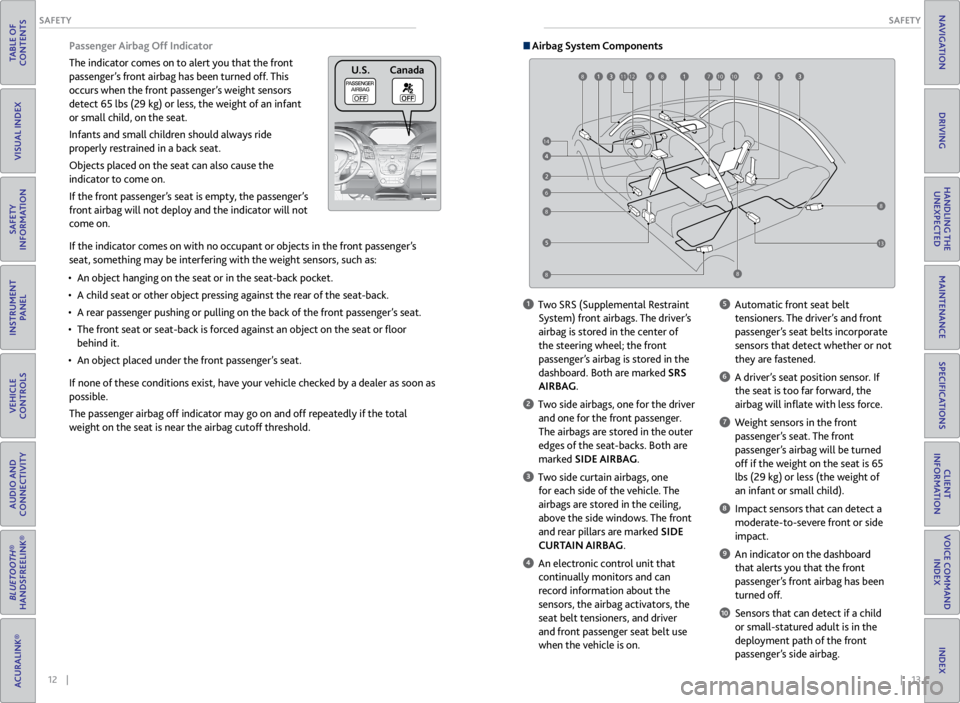
Passenger Airbag Off Indicator
The indicator comes on to alert you that the front
passenger’s front airbag has been turned off. This
occurs when the front passenger’s weight sensors
detect 65 lbs (29 kg) or less, the weight of an infant
or small child, on the seat.
Infants and small children should always ride
properly restrained in a back seat.
Objects placed on the seat can also cause the
indicator to come on.
If the front passenger’s seat is empty, the passenger’s
front airbag will not deploy and the indicator will not
come on.
If the indicator comes on with no occupant or objects in the front passenger’s
seat, something may be interfering with the weight sensors, such as:
• An object hanging on the seat or in the seat-back pocket.
• A child seat or other object pressing against the rear of the seat-back.
• A rear passenger pushing or pulling on the back of the front passenger’s seat.
• The front seat or seat-back is forced against an object on the seat or floor
behind it.
• An object placed under the front passenger’s seat.
If none of these conditions exist, have your vehicle checked by a dealer as soon as
possible.
The passenger airbag off indicator may go on and off repeatedly if the total
weight on the seat is near the airbag cutoff threshold.
U.S .C anada
Airbag System Components
6
789101211108
88
88
14
13
1 Two SRS (Supplemental Restraint
System) front airbags. The driver’s
airbag is stored in the center of
the steering wheel; the front
passenger’s airbag is stored in the
dashboard. Both are marked SRS
AIRBAG.
2 Two side airbags, one for the driver and one for the front passenger.
The airbags are stored in the outer
edges of the seat-backs. Both are
marked SIDE AIRBAG.
3 Two side curtain airbags, one for each side of the vehicle. The
airbags are stored in the ceiling,
above the side windows. The front
and rear pillars are marked SIDE
CURTAIN AIRBAG.
4 An electronic control unit that continually monitors and can
record information about the
sensors, the airbag activators, the
seat belt tensioners, and driver
and front passenger seat belt use
when the vehicle is on.
5 Automatic front seat belt tensioners. The driver’s and front
passenger’s seat belts incorporate
sensors that detect whether or not
they are fastened.
6 A driver’s seat position sensor. If the seat is too far forward, the
airbag will inflate with less force.
7 Weight sensors in the front
passenger’s seat. The front
passenger’s airbag will be turned
off if the weight on the seat is 65
lbs (29 kg) or less (the weight of
an infant or small child).
8 Impact sensors that can detect a moderate-to-severe front or side
impact.
9 An indicator on the dashboard that alerts you that the front
passenger’s front airbag has been
turned off.
10 Sensors that can detect if a child or small-statured adult is in the
deployment path of the front
passenger’s side airbag.
Page 16 of 71
24 || 25
INSTRUMENT P
ANEL
INSTRUMENT P ANEL
TABLE OF
CONTENTS
VISUAL INDEX
SAFETY
INFORMATION
INSTRUMENT PANEL
VEHICLE
CONTROLS
AUDIO AND
CONNECTIVITY
BLUETOOTH®
HANDSFREELINK®
ACURALINK®
INDEX
VOICE COMMAND INDEX
CLIENT
INFORMATION
SPECIFICATIONS
MAINTENANCE
HANDLING THE UNEXPECTED
DRIVING
NAVIGATION
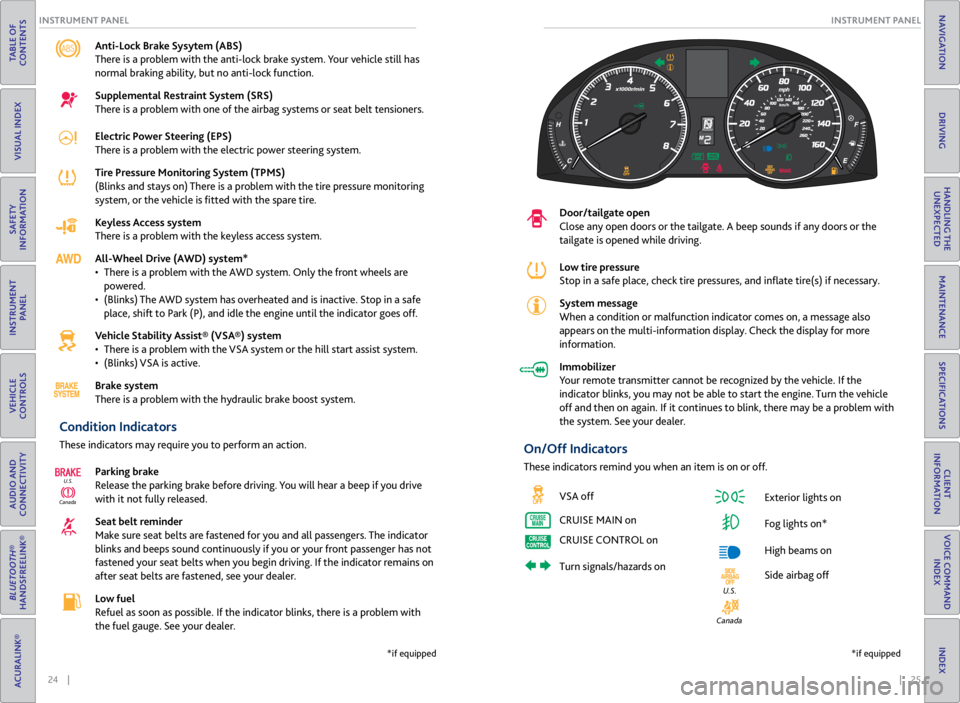
Anti-Lock Brake Sysytem (ABS)
There is a problem with the anti-lock brake system. Your vehicle still has
normal braking ability, but no anti-lock function.
Supplemental Restraint System (SRS)
There is a problem with one of the airbag systems or seat belt tensioners.
Electric Power Steering (EPS)
There is a problem with the electric power steering system.
Tire Pressure Monitoring System (TPMS)
(Blinks and stays on) There is a problem with the tire pressure monitoring
system, or the vehicle is fitted with the spare tire.
Keyless Access system
There is a problem with the keyless access system.
All-Wheel Drive (AWD) system*
• There is a problem with the AWD system. Only the front wheels are
powered.
• (Blinks) The AWD system has overheated and is inactive. Stop in a safe
place, shift to Park (P), and idle the engine until the indicator goes off.
Vehicle Stability Assist® (VSA®) system
• There is a problem with the VSA system or the hill start assist system.
• (Blinks) VSA is active.
Brake system
There is a problem with the hydraulic brake boost system.
Condition Indicators
These indicators may require you to perform an action.
Parking brake
Release the parking brake before driving. You will hear a beep if you drive
with it not fully released.
Seat belt reminder
Make sure seat belts are fastened for you and all passengers. The indicator
blinks and beeps sound continuously if you or your front passenger has not
fastened your seat belts when you begin driving. If the indicator remains on
after seat belts are fastened, see your dealer.
Low fuel
Refuel as soon as possible. If the indicator blinks, there is a problem with
the fuel gauge. See your dealer.
CanadaU.S.
*if equipped
Door/tailgate open
Close any open doors or the tailgate. A beep sounds if any doors or the
tailgate is opened while driving.
Low tire pressure
Stop in a safe place, check
tire pressures, and inflate tire(s) if necessary.
System message
When a condition or malfunction indicator comes on, a message also
appears on the multi-information display. Check the display for more
information.
Immobilizer
Your remote transmitter cannot be recognized by the vehicle. If the
indicator blinks, you may not be able to start the engine. Turn the vehicle
off and then on again. If it continues to blink, there may be a problem with
the system. See your dealer.
On/Off Indicators
These indicators remind you when an item is on or off.
VSA off
CRUISE MAIN on
CRUISE CONTROL on
Turn signals/hazards on Exterior lights on
Fog lights on*
High beams on
Side airbag off
Canada
U.S.
*if equipped
Page 22 of 71
36 || 37
VEHICLE CONTROLS
VEHICLE CONTROLS
TABLE OF
CONTENTS
VISUAL INDEX
SAFETY
INFORMATION
INSTRUMENT PANEL
VEHICLE
CONTROLS
AUDIO AND
CONNECTIVITY
BLUETOOTH®
HANDSFREELINK®
ACURALINK®
INDEX
VOICE COMMAND INDEX
CLIENT
INFORMATION
SPECIFICATIONS
MAINTENANCE
HANDLING THE UNEXPECTED
DRIVING
NAVIGATION
Adjusting the Seats
Make seat adjustments before driving to ensure the best comfort and safety.
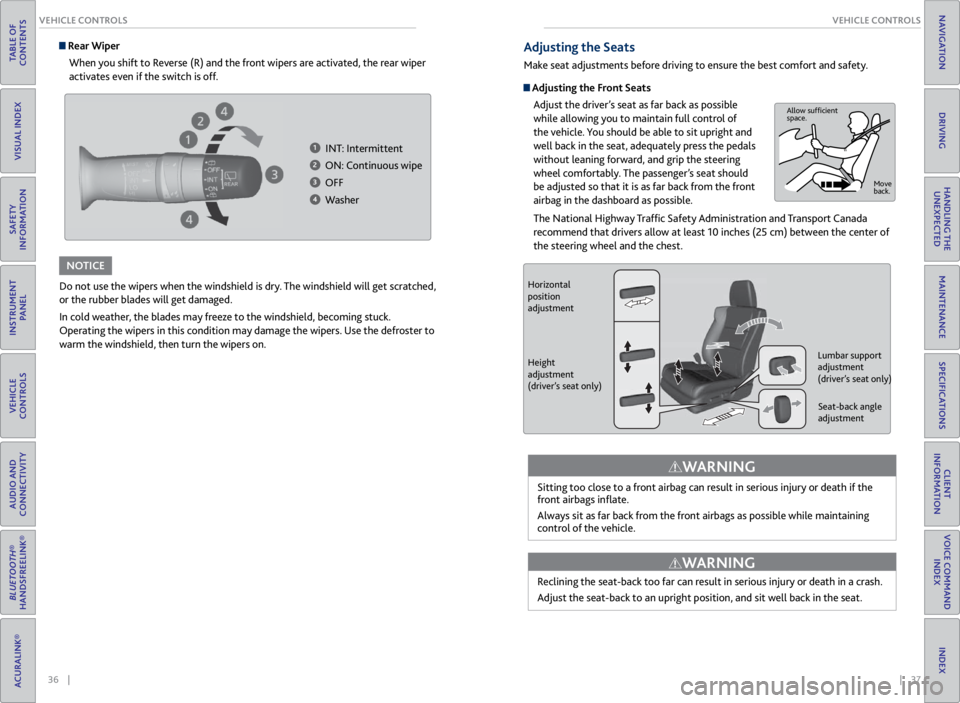
Adjusting the Front Seats
Adjust the driver’s seat as far back as possible
while allowing you to maintain full control of
the vehicle. You should be able to sit upright and
well back in the seat, adequately press the pedals
without leaning forward, and grip the steering
wheel comfortably. The passenger’s seat should
be adjusted so that it is as far back from the front
airbag in the dashboard as possible.
The National Highway Traffic Safety Administration and Transport Canada
recommend that drivers allow at least 10 inches (25 cm) between the center of
the steering wheel and the chest.
Sitting too close to a front airbag can result in serious injury or death if the
front airbags inflate.
Always sit as far back from the front airbags as possible while maintaining
control of the vehicle.
WARNING
Allow sufficient
space. Move
back.
Do not use the wipers when the windshield is dry. The windshield will get scratched,
or the rubber blades will get damaged.
In cold weather, the blades may freeze to the windshield, becoming stuck.
Operating the wipers in this condition may damage the wipers. Use the defroster to
warm the windshield, then turn the wipers on.
NOTICE
Rear WiperWhen you shift to Reverse (R) and the front wipers are activated, the rear wiper
activates even if the switch is off.
1 INT: Intermittent
2 ON: Continuous wipe
3 OFF
4 Washer
Horizontal
position
adjustment
Height
adjustment
(driver’s seat only) Seat-back angle
adjustment
Lumbar support
adjustment
(driver’s seat only)
Reclining the seat-back too far can result in serious injury or death in a crash.
Adjust the seat-back to an upright position, and sit well back in the seat.
WARNING
Page 45 of 71
82 || 83
DRIVING
DRIVING
TABLE OF
CONTENTS
VISUAL INDEX
SAFETY
INFORMATION
INSTRUMENT PANEL
VEHICLE
CONTROLS
AUDIO AND
CONNECTIVITY
BLUETOOTH®
HANDSFREELINK®
ACURALINK®
INDEX
VOICE COMMAND INDEX
CLIENT
INFORMATION
SPECIFICATIONS
MAINTENANCE
HANDLING THE UNEXPECTED
DRIVING
NAVIGATION
Pre-tow checklist
When preparing to tow, and before driving away, be sure to check the following:
• Avoid towing a trailer during your vehicle’s first 600 miles (1,000 km).
• The vehicle has been properly serviced, and the suspension and the cooling
system are in good operating condition.
• The trailer has been properly serviced and is in good condition.
• All weights and loads are within limits. Never exceed the gross weight ratings.
• Check if all loads are within limits at a public scale. If a public scale is not
available, add the estimated weight of your cargo load to the weight of your
trailer (as quoted by the manufacturer) and the tongue load.
• The hitch, safety chains, and any other attachments are secure.
• All items in or on the trailer are properly secured and cannot shift while you
drive.
Towing a Trailer
Your vehicle can tow a trailer if you carefully observe the load limits, use the
proper equipment, and follow the towing guidelines. See the Owner’s Manual on
the Owner Information CD or visit owners.acura.com (U.S.) or www.myacura.com
(Canada) for more information.
Towing Load Limits
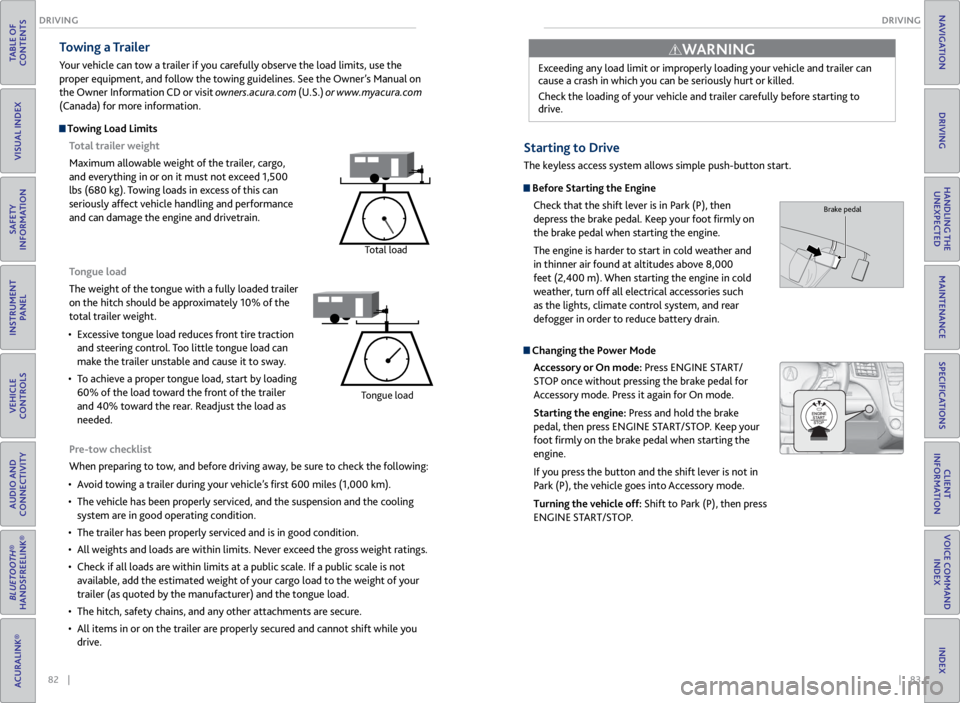
Total trailer weight
Maximum allowable weight of the trailer, cargo,
and everything in or on it must not exceed 1,500
lbs (680 kg). Towing loads in excess of this can
seriously affect vehicle handling and performance
and can damage the engine and drivetrain.
Total load
Tongue load
The weight of the tongue with a fully loaded trailer
on the hitch should be approximately 10% of the
total trailer weight.
• Excessive tongue load reduces front tire traction
and steering control. Too little tongue load can
make the trailer unstable and cause it to sway.
• To achieve a proper tongue load, start by loading
60% of the load toward the front of the trailer
and 40% toward the rear. Readjust the load as
needed.
Tongue load
Exceeding any load limit or improperly loading your vehicle and trailer can
cause a crash in which you can be seriously hurt or killed.
Check the loading of your vehicle and trailer carefully before starting to
drive.
WARNING
Starting to Drive
The keyless access system allows simple push-button start.
Before Starting the Engine
Check that the shift lever is in Park (P), then
depress the brake pedal. Keep your foot firmly on
the brake pedal when starting the engine.
The engine is harder to start in cold weather and
in thinner air found at altitudes above 8,000
feet (2,400 m). When starting the engine in cold
weather, turn off all electrical accessories such
as the lights, climate control system, and rear
defogger in order to reduce battery drain.
Changing the Power Mode
Accessory or On mode: Press ENGINE START/
STOP once without pressing the brake pedal for
Accessory mode. Press it again for On mode.
Starting the engine: Press and hold the brake
pedal, then press ENGINE START/STOP. Keep your
foot firmly on the brake pedal when starting the
engine.
If you press the button and the shift lever is not in
Park (P), the vehicle goes into Accessory mode.
Turning the vehicle off: Shift to Park (P), then press
ENGINE START/STOP.
Brake pedal
Page 55 of 71

102 || 103
MAINTENANCE
MAINTENANCE
TABLE OF
CONTENTS
VISUAL INDEX
SAFETY
INFORMATION
INSTRUMENT PANEL
VEHICLE
CONTROLS
AUDIO AND
CONNECTIVITY
BLUETOOTH®
HANDSFREELINK®
ACURALINK®
INDEX
VOICE COMMAND INDEX
CLIENT
INFORMATION
SPECIFICATIONS
MAINTENANCE
HANDLING THE UNEXPECTED
DRIVING
NAVIGATION
Learn about basic maintenance that you can perform on the vehicle yourself, as
well as information about how to best maintain the vehicle.
Safety Precautions
Some of the most important safety precautions are listed below; however,
we cannot warn you of every conceivable hazard that can arise in performing
maintenance. Only you can decide whether or not you should perform a given task.
Maintenance Safety
• To reduce the possibility of fire or explosion, keep cigarettes, sparks, and flames
away from the battery and all fuel-related parts.
• Never leave rags, towels, or other flammable objects under the hood.
• To clean parts, use a commercially available degreaser or parts cleaner, not
gasoline.
• Wear eye protection and protective clothing when working with the battery or
compressed air.
• Do not run the engine in confined spaces where carbon monoxide gas can
accumulate.
Vehicle Safety
• The vehicle must be stationary, and parked on level ground with the parking
brake set and the engine off.
• Be aware that hot parts can burn you.
• Be aware that moving parts can injure you.
MAINTENANCE
Improperly maintaining this vehicle or failing to correct a problem before
driving can cause a crash in which you can be seriously hurt or killed.
Always follow the inspection and maintenance recommendations according to
the schedules in this guide.
WARNING
Failure to properly follow maintenance instructions and precautions can cause
you to be seriously hurt or killed.
Always follow the procedures and precautions in this guide.
WARNING
Maintenance Minder™
Reminds you when indicated maintenance service is due.
When maintenance is due, the system message indicator comes on and the
Maintenance Minder appears on the multi-information display every time you turn
the vehicle on. Press the info button to change displays.
Maintenance Minder Service Codes
These codes indicate what services are due on your vehicle.
*1: If the message SERVICE does not appear more than 12 months after the display is\
reset, change the
engine oil every year .
#: See information on maintenance and emissions warranty.*2:If you drive in dusty conditions, replace the air cleaner element every 15,000 miles (24,000 km).
*3: If you drive primarily in urban areas that have high concentrations of i\
ndustrial soot and pollution from
diesel-powered vehicles, replace the dust and pollen lter every 15,000 miles (24,000 km).
CODEMaintenance Main Items
A•Replace engine oi l*1
B•Replace engine oil*1 and oil lter•Inspect front and rear brakes, service as necessary•Check parking brake adjustment•Inspect tie rod ends, steering gearbox, and boot s•Inspect suspension components•Inspect driveshaft boots•Inspect brake hoses and lines (Including ABS/VSA)•Inspect all uid levels and condition of uid s•Inspect exhaust system#
•Inspect fuel lines and connections#
*4:If you drive regularly in very high temperatures (over 110 °F, 43 °C), \
in very low temperatures (under -
20 °F, -29 °C), or tow a tra iler, repl ace ever y 60,000 mi les/100,000 km .
CODE Maintenance Sub Items
1
•Rotate tires
2
•Replace air cleaner element*2
•Replace dust and pollen lte r*3
•Inspect drive belt
3
•Replace transmission and transfer uid*
4•Replace spark plugs•Replace timing belt an d inspect water pump*4
•Inspect valve clearance
5
•Replace engine coolant
6
•Replace rear differential uid*
System
message
indicator
Main
itemSub item
Maintenance Minder