transmission Acura RDX 2015 Owner's Guide
[x] Cancel search | Manufacturer: ACURA, Model Year: 2015, Model line: RDX, Model: Acura RDX 2015Pages: 71, PDF Size: 18.23 MB
Page 4 of 71
| 1
VISUAL INDEX
INDEX
VOICE COMMAND
INDEX
CLIENT
INFORMATION
SPECIFICATIONS
MAINTENANCE
HANDLING THE UNEXPECTED
DRIVING
NAVIGATION
TABLE OF
CONTENTS
VISUAL INDEX
SAFETY
INFORMATION
INSTRUMENT PANEL
VEHICLE
CONTROLS
AUDIO AND
CONNECTIVITY
BLUETOOTH®
HANDSFREELINK®
ACURALINK®
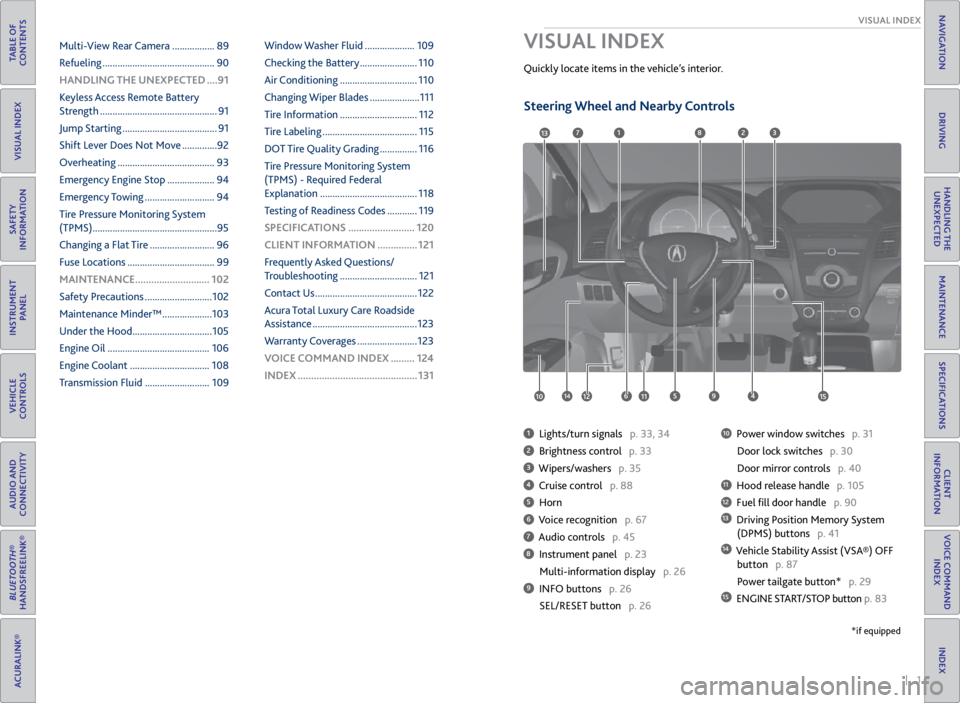
1 Lights/turn signals p. 33, 34
2 Brightness control p. 33
3 Wipers/washers p. 35
4 Cruise control p. 88
5 Horn
6 Voice recognition p. 67
7 Audio controls p. 45
8 Instrument panel p. 23
Multi-information display p. 26
9 INFO buttons p. 26
SEL/RESET button p. 26
10 Power window switches p. 31
Door lock switches p. 30
Door mirror controls p. 40
11 Hood release handle p. 105
12 Fuel fill door handle p. 90
13 Driving Position Memory System
(DPMS) buttons p. 41
14 Vehicle Stability Assist (VSA®) OFF
button p. 87
Power tailgate button* p. 29
15 ENGINE START/STOP button p. 83
VISUAL INDEX
Quickly locate items in the vehicle’s interior.
1
45961012
7283
11
13
1415
*if equipped
Multi-View Rear Camera ................. 89
Refueling ............................................. 90
HANDLING THE UNEXPECTED ....91
Keyless Access Remote Battery
Strength ............................................... 91
Jump Starting ...................................... 91
Shift Lever Does Not Move .............. 92
Overheating ....................................... 93
Emergency Engine Stop ................... 94
Emergency Towing ............................ 94
Tire Pressure Monitoring System
(TPMS) .................................................. 95
Changing a Flat Tire .......................... 96
Fuse Locations ................................... 99
MAINTENANCE ............................ 102
Safety Precautions ........................... 102
Maintenance Minder™ .................... 103
Under the Hood ................................ 105
Engine Oil ......................................... 106
Engine Coolant ................................ 108
Transmission Fluid .......................... 109Window Washer Fluid ....................
109
Checking the Battery ....................... 110
Air Conditioning ............................... 110
Changing Wiper Blades .................... 111
Tire Information ............................... 112
Tire Labeling ...................................... 115
DOT Tire Quality Grading ............... 116
Tire Pressure Monitoring System
(TPMS) - Required Federal
Explanation ....................................... 118
Testing of Readiness Codes ............ 119
SPECIFICATIONS ......................... 120
CLIENT INFORMATION ............... 121
Frequently Asked Questions/
Troubleshooting ............................... 121
Contact Us ......................................... 122
Acura Total Luxury Care Roadside
Assistance .......................................... 123
Warranty Coverages ........................ 123
V OICE COMMAND INDEX ......... 124
INDEX ............................................. 131
Steering Wheel and Nearby Controls
Page 15 of 71
22 || 23
INSTRUMENT P
ANEL
SAFETY
TABLE OF
CONTENTS
VISUAL INDEX
SAFETY
INFORMATION
INSTRUMENT PANEL
VEHICLE
CONTROLS
AUDIO AND
CONNECTIVITY
BLUETOOTH®
HANDSFREELINK®
ACURALINK®
INDEX
VOICE COMMAND INDEX
CLIENT
INFORMATION
SPECIFICATIONS
MAINTENANCE
HANDLING THE UNEXPECTED
DRIVING
NAVIGATION
Reporting Safety Defects
In the U.S.
If you believe that your vehicle has a defect which could cause a crash or could
cause injury or death, you should immediately inform the National Highway Traffic
Safety Administration (NHTSA) in addition to notifying American Honda Motor
Co., Inc.
If NHTSA receives similar complaints, it may open an investigation, and if it finds
that a safety defect exists in a group of vehicles, it may order a recall and remedy
campaign. However, NHTSA cannot become involved in individual problems
between you, your dealer, or American Honda Motor Co., Inc.
To contact NHTSA, you may call the Vehicle Safety Hotline toll-free at (888)
327-4236 (TTY: 1-800-424-9153); go to http://www.safercar.gov; or write to:
Administrator, NHTSA, 1200 New Jersey Avenue, SE., Washington, DC 20590. You
can also obtain other information about motor vehicle safety from http://www.
safercar.gov.
In Canada
If you believe that your vehicle has a defect which could cause a crash or could
cause injury or death, you should immediately inform Honda Canada, Inc., and you
may also inform Transport Canada.
If Transport Canada receives similar complaints, it may open an investigation, and
if it finds that a safety defect exists in a group of vehicles, it may lead to a recall
and remedy campaign. However, Transport Canada cannot become involved in
individual problems between you, your dealer, or Honda Canada, Inc.
To contact Transport Canada’s Defect Investigations and Recalls Division, you may
call (800) 333-0510. For more information on reporting safety defects or about
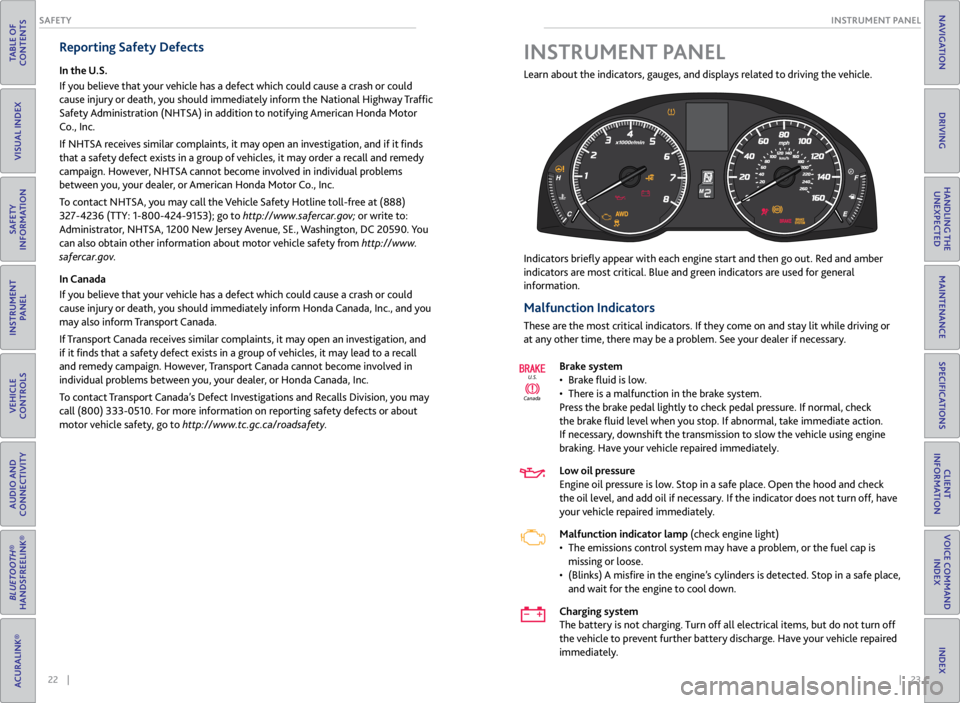
motor vehicle safety, go to http://www.tc.gc.ca/roadsafety. Learn about the indicators, gauges, and displays related to driving the vehicle.
Indicators briefly appear
with each engine start and then go out. Red and amber
indicators are most critical. Blue and green indicators are used for general
information.
Malfunction Indicators
These are the most critical indicators. If they come on and stay lit while driving or
at any other time, there may be a problem. See your dealer if necessary.
Brake system
• Brake fluid is low.
• There is a malfunction in the brake system.
Press the brake pedal lightly to check pedal pressure. If normal, check
the brake fluid level when you stop. If abnormal, take immediate action.
If necessary, downshift the transmission to slow the vehicle using engine
braking. Have your vehicle repaired immediately.
Low oil pressure
Engine oil pressure is low. Stop in a safe place. Open the hood and check
the oil level, and add oil if necessary. If the indicator does not turn off, have
your vehicle repaired immediately.
Malfunction indicator lamp (check engine light)
• The emissions control system may have a problem, or the fuel cap is
missing or loose.
• (Blinks) A misfire in the engine’s cylinders is detected. Stop in a safe place,
and wait for the engine to cool down.
Charging system
The battery is not charging. Turn off all electrical items, but do not turn off
the vehicle to prevent further battery discharge. Have your vehicle repaired
immediately.
Canada U.S.
INSTRUMENT P
ANEL
Page 46 of 71

84 || 85
DRIVING
DRIVING
TABLE OF
CONTENTS
VISUAL INDEX
SAFETY
INFORMATION
INSTRUMENT PANEL
VEHICLE
CONTROLS
AUDIO AND
CONNECTIVITY
BLUETOOTH®
HANDSFREELINK®
ACURALINK®
INDEX
VOICE COMMAND INDEX
CLIENT
INFORMATION
SPECIFICATIONS
MAINTENANCE
HANDLING THE UNEXPECTED
DRIVING
NAVIGATION
Shifting
Park (P): Used for parking or starting/stopping the
engine. Press the brake pedal, then press the release
button to shift.
Reverse (R): Used for reversing.
Neutral (N): Used for idling.
Drive (D): Used for normal driving or temporarily
driving in sequential mode.
Drive (S): Used for driving in sequential mode.
Press the release button, and use the paddle shifters
to change between 1st and 6th gears (see page 85).
When you change the shift lever from D to R and vice versa, come to a complete
stop and keep the brake pedal depressed. Operating the shift lever before the
vehicle has come to a complete standstill can damage the transmission.
Do not operate the shift lever while pressing the accelerator pedal. You could
damage the transmission.
NOTICE
Release
button
Sequential Shift Mode
Use the paddle shifters to change between 1st and 6th gears without removing
your hands from the steering wheel.
When the shift lever is in D: The vehicle goes into sequential shift mode
momentarily, and the gear position indicator comes on. When you start traveling
at a constant speed, sequential shift mode automatically switches off, and the
gear position indicator goes off.
When the shift lever is in S: The vehicle goes into sequential shift mode, and
the M (sequential shift mode) indicator and gear position indicator co\
me on. At
speeds of 6 mph (10 km/h) or less, the vehicle automatically shifts down into 1st
gear. It does not automatically shift up, even if vehicle speed increases. You can
pull away only in 1st or 2nd gear.
When switching out of sequential shift mode, move the shift lever from S to
D. When sequential shift mode is canceled, the M indicator and gear position
indicator go off.
Second gear lock mode: If you pull the (+) paddle shifter while stopped or driving
at 6 mph (10 km/h) or less, the gear position is locked in 2nd gear. This makes it
easier to pull away on slippery surfaces such as snow-covered roads. To cancel
2nd gear lock mode, pull the (-) paddle shifter or move the shift lever from S to D.
(-) Paddle shifter:
Pull to shift down
to a lower gear. (+) Paddle shifter:
Pull to shift up to a
higher gear.
Recommended shift points
Shift up Acceleration
1st to 2nd 15 mph (24 km/h)
2nd to 3rd 25 mph (40 km/h)
3rd to 4th 40 mph (64 km/h)
4th to 5th 45 mph (72 km/h)
5th to 6th 50 mph (80 km/h)
M indicator/gear
position indicator
Page 51 of 71

94 || 95
HANDLING THE UNEXPECTED
HANDLING THE UNEXPECTED
TABLE OF
CONTENTS
VISUAL INDEX
SAFETY
INFORMATION
INSTRUMENT PANEL
VEHICLE
CONTROLS
AUDIO AND
CONNECTIVITY
BLUETOOTH®
HANDSFREELINK®
ACURALINK®
INDEX
VOICE COMMAND INDEX
CLIENT
INFORMATION
SPECIFICATIONS
MAINTENANCE
HANDLING THE UNEXPECTED
DRIVING
NAVIGATION
Emergency Engine Stop
The ENGINE START/STOP button may be used to stop the engine due to an
emergency situation even while driving. If you must stop the engine, choose one of
the following operations:
• Press and hold the ENGINE START/STOP
button for three seconds, OR
• Firmly press the ENGINE START/STOP button
three times.
The steering wheel will not lock. The power mode changes to ACCESSORY, unless
the shift lever is in Park (P), in which case the power mode changes to VEHICLE OFF.
Because turning off the engine also disables the power assist the engine provides to
the steering and braking systems, it will require significantly more physical effort
and time to steer and slow the vehicle. Downshift gears and use both feet on the
brake pedal, if necessary, to slow the vehicle and stop immediately in a safe place.
Trying to lift or tow your vehicle by the bumpers will cause serious damage. The
bumpers are not designed to support the vehicle’s weight.
Improper towing such as towing behind a motorhome or other motor vehicle can
damage the transmission.
NOTICE
NOTICE
Emergency Towing
Call a professional towing service if you need to tow your vehicle.
All models
Flat bed equipment: The operator loads your vehicle on the back of a truck. This is
the best way to transport your vehicle.
2WD models
Wheel lift equipment: The tow truck uses two pivoting arms that go under the front
tires and lift them off the ground. The rear tires remain on the ground. This is an
acceptable way to tow your vehicle. Do not press the button while driving unless it is absolutely necessary for the
engine to be switched off.
Tire Pressure Monitoring System (TPMS)
Monitors the tire pressure while you are driving.
If your vehicle’s tire pressure becomes significantly low, the low tire pressure
indicator comes on and a message appears on the multi-information display.
What to Do
Stop your vehicle in a safe place. Adjust the tire pressure to the specified level on
a label on the driver’s doorjamb.
Driving on an extremely underinflated tire can cause it to overheat. An overheated
tire can fail. Always inflate your tires to the specified pressure.
NOTICE
Press the INFO button to
scroll to the tire pressure
monitor to see which
tire(s) have low pressure.
Tire
pressure
monitor
The
specific
tire is
displayed.
Page 55 of 71

102 || 103
MAINTENANCE
MAINTENANCE
TABLE OF
CONTENTS
VISUAL INDEX
SAFETY
INFORMATION
INSTRUMENT PANEL
VEHICLE
CONTROLS
AUDIO AND
CONNECTIVITY
BLUETOOTH®
HANDSFREELINK®
ACURALINK®
INDEX
VOICE COMMAND INDEX
CLIENT
INFORMATION
SPECIFICATIONS
MAINTENANCE
HANDLING THE UNEXPECTED
DRIVING
NAVIGATION
Learn about basic maintenance that you can perform on the vehicle yourself, as
well as information about how to best maintain the vehicle.
Safety Precautions
Some of the most important safety precautions are listed below; however,
we cannot warn you of every conceivable hazard that can arise in performing
maintenance. Only you can decide whether or not you should perform a given task.
Maintenance Safety
• To reduce the possibility of fire or explosion, keep cigarettes, sparks, and flames
away from the battery and all fuel-related parts.
• Never leave rags, towels, or other flammable objects under the hood.
• To clean parts, use a commercially available degreaser or parts cleaner, not
gasoline.
• Wear eye protection and protective clothing when working with the battery or
compressed air.
• Do not run the engine in confined spaces where carbon monoxide gas can
accumulate.
Vehicle Safety
• The vehicle must be stationary, and parked on level ground with the parking
brake set and the engine off.
• Be aware that hot parts can burn you.
• Be aware that moving parts can injure you.
MAINTENANCE
Improperly maintaining this vehicle or failing to correct a problem before
driving can cause a crash in which you can be seriously hurt or killed.
Always follow the inspection and maintenance recommendations according to
the schedules in this guide.
WARNING
Failure to properly follow maintenance instructions and precautions can cause
you to be seriously hurt or killed.
Always follow the procedures and precautions in this guide.
WARNING
Maintenance Minder™
Reminds you when indicated maintenance service is due.
When maintenance is due, the system message indicator comes on and the
Maintenance Minder appears on the multi-information display every time you turn
the vehicle on. Press the info button to change displays.
Maintenance Minder Service Codes
These codes indicate what services are due on your vehicle.
*1: If the message SERVICE does not appear more than 12 months after the display is\
reset, change the
engine oil every year .
#: See information on maintenance and emissions warranty.*2:If you drive in dusty conditions, replace the air cleaner element every 15,000 miles (24,000 km).
*3: If you drive primarily in urban areas that have high concentrations of i\
ndustrial soot and pollution from
diesel-powered vehicles, replace the dust and pollen lter every 15,000 miles (24,000 km).
CODEMaintenance Main Items
A•Replace engine oi l*1
B•Replace engine oil*1 and oil lter•Inspect front and rear brakes, service as necessary•Check parking brake adjustment•Inspect tie rod ends, steering gearbox, and boot s•Inspect suspension components•Inspect driveshaft boots•Inspect brake hoses and lines (Including ABS/VSA)•Inspect all uid levels and condition of uid s•Inspect exhaust system#
•Inspect fuel lines and connections#
*4:If you drive regularly in very high temperatures (over 110 °F, 43 °C), \
in very low temperatures (under -
20 °F, -29 °C), or tow a tra iler, repl ace ever y 60,000 mi les/100,000 km .
CODE Maintenance Sub Items
1
•Rotate tires
2
•Replace air cleaner element*2
•Replace dust and pollen lte r*3
•Inspect drive belt
3
•Replace transmission and transfer uid*
4•Replace spark plugs•Replace timing belt an d inspect water pump*4
•Inspect valve clearance
5
•Replace engine coolant
6
•Replace rear differential uid*
System
message
indicator
Main
itemSub item
Maintenance Minder
Page 56 of 71
104 || 105
MAINTENANCE
MAINTENANCE
TABLE OF
CONTENTS
VISUAL INDEX
SAFETY
INFORMATION
INSTRUMENT PANEL
VEHICLE
CONTROLS
AUDIO AND
CONNECTIVITY
BLUETOOTH®
HANDSFREELINK®
ACURALINK®
INDEX
VOICE COMMAND INDEX
CLIENT
INFORMATION
SPECIFICATIONS
MAINTENANCE
HANDLING THE UNEXPECTED
DRIVING
NAVIGATION
*1: If the message SERVICE does not appear more than 12 months after the display is\
reset, change the
engine oil every year .
#: See information on maintenance and emissions warranty.*2:If you drive in dusty conditions, replace the air cleaner element every 15,000 miles (24,000 km).
*3: If you drive primarily in urban areas that have high concentrations of i\
ndustrial soot and pollution from
diesel-powered vehicles, replace the dust and pollen lter every 15,000 miles (24,000 km).
CODE Maintenance Main Items
A
•Replace engine oi l*1
B•Replace engine oil*1 and oil lter•Inspect front and rear brakes, service as necessary•Check parking brake adjustment•Inspect tie rod ends, steering gearbox, and boot s•Inspect suspension components•Inspect driveshaft boots•Inspect brake hoses and lines (Including ABS/VSA)•Inspect all uid levels and condition of uid s•Inspect exhaust system#
•Inspect fuel lines and connections#
*4:If you drive regularly in very high temperatures (over 110 °F, 43 °C), \
in very low temperatures (under -
20 °F, -29 °C), or tow a tra iler, repl ace ever y 60,000 mi les/100,000 km .
CODEMaintenance Sub Item s
1
•Rotate tires
2•Replace air cleaner element*2
•Replace dust and pollen lte r*3
•Inspect drive belt
3
•Replace transmission and transfer uid*
4•Replace spark plugs•Replace timing belt an d inspect water pump*4
•Inspect valve clearance
5
•Replace engine coolant
6•Replace rear differential uid*
• Independent of the Maintenance Minder information, replace the brake fluid
every 3 years.
• Inspect idle speed every 160,000 miles (256,000 km).
• Adjust the valves during services A, B, 1, 2, or 3 if they are noisy.
U.S. models
Maintenance, replacement, or repair of emissions control devices and systems
may be done by any automotive repair establishment or individuals using
parts that are certified to EPA standards.
According to state and federal regulations, failure to perform maintenance on the
maintenance main items marked with # will not void your emissions warranties.
However, all maintenance services should be performed in accordance with the
intervals indicated by the multi-information display.
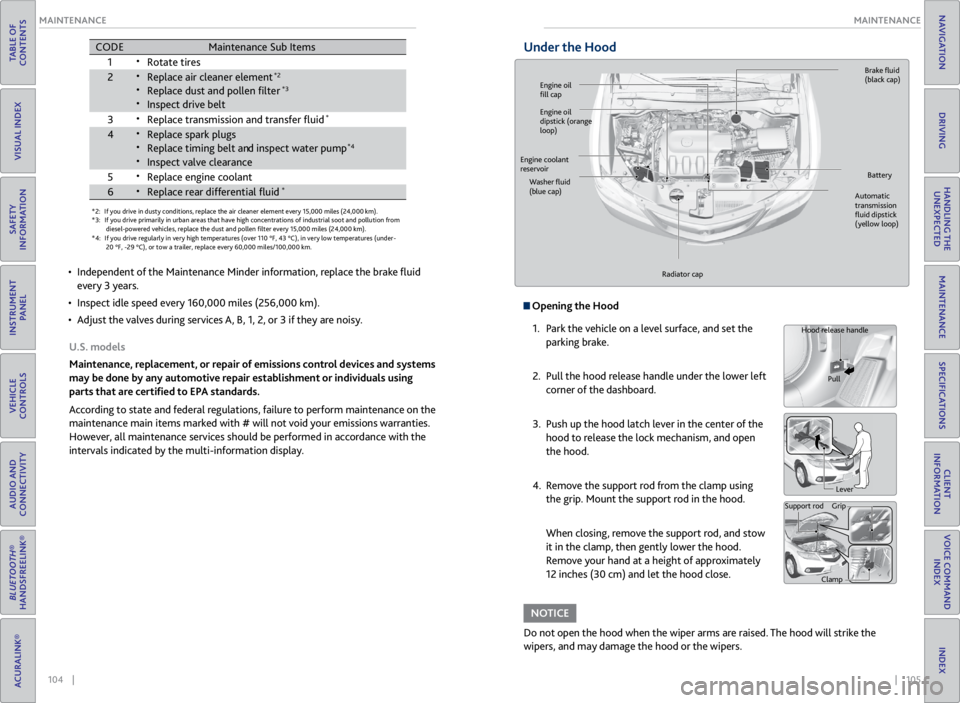
Under the Hood
Opening the Hood
1. Park the vehicle on a level surface, and set the
parking brake.
2. Pull the hood release handle under the lower left
corner of the dashboard.
3. Push up the hood latch lever in the center of the
hood to release the lock mechanism, and open
the hood.
4. Remove the support rod from the clamp using
the grip. Mount the support rod in the hood.
When closing, remove the support rod, and stow
it in the clamp, then gently lower the hood.
Remove your hand at a height of approximately
12 inches (30 cm) and let the hood close.
Do not open the hood when the wiper arms are raised. The hood will strike the
wipers, and may damage the hood or the wipers.
NOTICE
Hood release handle
Pull
Lever
Support rod Grip
Clamp
Engine oil
fill cap Brake
fluid
(black cap)
Automatic
transmission
fluid dipstick
(yellow loop)
Washer
fluid
(blue cap) Battery
Engine coolant
reservoir
Radiator cap
Engine oil
dipstick (orange
loop)
Page 58 of 71
108 || 109
MAINTENANCE
MAINTENANCE
TABLE OF
CONTENTS
VISUAL INDEX
SAFETY
INFORMATION
INSTRUMENT PANEL
VEHICLE
CONTROLS
AUDIO AND
CONNECTIVITY
BLUETOOTH®
HANDSFREELINK®
ACURALINK®
INDEX
VOICE COMMAND INDEX
CLIENT
INFORMATION
SPECIFICATIONS
MAINTENANCE
HANDLING THE UNEXPECTED
DRIVING
NAVIGATION
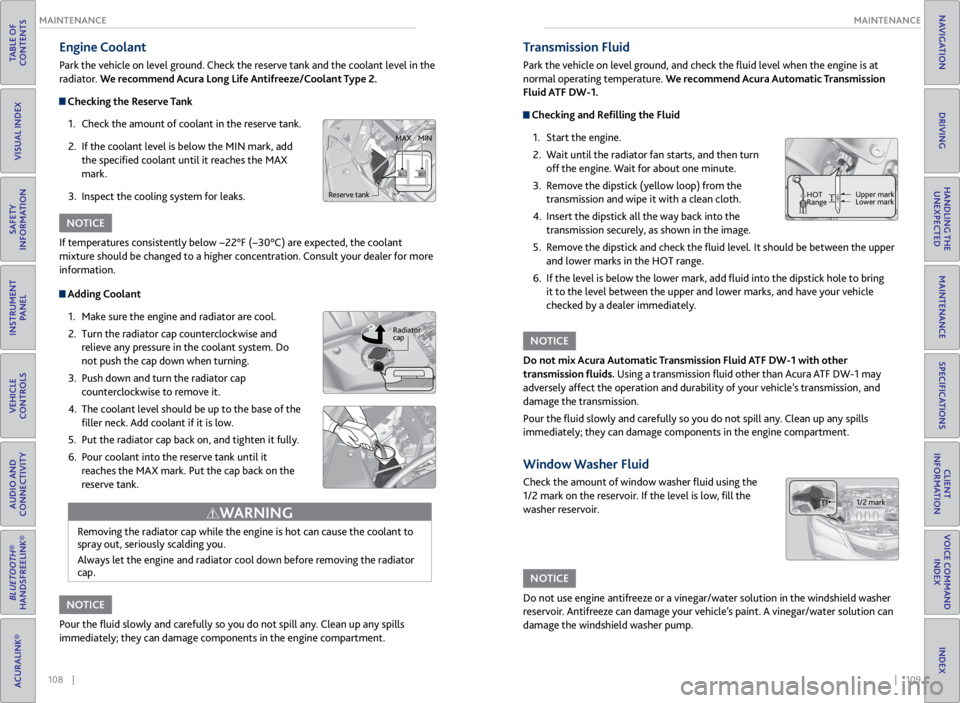
Engine Coolant
Park the vehicle on level ground. Check the reserve tank and the coolant level in the
radiator. We recommend Acura Long Life Antifreeze/Coolant Type 2.
Checking the Reserve Tank
1. Check the amount of coolant in the reserve tank.
2. If the coolant level is below the MIN mark, add
the specified coolant until it reaches the MAX
mark.
3. Inspect the cooling system for leaks.
Adding Coolant
1. Make sure the engine and radiator are cool.
2. Turn the radiator cap counterclockwise and
relieve any pressure in the coolant system. Do
not push the cap down when turning.
3. Push down and turn the radiator cap
counterclockwise to remove it.
4. The coolant level should be up to the base of the
filler neck. Add coolant if it is low.
5. Put the radiator cap back on, and tighten it fully.
6. Pour coolant into the reserve tank until it
reaches the MAX mark. Put the cap back on the
reserve tank.
Removing the radiator cap while the engine is hot can cause the coolant to
spray out, seriously scalding you.
Always let the engine and radiator cool down before removing the radiator
cap.
WARNING
If temperatures consistently below −22°F (−30°C) are expected, the coolant
mixture should be changed to a higher concentration. Consult your dealer for more
information.
Pour the fluid slowly and carefully so you do not spill any. Clean up any spills
immediately; they can damage components in the engine compartment.
NOTICE
NOTICE
Reserve tank MAX
MIN
Radiator
cap
Transmission Fluid
Park the vehicle on level ground, and check the fluid level when the engine is at
normal operating temperature. We recommend Acura Automatic Transmission
Fluid ATF DW-1.
Checking and Refilling the Fluid
1. Start the engine.
2. Wait until the radiator fan starts, and then turn
off the engine. Wait for about one minute.
3. Remove the dipstick (yellow loop) from the
transmission and wipe it with a clean cloth.
4. Insert the dipstick all the way back into the
transmission securely, as shown in the image.
5. Remove the dipstick and check the fluid level. It should be between the upper
and lower marks in the HOT range.
6. If the level is below the lower mark, add fluid into the dipstick hole to bring
it to the level between the upper and lower marks, and have your vehicle
checked by a dealer immediately.
Do not mix Acura Automatic Transmission Fluid ATF DW-1 with other
transmission fluids. Using a transmission fluid other than Acura ATF DW-1 may
adversely affect the operation and durability of your vehicle’s transmission, and
damage the transmission.
Pour the fluid slowly and carefully so you do not spill any. Clean up any spills
immediately; they can damage components in the engine compartment.
NOTICE
Window Washer Fluid
Check the amount of window washer fluid using the
1/2 mark on the reservoir. If the level is low, fill the
washer reservoir.
Do not use engine antifreeze or a vinegar/water solution in the windshield washer
reservoir. Antifreeze can damage your vehicle’s paint. A vinegar/water solution can
damage the windshield washer pump.
NOTICE
HOT
Range Upper mark
Lower mark
1/2 mark
Page 70 of 71
132 || 133
INDEX
INDEX
TABLE OF
CONTENTS
VISUAL INDEX
SAFETY
INFORMATION
INSTRUMENT PANEL
VEHICLE
CONTROLS
AUDIO AND
CONNECTIVITY
BLUETOOTH®
HANDSFREELINK®
ACURALINK®
INDEX
VOICE COMMAND INDEX
CLIENT
INFORMATION
SPECIFICATIONS
MAINTENANCE
HANDLING THE UNEXPECTED
DRIVING
NAVIGATION
Driving Position Memory System ................ 41
Electric Power Steering indicator .................24
Electronic Stability Control (ESC)................ 87
Emergency Engine Stop ................................ 94
Emergency Towing ......................................... 94
Engine Compartment Fuse Box ................... 99
Engine Coolant ............................................. 108
Engine Oil ...................................................... 106
Engine Specifications ................................... 120
Engine Start/Stop button ............................. 83
Entering a Destination ................................... 75
EPS indicator .................................................... 24
ESC ............................................................ 87
Fan speed ......................................................... 43
FAQs .......................................................... 121
Find Nearest Place .......................................... 76
Flat Tire ........................................................... 96
Floor Mats ....................................................... 39
Fluids .......................................................... 120
Engine Coolant ....................................... 108
Engine Oil ................................................ 106
Transmission Fluid ................................. 109
Window Washer Fluid ........................... 109
FM/AM Radio .................................................. 48
FM/AM Radio Commands ........................... 127
Foot Brake ....................................................... 86
Frequently Asked Questions ....................... 121
Front Airbags ..................................................... 9
Front Wipers .................................................... 35
Fuel Information ............................................ 90
Fuel Specifications ........................................ 120
Fuse Locations ................................................ 99
Engine Compartment Fuse Box ............. 99
Inspecting and Changing Fuses .............101
Interior Fuse Box .................................... 100
Gararge Opener ............................................. 42
Hard Disc Drive (HDD) Audio ....................... 62
Hard Disc Drive (HDD) Audio Commands .. 127
Hazard indicator .............................................. 25
Hazard Warning button ................................... 2
Headlight-Wiper Integration ........................ 35
Head Restraints .............................................. 38
Home Address ................................................. 75
HomeLink® ..................................................... 42
Immobilizer indicator ..................................... 25
Instrument Panel ............................................ 23
Condition Indicators ................................. 24
Malfunction Indicators ............................. 23
On/Off Indicators ..................................... 25
Interface Dial Feedback ................................. 74
Interior Fuse Box .......................................... 100
iPod® ........................................................... 54
iPod® Commands ......................................... 128
Jump Starting .................................................. 91
Keyless Access Remote Battery ................... 91Keyless Access System ..................................
28
Keyless Access System indicator ..................24
Lap/Shoulder Seat Belts .................................. 5
LATCH-compatible child seat ....................... 18
Light Bulbs ...................................................... 120
Lights ........................................................... 33
Brightness Control ................................... 33
Cargo Lights .............................................. 34
Exterior Lights ........................................... 33
Interior Lights ............................................ 34
Lights indicators .............................................. 25
Lock Tab ........................................................... 30
Low fuel indicator ........................................... 24
Low oil pressure indicator ............................. 23
Low tire pressure indicator ............................25
Maintenance .................................................. 102
Air Conditioning ...................................... 110
Changing Wiper Blades ........................... 111
Checking the Battery .............................. 110
Engine Coolant ....................................... 108
Engine Oil ................................................ 106
Fluids ......................................................... 120
Maintenance Minder™ .......................... 103
Opening the Hood .................................. 105
Resetting the Engine Oil Life ................. 107
Safety Precautions .................................. 102
Service Codes .......................................... 103
Transmission Fluid ................................. 109
Under the Hood ....................................... 105
Window Washer Fluid ........................... 109
Maintenance Minder™ ............................... 103
Making a Call ............................................ 65, 69
Malfunction indicator lamp .......................... 23
Map Legend ............................................... 73, 76
Master Door Lock Switch ............................. 30
Maximum Load Limit .................................... 80
Mirrors ........................................................... 40
Automatic Dimming Rearview Mirror .. 40
Power Door Mirrors .................................. 41
Reverse Tilt Door Mirrors ......................... 41
Moonroof ......................................................... 32
Multi-Information Display ............................ 26
Multi-View Rear Camera .............................. 89
Navigation ....................................................... 72
AcuraLink Real-Time Traffic™ ................. 77
Detour ......................................................... 77
Entering a Destination ............................. 75
Find Nearest Place .................................... 76
Home Address ............................................ 75
Interface Dial Feedback ........................... 74
Map Legend ......................................... 73, 76
Navigation Commands .......................... 124
Place Category ........................................... 76
Routing ........................................................ 76
Steering Wheel Controls .......................... 72Street Address ............................................
75
System Volume.......................................... 74
Voice Command Tips ................................ 72
Voice Recognition Tutor .......................... 74
One-Touch Turn Signal ................................. 34
Opening the Hood ........................................ 105
Overheating .................................................... 93
Pairing a Phone ........................................ 64, 68
Pandora® ......................................................... 60
Pandora® Commands .................................. 128
Parking Brake .................................................. 86
Parking brake indicator .................................. 24
Passenger Airbag Off indicator .....................12
Phone Commands ........................................ 129
Phone Operation ...................................... 63, 67
Phonebook ................................................ 65, 69
Place Category ................................................ 76
Power Door Mirrors ........................................ 41
Power Moonroof ............................................. 32
Power Tailgate ................................................. 29
Power Windows .............................................. 31
Radiator ........................................................... 93
Radio ........................................................... 45
Readiness Codes
............................................ 119
Rear Camera ................................................... 89
Rear Seats ........................................................ 39
Rear Window Defogger ................................ 43
Rear Wiper ....................................................... 36
Rearview Mirror .............................................. 40
Refueling .......................................................... 90
Fuel Information ....................................... 90
How to Refuel ........................................... 90
Remote Transmitter ...................................... 28
Remote Transmitter Battery ......................... 91
Reporting Safety Defects .............................. 22
Reverse Tilt Door Mirrors .............................. 41
Roadside Assistance ..................................... 123
Routing ............................................................ 76
Safety Information ........................................... 3
Carbon Monoxide Gas ................................ 4
Important Handling Information ............. 3
Important Safety Information .................. 3
Important Safety Precautions .................. 3
Reporting Safety Defects ......................... 22
Safety Messages .......................................... 4
Safety Label Locations ................................... 21
Seat Belts ........................................................... 5
Adjusting the Shoulder Anchor .................7
Fastening a Seat Belt .................................. 7
Lap/Shoulder Seat Belts .............................5
Proper Use of Seat Belts ............................ 5
Seat Belt Inspection .................................... 6
Seat belt reminder .................................... 24
Seat Belt with Detachable Anchor ........... 8
Seat Heaters ................................................... 43Seats
............................................................ 37
Adjusting the Front Seat .......................... 37
Adjusting the Head Restraints ............... 38
Rear Seats .................................................. 39
Sequential Shift Mode .................................. 85
Setting the Clock ........................................... 44
Shifting ........................................................... 84
Shift Lever Does Not Move ........................... 92
Side Airbag Off indicator ............................... 25
Side Airbags ..................................................... 10
Side Curtain Airbags ....................................... 10
SMS Text Messaging ................................ 66, 70
Song By Voice™ Commands ....................... 129
Sound ........................................................... 46
Specifications ................................................ 120
Speed Dial ................................... 65, 66, 69, 70
SRS indicator ................................................... 24
Steering Wheel ............................................... 40
Adjusting the Steering Wheel ................ 40
Steering Wheel Controls ................... 46, 72
Street Address ................................................. 75
Supplemental Restraint System indicator ..... 24
SYNC button .................................................. 43
System message indicator ............................ 25
System Volume ............................................... 74
Text Messaging ......................................... 66, 70
Tire Information ............................................ 112
DOT Tire Quality Grading ...................... 116
Inflation Guidelines ................................ 112
Inspection Guidelines ............................. 112
Tire and Loading Information Label ..... 113
Tire and Wheel Replacement ................ 113
Tire Identification Number (TIN) ......... 115
Tire Labeling ............................................. 115
Tire Service Life ........................................ 114
Tire Specifications ................................... 120
Tire Terminology ...................................... 115
Wear Indicators ....................................... 113
Winter Tires .............................................. 114
Tire Pressure Monitoring System
(TPMS) ................................................... 95, 118
Total Luxury Care .......................................... 123
Towing ........................................................... 94
Towing a Trailer .............................................. 82
Pre-tow Checklist ..................................... 82
Tongue Load .............................................. 82
Towing Load Limits .................................. 82
TPMS indicator ................................................ 24
Traffic ............................................................ 77
Transmission Fluid ....................................... 109
Troubleshooting ............................................ 121
Turn Signal ...................................................... 34
Turn Signal indicator ...................................... 25
Under the Hood ............................................ 105
Unlocking/Locking the Doors ................ 28, 30