back up control Acura RDX 2015 Owner's Guide
[x] Cancel search | Manufacturer: ACURA, Model Year: 2015, Model line: RDX, Model: Acura RDX 2015Pages: 365, PDF Size: 12.56 MB
Page 162 of 365
161
Features
Audio System Basic Operation
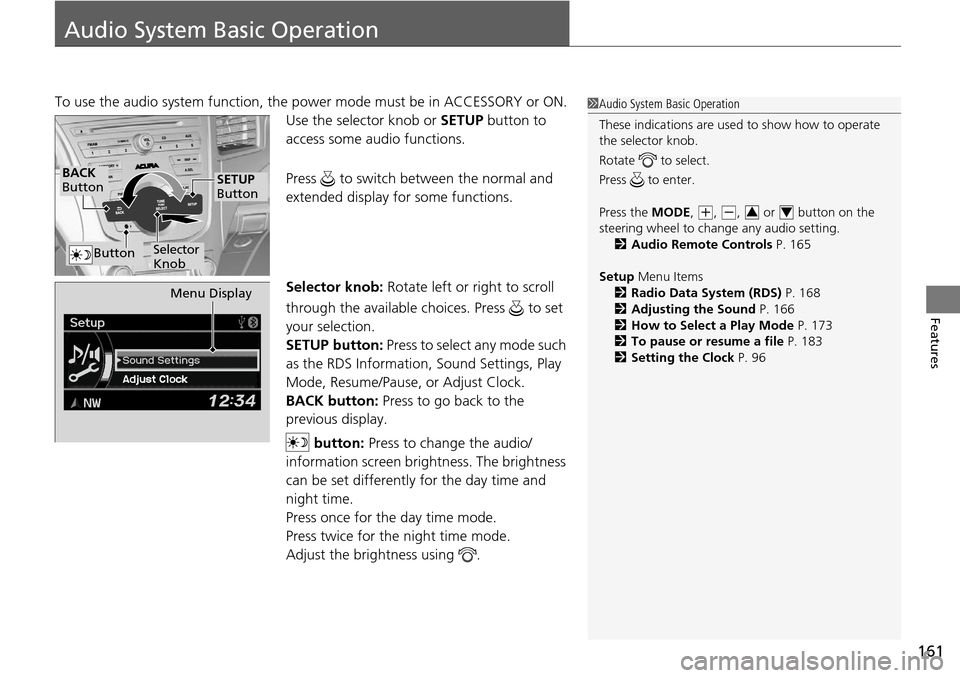
To use the audio system function, the power mode must be in ACCESSORY or ON.
Use the selector knob or SETUP button to
access some au dio functions.
Press to switch between the normal and
extended display fo r some functions.
Selector knob: Rotate left or right to scroll
through the available choices. Press to set
your selection.
SETUP button: Press to select any mode such
as the RDS Information, Sound Settings, Play
Mode, Resume/Pause, or Adjust Clock.
BACK button: Press to go back to the
previous display.
button: Press to change the audio/
information screen brightness. The brightness
can be set differently for the day time and
night time.
Press once for the day time mode.
Press twice for the night time mode.
Adjust the brightness using . 1 Audio System Basic Operation
These indications are used to show how to operate
the selector knob.
Rotate to select.
Press to enter.
Press the MODE,
( +, (-, or button on the
steering wheel to cha nge any audio setting.
2 Audio Remote Controls P. 165
Setup Menu Items
2 Radio Data System (RDS) P. 168
2 Adjusting the Sound P. 166
2 How to Select a Play Mode P. 173
2 To pause or resume a file P. 183
2 Setting the Clock P. 9634
BACK
Button
Selector
Knob
SETUP
Button
Button
Menu Display
Page 166 of 365
165
uuAudio System Basic Operation uAudio Remote Controls
Features
Audio Remote Controls
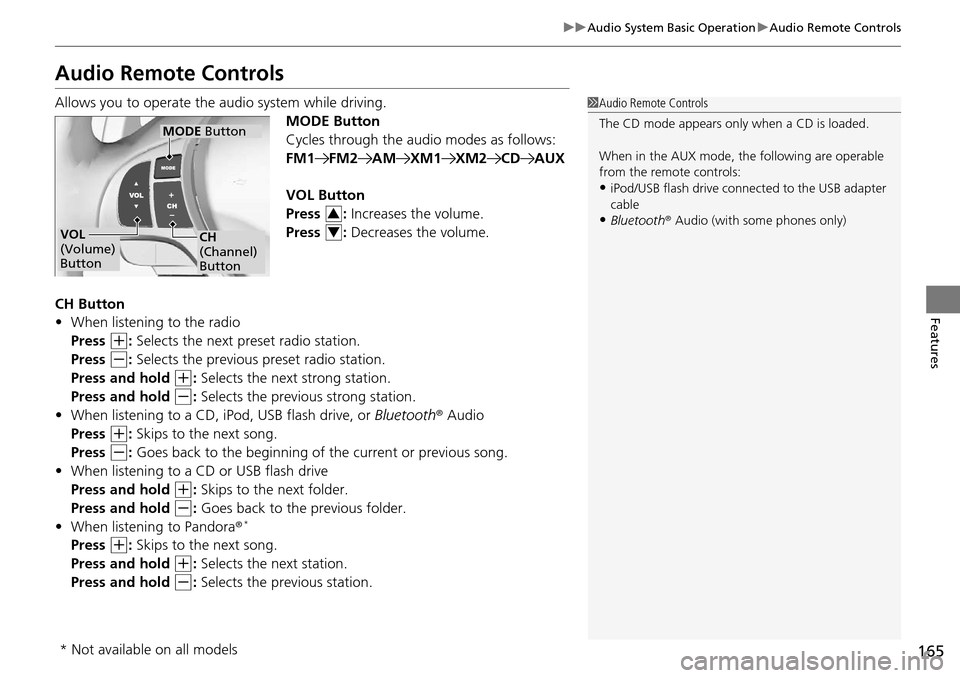
Allows you to operate the audio system while driving.
MODE Button
Cycles through the audio modes as follows:
FM1FM2AMXM1XM2CDAUX
VOL Button
Press : Increases the volume.
Press : Decreases the volume.
CH Button
• When listening to the radio
Press
(+: Selects the next preset radio station.
Press
(-: Selects the previous preset radio station.
Press and hold
(+: Selects the next strong station.
Press and hold
(-: Selects the previous strong station.
• When listening to a CD, iPod, USB flash drive, or Bluetooth® Audio
Press
(+: Skips to the next song.
Press
(-: Goes back to the beginning of the current or previous song.
• When listening to a CD or USB flash drive
Press and hold
(+: Skips to the next folder.
Press and hold
(-: Goes back to the previous folder.
• When listening to Pandora ®*
Press (+: Skips to the next song.
Press and hold
(+: Selects the next station.
Press and hold
(-: Selects the previous station.
1 Audio Remote Controls
The CD mode appears only when a CD is loaded.
When in the AUX mode, the following are operable
from the remote controls:
•iPod/USB flash drive connect ed to the USB adapter
cable
•Bluetooth ® Audio (with some phones only)VOL
(Volume)
Button
MODE Button
CH
(Channel)
Button
3
4
* Not available on all models
Page 197 of 365
196
Features
Bluetooth® HandsFreeLink ®
For models with navigation system, see Navigation System Manual for how to
operate Bluetooth ® HandsFreeLink ®.
Bluetooth ® HandsFreeLink ® (HFL) allows you to place and receive phone calls using
your vehicle's audio system, without handling your cell phone.
Using HFL
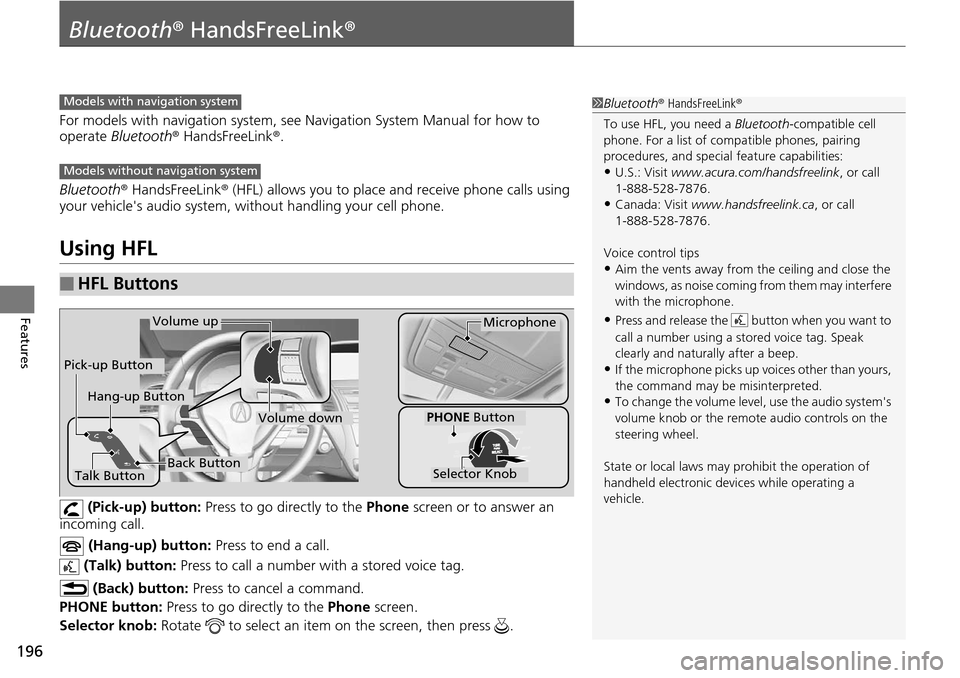
(Pick-up) button: Press to go directly to the Phone screen or to answer an
incoming call.
(Hang-up) button: Press to end a call.
(Talk) button: Press to call a number with a stored voice tag.
(Back) button: Press to cancel a command.
PHONE button: Press to go directly to the Phone screen.
Selector knob: Rotate to select an item on the screen, then press .
■HFL Buttons
1Bluetooth ® HandsFreeLink ®
To use HFL, you need a Bluetooth-compatible cell
phone. For a list of compatible phones, pairing
procedures, and special feature capabilities:
•U.S.: Visit www.acura.com/handsfreelink , or call
1-888-528-7876.
•Canada: Visit www.handsfreelink.ca , or call
1-888-528-7876.
Voice control tips
•Aim the vents away from the ceiling and close the
windows, as noise coming fr om them may interfere
with the microphone.
•Press and release the button when you want to
call a number using a st ored voice tag. Speak
clearly and naturally after a beep.
•If the microphone picks up vo ices other than yours,
the command may be misinterpreted.
•To change the volume level, use the audio system's
volume knob or the remote audio controls on the
steering wheel.
State or local laws may pr ohibit the operation of
handheld electronic devices while operating a
vehicle.
Models with navigation system
Models without navigation system
Talk Button
Volume upMicrophone
Hang-up Button
Pick-up Button
Volume down
Selector Knob
PHONE Button
Back Button
Page 240 of 365
239
uuOff-Highway Driving Guidelines uAvoiding Trouble
Driving
Avoiding Trouble
• Check Out Your Vehicle before you leave the pavement and make sure that all
scheduled maintenance has been completed. Pay special attention to the
condition of the tires, and check the tire pressures.
• Remember the route you choose presents limi ts (too steep or bumpy), you have
limits (driving skill and comfort), and your vehicle has limits (traction, stability, and
power). Failing to recognize these limits will likely put you and your passengers in
a hazardous situation.
• Accelerating and Braking should be done slowly and gradually. Trying to start
or stop too fast can cause a loss of traction and you could lose control.
• Avoiding Obstacles and Debris in the road reduces the likelihood of a rollover
or damage to your suspension or other components.
• Driving on Slopes increases your risk of a rollover, particularly if you attempt to
drive across a slope that is too steep. Goin g straight up or down a slope is usually
the safest. If you can’t clearly see all cond itions or obstacles on a slope, walk it
before you drive it. If there is any doubt whether you can safely pass, don’t try it.
Find another route. If you get stuck when climbing, do not try to turn around.
Back down slowly following the same route you took up the hill.
• Crossing a Stream - Avoid driving through deep water. If you encounter water
in your route (a small stream or large pu ddle, for example), evaluate it carefully
before going ahead. Make sure it is shallow, flowing slowly, and has firm ground
underneath. If you are not sure of the depth or the ground, turn around and find
another route. Driving through deep water can also damage your vehicle. The
water can get into the transmission and di fferential, diluting the lubricant and
causing an eventual failure. It can also wash the grease out of the wheel bearings.
• If You Get Stuck , carefully go in the direction that you think will get you
unstuck. Do not spin the tires as this will only make things worse and could
damage the transmission. If you are unable to free yourself, your vehicle will need
to be towed. Front and rear tow ho oks are provided for this purpose.
Page 359 of 365
358
Index
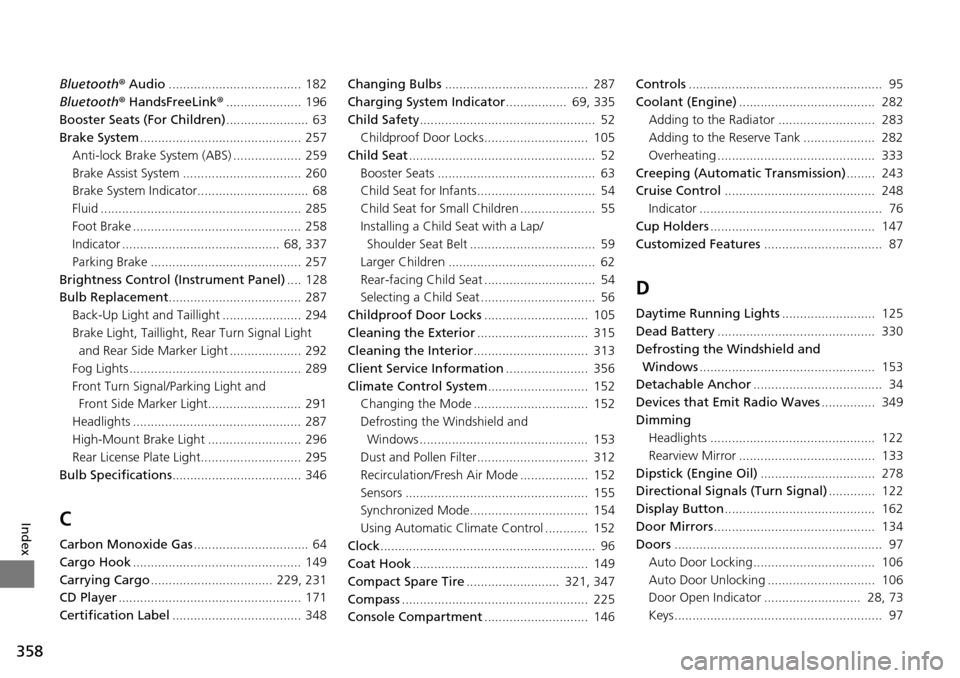
Bluetooth® Audio ..................................... 182
Bluetooth ® HandsFreeLink ®..................... 196
Booster Seats (For Children) ....................... 63
Brake System ............................................. 257
Anti-lock Brake System (ABS) ................... 259
Brake Assist System ................................. 260
Brake System Indicator............................... 68
Fluid ........................................................ 285
Foot Brake ............................................... 258
Indicator ............................................ 68, 337
Parking Brake .......................................... 257
Brightness Control (Instrument Panel) .... 128
Bulb Replacement ..................................... 287
Back-Up Light and Taillight ...................... 294
Brake Light, Taillight, Rear Turn Signal Light and Rear Side Ma rker Light .................... 292
Fog Lights ................................................ 289
Front Turn Signal/Parking Light and Front Side Marker Light.......................... 291
Headlights ............................................... 287
High-Mount Brake Light .......................... 296
Rear License Plate Light............................ 295
Bulb Specifications .................................... 346
C
Carbon Monoxide Gas ................................ 64
Cargo Hook ............................................... 149
Carrying Cargo .................................. 229, 231
CD Player ................................................... 171
Certification Label .................................... 348 Changing Bulbs
........................................ 287
Charging System Indicator ................. 69, 335
Child Safety ................................................. 52
Childproof Door Locks............................. 105
Child Seat .................................................... 52
Booster Seats ............................................ 63
Child Seat for Infants................................. 54
Child Seat for Small Children ..................... 55
Installing a Child Seat with a Lap/ Shoulder Seat Belt ................................... 59
Larger Children ......................................... 62
Rear-facing Child Seat ............................... 54
Selecting a Child Seat ................................ 56
Childproof Door Locks ............................. 105
Cleaning the Exterior ............................... 315
Cleaning the Interior ................................ 313
Client Service Information ....................... 356
Climate Control System ............................ 152
Changing the Mode ................................ 152
Defrosting the Windshield and Windows ............................................... 153
Dust and Pollen Filter............................... 312
Recirculation/Fresh Air Mode ................... 152
Sensors ................................................... 155
Synchronized Mode................................. 154
Using Automatic Climate Control ............ 152
Clock ............................................................ 96
Coat Hook ................................................. 149
Compact Spare Tire .......................... 321, 347
Compass .................................................... 225
Console Compartment ............................. 146 Controls
...................................................... 95
Coolant (Engine) ...................................... 282
Adding to the Radiator ........................... 283
Adding to the Reserve Tank .................... 282
Overheating ............................................ 333
Creeping (Automatic Transmission) ........ 243
Cruise Control .......................................... 248
Indicator ................................................... 76
Cup Holders .............................................. 147
Customized Features ................................. 87
D
Daytime Running Lights .......................... 125
Dead Battery ............................................ 330
Defrosting the Windshield and
Windows ................................................. 153
Detachable Anchor .................................... 34
Devices that Emit Radio Waves ............... 349
Dimming Headlights .............................................. 122
Rearview Mirror ...................................... 133
Dipstick (Engine Oil) ................................ 278
Directional Signals (Turn Signal) ............. 122
Display Button .......................................... 162
Door Mirrors ............................................. 134
Doors .......................................................... 97
Auto Door Locking.................................. 106
Auto Door Unlocking .............................. 106
Door Open Indicator ........................... 28, 73
Keys.......................................................... 97