instrument panel Acura RDX 2015 Owner's Guide
[x] Cancel search | Manufacturer: ACURA, Model Year: 2015, Model line: RDX, Model: Acura RDX 2015Pages: 365, PDF Size: 12.56 MB
Page 92 of 365
91
uuGauges and Multi-Information Display uMulti-Information Display
Continued
Instrument Panel
*: Default Setting
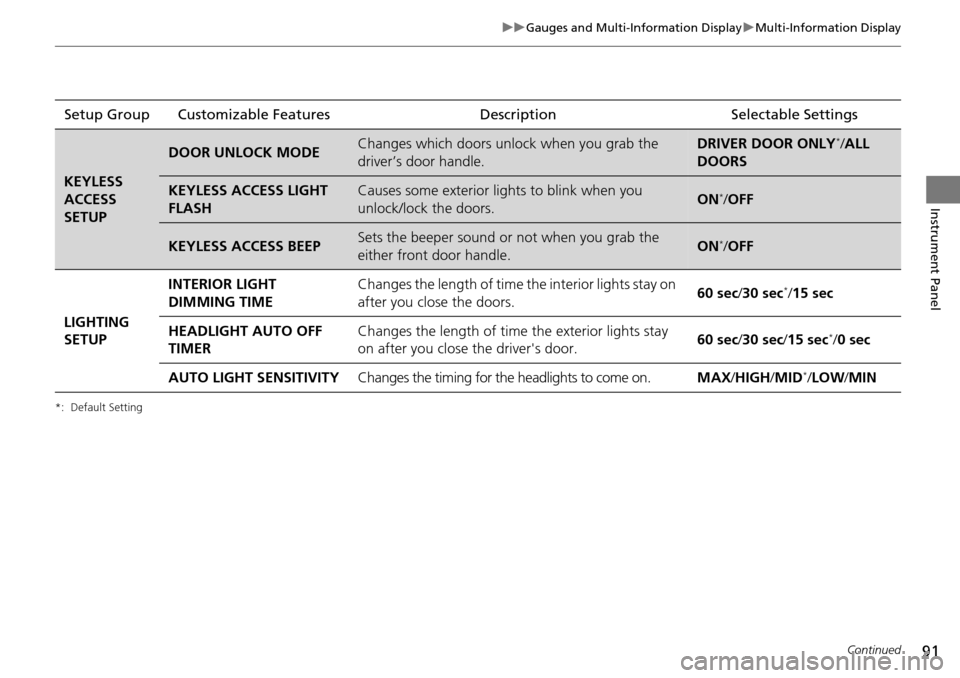
Setup Group Customizable Features Description Selectable Settings
KEYLESS
ACCESS
SETUP
DOOR UNLOCK MODEChanges which doors unlock when you grab the
driver’s door handle.DRIVER DOOR ONLY*/ALL
DOORS
KEYLESS ACCESS LIGHT
FLASHCauses some exterior lights to blink when you
unlock/lock the doors.ON*/ OFF
KEYLESS ACCESS BEEPSets the beeper sound or not when you grab the
either front door handle.ON*/OFF
LIGHTING
SETUP INTERIOR LIGHT
DIMMING TIME
Changes the length of time the interior lights stay on
after you close the doors.
60 sec
/30 sec
*/15 sec
HEADLIGHT AUTO OFF
TIMER Changes the length of time
the exterior lights stay
on after you close the driver's door. 60 sec
/30 sec/ 15 sec
*/0 sec
AUTO LIGHT SENSITIVITY Changes the timing for the headlights to come on. MAX/HIGH /MID
*/LOW /MIN
Page 93 of 365
92
uuGauges and Multi-Information Display uMulti-Information Display
Instrument Panel
*1:Not available on all models
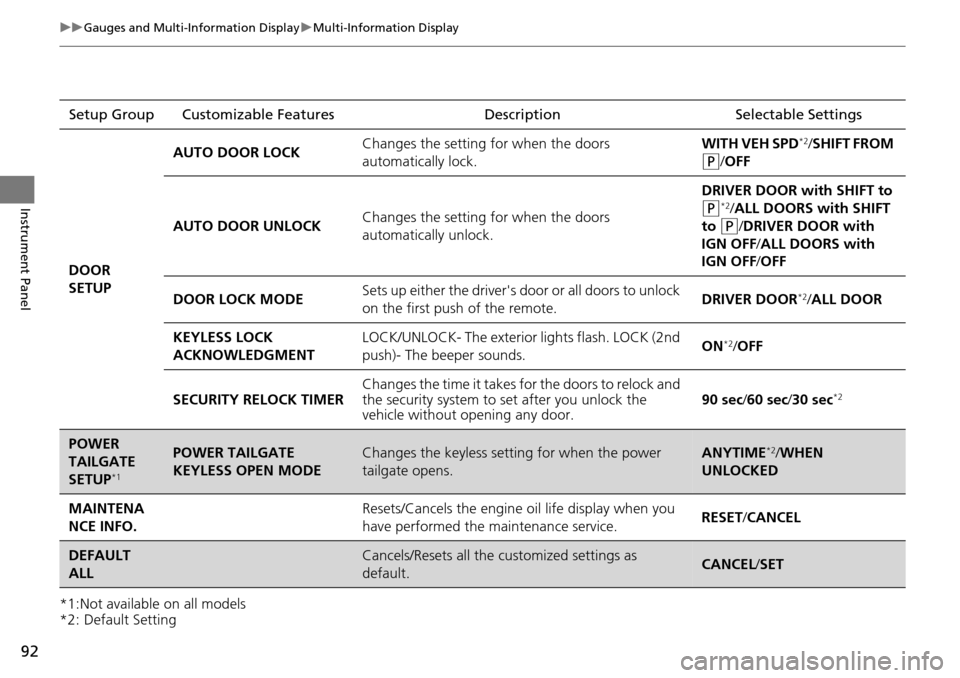
*2: Default SettingSetup Group Customizable Features Description Selectable Settings
DOOR
SETUP AUTO DOOR LOCK
Changes the setting for when the doors
automatically lock. WITH VEH SPD
*2/
SHIFT FROM
(P/ OFF
AUTO DOOR UNLOCK Changes the setting for when the doors
automatically unlock. DRIVER DOOR with SHIFT to
(P*2/ ALL DOORS with SHIFT
to
(P/DRIVER DOOR with
IGN OFF /ALL DOORS with
IGN OFF /OFF
DOOR LOCK MODE Sets up either the driver's door or all doors to unlock
on the first push
of the remote. DRIVER DOOR
*2/
ALL DOOR
KEYLESS LOCK
ACKNOWLEDGMENT LOCK/UNLOCK- The exterior
lights flash. LOCK (2nd
push)- The beeper sounds. ON
*2/
OFF
SECURITY RELOCK TIMER Changes the time it takes for the doors to relock and
the security system to set after you unlock the
vehicle without opening any door. 90 sec/
60 sec/30 sec
*2
POWER
TAILGATE
SETUP
*1
POWER TAILGATE
KEYLESS OPEN MODEChanges the keyless setting for when the power
tailgate opens.ANYTIME*2/WHEN
UNLOCKED
MAINTENA
NCE INFO.Resets/Cancels the engine oil life display when you
have performed the maintenance service. RESET /CANCEL
DEFAULT
ALLCancels/Resets all the customized settings as
default.CANCEL /SET
Page 94 of 365

93
uuGauges and Multi-Information Display uMulti-Information Display
Continued
Instrument Panel
■Example of customization settings
The steps for changing the “TRIP A” RESET TIMING setting to WITH REFUEL are
shown below. The default setting for “TRIP A” RESET TIMING is MANUALLY
RESET .
1.Press / button to select
CUSTOMIZE SETTINGS , then press the
SEL/RESET button.
2. Press the / button until METER
SETUP appears on the display.
3. Press the SEL/RESET button.
u LANGUAGE SELECTION appears first in
the display.
Page 95 of 365

94
uuGauges and Multi-Information Display uMulti-Information Display
Instrument Panel
4. Press the / button until “TRIP A”
RESET TIMING appears on the display,
then press the SEL/RESET button.
u The display switches to the
customization setup screen, where you
can select WITH REFUEL, IGN OFF,
MANUALLY RESET , or EXIT .
5. Press the / button and select WITH
REFUEL , then press the SEL/RESET button.
u The WITH REFUEL setup screen appears,
then the display returns to the
customization menu screen.
6. Press the / button until EXIT
appears on the display, then press the SEL/
RESET button.
7. Repeat Step 6 until you return to the
normal screen.
Page 115 of 365
uuSecurity System uSecurity System Alarm
114
Controls
■Setting the security system alarm
The security system alarm automatically sets when the following conditions have
been met:
• The power mode is in VEHICLE OFF (LOCK).
• The hood is closed.
• All doors and the tailgate are locked from outside with the key, remote
transmitter, or keyless access system.
■When the security system alarm sets
The security system alarm indicator in the instrument panel blinks. When the
blinking interval changes after about 15 seconds, the security system alarm is set.
■To cancel the security system alarm
The security system alarm is canceled wh en the vehicle is unlocked using the key,
remote transmitter, or keyless access system. The security system alarm indicator
goes off at the same time.
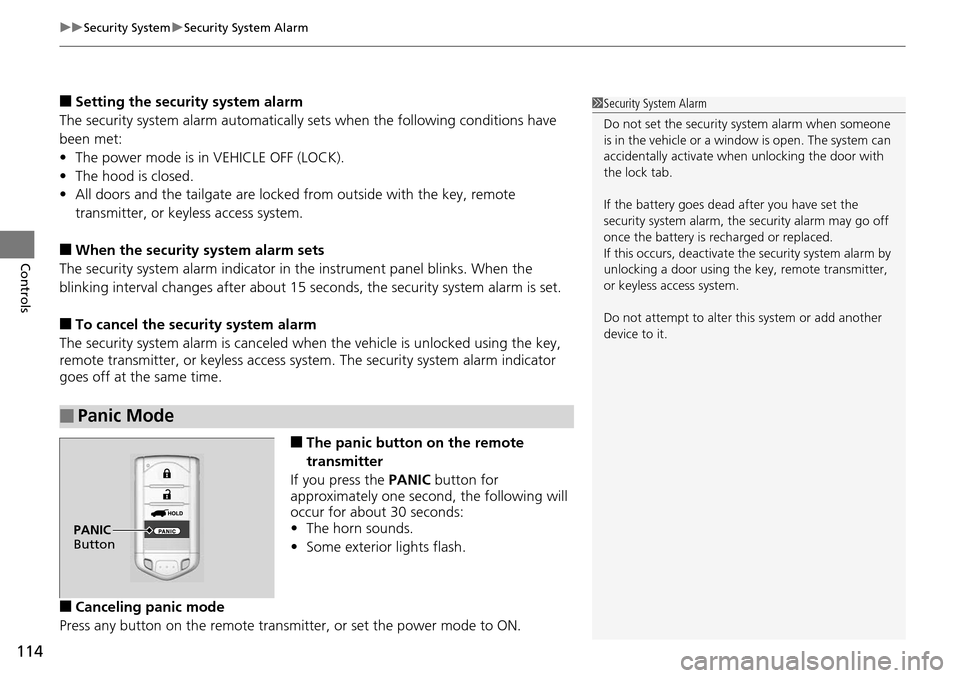
■The panic button on the remote
transmitter
If you press the PANIC button for
approximately one seco nd, the following will
occur for about 30 seconds:
• The horn sounds.
• Some exterior lights flash.
■Canceling panic mode
Press any button on the remote transmi tter, or set the power mode to ON.
■Panic Mode
1Security System Alarm
Do not set the security system alarm when someone
is in the vehicle or a window is open. The system can
accidentally activate when unlocking the door with
the lock tab.
If the battery goes dead after you have set the
security system alarm, the security alarm may go off
once the battery is re charged or replaced.
If this occurs, deactivate the security system alarm by
unlocking a door using the ke y, remote transmitter,
or keyless access system.
Do not attempt to alter th is system or add another
device to it.
PANIC
Button
Page 125 of 365

uuOperating the Switches Around the Steering Wheel uLight Switches
124
Controls
The headlights automatically co me on when the wipers are used several times within
certain number of intervals while the headlight switch is in
#Y.The headlights
automatically go off a few minutes after the wipers are stopped.
The headlights, all other exterior lights, an d the instrument panel lights turn off 15
seconds after you set the power mode to VEHICLE OFF(LOCK), take the remote with
you, and close the driver's door.
If you set the power mode to VEHICLE OFF (LOCK) with the headlight switch on, but
do not open the door, the lights turn o ff after 10 minutes (three minutes, if the
switch is in the
#Y position).
The lights turn on again when you unlock or open the driver's door. If you unlock
the door, but do not open it within 15 seconds, the lights go off. If you open the
driver's door, you will hear a lights on reminder chime.
■Headlight Integration with Wiper
■Automatic Lighting Off Feature
1Headlight Integration with Wiper*
This feature activates while the headlights are in
#Y. The instrument pane l brightness does not
change when the headlights come on.
If the ambient light is da rk, the automatic lighting
control overrides this feat ure, and the headlights
come on whether or not the wipers cycle several
times.
1 Automatic Lighting Off Feature
You can change the headlight auto off timer setting.
2 Customized Features P. 87
* Not available on all models
Page 129 of 365

128
uuOperating the Switches Around the Steering Wheel uBrightness Control
Controls
Brightness Control
When the power mode is in ON, you can use
the brightness control knob to adjust
instrument panel brightness.
Brighten: Turn the knob to the right.
Dim: Turn the knob to the left.
You will hear a beep when the brightness
reaches minimum or maximum. The multi-
information display will return to its original
state several seconds after you adjust the
brightness.
■Brightness level indicator
The brightness level is shown on the multi-
information display while you are adjusting it.
1 Brightness Control
Instrument panel brightne ss varies, depending on
whether the exterior lights are on or off. The
instrument panel dims to reduce glare when they are
on.
When it is bright out side and the headlight
integration with the wi per is activated, the
instrument panel bri ghtness does not change.
Pressing the (SEL/RESET) knob switches the
display.
If you turn the knob to the right until the brightness
display is up to max, a beep sound. This cancels the
reduced instrument panel brightness when the
exterior lights are on.
Control Knob
Page 133 of 365

132
uuOperating the Switches Around the Steering Wheel uAdjusting the Steering Wheel
Controls
Adjusting the Steering Wheel
The steering wheel height and distance from your body can be adjusted so that you
can comfortably grip the steering wheel in an appropriate driving posture.
1.Pull the steering wheel adjustment lever up.
u The steering wheel adjustment lever is
under the steering column.
2. Move the steering wheel up or down, and
in or out.
u Make sure you can see the instrument
panel gauges and indicators.
3. Push the steering wheel adjustment lever
down to lock the steering wheel in position.
u After adjusting the position, make sure
you have securely locked the steering
wheel in place by trying to move it up,
down, in, and out.1Adjusting the Steering Wheel
Make any steering wheel adjustments before you
start driving.
3WARNING
Adjusting the steering wheel position while
driving may cause you to lose control of the
vehicle and be seriously injured in a crash.
Adjust the steering wheel only when the
vehicle is stopped.To adjust
To lockLever
Page 249 of 365

248
uuWhen Driving uCruise Control
Driving
Cruise Control
Maintains a constant vehicle speed without having to keep your foot on the
accelerator. Use cruise control on freeways or open roads where you can travel at a
constant speed with little acceleration or deceleration.1Cruise Control
It may not be possible to maintain a constant speed
when driving uphill or downhill.
When not using cruise control:
Turn off cruise control by pressing the CRUISE
button.
3WARNING
Improper use of the cruise control can lead
to a crash.
Use the cruise control only when traveling
on open highways in good weather.
■Shift positions for cruise control:
In ( D or (S
When to use
Always keep sufficient distance
between you and the vehicle in
front of you.■Vehicle speed for cruise control:
Desired speed in a range above
roughly 25 mph (40 km/h) ~
How to useCRUISE MAIN is on in the
instrument panel.
Cruise control is ready to use.
■Press the CRUISE button on
the steering wheel.
Page 359 of 365
358
Index
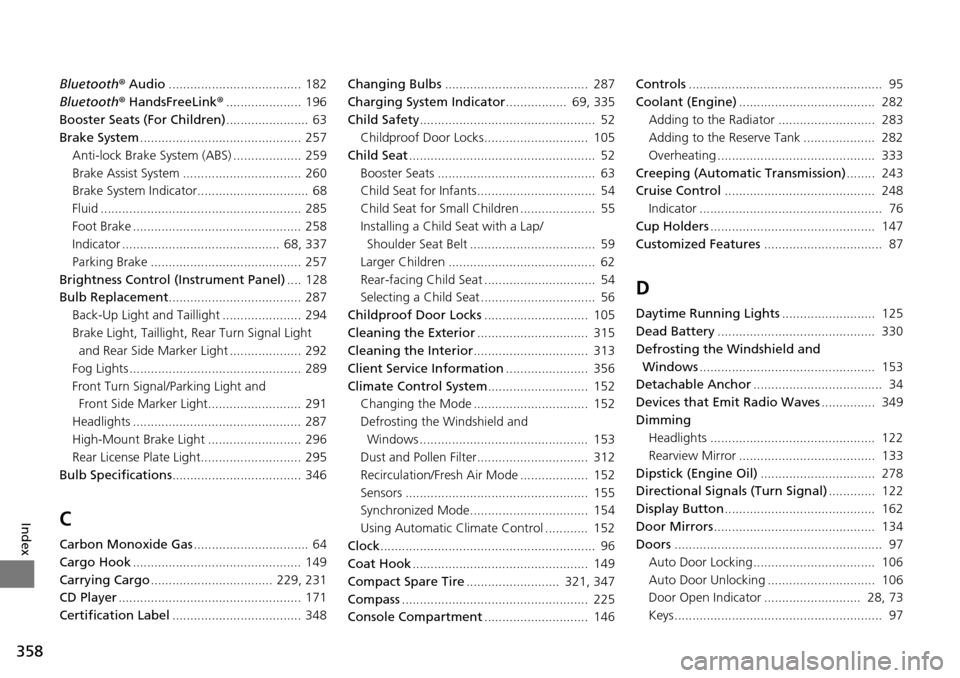
Bluetooth® Audio ..................................... 182
Bluetooth ® HandsFreeLink ®..................... 196
Booster Seats (For Children) ....................... 63
Brake System ............................................. 257
Anti-lock Brake System (ABS) ................... 259
Brake Assist System ................................. 260
Brake System Indicator............................... 68
Fluid ........................................................ 285
Foot Brake ............................................... 258
Indicator ............................................ 68, 337
Parking Brake .......................................... 257
Brightness Control (Instrument Panel) .... 128
Bulb Replacement ..................................... 287
Back-Up Light and Taillight ...................... 294
Brake Light, Taillight, Rear Turn Signal Light and Rear Side Ma rker Light .................... 292
Fog Lights ................................................ 289
Front Turn Signal/Parking Light and Front Side Marker Light.......................... 291
Headlights ............................................... 287
High-Mount Brake Light .......................... 296
Rear License Plate Light............................ 295
Bulb Specifications .................................... 346
C
Carbon Monoxide Gas ................................ 64
Cargo Hook ............................................... 149
Carrying Cargo .................................. 229, 231
CD Player ................................................... 171
Certification Label .................................... 348 Changing Bulbs
........................................ 287
Charging System Indicator ................. 69, 335
Child Safety ................................................. 52
Childproof Door Locks............................. 105
Child Seat .................................................... 52
Booster Seats ............................................ 63
Child Seat for Infants................................. 54
Child Seat for Small Children ..................... 55
Installing a Child Seat with a Lap/ Shoulder Seat Belt ................................... 59
Larger Children ......................................... 62
Rear-facing Child Seat ............................... 54
Selecting a Child Seat ................................ 56
Childproof Door Locks ............................. 105
Cleaning the Exterior ............................... 315
Cleaning the Interior ................................ 313
Client Service Information ....................... 356
Climate Control System ............................ 152
Changing the Mode ................................ 152
Defrosting the Windshield and Windows ............................................... 153
Dust and Pollen Filter............................... 312
Recirculation/Fresh Air Mode ................... 152
Sensors ................................................... 155
Synchronized Mode................................. 154
Using Automatic Climate Control ............ 152
Clock ............................................................ 96
Coat Hook ................................................. 149
Compact Spare Tire .......................... 321, 347
Compass .................................................... 225
Console Compartment ............................. 146 Controls
...................................................... 95
Coolant (Engine) ...................................... 282
Adding to the Radiator ........................... 283
Adding to the Reserve Tank .................... 282
Overheating ............................................ 333
Creeping (Automatic Transmission) ........ 243
Cruise Control .......................................... 248
Indicator ................................................... 76
Cup Holders .............................................. 147
Customized Features ................................. 87
D
Daytime Running Lights .......................... 125
Dead Battery ............................................ 330
Defrosting the Windshield and
Windows ................................................. 153
Detachable Anchor .................................... 34
Devices that Emit Radio Waves ............... 349
Dimming Headlights .............................................. 122
Rearview Mirror ...................................... 133
Dipstick (Engine Oil) ................................ 278
Directional Signals (Turn Signal) ............. 122
Display Button .......................................... 162
Door Mirrors ............................................. 134
Doors .......................................................... 97
Auto Door Locking.................................. 106
Auto Door Unlocking .............................. 106
Door Open Indicator ........................... 28, 73
Keys.......................................................... 97